Category Archives: microsoft

Build Mac and iOS apps in Visual Studio: Oxygene for Cocoa

Remobjects has released Oxygene for Cocoa, which lets you build apps for Mac and iOS using Visual Studio and the Oxygene language.

Oxygene is a Delphi-like language, making this an easy transition for Delphi developers. Until the most recent release, a version of Oxygene, called Prism, was bundled with Delphi, though this targeted .NET rather than Cocoa. Oxygene can also build apps for the Java runtime, making it a three platform solution.

The cross-platform approach is different from that taken by Embarcadero with FireMonkey, a cross-platform framework for Delphi itself. FireMonkey abstracts the GUI as well as the non-visual code, and in many cases controls are drawn by FireMonkey rather than using the native controls on platforms such as iOS. By contrast, Oxygene works directly with the Cocoa frameworks, so you will build the GUI in code or using the Xcode tools on the Mac.

More like Xamarin then? “We do work together with Mono and with Xamarin,” says Remobjects chief Marc Hoffman. “Oxygene for .NET works with the regular Mono framework for desktop or server apps. But when you get to the devices, the benefit with Oxygene is that you get much closer to the framework, you don’t have the weight of providing an abstraction for the classes you want to use.  If you write a UITableViewController to define a view, then you really write a UITableViewController, the same as you would in Objective-C, just the language is different, whereas in Xamarin you write a different class that sits on top and Mono does the mapping.”

Why not just use Xcode? This is in part a language choice. Remobjects says that Oxygene is “better than Objective-C” thanks to features like automatic boxing of integers, floats and strings, and generic arrays. There is more about the language here. Perhaps more important, if you know Pascal or Delphi it will look more familiar. You also get the ability to share code between Windows, Android, Mac and iOS, though this will be the non-visual code. Developers can also work mainly in Visual Studio rather than in Xcode.

The disadvantage is that you need two machines, or a VM running Windows on a Mac, and a remote connection to a Mac in order to debug.

I plan to try out Oxygene for Cocoa soon and of course will report on the experience.

Why custom templates might not appear in Word 2013

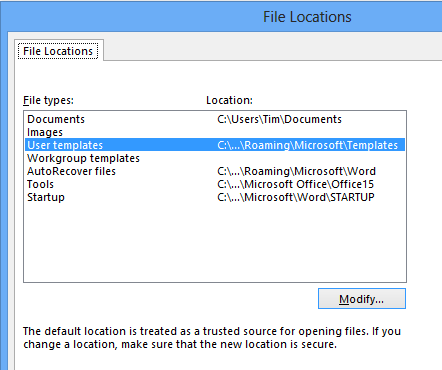
I have a custom Word template which I use for transcribing interviews (it lets me start and stop the audio with a key combination). I installed this into the location defined for user templates. This option is in File – Options – Advanced – File Locations.

image

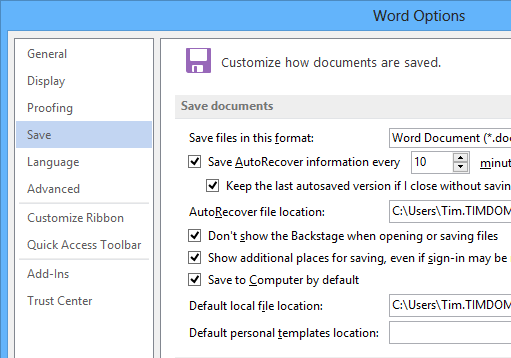
However, when I chose File – New in Word, my custom template did not appear. The reason, I discovered, is that Word has an additional option which sets the save location of personal templates. This was blank in my installation.

image

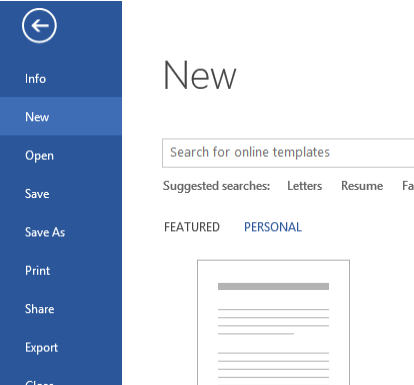
You have to set this to be the same as the user template path in File locations. After you do that, personal templates show up when you do File – New. Note that you also have to click on the PERSONAL heading before you see them.

image

It works. Now for a little rant.

  • Why are there two locations? What is meant to be the difference between the location for user templates, and the location for personal templates?
  • Why does a Save location impact what happens when happens when you are starting a new document?
  • How did the personal template location get to be blank?
  • If one of these locations is blank, why is Word not smart enough to have a look in the other one?

I guess this may be a bug.

While I am on the subject, it appears that there is no automatic way to sync custom templates across different Office installations, even if you sign in with the same account. A shame.

Miguel de Icaza: don’t blame Google for Microsoft’s contempt for developers

Xamarin’s Miguel de Icaza (founder of the Mono project) has complained on Twitter about Microsoft’s Windows Division’s “contempt for developers” when it created the Windows Runtime and a “4th incompatible Xaml stack”, in a conversation prompted by the company’s spat with Google over the YouTube app for Windows Phone. Google wants this removed because it does not show YouTube ads, to which Microsoft counters that the API for showing these ads is not available.

image 

I am more interested in his general reflections on the wisdom (or lack of it) shown by Microsoft in creating a new platform for touch-friendly apps in Windows 8, that lacks compatibility with previous Windows frameworks. “No developer wants to build apps twice for Windows: one for desktop, one for winstore” he also remarked.

The four XAML stacks are Windows Presentation Foundation, Silverlight (for which de Icaza created a version for Linux called Moonlight), Windows Phone (which runs a slightly different version of Silverlight), and now the Windows Runtime.

Could Microsoft have done this differently, without compromising the goal of creating a new tablet personality for Windows rather than continue with doomed attempts to make the desktop touch-friendly?

The obvious answer is that it could have used more of Silverlight, which had already been adapted to a touch environment for Windows Phone. On the other hand, the Windows division was keen to support native code and HTML/JavaScript as equally capable options for Windows Runtime development. In practice, I have heard developers remark that HTML/JavaScript is better than C#/XAML for the new platform.

It is worth noting that the Windows Runtime stack is by no means entirely incompatible with what has gone before. It still uses the Windows API, although parts are not available for security reasons, and for non-visual code much of the .NET Framework works as before.

Key Easy Assist feature of Microsoft InTune disabled on Windows 8, when will it return?

Microsoft’s cloud PC management service, InTune, is aimed at smaller businesses and the resellers who support them. It brings some of the features of System Center to organisations who are too small to justify deploying it, or who want a simpler solution.

One of the features of InTune is remote assistance. End users click a link on their InTune Center and it fires off an alert to an administrator.

image

When the adminstrator responds they can open up a chat session with the user, with other features including the ability to transfer files and (crucially) to view and control their desktop to troubleshoot problems.

This feature is not the same as the Remote Assistance built into Windows 7. Rather, it is based on Office Live Meeting 2007 (yes, 2007). It is tailor made for remote support, and easier for the end user to initiate.

Those who have tried to use the standard Remote Assistance (which is fine when it works) will be familiar with an intricate dance that starts with helping the user to find it, then talks them through trying Easy Connect, then when that doesn’t work, emailing an invitation file, then quoting the secret password, then verifying it when it doesn’t work, then giving up and blaming firewall issues.

Easy Assist by contrast is straightforward. At least, unless you have Windows 8 on either end. If the administrator is running Microsoft’s latest and greatest they get this message from InTune:

image

It says, “Launching Remote Assistance is not available on this operating system.”

Bewildered admins turned to the forums for assistance. The answer from Microsoft is a classic piece of support doublespeak:

Your account was likely upgraded to our latest release last week, which includes some changes for users on Windows 8. We made some changes to ensure the best experience when supporting customers.  To ensure the best experience on Windows 8 it was necessary to disable support for providing and receiving remote assistance.  This is a feature we want to implement in a future release as we know how valuable it is.

Note that the admin in question says “I often use this feature several times a day.”

This is Microsoft at its worst. It is not just that an important feature was removed without notice. It is also that there is no indication of when it might return, or any guarantee that it will return. The support company now has to explain to its clients why they now have to struggle with the standard Remote Assistance, or else pay extra for a third-party solution like the excellent but expensive LogMeIn. This, of course, will no longer be integrated with InTune.

One might also ask: why does the relatively new InTune product still rely on a feature of Office Live Meeting 2007 for this key functionality? Why is it not part of Lync, which is its replacement now in its second version?

I guess this will eventually be fixed. In the meantime, pleas like this go unanswered.

Easy Assist fix it for Windows 8 Already!!! This is ridiculous Windows 8 was available on Intune back in September of 2012. It more than six months and only the agent works correctly now. Easy Assist is a big selling point for clients to get the Intune Service. I also have a large number of existing Windows 7 customers on Intune who refuse to go to Windows 8 because they will lose functionality.

Microsoft shrugs off Windows 8 issues with record revenue

Yesterday Microsoft released its financial figures for the first three months of 2013.

Quarter ending March 31st 2013 vs quarter ending March 31st 2012, $millions

Segment Revenue Change Profit Change
Client (Windows + Live) 5703 +1070 3459 +480
Server and Tools 5039 +508 1979 +293
Online 832 +125 -262 +218
Business (Office) 6319 +477 4104 +307
Entertainment and devices 2531 +913 342 +570

Note that the figures for Windows and Office are boosted by deferred revenue from upgrade offers. The PC sales decline will be reflected in Windows client sales next time round.

CFO Peter Klein spoke of hoped-for improvements in Windows 8 device fortunes based on refinements coming in Windows “Blue” as well as more power-efficient CPUs coming from Intel. “We are confident we are moving in the right direction,” he said.

He also discussed the new subscription-based model for Office. Office 365 has added five times more subscribers this quarter than in the same period last year, he said, and revenue exceeds $1 billion.

Suh said that System Center revenue is up 22% and that Hyper-V has gained 4 points of market share in the year. Lync and SharePoint are also growing.

In answer to a question about Surface, Microsoft’s own-brand tablet, Klein spoke about a coming “broader array of Windows 8 devices including lower price points.” 

The deferred revenues disguise what would otherwise be a decline in Windows sales, but in other respects these figures are remarkable, particularly in a difficult economy.

Isn’t Windows 8 a failure, and won’t declining PC sales take Microsoft down too? It is possible, but so far the company has proved resilient. Perhaps the most significant positive here is that both Office 365 and Azure are working for the company, which means that cloud computing is not killing Microsoft’s business in the way that some speculated.

The PC puzzle: does the sales drop implicate or justify Windows 8?

Gartner has joined IDC in releasing figures showing a steep drop in PC sales for the first quarter of 2013.

Worldwide PC shipments totalled 79.2 million units in the first quarter of 2013, an 11.2 per cent decline from the first quarter of 2012, according to preliminary results by Gartner, Inc. Global PC shipments went below 80 million units for the first time since the second quarter of 2009. All regions showed a decrease in shipments, with the EMEA region experiencing the steepest decline.

says the release. In EMEA the decline was 16%. In the US, the decline was only 9.6%, but marked the 6 consecutive quarter of decline.

Gartner does not give worldwide figures for Apple, but says that its shipments grew by 7.4% in the US, which is a particularly strong market for Apple, giving it an 11.6% market share.

One bright spot for Microsoft:

Unlike the consumer PC segment, the professional PC market, which accounts for about half of overall PC shipments, has seen growth, driven by continuing PC refreshes.

That will please the folk at the event I am attending right now, the Microsoft Management Summit in Las Vegas, which is about managing servers, PCs and other devices in the enterprise. The consumerisation of IT is real, and so is Bring Your Own Device, but never underestimate the extent to which Windows is embedded in business.

Still, does the overall decline prove that Windows 8 was a huge mistake, and that Windows/Microsoft is now set for long-term decline?

image

Not necessarily. There is another way to look at these figures, which is that Microsoft was correct to conclude, back when Windows 8 was planned, that tablets and touch devices would erode the traditional PC market, and that it had to take the risk of reshaping its desktop operating system accordingly.

It is plausible, even likely, that PC sales would not have declined so fast if Windows 8 had been less radical. On the other hand, the long term cost of not reshaping the Windows UI for touch, nor introducing the app store model of software deployment, would probably be greater.

Put another way, the Windows 8 experiment means that PC sales may eventually stop declining, whereas without it they would continue to trend download, even though the curve for this last quarter might be less shocking.

Even if you accept this reasoning, you can still argue that the Windows 8 tablet personality is so poorly executed that it cannot compete with iOS and Android devices. Most Windows 8 users live on the desktop, even those with touch screens and tablets. I am seeing a lot of Surface Pro here in Vegas, with users loving its portability, performance, and elegant keyboard cover, but I see it being used like a laptop, not like a tablet.

Microsoft undoubtedly made mistakes in the initial release of Windows 8, the biggest problem being that the Windows Runtime side, which supports the tablet personality, was rushed out and is really not finished. Creating excellent and good-looking apps is harder than it should be, which is one reason why there are so few.

  • The Windows 8 experience for new users, especially those with long familiarity with earlier versions, is so poor that many prefer to stick with Windows 7. A few tweaks and compromises would have made this easier.
  • Windows RT, the ARM based edition which runs only “Modern” apps and Office, is spoilt by poor performance as well as the lack of good apps. The absence of Outlook from Office in Windows RT spoils its for the business market, where it is potentially attractive as a cost-effective, secure tablet operating system.
  • Microsoft’s OEM and retail partners do not seem to know how to sell Windows 8.

When I put these points to some Microsoft folk informally here at MMS the answer I got was “Blue will make you happy.” Blue, according to these guys, is not the code name for a new version of Windows. Rather, it is a process of incremental updates which users will get automatically. It is well-known of course that significant Windows 8 updates are on the way, and builds have been leaked.

Windows 8 has made a bad start, but it is not all bad. The desktop side (which is what most of us use most of the time) improves on Windows 7, and it is plausible that a combination of user learning along with updates that make the transition to the new Start screen less jarring will make adoption easier.

Equally, the Windows Runtime side will get better. I expect to see new and improved components for developers building apps, and better reliability and performance. Outlook is rumoured to be coming to Windows RT, and at some point we may also see versions of Office applications appear in the Modern UI.

Windows RT will have a tough fight with Intel-based tablets, but users will win either way, since next-generation ARM chipsets are much faster and Intel is making great strides with low-power, high-performance chipsets of its own.

Incidentally, Windows RT is not quite dead. I heard a questioner here at MMS ask questions about how to deploy their forthcoming purchase of a “large quantity” of RT devices.

Microsoft is at times a stumbling giant, but it is stumbling in the right direction with Windows 8, and it may yet work out. Even if by then it is called Windows 9.

Microsoft takes aim at VMware, talks cloud and mobile device management at MMS 2013

I am attending the Microsoft Management Summit in Las Vegas (between 5 and 6,000 attendees I was told), where Brad Anderson, corporate vice president of Windows Server & System Center, gave the opening keynote this morning.

image

There was not a lot of news as such, but a few things struck me as notable.

Virtualisation rival VMware was never mentioned by name, but frequently referenced by Anderson as “the other guys”. Several case studies from companies that had switched from “the other guys” were mentioned, with improved density and lower costs claimed as you would expect. The most colourful story concerned Dominos (pizza delivery) which apparently manages 15,000 servers across 5,000 stores using System Center and has switched to Hyper-V in 750 of them. The results:

  • 28% faster hard drive writes
  • 36% faster memory speeds
  • 99% reduction in virtualisation helpdesk calls

That last figure is astonishing but needs more context before you can take it seriously. Nevertheless, there is momentum behind Hyper-V. Microsoft says it is now optimising products like Exchange and SQL Server specifically for running on virtual machines (that is, Hyper-V) and it now looks like a safe choice, as well as being conveniently built into Windows Server 2012.

I also noticed how Microsoft is now letting drop some statistics about use of its cloud offerings, Azure and Office 365. The first few years of Azure were notable in that the company never talked about the numbers, which is reason to suppose that they were poor. Today we were told that Azure storage is doubling in capacity every six to nine months, that 420,000 domains are now managed in Azure Active Directory (also used by Office 365), and that Office 365 is now used in some measure by over 20% of enterprises worldwide. Nothing dramatic, but this is evidence of growth.

Back in October 2012 Microsoft acquired a company called StorSimple which specialises in integrating cloud and on-premise storage. There are backup and archiving services as you would expect, but the most innovative piece is called Cloud Integrated Storage (CiS) and lets you access storage via the standard iSCSI protocol that is partly on-premise and partly in the cloud. There was a short StorSimple demo this morning which showed how how you could use CiS for a standard Windows disk volume. Despite the inherent latency of cloud storage performance can be good thanks to data tiering, which puts the most active data on the fastest storage, and the least active data in the cloud. From the white paper (find it here):

CiS systems use three different types of storage: performance-oriented flash SSDs, capacity- oriented SAS disk drives and cloud storage. Data is moved from one type of storage to another according to its relative activity level and customer-chosen policies. Data that becomes more active is moved to a faster type of storage and data that becomes less active is moved to a higher capacity type of storage. 

CiS also uses compression and de-duplication for maximum efficiency.

This is a powerful concept and could be just the thing for admins coping with increased demands for storage. I can also foresee this technology becoming part of Windows server, integrated into Storage Spaces for example.

A third topic in the keynote was mobile device management. When Microsoft released service pack 1 of Configuration Manager (part of System Center) it added the ability to integrate with InTune for cloud management of mobile devices, provided that the devices are iOS, Android, Windows RT, or Windows Phone 8. A later conversation with product manager Andrew Conway confirmed that InTune rather than EAS (Exchange ActiveSync) policies is Microsoft’s strategic direction for mobile device management, though EAS is still used for Android. “Modern devices should be managed from the cloud” was the line from the keynote. InTune includes policy management as well as a company portal where users can install corporate apps.

What if you have a BlackBerry 10 device? Back to EAS. A Windows Mobile 6.x device? System Center Configuration Manager can manage those. There is still some inconsistency then, but with iOS and Android covered InTune does support a large part of what is needed.

Office 2013 Home and Business requires a Microsoft account to activate, a nuisance for Office 365 users

A small business contacted me with a perplexing problem related to Office 2013 and Office 365. The scenario looks like this:

  • All their staff have Office 365 E1 accounts (for small and midsize businesses)
  • They normally buy laptops with Microsoft Office. That would normally be the OEM version or more recently the Product Key Card (PKC) equivalent. This is licensed only for the PC on which it is first installed.
  • Since they already have Office, purchasing the more expensive Office 365 subscription (£9.80 vs £5.20, or £55.20 extra per user per year) which includes desktop Office is poor value (update: see comments for more notes on this option).

With me so far? Now comes the moment when a new member of staff joins, for whom a new laptop is purchased. They buy with it the closest equivalent to the Office 2010 Product Key Card, which is Home and Business 2013, this guy:

image

Note the designation Home and Business, indicating that it is fine for business use.

Next, they set up the laptop for Office 365 and install their new Office 2013. Only there is a problem. Office Home and Business cannot be activated without a “Microsoft account”. You might think that an Office 365 subscription counts as a “Microsoft account” but it is the wrong kind: it is an “organizational” account in Microsoft’s jargon, which is a subtly different creature. The Office 2013 purchase is then tied in to some extent to that account.

Specifically, the normal way to install is to go to http://www.office.com/setup. When you do, you enter the supplied product key, following which the unavoidable next step is to sign in with a Microsoft account.

Another feature of Office Home and Business 2013 (again different from Office 2010) is that there is no way (that I know of) to install it other than via Click and Run, which uses application virtualisation. Personally I prefer the non-virtualised install, after experiencing problems with previous versions of Click and Run. Maybe these are fixed now, maybe not, but this choice has been removed.

You can also install from a DVD as discussed here, if you download the DVD image from Microsoft. Unfortunately this is still a click-to-run install, and still requires a Microsoft account. You can enter the product key when invited to activate, but the process will not complete without logging in online. If you sign into Office 365 instead, you get an error. I also spotted this message:

image

It says, “You’re currently signed in with an organizational account. To view or manage any consumer subscriptions you may have purchased, please sign in with your Microsoft account.” This intrigues me, since if you have purchased a perpetual product called “Home and Business” you might imagine that is it neither consumer, nor a subscription.

There are a couple of problems with the requirement for a Microsoft account. One is that the business does not want the employee to start using features like Skydrive which are attached to any Microsoft account other than Office 365. Another is that the employee may leave, and the laptop transferred to somebody new. With the old Office 2010 PKC, which did not require a hook to a Microsoft account, that was a smooth transition. Office is licensed for the laptop, not the individual. The new Office 2013 is still licensed only for one laptop, but also has some sort of relationship to an individual Microsoft account, which will be a nuisance if that person leaves the company.

You can overcome these problems by purchasing a volume license for Office 2013 instead. The ideal product is Office Professional Plus. You can install it without using click-to-run and it does not require a Microsoft account to activate. But you guessed: this costs more than double the cost of Home and Business 2013. The approximate ex-VAT cost in the UK is £150 for Home and Business, versus £375 for Professional Plus.

The dependency on a Microsoft account is not clear on Microsoft’s site. The specifications for Office Home and Business are here. It says:

Certain online functionality requires a Microsoft account.

True; but in this case the product cannot be activated at all without a Microsoft account. It is useless without it.

The workaround is to give in and create a Microsoft account just for the purpose of activating Office. Of course you need an email address for this, though apparently (taking this from the above referenced discussion) you can activate up to 10 Office 2013 installs with one Microsoft account.

Once activated, there is no problem that I am aware of with using the product with Office 365.

It is still messy, since that Office install is forever linked with the Microsoft account you use, even though it is intended for use with Office 365.

Taking a wider perspective, it also seems to be that there may be purchasers who want to use Microsoft Office in part because (unlike, say, Google apps) it does not require online sign-in. They may prefer not to have a Microsoft account. With Office 2010 that was easy, but not with this new edition, and I am not seeing this spelt out in the product descriptions. Once you get it home, you will spot this on the packaging:

image

Considering the complications of using Home and Business 2013 with Office 365, it looks like the best option is to upgrade to the Office 365 subscription type which includes desktop Office, but that is a heavy financial penalty for a business that has already purchased Office for all its laptops.

Microsoft’s growth areas: Azure, Server with Hyper-V, Office 365, Windows Phone

Microsoft has left slip a few figures in posts from PR VP Frank Shaw and platform evangelist Steve Guggenheimer.

Observers have tended to focus on Windows “Blue” and what is happening with Microsoft’s core client operating system, but what caught my eye was a few figures on progress in other areas.

  • Windows Azure compute usage doubled in six months
  • Windows Azure revenue growing 3X
  • Office 365 paid seats tripled year on year last quarter
  • Server 2012 Datacenter edition licenses grown 80%

A notable feature of these figures is that they are relative, not absolute. Office 365 is a relatively new product, and Windows Azure (from what I can tell, since Microsoft did not release numbers) performed rather badly until its renaissance in early 2011 under Satya Nadella, Scott Guthrie and others – see here for more about this). It is easy to post big multiples if you are starting from a small base.

This is real progress though and my guess is that growth will continue to be strong. I base this not on Microsoft’s PR statements, but on my opinion of Office 365 and Windows Azure, both of which make a lot of sense for Microsoft-platforms organisations migrating to the cloud.

Why the growth in Server 2012 Datacenter? This one is easy. Datacenter comes with unlimited licenses for Windows Server running in Hyper-V virtual machines on that server, so it is the best value if you want to the freedom to run a lot of VMs, especially if some of those VMs are lightly used and you can afford to overcommit the processors (you need a new license for every two physical processors you install).

Here’s another figure that Shaw puts out:

Windows Phone has reached 10 percent market share in a number of countries, and according to IDC’s latest report, has shipped more than Blackberry in 26 markets and more than iPhone in seven.

Spin, of course. This February report from IDC gives Windows Phone just a 2.6% market share in the 4th quarter of 2012. Still, it did grow by 150% year on year, thanks no doubt to Nokia’s entry into the market.

My personal view is that Windows Phone will also continue to grow. I base this on several things:

  • I see more Windows Phones on the high street and in people’s hands, than was the case a year ago.
  • Windows Phone 8 is decent and the user interface is more logical and coherent than Android, which mitigates a lack of apps.
  • Nokia is bringing down the price for Windows Phone devices so they compare well with Android in the mid-market below Apple and the premium Android devices.
  • There is some momentum in Windows Phone apps, more so than for Windows 8. Guggenheimer notes that downloads from the Phone Store now exceed 1 billion.

The context of the above is not so good for Microsoft. It is coming from behind in both cloud and mobile and the interesting question would what kind of market share it is likely to have in a few years time: bigger than today, perhaps, but still small relative to Amazon in cloud and Apple and Android in mobile.

There is also the Windows 8 problem. Many prefer Windows 7, and those who use Windows 8, use it like Windows 7, mostly ignoring the tablet features and new Windows Runtime personality.

How will Microsoft fix that? Along with leaked builds of Windows Blue, Microsoft has announced the next Build conference, which will be in San Francisco June 26-28, 2013 (I am glad this will not be on the Microsoft campus again, since this venue has not worked well). There is a lot to do.

image

Microsoft’s Windows 8 app problem will not be solved by incentivising junk

Microsoft has launched a “Keep the cash” offer to developers. Publish up to 20 apps, 10 for Windows Phone and 10 for Windows 8, and get $100 for each of them.

image

The offer is little use for most of the world. The terms state that “Offer good only to legal residents of the 50 United States & D.C. aged 18 or older”.

It is little use for Microsoft either. How much development time does $100 buy? Still, there is a way to make sense of it for hobbyists or developers with some spare time. What you do is to create one of those apps that does very little but is specific to something like a particular sports team or pop star, and maybe searches the web for news about them. Then you replicate it 10 times over for 10 different teams or celebrities. Then you adapt it for both phone and Windows 8 store. That’s 20 apps, $2000.

In other words, the only thing this will achieve is to increase the amount of dross in these two stores. Microsoft is pumping the numbers, so that there is an appearance of success on the most naive analysis, counting the apps.

Incidentally, this is something that Windows Store VP Antoine LeBlond assured me Microsoft would not do, at the launch of Surface RT in New York last year.

Does Microsoft have an app problem? Yes, particularly on Windows 8. Windows Phone 8 is less of a problem; Microsoft’s phone is actually building some momentum from what I can tell and app availability is not too bad, despite some gaps such as Instagram and BBC iPlayer.

The app problem is nothing to do with quantity though. 10 good apps for the Windows Store is worth more to the platform than 10,000 poor ones. In fact, filling the store with junk is a negative that will cement the perception that there is little there that is worthwhile.

Rather, the app problem is the consequence of several factors:

1. The development platform is not good enough. Most things can be done, but not easily, and the default look and feel results in blocky apps that tend to scale badly on big screens. The built-in controls are too primitive. The user interface is insufficiently intuitive and users struggle to discover the menus and features hidden in the Charms bar.

2. Microsoft has so far failed to establish Windows 8 as a tablet platform. The reasons are complex and to do with the Windows heritage, the way OEM and retail partners treat Windows, and the fact that there are other tablet platforms (iOS and Android) out there which meet the need for many people.

3. Windows 8 is out there in reasonable numbers, but most users spend most of there time in the desktop, making the Windows Store app platform less successful than the quantity deployed would suggest.

4. Businesses are mainly standardising on Windows 7, not Windows 8, to the detriment of the new app platform.

In this context, the best thing that could happen for Windows 8 is the appearance of new compelling apps that will drive users to the underused tablet personality. Microsoft could and should do some of those (there are a few efforts, like Fresh Paint).

Those apps, though, will not be developed for $100. They will be developed either by enthusiasts who love the platform (which will not happen until the platform is improved), or by businesses who invest real money and effort in building them.

As it is, this misguided initiative does little other than to draw attention to the problems Microsoft has with its new Windows.