Category Archives: microsoft

Here comes Windows Server 8 beta: what’s new since the Developer Preview?

Following the release of Windows 8 Consumer Preview, Microsoft is now offering its server cousin. You can download Windows Server 8 beta here.

What’s new since the developer preview? Here are some highlights:

  • Metro UI screenshots to follow! There is a new Metro Remote Desktop client as well.
  • Voice over IP in Remote Desktop Services
  • SMB (Server Message Block) encryption, which you can turn on per share or for the whole server, encrypts all SMB data. SMB is the standard networking protocol for file access on a Windows network. The new feature is aimed at scenarios where data travels over untrusted networks. SMB has also been enhanced to reduce server/client round trips.
  • Always Offline is a new mode for offline files. Normally, if you use an offline folder in Windows then the local copies will only be used when the server is actually offline. In the new mode, the cached files are used anyway, giving local performance. By default the files will be synchronized every 120 minutes.
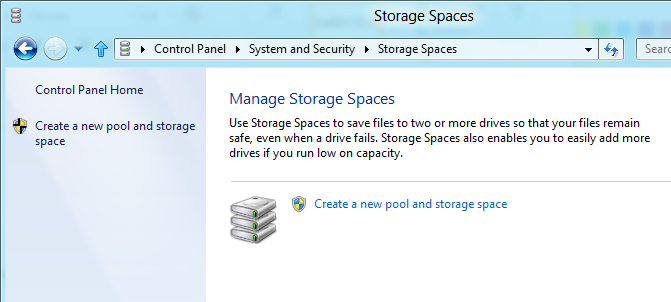
  • ReFS (Resilient File System) is implemented in the beta.
  • Hyper-V limits raised: up to 1TB in a VM, up to 64TB in a virtual hard drive.
  • Microsoft Online Backup: spotted as a non-functioning option in the Developer Preview, a new Online Backup Service is now implemented, You have to apply for an invitation if you want to try this out.
  • User Device Affinity is an enhancement to roaming profiles that lets you specify which computers a user may use for redirected data and settings.

This is new stuff since the Developer Preview; there a lot more that is new since Server 2008 R2

Nokia at Mobile World Congress: one year after the Windows Phone shift, how is it doing?

At Mobile World Congress in Barcelona Nokia CEO Stephen Elop reminded the press that this is the anniversary of the company’s big change of direction, when it adopted Windows Phone as its primary smartphone platform.

image

So how is it doing? Nokia’s speed of execution has been impressive. Since that announcement, the Lumia range has been introduced around the world; we were told today that it is on the way to China. The large screen Lumia 900 with LTE support has been launched in the USA and is coming to other territories, the next being Canada.

Nokia is also continuing to launch new Symbian devices. Today we heard about the Asha 202 and 203 which have touch screens as well as keypads, and the Asha 302 which includes an app-capable browser and support for Microsoft Exchange, pushing at SmartPhone boundaries but at a lower price.

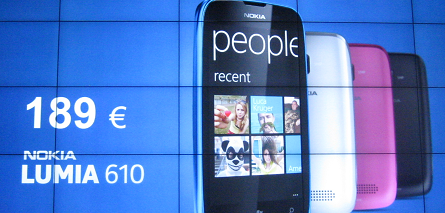
Perhaps the most interesting announcement today though was that Microsoft is lowering the minimum hardware requirements for Windows Phone 7 – a surprising move given that technology advances are already making the existing requirements less expensive. The new, lower bar is 256MB RAM and a slower processor. This enables Nokia to launch the Lumia 610 at 189 Euro.

image

One of the intriguing questions: as Lumias fall in price, what is the future of Symbian at Nokia? The question was asked at the end of the press conference but not answered.

To add to the confusion, Nokia announced the Symbian-based 808 Pure View with a 41 megapixel sensor and “CD quality” recording. Apparently it is Symbian because it was developed before the Windows switch.

Nokia is betting on location-based services and announced improvements to Nokia Drive (full offline support) as well as Nokia Transport, for local bus and tram services.

Is Nokia’s Windows adventure working out? That is the question, and remains a wait and see, though my judgment based on the first year is that it remains in the game. In a sea of Android here at Mobile World Congress it does at least have something distinctive to offer.

Tablets will be bigger than PCs. Are you ready?

Apple’s CEO Tim Cook spoke at the Goldman Sachs Technology Conference yesterday; Macrumors has what looks like a full transcript. Do not expect hot news; there is little or nothing in the way of announcements. It is interesting though as a recap of how Apple sees its future: iPad, iPhone, iCloud, Apple TV, maybe some future huge acquisition financed by its cash pile.

This is what stands out for me:

From the first day it shipped, we thought that the tablet market would become larger than the PC market and it was just a matter of the time it took for that to occur. I feel that stronger today than I did then.

I agree. The reasons are similar to those that caused laptops to outpace desktops. Mobility and convenience trump the better computing value you get in a desktop PC. Note: we still use desktops, and both desktops and laptops will continue to sell, but in smaller quantity.

Although you can list numerous reasons why tablets are not good enough – no keyboard, small storage capacity, underpowered for cutting-edge gaming, not really expandable, favourite apps not yet available, and more – none of these is sufficient to prevent the tablet taking over in the majority of cases.

You can have a keyboard if you want; build it into the case. Storage is increasing all the time, and we have the cloud. Graphics power is increasing all the time. Most people are happy to sacrifice expandability for the simplicity and reliability of a tablet. If your favourite app is not yet available, it soon will be; or else an equivalent will appear that replaces it.

Tablet benefits? Cost, no flappy screen, light and small, designed for ease of use, reliability of an appliance versus a computer for starters.

In itself, the move from one type of computing device to another is no big deal. The reason this one is such a deep change is because of other factors. I will list three:

  • The lock down

    Pioneered by Apple, this is the idea that users should not have full access to the operating system on their device in almost any circumstances. The lock down is a cost and a benefit. The benefit: resilience against malware, greater reliability. The cost: loss of control, loss of freedom, handing over even more power to those who do have full access, primarily the operating system vendor. Where UEFI secure boot is enabled, it is not even possible to boot to an alternative operating system.
  • The store

    Hand in hand with the lock down is the store, the notion that apps can only be installed through the operating system vendor’s store. This is not a universal tablet feature. Apple’s iPad has it, Microsoft’s forthcoming Windows 8 on ARM has it, Android devices generally let you enable “unknown sources” in order to install apps via a downloaded package, though sometimes this option is missing. Further, both Apple and Microsoft have schemes whereby corporates can install private apps. Still, the consequence of the lock down is that the ability to install apps freely is something which can be tuned either way. Since store owners take a cut of all the business, they have have a strong incentive to drive business their way.

    I have never believed Apple’s line that the iTunes store is intended as a break-even project for the convenience of its hardware customers.

  • The operating system

    I am at risk of stating the obvious, but the fact that most tablets are iPads and most non-Apple tablets are Android is a monumental shift from the Windows-dominated world of a few years back. Can Microsoft get back in this game? I am impressed with what I have seen of Windows 8 and it would probably be my tablet of choice if it were available now. The smooth transition it offers between the old PC desktop world and the new tablet world is compelling.

    That said, this cannot be taken for granted. I watched someone set up a new Android tablet recently, and was interested to see how the user was driven to sign up for a variety of services from Google and HTC (it was an HTC Flyer). Devices will be replaced, but accounts and identities are sticky. Users who switch devices may face having to move documents to a different cloud provider if they know how, re-purchase apps, figure out how to move music they have purchased, re-buy DRM content. A big ask, which is why Microsoft’s late start is so costly. At best, it will be a significant player (I think it will be) but not dominant as in the past.

    Late start? Did not Bill Gates wave a slate around and predict that it would be the future of the PC back in 2001:

    "So next year a lot of people in the audience, I hope, will be taking their notes with those Tablet PCs … it’s a PC that is virtually without limits and within five years I predict it will be the most popular form of PC sold in America."

    Right idea, wrong execution. Microsoft tried again with Origami, the ultra mobile PC, a device that was so obviously flawed that everyone knew it would fail. My belief is that Microsoft, helped by Apple’s example, has a tablet concept that works this time round, but nevertheless the history is discouraging.

    One reason for the relative failure of the Tablet PC and the complete failure of Origami was price. Microsoft’s business model depends on selling software licenses, whereas Apple mostly bundles this cost into that of the hardware, and Android is free. Price of the first Windows 8 tablets is unknown, but could again prove to be a problem.

    Interesting to debate; but however it shakes out, Windows-only is not coming back .

It follows that as tablet use continues to grow, both business and consumer computing are transforming into something different from what we have become used to. Considering this fact, it would be interesting to analyse affected businesses in terms of how ready they are for this change. It would be fascinating to see companies ordered by some kind of tablet readiness index, and my guess is that those towards the bottom of that hypothetical list are in for a nasty shock.

image

Windows on ARM fixes much that is wrong with Windows, but lack of apps makes it Microsoft’s big risk

Vendors who create new platforms work hard to attract developers, because high availability of apps is seen as essential for success. This is why, for example, RIM is offering free PlayBooks to developers who submit apps to BlackBerry App World.

image

Why then would Microsoft deliberately and consciously choose to release a new family of Windows machines on which existing Windows applications cannot run, even when recompiled? This is what is happening with Windows on ARM (WOA), as Windows President Steven Sinofsky makes clear in his lengthy post on the subject:

Developers wanting to reach WOA with existing apps have two options. Many apps will be best served by building new Metro style front ends for existing data sources or applications, and communicating through a web services API … Other existing applications will be well served by reusing large amounts of engine or runtime code, and surrounding that with a Metro style experience.

This restriction means that WOA cannot benefit from what what might otherwise be its biggest advantage versus the competition: huge numbers of apps that could easily be ported.

Microsoft’s reasoning is that the existing Windows software deployment model is broken so badly that it cannot be fixed:

If we enabled the broad porting of existing code we would fail to deliver on our commitment to longer battery life, predictable performance, and especially a reliable experience over time. The conventions used by today’s Windows apps do not necessarily provide this, whether it is background processes, polling loops, timers, system hooks, startup programs, registry changes, kernel mode code, admin rights, unsigned drivers, add-ins, or a host of other common techniques. By avoiding these constructs, WOA can deliver on a new level of customer satisfaction: your WOA PC will continue to perform well over time as apps are isolated from the system and each other, and you will remain in control of what additional software is running on your behalf, all while letting the capabilities of diverse hardware shine through.

says Sinofsky. It is a view that has merit, particularly when you consider how badly Windows has been damaged by poor quality OEM software.

Note that he is even promising an end to Windows “cruft”, as memorably described by Verity Stob in State of Decay:

Cruft Force 7. Wounded. Description: No longer able to logon using original account as the system freezes, so must logon as "Verity2" or similar

and the like. “Your WOA PC will continue to perform well over time,” Sinofsky promises.

Another reason to like this approach is that the Windows Runtime (WinRT), the platform for which third-parties are allowed to develop, is in my view a great piece of work. The WinRT apps in the Windows 8 Developer Preview perform well, even though they are simple things put together quickly, many of them by students as I recall. The insistence on asynchronous calls for any system API that might be slow to return should ensure responsive applications.

At the BUILD conference last September we were told that the Windows team sat down to create a new platform that avoids the mistakes of the past and while it introduce frustrations of its own, some of which we know about and some of which developers will discover, it does appear to be well thought-through.

Microsoft Office itself is not the best performing of software, particularly Outlook which is prone to long hangs. Fortunately, Outlook is missing from the version of Office 15 which will ship for WOA, and journalist Adrian Kingsley-Hughes reports positively on a recent glimpse at the software.

The big risk

A sure-fire success then? No, because the downside of WOA is that right now there are no apps for it, beyond what we have seen in the developer preview. It is a brand new platform; and the history of personal computing is littered with good products that failed because they could not achieve sufficient momentum.

I am just back from RIM’s BlackBerry conference in Amsterdam, impressed by what I have seen of the PlayBook and forthcoming BlackBerry 10 platform and its tools for developers, but thinking, is this enough to persuade a customer to buy a BlackBerry tablet instead of the safe choices of Apple iOS or Google Android?

Microsoft has the market presence to make this work, you may think; but the Windows Phone 7 story so far shows that this is not enough. The new phone OS has only a tiny market share after a year, and if it recovers, it will be more to do with Nokia than with Microsoft.

WOA also has interesting competition in the form of Windows 8 on x86, which will also have WinRT, but without the restrictions on desktop apps. If partners focus on Intel Windows 8, as the “full” version, it could be hard for WOA to find its market.

There are problems with Windows 8 on x86 too. Most of existing Windows apps will need a keyboard and mouse to work properly, and expect to find large amounts of storage, not the 16 or 32 GB in a typical tablet. Windows 8 Intel devices may end up like the Samsung tablet given to attendees at BUILD: powerful, but heavy, expensive, with short battery life, and complete with the clutter of a separate keyboard. Such devices have their place, but they are not an answer to the iPad.

It is WOA, not Windows 8 x86, that has to win market share from Apple.

Microsoft is choosing to do WOA right, rather than opening it up to the kinds of problems which have afflicted Windows in the past. That does makes sense, because it is those problems which have made users gladly move away from Windows now that compelling alternatives are available.

I also believe that OS vendors work too hard to pump up the app numbers, and not hard enough to ensure quality, resulting in app stores full of poor to indifferent apps. This is why schemes like the BlackBerry effort mentioned above do as much harm as good, enticing developers to submit rubbish in order to win a new gadget. An app store with 10 great apps is better for users than one with a thousand poor ones.

It is nevertheless true that apps make or break a platform. BUILD attendees and those who have downloaded the Windows 8 developer preview have had the tools to make WinRT apps for a few months now, but my impression is that most are waiting to see how it progresses before investing seriously in WinRT development. Another problem is that Windows 8 developer preview works nicely on a real tablet, but not so well in a virtual machine or on a PC without a touch screen.

I still think WOA may work.

  • If Microsoft does a good job with WOA Office, giving it an unique selling point against the competition.
  • If the WOA devices are competitively priced.
  • If the battery life is good.
  • If there are at least a handful of truly worthwhile third-party apps at launch.
  • If there is not some obvious problem with stability, or an annoyance that spoils the experience, like the one I found on the PlayBook when the virtual keyboard failed to pop up when trying to author a tweet in the web browser.

That is a lot of ifs though, and the progress of WOA will be a fascinating tech story throughout 2012.

Windows on ARM: Microsoft can write Desktop apps, but you cannot

Microsoft’s Windows chief Steven Sinofsky has written a long post describing Windows on ARM (WOA), which he says is a:

new member of the Windows family, much like Windows Server, Windows Embedded, or Windows Phone

There are many point of interest in the post, but the one which stands out for me is that while the traditional Windows desktop exists in WOA, third party applications will not be allowed there:

Developers with existing code, whether in C, C++, C#, Visual Basic, or JavaScript, are free to incorporate that code into their apps, so long as it targets the WinRT API set for Windows services. The Windows Store can carry, distribute, and service both the ARM and x86/64 implementations of apps (should there be native code in the app requiring two distributions).

says Sinofsky. He writes with extreme care on this issue, since the position for which he argues is finely nuanced. Why have the Windows desktop on WOA at all?

Some have suggested we might remove the desktop from WOA in an effort to be pure, to break from the past, or to be more simplistic or expeditious in our approach. To us, giving up something useful that has little cost to customers was a compromise that we didn’t want to see in the evolution of PCs

he says, while also saying:

WOA (as with Windows 8 ) is designed so that customers focused on Metro style apps don’t need to spend time in the desktop.

From a developer perspective, the desktop is more than just a different Windows shell. Apps that run on the Windows Runtime (WinRT) are isolated from each other and can call only a limited set of “safe” Windows APIs, protecting users from malware and instability, but also constraining their capabilities. The desktop by contrast is the old Windows, an open operating system. On Windows 8 Intel, most things that run on Windows 7 today will still work. On WOA though, even recompilation to target the ARM architecture will not help you, since Microsoft will not let desktops apps install:
Consumers obtain all software, including device drivers, through the Windows Store and Microsoft Update or Windows Update.

What if you really want to use WOA, but have some essential desktop application without which you cannot do your work, and which cannot quickly and easily be ported to WinRT? Microsoft’s answer is that you must use Windows on Intel.

That said, Microsoft itself has this problem in the form of Office, its productivity suite. Microsoft’s answer to itself is to run it on the desktop:

Within the Windows desktop, WOA includes desktop versions of the new Microsoft Word, Excel, PowerPoint, and OneNote, codenamed “Office 15”.

No Outlook, which I take to imply that a new WinRT-based Exchange client and PIM (Personal Information Manager) is on the way – a good thing.

Microsoft’s aim is to give customers the security and stability of a locked-down machine, while still offering a full version of Office. If you think of this as something like an Apple iPad but with no-compromise document editing and creation, then it sounds compelling.

At the same time, some users may be annoyed that the solution Microsoft has adopted for its legacy desktop application suite is not also available to them.

The caveat: it is not clear in Sinofsky’s post whether there may be some exceptions, for example for corporate deployments, or for hardware vendors or mobile operators. It will also be intriguing to see how Office 15 on ARM handles extensibility, for example with Office add-ins or Visual Basic macros. I suspect they will not be supported, but if they are, then that would be a route to a kind of desktop programming on WOA.

It will be interesting to see how Microsoft locks down Explorer, which Sinofksy says is present:

You can use Windows Explorer, for example, to connect to external storage devices, transfer and manage files from a network share, or use multiple displays, and do all of this with or without an attached keyboard and mouse—your choice.

By the way, this is a picture of the Windows ARM desktop as it looked at the BUILD conference last September. The SoC (System on a Chip) on this machine is from NVIDIA.

Windows Phone 8 “Apollo”: Windows 8 kernel, more form factors

Microsoft’s partner ecosystem is vulnerable to leaks, as demonstrated today by reports of a video said to have been made for Nokia, which arrived in the hands of a smartphone review website. The leaked information was corroborated by Windows journalist Paul Thurrott who has received advance information independently from Microsoft, but under non-disclosure:

Thanks to a recent leak which has revealed some interesting information about the next major Windows Phone version, I can now publicly discuss Windows Phone 8 for the first time.

First, a quick recap:

  • Windows Phone 7.5 “Mango” came out in the second half of last year and was the launch OS for Nokia’s Lumia phones.
  • Windows Phone “Tango” is expected in the second quarter of 2012 and appears to be a minor update focused on low-end handsets.
  • Windows Phone “Apollo” is the subject of the new leaks. Some of the details:
  • Uses the Windows 8 kernel and other OS components, rather than Windows CE
  • Supports multicore processors
  • Supports more form factors and screen resolutions
  • Preserves compatibility with Windows Phone 7 apps
  • Adds BitLocker encryption

I presume this also means that native code development will be supported, as it is for the Windows Runtime (WinRT) in Windows 8.

Date for “Apollo”? The rumour is towards the end of this year, as a close follow-on from Windows 8 itself.

Like many leaks, this one raises as many questions as it answers. While it makes sense that Windows Phone 8 and Windows 8 should share the same kernel, it also raises the question of  how they are differentiated. Windows 8, especially on ARM, is designed for small screens and tablets. Windows Phone 8, we now learn, will support more form factors. The implication is that there may be Windows Phone 8 devices that are close in size to Windows 8 devices. Will they run the same apps from the same Marketplace, at least in some cases, in the same way that some iOS apps support both iPhone and iPad?

The Windows 8 and Windows Phone 8 era will be simplified in one sense, with a single core operating system across desktop and devices. In another sense though, it ushers in new complexity, with multiple platforms that have subtle or not so subtle differences:

  • Windows 8 desktop side, on laptop and tablet (x86)
  • Windows 8 desktop side, laptop and tablet (ARM) – rumoured to be locked down for Office and perhaps a few other favoured apps
  • Windows 8 Metro side, desktop, laptop and tablet (x86) which should be nearly the same as
  • Windows 8 Metro side, desktop, laptop and tablet (ARM) – runs WinRT
  • Windows Phone 8 – runs WinRT, plus Silverlight compatibility layer

My guess is that Microsoft will push WinRT as the single platform developers should target, but I can see scope for confusion among both developers and users.

One of the best features of Office 365 vs BPOS: setting passwords not to expire

Should passwords expire? Most of the best practice guides I have seen say that they should, but there are downsides. The more often passwords expire, the more likely users are to forget them and contact support, or write them down, which is insecure. Further, it is all friction that means users get less work done.

There is plentiful evidence of the aggravation this causes, particularly when the new password has to be entered in several places. Smartphones are problematic because email accounts settings can be hard to find. For example:

guess who missed a super important email last night from my most important customer because unbeknownst to me, my smart phone was no longer receiving messages because the password had expired – even though I never selected a 90-day setting when i set up the account and had no idea such insanity was in place. It wasn;t until I logged into my computer just now and was greeted with none of my services working that I figured it out!

Even IT professionals can run into trouble:

My Office 365 account password expired today and, somewhere in the midst of the password reset I managed to lock myself out. As I only have one mailbox on the account (i.e. I am the administrator), that’s a bit of a problem.

Microsoft’s cloud services, BPOS and Office 365, both set automatic password expiry by default. This was a common complaint about BPOS. Originally you could contact support and get password expiry disabled; then Microsoft decided this was too much hassle for it (never mind the users) and made it impossible to change.

Fortunately Office 365 does allow you to disable password expiry. Here is how.

1. Install Office 365 sign-in assistant. Links are here.

2. Install PowerShell cmdlets for Office 365, downloads also in link above.

3. Run PowerShell, type:

import-module MSOnline

4. Next, type:

connect-MSOlService

Enter your credentials for an admin user. For example, user@mydomain.emea.microsoftonline com and the password.

image

5. Finally, type:

Set-MsolUser -UserPrincipalName TheUserName -PasswordNeverExpires $true

where TheUserName is the account name concerned, for example user@mydomain.co.uk

6. Alternatively you can do this in one shot for all users:

Get-MSOLUser | Set-MsolUser -PasswordNeverExpires $true

Note that with all these commands, no news is good news. In other words, success gets you nothing other than return to the flashing cursor. Errors get you red error messages.

Reference:

http://community.office365.com/en-us/f/146/p/18367/87501.aspx

What would you like to see in Microsoft Office 15?

Today brings the news that Microsoft Office 15 is now in Technical Preview (also known as private beta).

There is little news about what is in it other than this:

With Office 15, for the first time ever, we will simultaneously update our cloud services, servers, and mobile and PC clients for Office, Office 365, Exchange, SharePoint, Lync, Project, and Visio.

image

So what would you like to see in Office 15? Here are a few things on my wish list:

  1. Properly integrate SharePoint (and therefore Office 365) with Windows so that you can use it easily without ever opening a web browser. That might mean fixing SharePoint WorkSpace or doing something better, like Explorer integration without the various hassles associated with WebDAV.
  2. Fix Outlook, or better still replace it. I hear many complaints about Outlook, either concerning its performance, or else one of its many annoyances such as how hard it is to reply to an email while quoting sections of the original message – astonishing, when you consider the maturity of the product.
  3. Improve cross-platform support. Office on the Mac is poor compared to the Windows version, particularly in terms of performance. It is also time Microsoft came out with apps for iOS and Android for touch-friendly document editing.
  4. Update the user interface for touch control as far as possible. This will be critical for Windows 8 tablets, especially on ARM.
  5. Improve structured document editing in Word. Styles are hard to use, so are bullets and numbering. I tend not to use the paragraph numbering in Word because it is so fiddly and annoying.

The problem is that Office is a huge and intricate bag of legacy. The work Microsoft did in replacing the menus with ribbon toolbars was admirable in its way, and potentially more touch-friendly, but if you scratch the surface much is unchanged underneath. All the old commands remain.

Fixing a Small Business Server 2008 broken by updates

I had a call last night from a small business whose email no longer worked. They had applied updates to the server but Exchange had failed to restart.

Looking at the services it was easy to see why. All the Exchange services and certain others including the IIS web server were set to disabled:

image

The likely culprit was Update Rollup 5 for Exchange Server 2007 Service Pack 3 (KB 2602324) – or rather, the mechanism which applies the patch, since this seems to be an issue that others have run into as far back as 2008 with other Exchange patches, though it is rare:

I installed the Update Rollup 4 and did a reboot of my Exchange Server 2007. But since then, all my services are disabled. Is this a known issue?

My guess is that the patch disables the services in order to update the binaries and then, for some unknown reason not fixed by Microsoft over these last four years, fails to re-enable them.

It seems that no harm was done other than that the services were disabled, but how can you know which services are meant to be running, which should be set to manual, and which should stay disabled?

I contemplated doing a quick test install of SBS 2008 on a VM just  to see how it is set out of the box, but fortunately found this post by Susan Bradley which shows default SBS 2008 running services.

There were a few other things wrong.  SharePoint Services was raising event 5586:

Unknown SQL Exception 33002 occured. Additional error information from SQL Server is included below. Access to table dbo.Versions is blocked because the signature is not valid.

and there was the related event 33002 from the internal SQL Server used by SharePoint. The cause of this was SharePoint Services 3.0 Service Pack 3. When you apply a major update to SharePoint Services, you have to re-run the SharePoint Products and Technologies Configuration Wizard. This is by design, though it seems odd to me that you apply an update and it silently breaks the product it is updating until you run a further manual process. Of course the error itself does not give you much clue about what is really wrong.

The third major issue was a JRNL_WRAP_ERROR from the NTFrs File Replication Service. You have to be careful with this one, since the advised fix in the event log presumes the presence of a good replica elsewhere, which in the case of SBS is unlikely. See this article for details. With SBS which it is the sole domain controller you should set the BurFlags registry key to D4. Further comment on ServerFault here.

The incident reminds me of how prickly SBS can be. It is great value for what it does, but has all the complexity of Microsoft’s server stack plus the further disadvantage of being crammed onto one machine. I prefer a pseudo multi-server approach, even for small businesses, with at least two physical servers and separate VMs for Exchange, SharePoint, domain controller, backup DC on the other physical machine, and so on. Of course this has complexity of its own.

I would guess that when upgrade time comes around, companies like this will be looking carefully at Office 365. Or Google Apps; but the advantage of Office 365 is that you can make the transition from SBS with relatively little impact on users: just migrate the Active Directory, Exchange and SharePoint. You lose flexibility and some local performance, but hand over the maintenance issues to Microsoft.

Nokia results: hope for Windows Phone?

It is almost one year since Nokia’s dramatic announcement that it would transition its smartphone range to Windows Phone. Today the company released its results for the fourth quarter and for the full year 2011, the first since the release of the the Lumia range of Windows Phone devices. How it is doing?

This is one you can spin either way. The negative view: Nokia is losing money. Sales are down 21% year on year for the quarter and 9% for the full year, and the company reported an operating loss of just over a billion Euro for the year, most of which was in the last quarter.

If you look at the quarter on quarter device sales, they are down in both smart devices and mobile phones. The Symbian business has not held up as well as the company hoped:

changing market conditions are putting increased pressure on Symbian. In certain markets, there has been an acceleration of the anticipated trend towards lower-priced smartphones with specifications that are different from Symbian’s traditional strengths. As a result of the changing market conditions, combined with our increased focus on Lumia, we now believe that we will sell fewer Symbian devices than we previously anticipated.

says the press release. As for Windows Phone and Lumia, CEO Stephen Elop says that “well over 1 million Lumia devices” have been sold: a start, but still tiny relative to Apple iOS and Google Android. Elop cleverly calls it a “beachhead”, but given the energy Nokia put into the launch I suspect it is disappointed with the numbers.

Put this in context though and there are reasons for hope. First, Nokia’s speed of execution is impressive, from announcement to the first Windows Phones in nine months or so. Further, the Lumia (judging by the Lumia 800 I have been using) does not feel like a device rushed to market. The design is excellent, and within the small world of Windows Phone 7 hardware Nokia has established itself as the brand of first choice.

Second, despite the dismal sales for Windows Phone 7 since its launch, there are signs that Microsoft may yet emerge from the wreckage inflicted on the market by iOS and Android in better shape than others. WebOS has all-but gone. RIM has yet to convince us that it has a viable recovery strategy. Intel Tizen is just getting started. If Microsoft has a successful launch for Windows 8, Elop’s “third ecosystem” idea may yet come to fruition.

Third, Nokia has already shown that it is better able to market Windows Phone 7 than Microsoft itself, or its other mobile partners. Lumia made a good splash at CES in January, and the platform may gain some market share in the influential US market.

Nokia is not just Windows Phone though, and even if its smartphone strategy starts to work it has those falling Symbian sales to contend with. It will not be easy, even taking an optimistic view.

Nor will it be easy for Windows 8 to succeed in a tablet market owned by Apple at the high end and by Amazon/Android at the low end.