Category Archives: microsoft

Microsoft and the NHS: what went wrong?

Microsoft UK’s John Coulthard, Senior Director Healthcare and Life Sciences, has posted a comment on the decision by the NHS not to renew its EWA (Enterprise Wide Agreement) with Microsoft. His summary:

The bottom line is the NHS benefited from the productivity gains delivered through a suite of Microsoft software worth in excess of £270m per year. The actual cost to the NHS was £65m per year, delivering a saving of saving of £205m to the NHS and British taxpayers. For the next three years the cost would have risen to £85m as the NHS deploys more and more technology while the National Programme rolls out.

Software supplier whinging at loss of a lucrative contract? Of course; but at the same time I’d be interested to know whether this results in greater expense for UK taxpayers, of which I am one, and what is the real reason for the contract’s termination.

I’d like to think the decision is part of a strategy to end vendor lock-in and promote both competition and use of open source systems; but the truth may be less inspiring.

What are we to make of this report in Computer Weekly which says:

“Out of the blue, the Cabinet Office rejected the cut-down version of the renewal," said a source. "The noise from the top is that they are not sure national agreements work. It will be down to the trusts to make sure they are fully licensed."

One of the odd things reported is that the cut-down agreement was to have cost £21m, I presume annually; but the government is paying an immediate £50m to Microsoft:

The Cabinet Office did agree to pay Microsoft about £50m to cover software used in the previous agreement that was not licensed, but attributed the spend to the last administration’s budget.

That does not sound like a strategy to save money, when you consider the licensing costs now facing NHS trusts who no longer have an agreement in place.

Now, it is possible that the long-term effect will be to reduce lock-in, though that is optimistic; I do not know if any NHS trusts are actually planning to move away from Microsoft’s platform and even if they are, it is not something that can be done quickly. Another scenario is that most of them make their own agreements with Microsoft, the total cost of which exceeds what the EWA renewal would have cost.

Still, the outcome will probably please Google which has its own idea about how to provide IT for healthcare.

Nothing I’ve read really explains the decision and I would like to know more.

Stats that matter: Android grows in mobile, IE stops declining, eBooks take off

This should be three blog posts; but you’ve read this news elsewhere. Still, I can’t resist a brief comment on three recent trends.

Browsers

The first is that usage of Microsoft’s Internet Explorer has levelled off after a long period of decline. Microsoft says it is increasing but the numbers are too small to say that with confidence. StatCounter global stats for May to July show slight decline for IE (52.83% –> 52.37%) and FireFox (31.54%->30.88%), with Google Chrome the main beneficiary (8.81%->10.32%).

On this blog Chrome has grown from 4.2% to 12.4% in the last year. IE is still declining: 44.9% in July 09, 39.6% in June 10, and 38.2% in July 10.

My guess is that the success of Windows 7 might have brought back a few FireFox users. The interesting story though is where Chrome will be when it stops growing its share. My second guess is that it will be ahead of FireFox, though that is speculative. It is WebKit though, and I think that will be bigger than Mozilla’s Gecko thanks to adoption by Google, Apple, Adobe and others.

Mobile

Next, Google Android. Nielsen reports that it has pulled ahead of Apple iPhone in the US SmartPhone market; both are behind RIM’s Blackberry though that is in steady decline. RIM is announcing Blackberry 9800, the first on OS 6, later today; but I doubt it will disrupt Android’s growth. The developer angle is that Android is now equal to Apple’s iPad/iPhone in strategic importance, which will be a relief to Adobe – Flash runs on Android but not iPhone.

Android owners lack the satisfaction of Apple iPhone owners. 21% of them are eyeing the iPhone for their next upgrade, whereas only 6% of iPhone owners want Android next. Only 42% of Blackberry owners intend to remain loyal. It is all tending to confirm my speculation back in April that Android is the new Windows.

So in two years time, what will be the market share for RIM, Nokia Symbian/MeeGo, Windows Phone, HP Palm WebOS? It will not be easy for any of them.

eBooks

Finally, eBooks. The Kindle vs iPad vs Nook vs Sony is one story; but the bigger one is that the eBook is happening at last. David Carnoy’s recent articles on Amazon give the background. One is an interview with Amazon’s Ian Freed in which the retailer says eBook sales have tripled in the first quarter of 2010 vs that in 2009, and claims 70-80% of the market. Another looks at what Amazon didn’t say. However the market shares work out though, what matters is that screen, battery and wireless technology are now good enough, and publishers and authors willing enough, for eBooks to become mainstream, with huge implications for the media industry.

Dropbox: file sync that works, something for Ray Ozzie to think about

It all started when I wanted to get a document onto an iPhone. Apple makes this absurdly difficult, so I installed Dropbox, which does cloud synch of up to 2 GB free, more with subscription, across multiple platforms and devices: Windows, Mac, Linux, iPhone, Android, iPad and soon Blackberry.

I mentioned this on Twitter:

installed dropbox – live mesh but cross-platform and without the hassles?

and got several responses:

Dropbox is brilliant, I sync allsorts with it and use it as main storage on my netbook!

and

love that service, I couldn’t even get live sync to sign in!

and

I just updated my dropbox to the 50GB plan. Now have all my stuff synched across 5 macs/pcs + available on my iPhone.  Amazing

Now, Microsoft’s Live Mesh appeared in April 2008 and was meant to synch files across Windows, Mac and mobile, though the mobile client never really appeared. It has now been replaced by Windows Live Sync. There’s still no mobile support, not even for Windows mobile.

Dropbox launched publicly in September 2008 and now has a team of 28 people according to the About page – including the very capable Adam Gross formerly of Salesforce.com.

It seems to be an example of Microsoft having a good idea but being unable to deliver. The reason I mentioned “without the hassle” in my tweet is that Live Mesh always required a reboot and occasionally caused problems afterwards in my experience. Dropbox did not.

Ray Ozzie is Microsoft’s Chief Software Architect and seemed to be a key driver behind Live Mesh when it was announced. At one time it seemed that the technology might play a fundamental role in Microsoft’s efforts to unite cloud and device.

You can sign up for Dropbox free here.

Windows Phone 7 briefing report: no enterprise app deployment at launch

I attended a Microsoft briefing on Windows Phone 7 (WP7) yesterday. Here’s a quick summary of what interested me.

It does appear to be a decent phone. Unfortunately I’ve not yet received a preview device, but there’s no doubt that the user experience is well ahead of that on previous Windows Mobile devices.

The user interface is distinctive as you have no doubt seen. Microsoft is building strong links with both Facebook and Windows Live, surfaced at various places, and hopes this will be the best phone for social networking. It also hooks into Xbox Live, though it does not enable real-time multiplayer games, only turn-by-turn.

It has Bing maps with GPS support, though I suspect it will not be the equal of Google Maps on iPhone or Android. However, at least Microsoft is not in Apple’s position where it relies on a competitor for this key application.

One significant aspect for both users and developers is Tile Notifications. Each installed app has a tile which the user can install on the Start (home) page. These tiles can display text and image notifications that can be customized for the user. For example, a travel app could show a red alert and a message if a plane was cancelled or delayed. A sports app could show the latest score for your favourite team. However, there is no multi-tasking, so most of the time the app is not even running. How does this work?

The answer is that Microsoft hosts a notification server through which app vendors can push notifications. The app vendor needs to store on its own server any user-specific data, such as which flight she has booked. The app vendor can then push notifications to the user via Microsoft’s service. A more detailed explanation is here.

I like this form of notification since it is non-intrusive for the user. If you do not want to see them at all, you can just remove the tile from the Start page.

Microsoft confirmed that in-browser Silverlight will not work on launch. This strikes me as surprising, since Silverlight is built into the OS. I guess it will come later.

I asked a few questions.

When will we get Windows Phone 7? Microsoft is only saying “for Christmas 2010”.

Will it support tethering? No comment at the moment.

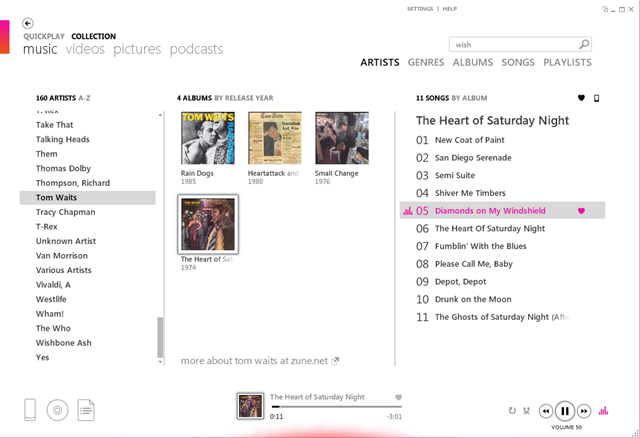
Will there be any way to copy a file from your PC to the device? I thought this would get a straightforward answer, but it did not. I was told that the PC side of WP7 has not been announced yet. However, it will bear some relation to what has been done before for Zune – though the UK still might or might not get the Zune Pass subscription service. Prompted by this discussion, I downloaded the Zune software. It is nicer to use than Windows Media Player, for sure. Why does Microsoft have two free media players, a good one that is reserved for a small niche of US users, and a mediocre one that comes with every version of Windows? You tell me.

image

Will there be any way to deploy applications without going through the Marketplace? The answer is mostly “No”, though Microsoft knows this is necessary for corporate apps and says there will be an announcement on the subject later this year. That said, there is a developer portal, intended for testing your apps, where you can specify up to 5 or 10 users who can download and install an app. This is in effect a limited private deployment, though it is not intended for that purpose.

Deploying apps to Windows Phone 7 will be slightly more expensive than it is for Apple’s iPhone. The policies are explained here. You pay $99 to register, which gets you five free submissions, after which it is $19.99 per app. Each registration is limited to five free apps, but there is no limit on paid apps. There is a 70/30 revenue split. The idea is to limit the number of low quality apps. Not a bad thing considering the amount of junk in Apple’s App Store.

HP will not do Android or Windows Phone 7 smartphones – but what chance for webOS?

HP’s Todd Bradley, Executive Vice President of Personal Systems and formerly CEO of Palm, was interviewed by Jon Fortt at CNBC. Fortt asks some great questions which mostly get woolly answers, but did get this statement from Bradley:

We will not do a Linux, Android phone. We won’t do a Microsoft Phone … we’ll deliver webOS phones.

I will be interested to see if HP sticks to this commitment. HP is Microsoft’s biggest customer and huge in business systems, but that does not necessarily mean it can make a success of a mobile platform on its own.

Mobile platforms stand (or fall) on several pillars: hardware, software, mobile operator partners, and apps. Apple is powering ahead with all of these. Google Android is as well, and has become the obvious choice for vendors (other than HP) who want to ride the wave of a successful platform. Windows Phone 7 faces obvious challenges, but at least in theory Microsoft can make it work though integration with Windows and by offering developers a familiar set of tools, as I’ve noted here.

RIM Blackberry is well entrenched in the Enterprise and succeeds by focusing on messaging and doing it well. Nokia and Intel will jostle for position with MeeGo.

It is obvious that not all these platforms can succeed. If we accept that Apple and Android will occupy the top two rungs of the ladder when it comes to attracting app developers, that means HP webOS cannot do better than third; and I’d speculate that it will be some way lower down than that.

You have to feel for HP, which has supported Microsoft’s failing mobile platform for many years – with the occasional lapse, remember when it became an OEM vendor for Apple’s iPods? – and now has decided it cannot rely on the company in this area. That is understandable. However, HP is heavily invested in Windows. It may be choosing just the wrong moment to abandon ship; or it may find that doing its own thing with webOS is no better. Google Android would have been a safer though less interesting choice.

Microsoft cash cows alive and well, lame ducks still lame

Here is my quick summary of Microsoft’s just-announced quarterly results:

Quarter ending June 30th 2010 vs quarter ending June 30th 2009, $millions

Segment Revenue Change Profit Change
Client (Windows + Live) 4548 +1379 3063 +1134
Server and Tools inc. Azure 4012 +84 1546 +340
Online 565 +64 -696 -111
Business (Office) 5250 +683 3284 +578
Entertainment and devices 1600 +343 -172 -31

What’s notable about these figures? Well, the big-picture Microsoft question is how it is coping with industry transitions, in particular the transition from on-premise servers and desktop software to cloud services and mobile device clients. Of course you can debate the extent and speed of that transition, but I believe it to be real.

The story here is that Microsoft’s traditional products are still amazingly profitable, and that the effort invested in making Windows 7 a decent upgrade from Windows XP or Vista is paying off. Further, Microsoft Office sales actually exceed Windows sales. It does not really surprise me; despite the existence of capable cheaper or free alternatives, I rarely see business PCs that do not have Office installed; and Microsoft is busy locking in Enterprise customers with hooks between Office client and SharePoint server.

On the other hand, Microsoft’s progress in cloud and device looks amazingly bad. The figures are not all that easy to read, since Azure, Microsoft’s cloud platform, is part of the Server and Tools business; and BPOS, the cloud-based Exchange and SharePoint offering, probably sits there too. The “Online” business in the figures covers Bing and MSN, and earns its money primarily from advertising. This part of the business managed to turn in a loss greater than its revenue, which is remarkable considering how successful Google is with that same business model.

Entertainment and Devices is also hard to read. If you read the press release, it turns out that the reason revenue increased was not thanks to the success of Xbox or an unlikely rebound for Zune or Windows Mobile. Xbox actually declined, and so did Windows mobile, and the increase was thanks to increased sales of Windows Embedded:

Non-gaming revenue increased $35 million or 1% primarily reflecting increased sales of Windows Embedded device platforms, offset in part by decreased Zune and Windows Mobile revenue.

Windows Embedded is an interesting story. I don’t know how its figures break down, but I research things such as digital signage and point of service systems from time to time, and there is a lot happening in that space which deserves more attention from the technical press, especially as it directly touches our lives.

Despite the Embedded success, Entertainment and devices also turned in a substantial loss, though nothing like the horrors of Online.

Conclusions? One is not to write off Microsoft; it’s still a highly profitable giant. But the other is that the company desperately needs a big success outside Windows and Office to convince us that it really has a bright future. A sparkling launch for Windows Phone 7 would do nicely.

Developing for Windows Phone 7

I spent some time today watching parts one and two of Windows Phone 7 Jump Start presented by Rob Miles and Andy Wigley. After a slow start there were clear demos of basic coding for Microsoft’s new phone; and I’d guess that most Microsoft platform developers would be reassured that if they can code for Silverlight, or do games in XNA, they will not have any problem coding for Windows Phone 7. The further implication is that it will be relatively easy, with the proviso that complex applications with good performance and excellent design are never easy. There is also the challenge of learning Expression Blend, if needed.

All participants were asked to state what other mobile platforms they had developed for; and while we were not shown the results of these polls there was a comment to the effect that “Windows mobile and None are neck and neck”, which I found interesting. It suggests that iPhone and Android developers are in no hurry to learn about Microsoft’s phone. If Microsoft gets enough customers they may then take an interest. Competing with Apple was always a given; but it is the rise of Google Android which must be most troubling to Microsoft, since it has given the non-Apple phone vendors what they need.

Still, the combination of Visual Studio plus Windows Phone 7 does make sense for .NET developers.

An early slide presented the Windows 7 hardware, which is worth reviewing as it is a reasonable specification. Supposedly Microsoft is taking a hard line with OEMs to keep the spec at or better than this minimum:

Display

480×800 QVGA
320×480 HVGA

Capacitive touch

4 or more contact points

Sensors

A-GPS, Accelerometer, Compass, Light

Camera

5 mega pixels or more

Hardware buttons

Start, Search, Back

Memory

256 MB RAM or more

8GB Flash storage or more

GPU

DirectX 9 acceleration

Using backup on Windows Hyper-V Server or Server Core

Hyper-V Server 2008 R2 is a free virtualisation platform from Microsoft and an excellent bargain; I guess it is something Microsoft feels it has to do in order to compete with VMWare’s vSphere Hypervisor (ESXi) which is also free. Of course Microsoft still gets your money if you run Windows Server on the VMs, in either case. Hyper-V Server is in essence Windows Server Core with just the Hyper-V Role enabled, which means there is no full GUI, just a command window and a few odd GUI apps like Task Manager, Notepad and Registry Editor which Microsoft decided we cannot live without.

So what happens if you want to backup Hyper-V Server with built-in tools? Windows Server Backup is not available, first because it is a GUI application, and second because it is not installed.

There is a way. Windows Server Backup has a command-line version called Wbadmin. In some ways it is better, because you can script it, schedule it, and easily configure it through command-line arguments. It is not installed by default on Hyper-V Server or Server Core, but you can add it:

ocsetup WindowsServerBackup

Aside: If you want to see what else you can install with ocsetup, try oclist. You can install all sorts of things on Hyper-V Server, using this and third-party software, but note the terms of the EULA:

2(b). The instance of the server software running in the physical operating system environment may be used only to:
· provide hardware virtualization services, and/or
· run software to manage and service operating system environments on the licensed server.

Backup comes into that category in my opinion, but there could be areas of uncertainty. Using Hyper-V Server as a general-purpose file server would be a breach of the license, but using a file share on Hyper-V Server to copy some utilities which which to manage the server should be OK. I think – consult your lawyer.

Once you have Wbadmin installed you can backup the server. Attach an external hard drive, say to drive E, and run:

wbadmin start backup -backupTarget:e: -include:c:,d: -quiet

Actually that is not quite right, though it was my first effort. If you run this, even on a system with only C and D drives, you will get a warning:

Note: The list of volumes included for backup does not include all the volumes that contain operating system components. This backup cannot be used to perform a system recovery. However, you can recover other items if the destination media type supports it.

The reason for this is that current versions of Windows use a hidden system partition by default. This partition does not have a drive letter, but is needed for system recovery. In order to include it, add the –allCritical argument:

wbadmin start backup -backupTarget:e: -include:c:,d -quiet -allCritical

This will add the hidden partition to the backup, and enable system recovery, where you can restore the OS and all its data in once operation.

Another important argument is –vssFull. This switch in effect tells the operating system it has been backed up. The archive bit on changed files is flipped. You want this to happen if this is your only backup, but you don’t want this to happen if you are also using another type of backup.

Note that you can quit the backup with Ctrl-C but in fact it continues running. If you quit and then want to check the status, type:

wbadmin get status

and if you really want to quit:

wbadmin stop job

Backing up running VMs

Now the interesting bit. Can we backup VMs while they are running?

It should be possible, though Microsoft does not make it easy. The idea is that the backup saves the state of the VM in a snapshot, and backs up the snapshot. This means it should start cleanly on restore. But there are several tricky points.

First, if you want to backup VMs from the host, you need to set a registry key – see the following article. I would like to know why this is not set by default – it must be deliberate, since the requirement has stayed the same in Server 2008 and Server 2008 R2.

Second, there are actually two different snapshot mechanisms, one operating entirely on the host called “saved state”, and one operating in conjunction with integration services in the VM, called “Child VM snapshot”, according to the most detailed official article on the subject. This feature is shown in Hyper-V settings as Backup integration. For the Child VM Snapshot to work, there is a further limitation, that:

The Snapshot File Location for the VM is set to be the same volume in the host operating system as the VHD files for the VM.

I am not sure what happens if you have VHDs in several locations, as you might do if you wanted to optimize performance by having VHDs on different physical disks. [Update – apparently in Windows Server 2002 R2 the .AVHD snapshot files are always in the same location as their parent VHD, and this is on a per-VHD basis, so it should not be a problem in R2].

Third, there is a question mark about whether either method works for VMs running Active Directory:

Active Directory does not support any method that restores a snapshot of the operating system or the volume the operating system resides on. This kind of method causes an update sequence number (USN) rollback. When a USN rollback occurs, the replication partners of the incorrectly restored domain controller may have inconsistent objects in their Active Directory databases. In this situation, you cannot make these objects consistent.

I am also not clear whether archive bits are flipped in the child VM, if you use –vssfull along with the Child VM snapshot. If so, you should definitely not use –vssFull in the host if you are also backing up from the guest. I am trying to get clarification on these points.

These are more questions than I would like for something as critical as backup and restore of VMs. For peace of mind you should either shut them down first, which is unacceptable in most production environments, or else backup from the guest instead of, or in addition to, backing them up from the host. I’ll update this post when I get further information.

Data Protection Manager

Finally, note that in grown-up Microsoft environments you are meant to use Data Protection Manager (DPM) rather than fiddling around with wbadmin. There is even a white paper on how this integrates with Hyper-V. Ultimately though this is also based on VSS so some of the same issues may apply. However, if you are using the free Hyper-V Server 2008 R2, you are probably not in the market for DPM and its additional hardware, software and licensing requirements.

Dysfunctional Microsoft?

Microsoft watchers have been scrutinising the fascinating Mini-Microsoft post on the Kin smartphone debacle and what it says about the company. If it is even slightly accurate, it is pretty bad; and it must be somewhat accurate since we know that the hopeless Kin launch happened and that the product was killed shortly afterwards. Of course it would have been better to kill the project before rather than after the launch; the negative PR impact has affected the strategically important Windows Phone 7 launch.

Handsome profits from Windows and Office have enabled Microsoft to survive and even prosper despite mistakes like Kin, or the Xbox 360 “red ring of death”, or the Vista reset and related problems – mistakes on a scale that would sink many companies.

I see frequent complaints about excessively bureaucratic management with too many layers, and a tendency towards perplexing, ineffective but expensive advertising campaigns.

There are also questions about CEO Steve Ballmer’s suitability for the task. He nearly indulged in a disastrously over-priced takeover of Yahoo, saved only by the obstinacy of the target company’s leadership. He habitually dismisses the competition, such as Apple’s iPhone, and is proved wrong by the market. He failed to see the importance of cloud computing, and even now that the company is at least partially converted he does not set the right tone on the subject. I watched his keynote at the Worldwide Partner Conference (WPC) where he sounded as if he were trying unsuccessfully to imitate Salesforce CEO Marc Benioff from ten years’ ago. Microsoft needs to present a nuanced message about its cloud initiative, not someone shouting “oh cloud oh cloud oh cloud”.

Microsoft is also copying its competition as never before. Bing has a few innovations, but is essentially a recognition that Google got it right and an attempt to muscle in with a copy of its business model – search, advertising and data mining. Windows Phone 7 occupies a similar position with respect to Apple’s iPhone and App Store. Windows 8 also seems to borrow ideas from Apple.

Nevertheless, Microsoft is not yet a dying company, and it would be a mistake to base too much analysis of the company on something like comments to Mini-Microsoft’s blog – good though it is – since it is a magnet for disaffected employees.

While Ballmer’s effort at the WPC was poor, he was followed by Bob Muglia, president of server and tools, who was excellent. Windows Azure has come on remarkably since its half-hearted preview at PDC 2008; and Muglia comes over as someone who knows what he is trying to achieve and how he intends to get there. The Azure “Appliance” idea, shipping a pre-baked cloud infrastructure to Enterprise customers, is a clever way to exploit the demand for a cloud application model but on hardware owned by the customer.

The eBay announcement at WPC was also quite a coup. eBay will “incorporate the Windows Azure platform appliance into two of its datacenters” later this year; and while it is not clear exactly how much of eBay will run on Azure, these appliance kits represent significant hardware.

We’ve seen other strong releases from Microsoft – server 2008 R2, Exchange 2010, SQL Server 2008 R2, SharePoint 2010 which whatever you think of SharePoint is a solid advance on its predecessor, and of course Windows 7 which has done a lot to rescue Microsoft’s performance and reputation after the Vista disappointment.

I also continue to be impressed by Visual Studio 2010, which is a huge release and works pretty well in my experience.

What about Windows Phone 7? With the market focused on iPhone vs Android, clearly it is in a tough market. If there is something slightly wrong with it on launch, instability or some serious hardware or software flaw, it might never recover. Nevertheless, I do not write it off. I think the design effort is intelligent and focused, and that the Silverlight/XNA/.NET development platform along with Visual Studio is an attractive one, especially for Microsoft Platform developers. VP Scott Guthrie describes the latest SDK here. People still switch phones frequently – something I dislike from an environmental point of view, but which works in favour of new entrants to the market. If Windows Phone 7 is a decent device, it can succeed; I’d rate its long-term chances ahead of HP WebOS, for example, and will be keen to try it when it becomes available.

phonedev

Is there a lot wrong with Microsoft? Yes. Does it need a fresh approach at the very top? Probably. Nevertheless, parts of the company still seem to deliver; and even the Windows Phone 7 team could be among them.

Small Business Server “Aurora” based on Windows Home Server and will have hooks to the cloud

The most interesting session at TechEd in New Orleans last month was one I could not talk about until today. It concerned the next version of Small Business Server, no date announced yet. The next SBS will come in two editions. SBS 7.0 will be conceptually similar to today’s SBS, but updated to Server 2008 R2, Exchange 2010 and so on.

SBS code-name “Aurora” is the compelling one though. It is based on Windows Home Server (or at least the next version of WHS, “Vail”, but with Active Directory added. There are no other apps; you are expected to use cloud services.

The reason this matters is Microsoft’s work on federated Active Directory. What this means is that your local SBS simply manages users, computers and file shares, but the same user accounts also work on cloud-hosted services such as Exchange or SharePoint – or any others that support Active Directory federation.

I love this concept; it is exactly the right thing for SMEs who need to run a properly managed Windows network while using hosted email and other cloud services.

image

Questions remain of course. Will services other than Microsoft’s own BPOS or third-party hosted Exchange and SharePoint support SBS federated Active Directory? And will Microsoft and its partners really steer small businesses in this direction, or focus on SBS 7.0?

More details in this article on The Register.

PS This version of SBS is not too far removed from what I asked for in February 2006.