Category Archives: .net

Microsoft Build Sessions published: Windows Phone XAML and HTML/JS apps, new Azure APIs and more

Developing for Windows Phone is now closer to developing for the Windows 8 runtime, according to information from Microsoft’s Build sessions, just published.

Build is Microsoft’s developer conference which opens tomorrow in San Francisco.

image

Building a Converged Phone and PC App using HTML and JavaScript states that “An exciting part of Windows Phone 8.1 is that you can now start building applications natively in HTML and JavaScript.”

Other sessions refer to the Common XAML UI Framework, which seems to refer to a shared UI framework for Windows Phone and WIndows 8, but using XAML rather than HTML and JavaScript.

This is in addition to Silverlight, not instead, judging by this session:

We’ve been doing a lot of work with new converged XAML app support on Windows Phone 8.1, but what about legacy Windows Phone Silverlight XAML based apps?  Come learn about all the new features we’ve enabled with Silverlight 8.1.

Microsoft has also come up with new APIs for applications that integrate with its Azure cloud platform and with Office 365. The Authentication library for Azure Active Directory lets you build both Windows and mobile applications that authenticate against Azure Active Directory, used by every Office 365 deployment. There is also talk of using Azure for Connected Devices, meaning “Internet of Things” devices using Azure services.

Some other sessions which caught my eye:

Connected Productivity Apps: building apps for the SharePoint and Office 365 platform.

What’s new in WinJS: the road ahead. XAML vs HTML/JS is a big decision for Windows developers.

Anders Hejlsberg on TypeScript

Automating Azure: “The Azure Management Libraries and Azure PowerShell Cmdlets allow this type of automation by providing convenient client wrappers around the Azure management REST API”

Authentication library for Azure Active Directory: The Active Directory Authentication Library (ADAL)

Panel discussion on desktop development: is there a future for WPF? Maybe some clues here.

Miguel de Icaza gets a session on going mobile with C# and Xamarin. I recall when de Icaza ran sessions on Mono, the open source implementation of the .NET Framework which he initiated shortly after Microsoft announced .NET itself, in nearby hotels at Microsoft events; now he is inside.

Learning from the mistakes of Azure: Mark Russinovich on what can go wrong in the cloud.

Looks like both cloud and apps for Windows Phone/Windows 8 are big themes at Build this year.

Entering Microsoft’s XAML labyrinth: is it worth it?

I spent some time at the weekend working on a Bridge game for the Windows Store. I am writing it in XAML and C#. The UI is hardly demanding, given that Bridge is a card game, but it has made me take a fresh look at XAML, the markup language for a Windows Store App user interface (unless you use HTML and JavaScript). XAML is also used in Windows Presentation Foundation and in Silverlight/Windows Phone.

As part of the game, the user selects a “bid” which consists of a number from 1 to 7 and a suit of cards (or double, redouble or pass). Most bridge games show this as a grid though functionally it is like a combo-box (choosing from a pre-defined range of options).

Naturally I looked for the easiest way to accomplish this. The solution I came up with was to nest TextBlock controls in Border controls in Grid cells. Then I wrote C# code that detects which cell the user taps and updates the background of the selected Border accordingly.

image

I have in mind to replace the text with graphics and make the numbers a bit smarter at some future date. My solution works fine; here it is at runtime:

image

At the weekend I happened to be chatting with a developer more expert in XAML than myself, who told me I had done it wrong. In XAML everything should be in Style definitions. I should use a ListView and design it in Blend.

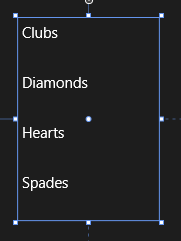
Well, I knew that I had somewhat subverted how XAML is meant to work, so I sat down to investigate this different approach. A ListView looks nothing like what I want out of the box.

image

However, with the magic of XAML it can be transformed. I made the ListView horizontal by defining an ItemsPanelTemplate in Application.Resources:

<ItemsPanelTemplate x:Key="ItemsPanelTemplate1">
  <StackPanel Orientation="Horizontal"/>
</ItemsPanelTemplate>

and adding 

ItemsPanel="{StaticResource ItemsPanelTemplate1}

as an attribute of the ListView.

Then I added an ItemTemplate to draw the kind of block that I wanted:

<ListView.ItemTemplate>
    <DataTemplate>
        <Border BorderThickness="1" Height="130" Width="130" BorderBrush="Black">
            <TextBlock FontSize="24" FontWeight="Bold" HorizontalAlignment="Center" VerticalAlignment="Center"
                       Text="{Binding Name}" Foreground="Black" />
        </Border>
    </DataTemplate>
</ListView.ItemTemplate>

Note that I am using a DataTemplate because the ListView is bound to an ObservableCollection in the proper XAML way.

At this point I am close to what I want – never mind that the numbers are missing, they can easily be added with a second ListView:

image

However I do not want that little tick mark appearing, the selected background colour is not to my taste, and the spacing of the items is wrong. How do I fix that?

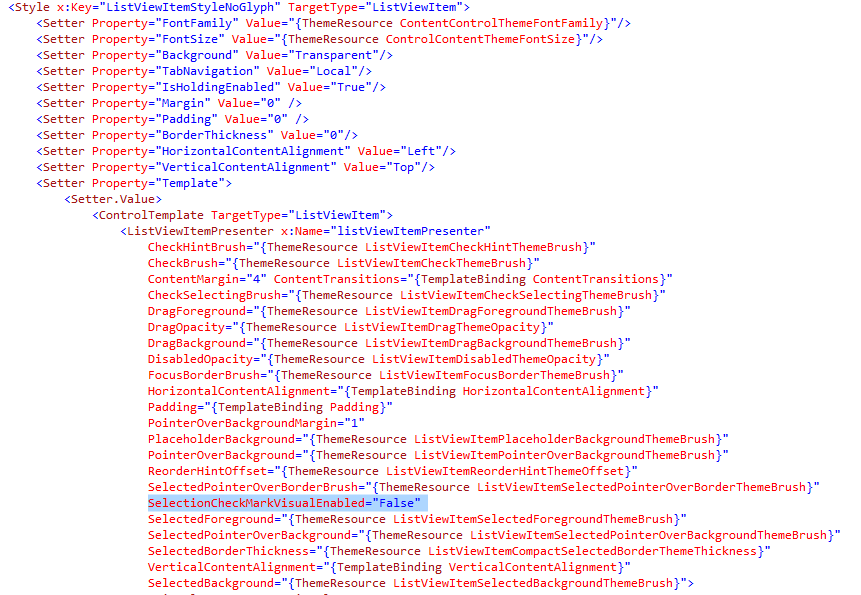
My search led me to this post which explains a far-from-obvious series of steps you can take in Blend. The steps did not quite work for me but got me on track to create a new Style resource which I called ListViewItemStyleNoGlyph and which lets me adjust the margin and also a previously hidden property called SelectionCheckMarkVisualEnabled. Blend generated a substantial block of code for this:

image

This has helped and now my ListView looks like this:

image

Well, it is nearly there and I can see that with a bit more effort I can get what I want. Even so, I am beginning to wonder whether my initial approach, in which I understood all the code, had advantages over this exploration into the labyrinth.

Is XAML well loved out there? I came across this post by Paul Stovell from a couple of years back which seems relevant. “I’ve lived and breathed the technology for the last six years”, he says, but writes:

What’s disappointing is that WPF started out quite positively during its time. Concepts like dependency properties, styles, templates, and the focus on data binding felt quite revolutionary when Avalon was announced.

Sadly, these good ideas, when put into practice, didn’t have great implementations. Dependency properties are terribly verbose, and could have done with some decent language support. Styles and templates were also verbose, and far more limited than CSS (when WPF shipped I imagined there would be a thousand websites offering high quality WPF themes, just like there are for HTML themes; but there aren’t, because it is hard).

Data binding in WPF generally Just Works, except when it doesn’t. Implementing INotifyPropertyChanged still takes way too much code. Data context is a great concept, except it totally breaks when dealing with items like ContextMenus. ICommand was built to serve two masters; the WPF team who favored routed commands, and the Blend team who favored the command pattern, and ended up being a bad implementation for both.

Stovell mentions the verbosity of XAML, and that it is hard, both of which sound right to me. He contrasts the way ASP.NET has evolved, with ASP.NET MVC a great improvement on web forms. Read the full post for more detail.

It seems to me that XAML does offer much that is wonderful: flexibility, capability, and the ability to separate presentation from data. At the same time, neither XAML nor Blend are intuitive tools for developers; they may make more sense to designers, but it seems to me that removing a tick mark from a ListViewItem should be more straightforward. Perhaps it is, in which case there is a failure of documentation or tooling rather than functionality, but it makes little difference to the developer.

SQL Server 2014 is done: Hekaton, Azure integration

Microsoft has released SQL Server 2014 to manufacturing (an odd phrase in these diskless days) but which signifies that it is code complete for the initial release. General availability is April 1st.

What do you do if hardware trends enable you to stuff vast amounts of RAM into your server, along with many CPU cores? The answer is that you optimize applications to work mostly in RAM, with disk important as a persistence layer. This contrasts to the approach when you have large amounts of disk space and little RAM, when you focus on loading only as much data into memory as you absolutely need.

The implications for a database server are profound. Instead of a logic that goes something like “read from disk, do something, write to disk” you can address the data directly; it is just a memory pointer.

Now combine that with stored procedures compiled to native code. Performance leaps up, and by much more than you get simply by caching data in RAM, or using fast SSD storage, but still using the old disk-based approach in the database engine.

This is the reasoning behind “Hekaton”, properly known as In-Memory OLTP (online transaction processing), which is a new in-memory database engine that comes with SQL Server 2014.

It is fully integrated. You just have to add a filegroup to a a SQL Server database with the keyword CONTAINS MEMORY_OPTIMIZED_DATA and then create a table with the keyword WITH (MEMORY_OPTIMIZED=ON). And for the stored procedures, use WITH NATIVE_COMPILATION.

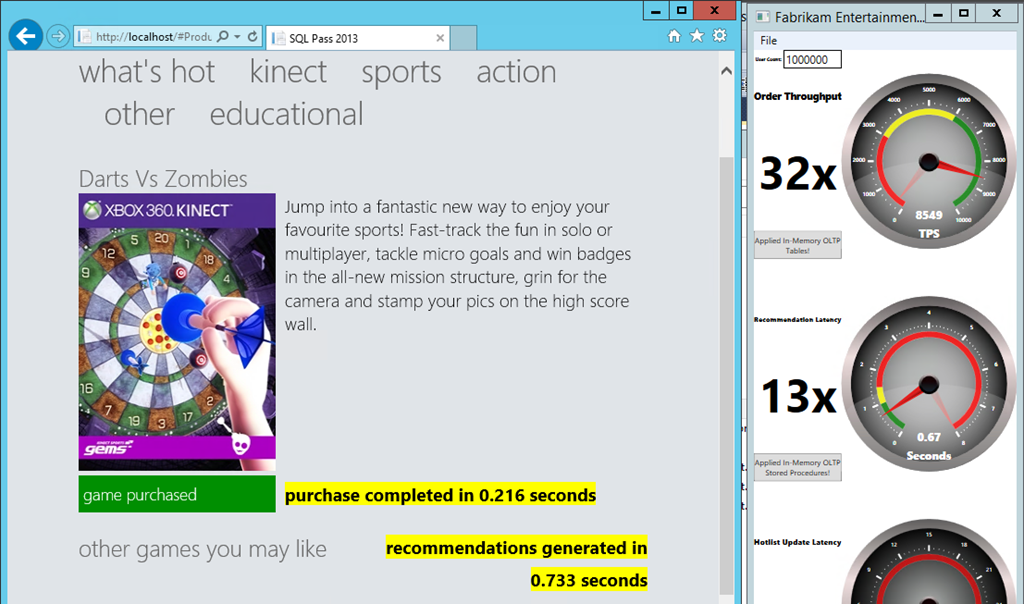
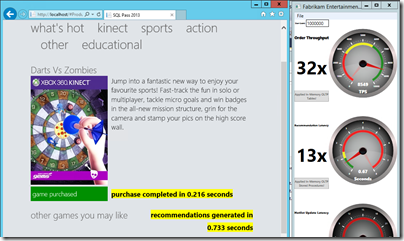
The speed-up is as great as you would expect. I have seen demonstrations of 30x or more performance increases, like this one in a demo based on one from the SQL Pass conference, but which I did for myself in one of Microsoft’s “Hands On Labs”:
image

In another demo, on an Azure VM, I got a speed up of 7x. Only seven times faster! Still, hard to complain about those sorts of numbers.

Unfortunately, in-memory OLTP is spoilt by some rather severe limitations in this release. The first problem is that a combination of the need to support native compilation of stored procedures, and other limitations, means that only a subset of T-SQL (the query and management language of SQL Server) is supported. You can see the list of what is not supported here; and it is depressing reading, with lots of keywords that you likely do use at the moment; even IDENTITY is on the list of what does not work.

Another issue is that the ability of In-Memory OLTP to take advantage of hardware is not as extensive as you might hope. Lead program manager Kevin Liu told me at a recent press workshop that the team recommends restricting total data size to 256GB, and that the recommended number of CPU sockets is two. You can get servers today with much more memory and more sockets. It gets complicated though: in a multi-socket server memory has processor affinity and there is a thing called NUMA (Non-Uniform Nemory Access) that describes the way memory is shared between processors.

According to Liu, Microsoft expects to lift these limitations in future releases, as well as improving T-SQL support, but things like this remind you that it is a version one release.

What else is in SQL Server 2014? There is some neat Azure integration, including a managed backup tool that is almost one click to have your data backed up to Azure storage; a brilliant facility for small businesses. You can also use Azure for high availability, creating always-on replicas in Azure VMs.

Data warehouse users will like the new clustered columnstore indexes, which allow you do use a column-oriented table structure for much faster processing of typical report and analysis queries. Columnstore indexes first appeared in SQL Server 2012 but were not updateable. Now they are.

SQL Server is well liked, licensing hassles aside; and even on licensing, Microsoft can always point at Oracle and claim, rightly, to be cheaper and less complex. It has earned a reputation for solid performance. SQL Server 2014 looks as good as ever, even if the management tools now look rather dated – the shell for SQL Server Management Studio uses an old version of Visual Studio, which is one of the reasons. I also suspect the SQL Server team lacks a dialog designer, but doubt that the average database admin cares one jot.

That said, it is difficult to describe this as a must-have upgrade, unless you can make good use of “Hekaton” in-memory OLTP. The porting effort will be worth it presuming you can get it to work. One of the good fits for the technology is managing web app session data, or, as in the example above, rapid processing to display recommendations or customisations on a web site.

I can imaging though that many users will look at Hekaton and decide that it is too much work or too immature for immediate use. What is left for them, apart from some nice Azure integration?

Not a huge amount, it seems to me, making this to my mind a transitional release.

Are you planning to upgrade? I would be interested to know your reasons why or why not.

X is for Xamarin: One company that is pleased to see Nokia X

Xamarin, which provides cross-platform development tools for targeting iOS and Android wtih C#, is not exhibiting here at Mobile World Congress in Barcelona, but does have a presence for meetings, and I caught up with Joseph Hill who is Director of Developer Relations.

Xamarin has just announced a joint SDK with SAP along with some SAP-specific support in its cloud testing service; but Monday’s announcement of Nokia X, Android smartphones from soon-to-be-Microsoft Nokia, was even bigger news from Hill’s perspective.

If you are a Windows Phone developer with apps written in C#, Xamarin gives you a way to port your code to Nokia X. Apparently Nokia itself has taken advantage of this to port Nokia Mix Radio, as described by Nokia’s developers here. Nokia also used MVVM Cross in order to take cross-platform abstraction beyond what Xamarin itself gives them (Xamarin is deliberately restricted to non-visual code).

Nokia states that it will do all future development using Microsoft’s Portable Class Libraries, and is also refactoring existing code:

The final step in our journey towards the common architecture is to throw out the legacy code from the Windows Phone and Windows 8 apps so they’re stripped back to existing PCL shared assemblies and then integrate them with our fully shared codebase. Now that the Nokia X has launched that’s the next major goal we’re striving towards and work begins now.

I imagine that Xamarin could prove useful in some of Microsoft’s other internal projects as it prepares for a world in which there is an official Microsoft Android platform.

As an aside, it seems to me unlikely that Microsoft will do anything other than run with Nokia X after the acquisition. Microsoft is supporting Nokia X with Skype and OneDrive, which is an indication of its attitude.

New features in Windows Azure, including web site backup, .NET mobile services

Microsoft has announced new features in Windows Azure, its cloud platform, described by VP Scott Guthrie on his blog.

Aside: I agree with this comment to his post:

Thank you Scott for update. I wish dozens of MS folks and MS representatives would have a clue about Azure roadmap to help businesses plan their release schedules / migration plans. Till that happens, this blog will remain the main source of updates and a hint of roadmap.

The changes are significant. ExpressRoute offers connectivity to Azure without going through the public internet. Currently you have to use an Equinix datacentre, Level 3 cloud connect, or an AT&T MPLS (Multiprotocol Label Switching) VPN. For enterprises that can meet the requirements and who are wary about data passing through the internet, or who want better connectivity, it is an interesting option.

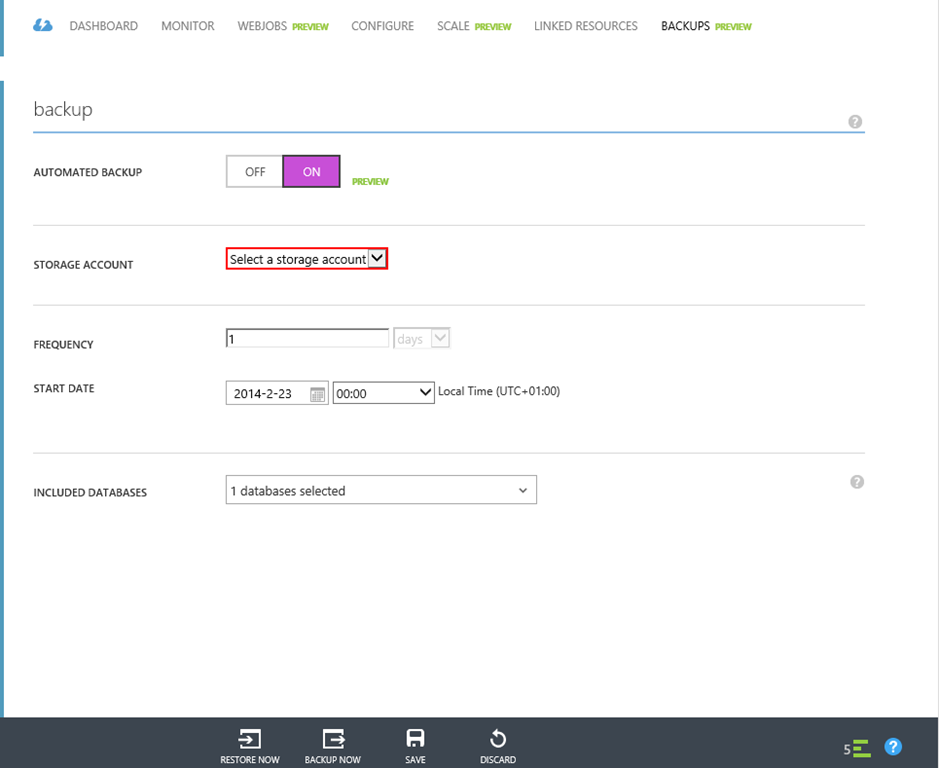
Next up is backup and restore for Azure web sites. Azure web sites are a way of deploying web applications, ranging from free to multi-instance with automatic scaling. You need at least a Standard site for serious use, as I explained here.

Now you can set up scheduled backup for both the web site and a supporting database. The feature is in preview but you can try it now using the Azure web management portal.

image

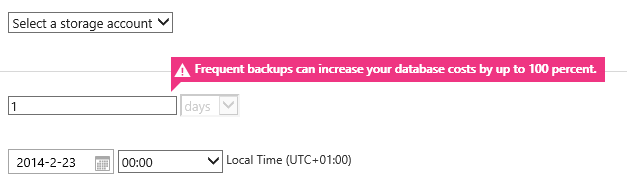
I noticed a couple of things. One is that the storage account used must be in the same subscription as the web site. I also spotted this warning:

image

which states that “frequent backups can increase you database costs by up to 100%”. Still, it is a handy feature.

Azure mobile services, designed to supply data to mobile apps, has been extended to support .NET code (previously you had to use Javascript). If you download the code, notes Guthrie, you find that it is  “simply an ASP.NET Web API project with additional Mobile Service NuGet packages included.”

Mobile Services also have new support for notification hubs and for PhoneGap (a way of building mobile apps using HTML and JavaScript).

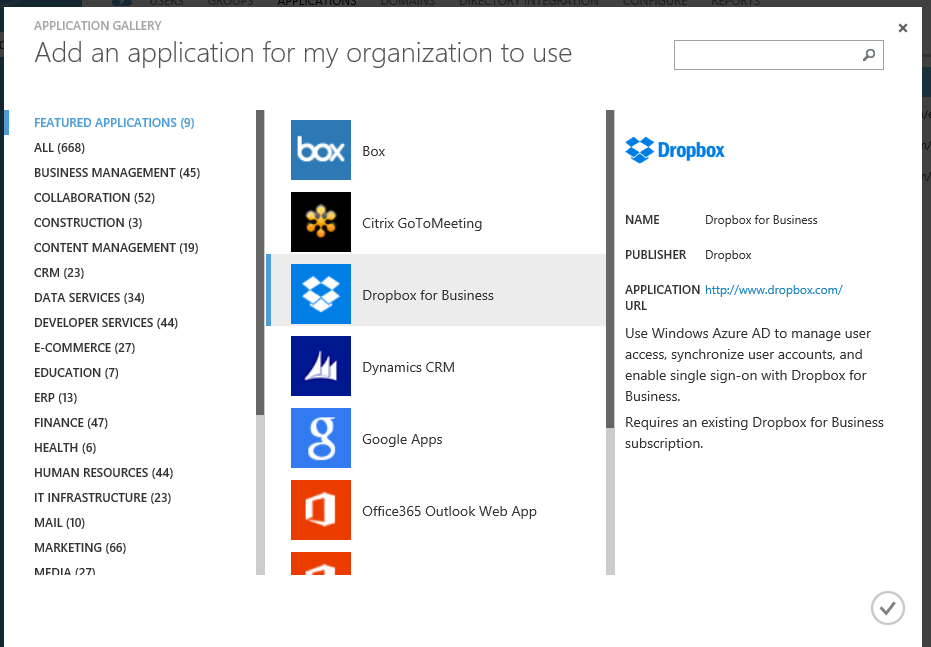
Another feature that caught my eye is easy linking of third-party apps to Azure Active Directory (which is also used by Office 365). For example, if you are struggling with SharePoint and its poor clients for Windows, iOS and Android, you might consider using Dropbox for business instead. Now you can integrate Dropbox for Business with your Office 365 user directory by selecting  it from the Azure management portal.

image

Frank comments from Microsoft Product Manager on the Visual Studio 2012 user interface mess. “Secrecy is bad – it lets problems fester”

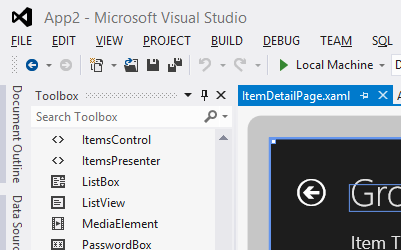
When Visual Studio 2012 was first previewed, it presented a new IDE style which featured all-caps menus and a mainly monochrome icon set which most developers disliked; the icons were too hard to distinguish. Microsoft has tweaked the design, restored more colour, and I hear fewer complaints today, but that essential design approach remains in Visual Studio 2013.

image

Microsoft product manager Brian Harry has made some frank comments on what happened, in a series of comments beginning here. The comments were made last month, but I had not seen them until today and consider them worth highlighting.

“The implementation of the new UI in 2012 was a mess” says Harry, explaining that the team assigned to create the new look was too small. Worse, it was too secret. “To aggravate this folly, there was a bit of a "cone of secrecy" around the new UI because we didn’t want it "leaking".  Even I didn’t get to see it until months into it,” he writes.

After a strong negative reaction to the preview, “we eventually came to realize we had a crisis on our hands,” says Harry:

Could we have reversed direction, of course.  We debated it vigorously – and for a while, I have to admit, I wasn’t sure.  Ultimately, I concluded that the only way was forward (not that it was actually my decision but I’m just stating my position).  I know some people will disagree with me emphatically and I respect that.  I am in the camp of people who generally like the new UI style.  I know some people think there aren’t any people in that camp but I’ve seen the survey’s and there actually are quite a lot of them.  I do believe there is continued room for improvement and we made some improvements over the past year (the Blue theme, for instance, is very popular – actually Dark is too; Light, not so much).  I’ve gotten completely used to all CAPS menus.  They never bothered me much and now, it just looks normal to me.  Contrast has gotten better.  Icon color has gotten better.  Icon shapes have gotten better.  I’d, personally, still like to see more liberal use of color (Team Explorer is mine and you can see we are a bit more liberal with color than much of VS :))  But all in all, I like the new UI and generally, people internally are happy with it too.

It was a journey and we made mistakes a long the way.  I think the biggest learning was – Don’t kid yourself into thinking you can do a ripple effect feature like that "on the cheap".  Another learning, for me at least, is secrecy is bad – it lets problems fester until they become crises.  Share, share, share.  The feedback is critical to course correction.

Now some observations of my own. My sense is that the flaws in the design stem from over-application of the content-first, “immersive UI” concept which is also seen in Windows 8 “Metro” or “Modern” apps. This concept makes perfect sense if you are browsing the web or reading a document: you want the screen furniture and tools to get out of the way as far as possible. If you are creating content though, the tools become more important. Arguably they become part of the “content”, if you define that as what you are focusing on.

I see the same design error in Microsoft Office 2013, which has a washed-out UI similar in many ways to that in Visual Studio 2012. If you are using Office mainly to consume content, it makes sense, but Office is a content creation tool, and the icons should be more prominent.

I am not sure of the logic behind all-caps menus except that they look vaguely modern and industrial; everybody knows that ALL CAPS is harder to read than lower case or mixed case, so this makes little sense to me.

In neither case is it that big a deal: I can still work productively and you get used to the UI.

Finally, you can tell from Harry’s remarks that the development team at Microsoft went all-out to try and please developers while also satisfying whatever corporate goals (misguided or not) were behind the new style. Kudos to them.

What next for Windows as Microsoft announces Build 2014?

Microsoft has announced Build 2014, its premier developer conference for Windows, April 2-4 in San Francisco.

image

In his blog post on the subject, developer evangelist Steve Guggenheimer mentions the Windows 8 app platform and Xbox One, and promises that Microsoft will talk about “what’s next for Windows, Windows Phone, Windows Azure, Windows Server, Visual Studio and much more.”

How is the buzz around Microsoft right now? Here are a few things that are not so good:

  • The Windows 8 app platform continues to struggle, despite picking up slightly from its dismal launch. Most of the conversation I hear around Windows 8 looks back to Windows 7 rather than forward to the new tablet platform: will the Start menu return?
  • The decline of the PC remains in full flow, while the non-Windows mobile platforms iOS and Android continue to grow
  • Xbox One, with its focus on Kinect and family entertainment, is falling behind Sony’s PlayStation 4 in terms of which console is most desired. Sony’s cheaper price and higher resolution on games like Call of Duty Ghosts make it a better for buy for gamers who can live without Kinect

On the other hand, a few positives:

  • Microsoft’s cloud platforms Office 365 and Windows Azure are growing fast, as far as I can tell
  • Server 2012 R2 is a solid upgrade to an already strong server product, and Hyper-V is making progress versus VMWare in virtualisation
  • Windows Phone 8 is making some progress in market share, though whether it will cross the point at which it becomes important enough for companies with apps to feel they have to support it remains an open question (currently they mostly do not)

What does that mean for Build? We may of course just see more of the same: improvements to Windows 8.x, further convergence with Windows Phone and Xbox platforms, new features for Windows Server and Azure, early previews of the next Visual Studio to support the new stuff.

I wonder though whether we may also see some new directions. Microsoft is supporting Xamarin for cross-platform mobile development and it would not surprise me to see more being made of this, or possibly some new approaches, to promote the use of Microsoft’s cloud services behind apps that run on iOS and Android.

Microsoft still intends for Windows 8/Windows Phone to be a major mobile platform alongside iOS and Android but its progress in reaching that point is slow. The task of building its cloud platform seems to be going better, despite competition from the likes of Amazon and Google, and in this context deep integration with the Windows client could be as much a liability as an advantage.

It may seem perverse; but it could pay Microsoft to focus on improving how well its server offerings (and Office) work with iOS and Android, rather than pushing for Windows everywhere as it has done in the past.

ComponentOne’s TouchToolkit for Windows Forms: another approach to the Windows tablet problem

Software component vendor ComponentOne has released Studio Enterprise 2013 v2.5, the latest in its suite of components, with support for Windows 8.1 and Visual Studio 2013.

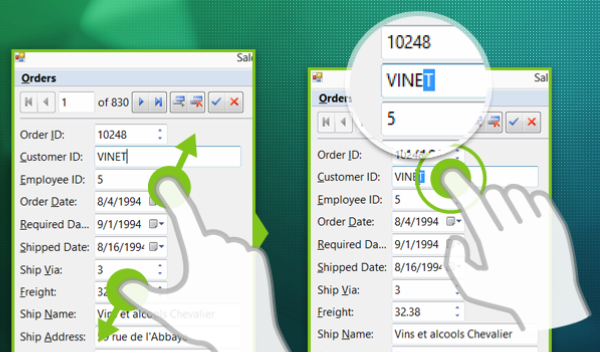
The piece that caught my eye is the TouchToolkit for Windows Forms.

image

Here’s the problem. The Windows desktop is poor with touch control, which is why Microsoft created Windows 8 with its alternate, touch-friendly Windows Runtime platform. However users are resistant to the changed user interface, and it does not help with existing desktop apps.

Developers are also faced with a question of simple mathematics. Develop a Windows 8 Store app, get a market of x. Develop a Windows desktop app, get a market of many times x, since Windows 8 can run desktop apps, but Windows 7 cannot run Store apps.

Embarcadero approached this problem with a framework called Metropolis, for Delphi and RAD Studio. It builds apps that mimic the Windows Runtime look and feel, but which are actually desktop apps. Of course they do not run on Windows RT, the ARM version. It is a confusing solution in my opinion, leading users into what Martin Fowler calls the Uncanny Valley, where stuff works almost but not quite how you expect.

I prefer the thinking behind the TouchToolkit. Take your existing Windows Forms apps, or write a new one, using these controls to make them more touch-friendly. They will never be as well suited to touch control as a Store app, but they might be good enough, and of course will run on Windows 7 and earlier versions.

The controls include a magnifier, support for zoom gestures, and a touch event provider that adds gesture support to any control.

Windows Forms, we all know, is not as good as WPF if you want an application that scales nicely and supports modern design. On the other hand, Windows Forms is pragmatic and easy to use framework that remains popular for line of business apps.

Anders Hejlsberg says C# 6.0 to use Roslyn compiler, coming in next Visual Studio after VS 2013

A disappointment at Microsoft’s Build conference last month was lack of news about the next version of C#, version 6.0. C# architect Anders Hejlsberg did present a session, but it was on TypeScript, a language which compiles to JavaScript.

Aside: Hejlsberg talks about the new Xbox music app in Windows 8.1 (and Xbox One) which is written in JavaScript. It is a large app with 500,000  lines of code, and new features are now implemented in TypeScript (30,000 lines so far).

However, Hejlsberg did also talk about C# 6.0 at Build, during this Channel 9 Q&A, though you have to scroll through to reach the C# content (about 34 minutes in).

image

He confirmed that C# in Visual Studio 2013 is the same as before, but there will be new previews of the forthcoming “Roslyn” compiler soon, and that C# 6.0 will be in the “next Visual Studio after” which suggests Visual Studio 2014, presuming Microsoft sticks to its annual release cycle.

“We are at a point where the Roslyn compilers are done,” he said.

Roslyn, Hejlsberg explained, is the new compiler for “C#, and VB, and the language services in the IDE.”

Roslyn performance will be at least as good as the existing native compiler, says Hejlsberg. It is better suited to parallel processing so will take advantage of multi-core machines, “particularly for large projects.”

You can read more about Roslyn here. Microsoft describes it as “opening up the Visual Basic and C# compilers as APIs.” Practical benefits include features like instant porting of VB code to and from C#, and the use of C# and VB as macro languages within a .NET application.

Hejlsberg also says that Roslyn will enable a faster pace of evolution for C# in future.

Another aside: Xamarin, which provides a compiler for C# targeting iOS and Android, gets a nod of approval from Hejlsjberg. “I’m a great fan of their work,” he says.

Blogger (and former Microsoft Excel developer) Wesner Moise provides a transcript of the key points.

Microsoft and mediocrity in programming

A post by Ahmet Alp Balkan on working as a developer at Microsoft has stimulated much discussion. Balkan says he joined Microsoft 8 months ago (or two years ago if you count when he started as an intern) and tells a depressing tale (couched in odd language) of poor programming practice. Specifically:

  • Lack of documentation and communication. “There are certain people, if they got hit by a bus, nobody can pick up their work or code.”
  • Inability to improve the codebase. “Nobody will appreciate you for fixing styling or architectural issues in their core, in fact they may get offended.”
  • Lack of enthusiasm. “Writing better code is not a priority for the most”
  • Lack of productivity. “I spend most of my time trying to figure out how others’ uncommented/undocumented code work, debugging strange things and attending daily meetings.”
  • Lack of contribution to the community. “Everybody loves finding Stack Overflow answers on search results, but nobody contributes those answers.”
  • Lack of awareness of the competition. “No one I met in Windows Azure team heard about Heroku or Rackspace.”
  • Working by the book. “Nobody cares what sort of mess you created. As long as that functionality is ready, it is okay and can always be fixed later.”
  • Clipboard inheritance. “I’ve seen source files copy pasted across projects. As long as it gets shit done (described above) no one cares if you produced unmaintainable code.”
  • Using old tools. “Almost 90% of my colleagues use older versions of Office, Windows, Visual Studio and .NET Framework.”
  • Crippling management hierarchy. “At the end, you are working for your manager’s and their managers’ paychecks.”

There are a couple of points to emphasize. This is one person in one team which is part of a very large corporation, and should not be taken as descriptive of Microsoft programming culture as a whole. Balkan’s team is in “the test org”, he says, and not making product decisions. Further, many commenters observe that they have seen similar at other organisations.

Nevertheless, some of the points chime with other things I have seen. Take this post by Ian Smith, formerly a Microsoft-platform developer, on trying to buy a Surface Pro at Microsoft’s online store. From what he describes, the software behind the store is of dreadful quality. Currently, there is a broken image link on the home page.

image

This is not how you beat the iPad.

Another piece of evidence is in the bundled apps for Windows 8. The more I have reflected on this, the more I feel that supplying poor apps with Windows 8 was one of the worst launch mistakes. Apps like Mail, Calendar and Contacts on the Metro-style side have the look of waterfall development (though I have no inside knowledge of this). They look like what you would get from having a series of meetings about what the apps should do, and handing the specification over to a development team. They just about do the job, but without flair, without the benefit of an iterative cycle of improvements based on real user experience.

When the Mail app was launched, it lacked the ability to see the URL behind a hyperlink before tapping it, making phishing attempts hard to spot. This has since been fixed in an update, but how did that slip through? Details matter.

A lot is known about how to deliver high quality, secure and robust applications. Microsoft itself has contributed excellent insights, in books like Steve McConnell’s Code Complete and Michael Howard’s Writing Secure Code. The Agile movement has shown the importance of iterative development, and strong communication between all project stakeholders. Departing from these principles is almost always a mistake.

The WinRT platform needed a start-up culture. “We’re up against iPad and Android, we have to do something special.” Microsoft can do this; in fact, Windows Phone 7 demonstrated some of that in its refreshing new user interface (though the 2010 launch was botched in other ways).

Another piece of evidence: when I open a Word document from the SkyDrive client and work on it for a while, typing starts to slow down and I have to save the document locally in order to continue. I am not alone in experiencing this bug. Something is broken in the way Office talks to SkyDrive. It has been that way for many months. This is not how you beat Dropbox.

In other words, I do think Microsoft has a problem, though equally I am sure it does not apply everywhere. Look, for example, at Hyper-V and how that team has gone all-out to compete with VMWare and delivered strong releases.

Unfortunately mediocrity, where it is does exist, is a typical side-effect of monopoly profits and complacency. Microsoft (if it ever could) cannot afford for it to continue.