Category Archives: professional

Microsoft Build 2014: what happened

It’s curious. Microsoft’s new CEO Satya Nadella has been in place for only a month which means that almost everything announced at Build, Microsoft’s developer conference which took place last week in San Francisco, must have been set before he was appointed; yet there was a sense of “all things new” at the event, as if he had overseen a wave of changes.

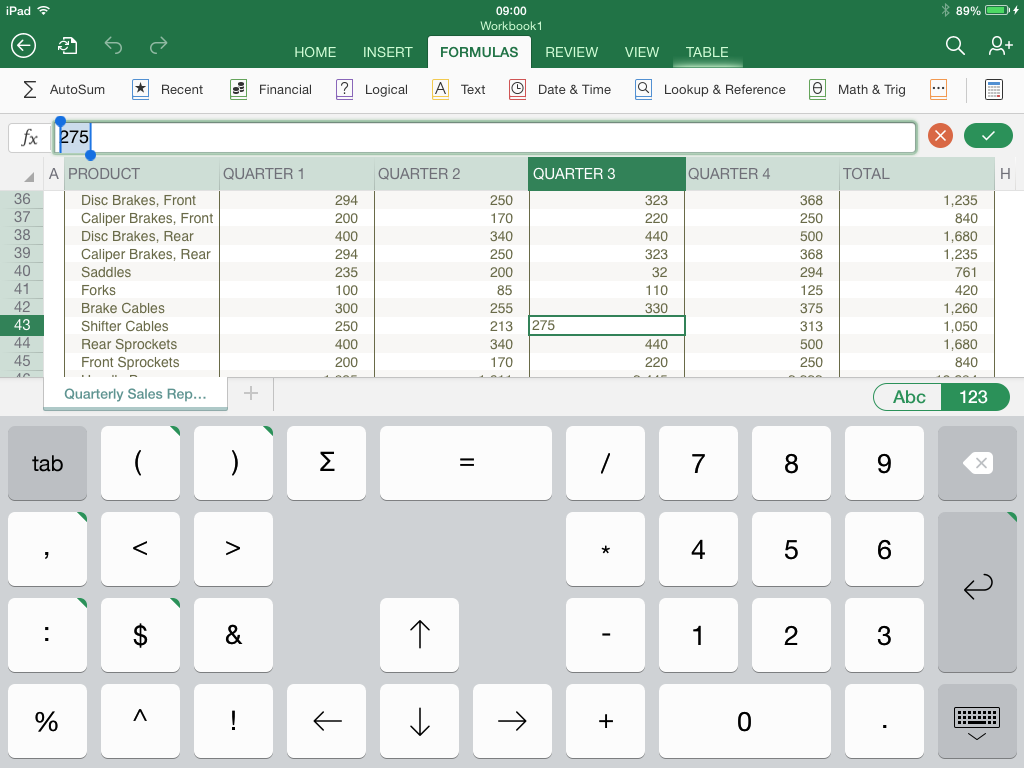
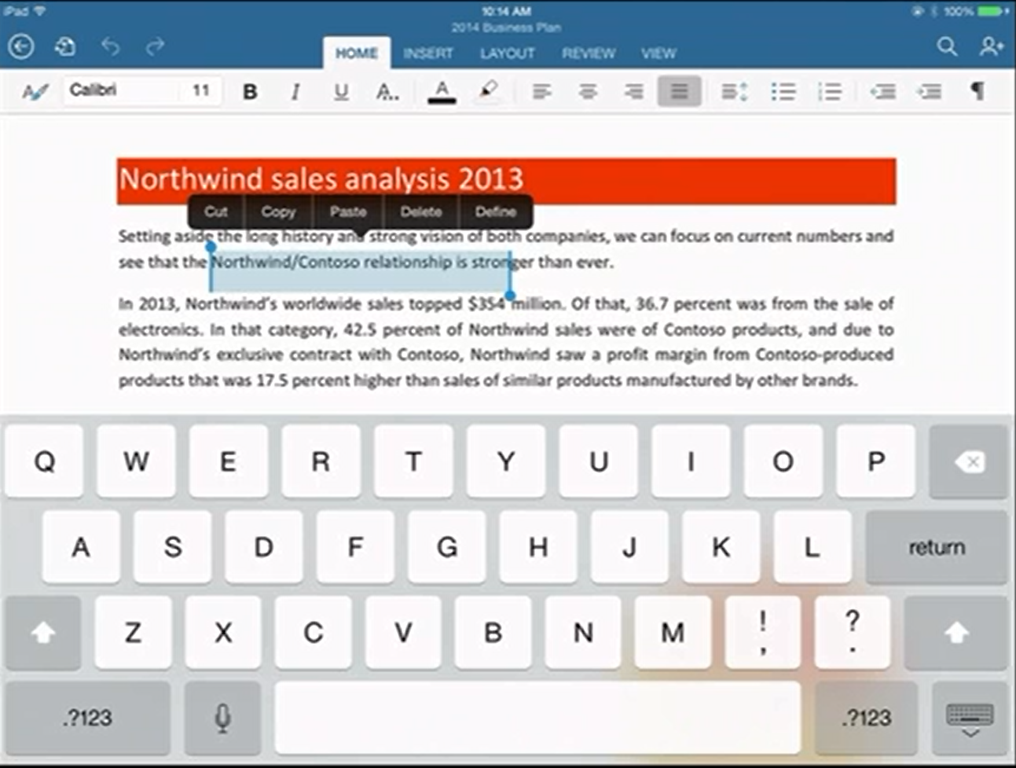
The wave began the previous week, with the simultaneous announcement and delivery of Office for iPad. The significance of this is threefold:

  • It demonstrated Microsoft’s decision to give first-class support to mobile platforms other than Windows
  • It demonstrated that Office can be redesigned to work nicely on a tablet
  • The quality of the product exceeded expectations, showing that in the right circumstances Microsoft can do excellent non-Windows software
image

Next came Build itself. It was a tale of two keynotes. The first was all about Windows client – both Phone and PC. The core news is the arrival of the Windows Runtime  (WinRT, the engine behind Metro/Store Apps) on Windows Phone 8.1. This means that WinRT is now the runtime that developers should target for apps that run across phone and desktop – and even, we were shown, Xbox One, which will support WinRT apps written in HTML and WinJS (Microsoft’s JavaScript library for Windows apps).

In support of this, Microsoft announced a new Universal App project for Visual Studio, which lets you share both visual and non-visual code across multiple targets. How much is shared is a developer choice.

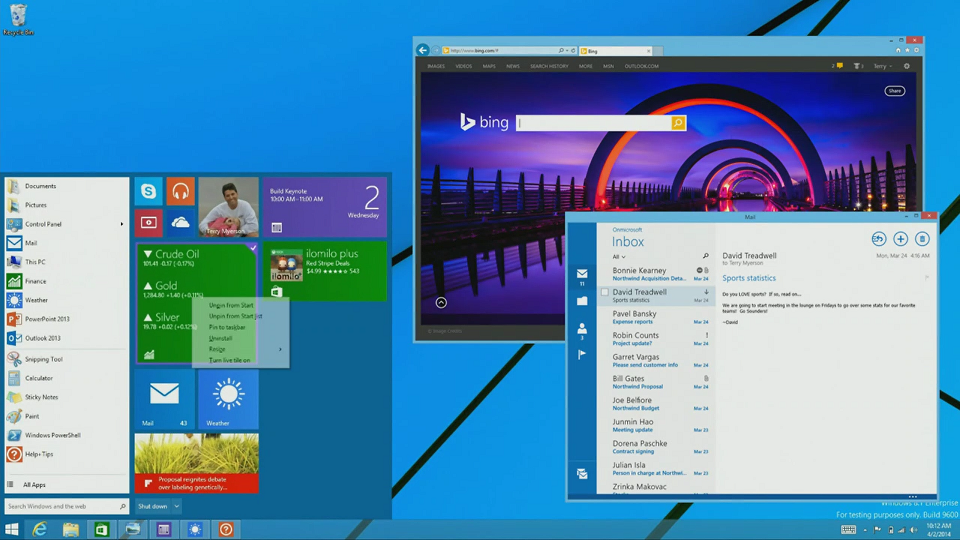
There is more. A Universal App is now (kind-of) a desktop app as well as a Store app, since in a future free update to Windows 8, it will run on the desktop within a window, as well as appearing in the Start menu on the desktop. We were even shown this; apparently it is a mock-up. This was the biggest surprise at Build.
image

What did Executive VP Terry Myerson say about this? Here is the exact quote:

We are going all in with this desktop experience, to make sure your applications can be accessed and loved by people that love the Windows desktop. We’re going to enable your Universal Windows applications to run in a window. We’re going to enable your users to find, discover and run your Windows applications with the new Start menu. We have Live Tiles coming together with the familiar experience customers are looking for to start and run their applications and we’ll be making this available to all Windows 8.1 users as an update. I think there will be a lot of happy people out there.

This is significant. When Myerson says, “we are going all in with this desktop experience”, he does not mean backtracking on Windows Store apps, to return to desktop windows apps (Win32 or WPF) as the future of Windows development. Rather, he means Windows Store apps integrated into the desktop.

There is a further twist to this. Windows Store apps are sandboxed and cannot communicate with each other or with the operating system other than via carefully designed and secured paths. This is in general a good thing, but restrictive for businesses designing line of business apps. It also means that legacy code cannot be carried over into a Store app, other than by full porting.

In the just-released Windows 8.1 Update this has changed. Side-loaded apps (in other words, not deployed from the Windows Store) can now escape the sandbox thanks to Brokered Windows Runtime Components. There are some limitations (32-bit only on the desktop side, for example) but this will make it possible to implement business applications as Store apps even if they need to interact with existing desktop applications or services.

There is still a huge blocker to Store apps from a business perspective, which is that you need Windows 8. Still, my guess is that once the update with the restored Start menu appears, most of the objections to Windows 8 will melt away.

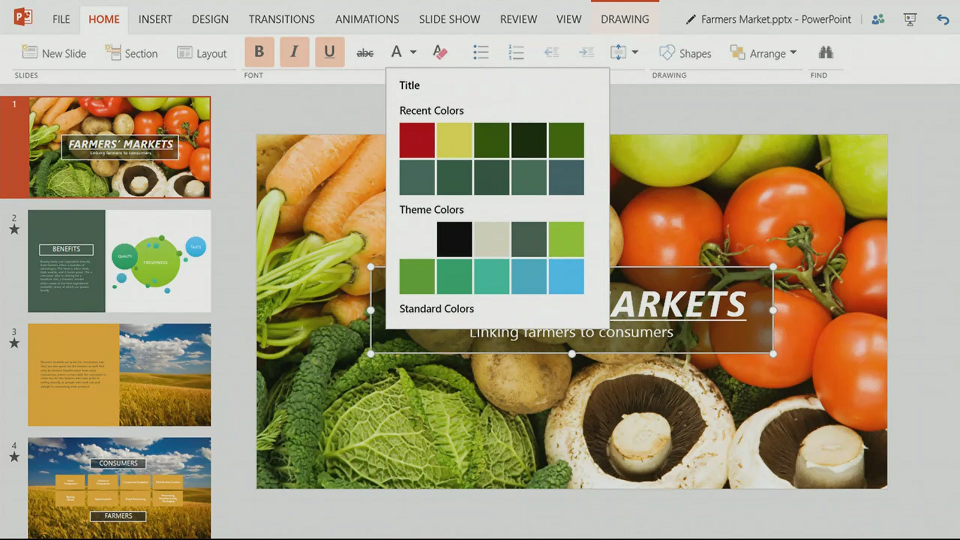
We also saw Office for the Windows Runtime, which will run on both Phone and PC. It is written, I discovered later, in XAML, DirectX and C++ (“Blazingly fast”, we were told). Corporate VP Kirk Koenigsbauer introduced a preview of this, or at least PowerPoint.
image

No detail yet, and several references to “early code” suggest to me that this is a year or more away from full release (giving Office on iPad a big head start); but it will come. Koenigsbauer did not call it cut-down; in fact, it was instanced as proof that WinRT is suitable for large-scale apps, so I would expect something more complete than Office on iPad; yet it is hard to imagine things like the VBA macro language appearing here in its current form (VBA is based on the ancient Visual Basic 6.0 runtime), so there will be some major differences.

We also saw Windows Phone 8.1, including the Cortana virtual personal assistant who responds to voice input. For me other things in Windows Phone 8.1 are more significant, including new swipe-style keyboard for fast text input, VPN, S/MIME secure email, and a new notification centre. Unlike touch Office, Windows Phone 8.1 is coming soon; Nokia’s Stephen Elop (soon to be in charge of Windows Phone at Microsoft) said that the first 8.1 Lumia devices could be out from May, depending on territory, and that all Lumia Windows Phone 8 devices will get the update in the summer.

On to day two, which was Cloud day, though we also got significant .NET developer news.

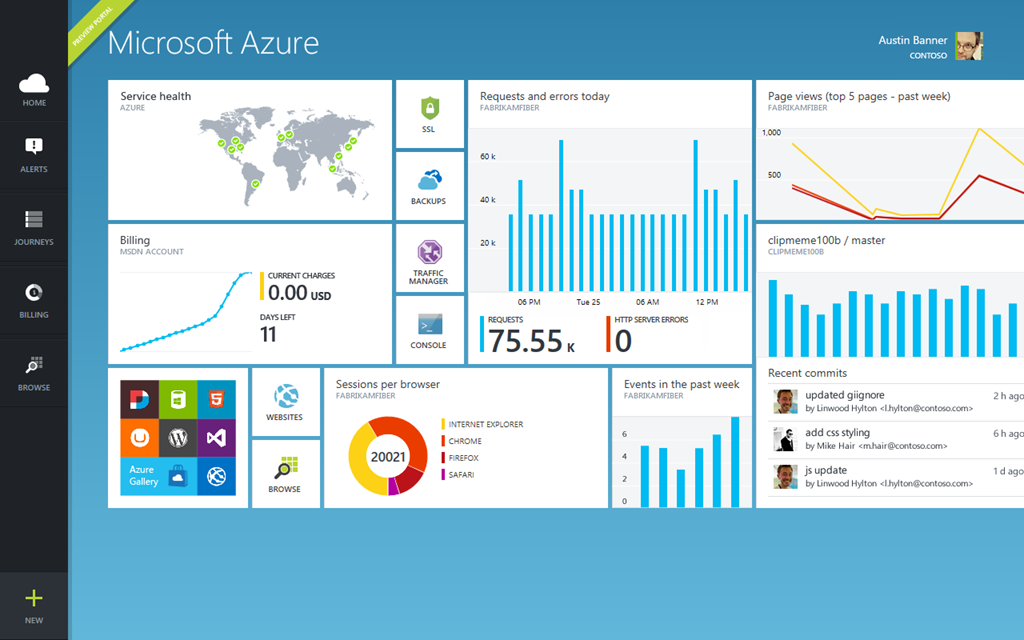
Executive VP Scott Guthrie introduced a new portal for Microsoft Azure, the cloud platform. This is not just a new look, but integrates with Visual Studio online so you can easily view and edit the code and track team projects. There are also new monitoring and analytics features so you can check page views, page load time, browser usage and more. Guthrie also announced integration with Puppet and Chef for deployment automation.
image

Language designer Anders Hejsberg also came on stage. He announced the release version of TypeScript, a “typed superset of JavaScript” which is suitable for large applications. He also announced a new preview release of the compiler project code-named Roslyn, and on stage pushed the button that published it as open source. What is Roslyn? It is the next generation compiler for C# and VB, and is itself written in C#. This enables compiler and workspace APIs, which in turn enable rich editor features:

The transition to compilers as platforms dramatically lowers the barrier to entry for creating code focused tools and applications. It creates many opportunities for innovation in areas such as meta-programming, code generation and transformation, interactive use of the C# and VB languages, and embedding of C# and VB in domain specific languages.

Roslyn will be fully released in the next version of Visual Studio, for which we do not yet have a date. Roslyn will be delivered alongside C# 6.0.

There is also a new .NET Foundation which will oversee open source projects for .NET, with backing from folk including Xamarin’s Miguel de Icaza and Umbraco’s Niels Hartvig. It is all a bit vague at the moment:

In the upcoming months, the .NET Foundation will be inviting many companies and community leaders to join the foundation, including its Board of Directors and will then finalize its operational details, including governance models for its open source initiatives, membership structure and industry and community engagement.

Another significant event in the .NET story is the arrival of true native code compilation for .NET, although currently only for 64-bit Store apps. More on this soon.

A couple of events during Build caught my eye. One was de Icaza’s session on using C# to build for iOS and Android, not so much for the content itself (though there was nothing wrong with it), but rather for the huge attendance it drew.

image

The session was moved to the Build keynote room, and while there were spare seats, the room felt well filled. This speaks loudly about the importance of those platforms even to Microsoft platform developers, as well as of Microsoft’s support of Xamarin’s work.

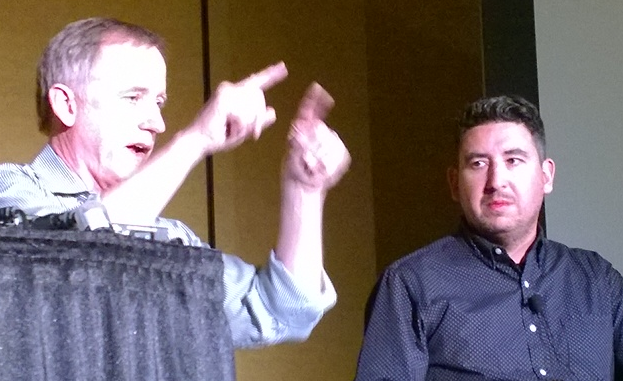
Another was the appearance of John Gruber, author of the Daring Fireball blog and an Apple enthusiast. He appeared in a video during the keynote, explaining how a project in which he is involved uses Azure for back-end services, and then in person at another session, interviewing journalist Ed Bott about what is changing at Microsoft.
image

Gruber seems to me representative of a group of smart observers who have not in general been impressed with Microsoft’s endeavours over the past few years; but he for one is now more positive on the subject. Windows Phone is much better than its market share suggests, he said. This alongside Azure and a new openness to supporting third-party clients has made him look more favourably on the company.

My summary is this. On the Windows client side, Microsoft is taking its unpopular Windows release and its minority Phone platform and making them better and more compatible with each other, making sense of the client platform in a way that should result in growth of the app ecosystem both on Phone and PC/Tablet. On the cloud side, the company is building Azure and Office 365 (two platforms united by Azure Active Directory) into a one-stop platform that is increasingly compelling. The result was a conference and a direction that was largely welcomed by those in attendance, as far as I could tell.

That does not mean that the PC will stop declining, or that iOS and Android will become less dominant in mobile. There is progress though, and more clarity about the direction of Microsoft’s platform than we have seen for some years.

For the official news from Build, see the Build Newsroom.
Microsoft CEO Satya Nadella introduces Microsoft Office for iPad, talks up Azure Active Directory and Office 365 development

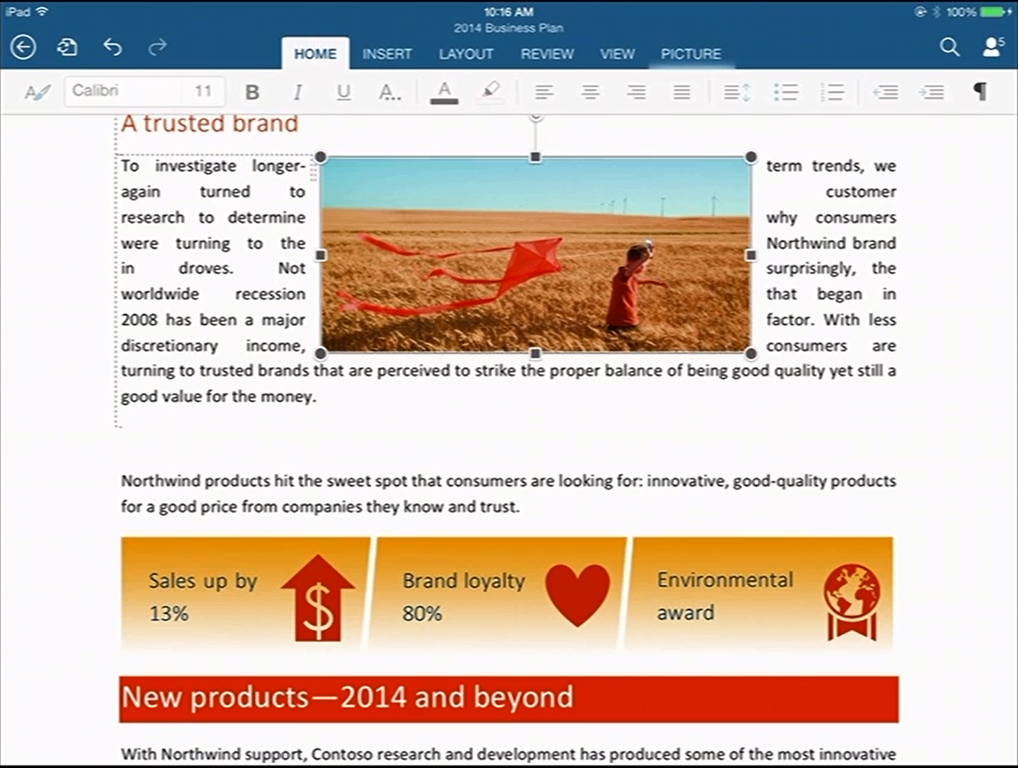
New Microsoft CEO Satya Nadella has announced Office for iPad at an event in San Francisco. Office General Manager Julie White gave a demo of Word, Excel and Powerpoint on Apple’s tablet.

image

White made a point of the fidelity of Office documents in Microsoft’s app, as opposed to third party viewers.

image

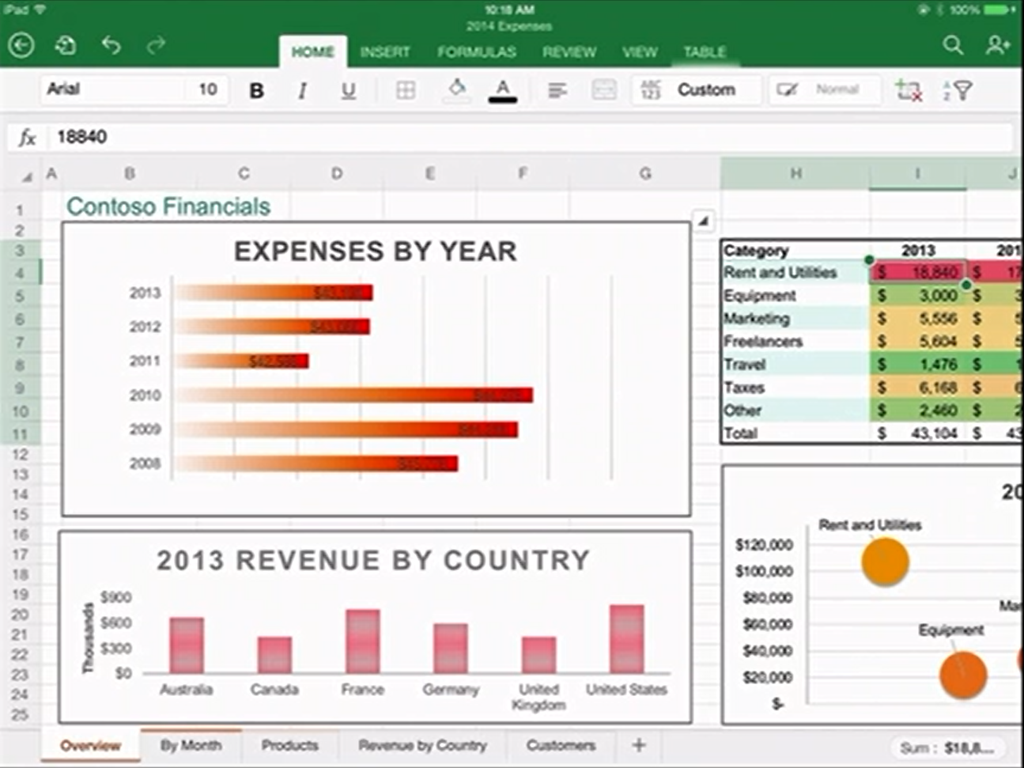
Excel looks good with a special numeric input tool.

image

Office will be available immediately – well, from 11.00 Pacific Time today – and will be free for viewing, but require an Office 365 subscription for editing. I am not clear yet how that works out for someone who wants full Office for iPad, but does not want to use Office 365; perhaps they will have to create an account just for that purpose.

There was also a focus on Office 365 single sign-on from any device. This is Azure Active Directory, which has several key characteristics:

1. It is used by every Office 365 account.

2. It can be synchronised and/or federated with Active Directory on-premise. Active Directory handles identity and authentication for a large proportion of businesses, small and large, so this is a big deal.

3. Developers can write apps that use Azure Active Directory for authentication. These can be integrated with SharePoint in Office 365, or hosted on Azure as a separate web destination.

While this is not new, it seems to me significant since new cloud applications can integrate seamlessly with the directory already used by the business.

Microsoft already has some support for this in Visual Studio and elsewhere – check out Cloud Business Apps, for example – but it could do more to surface this and make it easy for developers. Nadella talked about SDK support for iOS and other devices.

Microsoft hardly mentioned Android at the event, even though it has a larger market share than iOS. That may be because of the iPad’s popularity in the enterprise, or does it show reluctance to support the platform of a bitter competitor?

Microsoft is late with Office for iPad; it should perhaps have done this two years ago, but was held back by wanting to keep Office as an exclusive for Windows tablets like Surface, as well as arguments with Apple over whether it should share subscription income (I do not know how that has been resolved).

There was also a brief introduction to the Enterprise Mobility Suite, which builds on existing products including Azure Active Directory, InTune (for device management) and Azure Rights Management to form a complete mobility management suite.

Nadella made a confident performance, Office for iPad looks good.

What is coming up at Build, Microsoft’s developer conference next week? Nadella said that we will hear about innovations in Windows, among other things. Following the difficulties Microsoft has had in marketing Windows 8, this will be watched with interest.

Flash developers fret as Adobe doubles down on PhoneGap


Adobe has announced Experience Manager Apps for Marketers and Developers. This comes in two flavours: Experience Manager Apps is for marketers, and PhoneGap Enterprise is for developers. The announcements are unfortunately sketchy when it comes to details, though Andre Charland’s post has a little more:

  • Better collaboration – With our new PhoneGap Enterprise app, developer team members and business colleagues can view the latest version of apps in production, development and staging

  • App editing capabilities – Non-developer colleagues can edit and improve the app experience using a simple drag-and-drop interface from the new Adobe Experience Manager apps; this way developers can focus on building new features, not on making updates.

  • Analytics & optimization – Teams can immediately start measuring app performance with Adobe Analytics; we’re also planning to incorporate functionality so teams can start A/B testing their way to higher app engagement and monetization using Adobe Target.

  • Push notifications – Engage your customers on-the-go with push notifications from Adobe Campaign

  • Support and training – PhoneGap Enterprise comes with SLA and support so customers can be rest assured that Adobe PhoneGap has their back.

Head over to the PhoneGap Enterprise site and you get nothing more than a “Get in touch” button.

image

Announcement-ware then. Still, enough to rile Flash and AIR (Adobe Integrated Runtime) developers who feel that Adobe is abandoning a better technology for app development. Despite the absence of the Flash runtime on Apple iOS, you can still build mobile apps by compiling the code with a native wrapper.

Adobe… this whole thread should make you realize what an awesome platform and die hard fans you have in AIR. Even after all that crap you pulled with screwing over Flex developers, mitigating Flash to just games, retreating it from the web, killing AS4 and god knows what else you’ve done to try to kill the community’s spirit. WE STILL WANT AIR!

says one frustrated developer.

Gary Paluk has also posted on the subject:

I have invested 13 years of my own development career in Adobe products and evangelized the technology over that time. Your users can see that there is a perfectly good technology that does more than the new HTML5 offerings and they are evidently frustrated that you are not supporting developers that do not understand why they are being forced to retrain to use inferior technologies.

Has Adobe in fact abandoned Flash and AIR? Not quite; but as this detailed roadmap shows, plans for a next-generation Flash player have been abandoned and Adobe is now focused on “web-based virtual machines,” meaning I guess JavaScript and other browser technologies:

Adobe will focus its future Flash Player development on top of the existing Flash Player architecture and virtual machine, and not on a completely new virtual machine and architecture (Flash Player "Next") as was previously planned. At the same time, Adobe plans to continue its next-generation virtual machine and language work as part of the larger web community doing such work on web-based virtual machines.

From my perspective, Adobe seemed to mostly lose interest in the developer community after its November 2011 shift to digital marketing, other than in an “apps for marketing” context. Its design tools on the other hand go from strength to strength, and the transition to subscription in the form of Creative Cloud has been brilliantly executed.

How to crash your Windows Store XAML app

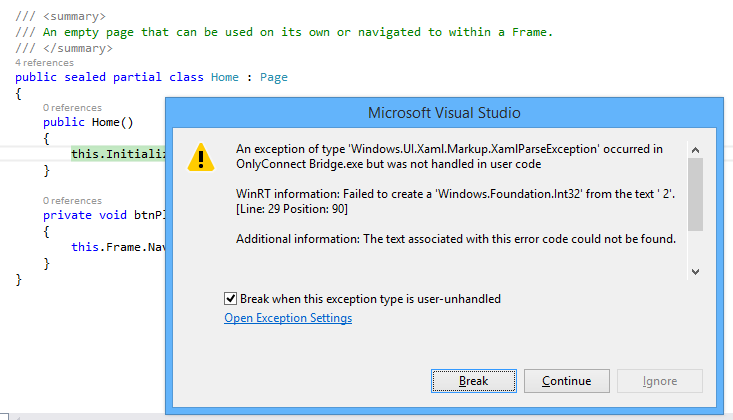
I am working on a Windows Store app, of which more soon. I am writing the app in XAML and C#. I was tweaking the page design when I hit a problem. Everything was fine in the designer in Visual Studio, but running the app raised an exception:

image

WinRT information: Failed to create a ‘Windows.Foundation.Int32’ from the text ‘ 2’.

along with the ever-helpful:

Additional information: The text associated with this error code could not be found.

The annoying this about this error is that debugging is not that easy. The exception is in Framework code, not your own code, and Microsoft does not supply the source. Once again, everything is fine in the designer and there are no compiler errors.

Puzzling. I resorted to undoing bits of my changes until I found what triggered the problem.

This was it. In the XAML, I had somehow typed a leading space before a number:

Grid.Row=" 2"

The designer parses this OK (it would be better if it did not) but the runtime does not like it.

Actually, I know why this happens. If you are typing in the XAML code editor (which I find myself doing a lot), then auto completion inserts the blank space for you:

image

I wish all bugs were this easy to solve, though I regard it as a bug in the Visual Studio editor. Posted here mainly in case others hit this problem; but I also observe that Windows Store development still seems less solid in Visual Studio than the tools for desktop or web apps.

Other problems I have hit include the visual designer changing to read-only of its own accord; and a highly irritating issue where the editor for a XAML code-behind class sometimes forgets the existence of all the controls you have declared in XAML, covering your valid code with red squiggly lines and reporting numerous errors, which disappear as soon as you compile. Once this starts happening, the problem persists for the rest of the editing session.

It is not all bad. I am pleased with the way I have been able to put together a touch-friendly game UI relatively easily. Now comes the fun part: writing the logic for the AI (Artificial Intelligence).

Embarcadero pre-announces AppMethod cross-platform development tool: Delphi repackaged?

Embarcadero is spilling the beans on a new development tool called AppMethod, which has its own site here and a little more information on TechCrunch. A fuller reveal is promised at SXSW, which kicks off on March 7 in Austin, Texas.

image

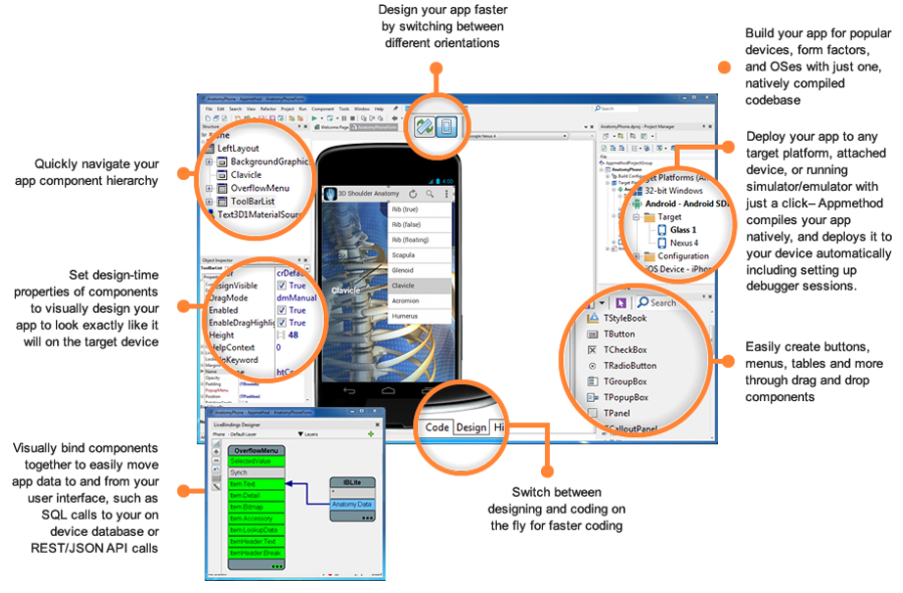
But what is AppMethod? The IDE looks very like Delphi, the languages are Object Pascal (like Dephi) or C++ (like C++ Builder), and target platforms include Windows, Mac, iOS and Android. It would be extraordinary if the GUI framework were not some variant of FireMonkey, the cross-platform and mobile framework in Delphi.

Just Delphi (and C++ Builder, which is Delphi for C++) repackaged then? In a comment Embarcadero developer evangelist David Intersimone says that is “way off base” though the only firm fact he offers is that AppMethod is less capable than Delphi for Windows, which presumably means that Delphi’s VCL (Visual Component Library) framework for Windows applications is not included.

Lack of a feature is not a compelling reason to buy AppMethod rather than Delphi so Object Pascal enthusiasts must hope there is more good stuff to be revealed.

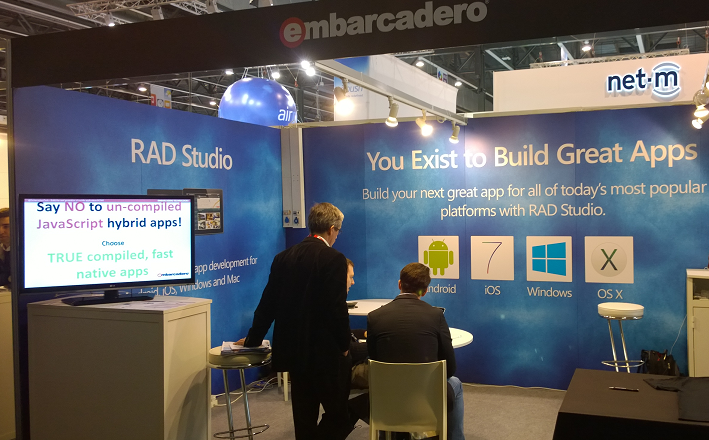
I looked out for the Embarcadero stand at Mobile World Congress (MWC), which was a small affair tucked away in the corner of one of the vast halls.

image

The stand was hardly bustling and was overshadowed by a larger stand next to it for another app building tool, AppMachine. While I would not read much into the size of a stand at MWC, that accords with my general sense that while the recently added cross-platform and mobile capabilities in Delphi have won some take-up, it is a small player overall. Embarcadero may feel that a new name and a bit of distance between FireMonkey/Delphi and the original Windows-only tool will help to attract new developers.

Why you cannot prove software correctness: report from QCon London

I’m at QCon London, an annual developer conference which is among my favourites thanks to its vendor-neutral content.

One of the highlights of the first day was Tom Stuart’s talk on impossible programs. Using a series of entertaining and mostly self-referential examples, Stuart described why certain computing problems are uncomputable. He also discussed the “Halting problem”: unless you emasculate a computing language by removing features like While loops, you cannot in general answer the question “will this program ever finish”.

All good fun; but the dark side of the talk comes at the end, when Stuart proves with a flourish that a consequence is that you cannot prove software correctness.

In a world that is increasingly software-driven, that is a disturbing thought.

Privacy and online data sharing is a journey into the unknown: report from QCon London

I’m at QCon London, an annual developer conference which is among my favourites thanks to its vendor-neutral content.

One session which stood out for me was from Robin Wilton, Director for Identity and Privacy at the Internet Society, who spoke on “Understanding and managing your Digital Footprint”. I should report dissatisfaction, in that we only skated the surface of “understanding” and got nowhere close to “managing”. I will give him a pass though, for his eloquent refutation of the common assumption that privacy is unimportant if you are doing nothing wrong. If you have nothing to hide you are not a social being, countered Wilton, explaining that humans interact by choosing what to reveal about themselves. Loss of privacy leads to loss of other rights.

image

In what struck me as a bleak talk, Wilton described the bargain we make in using online services (our data in exchange for utility) and explained our difficulty in assessing the risks of what we share online and even offline (such as via cameras, loyalty cards and so on). Since the risks are remote in time and place, we cannot evaluate them. We have no control over what we share beyond “first disclosure”. The recipients of our data do not necessarily serve our interests, but rather their own. Paying for a service is no guarantee of data protection. We lack the means to separate work and personal data; you set up a LinkedIn account for business, but then your personal friends find it and ask to be contacts.

Lest we underestimate the amount of data held on us by entities such as Facebook and Google, Wilton reminded us of Max Schrems, who made a Subject Access Request to Facebook and received 1200 pages of data.

When it came to managing our digital footprint though, Wilton had little to offer beyond vague encouragement to increase awareness and take care out there.

Speaking to Wilton after the talk, I suggested an analogy with climate change or pollution, on the basis that we know we are not doing it right, but are incapable of correcting it and can only work towards mitigation of whatever known and unknown problems we are creating for ourselves.

Another issue is that our data is held by large commercial entities with strong lobbying teams and there is little chance of effective legislation to control them; instead we get futility like the EU cookie legislation.

There is another side to this, which Wilton did not bring out, concerning the benefit to us of sharing our data both on a micro level (we get Google Now) or aggregated (we may cure diseases). This is arguably the next revolution in personal computing; or put another way, maybe the bargain is to our advantage after all.

That said, I do not believe we have enough evidence to make this judgment and much depends on how trustworthy those big commercial entities prove to be in the long term.

Good to see this discussed at Qcon, despite a relatively small attendance at Wilton’s talk.

The problem with backpedalling on Windows 8: it is the wrong direction

Lukas Mathis has a detailed post on Windows 8, including its advantages over the Apple iPad as a productivity tablet. Mathis switched from the iPad to a Surface Pro:

In general, I really love the Surface, and I use it much more, and for many more things, than I ever used any iPad I ever owned. But it’s not perfect.

Mathis likes the Metro (Windows Runtime) UI:

Almost everything that happens inside the Metro environment is fantastic. It’s clean, fast, and powerful. The apps are easy to use, but still offer a lot. The gesture-based user interface requires you to learn a few new things, but takes very little time to get used to.

This makes interesting reading for Windows users (and there seem to be many) who have convinced themselves that Metro is difficult, pointless or obstructive, though of course it may be those things to them. It is also true that you cannot easily get your work done in Metro alone. Office, Visual Studio, Windows Live Writer are three quick examples of applications which do not have any good substitute, not to mention countless custom line of business applications, so you still need the desktop whether you like it or not.

Mathis is also scathing about various aspects of Windows:

The problems with Windows 8 don’t end with the integration between desktop and Metro. There’s also the problem that good old Windows seems to be a pretty terrible operating system.

He relates encounters with DLL errors, inconsistent visual design, old stuff left in for legacy reasons, and a culture of adware, spyware and malware.

Personally I have learned how to navigate the Windows software world and have fewer problems than Mathis but that said, his complaints are justified.

These problems are hard to fix which is why Microsoft made such radical changes in Windows 8, making a new, secure and touch-friendly personality the centre and (conceptually at least) isolating the old desktop into a legacy area for running your existing apps. Although there are many flaws in the way this change has been executed, it seems to me a reasonable approach if Windows is to have a future beyond business desktops.

What was and is wrong with Windows 8? My own list of flaws includes:

  • Poor selection and quality of apps, even the built-in ones that had no reason not to be great
  • A design that lacks visual appeal
  • An immature development platform, too difficult, buggy and incomplete
  • Lack of a status bar in Metro so you cannot see at a glance essentials like time, date and battery life
  • Widescreen design that does not work well in portrait
  • Confusions like two versions of Internet Explorer, Metro PC settings vs Control panel and so on

I could go on; but there are also plenty of things to like, and I disagree with commonly expressed views like “it is no good without touch” (I use it constantly with only keyboard and mouse and it is fine) or “bring back the Start menu” (I like the new Start menu which improves in several ways over its predecessor).

It does not matter what I think though; the truth is that the business world in particular has largely rejected Windows 8, and the consumer world is hardly in love with it either. I look at lists of PCs and laptops for sale to businesses and the majority state something like “Windows 8 downgraded to Windows 7” or “Windows 7 with option to upgrade to Windows 8”. This tells the whole story.

It seems to me that the Windows 8 team has been largely disbanded, following Stephen Sinofsky’s resignation and Julie Larson-Green’s sideways moves; she is now “Chief Experience Officer in the Applications and Services Group”; and whatever that means, she is no longer driving the Windows team. Microsoft has to come to terms with the failure of Windows 8 to meet its initial objectives and to make peace with the user base that has rejected it. There are signs of this happening, with coming updates that improve integration between Metro and Desktop and ease the learning path for keyboard and mouse users:

Most of the changes in the update are designed to appease keyboard and mouse users, with options to show Windows 8 apps on the desktop taskbar, the ability to see show the desktop taskbar above Windows 8-style apps, and a new title bar at the top of Windows 8 apps with options to minimize, close, or snap apps.

The big question though is what happens to Metro in the next major release of Windows, bearing in mind that its chief advocates are no longer running the show. Should and will Microsoft stop trying to push the unwanted Metro environment on users and go back to improving the desktop, as it did when moving from Windows Vista to Windows 7?

My guess is that we will see some renewed focus on the desktop; but Microsoft will also be aware that the problems that gave rise to Metro still exist. The Windows desktop is useless on tablets, the Windows culture foists numerous applications with evil intent on users, and the whole design of traditional Windows is out of step with modern moves towards simpler, safer and easier to manage computing devices.

Therefore the correct direction for Microsoft is to improve Metro, rather than to abandon it. If we see a renewed focus on the desktop to the extent that energetic Metro development ceases, Microsoft will be marching backwards (and perhaps it will).

The only plausible “Plan B” is to do what some thought Microsoft should have done in the first place, which is to evolve Windows Phone to work on tablets and to replace Metro with a future generation of the Windows Phone OS, perhaps running alongside the desktop in a similar manner. Since Microsoft has stated its aim of a unified development platform for Windows Phone and Windows Runtime, Plan B might turn out the same as Plan A.

All this is late in the day, maybe too late, but the point is this: a revitalised desktop in Windows 9 will do little to arrest its decline.

Microsoft and developer trust

David Sobeski, former Microsoft General Manager, has written about Trust, Users and The Developer Division. It is interesting to me since I recall all these changes: the evolution of the Microsoft C++ from Programmer’s Workbench (which few used) to Visual C++ and then Visual Studio; the original Visual Basic, the transition from VBX to OCX; DDE, OLE and OLE Automation and COM automation, the arrival of C# and .NET and the misery of Visual Basic developers who had to learn .NET; how DCOM (Distributed COM) was the future, especially in conjunction with Transaction Server, and then how it wasn’t, and XML web services were the future, with SOAP and WSDL, and then it wasn’t because REST is better; the transition from ASP to ASP.NET (totally different) to ASP.NET MVC (largely different); and of course the database APIs, the canonical case for Microsoft’s API mind-changing, as DAO gave way to ADO gave way to ADO.NET, not to mention various other SQL Server client libraries, and then there was LINQ and LINQ to SQL and Entity Framework and it is hard to keep up (speaking personally I have not yet really got to grips with Entity Framework).

There is much truth in what Sobeski says; yet his perspective is, I feel, overly negative. At least some of Microsoft’s changes were worthwhile. In particular, the transition to .NET and the introduction of C# was successful and it proved an strong and popular platform for business applications – more so than would have been the case if Microsoft had stuck with C++ and COM-based Visual Basic forever; and yes, the flight to Java would have been more pronounced if C# had not appeared.

Should Silverlight XAML have been “fully compatible” with WPF XAML as Sobeski suggests? I liked Silverlight; to me it was what client-side .NET should have been from the beginning, lightweight and web-friendly, and given its different aims it could never be fully compatible with WPF.

The ever-expanding Windows API is overly bloated and inconsistent for sure; but the code in Petzold’s Programming Windows mostly still works today, at least if you use the 32-bit edition (1998). In fact, Sobeski writes of the virtues of Win16 transitioning to Win32s and Win32 and Win64 in a mostly smooth fashion, without making it clear that this happened alongside the introduction of .NET and other changes.

Even Windows Forms, introduced with .NET in 2002, still works today. ADO.NET too has been resilient, and if you prefer not to use LINQ or Entity Framework then concepts you learned in 2002 will still work now, in Visual Studio 2013.

Why does this talk of developer trust then resonate so strongly? It is all to do with the Windows 8 story, not so much the move to Metro itself, but the way Microsoft communicated (or did not communicate) with developers and the abandonment of frameworks that were well liked. It was 2010 that was the darkest year for Microsoft platform developers. Up until Build in October, rumours swirled. Microsoft was abandoning .NET. Everything was going to be HTML or C++. Nobody would confirm or deny anything. Then at Build 2010 it became obvious that Silverlight was all-but dead, in terms of future development; the same Silverlight that a year earlier had been touted as the future both of the .NET client and the rich web platform, in Microsoft’s vision.

Developers had to wait a further year to discover what Microsoft meant by promoting HTML so strongly. It was all part of the strategy for the tablet-friendly Windows Runtime (WinRT), in which HTML, .NET and C++ are intended to be on an equal footing. Having said which, not all parts of the .NET Framework are supported, mainly because of the sandboxed WinRT environment.

If you are a skilled Windows Forms developer, or a skilled Win32 developer, developing for WinRT is a hard transition, even though you can use a familiar language. If you are a skilled Silverlight or WPF developer, you have knowledge of XAML which is a substantial advantage, but there is still a great deal to learn and a great deal which no longer applies. Microsoft did this to shake off its legacy and avoid compromising the new platform; but the end result is not sufficiently wonderful to justify this rationale. In particular, there could have been more effort to incorporate Silverlight and the work done for Windows Phone (also a sandboxed and touch-based platform).

That said, I disagree with Sobeski’s conclusion:

At the end of the day, developers walked away from Microsoft not because they missed a platform paradigm shift. They left because they lost all trust. You wanted to go somewhere to have your code investments work and continue to work.

Developers go where the users are. The main reason developers have not rushed to support WinRT with new applications is that they can make more money elsewhere, coding for iOS and Android and desktop Windows. All Windows 8 machines other than those running Windows RT (a tiny minority) still run desktop applications, whereas no version of Windows below 8 runs WinRT apps, making it an easy decision.

Changing this state of affairs, if there is any hope of change, requires Microsoft to raise the profile of WinRT among users more than among developers, by selling more Windows tablets and by making the WinRT platform more compelling for users of those tablets. Winning developer support is a factor of course, but I do not take the view that lack of developer support is the chief reason for lacklustre Windows 8 adoption. There are many more obvious reasons, to do with the high demands a dual-personality operating system makes on users.

That said, the events of 2010 and 2011 hurt the Microsoft developer community deeply. The puzzle now is how the company can heal those wounds but without yet another strategy shift that will further undermine confidence in its platform.

Adobe Creative Cloud updates include 3D printing in Photoshop

Adobe has added a number of new features for its Creative Cloud software suite, which includes Photoshop, Illustrator and InDesign.

The new features include Perspective Warp in Photoshop, which can adjust the perspective of an object so you can match it to that of an existing background; a new Pencil tool in Illustrator; and for InDesign, simplified hyperlinks and the ability to automatically install fonts from Typekit (another Creative Cloud service) if they are missing from the document.

The most intriguing new feature though is 3D printing support in Photoshop.

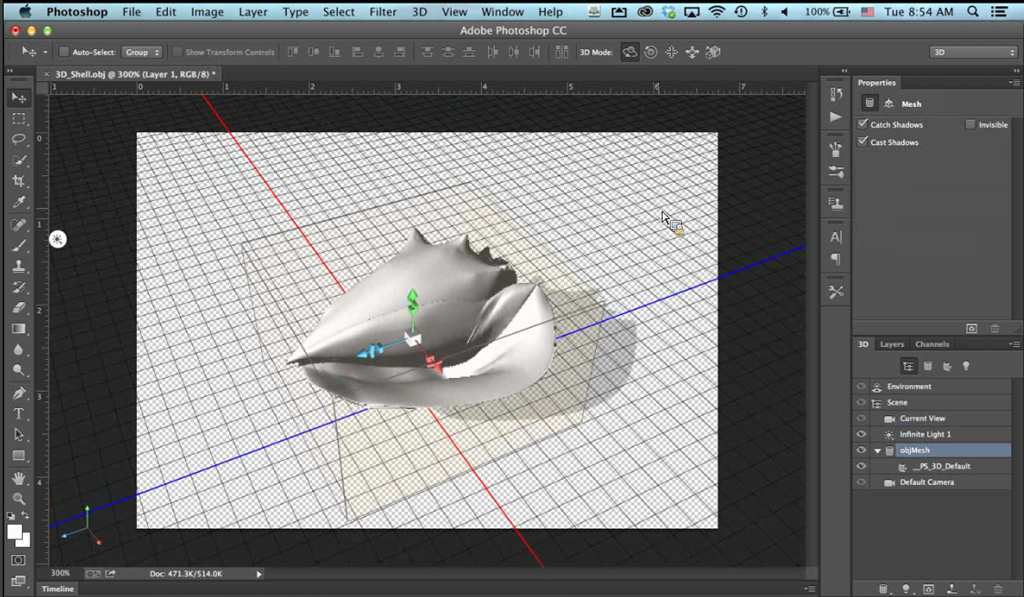
3D printing is not new; it has been around for many years in industry and medicine. More recently though, 3D printers that are affordable for hobbyists or small businesses have become available. There are also services like Shapeways which let you upload 3D designs and have the model delivered to you. Picking up on this new momentum, Adobe has added to Photoshop the ability to import a 3D design from a modelling tool or perhaps a 3D scanner, and print to a local printer or to a file for upload to Shapeways. Photoshop, according to Adobe, will do a good job of ensuring that models are truly print-ready.

image

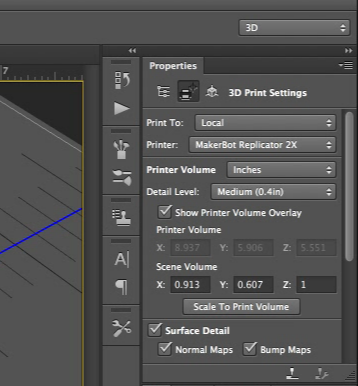
After opening the design and applying any changes needed, such as altering the shape or adding colour, you can use the new 3D Print Settings to print the model.

image

Photoshop is intended primarily as a finishing tool, rather than for creating 3D models from scratch.

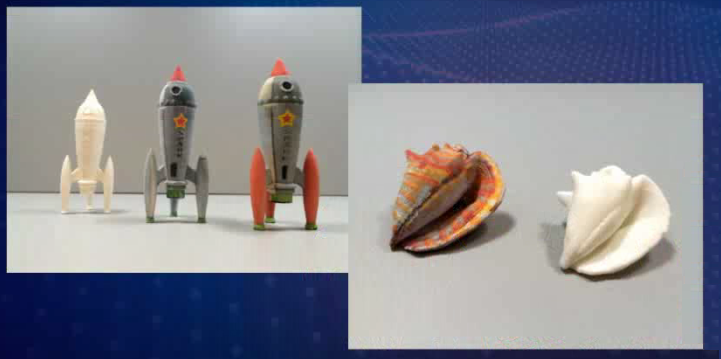
Here are some actual results:

image

3D printing support is now built into Windows 8.1, but Photoshop does not use this. Apparently the Windows feature arrived too late, but will be supported in a future release.

Adobe says it is bringing 3D printing to the creative mainstream; but to what extent is this a mainstream technology? The hobbyist printers I have seen are impressive, but tend to be too fiddly and temperamental for non-technical users. Still, there are many uses for 3D printing, including product prototypes, ornaments, arts and craft, and creating parts for repairs.