Category Archives: professional

Do you miss manuals? Why and why not …

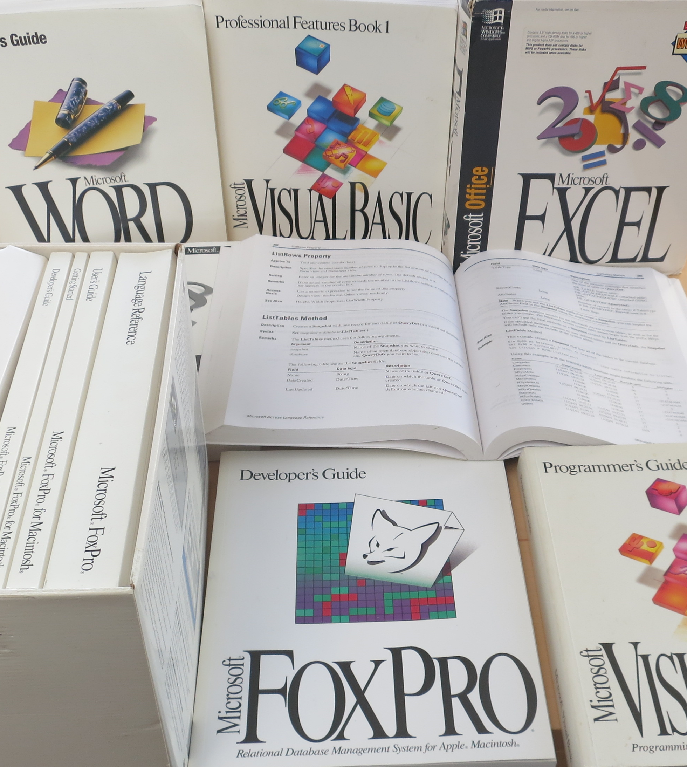
It’s that time of year. I keep more than I should, but now and again you have to clear things out. I don’t promise to dispose of all of these though: they remind me of another era, when software came in huge boxes packed with books.
image

If you purchased Microsoft Office, for example, you would get a guide describing every feature, as well as an Excel formula reference, a Visual Basic reference and so on.

If you purchased a development tool, you would get a complete language reference plus a guide to the IDE plus a developer guide.

The books that got most use in my experience were the references – convenient to work on a screen while using a book as reference, especially in the days before multiple displays – and the developer guides. You did not have to go the way the programmer’s guide suggested, but it did give you a clue about how the creators of the language or tool intended that it should be used.

Quality varied of course, but in Microsoft’s case the standard was high. When something new arrived, you could learn a lot by sitting down with just the books for a few hours.

What happened to manuals? Cost was one consideration, especially as many were never opened, being duplicates of what you had already. Obsolescence went deeper than that though. Manuals were always out of date before they printed, especially when update distribution was a download rather than a disk sent out by support (which means from the nineties onward).

Even without the internet, manuals would have died. Online help is cheaper to distribute and integrates with software – press F1 for help.

Then add the power of the web. Today’s references are online and have user comments. Further, the web is a vast knowledgebase which, while not wholly reliable, is far more productive than leafing through pages and pages trying to find the solution to some problem that might not even be referenced. In many cases you could post a question to StackOverflow and get an answer more quickly.

Software has bloated too. I am not sure what a full printed documentation set for Visual Studio 2013 would look like, but it would likely fill a bookshelf if not a room.

When software companies stopped sending out printed manuals, the same books were produced as online (that is, local, but disk-based) help. Then as the web took over more help went to the web, and F1 would either open the web browser or use a help viewer that displayed web content. There are still options for downloading help locally in many development tools.

Nothing to miss then? I am not so sure. It strikes me that the requirement to deliver comprehensive documentation was a valuable discipline. I wonder how many bugs were fixed because the documentation team raised a query about something that did not seem to work right or make sense?

Another inevitable problem is that since documentation no longer has to be in the box (or in the download), some software is delivered without adequate documentation. You are meant to figure it out via videos, blog posts, online forums, searches and questions.

A good documentation team takes the side of the user – whether end user, developer, or system administrator, depending on context. They write the guide by trying things out, and goad the internal developers to supply the information on what does and does not work as necessary. That can still happen today; but without the constraint of having to get books prepared it often does not.

2013: the web gets more proprietary. So do operating systems, mobile, everything

There may yet be an ITWriting review of the year; but in the meantime, the trend that has struck me most this year has been the steady march of permission-based, fee-charged technology during the course of the year, even though it has continued trends that were already established.

The decline of Windows and rise of iOS and Android is a great win for Unix-like operating systems over Microsoft’s proprietary Windows; but how do you get apps onto the new mobile platforms? In general, you have to go through an app store and pay a fee to Apple or Google (or maybe Amazon) for the privilege of deployment, unless you are happy to give away your app. Of course there are ways round that through jailbreaks of various kinds, but in the mainstream it is app stores or nothing.

The desktop/laptop model may be an inferior experience for users, but it is more open, in that vendors can sell software to users without paying a fee to the operating system vendor.

Microsoft though is doing its best to drive Windows down the same path. Windows Phone uses the app store model, and so does the “Metro” personality in Windows 8 – hence the name, “Windows Store apps”.

What about the free and open internet? That too is becoming more proprietary. Of course there is still nothing to stop you putting up a web site and handing out the URL; but that is not, in general, how people navigate to sites. Rather, they enter terms into a search engine, and if the search engine does not list your site near the top, you get few visitors.

In this context, I was fascinated by remarks made by Morphsuits co-founder Gregor Lawson in an interview I did for the Guardian web site. His business makes party costumes and benefits from a strong trademarked brand name. Yet he finds that he has to pay for Google ads simply to ensure that a user who types “morphsuits” into a search engine finds his site:

Yes, it is galling, it really is galling," he says. "We are top of the organic search, but we also have to pay. The reason is that some people like organic, some people like to click on ads. Google, in their infinite wisdom, are giving more and more space to the ads because they get money for the ads. So I have to pay to be in it.

It is also worth noting that when you click a link on Google, whether it is a search result or an ad, it is not a direct link to the target site. Rather, it is a link which redirects to that site after storing a database record that you clicked that link. If you are logged into Google then the search giant knows who you are; if you are not logged in, it probably knows anyway thanks to cookies, IP numbers or other tracking techniques. It does this in order to serve you more relevant ads and make more money.

Of course there are other ways to drive traffic, such as posting on Facebook or Twitter – two more proprietary platforms. As this internet properties grow and become more powerful, they change the rules in their favour (which they are entitled to do) but it does raise the question of how this story will play out over time.

For example, Lawson complains in the same interview that if he posts a message on Facebook, it will not be seen by the majority of Morphsuits fans even though they have chosen to like his Facebook page. Only if he pays for a promoted post can he reach those fans.

The power of Facebook must not be understated. One comment I heard recently is that mobile users on average now spend more time in Facebook than browsing the web and by some margin.

Twitter is better in this respect, though there as well the platform is changing, with APIs withdrawn or metered, for example, to drive users to official Twitter clients or the web site so that the user experience is controlled, ads can be delivered and so on.

These are observations, not value judgements. Users appreciate the free services they get from platforms like Google, Facebook and Twitter, and are happy to give up some freedom and share some personal data in return.

The question I suppose is how much power we are ceding to these corporations, who have the ability to make or break businesses and to favour their own businesses at the expense of others, and the potential abuse of that power at some future date.

I appreciate that most people do not seem to care much about these issues, and perhaps they are right not to care. I will give a shout out though to Aral Balkan who is aware of the issues and who created indiephone as a possible answer – an endeavour that has only small chance of success but which is at least worth noting.

Meanwhile, I expect the web, and mobile, and operating systems, to get even more proprietary in 2014 – for better or worse.

What next for Windows as Microsoft announces Build 2014?

Microsoft has announced Build 2014, its premier developer conference for Windows, April 2-4 in San Francisco.

image

In his blog post on the subject, developer evangelist Steve Guggenheimer mentions the Windows 8 app platform and Xbox One, and promises that Microsoft will talk about “what’s next for Windows, Windows Phone, Windows Azure, Windows Server, Visual Studio and much more.”

How is the buzz around Microsoft right now? Here are a few things that are not so good:

  • The Windows 8 app platform continues to struggle, despite picking up slightly from its dismal launch. Most of the conversation I hear around Windows 8 looks back to Windows 7 rather than forward to the new tablet platform: will the Start menu return?
  • The decline of the PC remains in full flow, while the non-Windows mobile platforms iOS and Android continue to grow
  • Xbox One, with its focus on Kinect and family entertainment, is falling behind Sony’s PlayStation 4 in terms of which console is most desired. Sony’s cheaper price and higher resolution on games like Call of Duty Ghosts make it a better for buy for gamers who can live without Kinect

On the other hand, a few positives:

  • Microsoft’s cloud platforms Office 365 and Windows Azure are growing fast, as far as I can tell
  • Server 2012 R2 is a solid upgrade to an already strong server product, and Hyper-V is making progress versus VMWare in virtualisation
  • Windows Phone 8 is making some progress in market share, though whether it will cross the point at which it becomes important enough for companies with apps to feel they have to support it remains an open question (currently they mostly do not)

What does that mean for Build? We may of course just see more of the same: improvements to Windows 8.x, further convergence with Windows Phone and Xbox platforms, new features for Windows Server and Azure, early previews of the next Visual Studio to support the new stuff.

I wonder though whether we may also see some new directions. Microsoft is supporting Xamarin for cross-platform mobile development and it would not surprise me to see more being made of this, or possibly some new approaches, to promote the use of Microsoft’s cloud services behind apps that run on iOS and Android.

Microsoft still intends for Windows 8/Windows Phone to be a major mobile platform alongside iOS and Android but its progress in reaching that point is slow. The task of building its cloud platform seems to be going better, despite competition from the likes of Amazon and Google, and in this context deep integration with the Windows client could be as much a liability as an advantage.

It may seem perverse; but it could pay Microsoft to focus on improving how well its server offerings (and Office) work with iOS and Android, rather than pushing for Windows everywhere as it has done in the past.

Will Microsoft scrap Windows RT? Here’s why it might not matter

At the UBS Global Technology Conference (aimed at investors, since UBS is an investment bank), Windows Executive Vice President Julie Larson-Green was interviewed about the future of Windows, and Microsoft has helpfully posted the audio and full transcript.

Larson-Green was asked about the viability of the “dual track” for Windows, or put another way, does Windows RT have a future?

I will interject an anecdote here. A neighbour came to me this weekend with a Windows XP laptop. Internet Explorer 8 no longer worked, and as no other web browser was installed, she could no longer get to the web on that machine. Microsoft has advice on reinstalling IE8; you re-run setup. We downloaded the setup from another machine and re-ran setup. It made no difference.

The only clue was an icon in the notification area for secure search. What was it? My neighbour did not know. She mentioned that she had been offered a free backup service and had started installing it. The service informed her that her backup was too large and she would have to pay. She thought she had cancelled and uninstalled it successfully, but maybe this toolbar, which redirects all searches to conduit.com, came along for the ride. Removing the toolbar from add/remove programs brought IE 8 back to life; if she is lucky, that will be end of the incident, if not, there could be other surprises.

It is just hopeless; and although later versions of Windows have improved security, users ultimately have full control of their machines and therefore the ability (with the help of unscrupulous third parties) to break them.

Now listen to Larson-Green’s description of Windows RT, evidence that Microsoft understands these issues very well:

Windows on ARM, or Windows RT, was our first go at creating that more closed, turnkey experience, where it doesn’t have all the flexibility of Windows, but it has the power of Office and then all the new style applications. So you could give it to your kid and he’s not going to load it up with a bunch of toolbars accidentally out of Internet Explorer and then come to you later and say, why am I getting all these pop-ups. It just isn’t capable of doing that by design.

That said, in its first year on the market Windows RT has largely failed. OEMs like Lenovo and Dell, who produced Windows RT tablets last year, have abandoned it. Microsoft is now the only Windows RT vendor, with Surface RT and Surface 2, other than Nokia with the Lumia 2520 – wait, that’s Microsoft too, following the Nokia acquisition.

Why has RT failed? Performance is an issue on most first generation devices (solved on Surface 2), users have been infuriated and/or flummoxed by the inability to install desktop applications, and even those (like myself) who understand and like the Windows RT concept run into functionality gaps, where there is no suitable Windows Store app and nothing built into the desktop that will do.

Nevertheless, something like Windows RT is necessary if Windows is to survive as a mainstream client operating system. What are Microsoft’s plans?

We have the Windows Phone OS. We have Windows RT and we have full Windows. We’re not going to have three. We do think there’s a world where there is a more mobile operating system that doesn’t have the risks to battery life, or the risks to security. But, it also comes at the cost of flexibility. So we believe in that vision and that direction and we’re continuing down that path.

You can read this as saying that Windows RT will be scrapped, to be replaced by Windows Phone OS adapted for larger form factors (which is what some of us thought Microsoft should have done three years ago). Some have drawn that conclusion, even in the mainstream press. However, this is not what Larson-Green said. Rather, she confirmed what has been strongly hinted for some time, that Windows Phone and Windows RT will converge. In fact, the company has already said that there will be a single development platform for Windows Store / Phone apps at some future date. Note that Windows Phone 8 is no longer built on Windows CE, the cut-down version of Windows, but uses the full Windows kernel, so some convergence has already taken place.

There are rumours of a battle within Microsoft: should Windows Phone adopt Windows RT, or vice versa? Windows Phone is increasing its market share, whereas Windows RT struggles, so from a marketing perspective the phone may be the winner here, though from a technical perspective it might be better to adapt Windows RT for the phone so that desktop Office remains possible on future devices.

If Microsoft gets this right, it will not matter to end users which way it goes. Here is what makes sense to me. Microsoft should converge the development platforms for Windows Phone and Windows Store apps so that both types of apps run on both platforms (though developers should be able to specify a minimum display size to avoid issues with apps designed for a larger screen), and a single project in Visual Studio should be able to target both platforms.

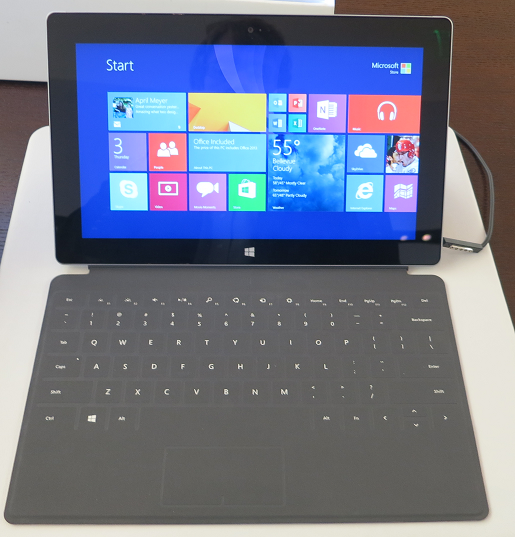
The most interesting question is the future of the desktop on Windows ARM tablets. I love having the desktop on Surface RT and Surface 2, because it greatly increases the utility of the devices; my perspective is that it’s great to have the Windows desktop and Office on a locked-down device, rather than lamenting the inability to install new desktop applications. However, it is a compromise that needs keyboard and trackpad or mouse for optimum operation, and means that Windows RT devices suffer from the same dual personality issues as full Windows 8.

If Microsoft managed to implement a decent version of Office as a Windows Store app, could we live without the desktop? Maybe, though I doubt it will be easy to match the full Windows version of Office (even without VBA) in the Windows Runtime environment.

Hyper-V 2012 R2 Live Migration Hands On

I have two servers running Hyper-V, which I have just upgraded to Hyper-V Server 2012 R2.

I thought it was time to test live migration. I have a VM which runs ISA server 2004. It is connected to two virtual switches, one for the internal network, and one for the external network. Both servers have two identically named virtual switches.

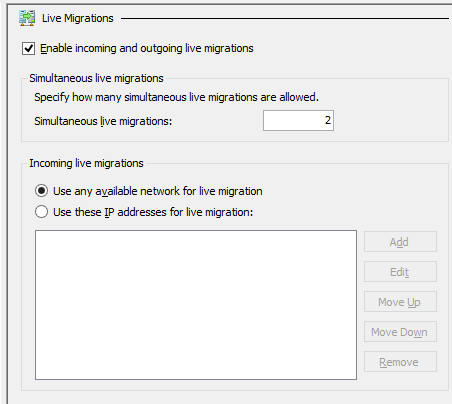
I ran into all the errors. First, I just checked the box for Enable incoming and outgoing live migrations for Hyper-V on each box.

image

Then I tried to move the VM. I got the error described here: The credentials supplied to the package were not recognized.

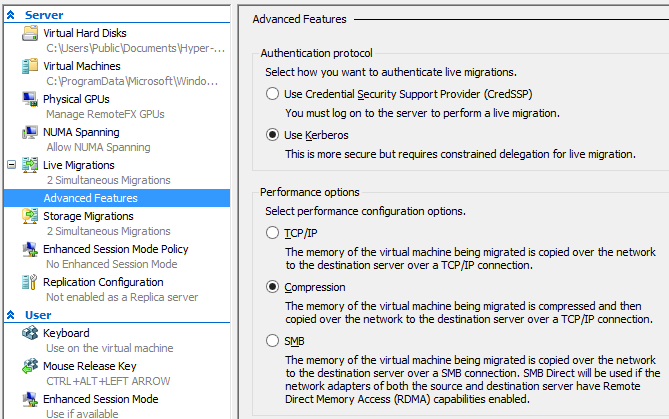
I am not using System Center VMM (Virtual Machine Manager) but just the Hyper-V manager. However it put me on the right track. To have any hope of success with this when working remotely (and who isn’t?) you need to go into the Advanced Features of Hyper-V Live Migration settings and check the box for Use Kerberos:

image

Next, you have to go into Active Directory and set up Delegation using Kerberos for several services: cifs, and Microsoft Virtual System Migration Service. There is a screengrab in the comments here. Do this for both (or all) the servers you want to participate in Live Migration.

I retried the move. Still no go; I got a General Access Denied error 0×80070005 when the source server tried to create a temp folder on the destination server.

The fix, it turned out, was to add the domain administrator to the local Hyper-V group Hyper-V Administrators. You can do this with PowerShell as explained (in generic terms) here.

Then reboot the source server.

I retried the move operation. It worked.

The funny thing: all my internet traffic goes through this VM. I use the internet constantly, but did not notice any downtime as the VM moved from one host to the other.

When I remembered I checked and found that the VM had indeed moved.

Very cool.

My question though: why is it that getting this stuff working always seems to involve several steps (in this case Active Directory, Advanced Feature settings, and of course reboot) that are barely documented?

Why can’t some wizard check the settings for you when you enable Live Migration and offer to fix them or at least tell you what to do?

Nevertheless, once you get it working this is impressive, especially considering that I have no shared storage nor System Center VMM.

Visual Studio 2013 is released. What’s new?

Microsoft released Visual Studio 2013 yesterday:

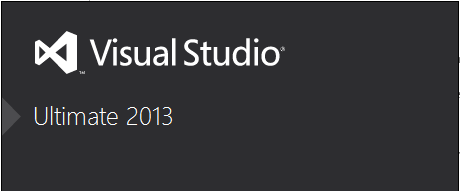
VS 2013 can be installed side by side with previous versions of Visual Studio or, if you have a VS 2013 pre-release, it can be installed straight over  top of the pre-release.

I installed over the top of the pre-release and I’m happy to say that this worked without incident. This is how it should be.

image

Oddly, the launch of Visual Studio 2013 is not until November 13th, proving that in Microsoft’s world products can “launch” before, at or after general release.

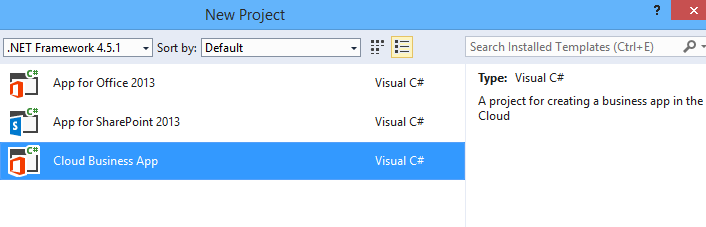
So what’s new in Visual Studio 2013? Tracking Visual Studio is difficult, because many important features show up as updates and add-ons. After all, at heart Visual Studio is just a shell or platform in which development sit. The Visual Studio LightSwitch HTML client, for example, which made LightSwitch into a strong tool for rapid application development of mobile web apps, appeared as part of Visual Studio 2012 Update 2. Now in Visual Studio 2013 we have LightSwitch support for Cloud Business Apps, though the new project type is shown under Office/SharePoint rather than under LightSwitch:

image

A Cloud Business App is an add-on for SharePoint typically running on Office 365. In the new model SharePoint apps do not really run on SharePoint, but are web apps that integrate with SharePoint. This is great in an Office 365 context, since you can write a web app that is accessible through the Office 365 site and which is aware of the logged-on user; in other words, it uses Azure Active Directory automatically. There’s more on the subject here.

What else is new? Here are some highlights:

  • Better ISO C/C++ compliance in Visual C++
  • Upgraded F# with language tweaks and improved performance
  • .NET Framework 4.5.1 with minor enhancements
  • Support for new Windows 8.1 controls and APIs in Windows Store apps – these are extensive.
  • “Just my code” debugging for C++ and JavaScript, and Edit and Continue for 64-bit .NET apps
  • Graphics diagnostics for apps running remotely
  • Sign into Visual Studio with a Microsoft account. Microsoft pulls developers further into its cloud platform.
  • Windows Azure Mobile Services – build a back end for an app running on Windows, Windows Phone, iOS, Android or web

Does that amount to much? Compared to the changes between Visual Studio 2010 and 2012, no. That is a good thing, since what we have is a refinement of what was already a capable tool, rather than something which gives developers a headache learning new ways to work.

Windows 8.1: now good enough that it is ready for general use

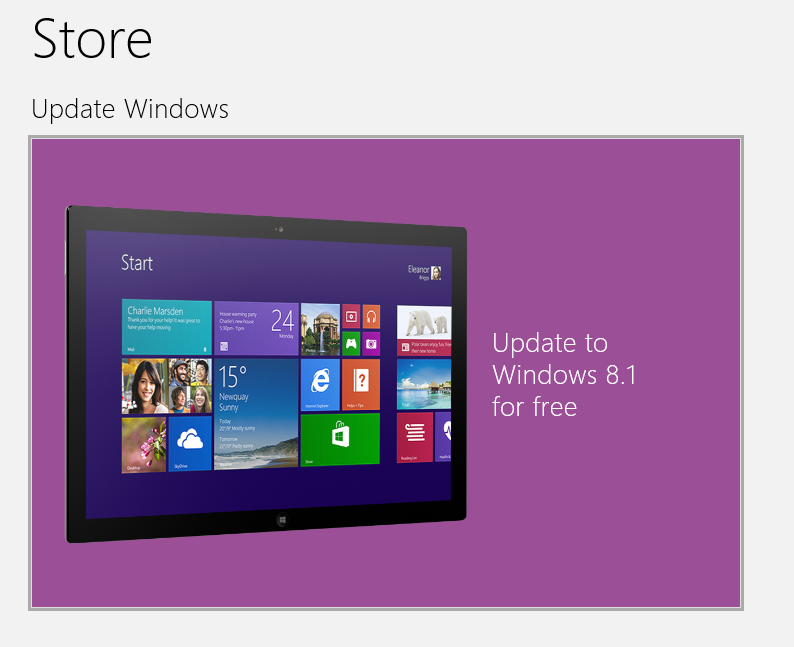
Windows 8.1 is now released and you can upgrade for free from Windows 8.0.

image

What is significant about Windows 8.1? This is something I have thought long and hard about. The problem with reviewing Windows 8/8.1 is all to do with its dual personality. You can review the details of the tablet or Metro or Windows Store side, but while these are interesting in their own way, the fact is that most users are in the desktop most of the time, so how much does it matter? Alternatively, you can review the desktop experience but frankly it’s hardly any different in Windows 8.1 than in Windows 8, and not that different in Windows 8 than in Windows 7 if you overcome the hump of “hey, where is my Start menu?”

image

Let’s divide this then into two strands. One is the progress of Windows towards being a tablet OS, a Bring Your Own Device, a cloud-centric operating system, secure, apps installed from a curated store or corporate portal. This is the future Microsoft has in mind, and there is some progress. You can see this in refinements to the new UI, the Start menu/screen becoming more like Windows Phone where you pin your favourites to the main part and find the rest in an “all apps” view, and new business-oriented management features which work in concert with Server 2012 R2 and System Center R2, including Workplace Join, Work Folders, InTune device management, Information Rights Management, and the ability to set up a company portal.

Windows 8.1, together with the server updates, adds a lot in this area; and while in my opinion it is not yet fully baked, you can see the pieces coming together and I think it will get there.

The second strand though is about the general user? This is where all the noise is. Microsoft managed to alienate a large part of its core user base with Windows 8.0, accelerating (ironically) the decline of PC sales (though they would have declined to some degree anyway).

I cannot in honesty say that Windows 8.1 is usable for, say, a desktop keyboard and mouse user where Windows 8.0 is not, because even Windows 8.0 works fine with keyboard and mouse if you take the trouble to learn how to use it (and it is not that much trouble).

I can say though that Windows 8.1 does much more to help users over that hump. The restored Start button is the thing that represents that shift, returned by user demand, even if it is not the Start menu of old. I use it all the time, though mostly with right-click for quick access to the admin menu and shutdown option.

Things like the new Help and Tips app also make life better for new users.

My view is that Windows 8.1 is easy enough for Windows 7 users that you could reasonably upgrade one of those “just let me get on with my work (or play)” users without too much stress. This was not the case with Windows 8.0.

I think those users should upgrade too, where possible. Windows 8 and 8.1 are real upgrades, even for desktop users. Things I would miss if I had to go back to 7 include faster boot, improved file copy dialog, improved task manager, and slightly better performance overall.

The two strands begin to come together if you go out and get a tablet. Even if you use the desktop most of the time, with keyboard and touch control or mouse, you find yourself dipping into the Modern UI some of the time, for web browsing or mail or Twitter at the times when you are using your tablet as a tablet and a keyboard would get in the way.

It is worth mentioning that most of the new wave of Windows 8 tablets are not hybrids with twist keyboards. Some are conventional laptops or ultrabooks of course, but there are also tablets with removable or optional keyboards, a better approach that lets you use Windows 8.1 as designed.

Does that make Windows 8.1 a huge success for Microsoft? It’s doubtful. I took a light-hearted look at attitudes to Windows 8 here and it was a way of explaining that for a lot of users Windows 8 just is not on their wish-list, no matter how good it may be.

The best outcome now is that Windows 8.1 starts to gain traction in business and among consumers, driving a stronger app ecosystem, and gradually greater use of the tablet side. Then the point comes where Windows and Windows Phone merge to the point where there is a single development platform, and the third ecosystem that former Nokia CEO Stephen Elop used to talk about becomes a reality.

I can see this happening, particularly in business where Office 365 is taking off, presuming Microsoft manages to makes Windows devices the best partners for its cloud services while still supporting others.

On the other hand, the idea that a resurgent Windows will beat off iPads and Androids and become a mainstream tablet for consumers is fanciful. Microsoft is too late, the usability still is not there, the app ecosystem is too far behind, and prices versus Android are too high.

All speculation; but if you are a Windows user, you should not hesitate to upgrade to Windows 8.1.

ComponentOne’s TouchToolkit for Windows Forms: another approach to the Windows tablet problem

Software component vendor ComponentOne has released Studio Enterprise 2013 v2.5, the latest in its suite of components, with support for Windows 8.1 and Visual Studio 2013.

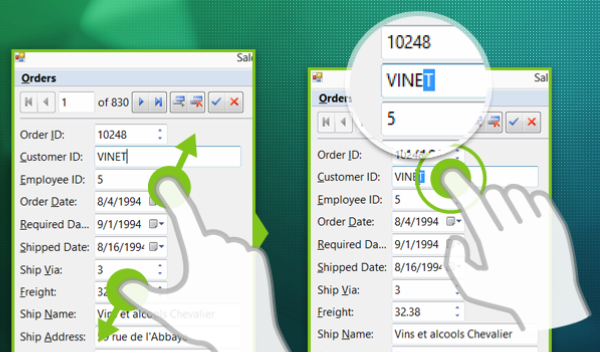
The piece that caught my eye is the TouchToolkit for Windows Forms.

image

Here’s the problem. The Windows desktop is poor with touch control, which is why Microsoft created Windows 8 with its alternate, touch-friendly Windows Runtime platform. However users are resistant to the changed user interface, and it does not help with existing desktop apps.

Developers are also faced with a question of simple mathematics. Develop a Windows 8 Store app, get a market of x. Develop a Windows desktop app, get a market of many times x, since Windows 8 can run desktop apps, but Windows 7 cannot run Store apps.

Embarcadero approached this problem with a framework called Metropolis, for Delphi and RAD Studio. It builds apps that mimic the Windows Runtime look and feel, but which are actually desktop apps. Of course they do not run on Windows RT, the ARM version. It is a confusing solution in my opinion, leading users into what Martin Fowler calls the Uncanny Valley, where stuff works almost but not quite how you expect.

I prefer the thinking behind the TouchToolkit. Take your existing Windows Forms apps, or write a new one, using these controls to make them more touch-friendly. They will never be as well suited to touch control as a Store app, but they might be good enough, and of course will run on Windows 7 and earlier versions.

The controls include a magnifier, support for zoom gestures, and a touch event provider that adds gesture support to any control.

Windows Forms, we all know, is not as good as WPF if you want an application that scales nicely and supports modern design. On the other hand, Windows Forms is pragmatic and easy to use framework that remains popular for line of business apps.

Anders Hejlsberg says C# 6.0 to use Roslyn compiler, coming in next Visual Studio after VS 2013

A disappointment at Microsoft’s Build conference last month was lack of news about the next version of C#, version 6.0. C# architect Anders Hejlsberg did present a session, but it was on TypeScript, a language which compiles to JavaScript.

Aside: Hejlsberg talks about the new Xbox music app in Windows 8.1 (and Xbox One) which is written in JavaScript. It is a large app with 500,000  lines of code, and new features are now implemented in TypeScript (30,000 lines so far).

However, Hejlsberg did also talk about C# 6.0 at Build, during this Channel 9 Q&A, though you have to scroll through to reach the C# content (about 34 minutes in).

image

He confirmed that C# in Visual Studio 2013 is the same as before, but there will be new previews of the forthcoming “Roslyn” compiler soon, and that C# 6.0 will be in the “next Visual Studio after” which suggests Visual Studio 2014, presuming Microsoft sticks to its annual release cycle.

“We are at a point where the Roslyn compilers are done,” he said.

Roslyn, Hejlsberg explained, is the new compiler for “C#, and VB, and the language services in the IDE.”

Roslyn performance will be at least as good as the existing native compiler, says Hejlsberg. It is better suited to parallel processing so will take advantage of multi-core machines, “particularly for large projects.”

You can read more about Roslyn here. Microsoft describes it as “opening up the Visual Basic and C# compilers as APIs.” Practical benefits include features like instant porting of VB code to and from C#, and the use of C# and VB as macro languages within a .NET application.

Hejlsberg also says that Roslyn will enable a faster pace of evolution for C# in future.

Another aside: Xamarin, which provides a compiler for C# targeting iOS and Android, gets a nod of approval from Hejlsjberg. “I’m a great fan of their work,” he says.

Blogger (and former Microsoft Excel developer) Wesner Moise provides a transcript of the key points.

Mobile developer survey: Apple iOS most profitable platform, but even Windows Phone is viable

Vision Mobile has released the results of a survey of 6000 mobile developers, sponsored by Blackberry and Mozilla.

Reading through the survey reminds me that despite the critical importance of apps to mobile platforms, surveys which look at developer intent are poor predictors of the future health of specific platforms. High interest or even affection for some new platform tends to dissipate quickly if platform adoption is poor.

Developers influence the success of a platform by developing (or not developing) desirable apps, but this is only one among many factors. Others include:

  • Mobile operators: which devices are they promoting and subsidising most?
  • Devices: which has the right blend of looks, usability and features?
  • Fashion: which smartphones are my friends using?
  • Price: which devices are best value?
  • Marketing: which vendor is doing the best job?
  • Enterprise: in business, security and manageability are important

The report confirms the dominance of iOS and Android and is generally down on Windows Phone while there are more optimistic remarks than I had expected about Blackberry 10 and Firefox OS (but note the sponsors).

Here is a stat that caught my eye though:

Monthly Revenue per developer per platform:

  • $5,200 iOS
  • $4,700 Android
  • $3,600 Windows Phone
  • $2,900 HTML5
  • $1,200 Blackberry 10

There is more money in iOS and Android, but Windows Phone and to some extent HTML5 is financially viable too. On niche platforms like Windows Phone, I guess there is a benefit in having less competition.