Category Archives: professional

Visual C++ will implement all of C++ 11 and C++ 14, some of C99 says Microsoft

Microsoft’s Herb Sutter spoke at Microsoft Build in San Francisco on the future of C++.

image

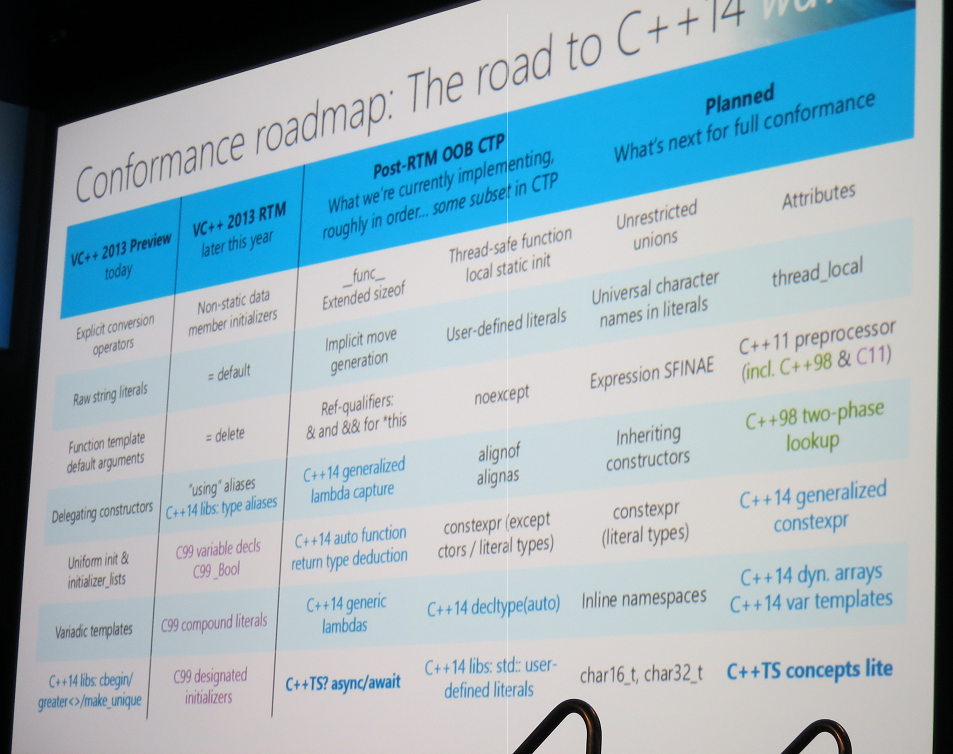
Microsoft has been criticised for being slow to implement all the features of ISO C++ 11. Sutter says most features are now included in the public preview of Visual Studio 2013 – which has a “Go Live” license so you can use it in production – including the oft-requested variadic templates. The full list:

  • Explicit conversion operators
  • Raw string literals
  • Function template default arguments
  • Delegating constructors
  • Uniform int and initializer_lists
  • Variadic templates

More features are coming in the RTM (final release) of Visual Studio 2013 later this year:

  • Non-static member initializers
  • =default
  • =delete
  • ‘using’ aliases

A technical preview will then follow and Sutter listed possible features of which there will be a subset. Full conformance will follow at an unspecified time.

Microsoft is also promising a full implementation of C++ 14, the next update to the standard, even though the exact specification is not yet fully agreed. Some C++ 14 features will be implemented ahead of C++ 11 features, if they are considered to add high value.

Two other points of interest.

Async/await (familiar to C# developers) will be implemented in the post-RTM CTP because it is such a useful feature for Windows Runtime app developers, even though it is not part of the ISO standard.

Finally, Microsoft will also several C99 features in the RTM of Visual Studio 2013:

  • Variable decls
  • C99_Bool
  • compound literals
  • designated initializers

The reason for implementing these is that they are needed to compile popular open source libraries like FFmpeg.

I asked Sutter why Microsoft is not planning full conformance to C99. He said it was a matter of priorities and that work on C++ 11 and C++ 14 was more important. If there are particular additional features of C99 developers would like to see implemented, contacting Sutter with requests and rationale might eventually yield results.

image

Microsoft Build: Windows 8.1 for developers, Visual Studio 2013, Xamarin for cross-platform

Microsoft’s Build developer conference is getting under way in San Francisco.

image

Today Microsoft is expected to announce the public preview of Windows 8.1 together with technical details of what is in the latest Windows update. Sessions include What’s new in the Windows Runtime (the tablet platform in Windows 8), and what’s new in XAML (the interface design language for Windows 8) and WinJS (the interop library for apps written in HTML and JavaScript).

Gartner’s Hype Cycle for new technologies runs from the Peak of Inflated Expectations through the Trough of Disillusionment, eventually settling at the Plateau of Productivity. Inflated expectations for Windows 8 – the iPad killer – expired many months back and we are well down in the trough, with little momentum behind the Windows 8 tablet platform, OEM partners still searching for the right way to package Windows 8 and coming up with unsatisfactory and expensive hybrid creations, and iPad and Android tablets ascendant.

At this point, Microsoft needs to win over its core market, much of which is determined to stick with Windows 7, as well as injecting some life into the tablet side of Windows 8. The platform has promise, but it is fair to say that the launch has been difficult.

The advantage now is that Microsoft is in a period of incremental improvement rather than reimagining Windows, and incremental improvements are easier to pull off. More reports soon.

The schedule also includes news of Visual Studio 2013 and there is likely to be a new preview for this as well. A smoothly integrated development platform across Windows client, Windows Phone, and the Windows Azure cloud, with a dash of XBox One for game developers? Microsoft has all the ingredients but with questions about whether it is able to deliver, as it is currently losing the battle for the client (PC and devices).

One answer for C# developers hedging their bets, or just trying to take advantage of the huge iOS and Android market, is the Xamarin toolset which lets code in C# and .NET and share non-GUI code across all the most popular platforms. Xamarin hosted a large party for Microsoft-platform developers last night in San Francisco. Xamarin’s approach is winning significant support, since it ensures a native GUI on each platform while still sharing a large proportion of your code.  Mono and Xamarin founder Miguel de Icaza was there to evangelise the Xamarin tools.

image

There was also a giant Jenga-like game. Here’s hoping that neither Xamarin’s nor Microsoft’s development stack looks like this.

image

Windows XP Mode hassles for Windows 8 upgraders

One of the reasons for the success of Windows 7 was the provision Microsoft made for customers stuck with applications that only run on Windows XP. Windows XP Mode is a free add-on for Windows 7 Professional that runs Windows XP. It can also hide the XP desktop and run individual applications in their own window, though this is cosmetic and merely hides the desktop. Windows XP Mode uses Virtual PC as its virtualisation platform.

What would expect to happen if you upgraded Windows 7 with XP Mode to Windows 8? Without having researched it, my expectation was that Windows XP Mode would migrate smoothly to Hyper-V in Windows 8.

Not so. Here is the official word:

With the end of extended support for Windows XP in April 2014, Microsoft has decided not to develop Windows XP Mode for Windows 8.  If you’re a Windows 7 customer who uses Windows XP Mode and are planning a move to Windows 8, this article may be helpful to you.  
When you upgrade from Windows 7 to Windows 8, Windows XP Mode is installed on your machine, however Windows Virtual PC is not present anymore. This issue occurs because Windows Virtual PC is not supported on Windows 8. To retrieve data from the Windows XP Mode virtual machine, perform the steps listed in the More Information section.

If you were relying on XP Mode to run some old but essential application, this is definitely worth knowing. Microsoft’s guidance on retrieving the data is unlikely to be much use, since the reason you use XP Mode is to run applications rather than to store data. Some users are not impressed:

This is SHOCKING.  I was using Win 7 Pro and had a fully configured (hours of work) XP Virtual Machine with my complete web development environment in it.  It didn’t even occur to me that it wouldn’t work on Windows 8.  I’ve only just discovered now when I tried to access it to do some updates!

I MUST recover this virtual PC.

Why did the Upgrade Advisor not mention this!?!?  I carefully resolved all the issues highlighted there before moving on.

Of course it is desirable to move off Windows XP completely, even in XP Mode, but the rationale is that it is better to be on a recent and supported version of Windows and to run XP in a virtual environment, than to run Windows XP itself.

Another oddity is that you can run Windows XP on Hyper-V in Windows 8. However you cannot get XP Mode to work unless you perform a repair install that changes the way it is licensed. Yes, it is licensing rather than technical reasons that blocks the XP Mode upgrade:

Note: The Windows XP Mode virtual hard disk will not work on Windows 8 as Windows 8 does not provide the Windows XP Mode license. The Windows XP Mode license is a benefit provided on Windows 7 only.

Users have discovered workarounds. Aside from the repair install mentioned above, you can also use Oracle Virtual Box and trick XP Mode into thinking that it is running on Windows 7 and Virtual PC. You can also run a virtual instance of Windows 7 and run XP Mode within that.

China’s Tianhe-2 Supercomputer takes top ranking, a win for Intel vs Nvidia

The International Supercomputing Conference (ISC) is under way in Leipzig, and one of the announcements is that China’s Tianhe-2 is now the world’s fastest supercomputer according to the Top 500 list.

This has some personal interest for me, as I visited its predecessor Tianhe-1A in December 2011, on a press briefing organised by NVidia which was, I guess, on a diplomatic mission to promote Tesla, the GPU accelerator boards used in Tianhe-1A (which was itself the world’s fastest supercomputer for a period).

It appears that the mission failed, insofar as Tianhe-2 uses Intel Phi accelerator boards rather than Nvidia Tesla.

Tianhe-2 has 16,000 nodes, each with two Intel Xeon IvyBridge processors and three Xeon Phi processors for a combined total of 3,120,000 computing cores.

says the press release. Previously, the world’s fastest was the US Titan, which does use NVidia GPUs.

Nvidia has reason to worry. Tesla boards are present on 39 of the top 500, whereas Xeon Phi is only on 11, but it has not been out for long and is growing fast. A newly published paper shows Xeon Phi besting Tesla on sparse matrix-vector multiplication:

we demonstrate that our implementation is 3.52x and 1.32x faster, respectively, than the best available implementations on dual IntelR XeonR Processor E5-2680 and the NVIDIA Tesla K20X architecture.

In addition, Intel has just announced the successor to Xeon Phi, codenamed Knight’s Landing. Knight’s Landing can function as the host CPU as well as an accelerator board, and has integrated on-package memory to reduce data transfer bottlenecks.

Nvidia does not agree that Xeon Phi is faster:

The Tesla K20X is about 50% faster in Linpack performance, and in terms of real application performance we’re seeing from 2x to 5x faster performance using K20X versus Xeon Phi accelerator.

says the company’s Roy Kim, Tesla product manager. The truth I suspect is that it depends on the type of workload and I would welcome more detail on this.

It is also worth noting that Tianhe-2 does not better Titan on power/performance ratio.

  • Tianhe-2: 3,120,00 cores, 1,024,000 GB Memory, Linpack perf 33,862.7 TFlop/s, Power 17,808 kW.
  • Titan: 560,640 cores, 710,144 GB Memory, Linpack perf 17,590 TFlop/s, Power 8,209 kW.

Windows Server 2012 R2, System Center 2012 R2, SQL Server 14: what’s new, and what is the Cloud OS?

Earlier this month I attended a three-day press briefing on what is coming in the R2 wave of Microsoft’s server products: Windows Server, System Center and SQL Server.

There is a ton of new stuff, too much for a blog post, but here are the things that made the biggest impression.

First, I am beginning to get what Microsoft means by “Cloud OS”. I am not sure that this a useful term, as it is fairly confusing, but it is worth teasing out as it gives a sense of Microsoft’s strategy. Here’s what lead architect Jeffrey Snover told me:

I think of it as a central organising thought. That’s our design centre, that’s our north star. It’s not necessarily a product, it goes across some things … for example, I would absolutely include SQL [Server] in all of its manifestations in our vision of a cloud OS. Cloud OS has two missions. Abstracting resources for consumption by multiple consumers, and then providing services to applications. Modern applications are all consuming SQL … we’re evolving SQL to the more scale-out, elastic, on-demand attributes that we think of as cloud OS attributes.

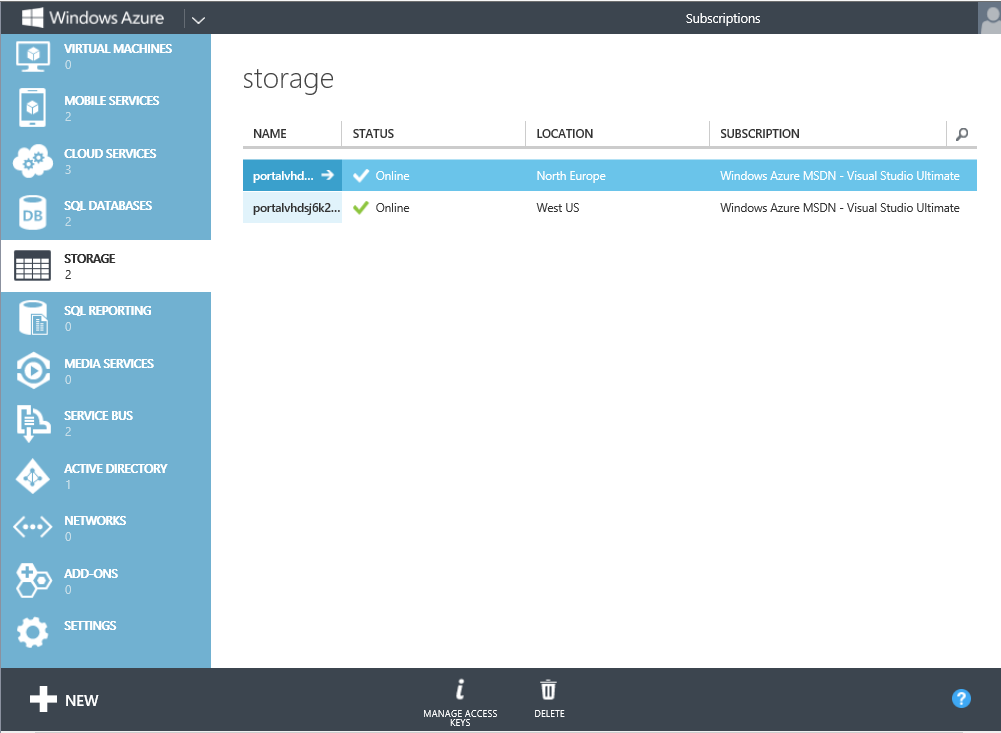
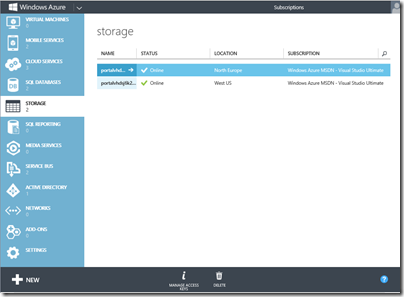
If you want to know what Cloud OS looks like, it is something like this:
image

Yes, it’s the Azure portal, and one of today’s big announcements is that this is the future of System Center, Microsoft’s on-premise cloud management system, as well as Azure, the public cloud. Azure technology is coming to System Center 2012 R2 via an add-on called the Azure Pack. Self-service VMs, web sites, SQL databases, service bus messaging, virtual networks, online storage and more.

Snover also talked about another aspect to Cloud OS, which is also significant. He says that Microsoft sees cloud as an “operating system problem.” This is the key to how Microsoft thinks it can survive and prosper versus VMWare, Amazon and so on. It has a hold of the whole stack, from the tiniest detail of the operating system (memory management, file system, low-level networking and so on) to the highest level, big Azure datacenters.

The company is also unusual in its commitment to private, public and hybrid cloud. The three cloud story which Microsoft re-iterated obsessively during the briefing is public cloud (Azure), private cloud (System Center) and hosted cloud (service providers). Ideally all three will look the same and work the same – differences of scale aside – though the Azure Pack is only the first stage towards convergence. Hyper-V is the common building block, and we were assured that Hyper-V in Azure is exactly the same as Hyper-V in Windows Server, from 2012 onwards.

I had not realised until this month that Snover is now lead architect for System Center as well as Windows Server. Without both roles, of course, he could scarcely architect “Cloud OS”.

Here are a few other things to note.

Hyper-V 2012 R2 has some great improvements:

  • Generation 2 VMs (64-bit Server 2012 and Windows 8 and higher only) strip out legacy emulation, UEIF boot from SCSI
  • Replica supports a range of intervals from 30 seconds to 15 minutes
  • Data compression can double the speed of live migration
  • Live VM cloning lets you copy a running VM for troubleshooting offline
  • Online VHDX resize – grow or shrink
  • Linux now supports Live Migration, Live Backup, Dynamic memory, online VHDX resize

SQL Server 14 includes in-memory optimization, code-name Hekaton, that can deliver stunning speed improvements. There is also compilation of stored procedures to native code, subject to some limitations. The snag with Hekaton? Your data has to fit in RAM.

Like Generation 2 VMs, Hekaton is the result of re-thinking a product in the light of technical advances. Old warhorses like SQL Server were designed when RAM was tiny, and everything had to be fetched from disk, modified, written back. Bringing that into RAM as-is is a waste. Hekaton removes the overhead of the the disk/RAM model almost completely, though it does have to write data back to disk when transactions complete. The data structures are entirely different.

PowerShell Desired State Configuration (DSC) is a declarative syntax for defining the state of a server, combined with a provider that knows how to read or apply it. It is work in progress, with limited providers currently, but immensely interesting, if Microsoft can both make it work and stay the course. The reason is that using PowerShell DSC you can automate everything about an application, including how it is deployed.

Remember White Horse? This was a brave but abandoned attempt to model deployment in Visual Studio as part of application development. What if you could not only model it, but deploy it, using the cloud automation and self-service model to create the VMs and configure them as needed? As a side benefit, you could version control your deployment. Linux is way ahead of Windows here, with tools like Puppet and Chef, but the potential is now here. Note that Microsoft told me it has no plans to do this yet but “we like the idea” so watch this space.

Storage improvements. Both data deduplication and Storage Spaces are getting smarter. Deduplication can be used for running VHDs in a VDI deployment, with huge storage saving. Storage Spaces support hybrid pools with SSDs alongside hard drives, hot data automatically moved, and the ability to pin files to the SSD tier.

Server Essentials for small businesses is now a role in Windows Server as well as a separate edition. If you use the role, rather than the edition, you can use the Essentials tools for up to 100 or so users. Unfortunately that will also mean Windows Server CALs; but it is a step forward from the dead-end 25-user limit in the current product. Small Business Server with bundled Exchange is still missed though, and not coming back. More on this separately.

What do I think overall? Snover is a smart guy and if you buy into the three-cloud idea (and most businesses, for better or worse, are not ready for public cloud) then Microsoft’s strategy does make sense.

The downside is that there remains a lot of stuff to deal with if you want to implement Microsoft’s private cloud, and I am not sure whether System Center admins will all welcome the direction towards using Azure tools on-premise, having learned to deal with the existing model.

The server folk at Microsoft have something to brag about though: 9 consecutive quarters of double digit growth. It is quite a contrast with the declining PC market and the angst over Windows 8, leading to another question: long-term, can Microsoft succeed in server but fail in client? Or will (for better or worse) those two curves start moving in the same direction? Informed opinions, as ever, are welcome.

Windows 8: return of Start button illuminates Microsoft’s painful transition

The Start button is coming back. At least, that’s the strong rumour, accompanied by leaked screenshots from preview builds. See Mary Jo Foley’s post complete with screen grab, though note that this is the Start button, not the Start menu. Other rumoured changes are boot to desktop by default, and the All Apps view by default in the Start screen.

Will this fix Windows 8? Absolutely not.

There are two reasons. First, in one sense Windows 8 does not need fixing. I’ve been running it from the first previews, and find it solid and fast. The new Start screen works well, and I’m now accustomed to tapping the Windows key and typing to start apps that are not already on the taskbar. It is a better app launcher and organiser than what it replaces, though I am not excited about Live Tiles which are out of sight and out of mind most of the time.

Second, this kind of minor UI change will not address the larger problem, which is the lack of compelling Metro-style apps for the platform. Nor will it fully placate those for whom nothing but making Metro completely invisible is acceptable.

These revisions are intended to make Windows 8 more acceptable to a market that essentially does not want it to change. The core market for Windows is increasingly conservative, being formed of business users with a big investment in the platform who do not want the hassle of retraining users, and home users who are used to Microsoft’s OS and not inclined to switch. While this is a large market, it is also a declining one, with tablets and smartphones taking over many former PC roles, and Macs increasingly the platform of choice for high-end users who need the productivity of a full OS.

Rather than content itself with a declining market, Microsoft came out with its bold re-imagining of Windows, with a new tablet-friendly app platform, while keeping faith with the past by preserving the desktop environment. Predictably, this was not a hit with the conservative market described above; in fact, it was the last thing they wanted, confusing and alienating.

Microsoft made it particularly hard for these users by making the new Metro environment hard to ignore. The Start screen, some settings, default apps for file types including images, PDFs and music, and power button hidden in the right-hand Charms menu all cause confusion.

Only the modern app platform has the potential to lift Windows beyond its large but suffocating and declining market of change-resistant users. Unfortunately the first months of Windows 8 has been more or less the worst case for Microsoft. Existing users dislike it and new users have failed to embrace it.

A rough ride for Windows 8 was expected, though if the script had run according to plan there should have been mitigating factors. A wave of Windows 8 tablets should have delivered a delightful experience with touch while still offering desktop productivity when needed. Well, it has happened a little bit, but Windows 8 tablets have suffered from multiple issues including high prices, lack of availability, fiddly designs, and in the case of Windows RT (the ARM version) poor performance and confusing marketing. Here’s a review of the Lenovo IdeaPad Yoga 11 RT machine, from Ebuyer, which shows what can go wrong:

THIS IS NOT A LAPTOP. It runs the dreadful Windows RT which is NOT windows 8, but a very poor limited version of 8. You can only download what Microsoft wants you to have. It came with a free Norton. The dealer convinced me that the failure to be able to download this was my deficiency. NOT – Norton cannot be downloaded onto RT machines. Neither can any other security software except defender which is already on it. You cannot install Chrome (much better than Explorer) It does not accept I tunes, You cannot dispense with the Microsoft log in password, which I do not need. Where the instructions for how to change the settings are, is still a mystery – as usual THERE IS NO INSTRUCTION MANUAL IN PAPER. You have to hunt for everything or go to an online forum.

A shame, because personally I like the concept of Windows RT with its low power consumption and nearly tinker-proof OS.

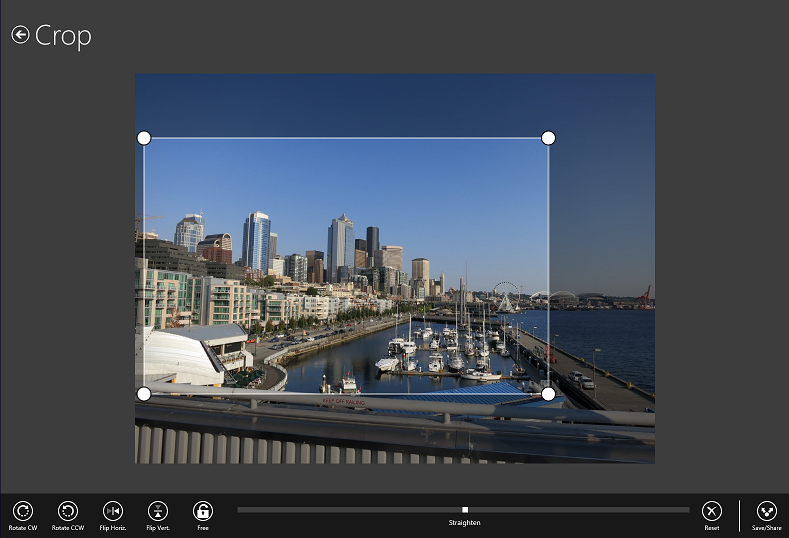
Is there hope for Windows 8? Sure. The core of the OS is excellent on the desktop side, less good on the Metro side but this can be improved. The app story remains poor, though occasionally a decent app comes along, like Adobe’s Photoshop Express: easy, fluid, elegant photo editing which works on both ARM and Intel.

image

It is fair to say, though, that Microsoft and its partners have plenty of work to do if they are to make this new Windows a success.

RAD Studio XE4 with Delphi for iOS is here. Who will use it?

Embarcadero has released RAD Studio XE4, its suite of development tools for Window, Web and for the first time, Apple iOS. iOS support first appeared in an earlier release, but in preview, and the current effort works using a new LLVM-based ARM compiler so is somewhat unlike the preview. Individual products such as Delphi XE4 are also available separately.

Looking at what’s new in Delphi and C++ Builder in XE4 it is apparent that iOS support is by far the main change since RAD Studio XE3, though there are two other significant changes:

  • Prism, a version of RemObjects Oxygene that compiles a Delphi-like language to .NET (and soon other targets) has been removed. Oxygene lives on at RemObjects.
  • FireDAC, a data access engine acquired from DA-SOFT, is now part of RAD Studio.

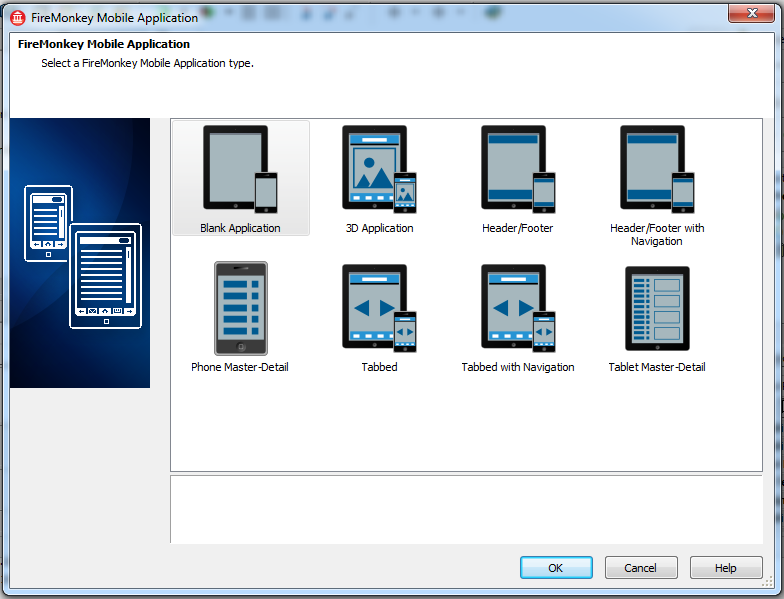
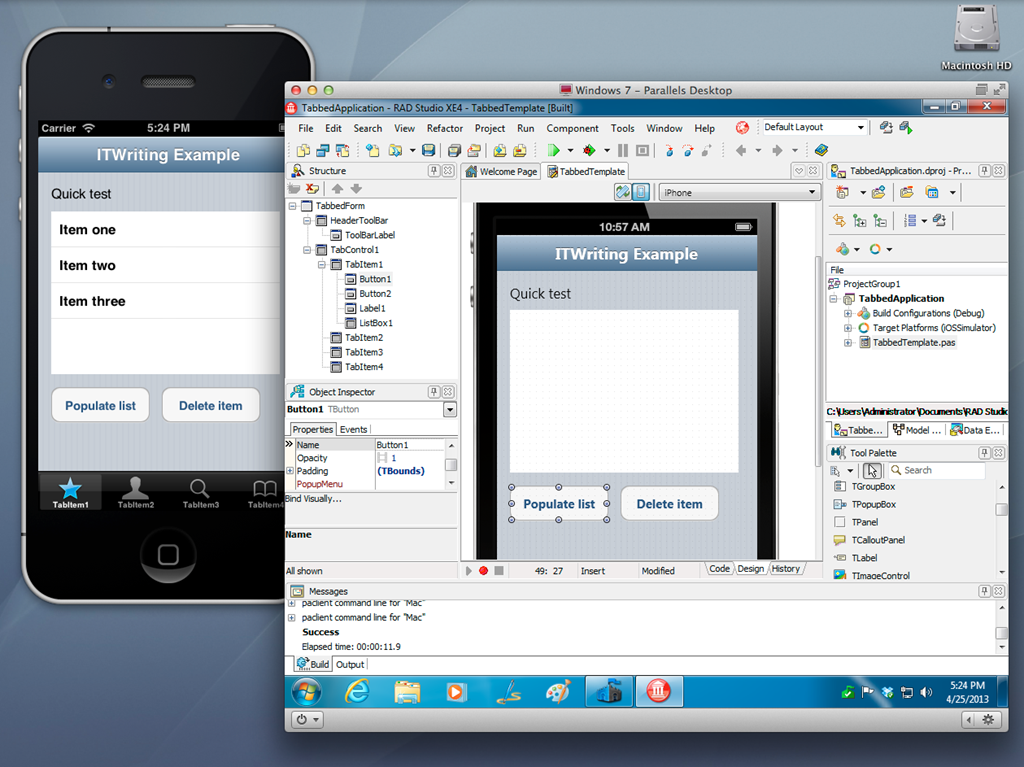
I ran up the new RAD Studio on a Parallels VM on a Mac, a VM on a Mac being the best way to try cross-platform development for OS X and iOS. The new IDE immediately presents you with instructions on setting up for iOS development (though I am not a fan of videos, preferring clear text instructions) but I no problems configuring the Mac agent (called PAServer) which makes this work. Start a new mobile app and you can pick a starter template or begin with a blank canvas.

image

I picked the Tabbed Application and was soon trying out my new app on the iOS simulator

image

So far so good, though the ability to run up a quick app is no proof of the quality of the development tool. Still, a few reflections.

As I noted earlier, it seems to me that Delphi developers are either Windows developers using the tried and trusted VCL (in which case there is very little for them in XE4), or developers who are targeting mobile platforms and using the cross-platform FireMonkey framework in order to share code between Windows, Mac and mobile. I guess it is also possible that developers targeting iOS alone will be so taken with Delphi or C++ Builder that they will come in as new users.

VCL developers now have 64-bit compilation and a mature framework, and given that the efforts of Embarcadero are now focused elsewhere, and that even Microsoft is going slow on new features for what it now calls “desktop Windows”, there is little reason for such developers to upgrade.

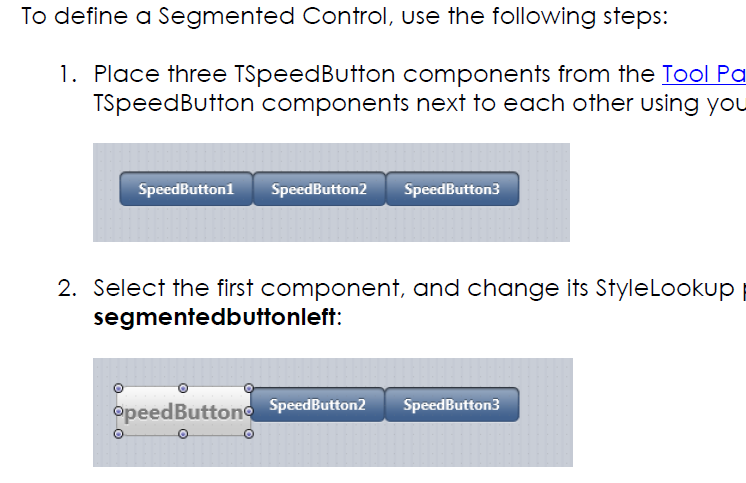
The key questions then are about the quality of the FireMonkey framework and the iOS support. It is hard for me to be objective, since I know Delphi from of old and it is a familiar environment. Delphi or C++ Builder for iOS has obvious attractions for such developers. I would be intrigued though to know what an Objective C or even a JavaScript developer would make of Delphi, coming to it fresh. I am sceptical whether an Xcode developer would find enough productivity benefit in Delphi and FireMonkey to want to move over, and suspect also that many would not be impressed by the FireMonkey approach to iOS controls, which are generally custom drawn rather than true native, or faked completely like the Segmented Control which you are meant to put together from SpeedButtons with segmented styling, as explained in the Delphi iOS tutorial:

image

Embarcadero is making a big play of being “true native” but native is not just about the executable code (I have written more about this elsewhere) and cross-platform always involves compromise.

There is also some disquiet in the developer community about the cost of keeping up to date with RAD Studio. The full RAD Studio XE4 Architect edition currently costs £2,892.60 ex VAT for a new user, or £1,927.80 to upgrade. If you just want basic Delphi, Delphi XE4 Pro is a more reasonable £642.60 for a new user, or £352.80 to upgrade – but you do not get iOS support for that, that is another £320.40 for the Mobile Add-on, and FireDAC if you need it a further £285.00. When XE3 came out, Embarcadero promised that iOS and Android support would be available later at a “low cost”; of course that is a relative and subjective term, but I can understand if some feel that the price is on the high side. Or you can buy software assurance and get upgrades free; I don’t have prices for that but the cost is significant.

It is unfortunate for Embarcadero that there is intense competition in the iOS tools space, not only from Apple’s excellent and free tools, but also from the likes of Xamarin and Titanium.

None of the above is intended to detract from the achievement of bringing Delphi to iOS, with Android promised, which is considerable.

Changes in the Delphi language for ARM and mobile support

Delphi developers should note changes in the Delphi language coming as a result of the move towards the LLVM compiler for mobile support. Embarcadero has released a paper describing these in detail. The just-released RAD Studio XE4 includes the ARM compiler for iOS, with an Android compiler to follow later this year.

It seems to me that Delphi developers will now fall into two broad camps:

1. Windows VCL developers for whom the new FireMonkey cross-platform framework is of little interest, either because they are not developing for Mac or mobile, or because they prefer other tools for those platforms.

2. Developers who are embracing the new platform targets, migrating code to FireMonkey or starting new projects there, and planning to share code across all platforms as far as possible.

If you are in the first camp, you need not worry too much about language changes yet. I believe it is Embarcadero’s long-term intention to unify Delphi’s compilers around LLVM on all platforms, but when or whether this will happen for Win32 and Win64 is moot; my guess is that what the company now calls the “classic compiler” will be around for a long time yet. However the Mac compiler may migrate to LLVM sooner. (I am speculating).

Currently, RAD Studio XE4 includes five compilers:

  • The Win32 compiler (DCC32)
  • The Win64 compiler (DCC64)
  • The Mac compiler (DCCOSX)
  • The iOS Simulator compiler (DCCIOS32)
  • The iOS ARM compiler (DCCIOSARM)

Of these, only the last one currently uses LLVM, though the iOS Simulator compiler behaves as closely as possible like its ARM cousin. In general the language changes are currently only applicable by default for the LLVM and Simulator compilers as far as I can tell.

What are the language changes? My quick summary of the biggest changes is as follows:

  • One string type only: UTF16, reference counted, immutable (though this is a point of confusion; reading the paper it seems it is not yet immutable as it describes modifying in place, but may become so).
  • 0-based strings. There is a compiler directive $ZEROBASEDSTRINGS, which is off for Delphi XE3 and Delphi XE4, but on for the mobile compiler in XE4.
  • Automatic reference counting. Objects are destroyed automatically when the reference count hits zero. MyObj.Free; does not destroy the object, only reduces the reference count (and destroys it if zero). You can create weak references (which do not increment the count) by using the [Weak] attribute. If you really want to destroy the object, use MyObj.DisposeOf;.

In addition, the With statement is now deprecated.

The language changes are described in detail in the paper The Delphi Language for Mobile Development, which you can find here.

No more Delphi for .NET: Prism removed from RAD Studio XE4

Embarcadero is removing Prism from the next version of RAD Studio, XE4, expected later this month.

Prism is actually a third-party product, based on RemObjects Oxygene. Prism and Oxygene let you code in Delphi and compile to .NET or Mono.

Marc Hoffman from RemObjects explains the change here:

Starting with the upcoming release of XE4, Embarcadero Prism will no longer be part of the RAD Studio SKU, and there will be no “XE4″ branded edition of Prism.

But worry not. As you all know, Prism has been nothing more than a re-branded version of our Oxygene for .NET product — and Oxygene will keep going on, stronger than ever.

In fact, Oxygene has long outgrown its Prism-branded edition, first when we introduced full native support for Java and Android to the language over 18 months ago, and of course with our upcoming support for truly native iOS and Mac apps, shipping next month.

The disappearance of Prism is the final chapter in the story of Delphi for .NET. Borland’s Delphi was first released in 1995, and combined a visual interface builder superficially similar to Visual Basic with a native code compiler, enabling full access to the Windows API  as well as better performance than Microsoft’s VB.

Delphi built up a strong following, but in 2002 when Microsoft brought out the .NET Framework Borland worried that Delphi would be left behind. In 2002 it brought out CSharpBuilder, an IDE for C# targeting the .NET Framework, and in 2003 Delphi 8 which also targeted .NET.

Other .NET versions followed, but whereas native code Delphi was a compelling alternative to runtime-based platforms like VB and .NET, the .NET versions of Delphi were less distinctive. Developers coding for .NET preferred Microsoft’s Visual Studio, while Delphi developers preferred to stick with native code.

When Embarcadero acquired the Delphi tools from Borland in 2008, it dropped .NET support from Delphi itself and replaced it with Prism.

I doubt that the disappearance of Prism will cause much consternation. Prism developers will simply switch to Oxygene instead.

Intel fights back against iOS with free tools for HTML5 cross-platform mobile development

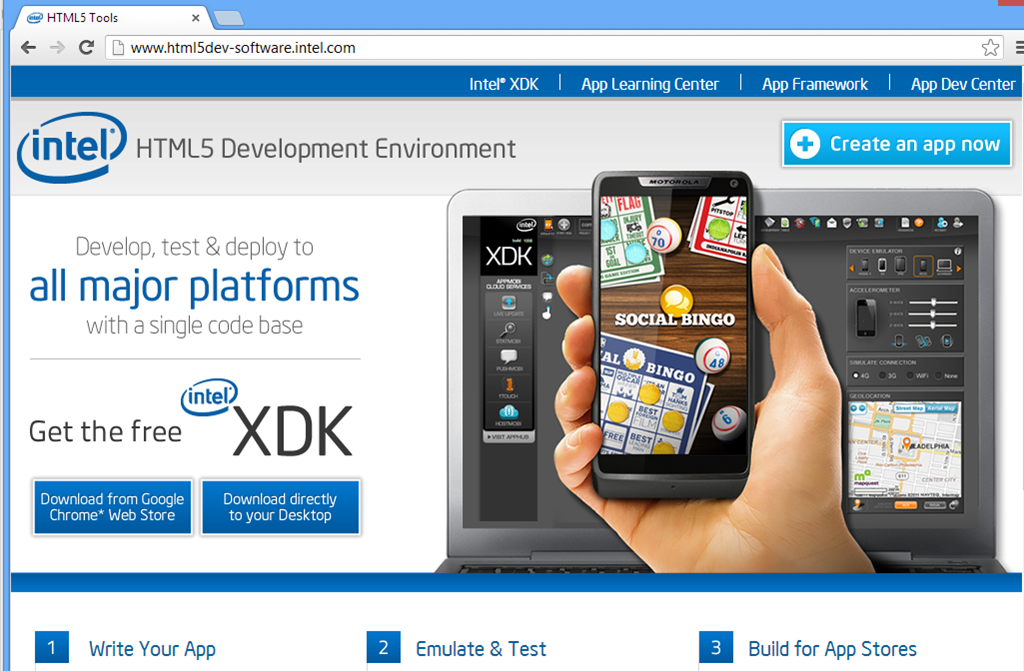
Today at its Software Conference in Paris Intel presented its HTML5 development tools.

image

There are several components, starting with the XDK, a cross-platform development kit based on HTML5, CSS and JavaScript designed to be packaged as mobile apps using Cordova, the open source variant of PhoneGap.

There is an intriguing comment here:

The XDK is fully compatible with the PhoneGap HTML5 cross platform development project, providing many features that are missing from the open source project.

PhoneGap is Adobe’s commercial variant of Cordova. It looks as if Intel is doing its own implementation of features which are in PhoneGap but not Cordova, which might not please Adobe. Apparently code that Intel adds will be fed back into Cordova in due course.

Intel has its own JavaScript app framework, formerly called jqMobi and now called Intel’s App Framework. This is an open source framework hosted on Github.

There are also developer tools which run as an extension to Google Chrome, and a cloud-based build service which targets the following platforms:

  • Apple App Store
  • Google Play
  • Nook Store
  • Amazon Appstore for Android
  • Windows 8 Store
  • Windows Phone 8

And web applications:

  • Facebook
  • Intel AppUp
  • Chrome Store
  • Self-hosted

The build service lets you compile and deploy for these platforms without requiring a local install of the various mobile SDKs. It is free and according to Intel’s Thomas Zipplies there are no plans to charge in future. The build service is Intel’s own, and not related to Adobe’s PhoneGap Build, other than the fact that both share common source in Cordova. This also is unlikely to please Adobe.

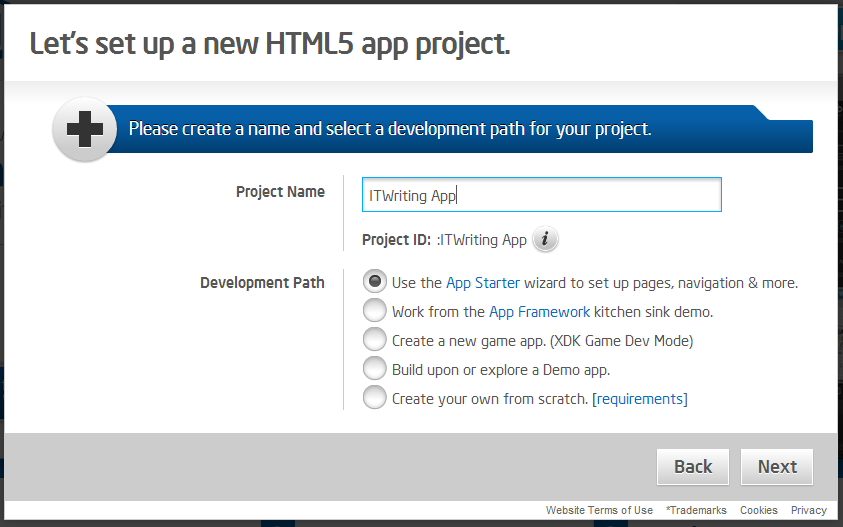
You can start a new app in the browser, using a wizard.

image

Intel also has an iOS to HTML5 porting tool in beta, called the App Porter Tool. The aim is to convert Objective C to JavaScript automatically, and while the tool will not convert all the code successfully it should be able to port most of it, reducing the overall porting effort.

Given that the XDK supports Windows 8 modern apps and Windows Phone 8, this is also a route to porting from iOS to those platforms.

Why is Intel doing this, especially on a non-commercial basis? According to Zipplies, it is a reaction to “walled garden” development platforms, which while not specified must include Apple iOS and to some extent Google Android.

Note that both iOS and almost all Android devices run on ARM, so another way of looking at this is that Intel would rather have developers work on cross-platform apps than have them develop exclusively for ARM devices.

Zipplies also says that Intel can optimise the libraries in the XDK to improve performance on its processors.

You can access the HTML5 development tools here.