Category Archives: professional

Microsoft takes aim at VMware, talks cloud and mobile device management at MMS 2013

I am attending the Microsoft Management Summit in Las Vegas (between 5 and 6,000 attendees I was told), where Brad Anderson, corporate vice president of Windows Server & System Center, gave the opening keynote this morning.

image

There was not a lot of news as such, but a few things struck me as notable.

Virtualisation rival VMware was never mentioned by name, but frequently referenced by Anderson as “the other guys”. Several case studies from companies that had switched from “the other guys” were mentioned, with improved density and lower costs claimed as you would expect. The most colourful story concerned Dominos (pizza delivery) which apparently manages 15,000 servers across 5,000 stores using System Center and has switched to Hyper-V in 750 of them. The results:

  • 28% faster hard drive writes
  • 36% faster memory speeds
  • 99% reduction in virtualisation helpdesk calls

That last figure is astonishing but needs more context before you can take it seriously. Nevertheless, there is momentum behind Hyper-V. Microsoft says it is now optimising products like Exchange and SQL Server specifically for running on virtual machines (that is, Hyper-V) and it now looks like a safe choice, as well as being conveniently built into Windows Server 2012.

I also noticed how Microsoft is now letting drop some statistics about use of its cloud offerings, Azure and Office 365. The first few years of Azure were notable in that the company never talked about the numbers, which is reason to suppose that they were poor. Today we were told that Azure storage is doubling in capacity every six to nine months, that 420,000 domains are now managed in Azure Active Directory (also used by Office 365), and that Office 365 is now used in some measure by over 20% of enterprises worldwide. Nothing dramatic, but this is evidence of growth.

Back in October 2012 Microsoft acquired a company called StorSimple which specialises in integrating cloud and on-premise storage. There are backup and archiving services as you would expect, but the most innovative piece is called Cloud Integrated Storage (CiS) and lets you access storage via the standard iSCSI protocol that is partly on-premise and partly in the cloud. There was a short StorSimple demo this morning which showed how how you could use CiS for a standard Windows disk volume. Despite the inherent latency of cloud storage performance can be good thanks to data tiering, which puts the most active data on the fastest storage, and the least active data in the cloud. From the white paper (find it here):

CiS systems use three different types of storage: performance-oriented flash SSDs, capacity- oriented SAS disk drives and cloud storage. Data is moved from one type of storage to another according to its relative activity level and customer-chosen policies. Data that becomes more active is moved to a faster type of storage and data that becomes less active is moved to a higher capacity type of storage. 

CiS also uses compression and de-duplication for maximum efficiency.

This is a powerful concept and could be just the thing for admins coping with increased demands for storage. I can also foresee this technology becoming part of Windows server, integrated into Storage Spaces for example.

A third topic in the keynote was mobile device management. When Microsoft released service pack 1 of Configuration Manager (part of System Center) it added the ability to integrate with InTune for cloud management of mobile devices, provided that the devices are iOS, Android, Windows RT, or Windows Phone 8. A later conversation with product manager Andrew Conway confirmed that InTune rather than EAS (Exchange ActiveSync) policies is Microsoft’s strategic direction for mobile device management, though EAS is still used for Android. “Modern devices should be managed from the cloud” was the line from the keynote. InTune includes policy management as well as a company portal where users can install corporate apps.

What if you have a BlackBerry 10 device? Back to EAS. A Windows Mobile 6.x device? System Center Configuration Manager can manage those. There is still some inconsistency then, but with iOS and Android covered InTune does support a large part of what is needed.

Google forks WebKit into Blink: what are the implications?

Yesterday Google announced that it is forking WebKit to create Blink, a new rendering engine to be used in its Chrome browser:

Chromium uses a different multi-process architecture than other WebKit-based browsers, and supporting multiple architectures over the years has led to increasing complexity for both the WebKit and Chromium projects. This has slowed down the collective pace of innovation – so today, we are introducing Blink, a new open source rendering engine based on WebKit.

Odd that not long ago we were debating the likelihood and merits of WebKit becoming the de facto standard for HTML. Now Google itself is arguing against such a thing:

… we believe that having multiple rendering engines—similar to having multiple browsers—will spur innovation and over time improve the health of the entire open web ecosystem.

Together with the announcement from Mozilla and Samsung of a new Android browser which, one assumes, may become the default browser on Samsung Android phones, there is now significant diversity/competition/fragmentation in the browser market (if you can call it a market when everything is free).

The stated reason for the split concerns multi-process architecture, with claims that Google was unwilling to assist with integrating Chromium’s multi-process code into WebKit:

Before we wrote a single line of what would become WebKit2 we directly asked Google folks if they would be willing to contribute their multiprocess support back to WebKit, so that we could build on it. They said no.

At that point, our choices were to do a hostile fork of Chromium into the WebKit tree, write our own process model, or live with being single-process forever. (At the time, there wasn’t really an API-stable layer of the Chromium stack that packaged the process support.)

Writing our own seemed like the least bad approach.

Or maybe it was the other way around and Apple wanted to increase its control over WebKit and optimize it for the OSX and iOS rather than for multiple platforms (which would be the Apple way).

It matters little. Either way, it is unsurprising that Apple and Google find it difficult to cooperate when Android is the biggest threat to the iPhone and iPad.

The new reality is that WebKit, instead of being a de facto standard for the Web, will now be primarily an Apple rendering engine. Chrome/Chromium will be all Google, making it less attractive for others to adopt.

That said, several third parties have already adopted Chromium, thanks to the attractions of the Chromium Embedded Framework which makes it easy to use the engine in other projects. This includes Opera, which is now a Blink partner, and Adobe, which uses Chromium for its Brackets code editor and associated products in the Adobe Edge family.

The benefit of Blink is that diverse implementations promote the importance of standards. The risk of Blink is that if Google further increases the market share of Chrome, on desktop and mobile, to the point where it dominates, then it is in a strong position to dictate de-facto standards according to its own preferences, as suggested by this cynical take on the news.

The browser wars are back.

Big GPU news at NVIDIA tech conference including first Tegra with CUDA

NVIDIA CEO Jen-Hsun Huang made a number of announcements at the GPU Technology Conference (GTC) keynote yesterday, including an updated roadmap for both desktop and mobile GPUs.

image

Although the focus of the GTC is on high-performance computing using Tesla GPU accelerator boards, Huang’s announcements were not limited to that area but also covered the company’s progress on mobile and on the desktop. Huang opened by mentioning the recently released GeForce Titan graphics processor which has 2,600 CUDA cores, and which starts from under £700 so is within reach of serious gamers as well as developers who can make use of it for general-purpose computing. CUDA enables use of the GPU for massively parallel general-purpose computing. NVIDIA is having problems keeping up with demand, said Huang.

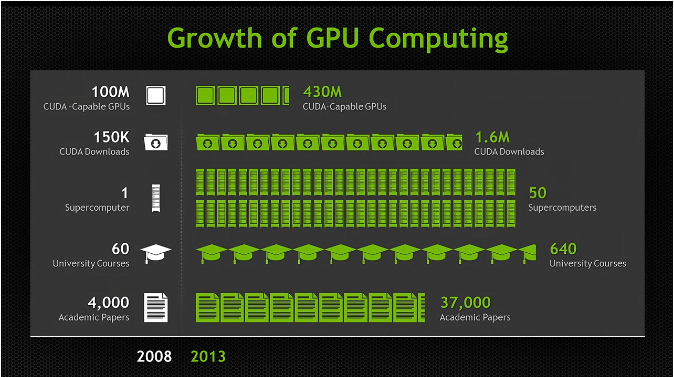
There are now 430 million CUDA capable GPUs out there, said Huang, including 50 supercomputers, and coverage in 640 university courses.

image

He also mentioned last week’s announcement of the Swiss Piz Daint supercomputer which will include Tesla K20X GPU accelerators and will be operational in early 2014.

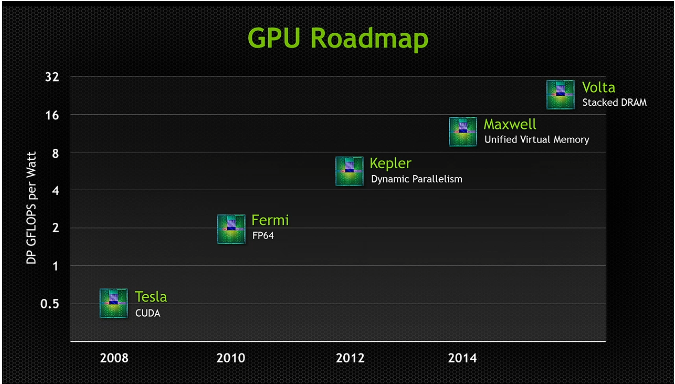
But what is coming next? Here is the latest GPU roadmap:

image

Kepler is the current GPU architecture, which introduced dynamic parallelism, the ability for the GPU to generate work without transitioning back to the CPU.

Coming next is Maxwell, which has unified virtual memory. The GPU can see the CPU memory, and the CPU can see the GPU memory, making programming easier. I am not sure how this impacts performance, but note that it is unified virtual memory, so the task of copying data between host and device still exists under the covers.

After Maxwell comes Volta, which focuses on increasing memory bandwidth and reducing latency. Volta includes a stack of DRAM on the same silicon substrate as the GPU, which Huang said enables 1TB per second of memory bandwidth.

What about mobile? NVIDIA is aware of the growth in devices of all kinds. 2.5bn high definition displays are sold each year, said Huang, and this will double again by 2015. These displays are mostly not for PCs, but on smartphones or embedded devices.

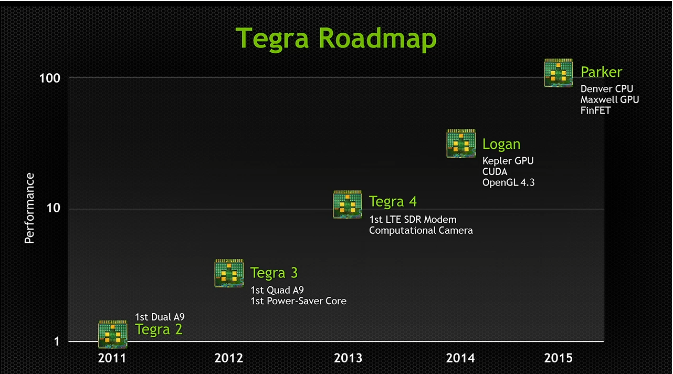
Here is the roadmap for Tegra, NVIDIA’s system-on-a-chip (SoC).

image

Tegra 4, which I saw in preview at last month’s mobile world congress in Barcelona, includes a software-defined modem and computational camera, able to tracks moving objects while keeping them in focus.

Next is Tegra Logan. This is the first Tegra to include CUDA cores so you can use it for general-purpose computing. It  is based on the Kepler GPU and supports full CUDA 5 computing as well as Open GL 4.3. Logan with be previewed this year and in production early 2014.

After Logan comes Parker. This will be based on the Maxwell GPU (see above) and NVIDIA’s own Denver (ARM-based) CPU. It will include FinFET multigate transistors.

According to Huang, Tegra performance will includes by 100 times over 5 years. Today’s Surface RT (which runs Tegra 3) may be sluggish, but Windows RT will run fine on these future SoCs. Of course Intel is not standing still either.

Finally, Huang announced the Grid Visual Computing Appliance, which I will be covering shortly in another post.

Native apps vs HTML 5: no consensus over how to choose

Wondering whether to invest in native apps or HTML5 web apps (maybe wrapped as native) for your next mobile development project? Welcome to plenty of confusion about which is the best path to take. Here are a few pieces of evidence from this month:

A Compuware survey of 3,500 consumers showed a preference for mobile apps over mobile websites:

When consumers were asked about the benefits of using a mobile app versus a mobile website (a website that is specifically designed to be viewed on a mobile device), the majority (85 percent) said they preferred mobile apps primarily because apps are more convenient, faster and easier to browse.

Just 1% expressed a preference for mobile websites over apps. Note that consumers cannot be expected to know whether or not a native app is actually written in HTML5 or not; but here is an intriguing report from Xero, which makes accounting software:

Very early on we chose to build Xero Touch using HTML5 technologies. That choice showed that we care about the future of the open web and its continued success as an application delivery platform and we firmly believe that HTML5 is the future of development across any and all platforms. We do not regret this choice – but we’ve found that building a complicated mobile application in HTML5 has been hard. Even with frameworks as amazing as Sencha Touch, we’ve found the ability to iterate as fast as we would like has become harder as our application has become more complex.

… the lesson we’ve learnt over the last 12 months has been that the cost in time, effort and testing to bring an HTML5 application to a native level of performance seems to be far greater than if the application was built with native technologies from the get-go … Maintaining and iterating a web app was becoming a big impediment – so the next release of Xero Touch will be built with native technologies and we’ve already made a lot of progress. It does feel better.

If a company is so unhappy with its development platform that it is willing to endure the pain and expense of switching, that is evidence of deep dissatisfaction.

On the other hand, here is the UK’s Government Digital Service:

Our position is that native apps are rarely justified. Since November 2012, central government departments and agencies have to get approval from Cabinet Office before starting work on apps. For government services, we believe the benefits of developing and maintaining apps will very rarely justify their costs, especially if the underlying service design is sub-optimal. Departments should focus on improving the quality of the core web service.

Is this because the Government Digital Service is spending public money and therefore apps are an unnecessary luxury? That is arguable, though it has not stopped the BBC (also publicly funded) from delivering a ton of apps, to predictable complaints from owners of less favoured platforms like Windows Phone.

This one will run and run. HTML5 will get better, but so also will native platforms, so I doubt this difficult choice will get easier any time soon.

It may be a matter of whether your particular app is a good fit for HTML5 or not. However, I am not aware of any consensus over what characteristics make an app a good or bad fit for an HTML5 solution, except that for broad reach HTML5 cannot be beaten, and for full access to device and OS features there is no substitute for native.

Internal Windows Runtime apps are prohibitively expensive to deploy, says Microsoft Regional Director

Now we know why Microsoft has been so reluctant to divulge details of how to deploy a business app that uses the Windows Runtime (also known as Metro apps or Windows Store apps; though in this case the Windows Store app designation is particularly silly since these apps are precisely not Store apps).

Presuming Windows MVP and Regional Director Rockford Lhotka is correct, a business that wishes to sideload Windows Runtime apps (in other words, to deploy but not via the Windows Store), a business needs to purchase a $30 sideloading key which, by a stroke of marketing genius, is only available in packs of 100.

image

Note the above screen grab shows a price of more than $30.00. I believe this is because Lhotka’s figures do not allow for any reseller markup, though there could be regional differences as well.

Here is what Microsoft’s Antoine Leblond said back in April 2012:

To enable sideloading of a Metro style app onto a PC:

  • Set Group Policy for “Allow all trusted apps to install”. If you cannot use Group Policy, then you can set this through the following setting: HKEY_LOCAL_MACHINE\Software\Policies\Microsoft\Windows\Appx\AllowAllTrustedApps = 1
  • Verify that the app is signed by a CA that is trusted on the target machines
  • Activate a special product key by using a script on the target machine to enable sideloading. We’ll go into more detail about how the IT admin will acquire the product keys in an upcoming blog post. The product key only needs to be install and activated once on the PC.

I have not seen the promised upcoming blog post but would be interested in doing so if anyone has a link?

Sideloading keys are only valid on Windows 8 Pro or Windows 8 Enterprise.

As a further disincentive, if you want to avoid running a PowerShell script on each target machine, you will need either System Center or InTune to manage the PCs. InTune is the cheaper option, at $6.00 per device per month. Lhotka calculates:

Let’s assume that your organization has 100 Windows RT or Windows 8 Pro devices, so you buy $3000 worth of side-loading keys. And let’s assume you use InTune. Finally let’s assume your devices have a 3 year life – which is pretty typical for corporate devices where you buy a service agreement from Lenovo or Dell or another vendor.

These 100 devices will cost $3000 for keys, plus $6 per device per month. This means that your org with 100 devices will pay around $23,000 extra to deploy a WinRT app just for this licensing.

and he concludes:

Right now it appears that Microsoft has worked very hard to devise a licensing and deployment scheme for WinRT apps designed specifically to discourage the creation of any WinRT business apps. Whether this is intentional or accidental I can’t say, but it is surely the case that no responsible business or IT manager could look at these scenarios and think that a move to WinRT for business app development makes sense at this time

That said, I am not sure he is being completely fair. I doubt a business will subscript to InTune just to support sideloading, and for those who do not want to subscribe, running a PowerShell script is not that hard. It seems to me that the problem could be mostly fixed by offering the sideloading keys in smaller packs.

I would add that now is probably not the moment to deploy a Windows Runtime app. The platform is not as good as it should be, and there is a case for waiting for the first major update in my opinion.

Still, $3000 for a licence pack is substantial, especially for a small business with fewer than 100 PCs.

The “Modern UI” side of Windows 8 has not taken off as yet, and a rational approach would be to encourage rather than discourage corporate developers to target the platform.

Note: a Microsoft Regional Director does not work directly for Microsoft. Lhotka works for Magenic. A Regional Director is an independent professional who is recognized for their ability to train and evangelise development on Microsoft’s platform.

Windows Phone 8 enterprise security versus Blackberry 10 Balance and Samsung Knox

How good is Windows Phone 8 security? Actually, pretty good. The key features are described here [pdf]:

  • Trusted Boot prevents booting to an alternative operating system, using the UEFI secure boot standard.
  • Only signed operating system components and apps can run.
  • App sandboxing:

    No communication channels exist between apps on the phone other than through the cloud. Apps are isolated from each other and cannot access memory used or data stored by other applications, including the keyboard cache.

  • Private internal app distribution by businesses who register with Microsoft
  • Password policies set through Exchange ActiveSync (EAS)
  • Built-in device management client
  • Bitlocker encryption when set by EAS RequireDeviceEncryption policy. AES 128 encryption linked to UEFI Trusted Boot.
  • SD card data is not encrypted, but the OS only allows media files to be stored on SD cards.
  • Information Rights Management can prevent documents being edited, printed, or text copied (other than tricks like photographing the screen).
  • Remote Wipe

The security features in Windows Phone 8 are largely based on those in full Windows, since the core operating system is the same. However, devices are more secure since they are not afflicted by the legacy which makes desktop Windows hard to lock down without damaging usability.

While the above sounds good, note that in most cases a simple PIN will get you access to everything. On the other hand, unless the PIN is seen it is not all that insecure, since you can set policies that lock or wipe the phone after a few wrong attempts.

Does Microsoft therefore have a good story versus Blackberry 10 Balance and Samsung Knox, both of which feature secure containers that isolate business apps and data from personal? The approach is different. In Windows Phone the focus is on the whole device, whereas the other two have the concept of segmentation, letting users do what they like (including installation of games and so on) in one segment, while the business gets to control the other.

Windows Phone does in fact have a somewhat similar feature aimed at children. Kids Corner lets you create a "fun" segment containing specified apps and games, sandboxed from the main operating system. While this is currently designed for children borrowing your phone, you can see how it could be adapted to create a personal/business split if Microsoft chose to do so.

For the time being though, you might worry about the potential for users to install a malicious app or game that manages to exploit a bug in Windows Phone and compromise security.

Even if the business can lock down the device so that users cannot install apps, this impairs the user experience to the extent that most users will want another phone for personal use. The attraction of the Blackberry and Samsung approach is the way it combines user freedom with business security.

Is Microsoft doing a good job of articulating the enterprise features of Windows Phone 8? That is a hard question to answer; but my observation is that Nokia, the main Windows Phone vendor, seems to focus more on consumer features like the camera and music, or general features like maps and turn by turn navigation. Enterprise features are hardly mentioned on the Nokia stand here at Mobile World Congress in Barcelona, while Microsoft does not have a stand at all. On the other hand, you would think that the company’s strong partner ecosystem would be effective in communicating the presence of these features to enterprises.

Cross-platform frameworks ordered by percentage of shared code

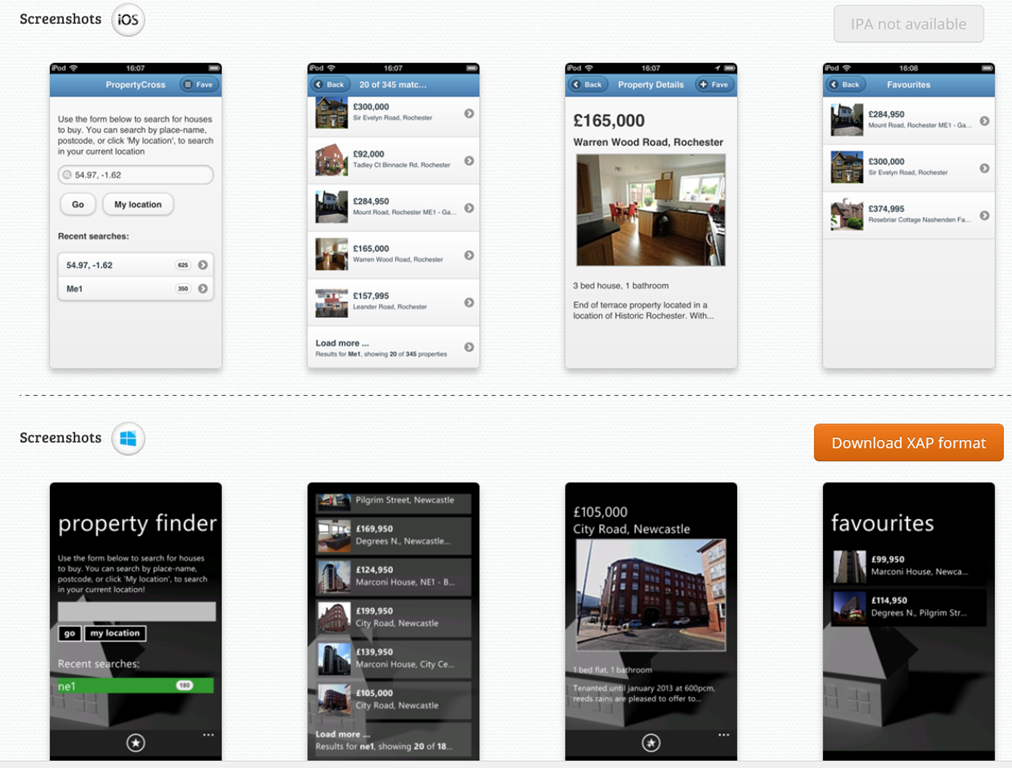
Following my piece on different approaches to building the user interface in cross-platform frameworks, twitter user Sam Hogarth pointed me to the PropertyCross project. This implements a non-trivial application in 8 different cross-platform tools, covering Android, iOS and Windows Phone. Note that only four of the frameworks support Windows Phone.

Using the pie charts presented for each framework, I was able to order them by percentage of shared code as follows:

1= Adobe AIR (100%), JQTouch (100%) , RhoMobile (100%), Sencha Touch (100%)

5. Appcelerator Titanium (around 90%)

6. JQuery Mobile (around 80%)

7. Xamarin (around 40%)

8. Native (0%)

A couple of notes. Of the 100% frameworks, three do not support Windows Phone, and the one which does (Rhomobile) seems to be a bit broken on Windows Phone, judging by the screenshots. The Property Details and Favourites pages do not render properly.

You would get more code sharing with Xamarin if you only supported two rather than three platforms. That is logical: since it does not abstract the GUI.

In most cases (not Rhomobile) it is striking how different Windows Phone appears versus iOS and Android, even with jQuery Mobile which uses HTML5.

image

Xamarin 2.0 and Xamarin Studio announced, build for OSX, iOS and Android with C#

Xamarin has announced significant updates to its developer platform. Xamarin is the company formed around 18 months ago, when Novell discontinued its investment in Mono, a cross-platform implementation of C# and the .NET Framework. Its focus is on mobile platforms, in particular iOS and Android, though there is also support for the Mac. On Windows and Windows Phone, the presumption is that developers will continue to use Microsoft’s .NET Framework.

“If you look at what you can develop with C#, there’s about 1.2 billion Windows machines out there, but there’s now about a billion Android and iOS devices. Together we can make C# a universal language for application development and reach 2.2 billion devices,” Xamarin co-founder and CEO Nat Friedman told me.

“There’s a wonderful built-in audience of C# developers, millions of them, who need a bridge to mobile. We can help them take their existing skills and tools, and even code they’ve already written, and bring them to mainstream mobile platforms like iOS and Android.”

The key announcements:

  • Xamarin Studio is  an updated version of MonoDevelop, the Mono IDE. It runs on Mac and Windows.#
  • You can now develop iOS apps in Visual Studio for the first time
  • MonoTouch, the framework for iOS, has been renamed Xamarin.iOS
  • Mono for Android is now called Xamarin.Android
  • A new component store has pre-built components for download, some free, some commercial.
  • Xamarin now offers a free Starter edition, and pricing plans for independent developers, smaller businesses, and enterprises. Indie is $299 per platform per year, Business is $999 per platform/year, and Enterprise $1800 platform/year.

The Starter edition is not much use. It has a limited app size, and even the sample project I downloaded, an Employee Directory, exceeded that size and I had to register for a trial.

Xamarin’s philosophy is to share non-visual code, but to create a user interface that is native for each platform. This is a compromise in terms of the effort involved in supporting multiple platforms, but ensures a native experience on each device. “That’s fundamental to our platform,” says Friedman. “We tell our developers to separate the UI layer from the rest of the app. That allows them to share all the non-UI code across platforms, but to deliver a fully native UI, even though the whole app is written in C#. That’s what users demand now, people want native experiences.”

“We’ve been building tools that essentially project the underlying iOS APIs or Java [Android] APIs into C#”, explains co-founder Miguel de Icaza. “What it means is that people need to build a new UI for each platform.” He adds that Microsoft platform developers should be used to this, as Microsoft itself has several similar but incompatible .NET platforms. “There’s the one on Silverlight, the one on WPF, the one on Windows RT, and the one on the phone, it’s four,” he says. “Developers have had to resort to putting their logic into shared libraries, and build a per-platform UI. We’re reusing that knowledge.”

The ability to develop for iOS in Visual Studio is new. “It’s our most-requested feature of all time.” said Friedman.

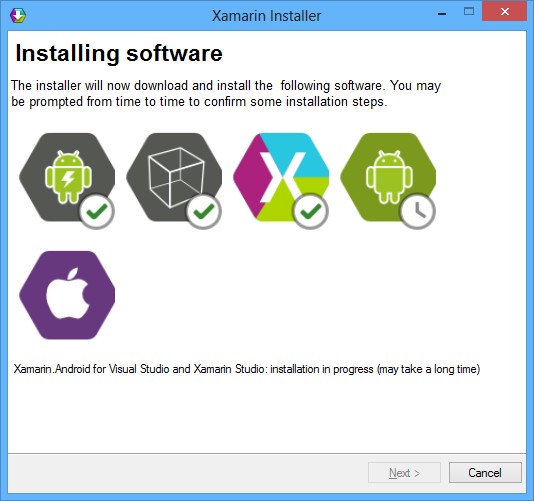
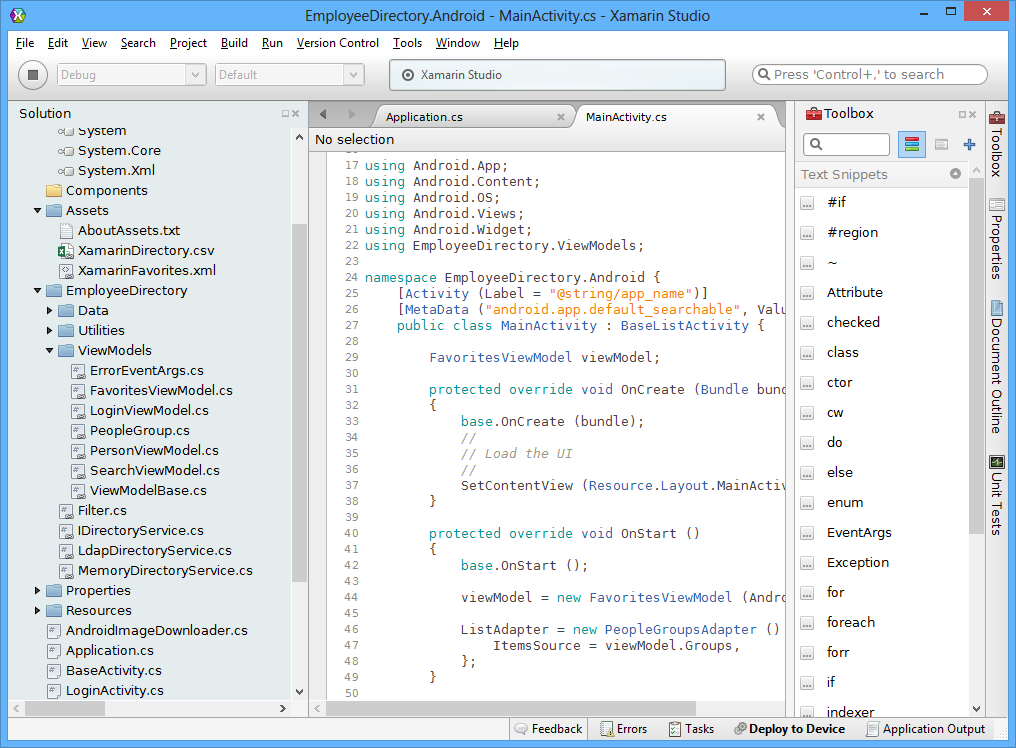
I downloaded Xamarin Studio, which in my case was around 1.3GB including an updated Android SDK.

image

The IDE itself is clean and fast, and very much code-centric. It lacks the bloat of Visual Studio, though you will miss many of the features of Microsoft’s IDE.

image

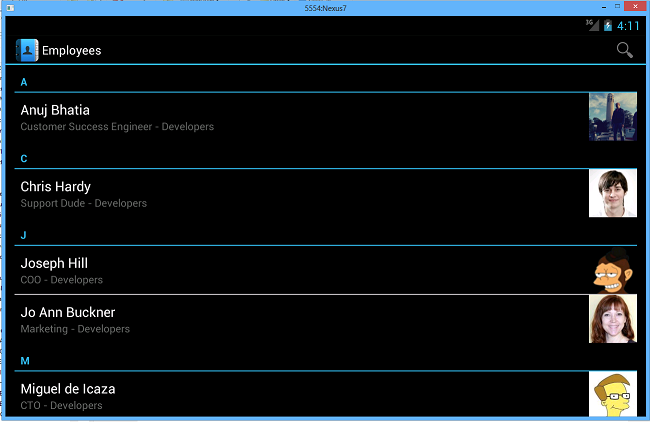
I build the sample Employee Directory app and deployed it to an Android emulator which I use for Nexus 7 development. Deploying the runtime components took a long time, but after waiting patiently the app launched successfully.

image

If you want to do iOS development you will need a Mac of course. Although you can code on Windows, if you then the code is pushed over the the Mac side for compilation and debugging. In order to use Visual Studio, one option is to run Windows in a virtual machine on a Mac, as I have done with reasonable success using Embarcadero’s cross-platform tools.

Xamarin says it is growing fast. There have been 230,000 downloads of its tools, increasing by around 700 per day, and over 12,000 paying customers.

Despite Xamarin’s roots in the open source world (and Mono is still open source), a quick look at the pricing table shows that this is a fully commercial offering and priced accordingly. Presuming customers keep on subscribing, that is a good thing, ensuring the future of the platform; but it is not so good for the smallest developers who might otherwise give it a try.

Embarcadero acquires AnyDAC data access libraries for Delphi, C++ Builder

Embarcadero has acquired the AnyDAC data access libraries from DA-SOFT, including its main author Dmitry Arefiev. These libraries support Delphi and C++ Builder and support connections to a wide range of database servers, including SQL Server, DB2, Oracle, PostgreSQL, SQLite, Interbase, Firebird, Microsoft Access, and any ODBC connection.

AnyDAC is well liked by Delphi devlopers for its performance, features and support. Its architecture includes a local data storage layer similar to the dataset in Microsoft’s ADO.NET.

While it is good to see this set of libraries added to the mainstream product, developers are asking the obvious questions. What will happen to the cost and to the support for AnyDAC?

I am both scared and relieved at the same time. We took the AnyDAC route a few years ago, getting out of the BDE, and we have not regretted it for a second. My fright comes from the fact that DA-SOFT could not be beat in terms of customer support…many of us have come to DA-SOFT with a problem, only to have it fixed the next day. It is only realistic to think that with Embarcadero, this will no longer be the case.

says Dan Hacker on product manager Marco Cantu’s blog.

Microsoft’s Visual Studio and Team Foundation Server get Git integration

Microsoft has announced Git integration in both the Visual Studio IDE and the Team Foundation Service hosted source code management system. According to Technical Fellow Brian Harry:

1. Team Foundation Server will host Git repositories – and more concretely, Team Foundation Service has support for hosting Git repositories starting today.

2. Visual Studio will have Git support – and concretely, we released a CTP of a VSIX plugin for the Visual Studio 2012 Update 2 CTP today.

Git is an open source version control system originally designed by Linus Torvalds to support the development of the Linux operating system. It is a distributed version control system, which means every working directory is itself a full repository, enabling easy forking and offline work.

Team Foundation Service is a version of Team Foundation Server hosted by Microsoft.

Git integration was also recently added to Perforce, another version control system, in the form of the Perforce Git Fusion add-in, emphasising the fact that Git is now a mainstream, enterprise revision control system.