Category Archives: software development

Top languages on Github: JavaScript reigns, Ruby and Python next

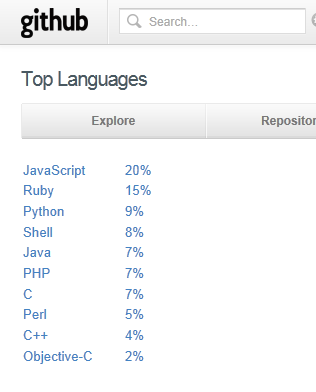
I cloned a github repository today, and while browsing the site noticed the language stats:

image

Git was originally developed for the Linux kernel and is mainly for the open source community. I was interested to see JavaScript, the language of HTML 5, riding so high. PHP, C and C++ are lower than I would have guessed, Ruby and Python higher.

Here are some figures for the venerable Sourceforge:

Java (7,163) 19%
C++ (6,449) 17%
C (4,752) 13%
PHP (3,521) 10%
Python (2,694) 7%
C# (2,481) 7%
JavaScript (2,011) 5%
Perl (1,138) 3%
Shell (757) 2%
Visual Basic NET (688) 2%
Delphi/Kylix (581) 2%

This comes with a health warning. I have taken the figures from the what you get if you browse the directory and drop down Programming Languages; but the total is only about 37,000, whereas Sourceforge hosts around 324,000 projects. I am not sure what accounts for the discrepancy; it could be that language is not specified for the other projects, or they are dormant, or some other reason. But I hope the proportions indicate something of value.

Github is madly trendy, and Sourceforge ancient, so this tells us something about how open source activity has shifted towards JavaScript, Ruby and Python, and away from Java, C/C++ and C#.

Of course the overall picture of programming language usage is quite different. For example, you can get some kind of clue about commercial activity from a job board like indeed.com, which currently has 77,457 US vacancies for Java, 22,413 for JavaScript, and only 5030 for Ruby.

Nevertheless, interesting to see what languages developers on Github are choosing to work with, and perhaps an indicator of what may be most in demand on the job boards a few years from now.

Finally, looking at these figures I cannot help thinking how short-sighted Microsoft was in abandoning IronPython and IronRuby back in 2010.

Trying out nide – a cloud IDE for Node.js

I was intrigued by reports of nide, a web-based IDE for Node.js. It was one of the entries in the Node.js Knockout challenge last summer.

So how do you install it? One line on Linux; but I did not want to put it on my web server and I re-purposed my spare Linux machine last year after one of my other servers broke.

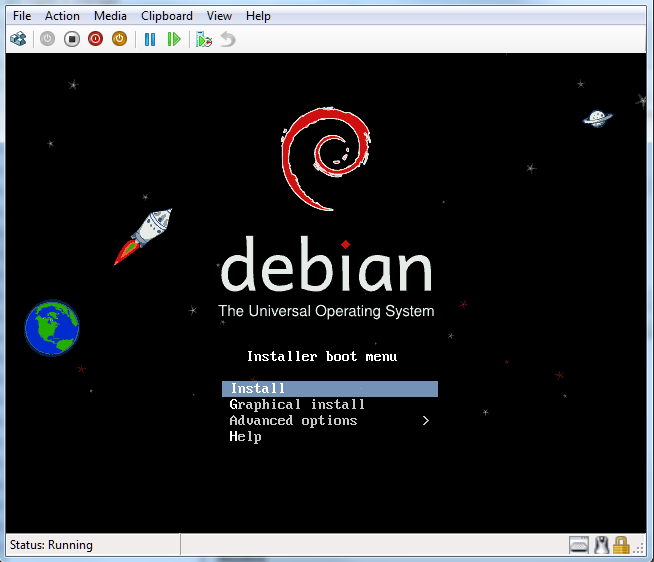
I decided to run up a Debian install on a Hyper-V server that has a little spare capacity.

image

I then followed the setups here for setting up Node.js and npm (Node Package Manager). I also installed nginx which I have been meaning to try for a while. Linux on Hyper-V works fine, though you have to use a “Legacy” network adapter which compromises performance a bit, unless you are willing to tackle installing Microsoft’s Hyper-V integration components for Linux, which do not support Debian though it is said to work. I do not need a GUI and the legacy network adapter is OK for this.

Everything works OK, though I found that nide does not work in Internet Explorer 9. I used Google Chrome, which makes sense I guess since the same JavaScript engine is used by Node.js.

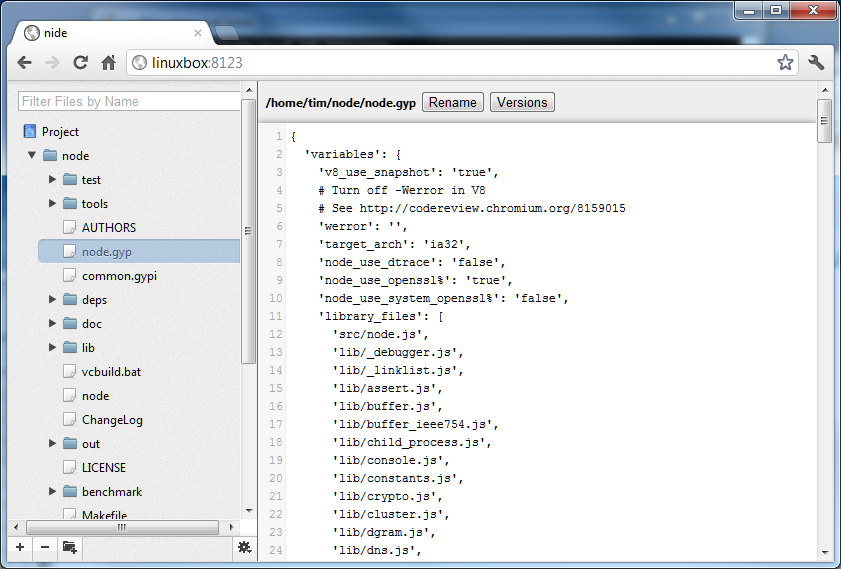
Nide is a simple affair which is essentially a file manager. Projects are displayed in a tree view, and you select a file to view or edit it. The icons at the bottom left of the screen let you create and delete files and folders.

image

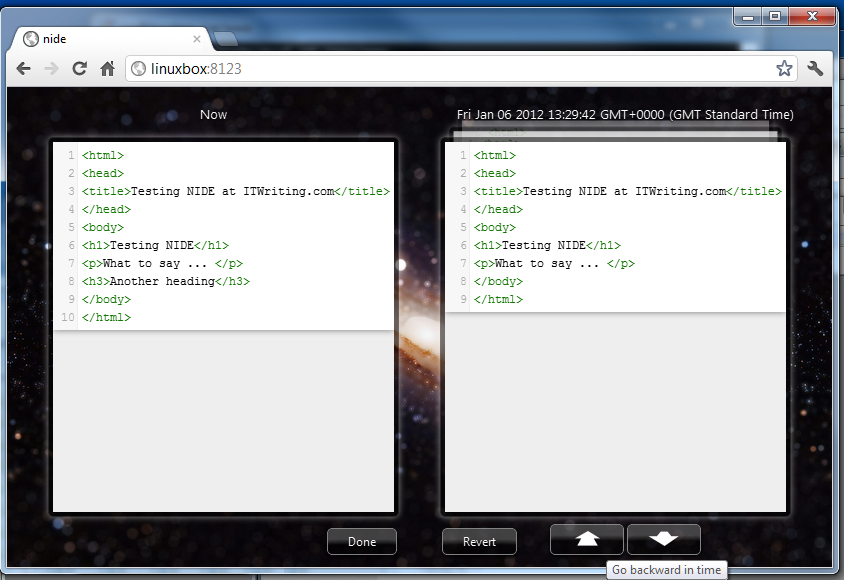
The smartest feature is version management. Files are saved automatically and you can easily compare versions and revert if necessary. The “Go backward in time” button shows that auto-saves are quite frequent.

image

There is also a GUI for npm built-in. Pretty good for a competition entry, though I had a few problems.

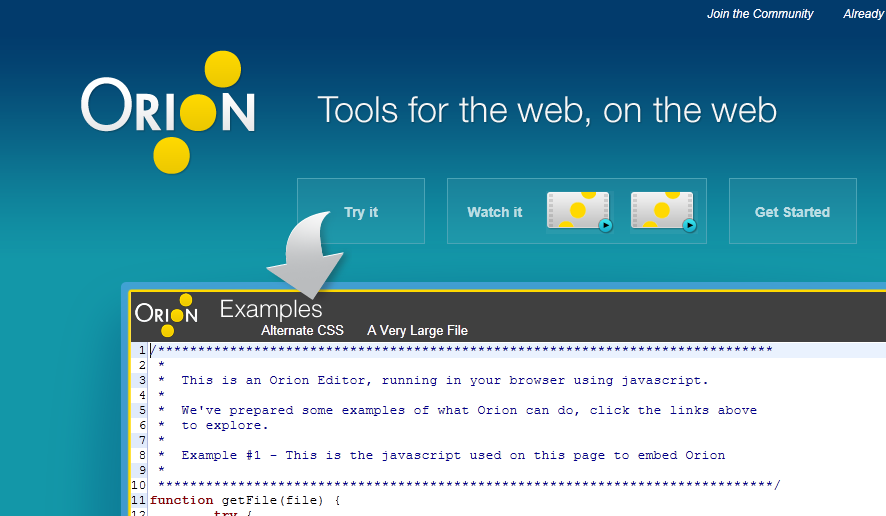
If you are interested in web-based IDEs, another interesting one is Orion, an Eclipse project.  Executive Director Mike Milinkovich says Orion will ship a 1.0 release later this year.

image

What is the best way to choose a development tool?

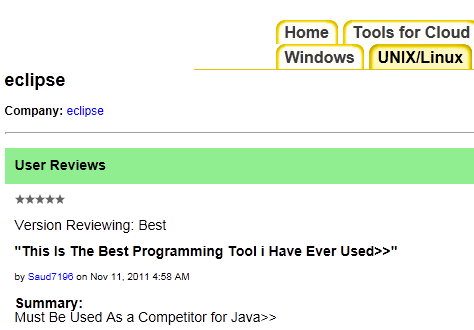
Research company Evans Data sent me a link this morning to its new Tool Grader service. This is a simple web application for reviewing and rating software tools. The same tool may rated separately rated for different platforms. For example, there is one entry for Eclipse under UNIX/Linux, and another separate one under Tools for Mobile.

I took a quick look and rate the site mostly useless. There are not many reviews, and most of the reviews are of little value, for example “This Is The Best Programming Tool i Have Ever Used,” from somebody who says that Eclipse “Must be used as a competitor for Java.”

image

The site would improve of course if a lot of people were to use it; but currently there is little incentive to do so, since most developers will take one look and never return. Evans Data could do better; it has a ton of data from surveys it has conducted and if it were to take some of the more useful data from those reports and integrate it with the Tool Grader the site would be more valuable. It will not do that I guess because its business model is to sell those reports, and because it would be a lot of work.

It gave me pause for thought though. What is the best way to choose a development tool? Part of the problem is that context is everything. The same tool will be great for one purpose and poor for another; it depends what you want it for, especially when it is a multi-faceted product like Eclipse or Visual Studio, both of which are really tool platforms.

If you are looking for information on which tool will be best for your project, I doubt that either Tool Grader or even purchasing an expensive report will help you much. One approach that has value is to install several candidates and try them out, but it takes considerable time and effort. Another idea is to go along to an active community like Stack Overflow, describe your project in some detail including any constraints like “our developers span three continents” or “the boss insists we use Rational ClearCase for source code management”, and ask for opinions from other users.

When I am assessing a tool I always try to visit forums where it is discussed and get a flavour of the types of problems and queries users have. If there is little discussion that suggests the tool is most likely little used, usually a bad thing. If the vendor has no open discussion on its site and emphasises the “contact support” route that suggests a weak community. I also look for potential showstoppers like instability or intractable problems such as difficulty wresting acceptable performance from either the tool or its output.

I do not pretend it is easy though. Tool choices are important because they have a significant impact on productivity, and it is hard to change your mind once you and your team have invested money, skills and code in a particular product.

Holiday season free giveaway: a must-read for developers

Among my top books for 2011 is this one by Jez Humble and David Farley. I reviewed it here, and it also sparked some discussion of what is the difference between the various continuous software development/deployment models.

I have a spare copy of this book to give away. All you need to do is comment to this post with a valid email address – this will not be posted or used for any other purpose, but I will use it to request your address if you win. Please do not include an URL as it risks being dumped in the spam bucket!

On  January 6th I will select a winner at random. I will post to anywhere in the world.

Update: I have selected a winner. To do so, I used Java’s Random class to generate a number between zero and one less than the number of comments. The number it came up with was 4, so the winner is Ian Smith, the 5th person to comment. Congratulations!


Adobe: why the big business shift when financial results look so good?

Adobe released its quarterly and full year results last week; I am catching up with this now after a week in China.

The company is doing well. Revenue is up by 11% year on year and it generated $1.5 billion in cash. It is buying back shares, usually a sign that a company has more money than it knows what to do with.

Here is the comparison with the equivalent quarter last year:

  Q4 2010 Q4 2011
Creative and interactive 404.8 437.2
Digital Media 165.9 186.4
Digital Enterprise 273.3 342.4
Omniture 109.0 131.1
Print and publishing 55 55.1

In other words, all business segments grew – impressive in uncertain economic times. See this earlier post for a rough breakdown of the segments.

A couple of observations. First, Adobe is benefiting from the big trend in IT towards web, cloud and device. Many companies regard apps (as in mobile apps) as vehicles for marketing, and Adobe’s tools are a natural fit, with or without Flash. We are in a more design-centric IT world than was the case a few years back, driven by Apple, SEO (Search Engine Optimisation), and just because we can: technology now performs basic computing functions with ease so design becomes the key differentiator.

Adobe is nevertheless remarkable in the way it has managed the transition from print to digital. Few companies manage that kind of fundamental shift in their market successfully.

The other point that interests me is why Adobe announced a major change in its business model in November. Digital media and marketing will be the focus, while it winds down its enterprise development platform, as well as moving away from Flash and focusing on HTML5 for delivery.

Unless the announced figures disguise future problems that are only visible on the inside, this move was driven by bad results. Digital Enterprise, which includes the middleware business, increased revenue by 25% over the same quarter last year.

In 2012 the Digital Enterprise segment is being renamed Digital Marketing Solutions, expressing the company’s intent.

Adobe’s change of direction caught me by surprise, as it was not really flagged at the MAX conference the previous month, though there was evidence of struggle with regard to Flash versus HTML5.

I would describe Adobe’s moves as bold. Taking action ahead of when it becomes inevitable is a good thing, but there are significant risks. Adobe’s platform is all about synergies, and chopping off bits that still have a significant following may have unexpected consequences.

Another curious facet of Adobe’s move is that its normally excellent PR department has done little, as far as I am aware, to brief the press. Major news concerning what will be donated to Apache, or the discontinuation of Flash Catalyst, has emerged from sporadic reports instead. Normally that is a sign of a company under stress, rather than one which is about to deliver excellent results.

I guess this time next year we will have a clearer picture.

Android: good or bad for Java? Oracle claims harm but I am sceptical

Patent blogger Florian Mueller quotes a statement filed by Oracle in its legal dispute with Google over its use of the Java language in Android:

Android’s growth in the mobile device market has been exponential, steadily diminishing Java’s share. For instance, Amazon’s newly-released Kindle Fire tablet is based on Android, while prior versions of the Kindle were Java-based. Android has been gaining in other areas as well, with Android-based set-top boxes and even televisions appearing this year. These are markets where Java has traditionally been strong but is now losing ground to Android. The longer Android is allowed to continue fragmenting the Java ecosystem, the more serious the harm to Java becomes, and the more difficult it is to try to unwind. Oracle suffers harm in the form of lost licensing opportunities for its existing Java platform products, and the enterprise-wide harm from fragmentation of Java, which reduces the ‘write once, run anywhere’ capability that has historically provided Java such great value.

The Kindle is an interesting example. I had not realised that the pre-Fire Kindle runs Java, but Oracle shows it as a case study and indeed, here are the javadocs.

Android infuriates Oracle because it uses the Java language, but has its own virtual machine called Dalvik. Dalvik bytecode is different from Java bytecode.

I have no expertise on the legal position, but while I can see Oracle’s point it is also true that Android has greatly boosted interest in Java development. Although Google has fragmented Java, the fact that the language is the same benefits Oracle insofar as it increases the pool of Java developers who may also be inclined to create Java applications on the server or in other contexts.

The interesting question to ask is where Java would be without Android. On mobile, it would likely be close to death. Apple’s iOS platform is equally as resistant to Java as to Adobe Flash. RIM Blackberry used to be a Java platform, but is moving away:

While we will continue to support our BlackBerry Java developer community as they build for BlackBerry smartphones, after further investigation we decided against supporting BlackBerry Java on BlackBerry BBX. We concluded that the BlackBerry Java experience on the BlackBerry PlayBook platform would ultimately not satisfy us, our development community, or our customers as the platform continues to evolve.

Microsoft has no interest in Java on the Windows Phone OS or in the Windows 8 OS that will likely replace it on devices.

Oracle’s claim is in the context of a legal dispute, and as Mueller observes, the company is happy to show off growing interest in Java in its press releases – though without mentioning the A word.

Of course you can understand why Oracle might want to enjoy the benefit of Java’s Android boost as well as the reward of a legal victory over Google.

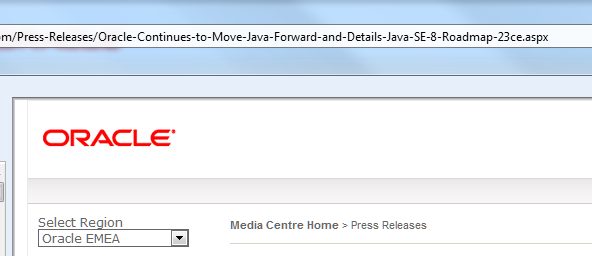
PS: interesting that Oracle’s Java press release seems to be served by Microsoft .NET:

image

Adobe discontinues Flash Catalyst, clarifies Flex and Flash Builder futures

Adobe has told a group of Flex developers, invited to San Francisco for a special reconciliatory summit following the sudden announcement that Flex is moving to the Apache Foundation, that Flash Catalyst will be discontinued. Developer Fabien Nicollet was there and posts:

CS5.5 version of Catalyst is the latest version of Flash Catalyst. It is compatible with Flex 4.5, but compatibility will not be ensured for future versions.

Flash Builder will also have features removed in future versions. Adobe’s slide talks of:

Removing unpopular and expensive to maintain features: Design View, Data Centric Development (DCD) and Flash Catalyst workflows.

The Monocle profiler, shown at the MAX conference as a sneak peek, “continues as a priority”.

The FalconJS project, to compile Flex to HTML5, will be discontinued, though possibly donated to Apache at a date to be determined.

AIR on Linux will not be given to Apache because it would mean sharing the proprietary Flash Player code. This is bad news in the Apache context.

Nicollet concludes:

Flex still has a bright future for companies who want to build fast and robust applications . Not to mention the people who will have a hard time building complex applications on HTML5, for whom Flex will always be a viable and mature alternative.

That is the optimistic view. What is clear from the summit is that Adobe is greatly reducing its investment. I guess we knew this already; but hearing about how Flash Builder will be cut-down, Catalyst discontinued, and so on, will not improve developer confidence.

A lot depends on the progress of the Apache project. My concern here is that since the Flash player, which is the Flex runtime, remains proprietary, this will dampen enthusiasm in the open source community and limit its ability to innovate around Flex.

NVIDIA plans to merge CPU and GPU – eventually

I spoke to Dr Steve Scott, NVIDIA’s CTO for Tesla, at the end of the GPU Technology Conference which has just finished here in Beijing. In the closing session, Scott talked about the future of NVIDIA’s GPU computing chips. NVIDIA releases a new generation of graphics chips every two years:

  • 2008 Tesla
  • 2010 Fermi
  • 2012 Kepler
  • 2014 Maxwell

Yes, it is confusing that the Tesla brand, meaning cards for GPU computing, has persisted even though the Tesla family is now obsolete.
image
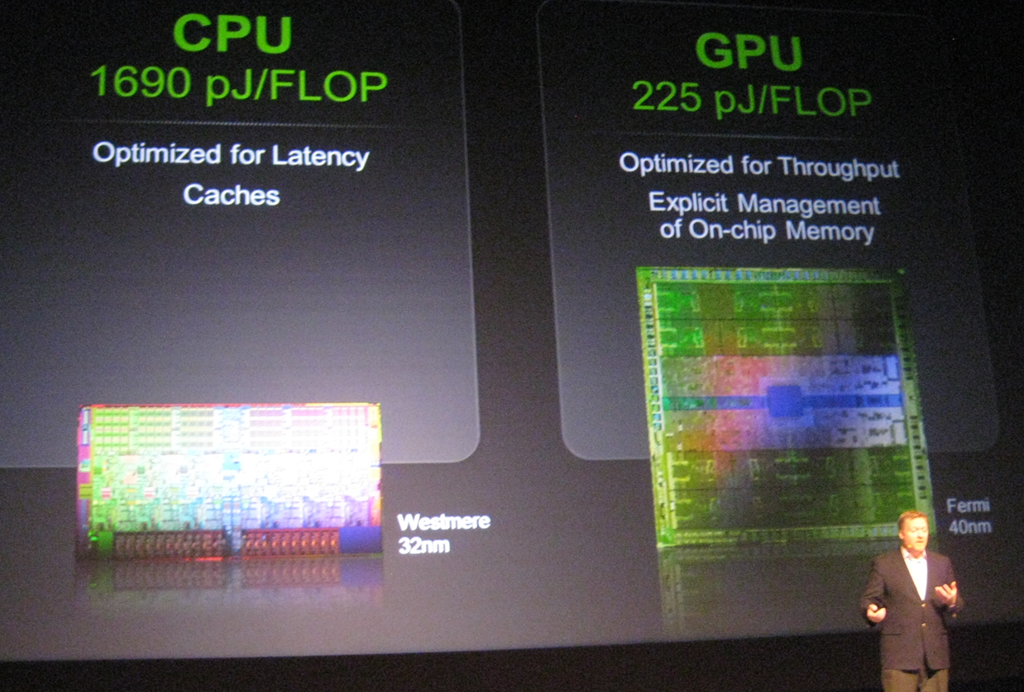
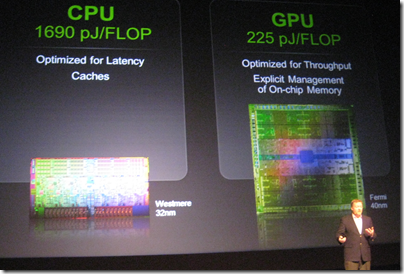
Dr Steve Scott showing off the power efficiency of GPU computing

Scott talked a little about a topic that interests me: the convergence or integration of the GPU and the CPU. The background here is that while the GPU is fast and efficient for parallel number-crunching, it is of course still necessary to have a CPU, and there is a price to pay for the communication between the two. The GPU and the CPU each have their own memory, so data must be copied back and forth, which is an expensive operation.

One solution is for GPU and CPU to share memory, so that a single pointer is valid on both. I asked CEO Jen-Hsun Huang about this and he did not give much hope for this:

We think that today it is far better to have a wonderful CPU with its own dedicated cache and dedicated memory, and a dedicated GPU with a very fast frame buffer, very fast local memory, that combination is a pretty good model, and then we’ll work towards making the programmer’s view and the programmer’s perspective easier and easier.

Scott on the other hand was more forthcoming about future plans. Kepler, which is expected in the first half of 2012, will bring some changes to the CUDA architecture which will “broaden the applicability of GPU programming, tighten the integration of the CPU and GPU, and enhance programmability,” to quote Scott’s slides. This integration will include some limited sharing of memory between GPU and CPU, he said.

What caught my interest though was when he remarked that at some future date NVIDIA will probably build CPU functionality into the GPU. The form that might take, he said, is that the GPU will have a couple of cores that do the CPU functions. This will likely be an implementation of the ARM CPU.

Note that this is not promised for Kepler nor even for Maxwell but was thrown out as a general statement of direction.

There are a couple of further implications. One is that NVIDIA plans to reduce its dependence on Intel. ARM is a better partner, Scott told me, because its designs can be licensed by anyone. It is not surprising then that Intel’s multi-core evangelist James Reinders was dismissive when I asked him about NVIDIA’s claim that the GPU is far more power-efficient than the CPU. Reinders says that the forthcoming MIC (Many Integrated Core) processors codenamed Knights Corner are a better solution, referring to the:

… substantial advantages that the Intel MIC architecture has over GPGPU solutions that will allow it to have the power efficiency we all want for highly parallel workloads, but able to run an enormous volume of code that will never run on GPGPUs (and every algorithm that can run on GPGPUs will certainly be able to run on a MIC co-processor).

In other words, Intel foresees a future without the need for NVIDIA, at least in terms of general-purpose GPU programming, just as NVIDIA foresees a future without the need for Intel.

Incidentally, Scott told me that he left Cray for NVIDIA because of his belief in the superior power efficiency of GPUs. He also described how the Titan supercomputer operated by the Oak Ridge National Laboratory in the USA will be upgraded from its current CPU-only design to incorporate thousands of NVIDIA GPUs, with the intention of achieving twice the speed of Japan’s K computer, currently the world’s fastest.

This whole debate also has implications for Microsoft and Windows. Huang says he is looking forward to Windows on ARM, which makes sense given NVIDIA’s future plans. That said, the I get impression from Microsoft is that Windows on ARM is not intended to be the same as Windows on x86 save for the change of processor. My impression is that Windows on ARM is Microsoft’s iOS, a locked-down operating system that will be safer for users and more profitable for Microsoft as app sales are channelled through its store. That is all very well, but suggests that we will still need x86 Windows if only to retain open access to the operating system.

Another interesting question is what will happen to Microsoft Office on ARM. It may be that x86 Windows will still be required for the full features of Office.

This means we cannot assume that Windows on ARM will be an instant hit; much is uncertain.
NVIDIA CEO Jen-Hsun Huang beats the drum for GPU computing

In his keynote at the GPU Technology Conference here in Beijing NVIIDA CEO Jens-Hsun Huang presented the simple logic of GPU computing. The main constraint on computing is power consumption, he said:

Power is now the limiter of every computing platform, from cellphones to PCs and even datacenters.

CPUs are optimized for single-threaded computing and are relatively inefficient. According to Huang a CPU spends 50 times as much power scheduling instructions as it does executing them. A GPU by contrast is formed of many simple processors and is optimized for parallel processing, making it more efficient when measured in FLOP/s (Floating Point Operations per Second), a way of benchmarking computer performance. Therefore it is inevitable that computers make use of GPU computing in order to achieve best performance. Note that this does not mean dispensing with the CPU, but rather handing off processing to the GPU when appropriate.

This point is now accepted in the world of supercomputers. The computer at Chinese National Supercomputing Center in Tianjin has 14,336 Intel CPUs, 7168 Nvidia Tesla GPUs, and 2048 custom-designed 8-core CPUs called Galaxy FT-1000, and can achieve 4.7 Petaflop/s for a power consumption of 4.04 MegaWatts (million watts), as presented this morning by the center’s Vice Director Xiaoquian Zhu. This is currently the 2nd fastest supercomputer in the world.

Huang says that without GPUs the world would wait until 2035 for the first Exascale (1 Exaflop/s) supercomputer, presuming a power constraint of 20MW and current levels of performance improvement year by year, whereas by combining CPUs with GPUs this can be achieved in 2019.

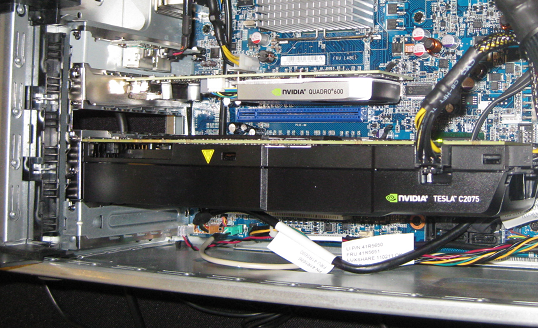
Supercomputing is only half of the GPU computing story. More interesting for most users is the way this technology trickles down to the kind of computers we actually use. For example, today Lenovo announced several workstations which use NVIDIA’s Maximus technology to combine a GPU designed primarily for driving a display (Quadro) with a GPU designed primarily for GPU computing (Tesla). These workstations are aimed at design professionals, for whom the ability to render detailed designs quickly is important. The image below shows a Lenovo S20 on display here. Maybe these are not quite everyday computers, but they are still PCs. Approximate price to follow soon when I have had a chance to ask Lenovo. Update: prices start at around $4500 for an S20, with most of the cost being for the Tesla board.

image

GPU computing with NVIDIA in Beijing

I’m in Beijing for NVIDIA’s GPU Technology Conference; I attended last year’s event in San Jose and found it fascinating, partly because it has an academic and research flavour with a huge variety of projects on display.

This year the event is in Beijing, reflecting the level of HPC (High Performance Computing) activity in this region.

image

image

NVIDIA’s business is graphics processors, though it has expanded into the SoC (System on a chip) business with its ARM-based Tegra chipset. This conference though is focused at the other end of the scale: Tesla GPUs that are primarily designed not for driving a display, but for rapid processing using massively parallel computing.

The Tesla business is relatively small for NVIDIA; less than 5% of its overall revenue, I was told; and I was told that the company treats it partly as research and development. That said, GPU computing is coming into the mainstream and the business is expected to grow. NVIDIA’s desktop GPU cards also support GPU computing.

I recently reviewed a video format converter from Cyberlink; the product was unexceptional except that it can take advantage of GPU computing when available to speed processing when converting from one video format to another. Since I do have a suitable graphics card (though sadly not a Tesla) this made a substantial difference, converting several times faster than another format converted I tried.

Of course NVIDIA is not the only player; there is an open standard (OpenCL) for GPU computing and other GPU vendors such as AMD implement OpenCL. NVIDIA implements OpenCL but also has its own CUDA architecture, which tends to be the focus of its conference as you would expect.

More reports soon.