Category Archives: software development

Silverlight 5 is done. Is Silverlight also done?

Microsoft has has announced the release of Silverlight 5.0.

image

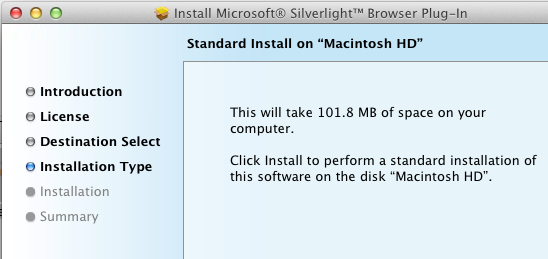
Silverlight is a cross-platform, cross-browser plug-in for Windows and Mac. It is relatively small size – less than 7MB according to Microsoft, though the Mac version seems to be bigger, with a 14MB compressed setup .dmg and apparently over 100MB once installed:

image

Never mind, it is a fine piece of work and has considerable capabilities, including the .NET Framework, the ability to render a GUI defined in XAML, multimedia playback, and support for applications running inside the browser or on the desktop. New in version 5 is better H.264 performance, 3D graphics, and Platform Invoke support on Windows enabling trusted applications to call the native API. Another change is that in-browser applications can also run with full trust, again only on Windows. The cross-platform idea has become increasingly diluted.

If Microsoft had come up with Silverlight early in the .NET story it might have become a major application platform. As it is, while still useful in some contexts, the technology has been side-lined by new things including HTML 5 and the Windows Runtime in the forthcoming Windows 8.

While I have huge respect for the team which created Silverlight and rapidly improved it, it now looks a sad story of reactive technology that failed to capture sufficient developer support. Microsoft invented Silverlight when Adobe Flash looked like it might take over as a universal runtime for web applications. The outcome was that Adobe evolved Flash with renewed vigour, keeping Silverlight at bay. Then Apple invented a new platform called iOS that supported neither Flash nor Silverlight, and the whole plug-in strategy began to look less compelling. Adobe has now reduced its focus on Flash, while Microsoft has been signalling a reduced role for Silverlight since its Professional Developers Conference in October 2010.

The question now is whether there will ever be a Silverlight 6.

Microsoft itself uses Silverlight across a number of products, such as administrative consoles for various server applications. Silverlight will be around for a while yet. Of course it is also the runtime for Windows Phone 7. Visual Studio LightSwitch generates Silverlight applications, and this one I am rather sad about, because it is an interesting tool that now seems to target the wrong platform. Perhaps the team will create an HTML 5 version one day.

Not allowed in Windows 8 Metro: porn, ads in live tiles, bugs, or opt-out data collection

Microsoft’s newly published Certification Requirements for the forthcoming Windows 8 store includes some notable points. Here are a few that caught my eye.

2.3 Your app must not use tiles or notifications for ads

No complaints about that one.

3.2 Your app must not stop responding, end unexpectedly, or contain programming errors

Hmm, this could be a tough one.

3.3 Your app must provide the same user experience on all processor types

OK, no “Intel-only” features. However you could by implication submit an “Intel-only” version of your app as long as it is called something different than than the ARM version.

3.7 Your app must not use an interaction gesture in a way that is different from how Windows uses the gesture

This is interesting as an example of enforcing application style guidelines. The intent is a consistent user experience, but is this heavy-handed?

4.1 Your app must obtain opt-in or equivalent consent to publish personal information

No stealthy personal data collection. A good thing; though if opt-in means “Hand over your data or you cannot run the app” it can still be difficult for users to avoid.

4.4 Your app must not be designed or marketed to perform, instruct, or encourage tasks that could cause physical harm to a customer or any other person

What a relief!

5.1 Your app must not contain adult content

Windows Metro a porn-free zone? This could be troublesome though. No games beyond PEGI 16? This is a preliminary document and it would not surprise me if there is some change here; maybe this is a restriction for the beta period only.

Windows Store: Microsoft explains another piece of its new platform

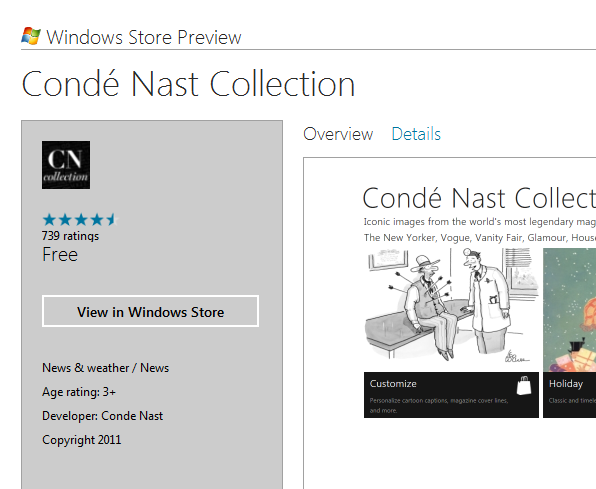
Microsoft’s Ted Dworkin, Partner Progam Manager, has posted details of how the forthcoming Windows Store will work. There is also detailed new information on MSDN. It is a key piece if you care about the next version of Windows, including details of how enterprises will be able to deploy apps as well as the terms of business for independent developers.

image

Here is a quick summary:

  • The store is both an app and a web site. The same content will automatically appear in both.
  • The store is for Metro-style apps, which run on the Windows Runtime. No word about desktop apps; my presumption is that they are excluded. The certification requirements refer only to Metro-style apps.
  • Apps can be offered as full-featured, limited or unlimited trial, upgradeable via in-app purchases.
  • Enterprise apps can be deployed through the store with access limited to employees.
  • Enterprise apps can also be deployed outside the store, using PowerShell scripts to domain-joined machines. Apps must be signed.
  • App vendors can use their own transaction engine and/or ad service if they choose, or use the built-in services for sale, in-app purchase and advertising. Subscriptions do not have to go through the store. My impression is that the initial sale does not have to be transacted through the store either but this is not 100% clear to me.
  • Developer registration for the store costs $49.00 for individuals or $99.00 for companies.
  • Revenue share is 70%, rising to 80% if you achieve over $25,000 revenue for an app.
  • Apps are subject to approval, but developers are given the App Certification Kit as part of the SDK. There is still scope for disagreement over the interpretation of policies.


There is an initial beta preview period during which all apps will be free. Microsoft has also annoyed most of the world’s developers by restricting a First Apps Contest to those who:

 are a developer – professional, hobbyist, or student – and you are a legal resident of the 50 United States and District of Columbia, France, Germany, Japan, or India

Oxygene for Java released: develop for Android and Java runtime with Delphi language in Visual Studio

RemObjects has released Oxygene for Java, a new version of its Object Pascal compiler. Object Pascal is pretty much the Delphi language though with some additional features of its own. Previous versions target the .NET runtime, and a version of this is marketed by Embarcadero as Prism. The IDE for Oxygene is Microsoft’s Visual Studio. This new version targets both the Java Runtime and the Android Dalvik VM. The obvious target market is Delphi developers who now want to create apps for Android, or cross-platform Java applications.

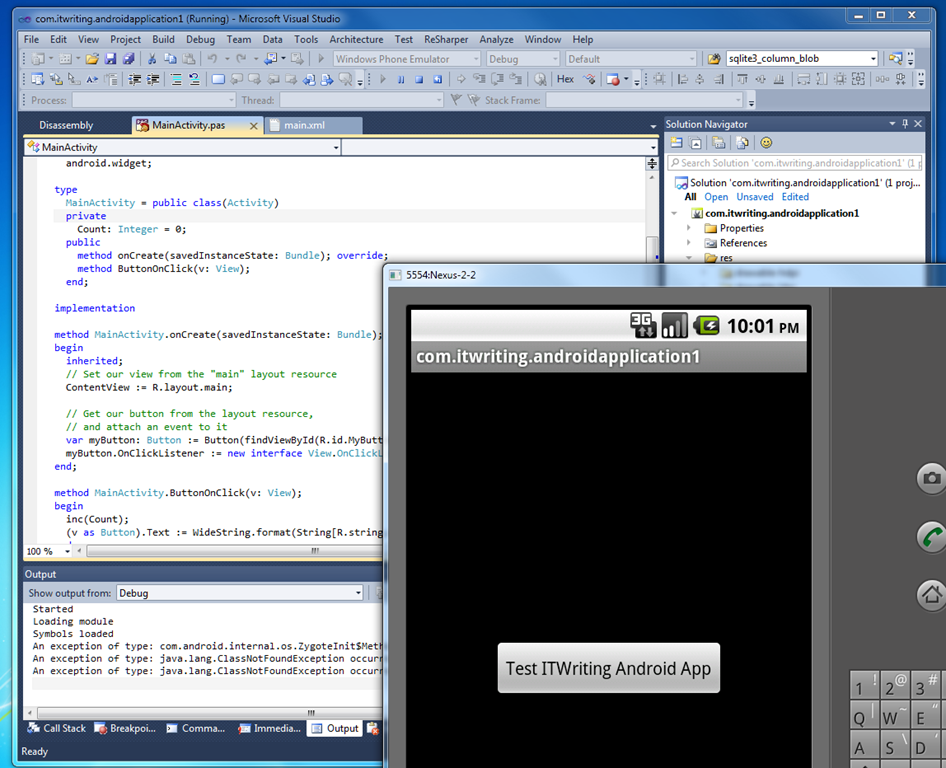
I downloaded the trial and ran the supplied Hello World in the Android emulator … it works.

image

A few further notes from the RemObjects announcement. While only Visual Studio is supported initially, an Eclipse version is also in preparation. Oxygene directly consumes .JAR libraries so you can use both first and third-party libraries. There is also a tool called Oxidizer that lets you import Java language code, which will be converted to Oxygene Object Pascal.

A point to note is that Embarcadero has already announced that its cross-platform FireMonkey framework will support Android as well as Apple iOS. This means that developers who want to code for Android in the Delphi language will have two choices. It looks to me as if Oxygene will be more suitable if you want to stay close to the Android SDK, whereas FireMonkey has its own custom-drawn user interface widgets and effects and should come into its own if you want the same code to run on both iOS and Android.

Given that a skilled Delphi developer would probably learn Java fairly quickly, how much value is there in Oxygene for Java? I guess factors include how much more productive you can be in Oxygene and the value of sharing code across projects targeting different platforms, presuming that you do not want to run Java everywhere.

Sencha’s Michael Mullany talks about Flash developers “flailing around for an alternative” and the Big App Rewrite

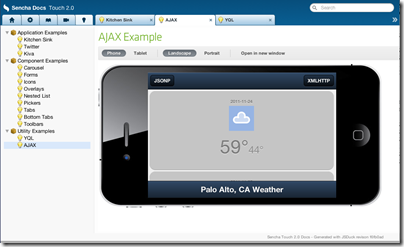
I spoke to Michael Mullany, CEO of Sencha, a company which creates HTML5 frameworks and tools for desktop and mobile browsers. Ext JS is aimed at desktop browser applications, while Sencha Touch is for mobile devices, currently Apple iOS, Google Android and Blackberry 6+. Sencha’s tools include Ext Designer, a visual application builder for Ext JS, and Sencha Animator, a designer for CSS 3 animations. Sencha Touch apps can also be packaged as native apps for iOS or Android.

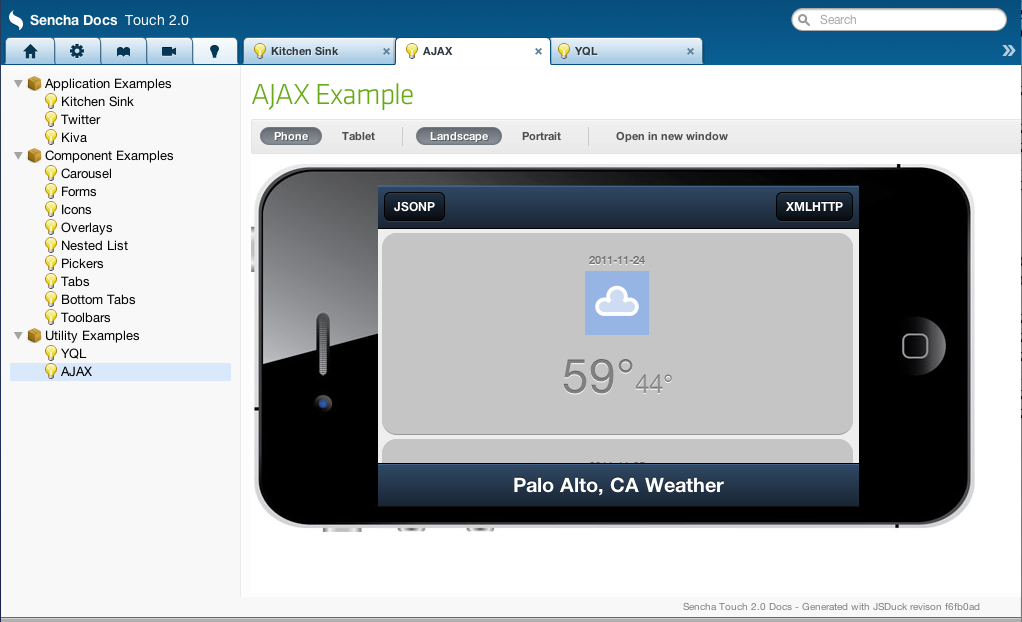
At its developer conference in Austin USA earlier this month, attended by around 600, the company announced Sencha.io, a cloud service for mobile web apps, as well as presenting Sencha Touch 2.0, a major update.
image

Mullany talks on his blog about “The Big App Rewrite”:

It’s a world where HTML5 powers the client apps, and they’re enriched with local APIs that execute on everything from traditional desktops to Smart TV’s. And cloud services provide the fabric that enables continuous, shared experiences across the diversity of end-devices. We think this is the platform for the web.

Sencha is perfectly in tune with the trends towards cloud, HTML5 and mobile, which is why I was keen to speak to Mullany. I asked him to contrast Ext JS and Sencha Touch with JQuery and JQuery Mobile.

JQuery is a pretty tiny library that helps with Dom abstraction and animations but that’s it. JQuery UI gives you some visual components as well but Ext-JS is the full enchilada. It’s supposed to be the web equivalent of Cocoa or the Microsoft Windows presentation foundation. It’s got an event system, a theming system, a very rich set of user interface controls, its object oriented, and it’s got a complex layout system so you can build nested layouts that have very complex event handling among different parts of the user interface. We’ve seen user interfaces that have several thousand data elements on a page.

It also has a model-view-controller architecture library on the client side so you can structure your code properly for large applications, it’s got a theming system so you can variable-ise your colours, shapes and look and feel very easily. It also has a full data package so you can do very rich data manipulation on the client, bind data in various complex ways across variables, it’s very different than J query.

And just like you’d probably never use Ext-JS on a public web page, you’d never use JQuery to build something like Marketo or Salesforce VisualForce or a Documentum content management system, all of which use Ext-JS. Ext-JS is one of the most popular behind the firewall development libraries for desktop development.

Now on the mobile side the difference is slightly less. JQuery mobile does give you a set of user interface widgets, but the difference is also similar to the desktop … Sencha Touch is designed to let you do anything you could do with Cocoa Touch or an Android SDK or a Windows Mobile SDK. Its intent is to equip you to develop native quality experiences with native style interaction, things like fixed user interface chrome, multiple independent scrollable areas, nested layouts, those kinds of capabilities.

Our performance tends to be better cross-platform, we’ve done more performance work, we have our theming system, we have an MVC library, we have a templating system. With JQuery mobile you tend to want to add multiple things together and you can certainly assemble a collection of things that will look like Sencha Touch, but Sencha Touch is designed to be integrated, everything is designed to work the same, and the general feedback is that even though Sencha Touch is a much richer system that takes some insight to learn, you get better applications out of it.

I also asked about the new cloud service, Sencha.io. A notable feature is that according to Mullany developers do not have to touch the code that runs on the cloud, they just call its API from the client:

We call it the first client-centric HTML5 cloud, which is a set of authentication, data, data synchronisation, and geo-location services that help people build mobile applications without needing to write server side code. So you literally write your client side application in HTML 5 using Sencha SDKs and then you store your user’s data and you store your user’s authentication credentials in our cloud. You don’t have to worry about mucking around with anything from Ruby on Rails to PHP to Java, it’s all abstracted behind these very clean APIs. We think that’s the future of mobile development, that you’ll have these very thin abstracted server-side services, and and these very rich mobile clients that have off-line state and local data storage powered by HTML5. We think that model is the future of mobile web development and we obviously hope that Sencha.io will be the most popular back-end.

Sencha’s frameworks are open source and dual-licenced. You can use both Touch and Ext JS freely under the terms of the GPL v3. There is also free commercial licencing for Sencha Touch, while commercial licences for Ext JS are paid for. Sencha also has commercial tools, and I asked Mullany to describe the tool products:

We really see the three legs of the business being cloud, tools, and SDKs. We just did a preview of the Sencha Designer 2.0 release at our conference. That has support for Sencha Touch in it so you can drag and drop Sencha touch applications together and then actually package them from within the tool. The intent is also to allow you to hook up to cloud APIs from within the tool as well so it is an integrated, easy-to-use visual application builder for both desktop and touch. So that’s targeted at developers.

Sencha Animator is a little bit different. There’s no JavaScript in it really at all. It is a pure CSS 3 animation tool, and it is a traditional visual timeline with keyframe manipulation, and a style visual editor for creating rich animations.

The market we’re targeting for that is people doing interactive brand advertising on mobile. That’s where you have ubiquitous support for CSS 3 animations that are hardware accelerated so they tend to be the best performance. It’s also very web content friendly so you don’t have to write your application in Sencha Touch just to use Animator, it’s pure CSS output that you drop into whatever piece of content that you want to build.

The reason we built it is because we saw people flailing around for an alternative to doing Flash ads on mobile. Because Flash was banned from iOS, it meant that a whole segment of rich advertising that was based on Flash for the desktop had nowhere to go. They weren’t going to build native iOS applications, it had to be web. So the question then was what do you build it in, do you use JavaScript animation, do you use SVG, do you use Canvas, do you use some of the other graphic technologies such as Web GL? The answer is that CSS 3 is really the highest performance and cognitively pretty easy to wrap your head around.

People “flailing around for an alternative to doing Flash ads?” Mullany has his own agenda, but his comments do highlight the problems caused for Adobe by the success of Flash-free iPhone and iPad. I cannot help thinking that Sencha would be an attractive acquisition for Adobe or certain other companies, but I am sure smarter people than myself have thought of that.

Post sponsored by Monster for the best in IT jobs.

Microsoft backs ECMAScript, dismisses Google Dart

Microsoft has posted an article on Evolving ECMAScript on its IE Blog. ECMAScript is the official standard for what we call JavaScript. The company is proposing some minor additions “to address gaps in Math, String and Number functionality as well as Globalization.” It has also taken the opportunity to take a shot at Google, which is proposing a new web language called Dart:

Some examples, like Dart, portend that JavaScript has fundamental flaws and to support these scenarios requires a “clean break” from JavaScript in both syntax and runtime. We disagree with this point of view. We believe that with committee participant focus, the standards runtime can be expanded and the syntactic features necessary to support JavaScript at scale can be built upon the existing JavaScript standard.

Dart will compile to JavaScript so there is a measure of compatibility, but if the language catches on then browsers without a native implementation will be disadvantaged.

What is the best programming language for a child progressing from Scratch?

Someone asked me what is the best programming language for a child to learn after starting (and having success) with Scratch.

Scratch is a visual programming language which actually runs on Smalltalk, though its users do not need to know this. Scratch 2.0 seems to be written in Adobe Flash so you can create and program projects in a web browser. As far as I can tell though, there is no obvious and natural progression from Scratch to a code-centric programming language.

I guess the first answer is not to move away from Scratch until you need to. You can do a lot with Scratch, as the many shared projects demonstrate.

Still, I agree that it makes sense to learn text-based programming before too long. What is the best one for a child to learn, not necessarily with computer science or a professional career in mind, but just to take the next step and create some cool games and applications?

I find myself leaning towards Microsoft’s C#. The reason is that there is a capable free version and  you can add XNA Game Studio for game development. C# is an excellent language and has some family resemblance to other languages including C, C++, Java and JavaScript, and Visual Studio is a strong IDE that is perhaps more approachable than say Eclipse or Netbeans.

Snags with C# are that Visual Studio only runs on Windows, the language is proprietary to Microsoft (though Mono is free and open source) and it is not ideal if you want to run on the Mac, or Google Android or Apple iPad.

That said, I could also make a case for Java, or JavaScript, or Python.

I would value suggestions though: what would you recommend to a teenager?

Adobe’s Falcon JS: Compile Flex code to HTML and Javascript

Adobe has issued further information about its intention to donate the Flex SDK, which builds Flash applications from XML and ActionScript, to the Apache Software Foundation. Specifically, the donation will include:

  • BlazeDS, the free version of LiveCycle Data Services
  • Falcon, the new Flex compiler due to be completed in 2012
  • Falcon JS, a previously unannounced project

Of these, Falcon JS is the most eye-catching. This is an “experimental cross-compiler from MXML and ActionScript to HTML and JavaScript.” In other words, Falcon JS has the potential to give developers a migration path from Flash to HTML clients. Note that it is described as a cross-compiler rather than a porting tool, so it may well be that the output is not easily edited. The Google Web Toolkit works like this, converting Java to JavaScript but not in a form that anyone is expected to edit. Adobe also adds:

We have undertaken some experimental work in this area, but remain unsure as to the viability of fully translating Flex-based content to HTML. The Falcon JS cross-compiler, referenced above, represents this early work.

What about the most sensitive of Adobe’s statements, that HTML is the long-term solution for enterprise applications? Adobe says:

In time (and depending upon your application, it could be 3-5 years from now), we believe HTML5 could support the majority of use cases where Flex is used today.

and adds:

We intend to make investments in HTML-related technologies, so that we can help advance HTML5 to make it suitable for enterprise applications.

I am not sure to what extent the new statement will ease the worries of Flex developers; but at least Adobe is clear about its intentions. While there are benefits in the Flex SDK moving to Apache, overall the message is that Adobe is hastening towards HTML 5. I am surprised, considering the progress the company has made in creating a strong cross-platform toolkit for mobile and desktop applications. Although no-one should doubt that Adobe will continue to support and evolve Flex as a development platform, it has in effect declared it to be a legacy technology, and I would guess that the effect will be to depress the level of activity there.

GPU programming coming to low-power and mobile devices – from EU Mont Blanc supercomputer to smartphones

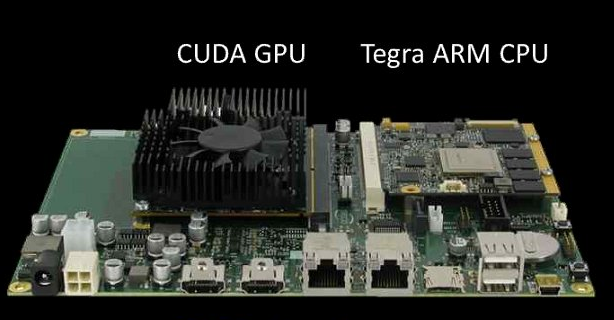
Supercomputing and low-power computing are not normally associated; but at the SC11 Supercomputing conference the Barcelona Supercomputing Center (BSC) has announced a new supercomputer, called the called the Mont-Blanc Project, which will combine the ARM-based NVIDIA Tegra SoC with separate CUDA GPUs. CUDA is NVIDIA’s parallel computing architecture, enabling general purpose computing on the GPU.

The project’s publicity says this enables power saving of 15 to 30 times, versus today’s supercomputers:

The analysis of the performance of HPC systems since 1993 shows exponential improvements at the rate of one order of magnitude every 3 years: One petaflops was achieved in 2008, one exaflops is expected in 2020. Based on a 20 MW power budget, this requires an efficiency of 50 GFLOPS/Watt. However, the current leader in energy efficiency achieves only 1.7n GFLOPS/Watt. Thus, a 30x improvement is required.

NVIDIA is also creating a new hardware and software development kit for Tegra + CUDA, to be made available in the first half of 2012.

image

The combination of fast concurrent processing, low power draw and mobile devices is enticing. Features like speech recognition and smart cameras depend on rapid processing, and the technology has the potential to make smart devices very much smarter.

NVIDIA has competition though. ARM, which designs most of the CPUs in use on smartphones and tablets today, has recently started designing mobile GPUs as well, and its Mali series supports OpenCL, an open alternative to CUDA for general-purpose computing on the GPU. The Mali-T604 has 1 to 4 cores while the recently announced Mali-T658 has 1 to 8 cores. ARM specifically optimises its GPUs to work alongside its CPUs, which must be a concern for GPU specialists such as NVIDIA. However, we have yet to see devices with either T604 or T658: the first T604 devices are likely to appear in 2012, and T658 in 2013.

New OpenACC compiler directives announced for GPU accelerated programming

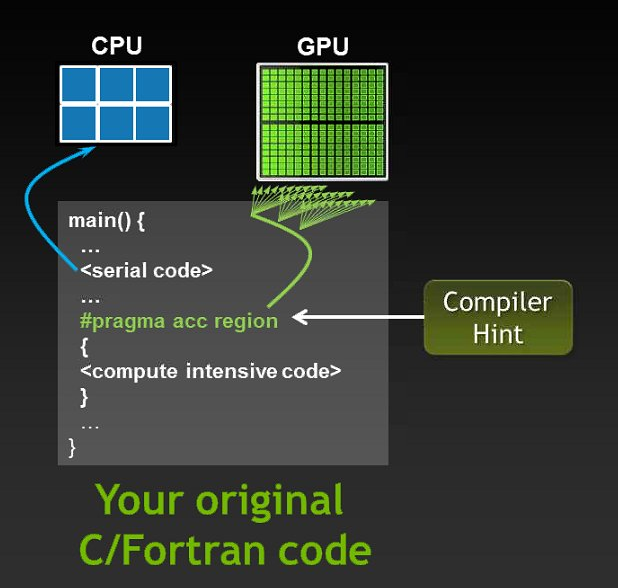
A new standard for accelerating C/C++ programming with compiler directives has been announced at the SC11 Supercomputing conference in Seattle. The new standard is called OpenACC  and has been created by NVIDIA, Cray, PGI (Portland Group) and CAPS enterprise.

OpenACC compiler directives are code annotations that enable the compiler to parallelise code while ensuring thread-safety. The big difference between OpenACC and the existing OpenMP standard is that OpenACC primarily targets the GPU rather than CPU, whereas OpenMP is generally CPU only. That said, OpenACC can also target the CPU so it is flexible; the idea is that it will adapt to the target system.

image

OpenACC is “defined to be interoperable with OpenMP” according to the FAQ and the OpenACC CEO hopes for some future integration, though it seems to have been developed independently which may cause some tension.

OpenACC is expected to ship during the first half of 2012 on compilers from PGI, Cray and CAPS Enterprise. The NVIDIA involvement may make you wonder whether it is GPU-specific; the answer is “maybe”. The FAQ says:

Will OpenACC run on AMD GPUs?

– It could, it requires implementation, there is no reason why it couldn’t

Will OpenACC run on top of OpenCL?

– It could, it requires implementation, there is no reason why it couldn’t

Will AMD/Intel/MS/XX support this?

– As this is just announced we can’t speak to the rate of external adoption or participation.

Will OpenACC run on NVIDIA GPUs with CUDA?

– Yes. Programmers may wish to develop some code using directives, and more sophisticated code using CUDA C, CUDA C++ or CUDA Fortra

Spot the Yes in the above! Still, you can scarcely blame NVIDIA for supporting its own GPU family; and I have been impressed with how the company works with the scientific and academic community to realise the potential of massively parallel computing.

OpenACC is about democratising parallelism, rather than advancing the state of the art. Best optimisation is obtained by more complex programming, but directives make some remarkable performance improvements easy to achieve.