Tag Archives: android

Contract Bridge on a tablet: Funbridge vs Bridgebase vs Bridge Baron

Bridge is an ideal game for a tablet, well suited to touch control and the kind of game you can play for a few minutes or a few hours at a time, which is excellent for travellers.

So what are the choices? Here is a quick look at some favourites.

Funbridge is available for iPhone, iPad and Android. There are also versions for Windows and Mac. The Android edition is the newest but works fine, though of all of them it is the iOS release that is the nicest to use.

image

The way Funbridge works is that you always play against a computer, though this is on the internet rather than running locally, but your scores are compared with other humans playing the same hands. I have not tried the “Two players game” so I am not sure how that works, except that the other player has to be a “friend” in the Funbridge community system. It looks like you play with your friend against two bots.

Funbridge has a lot to like. The user interface is excellent, much the best of all the tablet bridge software I have used and better than most desktop bridge software too. There is a good variety of game options, including one-off games, tournaments of 5 games each, and a series ladder you can climb from 1 club to 7 no trumps. You can select one of 6 conventions, including ACOL, SAYC (American Standard), and 5 card major at three levels from beginner to expert. I think this is a hint that to get the best from Funbridge you should use the 5 card major system.

Another nice feature of Funbridge is that you can go back and replay a hand to try a different line of play. You can also see all the other scores on any hand, and how they were bid and played.

Funbridge is not perfect though. The bidding is eccentric at times, and it can be hard to persuade your partner bot to play in no trumps rather than a suit. There is definitely an art to winning at Funbridge that is a different from what it takes to win at a real bridge table.

Since you are playing against a cloud-based server, you can only play if you have an internet connection. Not so good for most flights.

Funbridge is a pay per game service. Currently 50 deals costs £1.49 (about 3p each) or if you pay more the per-deal cost falls to under 2p. Unlimited deals for a year costs £69.99.

That said, you can get 10 games a week for free, though you only get the 10 free games if you have no paid games in your account; slightly unfair to the paying customers.

Bridgebase is available for iPad, iPhone, Android and Amazon Kindle. Bridgebase also offers a browser-based game based on Adobe Flash. Like Funbridge, you can only play with an internet connection. You can either play with human opponents, or solo with three bots.

image

Of course human opponents are more fun, though there are advantages to playing with bots. No pressure, you can think for as long as you like, and none of the issues which afflict online bridge, such as players simply disappearing when in a bad contract, or being bad tempered if you make a mistake.

The Bridgebase user interface is OK though feels clunky compared to the smoothness of Funbridge. As in Funbridge, you can compare your score with other human players even if you play against bots. You cannot replay games, but you can undo your play which means you can easily cheat against the bots if you feel so inclined. Against humans your opponents have to approve an undo, which they will be reluctant to do other then in cases of genuine mis-taps.

The biggest problem with Bridgebase is the standard of the bots, which is much weaker than Funbridge. The play can be quite bizarre at times, sometimes excellent, sometimes daft.

A weak feature is that if your computer partner wins the auction, it also plays the contract, sometimes badly. I do not see the point of this. You may find yourself playing “hideous hog” style (Victor Mollo’s character who always tried to play the contract) as it is painful reaching a good contract but watching the bot throw it away.

Bridgebase is free to play, though there are subscription options online to get some extra features.

Bridge Baron is available for Android, iPad, iPhone, Amazon Kindle and Barnes and Noble Nook. It is inexpensive (£13.99 currently on the App Store) but you have to pay separately for each platform. Unlike the other two games, Bridge Baron runs entirely on your device, which is good if you are offline, but means you do not compare your score against other humans. You can set the standard from novice to advanced.

Bridge Baron plays well enough to be fun, though well short of the best computer players. You can replay games at will. You can compare your score against the Baron’s score, review the bidding and play, and undo your play at will. You can also ask for a hint from the Baron.

The Bridge Baron user interface is basic, a little worse than Bridgebase (though faster) and much worse than Funbridge. I do not know why the card icons are so small; it is like playing on a huge table.

image

Still, good fun and good value.

Conclusion

All three of these games have something to commend them. Funbridge for the best user interface and a standard good enough to be enjoyable despite a few eccentricities. Bridgebase for the option to play with real people, and for free play with bots. Bridge Baron for playing offline.

On the other hand, Bridgebase is spoilt by the poor play of its bots. Bridge Baron is dull because you cannot compare your score with other humans. Funbridge is the one I choose if I have some deals available, but can get expensive if you play a lot, and you will get annoyed with your computer partner from time to time.

There is nothing on a tablet that comes close to Jack Bridge for standard of play.

Finally, note there is no bridge app for Windows RT. So if you are a bridge addict with a Surface RT, you are out of luck.
IntelliJ IDEA: the best IDE for programming Android?

Late last year the JetBrains team released IntelliJ IDEA 12, the latest version of its Java IDE.

Java today has many roles, but two dominate. One is server-side programming using one of many Java application servers, while the other is coding Android apps. IntelliJ IDEA has the former role well covered, though this is the first release with full support for Java 8, but Android development is less mature, though it seems to me that it has now come together.

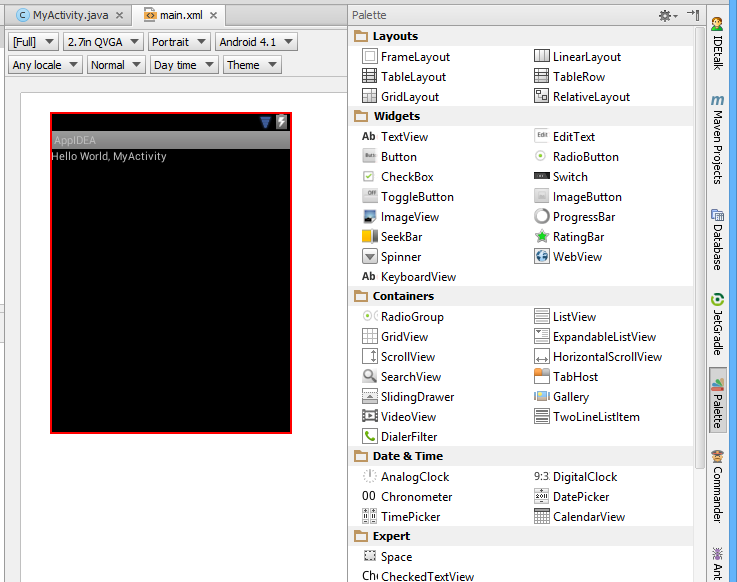
The big new feature for Android is the inclusion of a visual user interface designer. Standard Android layouts are defined in XML, and the IntelliJ IDEA tool is a two-way designer that lets you flip between visual and code views. I found it to work well.

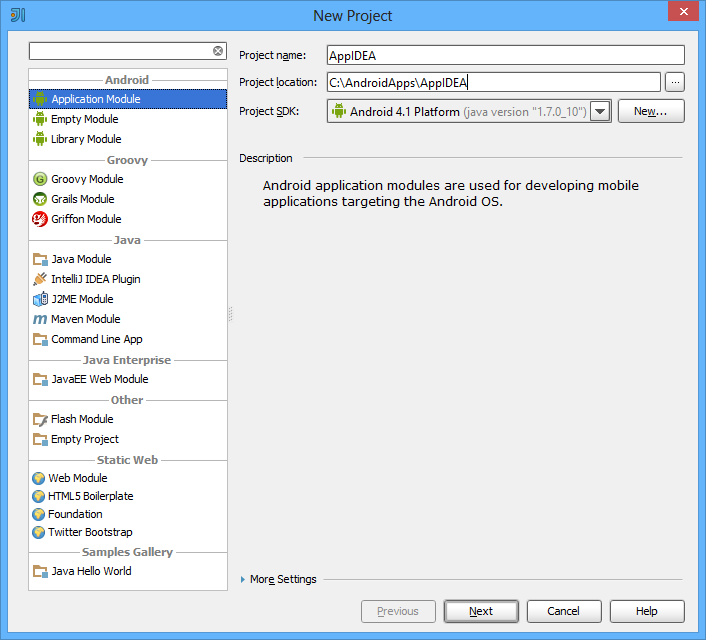
The starting point for an Android app is the New Project dialog. This hooks into the Android SDK installed on your machine. In this example I am using Android 4.1 “Jelly Bean”.

image

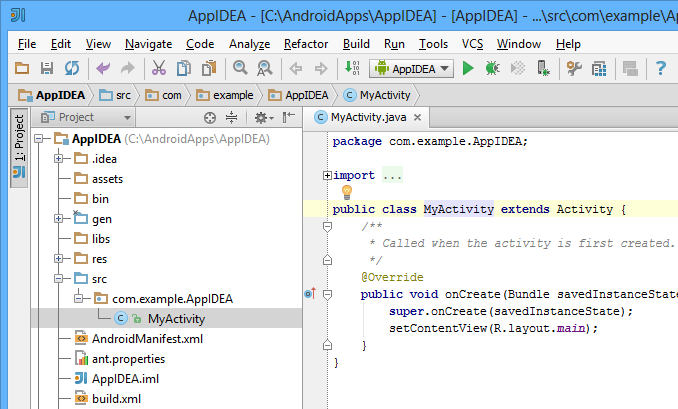
Next, you select a target device (actual or emulated) with the option to create a “Hello World” activity as a starting point. The project then opens in the IDE.

image

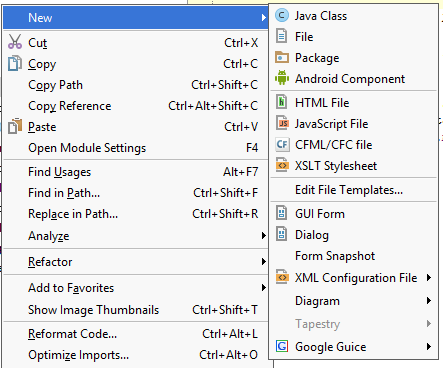
It is not obvious how to get from here to the new UI designer. The New dialog will not help you.

image

What you do is to hold down Control and click the word main in setContentView(R.layout.main).

image

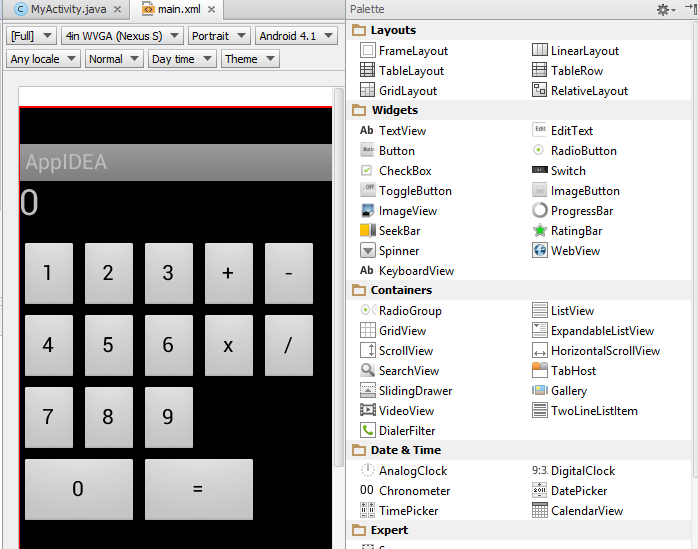
The default layout is a LinearLayout. If you are making, for example, a calculator, you probably want a TableLayout or GridLayout. I found it useful to be able to flip between text and design views. The design view can save a lot of typing. The text view is excellent when you want to see the exact code and perform text operations like copy or search and replace.

image

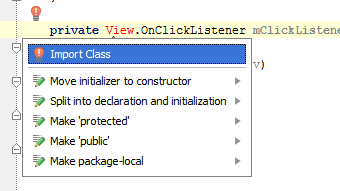
I was surprised not to find an instant way to create an event handler (unless I missed it) but this is easily done in the editor. With IntelliJ IDEA, it is always worth pressing Alt-Enter as this will offer a prompt of potentially useful actions.

image

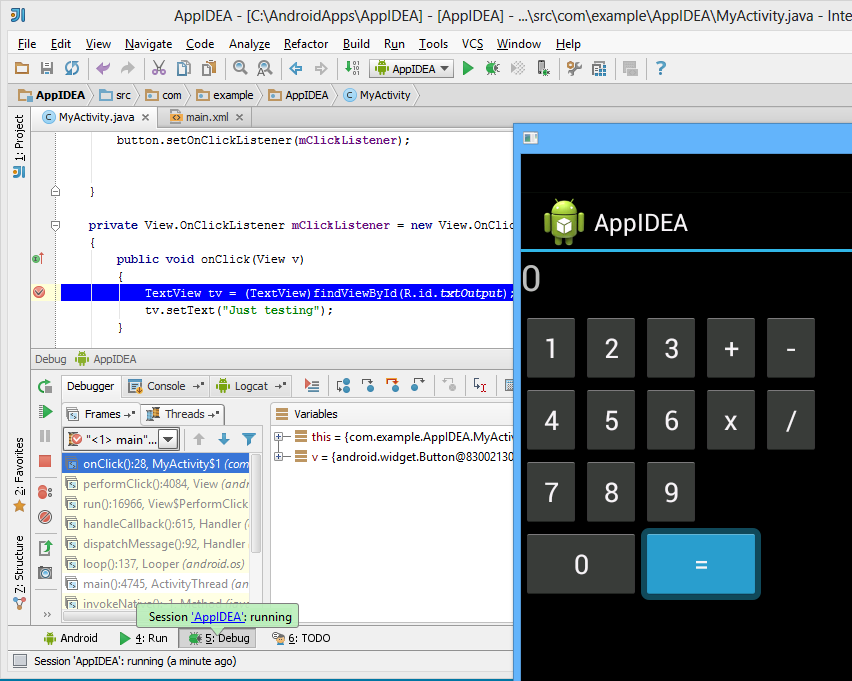
I hooked up an event listener and was able to set a breakpoint and debug my app:

image

Is this the best IDE for Android development? There is the mighty Eclipse of course; but while Eclipse can do most things, I am not surprised to see comments like this:

Usability: Intellij user experience is much easier to grasp. The learning curve in Intellij is by far faster. It seems using Intellij makes developing easier and more natural. Dropdowns, code completion, quick view, project wizards, etc, are all possible both in Eclipse and Intellij, but the experience in Intellij is much more satisfying.

That said, Eclipse is completely free, whereas the free Community Edition of IntelliJ IDEA has limitations – but as far as I can tell, Android support is included.

Google fights Android fragmentation with new SDK terms

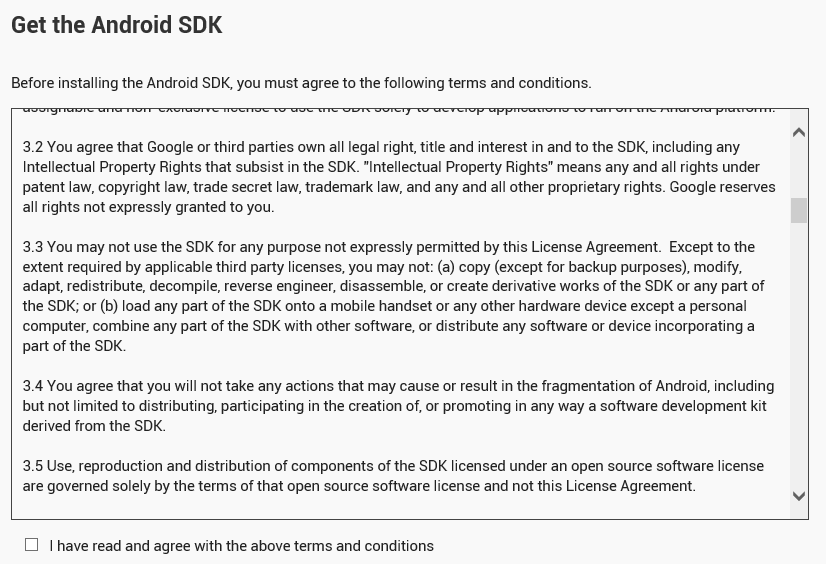
Google has revised the terms of the Android SDK license agreement so that users must now agree not to fragment Android by deriving other SDKs from Google’s official offering. In fact, you now have to agree not to fragment Android in any way as a condition of using the Android SDK.

image

The key clauses seem to be these (I write as a non-lawyer):

3.2 You agree that Google or third parties own all legal right, title and interest in and to the SDK, including any Intellectual Property Rights that subsist in the SDK. "Intellectual Property Rights" means any and all rights under patent law, copyright law, trade secret law, trademark law, and any and all other proprietary rights. Google reserves all rights not expressly granted to you.

3.3 You may not use the SDK for any purpose not expressly permitted by this License Agreement. Except to the extent required by applicable third party licenses, you may not: (a) copy (except for backup purposes), modify, adapt, redistribute, decompile, reverse engineer, disassemble, or create derivative works of the SDK or any part of the SDK; or (b) load any part of the SDK onto a mobile handset or any other hardware device except a personal computer, combine any part of the SDK with other software, or distribute any software or device incorporating a part of the SDK.

3.4 You agree that you will not take any actions that may cause or result in the fragmentation of Android, including but not limited to distributing, participating in the creation of, or promoting in any way a software development kit derived from the SDK.

How much of this is new? Here are the terms as stored on my hard drive:

3.2 You agree that Google or third parties own all legal right, title and interest in and to the SDK, including any Intellectual Property Rights that subsist in the SDK. "Intellectual Property Rights" means any and all rights under patent law, copyright law, trade secret law, trademark law, and any and all other proprietary rights. Google reserves all rights not expressly granted to you.

3.3 Except to the extent required by applicable third party licenses, you may not copy (except for backup purposes), modify, adapt, redistribute, decompile, reverse engineer, disassemble, or create derivative works of the SDK or any part of the SDK. Except to the extent required by applicable third party licenses, you may not load any part of the SDK onto a mobile handset or any other hardware device except a personal computer, combine any part of the SDK with other software, or distribute any software or device incorporating a part of the SDK.

The clause 3.4 specifically concerning fragmentation is new, but the clause 3.3 forbidding the creation of derivative works is not new. When this was first added is an interesting question and please comment if you know.

Note that the Android SDK depends on the Java Development Kit, and that Google’s use of Java in Android was the subject of unsuccessful litigation from Oracle.

Free software advocate Torsten Grote has posted about the move here and says:

This situation is far from perfect for software freedom. Developing Android Apps in freedom is only possible as soon as the Replicant developers catch up. Looks like Android stops being a Free Software friendly platform.

Replicant is a free version of the Android software stack including an SDK, though of course it will not be possible to include new parts of the SDK only available under the non-free license.

Mobile: Windows Phone appeal growing, iOS and Android secure say Titanium developers

Appcelerator and IDC have released their latest mobile developer report, in which nearly 3,000 users of the cross-platform development tool Titanium report on their views and intentions.

These reports are always interesting but experience suggests that they are poor predictors. A year ago, the Q4 2011 report told us:

Amazon’s new Kindle Fire ignites developer interest. When surveyed among 15 Android tablets, the lowcost, content-rich eReader was second only to the Samsung Galaxy Tab globally in developer interest. A regional breakdown shows Amazon edging Samsung in North America for the top slot. At 49% very interested in North America, the Kindle Fire is just 4 points less than interest in the iPad (53%) prior to its launch in April 2010.

Now, the Q4 2012 report says:

Amazon’s Kindle continues to struggle for developers’ interest. With less than 22% of mobile application developers “very interested” in building mobile apps for the device, the Kindle just barely breaks into developers’ top 10 app targets.

This is one example; a glance back through previous editions shows plenty of others, showing that developers struggle as much as the rest of us when it comes to guessing the value of future markets.

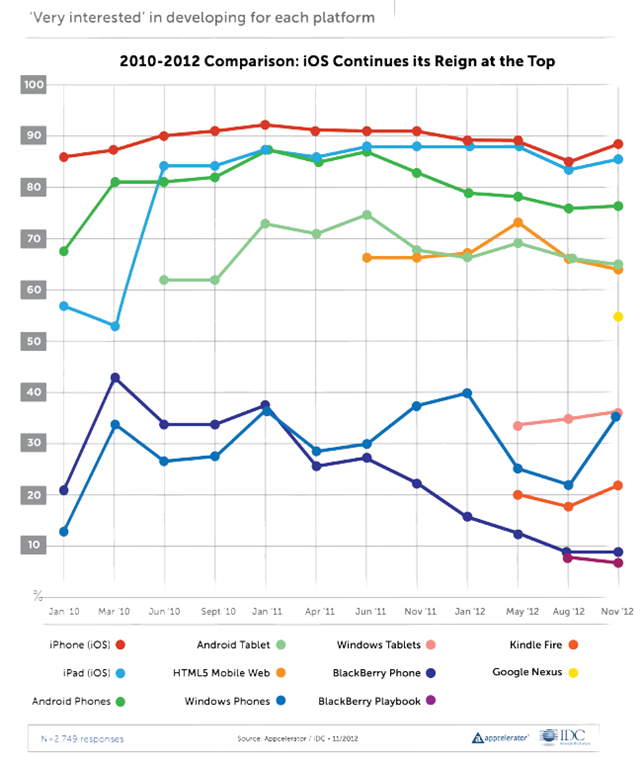
The report is still useful as a snapshot of how things look now, for cross-platform mobile developers. One question which is always asked, and therefore can be compared easily from one report to another, is the proportion of developers who are “very interested” in developing for each platform.

image

The top 5 contenders here are relatively stable, with Apple iOS top (iPhone and iPad), Android next (phone and tablet), and HTML5 Mobile Web also strong at about 65%.

The lower ranges are more interesting, as developers change their minds about prospects for the minority players. Windows Phone dived to around 22% in August 2012 but grew strongly to 36% in this report. Windows tablets, which we should probably take to mean the new Windows 8 app platform, is about the same. BlackBerry has declined from over 40% in March 2010 to 9% today, though I would suggest this will inevitably increase in the next report which will be after the launch of BlackBerry 10.

What else is interesting? One thing is Apple “fragmentation”. The problem here is that Apple iOS now has six screen sizes, once you add iPad mini and iPhone and iPad with or without high-res Retina displays. This gives me pause for thought. The challenge of mobile apps is now closer to that of desktop apps, where you do not know what display will be used or how users will choose to  size the application window. Intelligent layout and scaling is key.

Apple is also increasingly awkward to work with:

More generally, 90% of developers believe that Apple has become more difficult, or about the same, to deal with over the past three years when it comes to application
submission, fragmentation, and monetization.

Part of the report concerns Microsoft Surface. This focus is puzzling, in that it is the Windows 8 app platform which really matters, rather than Surface itself. Another oddity is the questions put, with no option to say “Surface is great”. The most positive option was:

It is a nice piece of hardware, but Windows 8 needs a lot more than that to be successful

A rather obvious statement which apparently won the agreement of 36% of developers.

The report gets even sillier when it comes to market disruption:

The top three companies that developers perceive to be ripe for disruption are a veritable who’s-who of the biggest tech darlings

say Appcelerator and IDC. It is true; but the figures are tiny:

Microsoft (8% of respondents), Google (7% of respondents), and Facebook (7% of respondents).

In other words, over 90% of developers believe these three companies are not likely to be disrupted soon; a figure that strikes me as conservative, especially for Microsoft.

More impressive is that over 60% of developers believe Facebook will lose out in future to a mobile-first social startup. This was also true last time round; 66% in Q3 2012 and 62% in Q4 2012.

The length of time it took Facebook to release just a single native iOS app, coupled with the fact that a corresponding native Android app is still MIA, has proven that the company does not yet have a viable cross-platform mobile strategy.

say Appcelerator and IDC. A fair point; but Facebook’s primary asset is its network of relationships rather than its software and it is not easy to disrupt. I would also guess that disruption is more likely to come from Google as it promotes Google+ and builds it more aggressively, perhaps, into Android, along with apps for iOS and other platforms as needed, than from a startup. But like the developers in this survey, I am guessing.

Xamarin brings C# to development of apps for the Mac App Store

Xamarin has released Xamarin Mac which adds Mac support to the existing iOS and Android compilers from the company:

  • MonoTouch: apps for iPhone and iPad using the MonoDevelop IDE on the Mac
  • Mono for Android: apps for Android using either Visual Studio or MonoDevelop
  • Xamarin.Mac: apps for Mac OS X using MonoDevelop on the Mac

The major platforms missing from the above are Windows and Linux (unless you count Android), even though Mono began as a Linux implementation of Microsoft’s .NET platform.

Xamarin says that a Windows version is not necessary since you can use Microsoft’s tools to code in C# for Windows desktop and Windows phone.

You can also get Mono for Windows, Mac and Linux from the old Mono project site.

Why would you bother with paid-for Xamarin.Mac when you can get Mono for Mac as a free download? There is even a Mac packager which lets you create a standalone package for your Mono app. A good question, but I guess the answer is the benefit of Xamarin-specific libraries and support from the company. Xamarin has also done the work to ensure that you can distribute your app via the Mac App Store.

Xamarin.Mac costs $399 for personal use, or $999 for an enterprise license which allows internal as well as app store distribution. A one year, one seat license with priority support costs $2,499.

Xamarin knows how to charge then, and in the end that may be a key reason why the project is working, whereas Mono struggled as an open source project that never had the resources it deserved.

The Mono Project site now says that it is “sponsored by Xamarin” so open source developers are getting some benefit from the commercial offshoot.

Xamarin is important for the C# language, since it represents a viable implementation which is independent of Microsoft.

The disruption of pay as you go hardware – and I do not mean leasing

Last week Amazon CEO Jeff Bezos spoke at a “Fireside Chat” with AWS (Amazon Web Services) chief Werner Vogels. It was an excellent and inspirational performance from Bezos.

image

If there was a common theme, it was his belief in the merit of low margins, which of necessity keep a business efficient. Low margins are also disruptive to other businesses with high margins. But how low can margins go? In some cases, almost to nothing. Talking of Kindle Fire, Bezos remarked that “We don’t get paid when you buy the device. We get paid when you use the device.” It is the same pay as you go model as Amazon Web Services, he said, trying to remain vaguely on topic since this was an AWS event.

His point is that Amazon makes money when you buy goods or services via the device, not from profit on the device itself. He adds that this makes him comfortable, since at that point the device is also proving its value to the customer.

Google has the same business model with its Nexus range, which is why Google Nexus 7 and Amazon Kindle Fire are currently the best value 7” tablets out there. For Google, there is another spin on this: it makes the OS freely available to OEMs so that they also push Google’s adware OS out to the market. If you are not making much profit on the hardware, it makes no difference whether you or someone else sells it.

We do not have to believe that either Amazon or Google really makes nothing at all on the Kindle Fire or Nexus 7. Perhaps they make a slim margin. The point though: this is not primarily a profit centre.

This is disruptive because other vendors such as Apple, Microsoft, Nokia or RIM are trying to make money on hardware. So too are the Android OEMs, who have to be exceptionally smart and agile to avoid simply pushing out hardware at thin margins from which Google makes all the real money.

Google can lose too, when vendors like Amazon take Android and strip out the Google sales channels leaving only their own. This is difficult to pull off if you are not Amazon though, since it relies on having a viable alternative ecosystem in place.

But where does this leave Apple and Microsoft? Apple has its own services to sell, but it is primarily a high margin hardware company selling on quality of design and service. Apple is under pressure now; but Microsoft is hardest hit, since its OEMs have to pay the Windows tax and then sell hardware into the market alongside Android.

Ah, but Android is not a full OS like Windows or OSX. Maybe not … yet … but do not be deceived. Three things will blur this distinction to nothing:

1. The tablet OS category (including iOS) will become more powerful and the capability of apps will increase

2. An increasing proportion of your work will be done online and web applications are also fast improving

3. More people will question whether they need a “full OS” with all that implies in terms of maintenance hassles

Microsoft at least has seen this coming. It is embracing services, from Office 365 to Xbox Music, and selling its own tablet OS and tablet hardware. That is an uphill struggle though, as the mixed reaction to Windows 8 and Surface demonstrates.

Most of the above, I hasten to add, is not from Bezos but is my own comment. Watch the fireside chat yourself below.

Telerik Icenium: new desktop and cloud IDE for mobile development

When I heard that Telerik is bringing out a new IDE for mobile app development, I could contain my excitement, especially after learning that it is another PhoneGap/Cordova based approach, wrapping JavaScript and HTML as a native app. While speaking to Telerik’s Doug Seven though, I found myself increasingly impressed.

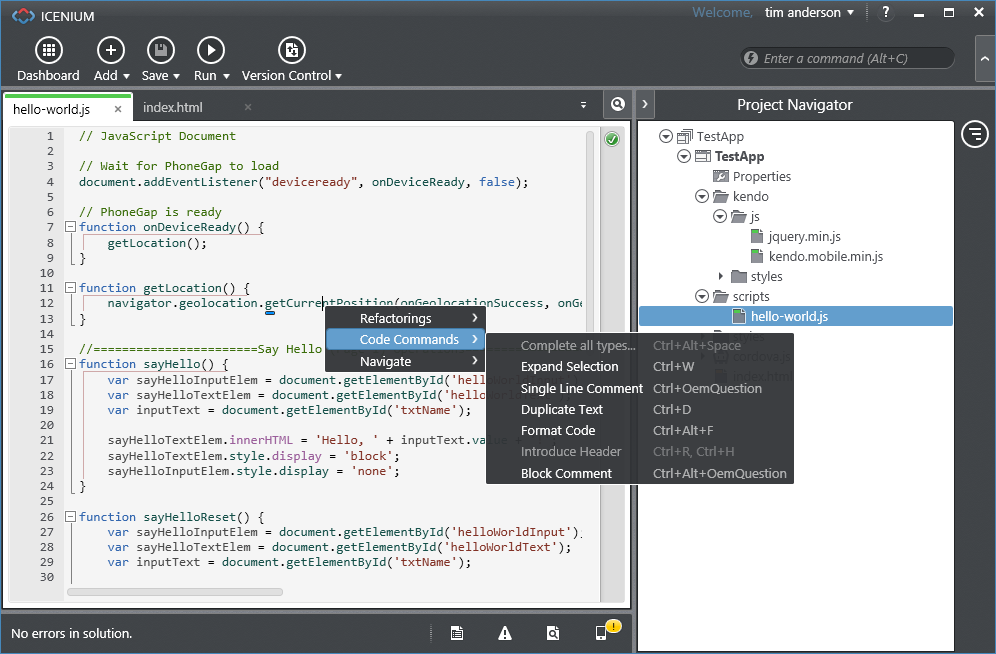
If that name sounds familiar, it might be because Seven was a director of Product Management in the Visual Studio team at Microsoft, and you can see that influence in the new IDE, which is called Icenium. Spot the Metro-style buttons at top left of the IDE!

image

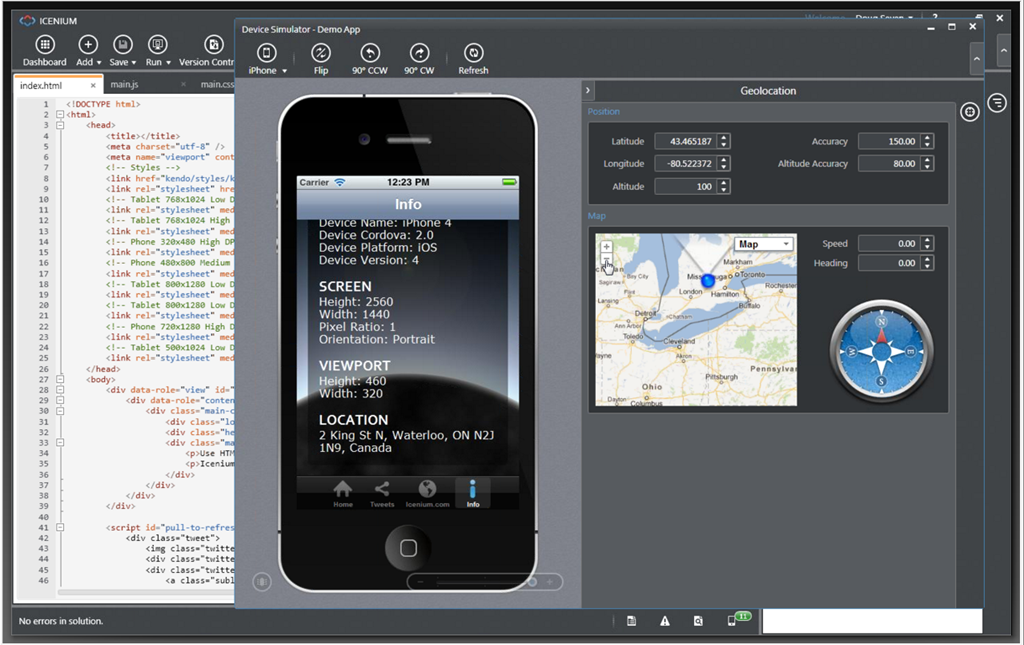
Icenium has several components. There is a Windows IDE called Graphite, illustrated above. Those on other platforms, or in distributed teams, can use Mist, which is a browser-based IDE which replicates many of the features of Graphite. There is also a set of cloud-based services to handle building apps for iPhone, iPad and Android devices. This means you do not need to install all the necessary SDKs on your own machine. Icenium also lets developers build signed iOS packages without needing to have a Mac.

The Icenium Device Simulator lets you test applications quickly on your own machine.

image

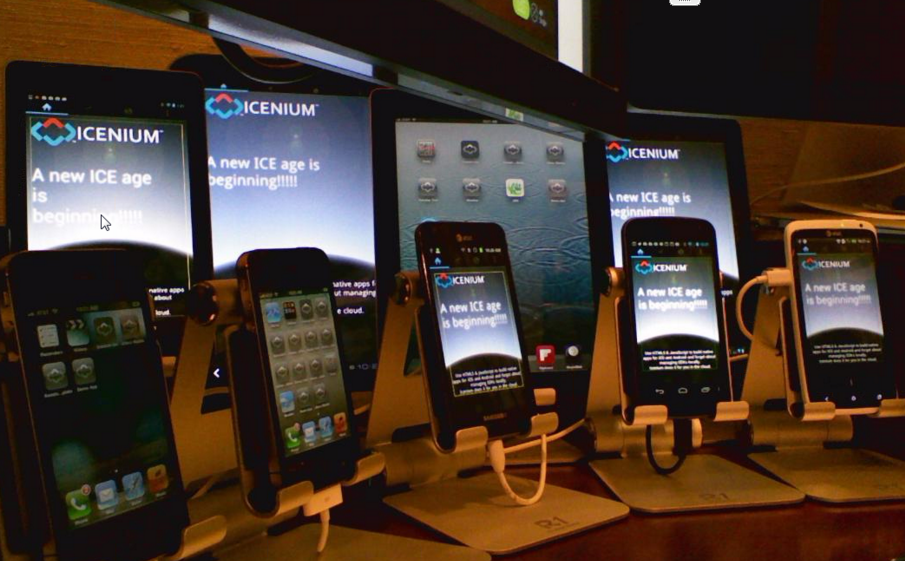
The tools look good, though I have not tried them yet, but the unique feature of Icenium is the ability to deploy and test quickly on multiple devices. Code is kept synchronized between Graphite and Mist, and also pushed out though LiveSync to multiple devices. Here is a snap of the view from Doug Seven’s desk, grabbed from his online presentation. He showed me how a code change ripples almost instantly to all these devices for testing.

image

An intriguing part of this is an iOS app called Ion which is a sort of runtime shell for Icenium apps. This means you can load apps for testing onto iOS devices that are not unlocked for developer use. You can also demonstrate apps on a client’s device using Ion. Apple’s attitude to runtimes in the App Store must be softening.

Icenium supports version control using either a Git repository hosted on the service, or your own choice of URL-based Git repositories.

Pricing will be per-developer at $16.00 per month if you sign up for a year, or $19.00 per month without a contract. Once you sign up, you can use all the tools on all your machines. You can also use Telerik’s Kendo UI Mobile framework. It is free until May 1 2013.

Isn’t Icenium’s cloud build feature similar to what Adobe’s PhoneGap Build already does?

“It’s a great comparison,” says Seven. “Adobe has the technology to make this [seamless development experience] possible, they just chose not to do it … [PhoneGap Build] is not integrated into the workflow. It’s a very manual process, I have to zip up my files, submit them to the PhoneGap Build process, then I get back these application packages that I have to manually deploy to my devices to see if it works.”

There is no support yet for mobile web apps, as opposed to apps packaged with Cordova, but this is a possibility for the future.

Like Adobe, Telerik has found WebKit and Google Chrome irresistible, despite Seven’s Microsoft background. WebKit is embedded in the Graphite IDE. You can use Mist with any modern browser, though “the one limitation is that the browser-based device simulator does require Chrome,” though he add that in general, “I use Mist on my iPad all the time.”

Google Nexus 7: a little bit of everything you do

Google’s Nexus 7 is more than just a tablet. It is Google through and through: a trade where you get a cool device, and Google gets your data and the opportunity to sell you stuff, both advertising and content.

image

That is why it is such good value; and it is good value. You get a 7″ 1280×800 display with toughened Corning glass; a Quad-core NVidia Tegra processor; WiFi; Bluetooth; NFC (Near Field Communications) with Android Beam; Accelerometer; GPS; Magnetometer, Gyroscope, 8 hours or so battery life, 1GB RAM, and 8 or 16GB (non-expandable) storage. It runs Android 4.1, “Jelly Bean”.

Not only is the spec decent, but the device is nicely done, though it has been put together quickly. The manufacturer, Asus, says that the Nexus was conceived at a meeting with Google in January, at CES 2012. A few points of interest from Asus:

  • The textured back cover is meant to “feel like a pair of premium driving gloves that will not slip out of your hands”.
  • There are two microphones, one on the top and one on the side, to avoid the chance of blocking audio input with your hand.
  • The display uses a single glass panel with a touch film layer, which Asus says makes it 42% thinner than a “standard touch display module”.

The display is excellent, bright to view and responsive to touch. I compared it to an HTC Flyer, another decent 7” Android tablet though now 18 months old, and the Nexus is sharper, more detailed and more vibrant.

The Nexus is also lighter and thinner than the Flyer, and performs better with its quad-core Tegra 3 vs the Flyer’s 1.%GHzz Snapdragon.

It is not all one way. The Flyer has a rear-facing camera, a microSD slot, and a stylus, all lacking on the Nexus. Still, the 16GB Flyer cost over £400 when it was released, and checking Amazon.co.uk today it is still over £200. The Nexus is £199.00 for 16GB, or £159.00 for 8GB, and comes with £15.00 credit towards content on the Google Play store.

In other words, the Nexus is fantastic value, and makes much of the competition look over-priced.

Nexus and you

First impressions of the Nexus are good. The device is easy to set up, though it insists that you sign in to a Google account. I had no problem setting up Exchange email alongside Gmail though.

There is an emphasis on content and one of the first things I noticed was the covers of a couple of CDs I recently purchased and ripped to my PC. The reason is that I have Google Music Manager installed on the PC, which had automatically uploaded them to Google Music, and now the Nexus was showing me recently uploaded music. It is what you can expect from a Google-connected life; stuff just shows up.

The home page is dominated by widgets recommending purchases. You can remove these but they set the tone: Google is trying to drive content sales.

image

There is also a Google strip along the top of the home page which allows text or voice search. The first time you tap this, you get an invitation to sign up for Google Now, a service which mines your personal information, such as location, calendars and other data from Google and from third parties, in order to deliver alerts and reminders.

image

Google Now is exactly in line with what former CEO Eric Schmidt said at Mobile World Congress back in 2010:

Google will know more about the customer because it benefits the customer if we know more about them.

Is it worth it? Does it matter if Google knows where you are, who your friends are, and where you are going? Can you trust Google not to misuse that information?

Those are big questions; and while I doubt that anything worse than occasional annoying advertising will happen if you switch on Google Now, it is also spooky and disturbing if you care about privacy.

Leaving aside the big issues, it is a great advertising opportunity for Google which can do targeting based not only on what it knows about you, but also on the context of where you are and what you are doing.

Nexus in use

What is the use of a 7” tablet? Quite a lot. It is a good size for personal media consumption, though it could do with a case that doubles as a stand for watching video. Web browsing works well using the Chrome browser. There is Maps, Skype, Twitter, Dropbox, Evernote, Kindle, music and games, calendar and email. The main limitation is that you need to be on WiFi, but most of the time that is not a problem.

The Nexus has three soft buttons: Home, Back and Recent apps.

image

Recent apps shows thumbnails of what you have opened recently and feels like multitasking even though it does not guarantee that those apps are actually running.

image

There are a few niggles. The Nexus has speech to text built-in. It kind-of works but so slowly that most will not bother with it. Typing is much quicker and more accurate, even on the soft keyboard.

No Adobe Flash, which is a disappointment, especially in the UK where BBC iPlayer is popular. Adobe is not making a version of Flash for Jelly Bean, though apparently older versions can be installed with a bit of manual effort. Flash cannot be installed directly from the Play store.

image

Conclusion

I think Nexus will fly off the shelves. No it is not as good as an Apple iPad, but it is smaller, lighter and cheaper, all of which count for a lot.

With deals like this, Google is making life tough for its third-party partners, Asus aside, and giving Amazon (perhaps the immediate target) a challenge too. Nor will it be easy for the likes of Microsoft, RIM and Nokia coming into the market with new tablets, given everything that the Nexus does perfectly well and at a keen price.

OEM vendors: it’s Google, not Microsoft you need to watch

When Microsoft announced Surface, its first own-brand PC, it raised immediate questions about the implications for the company’s hardware partners.

Not long after, and Google has also announced a tablet, the Nexus 7.

It looks a neat device. 7″ 1280×800 display, Corning-toughened glass, NFC, accelerometer, GPS, gyroscope, wi-fi, Bluetooth, and a Quad-core NVIDIA Tegra 3 processor. Plus you get Google’s latest “Jelly Bean” operating system.

By coincidence, I have just been reviewing another Android tablet, from a brand you likely have not heard of: the Gemini JoyTAB 8″ running “Ice Cream Sandwich”.

I did not get on well with the JoyTAB. It is full of the compromises you expect from a device made down to a price with little attention to design.

But the price. I thought the JoyTAB was at least good value at £149.00. What chance does it have against a Nexus 7 for just £10 more – and with £15 of Play Store credit thrown in?

image

The Nexus 7 is made by Asus so you can argue that at least one OEM vendor is not losing out here. Even so, competing with this thing will not be easy. 

We do not yet know the price of the Surface, either in Windows RT or Intel guise. My prediction is that Microsoft will aim to price it more like an Apple iPad than a Nexus. Although Microsoft is desperate for Windows 8 tablets to succeed, it also makes its money selling the software, Windows and Office, that is included in Surface. It cannot afford to price it too low.

By contrast, Google makes little money from software. Android is free. Google makes money from advertising, and also hopes to build its profit from the content market, where it takes a cut of every sale. If NFC payment takes off, it might even profit from every payment you make with an Android device.

I am right behind Microsoft in what it is doing with Surface. It has been let down by its OEM partners, with too much hastily designed and/or low quality hardware, further impaired by unwanted bundled software and poor customizations. Surface follows on from Microsoft Signature in challenging those partners to up their game. Long term, they will benefit from Microsoft’s efforts to improve Windows devices overall.

How Android tablet vendors will benefit from Nexus is less clear.

Review: JoyTAB 8″ Android tablet. Do you need to spend more?

How much Android tablet can you get for £150.00? Quite a lot, as this JoyTAB 8″ tablet from Gemini Devices demonstrates. No complaint about the specs: ARM Cortex A8 1.2Ghz processor, Mali-400 GPU, 512MB RAM, 8GB storage, running Android 4.03 “Ice Cream Sandwich”.

There is also a Micro-SD slot (confusingly labelled “TF Card”), a front-facing camera, headphone jack, USB connector, mini HDMI port, and wi-fi.

No Bluetooth, unfortunately, but you cannot have everything. Though given the choice, I would rather have Bluetooth than HDMI.

Still, no real complaint about the specs. How is it in use?

The unit is light though it feels a bit plastic, particularly the switches on the front and side, but they work fine. There is not much to see on the front: black screen, black surround, and two physical buttons, one for menu and one for back. On the side, there are buttons for power, volume and home. Personally I would rather have the home button on the front, but it is no big deal.

On the bottom edge are the connectors for USB, power, HTML, SD card and sound. Not clear why the SD slot is labelled “TF Card”, but I stuck a 4GB SD card in there and it worked instantly.

image

I turned on, and was greeted with the JoyTAB wallpaper, its brightness perhaps compensating for the rather dim screen.

image

Wi-fi connected smoothly, and I had a quick look at the apps:

image

Nothing exceptional here. Documents To Go is a trial, Twitter and BBC iPlayer I added myself.

Unfortunately BBC iPlayer was a letdown. The app bounces you to the browser, and the browser says my phone (?) is not supported.

image

I tried updating Flash Player to the latest version with no improvement. In fairness, this may be a BBC issue, though iPlayer works fine on other Android tablets I have tried.

YouTube mostly works, but video is not too good. It looks dark and detail is lost.

I got an even more entertaining error when I attempted to play my Google music in the browser.

image

Web browsing in general is a mixed experience. Mostly it is good enough, though searching Google is slow and jerky if you have incremental search enabled.

Not only is the screen dim, it is unresponsive too. Pinching and zooming is an effort, and when it does work it is not smooth.

Still, Angry Birds works well, email works with both Microsoft Exchange and Google Mail, and battery life seems not bad though charging is slow even with mains.

I connected it to a PC and got an error. USB storage shows up if you enable it in settings, but it did not connect as an Android device. I fixed this by installing the (unsigned) driver from Gemini, which I found in a forum post here.

While I have not seen any faults, the test device does make odd, quiet popping noises from time to time when charging, which is a concern.

In the end I cannot give this a recommendation. It is good value in one sense, but if you can stretch to a Samsung Galaxy, which admittedly is twice the price, you do get a substantially better experience. An Apple iPad costs even more; but if you want silky-smooth touch control, a beautiful screen, and for everything to just work, then it is worth the money.

What if you only have £149? My pick would be something like a nearly new HTC Flyer, currently on offer at Amazon UK for around that price. Yes, it only runs Android 3.x “Honeycomb”, but it is a lovely device with a great screen and HTC’s customised Sense UI.

Update: It is worth adding that Google has now announced the 7″ Nexus Tablet which is on offer in the UK for £159 for the 8GB version or £199 for 16GB. That changes the rules.