Tag Archives: google

The future of Google Apps: social features, high performance spreadsheets, working offline

Yesterday I spoke to Google’s Global Product Management Director for Google Enterprise (whew!) Matthew Glotzbach, at a press briefing for Google Apps which included the announcement of Google Docs Discussions, as covered here.

image_thumb

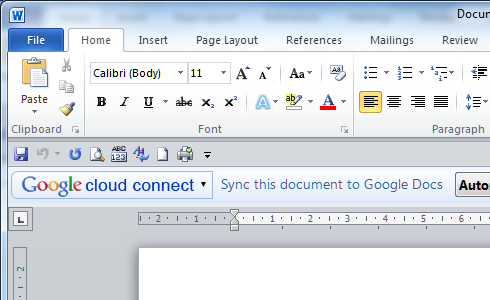
One of the issues discussed in the briefing was Cloud Connect, which I reported on here. Cloud Connect automatically copies and synchronises Microsoft Office documents with Google’s cloud storage. There are some performance and usability issues, but the biggest problem is that you cannot edit the documents in the browser; or rather, if you do, Google makes a second copy leading to versioning issues.

Google says this is a file format issue. The online Google Docs applications cannot edit documents in Microsoft Office formats – “the document models are completely different” says Glotzbach – though it can import and export those formats. Could Google develop the ability to edit Office documents online? “It is a technical challenge, something we haven’t built yet,” he added.

It is an interesting point. Microsoft’s Office Web Apps have flaws, but they do let you maintain the same document whether edited in the browser or in the Office desktop applications. It is an example of friction if you try to live partly in Microsoft Office, and partly in Google’s cloud. It may be better to stick with one or the other.

What about offline capability, something I hear a lot as counting against Google Docs. Google had a solution for this based on its Gears add-on, but then withdrew it.

We are actively working on offline. It is extremely important. Gears was a precursor. A lot of the ideas embedded in Gears have become part of HTML5.

says Glotzbach. I asked whether this will extend to the Chrome OS netbook operating system, and he said that it will:

Chrome, as the most modern browser based on HTML 5, has the capabilities built into its core. Chrome OS as a derivative of that has those offline capabilities baked into it, so it is a matter of having applications take advantage of that.

We also talked about the new discussions feature. I observed that it seems to be just one part of a bigger story. What about discussions spanning multiple documents? What about discussions without documents? Is there any way of doing that?

“Yes, email,” he said, chuckling. Clearly Google has taken to heart that email remains the de facto mechanism for most corporate collaboration. “We’ve also got Google groups. Obviously the manifestation of a group for many users is email, that’s how they interact with it, but there is also a destination site or page for that group.”

Might Google develop its own equivalent to Salesforce.com Chatter, for Twitter-like enterprise messaging?

The idea of eventually being able to pull in other streams, the idea of social media inside the enterprise Is a powerful idea. I think Chatter is a good example of that, and others such as Yammer. I think those ideas will likely find their way into businesses. It is not clear to me that social will be a destination within an Enterprise. Rather I see it as, features will emerge in various products that leverage those social capabilities. Discussions is influenced heavily by a lot of those social media ideas, and so you can see that evolving into more integrated social capabilities across the app suite.

What about Google spreadsheets, which seem great for simple tasks and collaboration, but suffer performance and scalability issues when used with large data collections that work fine in Excel?

There’s always work to do. We have today some limitations in terms of spreadsheet size. Those are things we are actively working on. With browser technologies I actually think we have an advantage over desktop applications. If I told you I had a spreadsheet that had 5 million columns and a billion rows, there’s no desktop spreadsheet in the world that can handle that kind of volume, but because we have in essence supercomputers on the back end processing that, what you display is just a window of that large data. So we’re using clever technologies like pre-fetching the rows and columns that are just off the edge of the page, similar to some of the technologies we use with Google Maps.

But it’s an example where we have some artificial limitations that we are working to remove. Imagine doing really sophisticated non-linear calculations in a spreadsheet. We’ve got a supercomputer on the back end that can do that for you in seconds.
Google on innovation – or should that be copying?

Patrick Copeland, Google Director of Engineering, gave the keynote at QCon London this morning. His theme was innovation: how it works at Google and elsewhere.

I was expecting some background on Google’s famous 20% time, where employees spent up to one day a week on something not in their job description, but I don’t think Copeland even mentioned it. In fact, he almost argued against it. There is no shortage of bright ideas, he said, and Google has over 100,000 of them in a database; but what matters is not idea, but innovators who have the ability to take a good idea and make it into a product.

He added that whatever “it” may be, building the right “it” is more important than building “it” right. If what you build is the wrong thing, it will not succeed, whereas the right idea will sometimes succeed despite poor implementation. Twitter and its well-known fail whale comes to mind.

Google’s record on innovation is mixed. You can make a long list of Google projects that have failed, from Lively – a kind of Second Life clone – to Google Wave. “You want to fast fail when things aren’t working” said Copeland, making the best of it.

On the other hand, Copeland mentioned GMail as a positive example. I would quibble a bit with this: was GMail innovation, or simply Hotmail done right?

Copeland also mentioned two other examples. The Chrome browser, he said, had two goals: to streamline the user interface so less screen space was wasted, and to have a fast JavaScript engine to show off Google apps. He also observed that rival browsers have copied both ideas; and it is true that Microsoft’s Internet Explorer 9, which will be released on March 14, happens to have both these features.

What about Android? Copeland said that the Android strategy vs Apple is similar to that of the clone PCs vs IBM in the eighties. He tried to make a point of innovation here, observing that IBM could not compete with innovation from many independent vendors, but this seems to me a stretch. The point about the clone PCs was that they were kind-of the same as the IBM PC but cheaper and faster. It was more about copying than about innovating. I think you can see this playing out with Apple vs Android to some extent, in that there are customers who will end up with an Android smartphone or tablet because it is kind-of the same as an iPhone or iPad but cheaper or with better specifications.

On the other hand, Apple is doing a better job at differentiation than IBM achieved with its PC; and technically iPhone apps do not run on Android so the parallel is far from exact. Many of the same apps are available for both iPhone and Android, so from user’s perspective there is some similarity.

The quick summary then: most innovations fail, and you need innovators rather than simply bright idea. The implication is that successful innovation happens when you have a company with lots of money to spend on projects that will likely fail, and that has a culture which attracts innovators. Google ticks both boxes.

Incidentally, when I asked how Google identifies its innovators Copeland said that you do not need to. They make a nuisance of themselves, so if you have them, you know.

Google fails to protect its mobile platform

The discovery of viruses in apps on Google’s Android Market is troubling. I like the fact that Android is open, and that you can easily install an APK (Android Package) from any source onto your device if you want to. That said, it is reasonable to expect that apps downloaded from the official Android Market will be virus-free, or at least that some attempt has been made to check them for malware.

Another problem which is apparently rampant in the Android market – and also to some extent in Apple’s app store – is app stealing, where someone takes an existing app, copies and re-uploads on their own account. In most cases it seems that the malware was on apps pirated in this manner.

Note that while it took Google less than five minutes to pull the malicious apps from the store, the original developer had apparently been trying for more than a week to get them pulled on copyright violation grounds.

Google takes 30% transaction fee for apps sold in the market. Enough, you would think, to check for malware.

Most seriously for the Android market, the situation for users is that apps on Android Market might be malware, whereas apps on Apple’s App Store are not. That is a big advantage for Apple, and one that you would have thought Google would want to counter.

The only winners here are the anti-virus companies, who will be delighted to inflict their subscriptions on mobile users just as they have on Windows desktops.

Another cloud fail: disappearing Google accounts

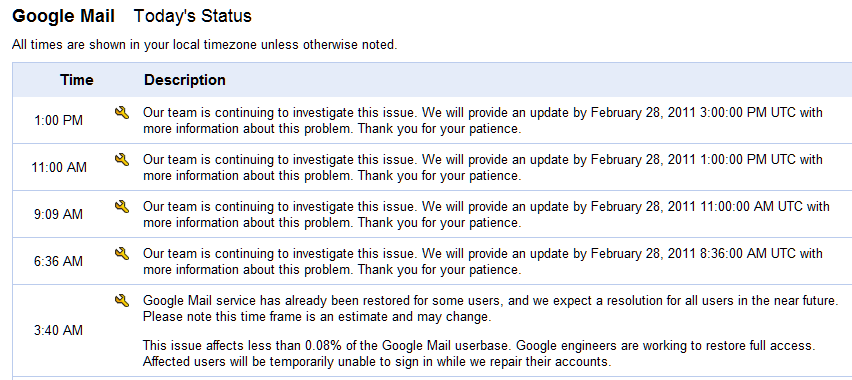
Every time a story like this runs it sets back cloud computing. Many users of Google Mail reported yesterday a problem with missing email:

I was on my eMail normally and when I refreshed all my account settings, eMail, labels, contacts etc has just disappeared.

Google’s App Status Dashboard has a series of updates:

image

It does say that the issue affects “less than 0.08% of the Google Mail userbase”. While that does not sound much, if Google Mail has 150 million users that would be 120,000 people. Of those accounts, only a proportion will be critical as some of us use Gmail only casually; but some people are severely inconvenienced:

This really is wildly inconvenient and worrisome, though. I rely on my Gmail an enormous amount for my job, and not having access to it is really crippling me. I can’t even do my work at this point, because all the material I need is in attachments on Gmail, so all I can do is wait until I (hopefully) get it back! I suppose I should have saved my files to my computer, but hindsight is 20/20.

Google is indicating that it will restore the data soon though it is all rather vague.

Of course there are also failed Exchange Servers and the like out there; sometimes backups fail too and data is lost. Cloud providers like Google do tend to lack transparency though, making times like this anxious ones for those who are affected.

The real lesson: if you have data you really care about, keep it in more than one place.

Hands on with Google Cloud Connect: Microsoft docs in Google’s cloud

Google has released Cloud Connect for Microsoft Office, and I gave it a quick try.

Cloud Connect is a plug-in for Microsoft Office which installs a toolbar into Word, Excel and PowerPoint. There is no way that I can see to hide the toolbar. Every time you work in Office you will see Google’s logo.

image

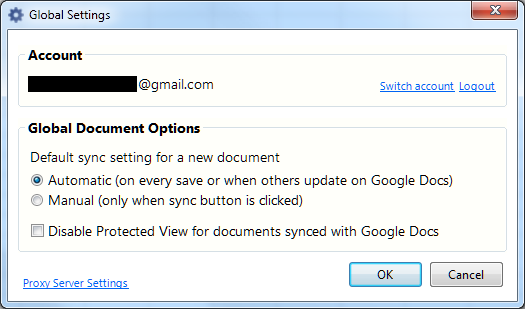
From the toolbar, you sign into a Google Docs account, for which you must sign up if you have not done so already. The sign-in involves passing a rather bewildering dialog granting permission to Cloud Connect on your computer to access Google Docs and contacts on your behalf.

The Cloud Connect settings synchronise your document with Google Docs every time you save, or whenever the document is updated on Google’s servers.

image

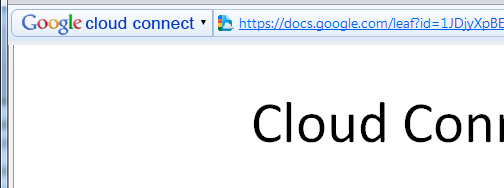
Once a document is synched, the Cloud Connect toolbar shows an URL to the document:

image

You get simultaneous editing if more than one person is working on the document. Google Docs will also keep a revision history.

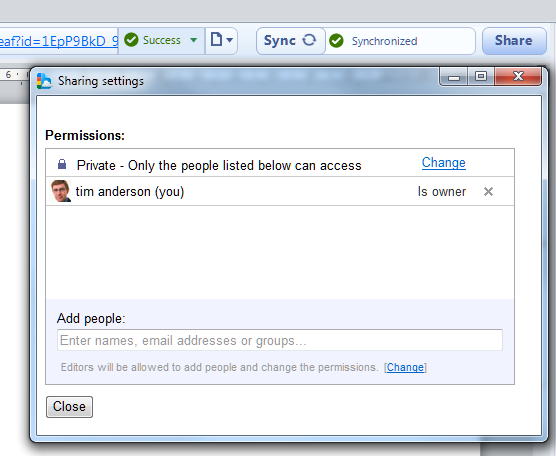
You can easily share a document by clicking the Share button in the toolbar:

image

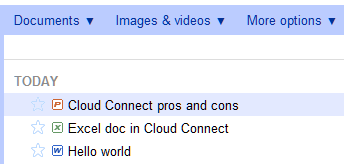
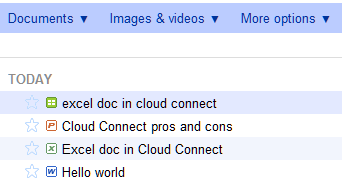
I found it interesting that Google stores your document in its original Microsoft format, not as a Google document. If you go to Google Docs in a web browser, they are marked by Microsoft Office icons.

image

If you click on them in Google Docs online, they appear in a read-only viewer.

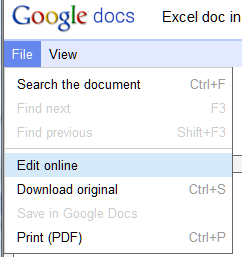
That said, in the case of Word and Excel documents the online viewer has an option to Edit Online.

image

This is where it gets messy. If you choose Edit online, Google docs converts your Office document to a Google doc, which possible loss of formatting. Worse still, if you make changes these are not synched back to Microsoft Office because you are actually working on a second copy:

image

Note that I now have two versions of the same Excel document, distinguished only by the icon and that the title has been forced to lower case. One is a Google spreadsheet, the other an Excel spreadsheet.

Google says this is like SharePoint, but better.

Google Cloud Connect vastly improves Microsoft Office 2003, 2007 and 2010, so companies can start using web-enabled teamwork tools without upgrading Microsoft Office or implementing SharePoint 2010.

Google makes the point that Office 2010 lacks web-based collaboration unless you have SharePoint, and says its $50 per user Google Apps for Business is more affordable. I am sure that is less than typical SharePoint rollouts – though SharePoint has other features.  The best current comparison would be with Business Productivity Online Standard Suite at $10 per user per month, which is more than Google but still relatively inexpensive. BPOS is out of date though and an even better comparison will be Office 365 including SharePoint 2010 online, though this is still in beta.

Like Google, Microsoft has a free offering, SkyDrive, which also lets you upload and share Office documents.

Microsoft’s Office Web Apps have an advantage over Cloud Connect, in that they allow in-browser editing without conversion to a different format, though the editing features on offer are very limited compared with what you can do in the desktop applications.

Despite a few reservations, I am impressed with Cloud Connect. Google has made setup and usage simple. Your document is always available offline, which is a significant benefit over SharePoint – and one day I intend to post on how poorly Microsoft’s SharePoint Workspace 2010 performs both in features and usability. Sharing a document with others is as easy as with other types of Google documents.

The main issue is the disconnect between Office documents and Google documents, and I can see this causing confusion.

Update: I uninstalled Cloud Connect after a couple of days. Two reasons. First, the chunky toolbar is annoying and takes valuable working space. Second, I had performance issues when working with documents opened from SharePoint. I guess the two do not get on well together.

Microsoft has its own unsurprisingly negative take on the product here. Apparently Cloud Connect uses the Track Changes feature under the covers, hence breaking this feature for any other purpose. If so, I would like to have been warned about this. On the other hand, I still like the usability of Cloud Connect. Microsoft is right to observe that auto-sync could result in inadvertent document sharing; but the simple and prominent sharing dialog is easier to use than SharePoint permissions.

What will it take to get developers to try Windows Azure? Microsoft improves its trial offer

Microsoft has announced an improved introductory trial for Windows Azure. You can now get:

  • 750 hours of an Extra Small Compute Instance
  • 25 hours of a Small Compute Instance
  • 500MB storage
  • 10,000 storage transactions
  • 500MB in / 500MB out data transfer
  • 1G Web Edition SQL Azure database

The offer lasts until the end of June, after which you will be charged at standard rates. The allowances are I believe per month – note that 750 hours is approximately the number of hours in a month so you can run an extra small instance continuously. This is the main change from the previous trial, which only offered 25 hours of a small compute instance.

You cannot sign up without handing over credit card details.

Further, some of these limits are not really generous. This blog, for example, would chew through those data transfer limits in no time.

Microsoft is also less generous than Amazon, which offers a year of free usage with data transfer of 15GB in and 15GB out per month. Google App Engine is free up to 1GB or persistent storage and about 5 million pages views a month.

I guess Microsoft needs to figure out whether it wants to target mainly enterprise and large-scale applications, or to offer a commodity platform to a broader market. I doubt this offer is aimed at enterprises. After all, serious commercial developers on Microsoft’s platform have MSDN subscriptions, which with premium and ultimate subscriptions already offer inclusive Azure time that is better than this: 7GB in and 14 GB out per month, for example. Startups on the BizSpark scheme also get this allowance.

This offer is for the rest of us then. It is certainly getting easier to try Azure, but is this enough to encourage experimentation? I suspect Microsoft may need to come even closer to what is offered by the competition.

RunRev releases LiveCode for Android preview alongside iOS, Mac, Windows, Linux

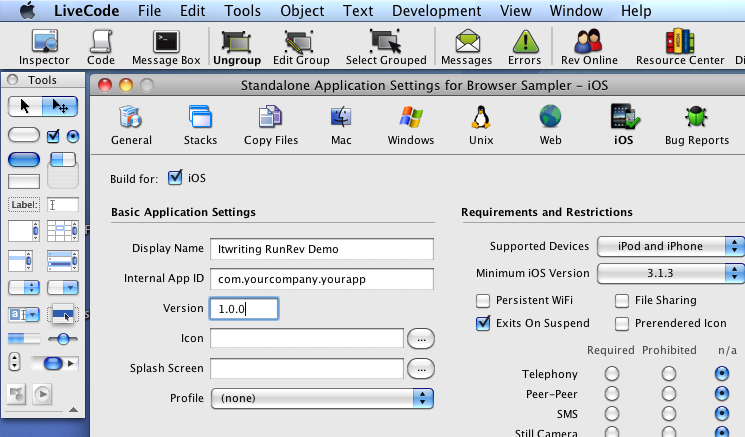
RunRev has announced a preview version of its LiveCode for Google Android, which will join existing versions for Windows, Mac, Linux, Web and iOS.

image

LiveCode is like a modern-day HyperCard, an early database and simple application builder for the Mac. It includes a graphical development environment with scripting using the LiveCode language, described by RunRev as “A very high level language”. Here is a sample:

put “The fox jumped over the lazy dog.” into theText

put “ quick brown” after word 2 of theText

The advantage is fast development, once you have become familiar with the platform.

On a quick look I noticed that LiveCode looks great for building a business-oriented client, but looks more challenging when it comes to interacting with a remote server application, though it does have support for basic http and https requests as well as socket support.

Now that Android is supported LiveCode looks interesting as a quick and easy route to cross-platform mobile apps.

Mobile app developers can register to receive the Android pre-release version today at www.runrev.com.

Computer book stats show resilience of Java as Android booms

Mike Hendrickson at O’Reilly has posted four articles analysing the state of the computer book market in more detail than most of us care about.  The overall picture is not too good – sales are down – and there are some interesting trends.

Here is a good one for anyone who thinks Java is dying. The programming languages post shows that unit sales of books on Java increased by 17.2% in 2010 vs 2009, whereas the next most popular language, C#, declined by 1.7%. Objective C, in third place, also declined slightly. JavaScript unit sales were up by 14.5%.

Why is Java booming? There is a clue in one of the two bestselling Java titles mentioned by Hendrickson: Professional Android 2 Application Development

Another trend that caught my eye is in the first post. Some of the Down categories surprised me:

Adobe Flash –84.43%

Mac OS –32.12%

Web Design Tools –53.2%

Adobe’s Creative Suite 5 has sold well as far as I’m aware so although books on Flash and Dreamweaver have not been selling well, it is dangerous to draw obvious conclusions.

The influence of Android is unmistakeable though. Something for Oracle to consider as it pursues Google for breach of intellectual property.

Android Market not working for all customers, says Angry Birds CEO

Rovio (Angry Birds) CEO Mikael Hed spoke at Mobile World Congress in Barcelona about “Making apps profitable.”

image

He should know – but “There is no super secret sauce to this”, he said. Quality, hard work, money, and I suspect a lot of luck are in the recipe.

There were some interesting asides though. One was that the Android Market payment system, which uses Google Checkout, is not working well for Roxio.

On Android there are several challenges with the billing part. It’s not possible for all customers across all carriers to buy Android content. That’s why even the most successful paid content on the Android market is in the low hundreds of thousands, which is a huge disappointment. It’s a problem for customers because they can’t buy the content even if they want to. That leads to increases in piracy.

In response, Roxio is exploring other ways to sell its Android apps, including alternative stores and in-carrier billing.

These reservations do not apply to Apple, which manages the entire iOS platform from store to device. On the other hand, the freedom which Android offers means that there are ways to work around the issues.

MeeGo NoGo: things look bad for the Intel/Nokia Linux project

A sad post yesterday from MeeGo contributor Andrew Wafaa suggests that MeeGo on netbooks may no longer happen:

Basically by all accounts MeeGo is stopping all work on the Netbook UX. Yup, all our hard work is now almost for nothing 🙁

This is remarkable. The original Moblin project, sponsored by Intel, was all about bringing an excellent user experience to Linux on netbooks. The first netbooks ran Linux, but met resistance from a general public familiar with Windows; yet Linux is more suitable for netbooks than Windows in its present form.

Moblin is different. It’s a friendly way to get the most out of your netbook. It doesn’t work like most other computers because it’s optimized for enjoying media, interacting with your social networks and the internet.

wrote Moblin Community Manager Paul Cooper back in 2009, when netbooks were hot.

The problem: tech trends sometimes outpace corporate planning. Moblin was a good idea in 2008, but nothing was delivered; and by the time it looked like it might be ready, the market seemed to want tablets – or Apple iPads – rather than netbooks; and whatever problem Moblin was addressing was already solved by Google Android.

image

Two years later, in February 2010, Moblin merged with Nokia’s Maemo, creating a new project called MeeGo. The new focus would be tablets and smartphones:

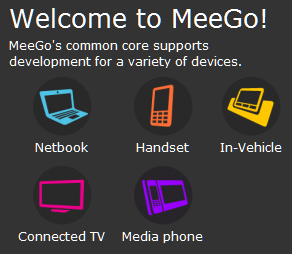
The power and capability of handhelds has reached astounding levels – netbooks have been a runaway success – and connected TVs, tablets, in-vehicle infotainment, and media phones are fast growing new markets for devices with unheard of performance. Our goal is to develop the best software to go with these devices.

said Intel’s Imad Sousou.

So where are the MeeGo smartphones? Well, maybe we will see one at Mobile World Congress next week. But Nokia is in disarray. According to a leaked memo from new CEO Stephen Elop:

The first iPhone shipped in 2007, and we still don’t have a product that is close to their experience. Android came on the scene just over 2 years ago, and this week they took our leadership position in smartphone volumes. Unbelievable.

We have some brilliant sources of innovation inside Nokia, but we are not bringing it to market fast enough. We thought MeeGo would be a platform for winning high-end smartphones. However, at this rate, by the end of 2011, we might have only one MeeGo product in the market.

Perhaps Nokia will progress MeeGo smartphones with renewed vigour; but what looks more likely is that Nokia will embrace a rival platform, maybe Google Android or Microsoft’s Windows Phone 7.

That might well be alongside MeeGo, rather than replacing it, but Nokia needs to focus its energy and I would guess that MeeGo will lose out.

It may be the beginning of the end for a promising project that has progressed too slowly.

Update: Reuters is reporting that “two industry sources close to the company” say Nokia has ended development of its first MeeGo smartphone