Tag Archives: microsoft

PhoneGap comes to Windows Phone

Nitobi has announced PhoneGap for Windows Phone 7, nicely timed just before the Microsoft BUILD conference next week.

PhoneGap is a cross-platform mobile development tool that uses the HTML and JavaScript engine on the phone as its runtime, supplemented by extensions which give access to other device features:

After unpackaging the contents of the www folder, your www/index.html file is loaded into an embedded headless browser control. This is essentially the same paradigm as other platforms, except here it is an IE9 browser and not a webkit variant. IE9 is a much more standards-compliant browser than previous IEs, and implements commonly used html5 features like DOMContentLoaded events, addEventListener interfaces, and CSS3. Be sure to use to get the html5 implementation otherwise the browser may fallback to a compatibility mode, and your code will likely choke and die.

The version for Windows Phone 7, just released in preview, is extended to support features including the camera, accelerometer, contacts, and notifications. There is also support for plugins:

PhoneGap-WP7 maintains the plugability of other platforms via a command pattern, to allow developers to add functionality with minimal fuss, simply define your C# class in the WP7GapClassLib.PhoneGap.Commands namespace and derive your class from BaseCommand.

In general Windows Phone 7 is not well supported by cross-platform toolkits, so PhoneGap support is an interesting development. PhoneGap has a high profile currently, and is being integrated into a diverse range of tools ranging from Adobe Dreamweaver to Embarcadero RadPHP, as well as the standard PhoneGap tools based on Eclipse.

Windows Phone 7 apps, stats and future

Justin Angel, a former Microsoft employee who worked on Silverlight, has posted his analysis of the 24,505 apps he found in the Windows Phone 7 marketplace, exploiting a loophole that lets you get the download links. A few highlights:

  • 97% of the apps are not obfuscated, meaning that it is trivial (with easily available tools) to decompile the source.
  • 90% are Silverlight vs 10% XNA. This is not so much an indicator of the popularity of the two frameworks, but more an indicator of how many apps are graphic-rich games rather than some other kind of utility. Of course if you are making a very simple app, Silverlight is easier than XNA, so that may be a factor too.
  • 99% are C# vs 1% Visual Basic and a smattering of F#. A fascinating stat that makes me wonder what is the future of Visual Basic.

There are more interesting stats about libraries and components used, for which I refer you to the original post.

Does it matter? Well, Windows Phone 7 has not been a big success so far, though the reasons for that are not so much the quality of the OS or the ease of developing apps, but rather its low profile at retail and the fact that most operators and manufacturers don’t really need it: Apple and Android between them pretty much have the market.

That said, there are a few reasons why Windows Phone or some evolution of it may yet be significant. Nokia is betting on it, and while Nokia is undoubtedly in difficulties, this must work in Microsoft’s favour. Further, fear uncertainty and doubt surrounding Android patent and copyright issues may persuade some industry players to give Windows Phone another look.

Perhaps more significantly, when Microsoft unveils its developer strategy at the BUILD conference next week, it is likely that the application model in Windows Phone, or some evolution of it, will integrate with what is planned for Windows 8. NVIDIA is already talking about how Windows 8 will run Windows Phone apps.

For these reasons I believe there is at least a glimmer of hope for Microsoft in the mobile world; certainly the developer story to be officially told next week will be an interesting one.

Full circle for Microsoft database APIs as OLEDB for SQL Server is deprecated

Microsoft’s Eric Nelson has posted about how the OLEDB driver for SQL Server is being deprecated and will not be supported beyond “Denali”, the forthcoming version.

OLEDB was created to be the successor to ODBC – expanding the supported data sources/models to include things other than relational databases. Notably OLEDB was tightly tied to a Windows only technology (COM) whilst ODBC was not (Although we did try and take COM cross platform via partners)

ODBC never did get replaced. What actually happened is that ODBC remained the dominant of the two technologies for many scenarios – and became increasingly used on none Windows platforms and has become the de-facto industry standard for native relational data access.

ODBC was as I recall Microsoft’s first attempt at creating a universal database API.

The death of OLEDB will be slow, according to Nelson. The OLEDB driver for Denali will be supported for seven years following Denali’s release. He also says that OLEDB itself, as opposed to the SQL Server OLEDB driver, is not necessarily being deprecated; though frankly if Microsoft ceases supporting it with its own database I cannot see much future for it.

Note that ADO.NET, which to some extent replaced OLEDB, is not being deprecated. However ADO.NET is only usable from .NET applications. When you consider that Microsoft may be to some extent tilting away from .NET and towards native code, the deprecation of OLEDB becomes even more significant.

ODBC is not particularly easy to use in its raw form. However, you can wrap ODBC with, yes, an OLEDB provider or an ADO.NET provider; or you can wrap the whole lot in an object-relational framework such as Entity Framework.

One more chapter in the long, strange and tortuous history of Microsoft’s data APIs.

Perfect virtualization is a threat to Windows: VMWare aims to embrace and extinguish

One advantage Microsoft Windows has in the cloud and tablet wars is that it it is, well, Windows. Microsoft’s Office 365 cloud computing product largely depends on the assumption that users want to run Office on their local PC or tablet. Windows 8 tablets will be attractive to enterprises that want to continue running custom Windows applications, though they had better be x86 tablets since applications for Windows on ARM processors will require recompilation.

On the other hand, if you can run Windows applications just as easily on a Mac, Apple iPad or Android tablet, then Microsoft’s advantage disappears. Virtualization specialist VMWare is making that point at its VMworld conference in Las Vegas this week. In a press release announcing “New Products and Services for the Post-PC Era”, VMWare VP Christopher Young says:

As our customers begin to embrace this shift to the post-PC era, we offer a simple way to deliver a better Windows-based desktop-as-a-service that empowers organizations to do more with what they already have. At the same time, we are investing in expertise and delivering the open products needed to accelerate the journey to a new way to work beyond the Windows desktop.

Good for Windows, good for what comes after Windows is the message. It is based on several products:

VMView: enables users to work on a remote Windows desktop from a machine running thick or thin client Windows, Mac, iPad or Android. Some versions let you check out a VM for offline working. Virtual desktops have advantages over local ones, in that they are more manageable, more secure, and more robust. Zapping and reinstating a virtual desktop is easier than rebuilding the OS on a physical machine. The new VMView 5.0 claims up 75 percent bandwidth improvement and better 3D graphics. Performance is always compromised to some extent, versus a local operating system, but for many business applications it is more than good enough.

VMWare Horizon: A cloud identity platform which centralizes authentication and access management. You can think of it as VMWare’s cloud-based replacement for Microsoft Active Directory. It is currently focused on access to web-based applications but at VMWorld the company announced its extension to virtual Windows applications, a capability to be in beta by the end of 2011.

Project AppBlast: Lets users run virtual Windows application in an HTML5-capable browser running on any device.

Project Octopus: a data synchronization service to enable collaboration and data-sharing, which will link to VMWare’s other services.

VMWare’s advantage is its strong technology and that Microsoft allowed its own virtualization technologies, including Hyper-V and Remote Desktop Services, to fall behind.

That said, Microsoft has made a substantial effort to catch up in the last few years. Hyper-V and System Center working together form the basis of Microsoft’s private cloud, and under the covers the Azure platform is based on Hyper-V virtual machines. Microsoft’s advantage is the notion that if you are running Windows server and Windows applications anyway, you will be better off with the built-in virtualization features rather than a third-party solution. Microsoft can also afford to undercut VMWare’s prices, because it is bundling virtualization with its operating system. Microsoft has made it easier to run mixed VMWare and Hyper-V systems by supporting VMWare with System Center.

An entrenched competitor is hard to shift though, and VMWare appears to have won the argument with Dell, which has announced the Dell Cloud based on VMWare’s vCloud multi-tenant services.

What is interesting here is not so much the question of who runs Windows applications best, in a variety of virtual scenarios, but the extent to which VMWare succeeds in establishing its own identify system as the heart of an application platform that lets enterprises move seamlessly to a non-Windows world. In other words, VMWare Horizon is now VMWare’s most strategic product. If it succeeds, then it is not only Microsoft that will need to pay attention.

Windows Live Messenger error message hell

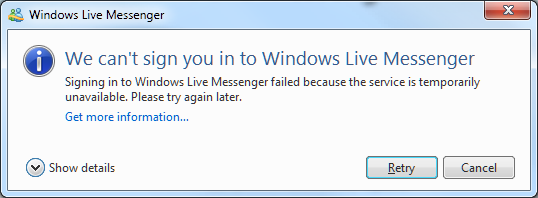
Recently I tried to sign into Live Messenger on Windows 7, only to be informed of what appears to be a temporary interruption in service.

image

Show details, by the way, shows Error code: 80040154

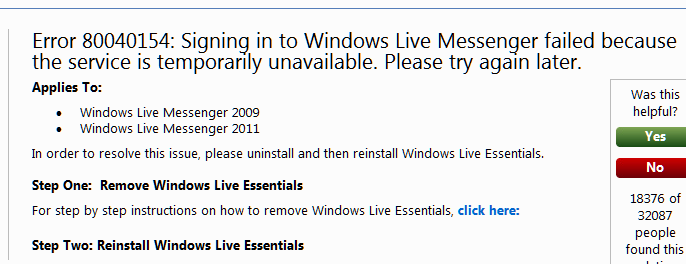
I retried and got the same message, so I clicked the Get more information link, which took me here:

image

The help document says that the solution is to reinstall Windows Live Essentials. I confirmed this, not by reinstalling (yet), but by trying Live Messenger on another machine, where I could sign into the same account successfully.

A few observations about this:

  • The error message is incorrect, since the error is apparently on the client whereas the message states it is a temporary problem with the service.
  • Microsoft’s engineers know that the error message is incorrect, since the help document references both the message and the solution.
  • The error message has been incorrect for years, since it applies to both Windows Live Messenger 2009 and 2011.
  • The misleading error message is particularly annoying, since if the user wants to use Live Messenger urgently they may well wait as advised by the message, not realising that the problem can be fixed immediately.
  • The solution is a brute-force one that involves many other applications, including Live Mail and Live Writer (on which I am typing this post). Or is it enough just to reinstall Messenger? The message suggests not. However if you use Live Mail for all your email, you probably want to know whether the uninstall will delete all your email and contacts or not. The referenced article on uninstalling Live Essentials does not say.

How could Microsoft improve this? At risk of stating the obvious:

  • Give an accurate error message.
  • Give a solution which targets the exact problem rather than relying on an uninstall/reinstall procedure that changes many things that are working fine.
  • If this is impossible, at least advise the user in one place concerning their obvious questions, such as “what happens to my stuff”.

Update: I found the cause of this problem. A developer tool beta had overwritten my system path with its own, breaking this among other things. I do not blame any application for breaking in these circumstances. I fixed the Live Messenger problem by performing a Repair on Live Essentials – less risky than uninstall/reinstall, and in this case sufficient.

Another idea if you have this kind of problem is System Restore.

Nevertheless, the error message could do with some work!

Adobe says role of Flex and Flash has changed, makes play for mobile

Adobe’s Andrew Shorten has posted on the future of Flex, the developer-oriented tool for building applications for the Flash runtime.

This is one of the clearest statements I have seen from Adobe that recognises that the role of Flash on the web is diminishing:

There are countless examples where, in the past, Flex was (rightly) selected as the only way to deliver a great user experience. Today, many of those could be built using HTML5-related technologies and delivered via the browser, and at Adobe, we will provide tooling to help designers and developers create those experiences – Edge and Muse are two such examples.

Adobe is not giving up on Flash, of course, and states that it is still the best for certain categories of application:

We firmly believe that Flex is already the best technology for building complex, high fidelity enterprise applications such as business dashboards, line of business tools, real time trading applications and desktop replacement applications.

I would add both statements are written from the perspective of application developers. The role of Flash as a video and multimedia player is a separate issue. Flash is also important in that context. There is some overlap, in that if your application includes multimedia content then Flash is correspondingly more attractive.

As an aside, it is interesting to note that this repositioning of Flash makes it not so different from Microsoft’s Silverlight: a runtime for business applications.

Adobe is focusing on a new market for Flex in mobile. This overcomes the Apple iOS problem, since you can compile a Flex application to iOS native code. Adobe promises “additional mobile development capabilities” later this year and says:

In our next major release timeframe we expect that the need to build a fully-native application will be reserved for a small number of use cases.

I agree that cross-platform mobile development is a key area and one where there is no clear winner yet. It is a good opportunity for Adobe, though there is increasing competition from the products like Appcelerator Titanium and PhoneGap.

I also think that Embarcadero’s new RAD Studio XE2 will attract interest. This tool which will be released soon does native code compilation across Windows, Mac and Apple iOS, with Android promised, using the Delphi IDE and language.

File operations in Windows: the good and the bad, the past and the future

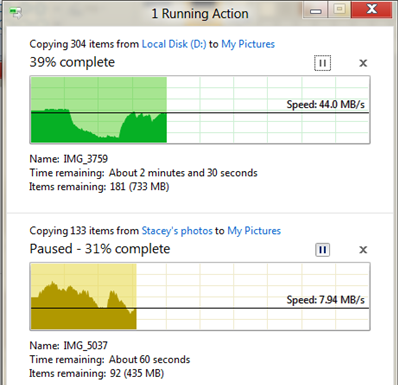
Microsoft’s Windows chief Steven Sinofksy has posted details of what file operations look like in Windows 8. There are a few changes, including a consolidated view of all current file operations that lets you pause and resume any of them. You can also click for more details and get a pretty graph.

image

Microsoft has also worked on the conflict resolution dialog, the one that says “Copy and Replace”, “Don’t copy”, and “Copy, but keep both files”. I consider this a pretty good dialog, but the new one adds the ability to inspect the actual files or even open them to check which is which.

A few observations. First, file operations are hard to get right from a usability perspective. I guess we have all had the experience of trying to help a non-technical user over the phone with some operation like, say, downloading a zip file, extracting it, and doing something with the contents. A common problem is that the user cannot find what they downloaded. Then they are not sure whether they did download it, and do so again. Then they get confused by the ZIP file, which mostly behaves like a folder in Explorer but is not quite the same; and of course since Windows XP SP2 all downloaded files are “blocked” by default which is another source of perplexity.

If you add complications like hidden folders and hidden file extensions in Windows Explorer, what should be a simple task can be really awkward. Let’s say your user has a video file called somemovie.vob that needs to be renamed to somevideo.mpg before it will play. With the default setting, when you rename it you actually get somevideo.mpg.vob. You have to talk the user through showing file extensions before it will work, or maybe open up a command prompt and use ren which does actually work correctly. Microsoft could fix this with a “Change file extension” option in Windows Explorer, but I do not know if this has made it to Windows 8.

The problems with hidden files and hidden file extensions show that something is wrong with the underlying model. Showing them is wrong because they are ugly and confusing; hiding them is wrong because you sometimes need them. It is a partial abstraction that is only partly successful. 

Apple’s solution in iOS is to hide the file system completely. The user will never have these problems. However, this is an autocratic approach that introduces new difficulties. If you have a documents in Pages in iOS you cannot move it directly to DropBox, for example, because there is no accessible file system. You are limited by whatever options the Pages app gives you for doing something with a document.

I believe thought that Apple is on the right lines. The app-centric view makes sense to users, and abstracting the file system so that users do not generally need to care about the location of a file is a reasonable goal. If the File Explorer goes the way of the command prompt, and becomes a tool used rarely by most users, that will mean Windows usability has improved.

Cloud-centric computing has potential to improve this, with your local storage just a cache of your internet-stored documents and data.

Finally, it is worth noting that file operations have got significantly better in Windows. Using the clipboard to copy and paste files, which I think came in with Windows 95, was a big advance. Then Vista fixed another annoyance: multiple file operations would abort on the first failure, leaving you uncertain which files had actually been transferred. Vista broke performance though, and file operations could be hilariously slow as Windows “discovered” files or just seemed to hang with a spinning bagel. Service packs and then Windows 7 pretty much fixed that.

I still like ROBOCOPY though. Hey Microsoft – why doesn’t Explorer have “Copy new and changed files only” or “Mirror directory”?

HP business breakdown and why a PC spin-off could backfire

I had a look at HP’s latest financials, following last night’s triple blast of news from the computer giant. It is ceasing webOS operations, acquiring enterprise knowledge management company Autonomy, and considering (though only considering) a spin-off or other major change to its PC division, the Personal Systems Group. Here is what HP said:

As part of the transformation, HP announced that its board of directors has authorized the exploration of strategic alternatives for the company’s Personal Systems Group. HP will consider a broad range of options that may include, among others, a full or partial separation of PSG from HP through a spin-off or other transaction. (See accompanying press release.)

Looking at the results for the second quarter 2011, here is how the main pieces break down:

$millions

Segment Percentage of revenue Earnings Percentage of total earnings
Services 9,089 28.5% 1225 33.8%
Servers, storage and networking 5396 16.9% 699 19.3%
HP Software 780 2.4% 151 4.2%
Personal systems group 9,592 30.1% 567 15.7%
Imaging and printing 6,087 19.1% 892 24.6%
Financial Services 932 2.9% 88 2.4%

Note that “Earnings” is earnings from operations; HP actually made less money than that, because various other corporate costs have to be deducted. But it gives an idea of where HP’s profit comes from.

So what do these groups do? PSG is notebooks, desktops, workstations and other, where “other” I’d guess will include the webOS mobile devices. In PSG, notebooks accounts for 54% of the total, with desktops taking 38% of the rest. Virtually all of these run Windows.

In servers, storage and networking, 61% is from what HP calls “Industry standard servers”. This is code for Windows server.

Under services, the three big businesses are Infrastructure Technology Outsourcing (42%), Technology Services (30%) and Application Services (19%). The first of these is clear-cut (have HP run your infrastructure), but the second two are both consulting services and on a brief look seem to have some overlap.

Autonomy, by the way, reported revenue of $million 247 in the three months ending June 30 2011 – pretty tiny relative to HP.

A few comments then. It’s worth noting that PSG is the biggest single segment for revenue, but not so for profit, though it is still making a useful contribution.

Imaging and Printing contributes most earnings as a proportion of revenue. I do not know how much of that comes from absurdly overpriced ink cartridges!

If you take PSG together with Industry Standard Servers, you find that around 40% of HP’s revenue comes from boxes running Windows. If you then consider what its printers, network and storage systems attach to, and that a proportion of HP’s consulting business concerns Windows systems and applications, it is obvious that HP’s fortunes are deeply entwined with Microsoft.

If HP removes PSG that will still be true, though less so. But why would HP want do remove PSG? I would guess two main reasons. One is that it is unprofitable relative to the other segments, and the other is that HP foresees the business declining under the force of various well-documented pressures: Apple, mobile, cloud.

It still makes little sense to me. I can understand why HP might want to get out of consumer desktops and laptops, but it seems to me that to supply corporate PCs fits snugly with the rest of HP’s business and has beneficial side-effects. After all, PCs, printers and servers do all plug together both physically and conceptually. Getting rid of PSG might have a negative effect on other parts of HPs business.

In the SMB market, by the way, resellers like HP because unlike Dell it does not mainly sell direct. HP boxes generally work as advertised in my experience, though I rate the laptops less highly than the servers and desktops.
HP discontinues WebOS, considers PC spin-off. Should have stuck with Microsoft

Oh yes, and buys Autonomy, a fast-growing specialist in enterprise knowledge management.

Here’s the news from HP’s announcement:

As part of the transformation, HP announced that its board of directors has authorized the exploration of strategic alternatives for the company’s Personal Systems Group. HP will consider a broad range of options that may include, among others, a full or partial separation of PSG from HP through a spin-off or other transaction. (See accompanying press release.)

HP will discontinue operations for webOS devices, specifically the TouchPad and webOS phones. The devices have not met internal milestones and financial targets. HP will continue to explore options to optimize the value of webOS software going forward.

In addition, HP announced the terms of a recommended transaction for all of the outstanding shares of Autonomy Corporation plc for £25.50 ($42.11) per share in cash.

A few quick comments. First, the failure of webOS does not surprise me. There is not much wrong with webOS as such; in pure technical terms it deserves better. Its focus on adapting web technologies for local mobile applications is far-sighted; it is a more interesting operating system than Android and in some ways it is surprising that it went to HP and not to Google, which is a web technology specialist.

The problem is that HP, despite its size, is not big enough to make a success of webOS on its own. This was my comment from just over a year ago:

Mobile platforms stand (or fall) on several pillars: hardware, software, mobile operator partners, and apps. Apple is powering ahead with all of these. Google Android is as well, and has become the obvious choice for vendors (other than HP) who want to ride the wave of a successful platform. Windows Phone 7 faces obvious challenges, but at least in theory Microsoft can make it work though integration with Windows and by offering developers a familiar set of tools, as I’ve noted here.

It is obvious that not all these platforms can succeed. If we accept that Apple and Android will occupy the top two rungs of the ladder when it comes to attracting app developers, that means HP webOS cannot do better than third; and I’d speculate that it will be some way lower down than that.

Frankly, if HP did not want to do Android, it should have stuck with Microsoft. But this is where the webOS news ties in with the announcement about he Personal Systems Group. HP fell out with Microsoft last year, as I noted in my 2010 retrospective. I said the two companies should make up; but it looks as if HP is more inclined to give up on PCs and pursue other lines that have better margins – like enterprise software.

I am puzzled though by the PSG announcement. It is always curious when a company announces that it might or might not do something, and the fact that HP says it is considering a spin-off of its PC division will be enough to makes its customers uncertain about the long-term future of HP PCs and some of them will buy elsewhere as a result. It would have paid HP either to say nothing, or to be more definite and aim for a speedy transition.

All this, on the eve of Microsoft’s detailed unveiling of Windows 8. What are the implications? More than I can put into a single post; but like Gartner’s reports of dramatically declining PC sales in Western Europe presented earlier this week, this is a sign of structural change in the industry.

Microsoft will be glad of one thing: it no longer has this major partner promoting a rival mobile and tablet operating system. Note that HP still is a major partner: even if it sells the Personal Systems Group, its server and services business will still be deeply entwined with Windows.

Google is now a hardware company as it announces acquisition of Motorola Mobility and its patents

Google is to acquire Motorola Mobility, a major manufacturer of Android handsets. Why? I believe this is the key statement:

We recently explained how companies including Microsoft and Apple are banding together in anti-competitive patent attacks on Android. The U.S. Department of Justice had to intervene in the results of one recent patent auction to “protect competition and innovation in the open source software community” and it is currently looking into the results of the Nortel auction. Our acquisition of Motorola will increase competition by strengthening Google’s patent portfolio, which will enable us to better protect Android from anti-competitive threats from Microsoft, Apple and other companies.

What are the implications? This will assist Google in the patent wars and perhaps give it some of the benefits of vertical integration enjoyed by Apple with iOS; though this last is a difficult point. The more Google invests in Google Motorola, the more it will upset other Android partners. Google CEO Larry Page says:

This acquisition will not change our commitment to run Android as an open platform. Motorola will remain a licensee of Android and Android will remain open. We will run Motorola as a separate business.

It is unlikely to be so simple; and the main winner I foresee from today’s announcement is Microsoft. Nokia’s decision to embrace Windows Phone rather than Android looks smarter today, since for all its faults Microsoft has a history of working with multiple hardware vendors. The faltering launches of HP’s TouchPad and RIM’s PlayBook have also worked in Microsoft’s favour. I do not mean to understate Microsoft’s challenge in competing with Apple and Android, but I believe it has a better chance than either HP or RIM, thanks to its size and existing market penetration with Windows.

Microsoft will be clarifying its mobile and slate strategy next month at the BUILD conference.

Today’s announcement is also a sign that Google takes Android’s patent problems seriously, as indeed it should. The company’s policy of act first, seek forgiveness later seems to be unravelling. Oracle has a lawsuit against Google with respect to use of Java in Android that looks like it will run and run. FOSS patent expert Florian Mueller argues today that Android also infringes the Linux license, and that this is a problem that cannot easily be fixed. Samsung’s latest Galaxy Tab has been barred from the EU; not entirely a Google issue, but it runs Android.

Note of clarification: Google is acquiring Motorola Mobility, not the whole of Motorola. In January 2011 Motorola split into two businesses. Motorola Mobility is one, revenue in second quarter 2011 around $3.3 billion. The other is Motorola Solutions, revenue in second quarter 2011 around $2 billion.