Tag Archives: microsoft

The Adobe Flash and Windows Phone 7 mystery

I attended Microsoft’s Mix event in March 2010, where Microsoft gave us the first detailed preview of Windows Phone 7 from the developer perspective. At that time, Microsoft made it clear that the Adobe Flash plug-in would not be supported in the first release, but implied that it would follow.

Did Microsoft ever announce that Flash support would definitely come? I am not sure that it was quite promised, though I do recall Microsoft spokespersons including Charlie Kindel explaining that native code development would not be possible for developers, other than for operators customising the device – the HTC Hub is an example – and for Adobe building Flash.

Adobe’s Mike Chambers did state that:

Adobe and Microsoft are working together to bring Flash Player 10.1 to Internet Explorer Mobile on Windows Phone 7 Series

In June, still pre-release, I spoke to Adobe’s Michael Chaize who told me that work on Flash for Windows Phone 7 was well advanced and that it would follow “within months” of the initial release.

There has also been contrary evidence. Microsoft’s Andy Lees explained to Mary Branscombe:

There is no ActiveX plug-in extensibility [in the browser] because of the security model; we’re not going to do that. And with no ActiveX plug-in model, how would we do Flash?

Fair enough and even sensible, but why did Microsoft imply earlier that Flash was on the way if in fact the security architecture made it impossible? Plans change of course, but I have never been able to get a clear statement on the matter other than vague expressions of cooperation between Adobe and Microsoft. Like this one from Microsoft’s Joe Marini:

We are working with Adobe, but it has not yet been decided the last time I checked – part of that is Adobe is doing what they have to do and we’re doing what we have to do. The last I checked the team is working with them but I don’t think they have any announcement whether it’s going to definitely work or not.

Now Microsoft has just released Windows Phone 7.5 “Mango”, the first major update to the the Phone OS, and Flash is still not supported. Either because Adobe has not yet done “what they have to do”, or because Microsoft has not done “what we have to do”, or because the architecture prevents it, who knows?

You can debate of course whether Flash support is a selling point or a burden for a smartphone – but it would be good to have clarity on the matter.

My own best guess is that if it has not come by now, it never will. Although Microsoft will not say so, for obvious reasons, I also think it is inevitable that the Windows Runtime and the Metro-style development model found in Windows 8 will form the operating system for a future Windows Phone, though I am not sure if it will be Windows Phone 8 or later, but that will change the rules. Currently IE in Metro does not support plug-ins, so I would say the prospects for Flash in the browser on Microsoft’s phone are not good.

What about Adobe AIR for Windows Phone? Interesting question, though it might be difficult given that Adobe would have to in effect create a Flash to Silverlight conversion tool which might hurt a bit. This would be easier on Metro since native code development is supported.

Adobe’s MAX conference is on next week so there may be further information on this long-running topic then.

The closest I got to Windows on ARM at Microsoft BUILD 2011

A couple of the stands in the exhibition at Microsoft’s BUILD conference last week were showing Windows on ARM. This one was on the NVIDIA stand and was most likely running its Tegra 2 SoC (System on a Chip) though Tegra 3 (code-name Kal-El) is apparently now in production. The tablet was displayed under a plastic shroud which could only be lifted when someone from Microsoft was present, though I was able to get this snap of the machine sans shroud. I was not permitted to handle the machine.

image

I have blanked out part of the background because it was black on black.

My main observation: it looks just like the Intel version. This screen shows a Metro app running side by side with the Windows desktop, and showing the “charms” on the right.

Gartner reports that Apple will have the tablet market almost to itself in 2011 (73.4% market share). I believe Windows on ARM is critical to Microsoft’s strategy to compete. In principle, it should be cheaper and more efficient than an Intel device, and one that is more locked-down in the style to which Apple has made us accustomed.

If Microsoft and its hardware partners can get the size, weight and design details right, I suspect I would rather have a Windows 8 tablet than an iPad. One advantage is the ability to have two apps side by side. Microsoft’s new user interface works really well with touch. I will expect to find a Windows remote desktop client there by default, and better support for Microsoft Office and SharePoint than I find in the iPad.

By the time Windows 8 comes out though, we will likely have iPad 3 with who-knows-what improvements; Apple has all the apps; and breaking into this market will not be easy.

Adobe to ship Flash 11 and AIR 3, repositions Flash vs HTML 5

Adobe has announced that Flash 11 and AIR 3 will ship in early October.

There are significant changes in this release.

  • Flash gets Stage 3D (previously codenamed Molehill), a set of low-level 3D APIs, GPU accelerated where hardware allows, which will make console-like 3D graphics and games possible in Flash. Stage 3D wraps DirectX on Windows and OpenGL on desktop and mobile platforms.
  • 64-bit Flash is here at last, supporting 64-bit Internet Explorer and other browses on Windows, Mac and Linux.
  • AIR, which uses Flash as a runtime for desktop and mobile applications, now supports native extensions for better device support, operating system integration, and the ability to speed performance-critical code or use open source libraries.
  • In addition, the AIR packager for iOS, which lets you wrap your application as a native executable, is now a feature called Captive Runtime which is available for Windows, Mac and Android as well as iOS. Users who install a packaged application will not know it uses AIR, and will not need to install or update the AIR runtime as it is packaged with the application, though it is not actually a single file (on Windows at least).

These new options make the Flash and AIR combination an interesting comparison with other cross-platform development tools, such as Embarcadero’s new Delphi XE2, which targets Windows, Mac and iOS with a new framework called FireMonkey; or Appcelerator’s Titanium tool for cross-platform desktop and mobile development. Note though that Adobe is not promising any performance improvement. This is just another way to package the same runtime.

Adobe’s advantage is its high quality design and development tools and the maturity of the Flash runtime. For application size and performance, it will likely fall short of true native development tools. The ActionScript language could do with updating, and I would not be surprised if Adobe addresses this in the next major Flash release.

But do we still need Flash? Flash in the browser is in decline, thanks to the influence of Apple and the rise of HTML 5. Adobe’s MAX conference is coming up soon, and I noticed in the schedule [Flash needed] a defensive note in some of the sessions; there is even one called “The Death of Flash” which talks about “the misinformation that’s percolated through the web over the past year”.

That may be so; but even Adobe is re-positioning Flash and recognizing the rise of HTML 5. “Customers see significant advantages for Flash in a few focused areas,” said Adobe’s Danny Winokur, VP and General Manager of Platform , in a press briefing. He identified these areas as gaming, media apps, and “sophisticated data-driven applications” – think data visualisation rather than just forms over data. “For everything else it is very clear that … HTML 5 is a mature enough technology that it is a really good solution.”

Adobe is therefore investing in HTML 5 tools as well as Flash tools, and Winokur mentioned the Edge motion design tool as well as the venerable Dreamweaver.

I asked Winokur, given that HTML 5 is maturing fast, how Adobe sees the picture vs Flash in say two years time. He replied that Adobe is actively working to advance HTML 5, but that “there will continue to be opportunities for innovation in Flash, where we can … enable new possibilities that did not previously exist on the Web.” He makes the case for Flash as a kind of leading edge for HTML, with features that eventually become part of the HTML standard.

It is a fair point, but it is obvious that the niche for Flash is getting smaller rather than larger.

Adobe has never charged for the Flash runtime, and while the Flash vs HTML path is tricky to navigate, Adobe mainly makes its money from design tools, server applications and web analytics, and while Flash plays some client role in many of these products, Adobe can tune them over time to make less use of the runtime. I believe we can see this happening.

More positively, Adobe is benefiting from the demand for rich content across both web and applications, and has just reported decent financial results, showing the company’s resilience.

Finally, everyone is asking what Adobe will do about Microsoft’s WIndows 8 Metro platform for tablets, given that browser plug-ins are not supported. Here is the answer:

… we expect Flash based apps will come to Metro via Adobe AIR, much the way they are on Android, iOS and BlackBerry Tablet OS today

though I hope this will be delivered more quickly than the promised Flash runtime for Windows Phone 7, which is not a subject either Adobe or Microsoft seems willing to talk about.

Update: Adobe has also announced the Flex 4.6 SDK and Flash Builder 4.6, which supports these new capabilities including Captive Runtime and Native Extensions, and has new controls specifically aimed at tablet apps.

Installing Windows 8 developer preview on VirtualBox

I have installed the Windows 8 developer preview on Oracle VirtualBox. It does not work on Virtual PC since 64-bit guests are not supported. It is probably fine on Hyper-V, but I don’t have spare Hyper-V capacity for it at the moment.

image

I had a few hassles and thought it would be worth sharing my notes.

I gave the VM 2GB of RAM, 2 processors, and the maximum amount of video ram, but these settings are up to you.

The main problem I encountered was with the mouse. I found that it worked a bit in the Windows 8 guest, but only a bit. The pointer jumped around and was too frustrating to use.

The solution I found was to remote desktop to the VM from my Windows 7 desktop. I could not get the remote desktop built into VirtualBox to work, on a brief try, so I used pure Windows to Windows.

In order to do this, I first set networking in VirtualBox to Bridged. This means it is on the same subnet as the host computer. Then I enabled remote desktop access in the Windows 8 control panel. I opened a command prompt to check the IP address – Windows key + R opens the Run prompt and is a useful combination when the mouse is not working.

Then I was able to use remote desktop to that IP address. Note that unless you join the Windows 8 machine to a domain, the username is:

machinename\email address

or alternatively

WindowsLiveID\email address

presuming you do the default thing, which is to hook up Windows 8 to a Live ID.

Now, if you do this you will have two GUIs showing, which is untidy. You can fix this by running the VM headless. Shut down the VM, navigate to the VirtualBox directory and run the following command:

vboxheadless –startvm yourvmname

Now you can log on to the Windows 8 VM without having any other instance on the screen.

You might not have the same problem with the mouse, of course.

Incidentally, I am not sure what is the best way to shutdown the VM, but I use a command prompt or WindowsKey – R and type:

shutdown /s

My final observation: Windows 8 with just mouse and keyboard is a lot less fun than on a real tablet. It raises the question of just how much value there is in Windows 8 for non-tablet users. I suspect rather little, which is why Windows 7 is set for a long life on the corporate desktop, and for other users who do not have touch screens.

Why I miss pinball machines

I’m just back from Microsoft’s BUILD conference in Anaheim, California, where I had little time to do much other than attend sessions, write, eat and sleep (a little).

I did have a quick look round the exhibition though, and was pleased to find four pinball machines. Unfortunately I never got a go, except on one that proved to be slightly broken. Another was so broken that it was switched off.

image

That’s one of the reasons you don’t see many pinball machines these days. They are high-maintenance, with many moving parts that get pounded constantly by one or more heavy silver balls, plus the occasional thump from the player as he bangs or shifts the machine just enough to affect the ball’s motion without causing, he hopes, a tilt.

Another reason for the game’s decline is that a good player can play for ages on a single quarter – or 50c, which seems to be the going rate now. It is a game of skill where accurate shooting gets you both long games and frequent extra balls and replays.

Neither of these characteristics is good for arcades, which like high income and low maintenance.

I love the game though. It offers tactile, physical pleasure that will never be captured by video simulations. The machines themselves are pure delight, every one different, often with gorgeous artwork and amazing gameplay with loops and tunnels and mini-play areas and fantastic contraptions that enable themselves if you get the right sequence of targets.

Most latter-day machines have a multi-ball mode, which is a lot of fun and surprisingly difficult. Watching several balls at once is a great deal harder than keeping your eye on just one.

I am not sure that pinball machines are made any more, though enthusiasts seem to be able to keep the old ones going. Sadly a lot of the machines you encounter in dusty corners of cafés and arcades are not in good order, the bumpers do not bump as they should, some features do not quite work, and they are disappointing.

The best one at BUILD was called Pirates of the Caribbean and seemed pretty good, though I never got a game.

Most of the time I have to make do with computer simulations. The best I have come across are the Pro Pinball series for the PC (don’t get the Xbox version which is a poor port). I was on a forum once with one of the developers, who explained how he hated scrolling on pinball simulations. I agree – how you can shoot accurately with the play area is scrolling all time? There is also an amazing open source project which lets you load actual machine ROMs for authentic simulation, though this is of uncertain legality.

I am more interested in simulations than pinball-ish games that you could never build. One of the great features of Pro Pinball is that you can go into a maintenance mode and tune it as you would a real machine.

Unfortunately none of these are anything like as much fun as the real thing, though they do save on quarters or your local equivalent.

Reflections on Microsoft BUILD 2011

I’m just back from Microsoft’s BUILD conference at Anaheim in California, which lived up to the hype as a key moment of transition for the company. Some said it was the most significant PDC – yes, it was really the Professional Developers Conference renamed – since 2000, when .NET was introduced; some said the most significant ever.

image

“Significant” does not necessarily mean successful, and history will judge whether BUILD 2011 was a new dawn or the beginning of the end for Windows. Nevertheless, I have not heard so much cheering and whooping at a Microsoft conference for a while, and although I am no fan of cheering and whooping I recognise that there was genuine enthusiasm there for the new direction that was unveiled.

So what happened? First, let me mention the Windows Server 8 preview, which looks a solid upgrade to Server 2008 with a hugely improved Hyper-V virtualisation and lots of changes in storage, in IIS, networking, in data de-duplication, in modularisation (enabling seamless transition between Server Core and full Server) and in management, with the ascent of PowerShell scripting and recognition that logging onto a GUI on the server itself is poor practice.

The server team are not suffering the same angst as the client team in terms of direction, though the company has some tricky positioning to do with respect to Azure (platform) and Server 8 (infrastructure) cloud computing, and how much Microsoft hosts in its own datacentres and how much it leaves to partners.

What about Windows client? This is the interesting one, and you can almost hear the discussions among Microsoft execs that led them to create the Windows Runtime and Metro-style apps. There is the Apple iPad; there is cloud; there are smartphones; and Windows looks increasingly like a big, ponderous, legacy operating system with its dependence on keyboard and mouse (or stylus), security issues, and role as a fat client when the industry is moving slowly towards a cloud-plus-device model.

At the same time Windows and Office form a legacy that Microsoft cannot abandon, deeply embedded in the business world and the source of most of the company’s profits. The stage is set for slow decline, though if nothing else BUILD demonstrates that Microsoft is aware of this and making its move to escape that fate.

Its answer is a new platform based on the touch-friendly Metro UI derived from Windows Phone 7, and a new high-performance native code runtime, called Windows Runtime or WinRT. Forget Silverlight or WPF (Windows Presentation Foundation); this is a new platform in which .NET is optional, and which is friendly to all of C#, C/C++, and HTML5/JavaScript. That said, WinRT is a locked-down platform which puts safety and lock-in to Microsoft’s forthcoming Windows Store ahead of developer freedom, especially (and I am speculating a little) in the ARM configuration of which we heard little at BUILD.

BUILD attendees were given a high-end Samsung tablet with Windows 8 pre-installed, and in general the Metro-style UI was a delight, responsive and easy to use, and with some fun example apps, though many of the apps that will come as standard were missing and there was evidence of pre-beta roughness and instability in places.

The client strategy seems to me to look like this:

Windows desktop will trundle on, with a few improvements in areas like boot time, client Hyper-V, and the impressive Windows To Go that runs Windows from a bootable and bitlocker-encrypted USB stick leaving no footprint on the PC itself. Many Windows 8 users will spend all their time in the desktop, and I suspect Microsoft will be under pressure to allow users to stick with the old Start menu if they have no desire or need to see the new Metro-style side of Windows..

A new breed of Intel tablets and touch-screen notebooks will make great devices towards the high end of mobile computing. This is something I look forward to taking with me when I need to work on the road: Metro-style apps for when you are squashed in an aeroplane seat, browsing the web or checking a map, but full Windows only a tap away. These will be useful but slightly odd hybrids, and will tend to be expensive, especially as you will want a keyboard and stylus or trackpad for working in desktop Windows. They will not compete effectively with the iPad or Android tablets, being heavier, with shorter battery life, more expensive and less secure. They may compete well with Mac notebooks, depending on how much value Metro adds for business users mainly focused on desktop applications.

Windows on ARM, which will be mainly for Metro-style apps and priced to compete with other media tablets. This is where Microsoft is being vague, but we definitely heard at BUILD that only Metro-style apps will be available from the Windows Store for ARM, and even hints that there may be no way to install desktop apps. I suspect that Microsoft would like to get rid of desktop Windows on ARM, but that it will be too difficult to achieve that in the first iteration. One unknown factor is Office. It is obvious that Microsoft cannot rework full Office for Metro by this time next year; yet offering desktop Office will be uncomfortable and (knowing Microsoft) expensive on a lightweight, Metro-centric ARM device. Equally, not offering Office might be perceived as throwing away a key advantage of Windows.

Either way, Windows on ARM looks like Microsoft’s iPad competitor, safe, cloud-oriented, inexpensive, long battery life, and lots of fun and delightful apps, if developers rush to the platform in the way Microsoft hopes.

There are several risks for Microsoft here. OEM partners may cheapen the user experience with design flaws and low-quality add-ons. Developers may prove reluctant to invest in an unproven new platform. It may be hard to get the price down low enough, bearing in mind Apple’s advantage with enormous volume purchasing of components for iPad.

Still, one clever aspect of Microsoft’s strategy is that everyone with Windows 8 will have Metro, which means there will be a large installed base even if many of those users only really want desktop Windows.

I also wonder if this is an opportunity for Nokia, to use its hardware expertise to deliver excellent devices for Windows on ARM.

Finally, let me mention a few other BUILD highlights. Anders Hejlsberg spoke on C# and VB futures (though I note that there were few VB developers at BUILD) and I was impressed both by the new asynchronous programming support and the forthcoming compiler API which will enable some amazing new capabilities.

I also enjoyed Don Syme’s session on F#, where he focused on programming information rather than mere algorithms, and showed how the language can query internet data sources with IntelliSense and code hints in the IDE, inferred from schemas retrieved dynamically. You really need to watch his session to understand what this means.

In the end this was a great conference, with an abundance of innovation and though-provoking technology. In saying that, I do not mean to understate the challenges this huge company still faces.

Data Access in Windows 8 WinRT

I’ve been teasing out details about the Windows Runtime (WinRT) here at Microsoft’s BUILD conference in Anaheim, California.

WinRT is the runtime for touch-friendly Metro-style apps, in effect Microsoft’s operating system for tablets, though it has a dual personality and full desktop Windows is also available.

Microsoft experts told me that there is no client for SQL Server or other network databases in WinRT. To access such databases, you have to create a web service and call that. This is similar to the Silverlight model. The .NET Framework in WinRT will support WCF RIA Services, which is one option for this.

If you only want to store and retrieve data locally, there seems to be a JET API, or you could use something like SQLite or roll your own simple database manager. HTML and JavaScript apps support IndexedDB. All these options read and write data to the app’s isolated storage; they do not enable free access to the file system.

LINQ (Language Integrated Query) is supported but of course that is only as useful as the data it can connect to.

Which Microsoft cloud? Windows Server 8 shows Azure is not everything

I was fortunate to attend a two-day drilldown into what is coming in Windows Server 8 last week, just before the BUILD conference under way in Anaheim, California. It is an impressive release, with two things standing out for me.

One is that Microsoft has successfully re-engineered Windows Server so that it is both sufficiently modular that you can transition from Server Core to full Server and back without reinstall, and also sufficiently detached from the Windows GUI that everything runs and can be configured without the need to log on to the Windows desktop on the server itself. This is a huge achievement.

Second, much of the engineering in Server 8 is focussed on making it better for cloud hosting. This the focus of changes in both Hyper-V and IIS, isolation of virtual networks, proper bandwidth and CPU quotas and throttling, and the ability to move VMs freely between hosts without taking them offline, and to replicate them for failover purposes. You can read more in my piece on The Register.

The question this raises for me is about Windows Server clouds and Azure. Of course Azure runs on Windows Server, but Azure is a platform, all the VMs are stateless, and when you use Azure you are buying into a whole set of services that might or might not match your needs. At a developer event yesterday, one explained how he could not use Azure because he needed to install a third-party application. The Hyper-V role helps a little, but it is not ideal as you still need to solve the stateless problem; at any time, changes you make to the server may be reverted.

If you simply rent plain Windows Server VMs in the cloud, you lose some of the benefits of cloud computing since you are responsible for everything about how the server is configured and maintained; but you also get complete freedom to set it up as you want.

One of the issues with moving from running your own Exchange and SharePoint, for example, to a cloud-hosted service like Office 365 is that you lose control of your destiny. If the service goes down, you have to beg and plead with support to get information and to speed recovery.

Now consider a scenario in which you have your Exchange and SharePoint on hosted Hyper-V VMs with replication (now coming in Server 8) to an alternate provider such as Amazon Web Services, or to your own on-premise servers. If the service goes down, you failover to the replicas.

Another compelling idea relates to live migration. Imagine you have a VM running on premise, and want to move it to the cloud. Without interruption of service, you could in principle migrate it from on-premise to the cloud and back at will. You need a fast connection of course, but this aspect is constantly improving.

The bottom line: plain Windows Server on a VM has many attractions versus an entire platform like Azure.

The snag is, Microsoft does not offer this type of hosting at the moment. Well, that is not necessarily a snag depending on what you think about hosting with Microsoft; but for some there is considerable reassurance in hosting with a company of Microsoft’s size, and which should in theory have the best understanding of what it takes to host Windows Server.

My guess is that Microsoft will either add this capability to Azure – without the limitations of the Hyper-V role, but with replication and failover – or else develop a new cloud service alongside Azure for this purpose.

My further guess is that it would be popular, possibly more so than Azure is today.

Here comes Windows 8 – but what about the apps?

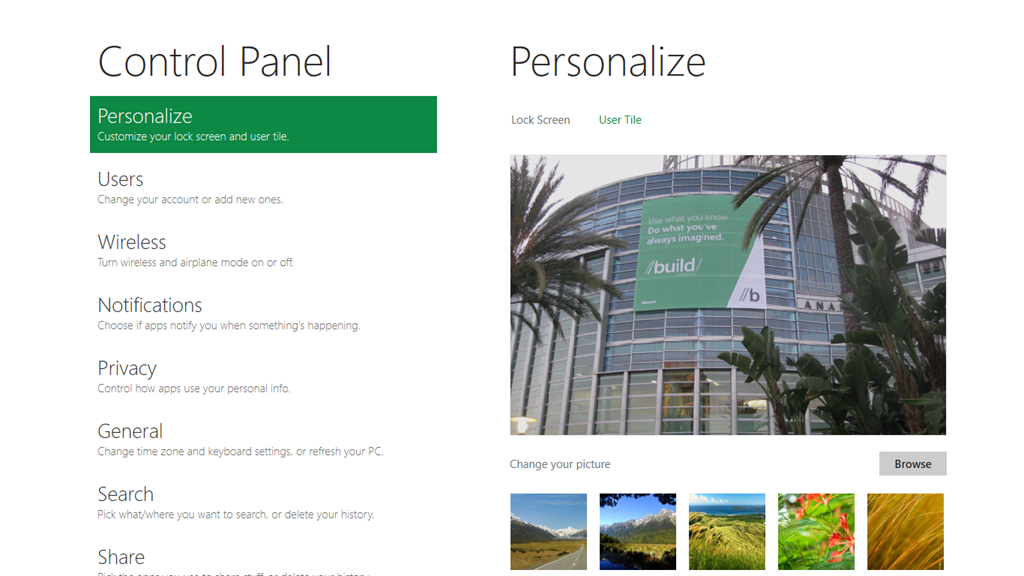
I’ve spent what feels like most of the night trying out the first developer preview of Windows 8, using an Intel tablet PC loaned by Microsoft for that purpose. The early preview is frustrating, in that many of what will be standard apps like Mail and Contacts are missing, but it is already obvious that Microsoft has done a great job with what I am calling the “Metro” platform within Windows 8. Here is Control Panel in the new user interface:

image

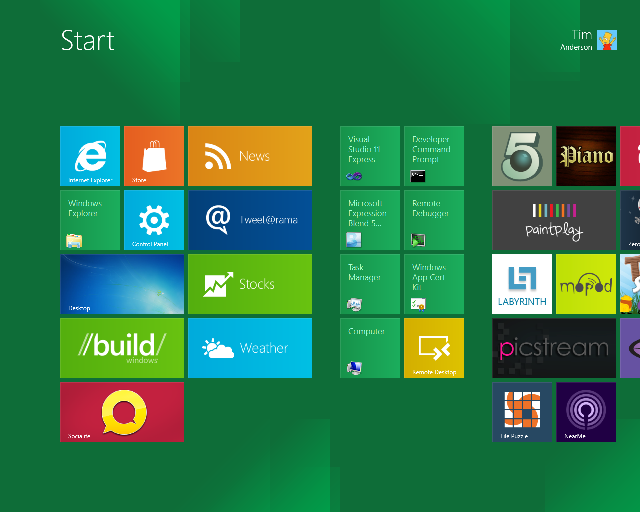
This is the touch-optimized personality of tthe new operating system, featuring a Start menu with live tiles like an evolved Windows Phone 7, apps that run full-screen to create an "immersive user interface", and swipe control to show application menus, switch apps, or access standard features.

It is a delight to use; but this is Metro, with its own Windows Runtime (WinRT), a native code API which is wrapped for access by either HTML and JavaScript apps (which also use the IE 10 runtime), or by C/C++, VB or C# apps driving XAML-defined user interfaces – yes, kind of like Silverlight but not Silverlight.
What about all our Windows apps? For that we need the desktop personality in Windows 8. Tap the Desktop tile, or launch a "Desktop" app, and it suddenly appears, looking much like Windows 7.

The problem: while Windows 8 "Metro" looks great, there are currently zero apps for it, or at least only those supplied with the preview, because it is brand new.
In truth then, Microsoft has not quite done what would have been ideal, which is to make Windows touch-friendly. That would have been impossible. Instead, it has integrated Windows with a new touch-friendly platform.

The key question: will this new platform attract the support it needs from developers in order to become successful in its own right, so that we can do most of our work there and retreat to the desktop only for legacy apps, or apps which really need mouse and keyboard?

It is a big ask, and we have seen HP with WebOS, and probably RIM with PlayBook, fail at this task.

Of course it is still Windows; but I do have a concern that a proportion of users will try Windows 8, find the transitions between Desktop and Metro unsettling, and stick with version 7.0.

Let me add these are very much first impressions; and that Metro really does look good. Perhaps it will win; but a lot of momentum has to build behind it for that to be possible.

Building Windows – when Microsoft shows its hand

I’m in Anaheim, California on the eve of Microsoft’s BUILD conference. I have heard the phrase “wait until BUILD” so many times from Microsoft over the last few months that it has given this conference a special flavour. After Wednesday, the company will have to think of another way to avoid awkward questions like what is happening to Silverlight.

This is the latest chapter in the progression of Windows, server client and mobile. In particular, I will be trying to understand Microsoft’s software development platform. Whatever it looks like, it will be diverse, and include native code, HTML and JavaScript, .NET code including Silverlight, and perhaps some new hybrid. What will be the pros and cons of each approach, how do developers create apps that span desktop, tablet and mobile, and how will the delivery model change in the app store era?

Interesting questions; but the other theme is about how effectively Microsoft will compete versus its competition as the importance of desktop Windows shrinks. Cloud, mobile and tablet are the themes here, and after many mis-steps time is running out.

Not much to add except “watch this space” over the next few days; though I would be interested in any specific comments or questions on Microsoft’s strategy.