Category Archives: microsoft

Steve Ballmer shows off Windows 8 in Build keynote

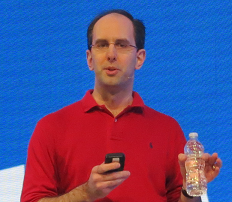
Microsoft’s BUILD conference has kicked off in Redmond with a keynote featuring CEO Steve Ballmer, Developer evangelist Steven Guggenheimer, and Kevin Gallo from the Windows Phone team. There were also a few guest appearances, including Tony Garcia from Unity, a cross-platform games engine.

The company has a lot to talk about, with Windows 8 just launched – four million upgrades sold so far, we were told, which seems to me a middling OK but not great result – and Windows Phone 8 also fully announced for the first time.

The keynote opened with a performance by Jordan Rudess from Dream Theatre, enjoyable and somewhat relevant given that he has helped create two music apps for Windows 8, Morphwiz and Tachyon, which he talked briefly about and played on a Surface RT and Lenovo desktop.

image

Then Ballmer came on and gave what I can only describe as a hands-on tutorial in how to use Windows 8 apps. I found this odd but it was well received; my conclusion is that many people have not bothered to look closely at Windows 8, or have been put off by the Start menu issue, and much of what Ballmer showed was new to them. It was not to me, so I was not gripped by this section of the keynote.

I preferred the presentation from Steven Guggenheimer; most of what he presented is also covered here, and included the announcement of forthcoming Windows 8 apps from Disney, ESPN and Dropbox. The Dropbox announcement is particularly significant, since I have heard complaints about its absence from Surface RT, which is unable to run the usual desktop client for Dropbox. Another app that is on the way is from Twitter. Guggenheimer also described a new PayPal API for Windows Store apps.

I do wonder why key services like Dropbox and Twitter are only now announcing Windows 8 apps. Windows 8 has been available in preview versions since last year’s Build event, and has not changed that much as a developer platform.

Gallo introduced some of the new features in Windows Phone 8, and claimed that Microsoft has delivered the majority of developer requests in the new Phone SDK which is available from today. He emphasised the possibility of sharing code between Windows Phone 8 and Windows 8, using Visual Studio to ensure compatibility.

Garcia presented Unity for Windows Phone, which is potentially a big deal, since it is widely used. The demo of immersive gaming graphics on Windows Phone 8 was impressive.

image

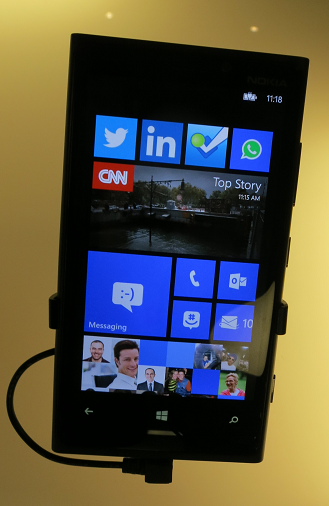
Finally, Nokia’s Richard Kerris came on, mostly to announce a giveaway of the new 920 Windows Phone 8 device for Build attendees.

image

This raised a loud cheer as you would expect, though it may be significant that the free phone won an even warmer reception than the earlier announcement of a free Surface RT.

The cost of signing up for a Windows Phone developer account has been reduced to just $8.00 for the next few days; see here for more details.

Did Microsoft do enough in this keynote? Personally I would like to have seen more technical depth, and a more convincing presentation of why the company thinks these new devices have what it takes to take on Apple and Google. Still, this is all about partners, and the arrival of Dropbox and Twitter as Windows 8 apps, and Unity for Windows Phone 8, are all significant events.

Slow JavaScript performance in Microsoft Surface RT

Outlook Web Access is useful on Microsoft’s Surface RT, since the built-in mail client is only basic. However I noticed sluggish performance, which made me wonder if Microsoft’s “Chakra” JavaScript engine is slow on Windows RT.

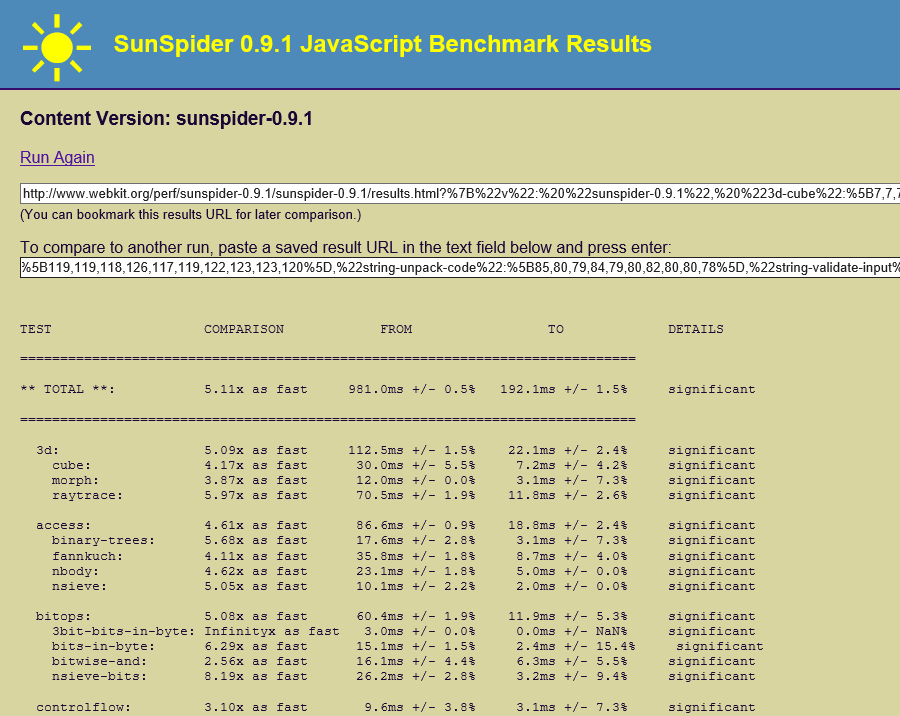
I ran the Sunspider JavaScript performance test on the Samsung Slate 7 I bought back in February, which has a 1.6Ghz Core i5, and compared it to the same test on Surface RT, which has a 1.3 Ghz NVidia Tegra 3 chipset.

The Samsung slate was 5.11 times as fast. Question: how much of that is down to the Core i5 being a faster CPU, and how much is down to a less well optimized Chakra engine?

image

Incidentally, the Apple iPad 2 which has an Apple A5 processors running at around 890 Mhz is approximately 33% slower on the SunSpider test. Since the CPU is clocked 45% slower that is a good result for the iPad 2 and Safari.

A Google Nexus 7 on the other hand which has the same Tegra 3 chipset as the Surface is about 55% slower than the Surface, which is poor.

Surface Reflections: it can only get better

Microsoft has released Surface RT, its first own-brand PC (if you can call it that) and also one of the first few devices to run Windows on ARM, formally known as Windows RT. I have been using Surface RT with the “Touch” keyboard cover intensively since its launch; it is a fascinating device, and the reactions to it from early purchasers is also interesting to watch.

Surface has various problems. It is designed for the new-style apps called Metro, or Windows Store apps, but the truth is that the selection of apps currently available is small and many are trivial or poor. There are many gaps. On the other hand, I have found workarounds for most issues, and there is plenty to like too.

Right now we are seeing Surface at its worst. Here’s why:

  • This is the first release of Windows on ARM. I have not found Surface particularly buggy or slow, but I would guess that performance will improve and bugs will be fixed as updates flow.
  • This is Windows 8, which is unfamiliar to many. It is not unfamiliar to me; but my guess is that for someone new both to Surface and to Windows 8, there will be some initial struggles. This will get better as users become more familiar with the operating system.
  • Better apps will come. Most developers are now seeing Windows RT for the first time; and it is remarkable that apps built for x86 Windows – like the ITWriting app – work as well as they do on ARM. On the other hand, I have also heard of performance issues, and certainly Pinball FX2 seems less smooth on Surface than on a Core i5 (not a surprise).

Here are a few details.

Annoying things

Password management. I use Password Safe, which does not run on Windows RT. I resorted to VPN and Remote Desktop to another machine to use Password Safe. There are some Windows Store password managers and I need to investigate; ideally I need one which supports Password Safe import.

Live Writer. My preferred blogging tool does not run on Surface RT. I am making do with Word. The only other option I know of is to post through the browser (self-hosted WordPress).

SSH connection. As part of the setup for blogging with Word, I needed to make an SSH connection to a Linux server. There is an SSH app for Apple iOS, but not for Surface. Not knowing any other way, I went the Remote Desktop route again.

Printing. I am staying with a friend and needed to print a boarding pass. He has a shared printer attached to a Mac. Windows RT found the printer, using the old-style Control Panel, but gave a message about a missing network driver and to consult my administrator. Next, it gave me a driver selection dialog and I picked one I thought might work. It seemed to install, but when I tried to print, I got nothing: no error, but nothing printed either.

Windows Update. I discovered that the final version of Office 2013 is available through Windows Update. I used Control Panel to find it. The update, which had to be selected manually, gave me an installation error. I looked this up and discovered it was because the Office Upload Center was running – thanks to my making a connection to SharePoint earlier. I terminated the Upload Center. Then the update failed with a different error. Now I am in limbo with this; Office 2013 final seems to be installed, but it is not listed in update history except as a failed update; however I cannot remove it nor reinstall it.

Word save error. Following a successful blog posting, I was unable to save the Word document. I got this file permission error:

Send As missing in Mail. The Mail app is working for me, connecting to my self-hosted Exchange server. However I make use of Send As in order to send mail as a different user. This works in Outlook but not in Mail. The workaround is to use Outlook Web Access, which does support Send As.

Good things

The hardware seems excellent. I love that the Touch keyboard gives me the ability to type at a decent speed and use a trackpad, but without adding significant bulk. I like the solid feel of the device and the kickstand. I am also realising that the reason Microsoft talks so much about the hardware is that there is less to show off about on the software side.

Skype. I have made several phone calls with the new Metro Skype client and it has worked very well, even without using a headset.

Music. Microsoft handed out Xbox music passes to early Surface customers. The music app works, and while I do not love the user interface, there is a lot of music available to stream.

USB. I’ve plugged wireless mouse adapters and storage devices into the USB port and they have worked fine.

Battery life. I debated whether to put this as Good or Mixed. I’d like longer, but at 8 hours or so it is decent. A good sign is that Surface seems to run nice and cool. No fan needed, so it is silent too.

Office and SharePoint. The presence of Office makes a huge difference to how I use Surface. One thing I managed to do was to link up Explorer with my self-hosted SharePoint so I can easily open documents there. Unfortunately the way to do this is not something you are likely to discover by accident, but it does work, although with more prompts than I would like.

Split/Snapped view can be very useful. For example, Mail app docked while working on the desktop.

Mixed things

Windows desktop. I find I spend a lot of time in the Windows desktop. Applications I use regularly include not just Office but also Paint, Notepad, Explorer, Control Panel, Snipping tool, VPN and Remote Desktop. These apps greatly increase the usefulness of the Surface; but it should not be this way; ideally I should be able to get most things done in the Metro user interface. Desktop apps still have the problems that Windows has always had, like the ability to throw up mystifying and useless error messages such as the one from Word shown above. Surface cannot be the true breakthrough device it needs to be until that is the case.

Performance. Generally I have found performance fine, and slowness when it occurs usually the fault of a slow internet connection or site. It could be snappier though, and I am not sure how good it will be with long Word documents or large Excel spreadsheets. If you resize the Word window, you can see a slight delay as it repaints.

Some apps seem slower than they should be; I have had problems with Tweetro, a Twitter client, though this may be partly due to issues with the Twitter API. An Atom windows 8 machine I tried at an HP event was more sluggish than Surface; but who knows, perhaps that was an issue with that particular device. I intend to do some measuring to get a better understanding of this.

Price. By the time you have added a keyboard cover, Surface is expensive considering its specs. The quality of design and manufacture, and the inclusion of Office, mitigate that; but current price levels will limit the market.

Final reflections

Surface is a step forward for Windows, but this is a journey and the device as it is today does not fulfil all its promise. Even as it is though, it is highly capable and will probably get a lot of use from me as a device that does enough to make carrying a laptop or x86 tablet unnecessary. I recognise that some of that utility is only possible if you have knowledge of Windows, a flaw which needs Microsoft’s urgent attention.

I like the fact that you cannot install desktop apps, despite its inconvenience, not only for security and stability, but also because it forces Microsoft and its users into the new Metro world.

The worry is that so far Microsoft has failed to convince most software vendors and developers that this new platform is worth their attention. If that does not change, then Windows will continue its slow decline.

I like Surface RT though; it deserves to succeed, and I will be interested to see if a significant community gets behind it and make it better.

Blogging with Surface

I generally post to this site using Windows Live Writer. Unfortunately this does not run on Microsoft’s new Surface tablet, since it is a desktop executable and Windows RT only allows Windows Store apps to be installed. So how to blog?

This site runs WordPress, and of course you can post using the browser. However I prefer to use an offline editor, and the only choice in this respect that I know of is Microsoft Word. I looked at this years ago and decided it was poor; but needs must.

One of the issues with using Word is that while it can connect successfully to the WordPress api for posting, it cannot apparently post images using the WordPress upload API – though if you know a way of configuring Word for this, please let me know. It does support FTP, so I set up an FTP server for this purpose. I did all this on the surface, though in order to make an SSH connection to the web server to sort out the DNS I resorted to VPN and Remote Desktop so I could use Putty, another Windows utility that does not work on Surface RT.

If you can see the image above, then it worked.

Windows 8 launches: key questions remain, but Surface shines

I am in New York for the launch of Windows 8. This morning was the general launch; the Surface RT launch is to follow this afternoon. Windows chief Steven Sinofsky introduced the event. I was intrigued by how dismissive he was about a key Windows 8 issue: the learning challenge it presents to new users. He gave the impression that a few minutes experimenting will be enough, though he also referred to a guide that may be new; yesterday I picked up a small booklet which I had not seen before, introducing Windows 8.

Next Microsoft’s Julie Larson-Green and Michael Angiulo came on to show off a few details about the Windows 8 user interface, followed by Ballmer who gave what is for him a muted address about how great Windows 8 is going to be. Solid facts were few, but Microsoft did mention that over 1000 devices are certified for Windows 8.

So what is Windows 8 all about? It’s a tablet, it’s a laptop, it’s a PC we were told, in other words, everything. But everything is also nothing, and my sense is that even Microsoft is struggling to articulate its message, or at least, struggling to do so in ways that would not offend key partners.

Personally I like Windows 8, I find it perfectly usable and appreciate the convenience of the tablet format. That said, I look at all these hybrid devices and my heart sinks: these are devices that are neither one thing nor another, and pay for it with complexity and expense. Will they win over users who might otherwise have bought a MacBook? I am doubtful.

Windows RT and Intel Atom devices are more interesting. If Microsoft and its partners can push out Windows 8 devices that inexpensive and work well on tablets without keyboard clutter, that is what has potential to disrupt the market.

That brings me on to Surface. It is all in the body language: the conviction that was missing from the Windows 8 keynote in the morning was present in the Surface keynote in the afternoon. Even the room was better, with stylish Surface fake pavement art in the corridor and smart white seating.

image

General Manager Panos Panay showed off little details, like the way the rear camera angles so that it is level when the Surface is set on its kickstand. He talked about Microsoft’s drop tests, claiming that they had tested 72 different ways to drop a Surface and designed it not to break. He demonstrated this by dropping it onto a carpet, which was not too challenging, but the fact that Sinofsky successfully used it as a skateboard was more impressive.

image

No doubt then: Microsoft has more enthusiasm for Surface, described by Panay as “the perfect expression of Windows”, than it does for the 1000 certified devices from its partners, though the company would never admit that directly.

What is the significance of Surface? It goes beyond the device itself. It will impact Microsoft’s relationship with its hardware partners. It embodies an Apple-like principle that design excellence means hardware designed for software designed for hardware. It shows that the “OK but nothing special” approach of most Windows hardware vendors is no longer good enough. If Surface is popular, it will also introduce demand for more of the same: a 7” Surface, a Surface phone, and more.

Despite its quality, the success of Surface is not assured. The biggest problem with Windows 8 now is with the lack of outstanding apps. That is not surprising given that the platform is new, and you would think that users would make allowance for that. On the other hand, they may lack patience and opt for better supported platforms instead, in which case building app momentum will be a challenge.

Telerik Icenium: new desktop and cloud IDE for mobile development

When I heard that Telerik is bringing out a new IDE for mobile app development, I could contain my excitement, especially after learning that it is another PhoneGap/Cordova based approach, wrapping JavaScript and HTML as a native app. While speaking to Telerik’s Doug Seven though, I found myself increasingly impressed.

If that name sounds familiar, it might be because Seven was a director of Product Management in the Visual Studio team at Microsoft, and you can see that influence in the new IDE, which is called Icenium. Spot the Metro-style buttons at top left of the IDE!

image

Icenium has several components. There is a Windows IDE called Graphite, illustrated above. Those on other platforms, or in distributed teams, can use Mist, which is a browser-based IDE which replicates many of the features of Graphite. There is also a set of cloud-based services to handle building apps for iPhone, iPad and Android devices. This means you do not need to install all the necessary SDKs on your own machine. Icenium also lets developers build signed iOS packages without needing to have a Mac.

The Icenium Device Simulator lets you test applications quickly on your own machine.

image

The tools look good, though I have not tried them yet, but the unique feature of Icenium is the ability to deploy and test quickly on multiple devices. Code is kept synchronized between Graphite and Mist, and also pushed out though LiveSync to multiple devices. Here is a snap of the view from Doug Seven’s desk, grabbed from his online presentation. He showed me how a code change ripples almost instantly to all these devices for testing.

image

An intriguing part of this is an iOS app called Ion which is a sort of runtime shell for Icenium apps. This means you can load apps for testing onto iOS devices that are not unlocked for developer use. You can also demonstrate apps on a client’s device using Ion. Apple’s attitude to runtimes in the App Store must be softening.

Icenium supports version control using either a Git repository hosted on the service, or your own choice of URL-based Git repositories.

Pricing will be per-developer at $16.00 per month if you sign up for a year, or $19.00 per month without a contract. Once you sign up, you can use all the tools on all your machines. You can also use Telerik’s Kendo UI Mobile framework. It is free until May 1 2013.

Isn’t Icenium’s cloud build feature similar to what Adobe’s PhoneGap Build already does?

“It’s a great comparison,” says Seven. “Adobe has the technology to make this [seamless development experience] possible, they just chose not to do it … [PhoneGap Build] is not integrated into the workflow. It’s a very manual process, I have to zip up my files, submit them to the PhoneGap Build process, then I get back these application packages that I have to manually deploy to my devices to see if it works.”

There is no support yet for mobile web apps, as opposed to apps packaged with Cordova, but this is a possibility for the future.

Like Adobe, Telerik has found WebKit and Google Chrome irresistible, despite Seven’s Microsoft background. WebKit is embedded in the Graphite IDE. You can use Mist with any modern browser, though “the one limitation is that the browser-based device simulator does require Chrome,” though he add that in general, “I use Mist on my iPad all the time.”

ThoughtWorks bemoans excessive software complexity, advocates small, focused services

ThoughtWorks has released its latest Technology Radar, an opinionated analysis of software development trends.

Things the folk at ThoughtWorks like include automated build and deployment, essential for Continuous delivery; NOSQL database managers especially Neo4j; mobile-first development; the AppCode IDE for Apple’s Objective-C; the Graphite realtime graphing tool for creating dashboards; Clojure and Scala for programming.

I meet some of the ThoughtWorks team at developer conferences from time to time, and generally find them smart and though-provoking to talk to. They must be the despair of the big enterprise software vendors, with a liking for open source and an aversion to heavyweight high-maintenance systems.

This remark particularly caught my eye:

Simple architectures—Simple continues to gain traction, including both techniques for building and composing applications, as well as infrastructure-based techniques to enable simple deployment, failover and recovery. This theme is a recurring one for us, but we have not yet seen the usage shifts we believe are necessary.

I asked consultant James Lewis and practice lead Sam Newman to expand on that. Why do we continue to choose complexity over simplicity?

“A lot of people like to stay inside their big box, and don’t understand the complexities that then creates,” said Newman. “There’s a lack of critical thought given to how services talk to each other. A lot of them are driven by whatever the vendor says you do. Java makes RMI very easy. [Microsoft] .NET makes binding to WSDL [SOAP] schemas very easy. All these tools make bad things very easy to do.

“When you start talking to organisations about smaller services that are focused on doing one thing well, they have the horror associated with now having more than one box to manage and operate. So it’s hard to talk about moving from one big monolithic complicated box that is hard to change, to lots of little boxes, without also having conversations with those clients about how they get better at managing multiple services.

“Netflix has 300 services. Each service runs on at least six machines. They are very good at deploying those services. Yet they are not an overly complicated domain compared to some of our clients.”

“Amazon were talking about this in 2004,” adds Lewis, “the idea that you join up development of these small, simple applications with the operational control, so the same people who build them are also the people who run them. Now that we’re seeing both private and public clouds, and the ability to spin up machines becoming more and more prevalent, its starting to become more attractive.”

This is a consistent theme from ThoughtWorks. Break up complex solutions into many small services, think about how they talk to each other (with REST and HTTP favoured), and think about the infrastructure and how to automate it as well as the software itself.

“In many organisations these conversations are happening,” Newman told me. “I go to clients now, and they talk about the Enterprise Service Bus as being something they’d love to get rid of if they only knew how. Five to ten years ago, to even mention the Enterprise Service Bus as being a problem, they’d look at you with daggers in their eyes.”

“It’s almost like we’re now able to fulfil the promise of service orientation,” says Lewis. “It needed these additional practices, around things like automated deployment, automated rollback, and an understanding that people and process are tied intrinsically with it.”

Another issue, claims Lewis, is that software architects simply get out of touch with best practice.

“Most architects who build big systems are quite a long way from their codebases. They sit in rooms talking to other architects. They might have last written a line of code five or ten years ago. What they do is to design systems as they would have done ten years ago. People do get divorced from the latest trends and perpetuate less effective ways of doing things.”

Finally, here’s something for the Microsoft platform people who read this site. ThoughtWorks is not altogether averse to Microsoft and mentions the Azure cloud platform as something which is becoming interesting. But Windows Phone:

Despite a promising start to Windows Phone, a well thought-out user interface, and probably the best development experience of any mobile platform, we have seen several stumbles in the execution of the platform strategy by Microsoft and its partners. This makes us less optimistic about the future of the platform than we were in the last radar.

Translation: nice mobile platform, but nobody’s buying it. Then again, on Monday next week Windows Phone 8 will be properly unveiled. Still hope?

Microsoft posts decline in revenue and profits on the eve of Windows 8 launch

Microsoft has announced its results for the first quarter of its financial year. The quote from Chief Financial Officer Peter Klein sums it up pretty well:

While enterprise revenue continued to grow and we managed our expenses, the slowdown in PC demand ahead of the Windows 8 launch resulted in a decline in operating income

Except that is for one thing. Klein implies that the PC slowdown is something to be expected ahead of the launch of a new edition of Windows, but I suggest there is more to it than that. First though, here are the figures, in the summary form that I have used before:

Quarter ending September 30th 2012 vs quarter ending September 30th 2011, $millions

Segment Revenue Change Profit Change
Client (Windows + Live) 3244 -1630 1646 -1624
Server and Tools 4552 +336 1748 +183
Online 697 +56 -364 150
Business (Office) 5502 -133 3646 -71
Entertainment and devices 1946 -15 19 -321

What is notable here is a significant reduction in revenue from the Windows client, while the enterprise-focused server and tools continue to grow. The Office products are bumping along fine, despite a small reduction in revenue, and despite the fact that we are on the eve of a new edition of Office as well as Windows.

Note that I am not a financial analyst, so take the following observations in that light.

I suggest that falling revenue from the Windows client is not just because Windows 8 is on the way, but because of a shift in the market towards mobile and tablets – Apple iPad and Google Android devices. See this post for an example of that in the consumer market.

Will Windows 8 deliver the hoped-for boost in PC and Windows sales? I am sceptical, especially in the short term (in other words, the next quarter). I discussed some of the issues here. Microsoft is making radical changes both to Windows and to its business model. It is doing the right thing, bringing Windows into the tablet era, and venturing into Windows device manufacture in order to pull quality of hardware design into its own hands rather than trusting entirely to OEM partners.

That transition may or may not work long-term, but in the short term it is likely to be costly. In Windows 8 Microsoft has concentrated on establishing a new ecosystem around the new tablet-friendly Windows Runtime platform. The consequence is that it does not deliver much benefit to users of desktop applications – in other words, all Windows applications other than those in the new Windows app store. Further, moving to Windows 8 is difficult at first for those familiar with Windows, so much so that many users react against it.

This means that Windows 8 will not deliver the upgrade rush that Windows 7 enjoyed, following on from the unpopular Vista. Rather, its success rests on the new elements in Windows: tablet use and Windows 8 apps.

Right now though, there is very little in the Windows Store that is good enough to drive sales. Developers are waiting to see if the platform succeeds before diving in.

The Windows 8 platform does have plenty of potential; and Microsoft is putting a huge promotional push behind it. Against that, there are powerful forces that will tend to suppress demand. It is going to be a battle, and one for which the outcome is hard to predict.

Will Windows 8 save the PC? Gartner reports 8% year on year sales decline

Gartner has reported on third quarter worldwide PC sales and they do not look good:

  • At 87.5 million units, they have declined 8.3% compared with the same quarter in 2011
  • HP is down 16.4%, Dell is down 13.7%. Lenovo managed 9.8% growth and is now number one with 15.7% of the market

Key quote: “The third quarter has historically been driven by back-to-school sales, but U.S. PC shipments did not increase, not even sequentially, from the second quarter of 2012. Channels were conservative in placing orders” said Gartner’s Mikako Kitagawa.

Gartner researchers add that ultrabooks have failed to turn round sales because they are not competitively priced. Worth noting when you look at the expensive hybrid docking tablets and convertibles vendors have come up with for Windows 8.

Gartner’s figures exclude “media tablets” such as the Apple iPad or Android tablets.

Of course you would expect a decline on the eve of the launch of Windows 8, as retailers clear their shelves, though Kitagawa says “On the professional side, there was minimum impact from Windows 8 in the quarter because the professional market will not adopt Windows 8 PCs immediately after the release.”

But will consumers rush to buy Windows 8 machines and make the next quarter boom? Let me throw out a few predictions:

  • Kitagawa is right about the professional market. We may see a few Windows 8 tablets show up among execs, but most companies will go the easy route and stick with Windows 7 for the time being.
  • The Windows 8 launch will be fascinating with cries of agony from some while others say it is rather good.
  • Time will be good for Windows 8 as the shock wears off and people learn how to use it.
  • Microsoft’s Surface will be a success and show Windows 8 at its best, though there will be confusion over lack of compatibility with desktop applications.

I am not sure though that this means a strong fourth quarter. Confusion over the new UI and vendors with over-complicated hybrid products will probably prevent sales from taking off immediately. Further, Windows 8 has to compete with Windows 7, which is already pretty good.

Broadly I reckon Microsoft is doing the right thing with Windows 8: reinventing the platform as a tablet OS while keeping faith with the past, on x86 at least.

I have doubts about some aspects of the Metro user interface and expect it will improve in later versions with some softening of the “immersive UI” religion that hides menus and toolbars so effectively that users think apps are broken, or have to click or tap twice when once should be enough – eg the back button in Metro-style Internet Explorer.

Even so, there are a few excellent new-style apps, more will come, and I expect the platform to succeed eventually.

Visual Studio 2012 hits and misses

A few quick reflections after writing a rather large review of Visual Studio 2012, Microsoft’s development tool for everything Windows.

Several things impressed me. The Graphics Diagnostics Tools for Direct3D, for example, is amazing; you can capture a frame, select a pixel, and drill down into why it is the colour it is. See Amit Mohindra’s blog post here. Though admittedly I got “Unable to start the experiment session” on my first go with this; make sure the Debugger Type is set to Native Only.

image

Graphics is not really my area; but web development is more like it, and I continue to be impressed by what Microsoft has done with Windows Azure. You can go from hitting New Project in Visual Studio to an ASP.NET MVC 4.0 web site up and running on Windows Azure in moments. Even if you add an Azure SQL database into the mix it is not much harder. The experience is slightly spoiled by the fact that the new Azure portal for web sites etc is still in preview and seems to be a bit unreliable; I sometimes get an error when logging in and have to refresh before it works. That is a minor detail though; the actual deployed web sites and applications seem to work fine.

That said, it was also apparent to me that Microsoft’s Azure story has become a little confusing. Want an ASP.NET web app on Azure? Choose between a Web Role, a stateful VM, or a web site. Both web roles and web sites can be scaled quite effectively, thanks to the built in load balancer for web sites. Still, choice is good, as long as the differences are understood. It appears that Microsoft is still backing the web role approach as the most architecturally sound; but web sites are so easy to use and understand that it would not surprise me if they are more successful.

Another hit with me is the SQL Server Data Tools (SSDT), once I understood the difference between DACPACs and BACPACs – a DACPAC encapsulates the schema and logins etc for a database in a single file that you can import elsewhere, whereas a BACPAC also stores the data. The approach in SSDT is that a database schema is just a bunch of SQL scripts, and that if you manage it that way it makes a lot of sense in terms of version control, schema comparisons, deployment and maintenance.

On the ALM side I am impressed with Team Foundation Server Express, which is genuinely easy to install and lights up most of the key features of Microsoft’s ALM platform, though it does not handle the full SharePoint team portal or all the reporting features. Cloud hosting is also an option for TFS and that also worked OK for me, though with occasional delays as my code crossed the internet.

I hesitate slightly with TFS though. It feels like a heavyweight solution, whereas most developers like lightweight solutions. I know that open source tools like git and subversion only do a fraction of what you can do with TFS; but they also never keep me waiting.

I also wonder whether TFS simply creates too many artefacts. Work items seem to multiply rapidly as you use the system, which is good for traceability but could also become a bit of a bureaucratic nightmare if you have team members who make every action into a thing that needs comments and deadlines and links to source code and so on.

I guess it is like any other tool; it will work well for a team that already works well, but will not solve problems for a team that is already a bit dysfunctional.

I had not looked at Microsoft’s modelling featurs for a while; I was interested to discover new code generation features in the UML diagramming tools.

I am slowly beginning to understand what Microsoft is doing with apps for SharePoint. Get this: Microsoft is moving SharePoint 2013 towards being more of a service than a platform; you do not build apps on SharePoint; you build apps that use SharePoint services. This means you can at last develop SharePoint apps without having SharePoint installed on the same box as Visual Studio (thank goodness). And you can build SharePoint apps with PHP or Java as well as ASP.NET, because they are calling SharePoint, not running on it. Makes sense.

So what is not to like? There are a few puzzles, like the way Visual C++ has fallen behind in standards compliance despite the presence of Herb Sutter at Microsoft.

I also still find the whole XAML/Visual Studio/Blend thing a bit of a struggle. One day I will open up Blend, Microsoft’s XAML designer, and it will all fall into place as a natural and quick way to build a user interface, but it has not happened yet. I have also heard that developers should find the designer in Visual Studio enough; but at best it is rather slow and a little unpredictable.

Otherwise the tools for Windows Store apps seem decent to me, though I have heard that advanced developers are finding some issues; not surprising considering how new a platform it is. It is a distinctive platform, and my sense it that while there is a lot to like, developers need time to get the best from it, and there is also scope for Microsoft to improve it, maybe a few refinements in Windows 8 SP1?

Considering its scope, Visual Studio was relatively stable in my tests, though I did once get it into a state where it froze every time I tried to debug an application; fixed by a reboot (sigh).

I do not mind the monochrome user interface; I do not like it especially but it is something you get used to and do not notice after a short time.

Overall? Few people will use everything that is in Visual Studio and of course I have missed out most of it in the above, but it is a mighty achievement and still an asset to Microsoft’s platform.