Category Archives: microsoft

Microsoft’s Scott Guthrie on what has happened to Silverlight

I spoke to Microsoft’s Scott Guthrie last week, during his trip to the UK for a couple of Windows Azure events in Cambridge and London.

Guthrie is now Corporate VP Windows Azure Application Platform, a job he took up in May 2011. Before that he worked on .NET technologies including Silverlight, and I asked if he had any reflections on the subject. He was scrupulously tactful.

“In terms of looking at our XAML stack right now, if you look at some of the announcements we’ve made in terms of Windows 8, Metro, Surface, tablets and desktops, and Windows Phone, XAML is alive and well and being used for more things than ever.

“Silverlight 5 shipped after I moved on to Azure. We did an update to Silverlight 5 about a month ago. For XAML developers, and developers using Silverlight or WPF XAML technologies, there is a long roadmap ahead.”

He seemed to me to be saying that even if Silverlight is dead (nobody expects a Silverlight 6), XAML lives on.

I observed that in the new (and much improved) Windows Azure admin portal, the Silverlight UI has gone, replaced by an HTML 5 user interface.

“It’s actually HTML, it’s not HTML 5. It works with non HTML 5 browsers as well.“ he said. “That was less of a technology statement, it was more that, historically Azure had 5 or 6 admin tools that were fairly disjoint. One of the decisions we made as part of the new Azure that we’re building was, let’s have a single admin tool framework that connected everything. We decided to do it with HTML, partly because we did want to get reach on tablets like iPads and Android devices.

“It was less a technology statement, it was more that we wanted a single admin tool, and we decided to go with an HTML-based approach. We still use Silverlight for some of our admin experiences like database management tools, and for streaming and other capabilities.”

It is true that Silverlight remains in the Azure database design tool, if you use the portal. It is also used extensively in System Center 2012 – yes, I have actually installed it – and in Windows InTune.

It is as if, back in 2009 and early 2010, the memo went out: use Silverlight for everything. Then, later in 2010, the memo went out: use HTML for everything; but too late for the current generation of server admin products.

Microsoft has announced that Visual Studio LightSwitch, which generates Silverlight applications, is being revised to offer HTML applications as well. I expect this process of Silverlight removal and de-emphasis to continue over the next couple of years. Note that Microsoft’s own Windows RT does not support Silverlight (as far as I am aware), nor does Windows 8 on the Metro side.

Windows Phone 8 and Windows 8: nearly converged

Microsoft has shared details of the forthcoming Windows Phone 8 operating system, which is set to be available on devices before the end of 2012.

The improvements are fundamental, and it seems that Microsoft has finally created a mobile platform that has what it takes, technically, to compete in the modern smartphone market. Winning share from competitors is another thing of course; Nokia’s hoped-for third ecosystem is still tiny relative to Apple iOS or Google Android.

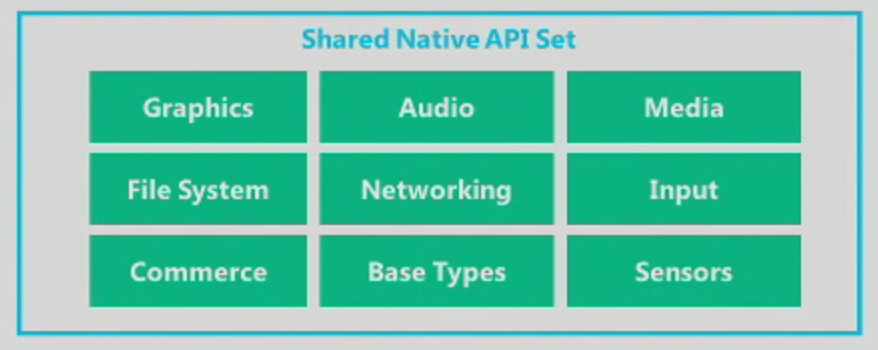
It starts with a change in the core operating system, from Windows CE to Windows 8. The two now share the same kernel, and APIs including Graphics, Audio, Media, File System, Networking, Input, Commerce, Base Types and Sensors. The .NET Framework is also the same. The browser will be Internet Explorer 10.

image

Silverlight was not mentioned, nor was XNA, though we were told that Windows Phone 7.x apps will run on Windows Phone 8.

The change does enable multi-core support at last. Screen resolution can now go up to 1280 x 768, ready for high-definition displays. There is also support for MicroSD storage, a feature which should have been in the first release.

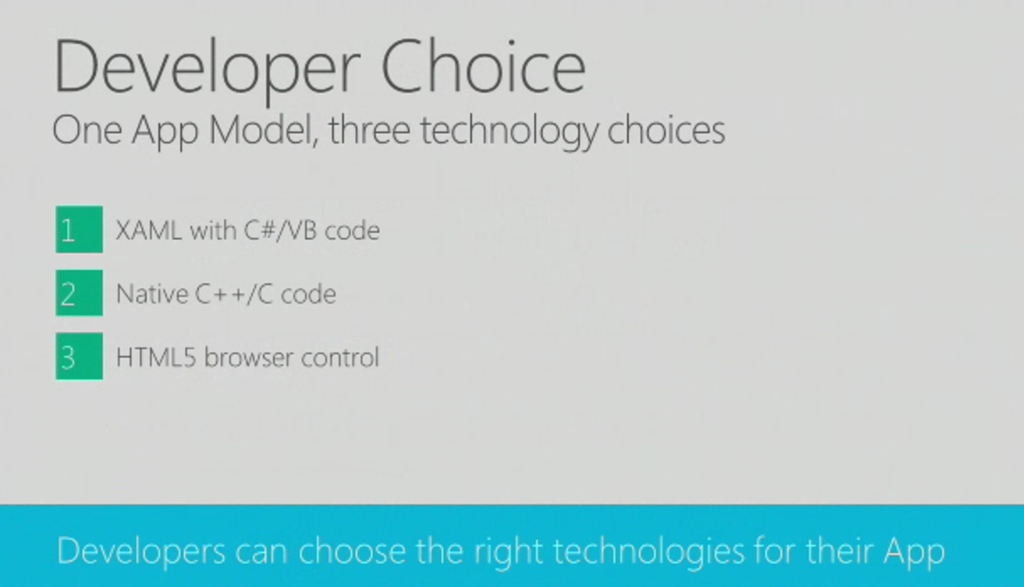
What about Windows RT, the runtime for Metro-style apps in Windows 8? Here is the significant slide from yesterday’s presentation:

devchoices

This looks similar to Windows RT, which also supports three development models: XAML and .NET, native C/C++ code, and HTML5. It is not quite the same though. One thing I did not hear mentioned was contracts, the communication and file sharing system built into Windows 8, though we were promised “sharing under user control”. Nor did we hear about language “projections”, the layer that lets different languages in Windows 8 call the same Windows Runtime APIs. My guess at the moment is that Windows Phone 8 does not include the Windows Runtime, though it does have much in common with it. The further guess is that the full Windows Runtime will come in Windows Phone 9.

In other words, it seems that Windows Phone 8 will not run apps coded for Windows 8, though we were told that if you code to the XAML and .NET model for apps, and the native code model for games, few changes will be needed. XNA developers should consider a change of direction.

Support for C/C++ is a key feature and one that in my view should have been in the first Windows Phone release. One of the things it enables is official support for SQLite, the cross-platform database engine also found in Mac OS X and numerous other platforms. A good day for SQLite, which pleases me as I am a fan.

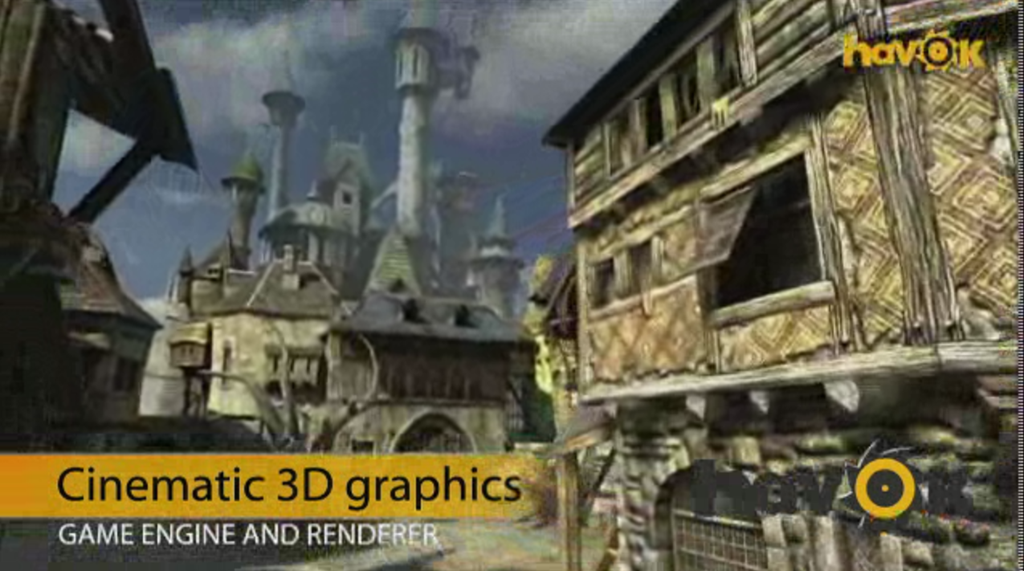
There will also be C/C++ gaming libraries coming to Windows Phone 8, including Havoc:

havoc

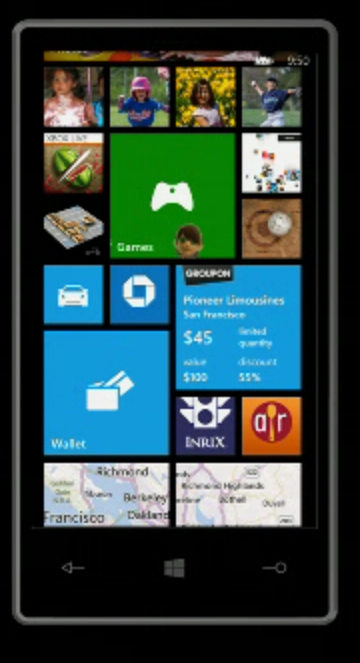
What else is new? Users will like the new Start screen, which unlike the whole of Windows Phone 8 is also coming to existing devices, which will get a half-way upgrade called Windows Phone 7.8 (7 and 8, geddit?). The innovation in the new Start screen is that any tile can be sized by the user to any of the supported sizes. The smallest size allows four tiles across, so you can make your Windows Phone look more like Android or iOS if you so choose.

newstart2

What else? Microsoft is not announcing “end-user features” yet, but did promise Nokia offline maps plus turn by turn directions; digital wallet which can be paired with a secure SIM for NFC (near field communications) payment, and deep support for Skype and VOIP so they “feel like any other call”. Apparently operators will love the way the wallet is implemented, because unlike Android it is hooked to the SIM, but I doubt they will be so keen on Skype.

There is an improved speech engine which duly failed to recognise speech input correctly in the first demo, though it worked after that.

Finally, Microsoft is now talking Enterprise for Windows Phone. There will be bitlocker encryption and enterprise app deployment without Windows store, as well as device management. Think full System Center 2012 integration.

Conclusion? There is disappointment that existing Windows Phone 7 devices are not fully upgradeable, but this is hardly surprising given the changed core. As a platform it is greatly improved, though I would like to see full WinRT included. Despite its poor start, you cannot dismiss this mobile OS as Microsoft continues to use its financial muscle to try and try again.

If it succeeds, will it be too late for Nokia? Maybe, though my hunch is that Microsoft will do what it takes to keep its key mobile partner alive.

Wrestling with SharePoint and Office 365: code to bulk move documents

I have mixed feelings about SharePoint, Microsoft’s flexible but infuriating collaboration platform. It makes difficult things easy and easy things difficult, or something like that. Today’s story is an example, and may also be of interest if you are wondering how to write code that manipulates documents in SharePoint as found in Office 365.

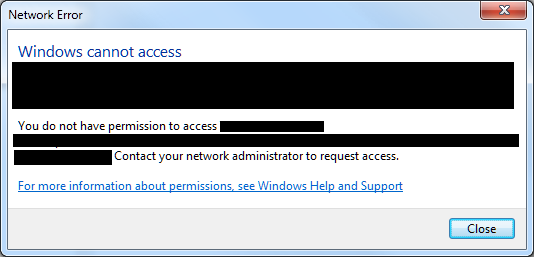
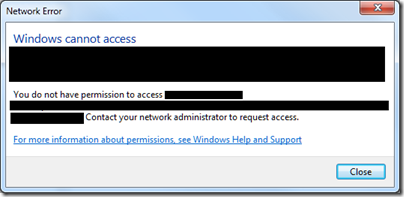
The problem started when some contacts of mine who use Office 365 could not open a folder in Windows Explorer. They received a permission error along with the famous invitation to “Contact your network administrator to request access.”
image

The folder in question is actually a SharePoint folder which accesses Office 365 through WebDAV. I took a look, and found that, whatever the problem was, it had nothing to do with permissions. I also observed that there was no problem accessing the folder through the web browser; but like many users, these people prefer to use Explorer.

Next, I started moving files out of the troublesome folder into another one. I began to suspect that some rogue document was causing the error. This suspicion proved correct, but it was not easy to track down. The problem: the SharePoint web user interface does not provide any bulk copy or move option. If you want to move a bunch of documents, the recommended way is to use Windows Explorer, the exact feature that in this instance was not working.

Moving documents one by one through a laborious Web UI is no fun, so I then had the bright idea of writing some code to move the documents. This means taking a dive into the labyrinthine SharePoint API.

I was surprised how hard this is. Here is how I got started:

First, I downloaded the SharePoint SDK and run the setup. I chose to install only the Foundation help and samples.

Next, I created a new Windows Forms project in Visual Studio 2010. Note you must set the project to target the full .NET Framework 4.0, not just the Client profile

After that, I had to copy two DLLs from my own SharePoint 2010 server. These are in:

C:\Program Files\Common Files\Microsoft Shared\Web Server Extensions\14\ISAPI

I am surprised they are not included with the SDK.

After that, I looked for some code samples for the SharePoint Client Object Model. You can find this described here or consult the reference here. It is a capable API, but you soon realise why there is plenty of work for SharePoint specialists. ClientContext, CAML queries, FolderServerRelativeUrl: there is a lot to get your head around.

The first problem I had though was authentication. Office 365 uses claims-based authentication, whereas all the SharePoint API examples seem to assume you are on an intranet and already authenticated for your SharePoint server. Coding for claims-based authentication is a headache.

I tried code from here to authenticate against the Office 365 claims-based federation server, but with no success. It seems to be based on beta code and does not work now. I then read the official document on the subject here and downloaded the sample code. Here is what worked for me:

Add the ClaimsAuth project from the sample to my Windows Forms solution.

Modify this line in ClaimsWebAuth.cs:

Application.Run(DisplayLoginForm);

to this

DisplayLoginForm.ShowDialog();

the reason being that ClaimsAuth is designed for a console application.

Then I could run some basic Client Object Model code like this:

ClientContext cc = ClaimClientContext.GetAuthenticatedContext(url);

            if (cc != null)
            {
                cc.Load(cc.Web); 
                cc.ExecuteQuery(); 
                lbTest.Text = "Title: " + cc.Web.Title;
                cc.Dispose();
            }

All this does is to connect to the Office 365 SharePoint site at url and display its title – but if you can do that, you have got past the first hurdle.

Next I had to figure out how to move all the documents in one folder to another. Again, I found this tricky. I was able to list all the items in a library, which is the top-level folder for a collection of documents, but how do you list all the items in a subfolder? Something to do with CAML, it seems, also known as Collaborative Application Markup Language. Does anyone out there love CAML? I thought not. CAML queries are like SQL queries chopped up into XML elements.

Another characteristic of the Client Object Model is that you constantly have to call the Load and ExecuteQuery methods of your ClientContext object, otherwise you will get a PropertyOrFieldNotInitializedException. There is a good reason for this, as it reduces the amount of data passing over the wire, but it can also be perplexing.

Here is the code I ended up with, where “docs” is the top-level folder or library name,

if (cc != null)
            {
                cc.Load(cc.Web);
                cc.ExecuteQuery();
                var site = cc.Web;

                var lib = site.Lists.GetByTitle("docs");
               
                CamlQuery camlQuery = new CamlQuery();
                camlQuery.FolderServerRelativeUrl = @"/docs/path/to/sourcefolder";

                string camlQueryXml = "<View>" +
                    "<Query>" +
                      "<OrderBy>" +
                        "<FieldRef Name=’FileLeafRef’ Ascending=’True’ />" +
                      "</OrderBy>" +
                    "</Query>" +
                  "</View>";
 
                camlQuery.ViewXml = camlQueryXml;

                ListItemCollection lis = lib.GetItems(camlQuery);

                cc.Load(lis);

                cc.ExecuteQuery();
                ListItem FolderCF = null;
                foreach (ListItem li in lis)
                {

                    string sTitle = li.FieldValues["FileLeafRef"].ToString();

                  // you can inspect the title to see if you want to move the file,

                  //eg only those beginning with a letter in the first half of the alphabet

                    {
                        File thefile = li.File;

                        cc.Load(thefile);
                        cc.ExecuteQuery();

                        if (!li.File.ServerObjectIsNull.Value)
                        {
                            string dest = @"/docs/path/to/destfolder/" + thefile.Name;
                            thefile.MoveTo(dest, MoveOperations.Overwrite);
                            cc.ExecuteQuery();
                        }
                    }

                }

                cc.Dispose();
            }

Pretty simple? Maybe it is to a SharePoint guru; all I can say is that I did not find it intuitive.

Note that this is not intended as production code so if you borrow it please add exception handling etc. It was a quick hack to solve a problem.

The good news is that once I was able to move documents from folder to folder programmatically, I was able to troubleshoot the original problem. Mysteriously, there was one document which, if it was in a folder, caused the access denied error when opened with WebDAV. Once I isolated the document, I discovered that if I renamed it, the problem went away. Curiously, there are no special characters in the name, just letters and spaces, so this is something of a mystery.

Still, it was a useful exercise, especially since moving a batch of documents using the Client Object Model seems quicker than using Explorer and WebDAV.
Office in Windows RT: not licensed for business use?

Journalist Jon Honeyball remarked on Twitter that the version of Microsoft Office in Windows RT, and therefore in the first Microsoft Surface Tablet, is Office Home and Student 2013.

I was sceptical, but it is there on the spec sheet [pdf]:

image

We already knew that Outlook is missing; but now it seems possible that Office in Windows RT is licensed only for non-commercial use. Here is the statement about Office 2010 Home and Student:

I own or work for a small business; can I use Office Home and Student 2010 at my work?

No. Office Home and Student 2010 is licensed only for non-commercial use for members of your household.

Such a restriction would blow so large a hole in the positioning of Windows RT as the ideal BYOD (Bring Your Own Device) for business that I am inclined to believe it will be changed for Office in Windows RT.

Then again, Office is a huge business for Microsoft and it is easy to hear the internal debate over this. “You cannot just give it away”.

Another possibility is that Microsoft will come up with some licensing deal which permits use of Office in Windows RT at work, for a suitably Enterprisey fee.

Update: Note that Microsoft has already announced a few things here about Windows RT licensing:

Windows RT Virtual Desktop Access (VDA) Rights: When used as a companion of a Windows Software Assurance licensed PC, Windows RT will automatically receive extended VDA rights. These rights will provide access to a full VDI image running in the datacenter which will make Windows RT a great complementary tablet option for business customers.

Companion Device License: For customers who want to provide full flexibility for how employees access their corporate desktop across devices, we are introducing a new Companion Device License for Windows SA customers. For users of Windows Software Assurance licensed PCs this optional add-on will provide rights to access a corporate desktop either through VDI or Windows To Go on up to four personally owned devices.

This means that if you have a PC licensed with Windows Software Assurance, you can access a virtual desktop from Windows RT without further charge.

Generally, I believe Microsoft also allows you to use Remote Desktop into a physical client without an additional license, provided it is single-user. In other words, only one user at a time can use a physical Windows 7 installation, whether sitting at the machine or remotely.

None of these provisions covers Office on the client though. They are concerned only with remote desktop access of various kinds.

Microsoft to make its own tablet called Surface, puts Windows RT centre stage

Microsoft has announced its own tablet, called Surface, for “work and play”, said CEO Steve Ballmer at an event in Los Angeles yesterday.

image

The first of what will be a family of devices has a 10.6” Corning Gorilla Glass screen, is just 9.3mm thick, and has a magnesium “VaporMg” case with a built-in stand/magnetic cover which doubles as a multitouch keyboard.

Surface comes in two forms. One runs Windows RT with an NVidia processor, which means it is the ARM version of Windows 8. There is a desktop UI alongside Metro, but the desktop is there only to run Microsoft Office (which is bundled), Explorer, and whatever other utilities Microsoft chooses to include. It is not possible to install new desktop applications. Users can only install Metro-style apps from the Windows Store.

The other runs Windows 8 Professional. Note that this x86 version is heavier (903g vs 676g), thicker (13.5mm vs 9.3mm) and more power-hungry (42 W-h vs 31.5 W-h). However, it does benefit from USB 3.0 rather than USB 2.0.

Why has Microsoft done this, and risked alienating the hardware partners on which it depends for the success of Windows?

I posted on this subject a few days ago. Yes, Microsoft’s hardware partners have driven the success of Windows, but they have also been part of the problem as Apple has captured a gradually increasing proportion of the personal computer market. Problems include foistware(unwanted software) bundled with PCs and rushed designs that have too many annoyances.

With Windows Phone 7, it was not until Nokia entered the market a year after the launch that we saw hardware and design quality that does justice to the operating system. Distracted by Android, partners like HTC and Samsung brought out drab, unimaginative phones that contributed to a poor start for Microsoft’s smartphone OS.

Now with Windows 8, the danger is that the same may happen again. We have seen few Windows RT designs, and evidence that vendors are having difficulty in reimagining Windows.

Until today, that is. The announcement ensures that Windows RT will win plenty of attention at launch, alongside the x86 editions, and that Microsoft has a measure of control over its own destiny, in how Windows 8 is realised in hardware.

Microsoft says that the Windows RT Surface will launch at the same time as Windows 8, but that the Intel edition will follow a few months later.

How much for a Surface? The press release says:

Suggested retail pricing will be announced closer to availability and is expected to be competitive with a comparable ARM tablet or Intel Ultrabook-class PC. OEMs will have cost and feature parity on Windows 8 and Windows RT.

image

Three reasons why Microsoft should make its own Windows RT (ARM) Tablet

Rumours are flying that Microsoft will announce an own-brand Windows RT tablet on Monday.

No comment on the truth of these, but it would be a smart move.

Here are three reasons.

First, the OEM foistware problem. This has got a little better in recent years, but not enough to compete with Apple and its clean machines. The problem is so bad that Microsoft set up its own retail stores to sell  cleaned-up Windows PCs:

Many new PCs come filled with lots of trialware and sample software that slows your computer down—removing all that is a pain, so we do it for you! Every PC the Microsoft Store sells is put on a software diet and performance is tuned to run the best it can.

Microsoft addressed this in Windows Phone by imposing conditions on the extent to which OEMs can customise the user interface or embed their own software. It cannot do this  though with Windows 8 on x86. Manufacturing its own model is one of the few ways Microsoft can get Windows PCs that work as designed into the hands of consumers.

Second, the design problem. Few Windows PCs (if any) are as well designed as Macs or iPads. Manufacturers are geared towards low prices and frequent model changes rather than intensive work on every detail of the design.

Third, Microsoft wants to make a splash with Windows RT, the ARM version, and there is evidence that it is having difficulty communicating its benefits or convincing its OEM partners to get fully behind it.

This third is the biggest issue, which might drive Microsoft to compete with its third-party partners, and requires some explanation. Many people I speak to cannot see the point of Windows RT. This version of Windows 8 will not run x86 applications, so you cannot install any of your old software. Further, there is no way to install desktop applications, so software vendors cannot port their existing applications. They must create new Metro-style apps instead. So why bother with Windows RT?

This reaction is understandable, but unfortunately for Microsoft Windows 8 on x86 has no chance of competing with Apple’s iPad.

Yesterday I attended an Asus event in London where the company was showing its new range of Android tablets and Windows ultrabooks. It was not showing its prototype Windows 8 machines, but I was able to discuss the likely Windows 8 products, All but one is x86, and they will have Wacom digitizers,  which means they will work with a stylus like an old-style Tablet PC, as well as with touch. That will push up the price.

Worse still, these x86 devices, like the Samsung Slate on which I run WIndows 8 Release Preview, will not be enjoyable to use with touch alone. Users will find themselves running applications designed for keyboard and mouse: you can get them to work, but it is frustrating. These devices are not Windows reimagined, they are the old Windows plus a few new tricks.

Too expensive, too hard to use: Windows 8 on x86 is not an iPad-beater.

Windows RT on the other hand is more promising. This does have a desktop, but it will only run Office, Windows Explorer, and whatever other desktop utilities Microsoft chooses to provide. Office aside, you will be forced to use touch-friendly Metro apps most of the time. Microsoft can tune Windows RT by removing legacy components that are no longer needed, because applications which rely on them cannot be installed. You also get the power efficiency of ARM, so a long battery life. Finally, if Microsoft has done it right Windows RT should be more secure, since the entire operating system is locked down.

Windows RT is critical to Microsoft and if it has to make its own hardware in order to market it properly, then it should do so.

Amazon web service APIs: a kind of cloud standard?

I am at the Cloud Computing World Forum in London where one of the highlights was a keynote yesterday from Amazon CTO Werner Vogels. Amazon, oddly enough, does not have a stand here; yet the company dominates the IAAS (Infrastructure as a service) market and has moved beyond that into more PAAS (Platform as a service) type services.

image

Vogels said that the reason for Amazon’s innovation in web services was its low margin business model. This was why, he said, none of the established enterprise software companies had been able to innovate in the same way.

He added that Amazon did not try to lock its customers in:

If this doesn’t work for you, you should be able to work away. You should be in charge, not the enterprise software company.

Sounds good; but Amazon has its own web services API and if you build on it there is an element of lock-in. Or is there? I was intrigued by a remark made by Huawei’s Head of Enterprise R&D John Roese at a recent cloud computing seminar:

We think there is an imperative in the industry to settle on standardised interfaces. There should be no more of this rubbish where people think they can differentiate based on proprietary interfaces in the cloud. A lot of suppliers are not very interested in this because they lose the stickiness of the solution, but we will not see massive cloud adoption without that portability. 

But what are these standardised interfaces? Roese said that Huawei uses Amazon APIs. For example, the Huawei Cloud Storage Engine:

The CSE boasts a high degree of openness. It supports S3-like interfaces and exposes the internal storage service enabler to 3rd party applications.

There is also Eucalyptus, open source software for private clouds that uses Amazon APIs. Is the Amazon web services API becoming a de-facto standard, and what does Amazon itself think about third parties adopting its API?

I asked Vogels, whose response was not encouraging for the likes of Huawei treating it as a standard. The question I put: is the adoption of Amazon’s API by third parties influencing his company in its maintenance and evolution of those APIs?

It is not influencing us. It is influencing them. Who is adopting our APIs? We licensed Eucalyptus. People ask us about standardisation. I’d rather focus on innovation. If others adopt our APIs, I don’t know, we rather focus on innovation.

The lack of interest in standardisation does undermine Vogels’ comments about the freedom of its customers to walk away, though lock-in is not so bad if your use of public cloud is primarily at the IAAS level (though you may be locked into the applications that run on it).

Another mitigating factor is that third parties can wrap cloud management APIs to make one cloud look like another, even if the underlying API is different. Flexiant, which offers cloud orchestration software, told me that it can do this successfully with, for example, Amazon’s API and that of Microsoft Azure. Perhaps, then, standardisation of cloud APIs matters less than it first appears.

Visual Studio LightSwitch to get HTML5 support

Microsoft’s Visual Studio LightSwitch is a rapid application development tool designed to create database-oriented, browser hosted applications with little code.

LightSwitch is intriguing because it does model-driven development. You design the model, LightSwitch generates the application. Microsoft’s idea was that non-specialist developer would like the tool, though there is little evidence of that. However, it does enable professional developers to put together functional applications quickly.

Unfortunately LightSwitch was conceived when Silverlight was all the rage at Microsoft. It generates Silverlight apps, which means they can run either on the desktop or in the browser, but also cuts out every device out there that does not run Silverlight. Including of course hot new mobile devices from Apple iOS to Android and even, on the Metro side, Windows 8.

But this is model-driven development, right? Just add code generation for HTML 5 and the same tool will generate standard browser-based apps.

Microsoft has announced just that at TechEd, under way this week in Florida. Visual Studio VP Jason Zander demonstrated LightSwitch for HTML5:

image

which means you can run the apps on iOS:

image

This feature is not in the current RC of Visual Studio 2012 but will be added later.

HTML 5 support puts LightSwitch back on the map as a RAD (Rapid Application Development) tool. But is there any appetite for model-driven development, which has all-but failed in so many other implementations?

That is as yet unproven, but at least the fate of LightSwitch no longer depends on that of Silverlight.

The new Windows Azure: a better cloud platform from Microsoft

Microsoft’s Scott Guthrie has posted more details of changes in Windows Azure. I was also able to sign up for the preview of Virtual Machines and Web Sites (my web site application is pending).

In the past the Azure portal for managing your cloud services has been functional but ugly and irritating. This has been replaced by a new portal (in preview) which is a great improvement.

image

image

Even better, the portal has a REST API which developers can program directly, giving Amazon-like programmatic control of your Azure infrastructure, though I have not looked at the actual API yet. The SDK is open source and hosted on GitHub under an Apace 2 license.

Guthrie talks about scaling in Azure web sites. You can control the number of VM instances used by your web site and “Windows Azure automatically handles load balancing traffic across VM instances”. The one thing I do not see is how you would have instances brought online and taken offline in response to demand. However, given the REST API you would imagine that writing code to do this would not be too challenging. The portal includes a dashboard for monitoring performance so the API can access this information.

You can have up to 10 web sites on a free shared hosting environment, and pay only when you upgrade to a dedicated VM.

Free is free; but once you do scale up it does not look cheap to me. Here are a couple of samples from the calculator:

image

or for a busier site:

image

These kinds of figures would put me off moving this site to Azure, for example. That said, I would be interested to see a detailed cost comparison between Azure, Amazon, and other cloud hosting providers like Rackspace.

There are more features mentioned in Guthrie’s post and it does look like an improvement both in features and usability.

Microsoft, Windows 8, and the Innovator’s Dilemma (or, why you hate Windows 8)

One thing is obvious from the immediate reaction to Windows 8 Release Preview. Most of those who try it do not like it. It is a contrast to the pre-release days of Windows 7, when there was near-consensus that, whatever you think of Windows overall, the new edition was better than its predecessors.

Why would a company with huge resources and the world’s most popular desktop operating system – 600 million Windows 7 licenses so far, according to OEM VP Steven Guggenheimer – create a new edition which its customers do not want?

Microsoft under Steve Ballmer is a somewhat dysfunctional company – too many meetings, says ex-softie Brandon Watson – but there is still a wealth of talent there. Specifically, Windows President Steven Sinofsky has proven his ability, first with Microsoft Office 2007 which beat off the challenge from OpenOffice.org, and next with Windows 7, which if it repeated the disappointment of Windows Vista would have damaged the company severely.

If it is not incompetence, then, what is it?

In this context, Clayton M. Christensen’s 1997 classic The Innovator’s Dilemma – When new technologies cause great firms to fail is a good read. Chapter one is here. Christensen studied the hard drive market, asking why sixteen of the seventeen companies which dominated the industry in 1976 had failed or been acquired by 1995, replaced by new entrants to the market. Christensen argues that these firms failed because they listened too much to their customers. He says that delivering what your customers want is mostly a good idea, but occasionally fatal:

This is one of the innovator’s dilemmas: Blindly following the maxim that good managers should keep close to their customers can sometimes be a fatal mistake.

Specifically, hard drive companies failed because new entrants had physically smaller hard drives that were more popular. The reason the established companies failed was because their customers had told them that physically smaller drives was not what they wanted:

Why were the leading drive makers unable to launch 8-inch drives until it was too late? Clearly, they were technologically capable of producing these drives. Their failure resulted from delay in making the strategic commitment to enter the emerging market in which the 8-inch drives initially could be sold. Interviews with marketing and engineering executives close to these companies suggest that the established 14-inch drive manufacturers were held captive by customers. Mainframe computer manufacturers did not need an 8-inch drive. In fact, they explicitly did not want it: they wanted drives with increased capacity at a lower cost per megabyte. The 14-inch drive manufacturers were listening and responding to their established customers. And their customers–in a way that was not apparent to either the disk drive manufacturers or their computer-making customers–were pulling them along a trajectory of 22 percent capacity growth in a 14-inch platform that would ultimately prove fatal.

Are there any parallels with what is happening in computer operating systems today? I think there are. It is not exact, given that tablet pioneer Apple cannot be described as a new entrant, though Google with Android is a closer match. Nevertheless, there is a new kind of operating system based on mobility, touch control, long battery life, secure store-delivered apps, and cloud connectivity, which is eating into the market share for Windows. Further, it seems to me that for Microsoft to do the kind of new Windows that its customers are asking for, which Christensen calls a “sustaining innovation”, like Windows 7 but faster, more reliable, more secure, and with new features that make it easier to use and more capable, would be a trajectory of death. Existing customers would praise it and be more likely to upgrade, but it would do nothing to stem the market share bleed to Apple iPad and the like. Nor would it advance Microsoft’s position in smartphones.

Should Microsoft have adapted its Windows Phone OS for tablets two years ago, or created Metro-style Windows as an independent OS while maintaining Windows desktop separately? YES say customers infuriated by the full-screen Start menu. Yet, the dismal sales for Windows Phone show how difficult it is to enter a market where competitors are firmly entrenched. Would not the same apply to Windows Metro? Reviewers might like it, developers might like it, but in the shops customers would still prefer the safety of iPad and Android and their vast range of available apps.

You begin to see the remorseless logic behind Windows 8, which binds new and old so tightly that you cannot escape either. Don’t like it? Stick with Windows 7.

Microsoft will not say this, but my guess is that customer dissatisfaction with Windows 8 is expected. It is the cost, a heavy cost, of the fight to be a part of the next generation of client computers. It is noticeable though that while the feedback from users is mostly hostile, Microsoft’s OEM partners are right behind it. They do not like seeing their business munched by Apple.

The above does not prove that Microsoft is doing the right thing. Displeasing your customers, remember, is mostly the wrong thing to do. Windows 8 may fail, and Microsoft, already a company with shrinking influence, may go into an unstoppable decline. Bill Gates was right about the tablet taking over from the laptop, history may say, but Microsoft was incapable of making the radical changes to Windows that would make it work until it was too late.

Give credit for this though: Windows 8 is a bold move, and unlike the Tablet PCs that Gates waved around ten years ago, it is an OS that is fit for purpose. Sinofsky’s goal is to unify the smartphone and the tablet, making a new mobile OS that users will enjoy while also maintaining the legacy desktop and slotting in to enterprise management infrastructure. I admire his tenacity in the face of intense protest, and I am beginning to understand that foresight rather than stupidity underlies his efforts.