Category Archives: microsoft

Microsoft Office 2013 SkyDrive Pro in action, with offline documents

Microsoft Office 2013, combined with Office 365 or the new SharePoint, introduces SkyDrive Pro. This is an area where users can store documents online, similar to the public SkyDrive, but as part of an organization’s SharePoint site or Office 365 team site.

One features which I was glad to see is the ability to store documents offline in a special Explorer folder. These are kept synchronized with the online storage.

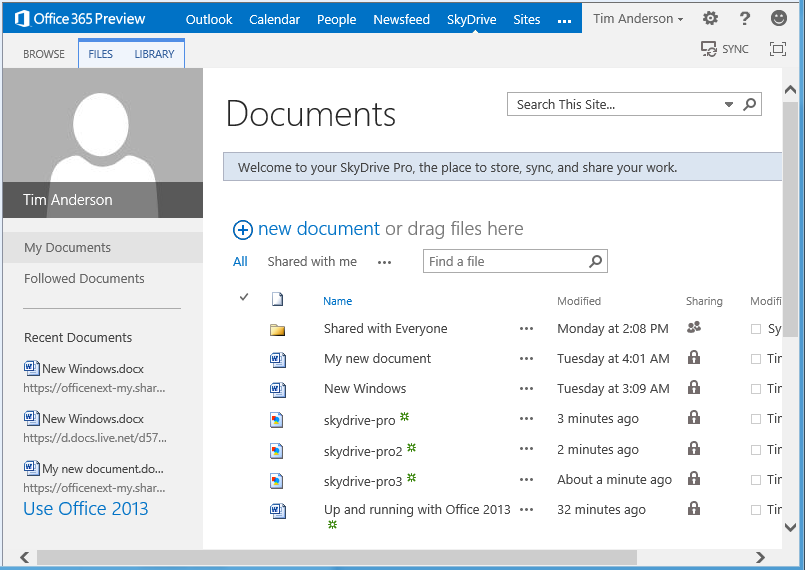
Here is how this works with my preview Office 365 account. I log in to the online portal, and click the SkyDrive option in the menu.

image

I see my SkyDrive files.

image

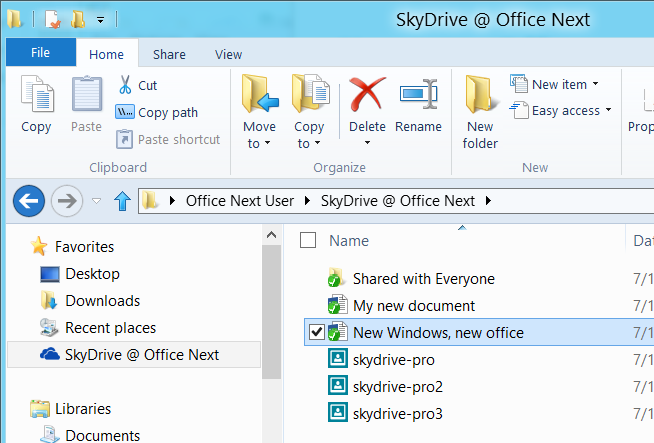
At top right is a SYNC hyperlink. Click that, and this sets up synchronization to a special Explorer folder, which in my case is called SkyDrive @ Office Next. This is not just a shortcut to a network location. The documents remain there if you are working offline.

image

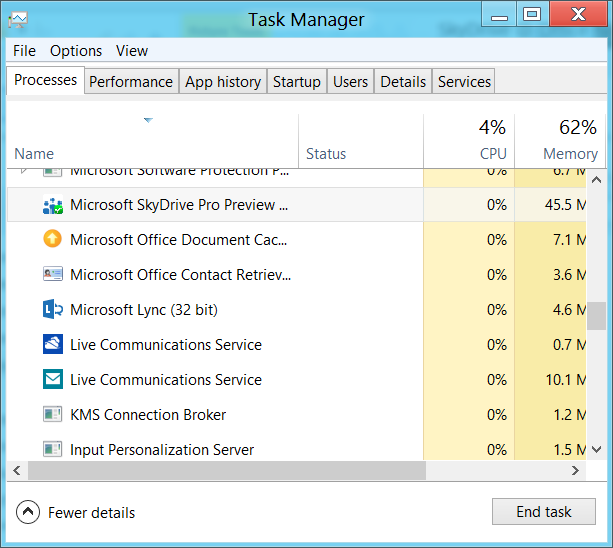
This excellent feature seems to depend on a new client called SkyDrive Pro Preview which has an icon in the notification area and also shows up in Task Manager.

image

If the SkyDrive Pro client is not installed and you attempt to sync your online files, the bad old SharePoint Workspace shows up instead. The consumer SkyDrive client will not do. SharePoint Workspace also supports offline files, but does not integrate with Explorer and is prone to go wrong.

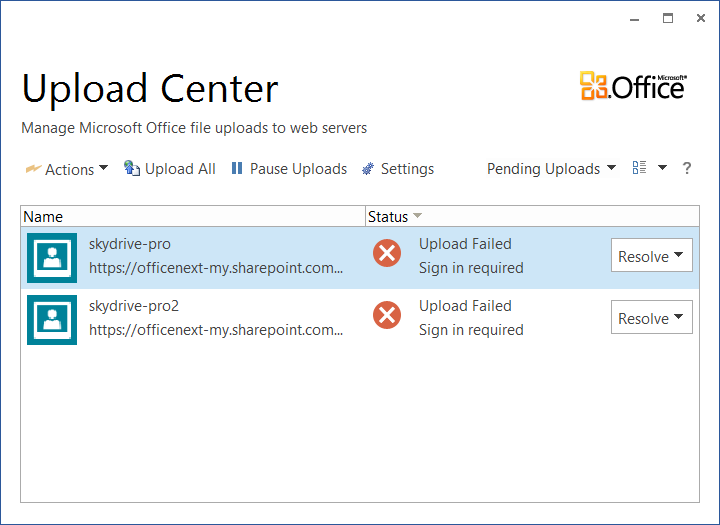
Now here is the puzzle. Microsoft loaned me a Samsung Slate with Office 2013 pre-installed, and this has SkyDrive Pro. However it also has SharePoint Workspace, and the associated Office Upload Center, which duly went into a sulk when trying to sync my SkyDrive Pro files.

image

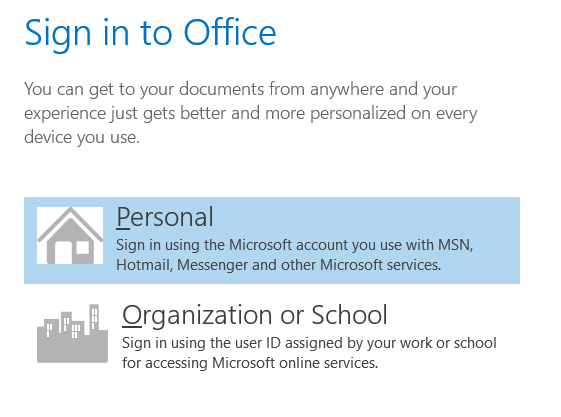
Clicking Resolve and entering my login details did nothing. However, when I clicked on the SkyDrive Pro icon instead, I got the new-style Office sign-in, following which everything worked.

image

A few puzzles then. Is the SkyDrive Pro client really new, or it is just a new wrapper for the bad old SharePoint Workspace?

Further, it seems that Microsoft has not yet cracked the problem whereby users sign in, tick the “Keep me signed in” option, but still get asked to sign in repeatedly.

Microsoft opens up Office 365 and Azure single sign-on for developers

Remember Passport and Hailstorm? Well here it comes again, kind-of, but in corporate-friendly form. It is called Windows Azure Active Directory, and is currently in Developer Preview:

Windows Azure AD provides software developers with a user centric cloud service for storing and managing user identities, coupled with a world class, secure & standards based authorization and authentication system. With support for .Net, Java, & PHP it can be used on all the major devices and platforms software developers use today.

The clearest explanation I can find is in John Shewchuk’s post on Reimagining Active Directory for the Social Enterprise. He makes the point that every Office 365 user is signing on to Microsoft’s cloud-hosted Active Directory. And here is the big deal:

The Windows Azure Active Directory SSO capability can be used by any application, from Microsoft or a third party running on any technology base. So if a user is signed in to one application and moves to another, the user doesn’t have to sign in again.

Organisations with on-premise Active Directory can use federation and synchronisation (Shewchuk fudges the distinction) so that you can get a single point of management as well as single sign-on between cloud and internal network.

Is this really new? I posted about Single sign-on from Active Directory to Windows Azure back in December 2010, and in fact I even got this working using my own on-premise AD to sign into an Azure app.

It seems though that Microsoft is working on both simplifying the programming, and adding integration with social networks. Here is where it gets to sound even more Hailstorm-like:

… we will look at enhancements to Windows Azure Active Directory and the programming model that enable developers to more easily create applications that work with consumer-oriented identities, integrate with social networks, and incorporate information in the directory into new application experiences.

Hailstorm failed because few trusted Microsoft to be the identity provider for the Internet. It is curious though: I am not sure that Facebook or Google are more well-trusted today, yet they are both used as identity providers by many third parties, especially Facebook. Spotify, for example, requires Facebook sign-in to create an account (an ugly feature).

Perhaps the key lesson is this. Once people are already hooked into a service, it is relatively easy to get them to extend it to third-parties. It is harder to get people to sign up for an all-encompassing internet identity service from scratch.

This is why Azure Active Directory will work where Hailstorm failed, though within a more limited context since nobody expects Microsoft to dominate today in the way it might have done back in 2001.

SharePoint security update stops SharePoint working

This morning I noticed that my test SharePoint 2010 installation was not working. Browsing to the site got me HTTP Error 503. The service is unavailable.

The problem seems to be related to the update KB2553365 which I noticed had been installed last night, following an initial failure.

image

Note this point in the description of the update:

After you install this security update on all SharePoint servers, you will have to run the PSconfig tool to complete the installation. For more information about how to use the PSconfig tool, visit the following TechNet webpage:

PSconfig command-line reference (SharePoint Foundation 2010)

In other words, if your server is set up update automatically, this update breaks SharePoint until you manually run the PSconfig utility which applies SharePoint updates.

Further, there is no automatic notification of this requirement. You have to figure it out.

SharePoint administrators know about PSconfig, but companies with Small Business Server or other small-scale environments are not always familiar with the problem.

Worse still, in my case PSconfig has not fixed it. I am restoring last night’s backup.

Macro virus reborn: ACAD/Medre.A steals drawings using AutoCAD AutoLISP

Remember the Concept virus? Someone wondered if you could make a self-replicating virus with a Microsoft Word macro. It worked; and the proof of concept soon became a real virus causing the usual mayhem and spoiling our clever VBA templates.

Microsoft locked down Office macros fairly effectively; but the idea lived on and has re-emerged as an AutoCAD virus which runs automatically when a drawing is opened. It is not quite the same, as in AutoCAD the code has to be in an external .lsp file, but you can have code in the S::STARTUP function run when a document loads, as explained in the documentation here. The malware relies on the fact that when drawings are emailed, users often archive an entire folder rather than sending a single file. This is how the virus spreads.

Most of the actual malicious code is not in AutoLISP, but in the more familiar form of VBScript files to which the code calls out. The malware then emails AutoCAD drawings to addresses in China – a rather crude mechanism for stealing data, but apparently somewhat effective since on investigation the target mailboxes were found overflowing with messages.

The threat is serious though. Much intellectual property and many future product plans are contained in AutoCAD drawings.

Security vendor ESET’s white paper [PDF] describes the attack in detail.

According to ESET, the combined efforts of Autodesk, Chinese ISP Tencent, and the Chinese National Computer Virus Emergency Response Center have contained the virus for now. There is also a free clean-up utility here: http://download.eset.com/special/EACADMedreCleaner.exe.

Microsoft announces launch dates for Windows 8: software will be done early August

Microsoft’s Tami Reller has announced the launch dates for Windows 8, the company’s controversial new operating system which combines the familiar desktop with a new touch-based user interface and associated runtime. She was speaking at the Worldwide Partner Conference under way in Toronto.

image

The team is on track to complete the software in early August, a milestone known as RTM (Release to Manufacturing).

This means that the final version of Windows 8 will be available for download by developers and enterprises from August – just a couple of months from now.

PCs and tablets preloaded with Windows 8 will be in the shops from late October.

The appearance of Windows 8 hardware is more significant this time round than is usually the case. One reason is that most PCs currently on sale do not have touch screens; and even those that do will lack the range of sensors expected in Windows 8 tablets.

Even more significant is that the ARM build of Windows 8, called Windows RT, is only available with new hardware. This means it will not be generally available at all until the hardware appears in October.

Moving a database from on-premise SQL Server to SQL Azure: some hassle

I am impressed with the new Windows Azure platform, but when I moved a simple app from my local machine to Azure I had some hassle copying the SQL Server database.

The good news is that you can connect to SQL Azure using SQL Server Management studio. You need to do two things. First, check the server location and username. You should already know the password which you set when the database was created. You can get this information by going to the Azure portal, selecting the database, and clicking Show connection strings on the dashboard.

Second, open the SQL firewall for the IP number of your client. There is a link for this in the same connection string dialog.

Now you can connect in SQL Server Management Studio. However, you have limited access compared to what you get as an admin on your local SQL Server.

Here is the Tasks menu for an on-premise SQL Server database:

image

and here it is for a SQL Server Azure database:

image

Still, you can start Export Data or Copy Database from your on-premise connection and enter the Azure connection as the target. However, you should create the destination table first, since the Export Data wizard will not recreate indexes. In fact, SQL Azure will reject data imported into a table without at least one clustered index.

I tried to script a table definition and then run it against the SQL Azure database. You can generate the script from the Script Table as menu.

image

However even the simplest table will fail. I got:

Msg 40514, Level 16, State 1, Line 2
‘Filegroup reference and partitioning scheme’ is not supported in this version of SQL Server.

when attempting to run the script on SQL Azure.

The explanation is here.

Windows Azure SQL Database supports a subset of the Transact-SQL language. You must modify the generated script to only include supported Transact-SQL statements before you deploy the database to SQL Database.

Fortunately there is an easier way. Right-click the table and choose Generate Scripts. In the wizard, click the Advanced button for Set Scripting Options.

image

Find Script for the database engine type, and choose SQL Azure:

image

You may want to change some of the other options too. This generates a SQL script that works with SQL Azure. Then I was able to use the Export Data wizard using the new table as the target.  If you use Identity columns, don’t forget Enable identity insert in Edit Mappings.

image

Farewell to Microsoft Small Business Server

Microsoft has announced pricing and licensing for Windows Server 2012. A dry topic perhaps; but one which confirms the end of a product with which I am perhaps too familiar: Small Business Server. It is spelt out in the FAQ:

Q33. Will there be a next version of Windows Small Business Server 2011 Standard?

No. Windows Small Business Server 2011 Standard, which includes Exchange Server and Windows server component products, will be the final such Windows Server offering. This change is in response to small business market trends and behavior. The small business computing trends are moving in the direction of cloud computing for applications and services such as email, online back-up and line-of-business tools.

The next question confirms that there will not be a new edition of Small Business Server 2011 Premium either. The official replacement is Windows Server 2012 Essentials, which is in effect the next version of Small Business Server Essentials. This handles local Active Directory, file sharing, local applications, and a connector to Office 365. However there is a 25 user account limit, whereas SBS standard supported up to 75 users, so there will be some businesses who are now forced to choose between moving to Windows Server Standard, or ditching the local server completely (which is often impractical).

image

Microsoft is pinning the reason on cloud computing, which makes some sense. Now and again I am asked by small businesses what sort of technology they should adopt; and my answer in general is to point them at either Microsoft Office 365 or Google Apps.

It is not quite clear-cut. A Small Business Server can theoretically work out cheaper, if you presume that it will not require any external maintenance. That is rarely the case though, and for most people the cloud-hosted option will be both cheaper and less troublesome.

What if you do need on-premise Active Directory, Exchange and SharePoint, which are the core components of SBS? Technically, there are in my opinion better ways to do this than with SBS. While SBS has always been excellent value for money, it is over-complex because it crams onto one box applications which are designed to run on separate boxes. It does work, but if anything goes wrong it is actually harder to troubleshoot than when you have separate servers. I prefer to see one Hyper-V box with separate Virtual Machines (VMs) for each major function, than SBS running on bare metal. VMs are also more flexible, and easier to restore if the hardware breaks.

Farewell then to SBS. I will remember it with some affection though. Think back to the nineties, when most email was POP3, and most internet was dial-up. People had problems like losing emails, because they had been downloaded to a desktop PC and they were out and about with a laptop. Moving to Microsoft Exchange, for which Outlook is the client, was bliss by comparison. Email synchronised itself to all your PCs, you could work offline, and Outlook for all its faults became a one-stop application for calendar, contacts and messages.

The beauty of SBS was that you could get Exchange along with the benefits of a Windows domain – one central directory of users and the ability to assign permissions to file shares – at a price that was more than reasonable.

I also think of SBS as a reliable product, when correctly installed. When it does go wrong it is often due to users trying to do stuff that does not quite work, or other applications which get installed on the same box, or hardware faults which users have attempted to fix by messing around with Windows, or anti-virus software misbehaving (Sophos! Confess!).

Microsoft is doing the right thing though. The SBS bundle makes little sense today, and if you do still need it, you can stick with the 2011 edition for a few years yet.

aQuantive may be Microsoft’s biggest acquisition failure. Have there been good ones? A look back.

Today’s news that Microsoft  is writing off $6.2 billion from the useless acquisition of aQuantive in August 2007 gives me pause for thought.

How bad is this company at acquisitions? Particularly those under CEO Steve Ballmer’s watch. He became CEO in January 2000.

image

Microsoft acquired Danger in February 2008 for $500M. Small relative to the aQuantive acquisition, but how much further money did the company burn transforming Danger from an excellent cloud and mobile company to the group that came up with Kin, the phone withdrawn from the market after just two months on sale? Not to mention the downtime and threatened loss of data suffered by Danger’s online service under Microsoft’s stewardship.

Microsoft attempted to buy Yahoo for $44.6bn in 2008. Yahoo’s executives declined, a move that was (very) bad for Yahoo shareholders but quite possibly right in a business sense; it would not have been a good fit.

Microsoft acquired Groove Networks complete with Notes inventor Ray Ozzie in March 2005. I put this in the disaster category. Groove went nowhere at Microsoft. Ozzie became Chief Software Architect and talked of internet vision but did not deliver. The wretched SharePoint Workspace is apparently based on Groove.

What about the good ones? My view is that Microsoft paid too much for Skype at $8.5 billion but at least it acquired a large number of users and has some chance of enhancing its mobile offerings with Skype integration.

Microsoft acquired Bungie in 2000 and given the success of Halo (without which, maybe, the whole Xbox project might have faltered) we have to count that a success, even though Bungie was spun off back to independence in 2007.

Other notables include Great Plains in December 2000 (now morphed into Dynamics ERP); Connectix in February 2003 which got Microsoft started in virtualization; and Opalis in December 2009 whose software now plays a key role in Microsoft’s System Center 2012 private cloud software.

Winternals in July 2006 was a great acquisition. Microsoft acquired some indispensable Windows troubleshooting tools, and also Mark Russinovich and Bryce Cogwell, able people who I suspect contributed to the transformation of Windows Vista into Windows 7, and in the case of Russinovich, to the technology in Windows Azure which now seems reborn as an excellent cloud platform.

You can see all Microsoft’s completed acquisitions here.

(If the company would like to acquire itwriting.com for a few billion I am willing to talk.)

MySQL on Windows Azure is expensive and provided by a third-party, spoils web site offer

I have been impressed by the changes in the June release of Windows Azure, available through a sparkling new HTML-based portal that lets you create new virtual machines and web sites with a few clicks or taps. One of the new features is multi-tenant web sites, starting from free and scaling up to multiple load-balanced instances. I even wondered about moving this blog, which is on WordPress, to run on an Azure web site.

When you create a web site on Azure, you can choose between a free MySQL database or a paid-for SQL Server database. At least, that is what was announced, and it is kind-of true. However, if you choose a MySQL database, a message about agreeing to terms from third-party ClearDB pops up. Even your subscription details will be passed to ClearDB.

image

You click the link, and discover that the free MySQL offer is not generous. In fact, it is limited to a tiny 20MB, making is useless for most applications. It also has, according to ClearDB, low performance.

image

If your database may grow to more than 1GB you need ClearDB’s Saturn offer, at $49.99 per month.

This has killed my interest in running this blog on Azure, at least via this route. I am not familiar with ClearDB, but for all I know it is a fine company. Nevertheless, if I am betting on Windows Azure, I would rather not have to bet also on an unfamiliar third-party. I also note that many ISPs offer MySQL databases with few restrictions and better terms. Take UK ISP ICUK, for example, which I use on occasion. For £3.00 per month you can get Linux web hosting with up to 10 MySQL databases. They may not have all the features of ClearDB, but as far as I am aware (don’t take my word for it) they are on a fault-tolerant cluster and backed up nightly.

As I understood it, Microsoft’s goal with the multi-tenanted web sites is to provide a quick solution for test and development, that can scale to a serious web site. Maybe enterprises will not blink, but a $49.99 monthly plan for the database takes it out of the realm of quick and cheap test and development from my perspective.

It is also unfortunate that the Azure web site gallery does not provide an option to use SQL Server for some applications in its quick-create Gallery. These include WordPress and Drupal. I agree that these applications probably work best with MySQL, but you can configure them to use SQL Server.

There are other ways to bypass ClearDB. You could set up a plain PHP web site and configure it to run WordPress on SQL Server, for example. You could also use a Linux VM, even a Small Instance, with 1 virtual CPU and 1.75GB RAM, and put MySQL on there. Thanks to Azure’s fabric, it will have some resilience: all storage is, as I understand it, in triplicate.

In the end I guess this is not unexpected. Microsoft is a Windows company and you can understand why it wants to get someone else to manage MySQL; and also why it does not wish to undercut SQL Server with too generous an offer for MySQL.

Even so, the 20MB limit is a disappointment and makes the Azure free web sites less interesting.