Category Archives: microsoft

Windows Azure get new hybrid cloud, infrastructure as a service features

Microsoft has announced new preview features in Windows Azure, its cloud computing platform, which introduce infrastructure as a service features as well as improving its support for hybrid public/private clouds.

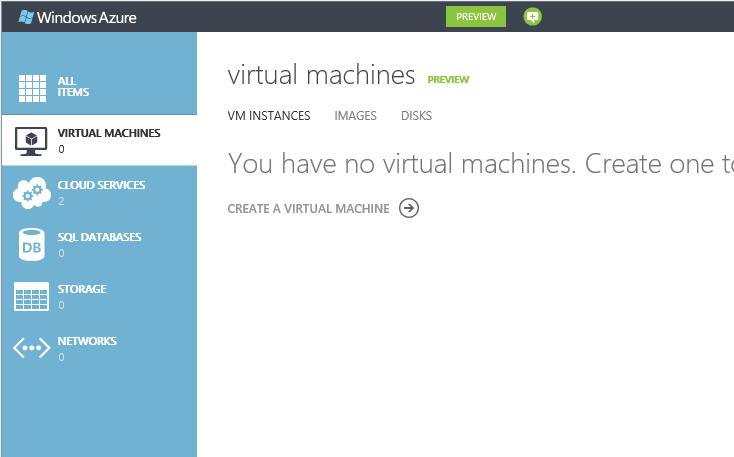
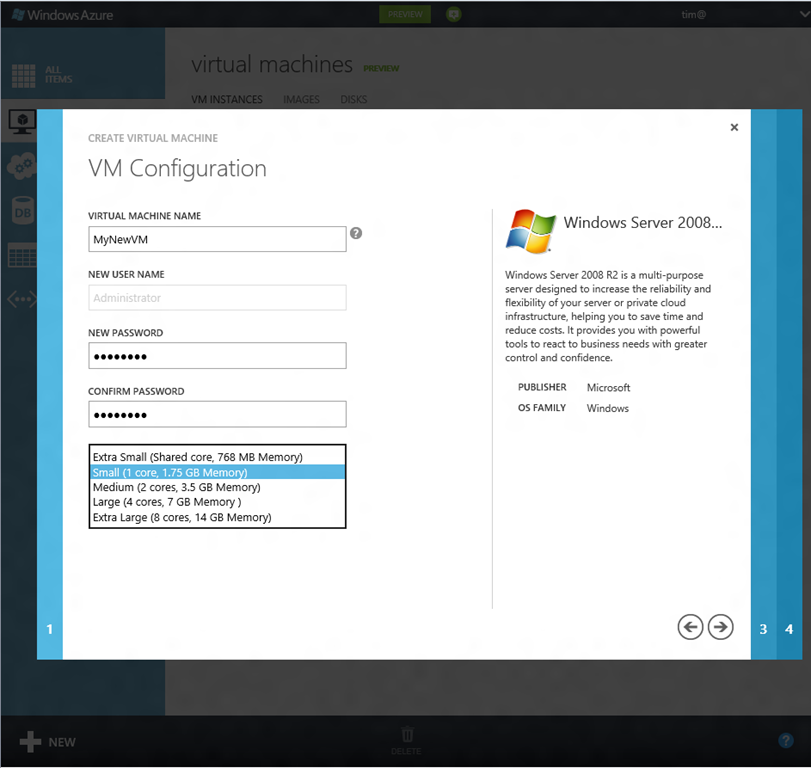
The best summary is in the downloadable Fact Sheet (Word document). One key piece is that virtual machines (VMs) can now be persistent. Previously Azure VMs were all conceptually stateless. You could save data within them, but it could be wiped at any time since Azure may replace it with the original you created when it was first deployed.

Supported operating systems are Windows Server 2008 R2, Windows Server 2012 RC, and four flavours of Linux.

One of the features mentioned by VP Bill Laing is the ability to migrate VHDs, the virtual hard drives used by Hyper-V and Azure, between on-premise and Azure:

Virtual Machines give you application mobility, allowing you to move your virtual hard disks (VHDs) back and forth between on-premises and the cloud. Migrate existing workloads such as Microsoft SQL Server or Microsoft SharePoint to the cloud, bring your own customized Windows Server or Linux images, or select from a gallery.

Windows Azure Virtual Network lets you extend your on-premise network to Azure over a VPN. This sounds like the existing feature called Windows Azure Connect first announced at the end of 2010, though since Azure Virtual Network is also a preview this seems to be talking a long time to come to full release.

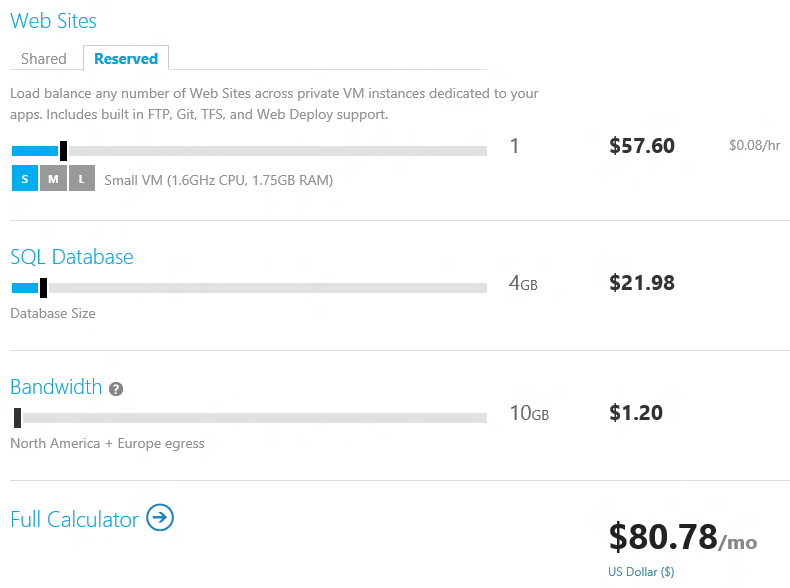
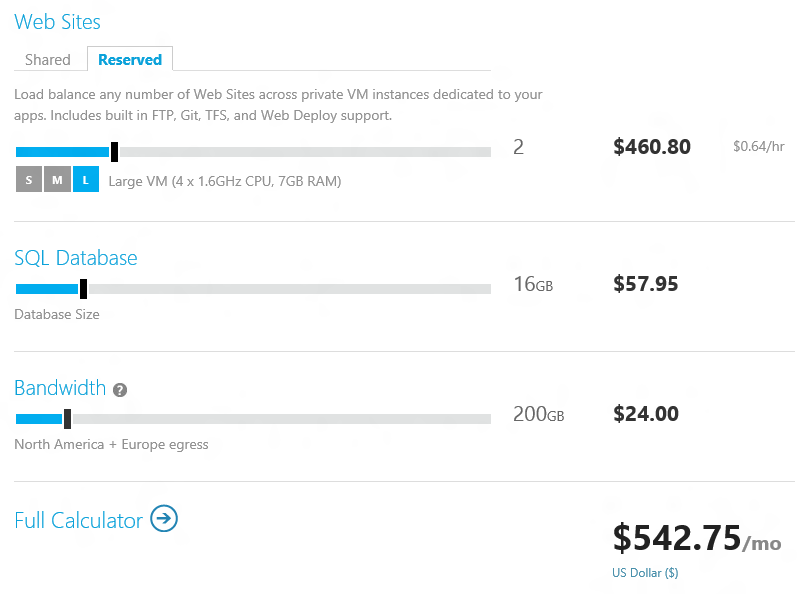
Windows Azure Web Sites is a new web hosting offering. Previously, Azure was focused on web applications rather than generic web sites. This new offering is aimed at any website, running on Internet Information Server 7 with supported frameworks including ASP.NET, PHP and Node.js. MySQL is supported as well as Microsoft’s own Azure SQL Database based on SQL Server.

There is also a new management portal in preview. Azure SQL Reporting is out of preview, and there are also new services for media, caching, and geo-redundant storage.

My guess is that Microsoft-platform customers will welcome these changes, which make Azure a more familiar platform and one that will integrate more seamlessly with existing on-premise deployments. No doubt Microsoft also hopes to compete more effectively with Amazon’s EC2 (Elastic Compute Cloud).

One thing which I will would like to know more about is Azure’s elasticity, the ability to scale on demand. Laing describes Azure Web Sites as a “highly elastic solution,” and the Fact Sheet mentions:

the ability to scale up as needed with reserved instances.

It is not clear though whether Microsoft is offering built-in load balancing and scaling on demand, an area where both Azure and System Center 2012 (Microsoft’s private cloud management suite) are relatively weak. That is, scaling is possible but complex to automate.

Windows Vista designer pops up to explain and defend Windows 8

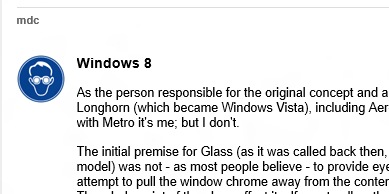
I wrote a first look for Windows 8 Release Preview for The Register which prompted, as you would expect, a barrage of comments from Reg users, most expressing distaste for Redmond’s latest. Buried on page three of the comments though is this one which is worth calling out, since it explains some of the thinking behind Aero Glass in Windows Vista and how that same thinking is expressed in the Metro design – though note that the user mdc (who is that?) says in a later comment that he has “moved into a different field entirely (photography)” so is not responsible for Metro or Windows 8.

image 

Anyway, mdc observes that Microsoft has been working for years on the idea of a “content-centric” user interface, one where the surrounding chrome disappears so that content is king. In this respect, Glass can be seen as a move towards the Metro immersive UI:

The initial premise for Glass (as it was called back then, the Aero UX sprung up around the Glass model) was not – as most people believe – to provide eye candy for the end user. Instead, it was an attempt to pull the window chrome away from the content and make it as unobtrusive as possible. The whole point of the glass effect itself was to allow the end user to make better use of their screen real-estate by allowing them to see content beneath the active window.

Glass was not radical though, and did not change the model of multiple overlapping windows. According to mdc though, something more revolutionary was considered for Vista:

Some of my other concepts promoted a VERY different approach to the user experience, much more in line with what is seen today in Windows 8. In fact, the premise for the shift in the desktop paradigm goes back as far as the early Blackcomb concepts first demoed by the MSN services division in 1999; it has ALWAYS been felt that the desktop itself is a rather clunky way of providing content to the end user, which is – after all – the purpose of computing devices, be they traditional desktops, laptops, phones, or even set-top boxes. Windowing systems were designed to allow users to work on multiple pieces of data in quick succession, and yet over the years usability studies have found that users rarely manipulate more than 2 documents simultaneously.

In the end the idea was rejected, partly because of the work involved, and partly because Microsoft’s Jim Allchin, among others, felt that the familiarity of the Windows user interface was an important selling point versus the competition.

Apparently we  are wrong to imagine that Windows 8 is based on the Windows Phone design:

While some have suggested that Windows 8’s interface is "touch-only" or "based on Windows Phone 7", that couldn’t be further from the truth. Windows Phone 7 was instead a pilot program – in a relatively low risk sector – for the designs originally suggested for Blackcomb, which have now found their way into Windows 8. At the time, touch interfaces hadn’t even been conceived of – remember, back then touch sensitive screens were Resistive nasties that required at best a stylus, or at worst jabbing at them hard with a finger or pen.

The fact is that Metro just happened to be easily accessible for touch devices, and that has been touted as one of its benefits; it is NOT, and never has been, the original aim of the design. The aim of the design is exactly the same as Aero was – to take the chrome away from the content, and allow the user to focus on what they’re doing rather than unnecessary clutter. A perfect example of this is internet Explorer on Metro; in its default state, all you see is a webpage; chrome CAN be pulled up if the user requires, but is otherwise absent. The majority of Metro applications are like this – in fact it’s part of the Metro UX specifications.

and he adds:

Personally, I see Metro as a good thing; it allows me to do my work without distraction, and I’m just disappointed that I wasn’t the one who did the design work for it this time around.

Windows 8 Metro is not just about touch then: it is a reshaping of the user interface to put content first.

Huge icons in Windows 8 Metro

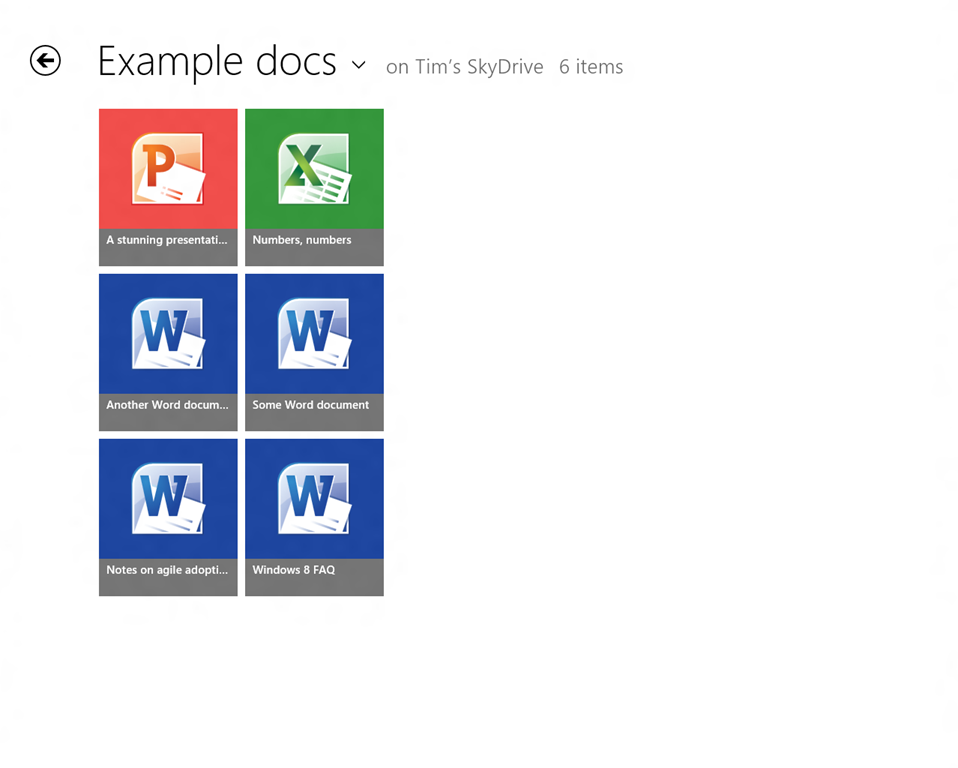
This is the SkyDrive Metro-style app running on my 1280 x 1024 desktop, in its default view. Note that each icon is 185 x 211 px. The actual title of each document is in relatively small text though still readable.

image

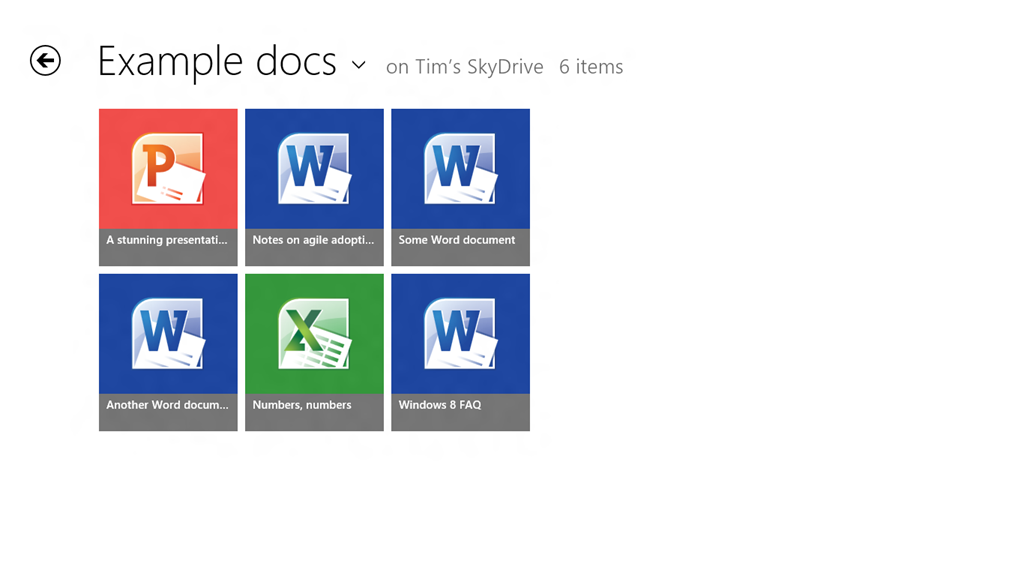
On my slate I only get two rows per screen:

image

You can set it to Detail view which gives nine rows on the desktop display and six rows on the slate.

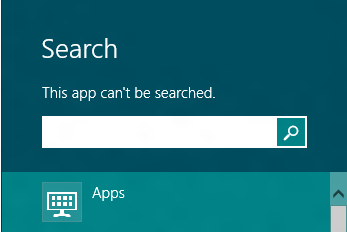
Touch-friendly, undoubtedly, but is this really best-practice design? What if you have lots of documents in a folder? I suppose it is just swipe-swipe-swipe, not helped by the fact that the SkyDrive app cannot be searched:

image

nor is there any way that I can see to sort the documents, say by last modified.

Of course you can do all these things in the touch-hostile desktop application.

Both the app and Windows 8 itself are pre-release so may improve, but I would like to see a smarter approach to browsing and selecting documents in Windows 8 Metro-style.

For more on Windows 8, see my review on The Register.

New Windows 8, new Visual Studio 2012

Microsoft has released the Release Candidate of Visual Studio 2012 (now the official name), which you can download here, to coincide with the release of Windows 8 Release Preview and Windows Server 2012 Release Preview.

Visual Studio also has a new logo, as you can see from the setup window below.

image

Microsoft’s Jason Zander has posted about the new release here. Some of the main areas of difference between the RC and the Beta are:

  • Better performance
  • User interface tweaks including the return of a little more colour to the product
  • Solution Explorer filtering
  • New Metro style app templates
  • Improved XAML and Blend designers
  • Updated ASP.NET 4.5 web forms to support the await keyword
  • Tweaks to LightSwitch, Team Foundation Server, Architectural Tools

There is also a more detailed post by Scott Hanselman on what’s new in web development here.

Windows 8 Release Preview now available, Adobe Flash included, finished version expected August 2012

Microsoft has made the Release Preview of Windows 8 available to download. So what’s new?

image

The press release:

  • Confirms that a “touch-friendly and power-optimized Adobe Flash Player” is integrated into Internet Explorer 10
  • Announces new Family Safety features
  • States that IE10 is “Do not track” by default
  • Announces new apps and improvements to existing ones

All of which will come as a disappointment to those hoping for any sort of change of direction following a mixed-to-negative reception for the Consumer Preview.

Windows chief Steven Sinofsky says:

If the feedback and telemetry on Windows 8 and Windows RT match our expectations, then we will enter the final phases of the RTM process in about 2 months.

My guess that feedback along the lines of “Bring back the Start menu” will not count as an obstacle.

The application that would not uninstall

I install a ton of pre-release and test software so it is not surprising that I sometimes run into Windows Installer issues. Here is an entertaining error though. It is unlikely, I guess, that you will hit this problem; but I present it as an illustration of what can go wrong, as we move into the era of locked-down operating systems and easy app installs. Though even these are not perfect. Notice how the operating system fights me all the way.

Years ago I installed Microsoft’s Office Labs Ribbon Hero, a tutorial add-on for Office. At the time I was running Windows Vista. Since then I have done an in-place upgrade to Windows 7. I tried to remove it today through Control Panel and got this message:

image

After presenting this information setup closed and the application was not uninstalled.

So … the application does not support Windows 7 and therefore you cannot remove it. Clever, and I found this a tricky problem to get around.

I took a look at the Windows installer files which you can find in %SYSTEMROOT%\Installer. All the msi files have random names. However, you can right-click the column heading area and choose More, then check Subject in the list. Click OK, and now the application to which each msi relates appears.

image

Now you can click the column heading to sort by subject and find the problem msi.

image

I copied the msi to my desktop.

For the next step you need the Orca tool from the Windows Installer SDK. If Orca is installed, you can right-click the MSI and choose Edit with Orca.

image

I then selected LaunchCondition and deleted the launch condition that required Windows XP.

INSTALLED OR VersionNT = 501 OR APPLYING_AUTOUPDATE

Hmm, something odd here as it should pass INSTALLED? Still, save, right-click the msi, choose Uninstall. You still hit the error. Why? Somehow, Windows works out that you are uninstalling a product for which an msi exists in the official location and uses that one instead. You have to copy your modified msi to the correct location. Open an administrator command prompt:

image

Now right-click the msi and choose Uninstall.

It worked. Phew.

Adobe Flash in Windows 8 Metro, but not technically a plug-in

Today’s Windows 8 rumour is that Adobe Flash will be baked into Internet Explorer 10 in Windows 8, not only in the desktop edition but also in Metro.

Until this is confirmed by Microsoft, it is only a rumour. However, it seems likely to me. The way this rumour mill works is:

  • Some journalists and book authors working closely with Microsoft already have information on Windows 8 that is under non-disclosure.
  • Some enthusiast sites obtain leaked builds of Windows 8 and poke around in them. Unlike new Mac OS X releases, Windows builds are near-impossible to keep secure because Microsoft needs to share them with hardware partners, and mysteriously copies turn up on on the Internet.
  • When an interesting fact is leaked, this allows those journalists and book authors who already have the information to write about it, since most non-disclosure agreements allow reporting on what is already known from other sources.

That is my understanding, anyway. So when you read on WinUnleaked.tk that Flash is in IE10 you may be sceptical; but when Paul Thurrott and Rafael Rivera report the same story in more detail, you can probably believe it.

Back to the main story: presuming this is accurate, Microsoft has received Flash source code from Adobe and integrated it into IE10, in a similar manner to what Google has done with Flash in Chrome. This means that Flash in IE10 is not quite a plug-in. However, on the Metro side the inclusion of Flash is apparently a compatibility feature:

So, Microsoft has extended the Internet Explorer Compatibility View list to include rules for popular Flash-based web sites that are known to meet certain criteria. That is, Flash is supported for only those popular but legacy web sites that need it. This feature is not broadly available for all sites.

say Thurrott and Rivera, though I presume this only applies to the Metro IE10 rather than the desktop version.

Does this make sense? Not altogether. Oddly, while I have heard plenty of criticism of Windows 8 Consumer Preview, I have not heard many objections to the lack of Flash in Metro IE. Since Apple does not support Flash on iOS, many sites already provide Flash-free content for tablet users. Further, on the x86 version of Windows 8 there is an easy route to Flash compatibility: just open the site in the desktop browser.

That said, there is still plenty of Flash content out there and being able to view it in Windows 8 is welcome, especially if you can make your own edits to the compatibility list to get Flash content on less well-known sites. My guess is that Microsoft wants to support Flash for the same reason Android devices embraced it: a tick-box feature versus Apple iOS.

One further thought: this is a sad moment for Silverlight, if Microsoft is supporting Flash but not Silverlight on the Metro side of Windows 8.

Making sense of Microsoft’s Windows 8 strategy

Here are two things we learn from Jensen Harris’s post of 18 May.

image

First, Microsoft cares more about WinRT and Metro, the new tablet-oriented user interface in Windows 8, than about the desktop. In the section entitled Goals of the Windows 8 user experience, Harris refers almost exclusively to WinRT apps. Further, he asks the question: what is the role of desktop in Windows 8?

It is pretty straightforward. The desktop is there to run the millions of existing, powerful, familiar Windows programs that are designed for mouse and keyboard. Office. Visual Studio. Adobe Photoshop. AutoCAD. Lightroom. This software is widely-used, feature-rich, and powers the bulk of the work people do on the PC today.

Does that mean the desktop is for legacy, like XP Mode in Windows 7? Harris denies it:

We do not view the desktop as a mode, legacy or otherwise—it is simply a paradigm for working that suits some people and specific apps.

He adds though that “We think in a short time everyone will mix and match” desktop and Metro apps – though he does not call them Metro apps, he calls them “new Windows 8 apps.”

Second, Microsoft considers that the poor reaction to the Consumer Preview can be fixed by tweaking the detail rather than by changing the substance of how Windows 8 is designed.

But fundamentally, we believe in people and their ability to adapt and move forward. Throughout the history of computing, people have again and again adapted to new paradigms and interaction methods—even just when switching between different websites and apps and phones. We will help people get off on the right foot, and we have confidence that people will quickly find the new paradigms to be second-nature.

In fact, this post is peppered with references to negative reactions for previous versions of Windows. Microsoft is presuming that this is normal and that history will repeat:

Although some people had critical reactions and demanded changes to the user interface, Windows 7 quickly became the most-used OS in the world.

This is revisionist, as I am sure Harris and his team are aware. The reaction to Windows 7 was mainly positive, from the earliest preview on. It was better than Windows Vista; it was better than Windows XP.

Windows Vista on the other hand had a troubled launch and was widely disliked. User Account Control and its constant approval prompts was part of the problem, but more serious was that OEMs released Vista machines with underpowered hardware further slowed down by foistware and in many cases it Vista worked badly out of the box. You could get Vista working nicely with sufficient effort, but many just stayed with Windows XP.

The failure of Vista was damaging to Microsoft, but mitigated in that most users simply skipped a version and waited for Windows 7. The situation now is more serious for Microsoft, both because of the continuing popularity of the Mac and the rise of tablets, especially Apple’s iPad.

It is precisely because of that threat that Microsoft is making such a big bet on Metro and WinRT. The reasoning is that while shipping a build of Windows that improves on 7 would please the Microsoft platform community, it would be ineffective in countering the iPad. It would also fail to address problems inherent in Windows: lack of isolation between applications, and between applications and the operating system; the complexity of application installs and the difficulty of troubleshooting them when they go wrong; and the unsuitability of Windows for touch control.

There is also a hint in this most recent post that classic Windows uses too much power:

Once we understood how important great battery life was, certain aspects of the new experience became clear. For instance, it became obvious early on in the planning process that to truly reimagine the Windows experience we would need to reimagine apps as well. Thus, WinRT and a new kind of app were born.

Another key point: Microsoft’s partnership with hardware manufacturers has become a problem, since they damage the user experience with trialware and low quality utilities. The Metro-style side of Windows 8 fixes that by offering a locked-down environment. This will be most fully realised in Windows RT, Windows on ARM, which only allows WinRT apps to be installed.

Microsoft decided that only a new generation of Windows, a “reimagining”, would be able to compete in the era of BYOD (Bring Your Own Device).

One thing is for sure: the Windows team under Steven Sinofsky does not lack courage. They have form too. Many of the key players worked on the Office 2007 Ribbon UI, which was also controversial at the time, since it removed the familiar drop-down menus that had been in every previous version of Office. They stuck by their decision, and refused to add an option to restore the menus, thereby forcing users to use the ribbon even if they disliked it. That strategy was mostly successful. Users got used to the ribbon, and there was no mass refusal to upgrade from Office 2003, nor a substantial migration to OpenOffice which still has drop-down menus.

I have an open mind about Windows 8. I see the reasoning behind it, and agree that it works better on a real tablet than on a traditional PC or laptop, or worst of all, a virtual machine. Harris says:

The full picture of the Windows 8 experience will only emerge when new hardware from our partners becomes available, and when the Store opens up for all developers to start submitting their new apps.

Agreed; but it also seems that Windows 8 will ship with a number of annoyances which at the moment Microsoft looks unlikely to fix. These are mainly in the integration, or lack of it, between the Metro-style UI and the desktop. I can live without the Start menu, but will miss the taskbar with its guide to running applications and its preview thumbnails; these remain in the desktop but do not include Metro apps. Having only full-screen apps can be irritation, and I wonder if the commitment to the single-app “immersive UI” has been taken too far. When working in Windows 8 I miss the little clock that sits in the notification area; you have to swipe to see the equivalent and the fast and fluid UI is making me work harder than before.

I believe Microsoft will listen to complaints like these, but probably not until Windows 9. I also believe that by the time Windows 9 comes around the computing landscape will look very different; and the reception won by Windows 8 will be a significant factor in how it is shaped.

Microsoft appeals to Windows 8 Metro developers not to stray from the official API

Microsoft’s John Hazen has posted on the official Building Windows 8 blog about the security and reliability principles in the Metro platform in Windows 8. Hazen explains how apps are installed from the Windows store, use contracts to interact with the operating system, and have to ask user consent for access to device capabilities such as the webcam or GPS, or to access user data such as documents and music.

The most intriguing part of the document comes when Hazen appeals to developers to stick to the API that is referenced in the official Windows 8 Metro SDK:

Resist the temptation to find ways to invoke APIs that are not included in the SDK. This ultimately undermines the expectations that customers have for your app. APIs that are outside the SDK are not guaranteed to work with Metro style apps either in this release or in future releases, so you may find that your app doesn’t function properly for all customers. These APIs may also not function properly in the async environment that is foundational to Metro style app design. Finally these APIs may undermine customer confidence by accessing resources or data that Metro style apps would not normally interact with. For all these reasons, we have provided checks in the Windows App Certification Kit to help you catch places where you might have inadvertently called interfaces not exposed by the SDK.

While it is possible to hide or obfuscate calls to APIs that are not included in the SDK, this is still a violation of customer expectations and Store policy. In the end, we have created this platform to help developers like you to build amazing apps that work well with the system and with other apps and devices to delight customers. Working with the Metro style SDK is fundamental to your realizing that goal.

The worrying aspect of this appeal to developers to play nice is Hazen’s admission that crafty developers may find ways to escape the Metro sandbox, undermining both the security and the privacy protection built into Metro. The main protection against this is such such an app should be blocked from the Windows Store, but can Microsoft check with 100% confidence that no hidden or obfuscated API calls exist? How effective is the Metro sandbox?

My guess is that the danger will be greater on the x86 version of Windows 8 than in Windows RT, which is locked down to prevent any third-party desktop applications from being installed. Nevertheless, a large part of the non-Metro Windows API must exist in Windows RT, to support the desktop, Explorer and Microsoft Office.

Review: Digital Wars by Charles Arthur

Subtitled Apple, Google, Microsoft and the battle for the internet, this is an account by the Guardian’s Technology Editor of the progress of three tech titans between 1998 and the present day. In 1998, Google was just getting started, Apple was at the beginning of its recovery under the returning CEO Steve Jobs, and Microsoft dominated PCs and was busy crushing Netscape.

Here is how the market capitalization of the three changed between 1998 and 2011:

  End 1998 Mid 2011
Apple $5.4 billion $346.7 billion
Google $10 million $185.1 billion
Microsoft $344.6 billion $214.3 billion

This book tells the story behind that dramatic change in fortunes. It is a great read, written in a concise, clear and engaging style, and informed by the author’s close observation of the technology industry over that period.

That said, it is Apple that gets the best quality coverage here, not only because it is the biggest winner, but also because it is the company for which Arthur feels most affinity. When it comes to Microsoft the book focuses mainly on the company’s big failures in search, digital music and smartphones, but although these failures are well described, the question of why it has performed so badly is not fully articulated, though there is reference to the impact of antitrust legislation and an unflattering portrayal of CEO Steve Ballmer. The inner workings of Google are even less visible and if your main interest is the ascent of Google you should look elsewhere.

Leaving aside Google then, describing the success of Apple alongside Microsoft’s colossal blunders makes compelling reading. Arthur is perhaps a little unfair to Microsoft, because he skips over some of the company’s better moments, such as the success of Windows 7 and Windows Server, or even the Xbox 360, though he would argue I think that those successes are peripheral to his theme which is internet and mobile.

The heart of the book is in chapters four, on digital music, and five, on smartphones. The iPod, after all, was the forerunner of the Apple iPhone, and the iPhone was the forerunner of the iPad. Microsoft’s famous ecosystem of third-party hardware partners failed to compete with the Ipod, and by the time the company got it mostly right by abandoning its partners and creating the Zune, it was too late.

The smartphone story played out even worse for Microsoft, given that this was a market where it already had significant presence with Windows Mobile. Arthur describes the launch of the iPhone, and then recounts how Microsoft acquired a great mobile phone team with a company called Danger, and proceeded to destroy it. The Danger/Pink episode shows more than any other how broken is Microsoft’s management and mobile strategy. Danger was acquired in February 2008. There was then, Arthur describes, an internal battle between the Windows Mobile team and the Danger team, won by the Windows Mobile team under Andy Lees, and resulting in 18 months delay while the Danger operating system was rewritten to use Windows CE. By the time the first new “Project Pink” phone was delivered it was short on features and no longer wanted by Verizon, the partner operator. The “Kin” phone was on the market for only 48 days.

The Kin story was dysfunctional Microsoft at its worst, a huge waste of money and effort, and could have broken a smaller company. Microsoft shrugged it off, showing that its Windows and Office cash cows continue to insulate it against incompetence, probably too much for its own long-tem health.

Finally, the book leaves the reader wondering how the story continues. Arthur gets the significance of the iPad in business:

Cook would reel off statistics about the number of Fortune 500 companies ‘testing or deploying’ iPads, of banks and brokers that were trying it, and of serious apps being written for it. Apple was going, ever so quietly, after the business computing market – the one that had belonged for years to Microsoft.

Since he wrote those words that trend has increased, forming a large part of what is called Bring Your Own Device or The Consumerization of IT. Microsoft does have what it hopes is an answer, which is Windows 8, under a team led by the same Steven Sinofsky who made a success of Windows 7. The task is more challenging this time round though: Windows 7 was an improved version of Windows Vista, whereas Windows 8 is a radical new departure, at least in respect of its Metro user interface which is for the Tablet market. If Windows 8 fares as badly against the iPad as Plays for Sure fared against the iPod, then expect further decline in Microsoft’s market value.