Category Archives: microsoft

Office and Windows Live SkyDrive – don’t miss unlucky Clause 13

How secure is Windows Live SkyDrive?

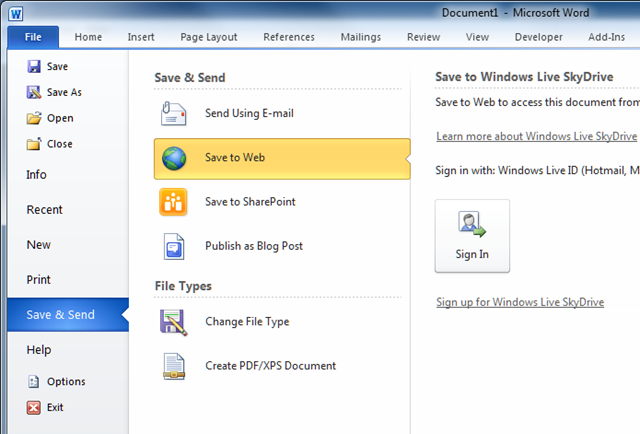
One of the most notable features of Office 2010 is that you can save directly to the Web, without any fuss. In most of the applications this option is accessed via the File menu and the Save & Send submenu. Incidentally, this submenu used to be called Share, but someone decided that was confusing and that Save & Send is less confusing. I think they are both confusing; I would put the Save options under the Save submenu but there it is; it is not too hard to find.

image

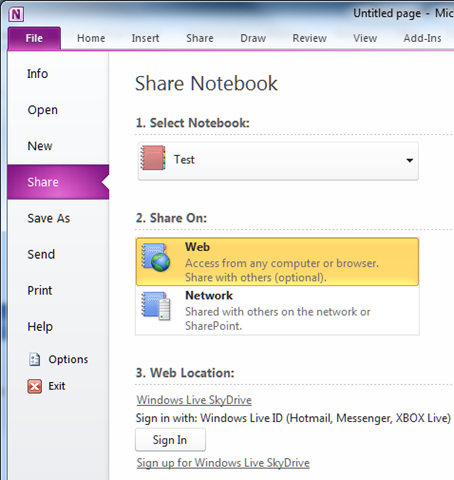
Microsoft does not like to be too consistent; so OneNote 2010 has separate Share and Send menus. The Share menu has a Share On Web option.

image

What Save to Web actually does is to put your document on Windows Live SkyDrive. I am a fan of SkyDrive; it is capacious (25GB), performs OK, reliable in my experience, and free.

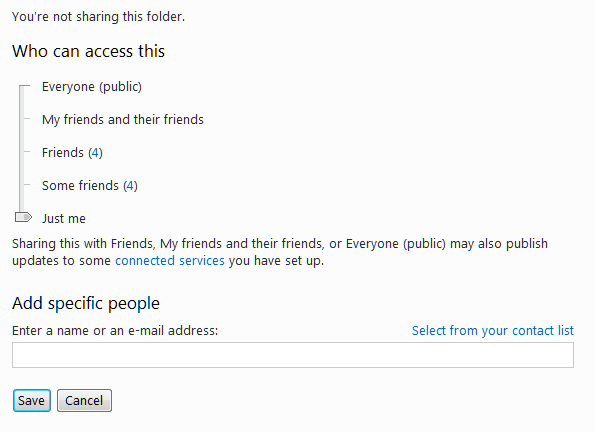
The way the sharing works is based on Microsoft Live IDs and Live Messenger. You can only set permissions for a folder, not for an individual document, and you have options ranging from private to public. Usually the most useful way to set permissions is not through the slider but by adding specific people. Provided they have a Live ID matching the email address they give, they will then get access.

image 

You can also specify whether the access is view only, or “add, edit details, and delete files” – a bit all-or-nothing, but still useful.

image

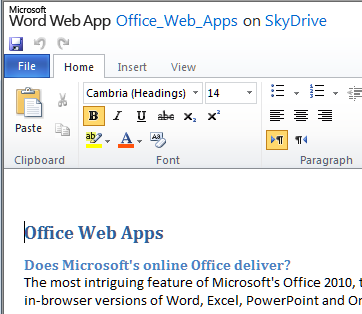
SkyDrive hooks in with Office Web Apps so you can create and edit documents directly in the browser – provided it is a supported browser and that the Web App doesn’t detect you are on a mobile device, in which case it is view-only. The view-only thing is a shame when it comes to a large screen device like an iPad, though the full version nearly works.

image

Overall it’s a major change for Office, even though similar functionality has been around for a while from the likes of Zoho and Google Docs. This is Office, after all, the most popular Office suite; and plenty of users will be trying out these features because they are there, and thinking that they could be pretty useful.

There is one awkward question though. Is Windows Live SkyDrive secure? It turns out that this is not an easy question to answer. Of course it cannot be 100% secure; but even assessing its security is not easy. If you try to find out you are likely to end up here – the Microsoft Service Agreement. Which says, in bold type so you don’t miss it:

13. WE MAKE NO WARRANTY.

We provide the service ‘as-is,’ ‘with all faults’ and ‘as available.’ We do not guarantee the accuracy or timeliness of information available from the service. We and our affiliates, resellers, distributors and vendors (collectively, the ‘ Microsoft parties’) give no express warranties, guarantees or conditions. You may have additional consumer rights under your local laws that this contract cannot change. We exclude any implied warranties including those of merchantability, fitness for a particular purpose, workmanlike effort and non-infringement.

14. LIABILITY LIMITATION.

You can recover from the Microsoft parties only direct damages up to an amount equal to your service fee for one month. You cannot recover any other damages, including consequential, lost profits, special, indirect, incidental or punitive damages.

I guess Clause 13 could be called the unlucky clause. If you are unlucky, don’t come crying to Microsoft.

There are two big questions here. One is how secure your documents are against unauthorised access. The other is how reliable the service is. Might you log on one day and find you cannot get access, or that all your documents have disappeared?

Three observations. First, despite clause 13, Microsoft has a lot to lose if its service fails. It has to succeed in cloud computing to have a profitable future, and a major data-losing catastrophe is costly, in that it drives customers away. The Danger episode was bad enough; though even then Microsoft eventually recovered the data it said initially had been lost.

Second, it may well be that the biggest security risk is from careless users, not from Microsoft. If your password (or that of a friend to whom you have given read or write access) is a favourite football team it won’t be surprising if somebody guesses.

Third, I have no idea how to quantify the risk of Microsoft losing data or denying access to my documents. That suggests it would be foolish to keep data there without backing it up elsewhere from time to time. The same applies to other cloud services. I guess if you pay for a service, and know how it is backed up to a different location, and have tested the effectiveness of that backup, and know that there are archives as well as backups – in other words, you can go back in time – I guess that then you might reasonably feel more confident. Otherwise, well, see clause 13 above.

Adobe LiveCycle and the Apple problem

Earlier this week I attended Adobe’s partner conference in Amsterdam, or at least part of it. The sessions were closed, but I was among the judges for the second day, where partners presented solutions they had created; the ones we judged best will likely be presented at the Max conference in October.

Seeing the showcased solutions gave insight into how and why LiveCycle is being used. LiveCycle is actually a suite of products – the official site lists 14 modules – which are essentially a bunch of server applications to process and generate PDF forms and documents, combined with data services that optimise data delivery and synchronisation with Flash clients, typically built with Flex and running either in-browser or on the desktop using AIR. These two strands got twisted together when Adobe took over Macromedia.

LiveCycle applications are Java applications, and run on top of Java Enterprise Edition application servers such as Oracle’s WebLogic or IBM’s WebSphere. This does mean that support for Microsoft’s .NET platform is weak; Adobe argues that that Microsoft’s platform has its own self-contained stack and development tool (Visual Studio) which makes it not worth supporting, though of course there are ways to integrate using web services and we saw examples of this. Many of the partners whispered to me that they also build SharePoint solutions for their Microsoft platform customers, and that SharePoint 2010 is a big improvement on earlier versions for what they do. Still, Java is the more important platform in this particular area.

Why would you want to base an Enterprise application on PDF? The answer is that many business processes involve forms and workflows, and for these LiveCycle is a strong solution. PDF is widely accepted as a suitable format for publishing and archiving. One thing that cropped up in many of the solutions is digital signatures: the ability to verify that a document was produced at a certain time and date and has not been tampered with plays well with many organisations.

Here’s a quick flavour of some of the solutions we saw. Ajila AG showed an application which handles planning permission in parts of Switzerland; everything is handled using PDF form submissions and email, and apparently a process which used to take 45 days is now accomplished in 3 days. Another Ajila AG solution handles the electronic paperwork for complex financial instruments at the Swiss stock exchange. Ensemble Systems showed an e-invoicing system which includes a portal where both a company and its suppliers can log in to view and track the progress of an invoice. Impuls Systems GmbH used PDF forms combined with Adobe Connect Pro conferencing to create online consultation rooms and guided form completion for clients purchasing health insurance. Aktive Reply built a system to replace printed letterheads for an insurance company with 10,000 agents; not only does the system save paper, but it also synchronises any address changes with a central database. Another Aktive Reply application lets lawyers assemble contracts from a database of fragments, enforcing rules that reduce the chance of errors; we were told that this one replaced a complex and error-prone Word macro.

OK, so why would you not want to use LiveCycle for your forms or document-based workflow or business process management application? Well, these solutions tend to be costly so smaller organisations need not apply; and I did worry on occasion about over-complexity. More important, the whole platform depends on PDF, often making use of smart features like Adobe Reader Extensions and scripting. After all, this is why Adobe added all these abilities to PDF, despite security concerns and the desire some of us have for simple, fast rendering of PDF documents rather than yet another application platform.

PDF is well supported of course, but once you move away from Windows and Mac desktops, it is often not the official Adobe Reader that you use, but some other utility that does not support all these extra features. In many cases it is not just PDF, but Flash/Flex applications which form part of these LiveCycle solutions. Adobe understands the importance of mobile devices and I was told that more effort will be put into Adobe Reader for mobile devices, to broaden its support and extend its features. Reader for Android is also available, as an app in the Android Market.

That’s fair enough, but what about Apple? Curiously (or not) PDF is not well supported on the iPad, though you can read PDF in Safari and in mail attachments. This is not Adobe Reader though; and given that PDF now supports Flash as well as scripting there seems little chance of Adobe getting it onto the App Store. Flash itself is completely absent of course.

Lack of compatibility with Apple devices did not seem to be a big concern among the partners I spoke to at the conference. Many of the solutions are internal or work within controlled environments where client compatibility can be enforced. Nevertheless, I can see this becoming an increasing problem if Apple’s success with iPhone and iPad continues, especially in cases where applications are public-facing. My suggestion to Adobe is that it now needs to work on making LiveCycle work better with plain HTML clients, in order to future-proof its platform to some extent.

Native code interop in Adobe AIR vs Microsoft Silverlight

The latest versions of Adobe AIR and Microsoft Silverlight both allow access to native code, but with limitations. The two platforms take a different approach though – here is a quick comparison.

Native code access in AIR

The new version 2.0 of Adobe AIR is just about done. The runtime is available now (as is Flash Player 10.1), but we have to wait until June 15 for the final version of the SDK.

AIR lets you create cross-platform desktop applications that use the Flash runtime. Supported operating systems include Mac, Windows and Linux, and coming soon, Android. Sadly, supported operating systems do not include Apple’s iPhone or iPad.

One of the big new features in AIR 2.0 is access to native code. Of course this breaks cross-platform, unless you create identical native code extensions for all the platforms that AIR supports. Still, the ability to extend AIR without limit using native code is significant. So how do you use it, can you call a DLL or a dynamic shared library? What about COM on Windows, for automating Microsoft Office?

The answer is that you can do all these things, but not easily. There are actually three obvious ways to communicate with native applications in AIR 2.0:

1. Open a document using the default file handler. This is done using the new openWithDefaultApplication function. This is a handy way to open a PDF or Microsoft Office document, but you as the developer have little control over what happens. You do not know which application will open, and cannot control it once it does open.

2. Socket support. Your AIR application can send and receive data over a TCP socket. If you write a native code socket server and install it, you can get access to the local operating system APIs that way.

3. Native process support. This one looks promising. The new NativeProcess class lets you launch a native application and communicate with it via STDIN and STDOUT. Your native application could do anything, of course, such as calling a DLL or using COM, but it must use STDIN and STDOUT to communicate with AIR.

Another limitation is that AIR applications which use this function must be installed with a native installer, rather than by downloading an .AIR file. A further limitation is that auto-update does not work for these applications. You will have to write your own code to check for updates and download an updated installer if necessary.

Native code access in Silverlight

Microsoft Silverlight 4.0 also has the ability to run on the desktop and to call native code – but the native code part only works on Windows, and is restricted to applications that are “Trusted”, which means the user has approved the installation. A trusted Silverlight 4.0 desktop application can call COM via AutomationFactory.CreateObject. Presuming it is successful, your application can call methods on the returned object. If what you really want is to call a DLL, for example, you would have to write a COM DLL (or an application with a COM API) that calls the native DLL.

In addition, Silverlight 4.0 trusted applications have socket support, so that would be another possible approach. However, unlike Adobe AIR 2.0, you cannot simply open a document using the default file handler for its type. That said, it would be trivial to do so using COM and the WScript object, for example. You can also use the browser to do this – see here for an interesting case study from Beat Kiener, who does this with remote documents.

The main limitation of native code access in Silverlight is that it only works on Windows. Even if it does go cross-platform at some point, you would not use COM on Mac or Linux, so some other mechanism will be necessary.

Comparing the two

First, let’s acknowledge that native code interop is not something to use lightly in a cross-platform runtime. If you have to use native code, maybe AIR or Silverlight is not the right choice.

Opening files using the default file handler is a different case, as you can do this without any platform-specific code.

Still, if you can do almost everything in AIR or Silverlight, but need to call a native API for just one or two important features, it may be a reasonable approach.

My immediate observation is that native code interop is easier in Silverlight, though wrecked by being restricted to Windows only. The packaging and updating limitations in AIR, plus being restricted to STDIN and STDOUT, is more arduous than using COM in Silverlight.

Further, it is a shame that neither platform lets you simply call a dynamic library. It would then be relatively easy to write some conditional code to load the appropriate library on different platforms, and many tasks could be accomplished without needing to build and deploy your own native code executable for each platform.

Will you be using native code interop in either AIR or Silverlight? I’d be interested in hearing of examples, and how well it is working for you.

Microsoft TechEd 2010 wrap-up: cloud benefits, cloud sceptics

Microsoft TechEd in New Orleans continues today, but I’m back in the UK; unfortunately I was not able to stay for the whole event.

So aside from discovering that walking the streets of New Orleans in June is like taking a Turkish bath, what did I learn? The biggest takeaway for me is that Microsoft is now serious about cloud computing, at least on the server and tools side represented here. As I put it in my report for The Register, the body language has changed: instead of “we do cloud if you must”, Microsoft is now pushing hard to promote Windows Azure and BPOS – hosted Exchange, SharePoint and Live Meeting – while still emphasising that Windows continues to give you a choice of on-premise servers.

That does not mean Microsoft is winning in the cloud, of course. There is a question in my mind about whether Microsoft is merely exporting the complexity of on-premise to serve it over the Internet, rather than developing low-touch cloud systems. I think there is a bit of both. Windows InTune is an interesting case. This is a sort of cloud version of system center, for managing laptops and desktop PCs.On the one hand, I was impressed with its ease of use in the demos we saw. On the other hand, what does managing the intricacies of desktop PCs have to do with cloud computing? Not much, perhaps, except that it is a task that still needs to be done, and if the cloud can make it easier then I’m all in favour.

Although Microsoft was talking up the cloud at TechEd, many of the attendees I spoke to were less enthusiastic. One telling point: I spoke to a training company in the vast exhibition and asked what were the most popular courses. Among other things, he said he was doing a lot of Silverlight, a little WPF, and that there was little interest in Windows Azure.

I also attended an “expert panel” on cloud security, which proved an entertaining affair. The lively Laura Chappell said the whole thing was a nightmare, and none of the other experts dared to disagree. I chatted to her afterwards about some of the issues. Here is a sample:

One of the things is ediscovery. You have something on your computer that indicates someone is planning something against the president of the united states. With the Patriot Act, they can immediately go to that service provider, and they don’t care if it’s virtualised across 10 different systems, they are going to shut them down, and they do not care who else’s stuff is on there, the Patriot Act gives them the power to do that. You went out of business, so did 7 other companies, and they don’t have a timeline, with the patriot act, for them to bring their servers back up.

If anyone sceptical of the benefits of cloud went along, they would not have come away reassured.

Finally, there was a ton of good stuff announced at TechEd. I attended a press briefing the day before, with sessions on Server 2008 RS SP1, InTune, and other topics. The most interesting part of the day was a session which I am not allowed to talk about; but I will say mysteriously that Microsoft’s strategy for the product was not too far removed from one that I proposed on this blog, though I am sure there is no connection.

The other announcements were public. If you have not checked out the new Azure Tools, don’t hesitate; they are much improved. Unfortunately I hardly dare to use Azure, because although I have some free hours from MSDN I’m worried about leaving some app running by mistake and ending up with a big credit card bill. Microsoft needs to make Azure more friendly for developers experimenting.

Windows AppFabric is now released and pretty interesting, though it was not prominent at TechEd. Given that many business processes are essentially workflows, and that this in combination with Visual Studio 2010 makes building and deploying a workflow app much easier, I am surprised it does not get more attention.

Windows Phone 7: is it really consumer?

Here at TechEd in New Orleans we’ve seen some further demos of Windows Phone 7. Two features that have been highlighted are the ability to have more then one Exchange account, and a mobile version of SharePoint Workspace for easy access to SharePoint documents and an option to keep an offline copy.

Neither of these strike me as consumer features, which is intriguing given that at the Mix conference in March we were told that the first release of Windows Phone 7 is firmly targeted at consumers rather than businesses.

I also saw a report in the New York Times this morning noting that Apple is working to stave off the threat to iPhone from Google. No mention of Windows Phone 7, which I suspect has been almost written off as irrelevant by the general public. In the rarefied atmosphere of Microsoft TechEd, though, where most people I talk to seem to be solidly Microsoft platform – Exchange, SharePoint, Office Communications Server and so on – having a mobile phone that integrates nicely makes a lot of sense.

There’s also the application aspect. Windows Phone 7 runs Silverlight, which means .NET code, so for developers who already use Visual Studio it is a mobile platform that fits with their work.

In fact, it is easy to see why Windows Phone 7 will appeal to these business users, whereas in the consumer space it is up against tough competition.

I will be interested to see what Microsoft says about business use of Windows Phone 7 as we get closer to launch.

Windows gets thinner – a comeback for the thin client?

Included in today’s SP1 announcement at TechEd is the news that remote desktop sessions to Hyper-V virtual machines will support USB devices as well as the hardware accelerated graphics already announced back in March, in a feature called RemoteFX. The combination means you could be using a remote desktop and still be able to attach USB devices, play games, view HT video, or use graphically demanding applications like Autocad. In other words, it narrows the performance gap between a full desktop or laptop PC, and a thin client with everything running on a remote server.

The downside to this idea is that it requires a high-end graphics card or cards – in particular, lots of video RAM – on the Hyper-V host server. Most servers have low-end graphics cards, because until now there has been little use for them. Nothing comes for free; and it takes more server capacity and more bandwidth to support this kind of remote session. Lightweight sessions using the old Terminal Services model are far more efficient.

Still, you could adopt a hybrid approach and only give users full-featured desktops if they actually need them; and both server power and available bandwidth will increase over time as technology impresses. The implication is that thin clients might get more attention, with the possibility of running all or most of your desktops on the server.

We were told that the prototype thin client device from ThinLinX, demonstrated at TechEd, uses only around 3 watts.

thin-win

The load on server RAM is mitigated by another SP1 feature in Hyper-V: dynamic memory. You can specify a minimum and maximum for each VM, and the available physical RAM will be allocated dynamically according to load, and the priority you set.

dynamic-mem 

Could thin client Windows stage a comeback? I’d like to see figures showing the real-world cost savings; but it looks plausible to me.

Serena flip-flops: goes Google, then back to Microsoft

Interesting story from Serena software, an 800-employee company with 29 offices around the globe whose products cover application lifecycle management and business process management.

In June 2009 the company switched to Google Apps, meriting a post on the Official Google Enterprise Blog. Ron Brister, Senior manager of Global IT Operations talks about the change:

it was becoming increasingly clear that our messaging infrastructure was lacking. Inbox storage space was a constant complaint. Server maintenance was extremely time-consuming, and backups were inconsistent. Then we found that – calculating additional licenses of Microsoft Exchange, client access licenses for users, disaster recovery software, and additional disk storage space to increase mailbox quotas to 1.5GB – staying with our existing provider would have cost us upwards of $1 million. That was a nearly impossible number to justify with executives.

We thought about replacing our on-premise solution, but to tell the truth, we were skeptical. I, personally, had been a Microsoft admin for 15 years, and Microsoft technologies were ingrained in my thought processes. But Google Apps provided many pluses: Gmail, Google’s Postini messaging security software and 25 GB of mailbox space, as well as greater uptime and 24/7 phone support.

The overall move to Google Apps took all of six hours. We waited for the phones to ring, but all we heard was silence – in fact, we sat there playing meebo for quite a while – and still, nothing happened. We cut the cord all in one stroke to avoid the hassle of living in two environments at once. We made the switch globally, all in one day – and, due to the advantages of this cloud computing solution, we’ve never looked back.

Sounds good – the perfect PR story for Google. Until this happened, one year on – it’s Brister again:

We work closely with our 15,000 worldwide customers to deliver solutions that help them be more successful.  As a result, we rely heavily on collaboration tools for our employees to share information and work together with customers and partners. 

This is one of the chief reasons we’ve chosen to adopt Exchange Online and SharePoint Online together with Office 2010.  They deliver trustworthy, enterprise-class solutions – with the performance, security, privacy, reliability and support we require. We know that Microsoft is a leader in the providing these kinds of solutions, and in our discussions with them, it became clear that they are 100% committed to Serena’s success and delivering solutions that drive the future of collaboration.

Using Office, SharePoint and Exchange will allow us to collaborate more effectively internally and with customers and partners, many of whom use the same technologies, and we can do so without having to deal with content loss or clients being unable to open or edit a document. In particular, Exchange is unchallenged in its calendaring and contact management abilities, mission critical functions for a global company such as Serena.

Big change. Leaving aside the fluff about “trustworthy, enterprise-class solutions”, what went wrong? Did the phones start ringing?

I’m guessing that the biggest clue here is the point about many of Serena’s customers using “the same technologies”. Apparently there was friction between Office and Exchange elsewhere, and Google Apps at Serena. Of course this could work the other way, if the day comes when more of your customers are on Google.

Here’s a few more clues from Brister:

There are alternatives on the market that promise lower costs, but in our experience, this is a fallacy.  When looking at alternatives, CIOs should really evaluate the total cost of ownership as well as the impact on user productivity and satisfaction, as there can be hidden costs and higher TCO.  For instance, slow performance and/or lack of enterprise-class features (e.g., with calendaring and contact management) will torpedo the value of such a backbone system, and may get the CIO fired.

We are currently upgrading to Office 2010, and look forward to taking advantage its hybrid nature– enabling us to embrace the cloud for scale and more rapid technology innovation while preserving what we like about software, including powerful capabilities and the ability to work anywhere – even offline. 

Brister again mentions calendaring and contact management. I guess things like those meeting invitations that automatically populate your calendar and which you accept or reject with a click or two. Offline gets a plug too.

Note that Serena has not gone back to on-premise. I’d be interested to know how the cost of the new BPOS solution compares to the “upwards of $1 million” cost which Brister complained about in 2009, for staying on-premise.

Did Microsoft simply buy Serena back? Brister says no:

Since this blog posted, there has been some speculation that our decision to migrate from Google Apps to Microsoft BPOS was based solely on price, and that Microsoft, to quote a favorite film, made us an offer we couldn’t refuse.  This is 100% false.  Microsoft is not giving us anything for free. 

It’s important not to make too much of one case study. Who knows, Brister may be back a year from now with another story. But it shows that Microsoft cannot be counted out when it comes to cloud-hosted Enterprise software. I’d be interested in hearing other accounts of how the “Go Google” switch works out in practice.

Steve Ballmer and Ray Ozzie at All things Digital – a poor performance

Microsoft CEO Steve Ballmer and Chief Software Architect Ray Ozzie put on a poor performance when quizzed by Walt Mossberg at the All Things Digital conference, judging by Ina Fried’s live blog.

What was wrong with it? They allowed the conversation to be focused mainly on competing products: Apple iPad, Google Android, Google Apps, Google search. Since these products have exposed weaknesses in Microsoft’s own offerings, it was unlikely to work out well.

Mossberg asks about the transition to the cloud. “You guys are putting, for instance, a version of Office in the cloud.”

That was a gift. You would expect the two men to enthuse about how Microsoft’s dominance with desktop Office was now including the cloud as well, how the Office Web Apps enable new opportunities for collaboration, how Microsoft’s investment in XML for Office was now enabling the same document to live both on the desktop and in the cloud.

Nope. Ozzie waffles about people being more connected. Ballmer “disputes the notion that everything is moving to the cloud”.

So what about Steve Jobs prediction, of a transition from PCs to tablets and mobile devices? Ballmer says “not everyone can afford five devices,” lending support to the notion that Windows is for those who cannot afford something better.

Mossberg asks about tablets. Although Mossberg did not say so explicitly, tablets have been a tragi-comedy at Microsoft. Bill Gates evangelised the tablet concept years ago, pre-echoing Jobs’ claim that they would largely replace laptops. Microsoft tried again and again, with XP Tablet Edition, Vista on tablets, then “Origami”, or Ultra-mobile PC. Going back even further there were was the stylus-driven Palm-size PC (I have one in the loft). Tablet PC was not a complete failure, but remained an expensive niche. Origami sank without trace.

Ballmer replied that the “race is on”. Meaning? I guess, now that Apple has demonstrated how to make a successful Tablet, Microsoft will copy it? Or what?

I am not sure how you defend such a poor track record; but the starting point would be to explain that Microsoft has learned from past mistakes. In some ways it has; Windows 7 learns from mistakes in Vista, and Windows Phone 7 learns from mistakes in Windows Mobile.

None of that from Ballmer, who says vaguely that he expects Windows to run on a variety of devices. He makes matters worse later, by defending the stylus. “A lot of people are going to want a stylus,” he says. Some do, perhaps, but Apple has pretty much proved that most people prefer not to have one. I’d like to see effort go into designing away the need for a stylus, rather than implying that Microsoft is just going to repeat its part mistakes.

Someone in the audience asks, “Will we see Silverlight on Android or iPhone?” “My guess is  if it did, it would be blocked”, says Ballmer, ignoring the Android part of the question.

He’s ignoring the force of the question. Why bother developing for Silverlight, if it is locked into a Microsoft-only future, especially considering the company’s poor position in mobile currently? Ballmer could have mentioned the Nokia Symbian port. He could have said how Microsoft would get it on iPhone just as soon as Apple would allow it. He could have said that Microsoft is working with Google on an Android port – I don’t know if it is, but certainly it should be. He could have said that Silverlight plus Visual Studio plus Microsoft’s server applications is a great platform that extends beyond Windows-only clients.

Microsoft does have problems; but it also has strong assets. However it is doing an exceptionally poor job of communicating its strengths.

Update: There is a fuller transcript at Engadget, in which Ballmer and Ozzie come over better, though they still fail to impress. On mobile though, I like this comment:

We have new talent, we had to do some cleanup, we did it for Windows, and we’re doing it for mobile. And excellence in execution is also part of the equation.

I’d be interested in hearing from anyone present at the event.

On Microsoft: is the sky falling? Remember Netware?

The top story on Guardian Technology right now is a rumour about Google getting rid of Windows. Apparently Google prefers its employees to use Mac or Linux.

Why is this interesting? I suspect because the world is now looking for evidence that Microsoft is failing. Microsoft failing in mobile is one thing, but to fail in its heartland of desktop operating systems is even more interesting. Presuming that Google itself has “gone Google”, it is also a reminder that once you free your organisation from Office and Outlook and Exchange, it also enables you to shift from Windows on the desktop. A side-effect of cloud is choice of local operating system.

Most businesses still run Windows as far as I can tell. Microsoft’s platform is also very broad. I had a discussion with the Windows Embedded team recently about point-of-service and digital signage; interesting stuff, and invisible to most of us.

So the sky is not falling yet. Nevertheless, if these is a public perception that Microsoft is failing to keep pace with new models of computing, that in itself is a serious problem.

I have not forgotten the Novell story. Back in the nineties, everyone knew that Windows NT was supplanting Novell’s Netware. At the same time, everyone knew that Netware was in most respects superior to Windows NT: the directory was more advanced, maintenance was easier, reliability was better. Here’s a blog from 1999 by Nick Holland explaining why:

The general industry perception is that Novell is a "has-been".  Microsoft Windows NT is where everyone is going.

I often get people asking me if they should switch to NT, and I ask them why they think they should.  The answer: "Well, isn’t everyone else?"  The reply: 1) No, they aren’t.  2) even if they were, how does that mandate that you should?

Holland goes on to note that Netware is still more widely used than Windows, and explain in detail why he prefers to install and support Netware. He was a Netware guy defending his choice; but reading his rant a decade later there’s not much to disagree with in his technical assessment.

So why did Windows NT win in the market, against an entrenched and superior alternative? There were several factors. Windows had already won on the client, and Microsoft ensured that it integrated best with its own directory and servers. Second, executives liked the idea of using the same platform on both client and server; support would not be able to blame the other guy. Third, once the perception that everyone was switching to Windows NT took hold, it became self-fulfilling. In the end, that perception may have been the most significant thing.

Today, perception is working against Microsoft. Windows mobile is a shrinking platform. Internet Explorer is losing market share. Microsoft has had the embarrassment of working for years on Tablet PC and Origami (ultra mobile PC), only to have Apple beat it easily with the iPad, its first product launch in that market.

Microsoft’s Brandon LeBlanc takes the Financial Times to task for saying:

Windows is known for being more vulnerable to attacks by hackers and more susceptible to computer viruses than other operating systems.

I don’t doubt the effort Microsoft has made over security for a number of years now, and LeBlanc makes some fair points. Nevertheless, I suspect the general reader will agree with what the FT says. They are more likely to have suffered from malware on a Windows machine, or to have friends that have suffered, than with a Mac or Linux (if they know anyone running Linux). That counts for more than any amount of spin about security enhancements in Windows.

Apple CEO Steve Jobs says, as summarised by Ina Fried:

When we were an agrarian nation, all cars were trucks because that’s what you needed on the farms. Cars became more popular as cities rose, and things like power steering and automatic transmission became popular. PCs are going to be like trucks. They are still going to be around…they are going to be one out of x people. This transformation is going to make some people uneasy…because the PC has taken us a long ways. It’s brilliant. We like to talk about the post-PC era, but when it really starts to happen, it’s uncomfortable.

Jobs is right, though he is focused on the device. He is not an internet guy, and that is a weakness, as John Battelle describes in this iPad post. You can debate whether the future tips more towards Apple or Google. Neither scenario is any comfort to Microsoft.

The sky is not falling yet. Microsoft’s platform is still an important one. Follow the trends though, and they all seem to point to a lesser role for the company in the coming decade than in the last one. Windows 7 surprised us with its quality. We need a few more surprises of equal or greater significance before that perception will change.

Google Chrome Mac and Linux arrives – may hurt Firefox more than Safari

Today Google announced that Chrome for Mac and Linux is now fully released:

Since last December, we’ve been chipping away at bugs and building in new features to get the Mac and Linux versions caught up with the Windows version, and now we can finally announce that the Mac and Linux versions are ready for prime time.

The two big stories in the browser world right now are the decline of Microsoft Internet Explorer (though it still commands more than half the market  in most stats that I see) and the rise of Google Chrome. Why do users like it? From what I’ve seen, they like the performance and the usability. In fact, Chrome would make a great case study on why these factors count for more than features in user satisfaction. That said, I’ve been using Chrome on the Mac today and while it starts up more quickly than Safari, performance overall seems similar and I doubt there will be a huge rush to switch.

In the stats for ITWriting.com, I’ve seen steadily increasing Chrome usage:

  • July 2009: 4.2%
  • October 2009: 4.6%
  • January 2010: 9.6%
  • May 2010: 13.7%

So far this month, IE is down to 35.3% in the stats here, behind Firefox at 35.9%.

These figures are not representative of the internet as a whole, though I’d argue that it does represent a technical readership which may well be a leading indicator.

Chrome seems to be gradually taking market share from all the major browsers, though IE is doing so badly that any defections from Firefox to Chrome are more then made up by IE defectors to Firefox, if I’m interpreting the stats correctly. This won’t always be the case though, and Mozilla is vulnerable because unlike Microsoft or Apple the browser is the core of its business.

There is also a sense in which Chrome competes with Firefox for the user who has decided not to use the browser that comes with the operating system.

Chrome is strategically important to Google, not just as a browser, but as a platform for applications. It hooks into the Web Store announced at the recent Google I/O conference, and it will soon be easy to create browser applications that run offline. Google has the financial muscle to market Chrome. I’d also suggest that the momentum behind other projects, especially Android but also Google Apps, will indirectly benefit the browser.

On the Mac, it is worth noting that both Safari and Chrome use the same open source WebKit project, sponsored by Apple, which I guess is more interesting now that Google and Apple are competing fiercely in mobile.