Category Archives: .net

Decompiling Silverlight

A Silverlight application is a .NET application. Most developers will be aware of this; but it is worth noting that whereas ASP.NET code executes on the server and is not normally available for download, Silverlight code is downloaded to the client and can easily be decompiled. It is almost as easy to view as JavaScript code in the browser.

If you want to investigate this, the first thing to do is to find the .xap file which contains the Silverlight application. You will likely find this in your browser cache, or you can download it directly from the web site hosting the application. If you have out-of-browser Silverlight apps, they are usually located at:

C:\Users\[username]\AppData\LocalLow\Microsoft\Silverlight\OutOfBrowser

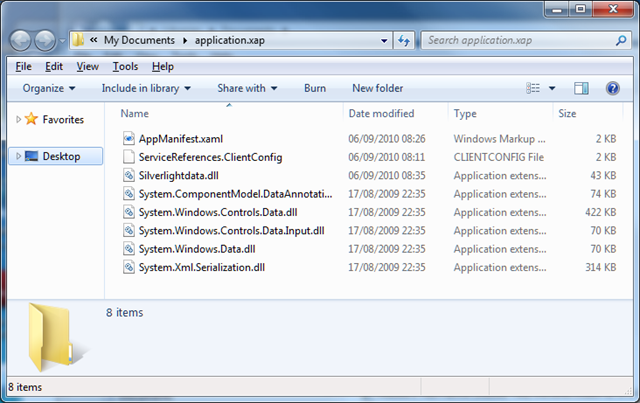
Copy the .xap file somewhere convenient, and rename it to have a .zip extension. Then extract the files. The result looks something like this:

image

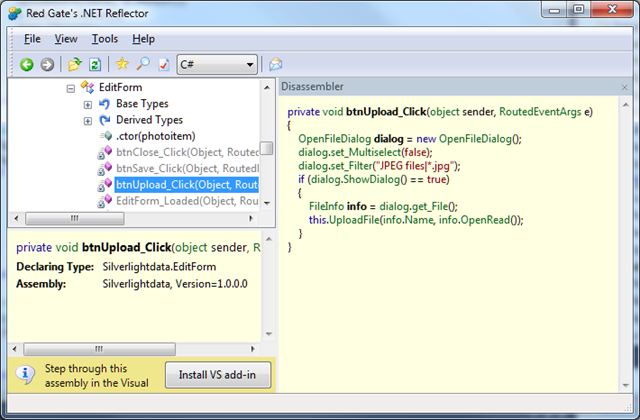
Next, you need a .NET decompiler such as Redgate .NET Reflector. Run Reflector and open a .dll file containing application code. Select a method, and Reflector does its best to show you the code. It does a good job too:

image

The purpose of this post is not to encourage decompiling other people’s code, but rather to make the point that even though Silverlight code is “compiled”, it is trivial to read it – just in case anyone thought it was a bright idea to store passwords or other authentication secrets there.

The solution is to never to put anything security-critical in client-side code. Second, you can use an obsfuscator such as dotfuscator to make the decompiled code harder to read.

Silverlight versus HTML, Flash – Microsoft defends its role

Microsoft’s Brad Becker, Director of Product Management for Developer Platforms, has defended the role of Silverlight in the HTML 5 era. Arguing that it is natural for HTML to acquire some of the features previously provided by plug-ins – “because some of these features are so pervasive on the web that they are seen by users as fundamentally expected capabilities” – he goes on to identify three areas where Silverlight remains necessary. These are “premium” multimedia which merges video with application elements such as conferencing, picture in picture, DRM, analytics; consumers apps and games; and finally business/enterprise apps.

It is the last of these which interests me most. Becker’s statements come soon after the preview of Visual Studio LightSwitch, which is solely designed for data-driven business applications. Taking the two together, and bearing in mind that apps may run on the desktop as well as in browser, Silverlight is now encroaching on the territory which used to belong to Windows applications. With LightSwitch in particular, Microsoft is encouraging developers who might previously have built an app in Access or Visual Basic to consider Silverlight instead.

Why? Isn’t Microsoft better off if developers stick to Windows-only applications?

In one sense it is, as it gets the Windows lock-in – and yes, this is effective. I’m aware of businesses who are tied to Windows because of apps that they use, who might otherwise consider Macs for all or some of their business desktops. On the other hand, even Microsoft can see the direction in which we are travelling – cloud, mobile, diverse clients – and that Silverlight fits better with this model than Windows-only desktop clients.

Another consideration is that setup and deployment issues remain a pain-point for Windows apps. One issue is when it goes wrong, and Windows requires skilled surgery to get some app installed and working. Another issue is the constant energy drain of getting new computers and having to provision them with the apps you need. Microsoft has improved this no end for larger organisations, with standard system images and centralised application deployment, but Silverlight is still a welcome simplification; provided that the runtime is installed, it is pretty much the web model – just navigate to the URL and the app is there, right-click if you want to run on the desktop.

If Microsoft can also establish Windows Phone 7, which uses Silverlight as the runtime for custom apps, the platform then extends to mobile as well as desktop and browser.

The downside is that Silverlight apps have fewer capabilities than native Windows apps. Printing is tricky, for example, though Becker refers to “Virtualized printing” and I am not sure what exactly he means. He also highlights COM automation and group policy management, features that only work on Windows and which undermine Silverlight’s cross-platform promise. That said, via COM automation Silverlight has full access to the local machine giving developers a way of overcoming any limitations if they are willing to abandon cross-platform and browser-hosted deployment.

A winning strategy? Well, at least it is one that makes sense in the cloud era. On the other hand, Microsoft faces substantial difficulties in establishing Silverlight as a mainstream development platform. One is that Adobe was there first with Flash, which has a more widely deployed runtime, works on Android and soon other mobile devices, and is supported by the advanced design tools in Creative Suite. Another is the Apple factor, the popular iPhone and iPad devices which are a spear through the heart of cross-platform runtimes like Silverlight and Flash.

Finally, even within the Microsoft development community Silverlight is a hard sell for many developers. Some us recall how hard the company had to work to persuade Visual Basic 6 developers to move to .NET. The reason was not just stubborn individuals who dislike change – though there was certainly some of that – but also existing investment in code that could not easily be migrated. Both factors also apply to Silverlight. Further, it is a constrained platform, which means developers have to live with certain limitations. It is also managed code only, whereas some of the best developers for both desktop and mobile apps work in C/C++.

I suspect there is division even within Microsoft with regard to Silverlight. Clearly it has wide support and is considered a strategic area of development. At the same time, it is not helpful to the Windows team who will want to see apps that take advantage of new features in Windows 7 and beyond.

Yesterday Windows Phone 7 was released to manufacturing, which means the software is done. Another piece of the Silverlight platform is in place; and I guess over the next year or two we will see the extent to which Microsoft can make it a success.

Open season for patent litigation makes case for reform

It seems to be open season for software patent litigation. Oracle is suing Google over its use of Java in Android. Paul Allen’s Interval Licensing is suing AOL, Apple, eBay, Facebook, Google, Netflix, Yahoo and others – the Wall Street Journal has an illustrated discussion of the patents involved here. Let’s not forget that Apple is suing HTC and that Nokia is suing Apple (and being counter-sued).

What’s next? I was reminded of this post by former Sun CEO Jonathan Schwartz. He confirms the supposition that large tech companies refrain from litigation – or at least, litigate less than they might, refrain is too strong a word right now – because they recognize that while they may have valid claims against others, they also most likely infringe on patents held by others.

The gist of Schwartz’s post is that Microsoft approached Sun with the claim that OpenOffice, owned by Sun, infringes on patents held by Microsoft thanks to its work on MIcrosoft Office:

Bill skipped the small talk, and went straight to the point, “Microsoft owns the office productivity market, and our patents read all over OpenOffice.”

Sun’s retort was in relation to Java and .NET:

“We’ve looked at .NET, and you’re trampling all over a huge number of Java patents. So what will you pay us for every copy of Windows?”

following which everything went quiet. The value of .NET to Microsoft is greater than the value of OpenOffice to Sun or Oracle.

Oracle, however, seems more willing to litigate than Sun; and I doubt it cares much about OpenOffice. Might we see this issue reappear?

That said, Microsoft also has a large bank of patents; and who knows, some of them might be brought to bear against Java in the event of legislative war.

The risk though is that if everyone litigates, the industry descends into a kind of nuclear winter which paralyses everyone. Companies like Interval Licensing, which seemingly exist solely to profit from patents, have no incentive to hold back.

Can any good come of this? Well, increasing software patent chaos might bring some benefit, if it forces countries like the USA to legislate in order to fix the broken patent system.

Protecting intellectual property is good; but against that you have to weigh the potential damage to competition and innovation from these energy-sapping lawsuits.

We need patent reform now.

Visual Studio LightSwitch – model-driven architecture for the mainstream?

I had a chat with Jay Schmelzer and  Doug Seven from the Visual Studio LightSwitch team. I asked about the release date – no news yet.

What else? Well, Schmelzer and Seven had read my earlier blog post so we discussed some of the things I speculated about. Windows Phone 7? Won’t be in the first release, they said, but maybe later.

What about generating other application types from the same model? Doug Seven comments:

The way we’ve architected LightSwitch does not preclude us from making changes .. it’s not currently on the plan to have different output formats, but if demand were high it’s feasible in the future.

I find this interesting, particularly given that the future of the business client is not clear right now. The popularity of Apple’s iPad and iPhone is a real and increasing deployment problem, for example. No Flash, no Silverlight, no Java, only HTML or native apps. The idea of simply selecting a different output format is compelling, especially when you put it together with the fast JIT-compiled JavaScript in modern web browsers. Of course support for multiple targets has long been the goal of model-driven architecture (remember PIM,PSM and PDM?) ; but in practice the concept of a cross-platform runtime has proved more workable.

There’s no sign of this in the product yet though, so it is idle speculation. There is another possible approach though, which is to build a LightSwitch application, and then build an alternative client, say in ASP.NET, that uses the same WCF RIA Services. Since Visual Studio is extensible, it will be fun to see if add-ins appear that exploit these possibilities.

I also asked about Mac support. It was as I expected – the team is firmly Windows-centric, despite Silverlight’s cross-platform capability. Schmelzer was under the impression that Silverlight on a Mac only works within the browser, though he added “I could be wrong”.

In fact, Silverlight out of browser already works on a Mac; the piece that doesn’t work is COM interop, which is not essential to LightSwitch other than for export to Excel. It should not be difficult to run a LightSwitch app out-of-browser on a Mac, just right-click a browser-hosted app and choose Install onto this computer, but Microsoft is marketing it as a tool for Windows desktop apps, or Web apps for any other client where Silverlight runs.

Finally I asked whether the making of LightSwitch had influenced the features of Silverlight or WCF RIA Services themselves. Apparently it did:

There are quite a few aspects of both Silveright 4 and RIA services that are in those products because we were building on them. We uncovered things that we needed to make it easier to build a business application with those technologies. We put quite a few changes into the Silverlight data grid.

said Schmelzer, who also mentioned performance optimizations for WCF RIA Services, especially with larger data sets, some of which will come in a future service pack. I think this is encouraging for those intending to use Silverlight for business applications.

There are many facets to LightSwitch. As a new low-end edition of Visual Studio it is not that interesting. As an effort to establish Silverlight as a business application platform, it may be significant. As an attempt to bring model-driven architecture to the mainstream, it is fascinating.

The caveat (and it is a big one) is that Microsoft’s track-record on modelling in Visual Studio is to embrace in one release and extinguish in the next. The company’s track-record on cross-platform is even worse. On balance it is unlikely that LightSwitch will fulfil its potential; but you never know.

Ten things you need to know about Microsoft’s Visual Studio LightSwitch

Microsoft has announced a new edition of Visual Studio called LightSwitch, now available in beta, and it is among the most interesting development tools I’ve seen. That does not mean it will succeed; if anything it is too radical and might fail for that reason, though it deserves better. Here’s some of the things you need to know.

1. LightSwitch builds Silverlight apps. In typical Microsoft style, it does not make the best of Silverlight’s cross-platform potential, at least in the beta. Publish a LightSwitch app, and by default you get a Windows click-once installation file for an out-of-browser Silverlight app. Still, there is also an option for a browser-hosted deployment, and in principle I should think the apps will run on the Mac (this is stated in one of the introductory videos) and maybe on Linux via Moonlight. Microsoft does include an “Export to Excel” button on out-of-browser deployments that only appears on Windows, thanks to the lack of COM support on other platforms.

I still find this interesting, particularly since LightSwitch is presented as a tool for business applications without a hint of bling – in fact, adding bling is challenging. You have to create a custom control in Silverlight and add it to a screen.

Microsoft should highlight the cross-platform capability of LightSwitch and make sure that Mac deployment is easy. What’s the betting it hardly gets a mention? Of course, there is also the iPhone/iPad problem to think about. Maybe ASP.NET and clever JavaScript would have been a better idea after all.

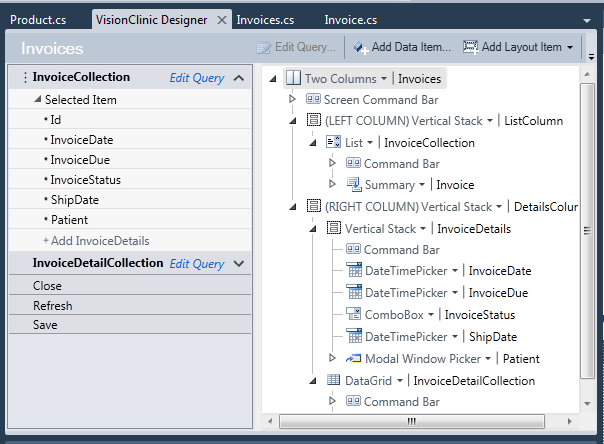
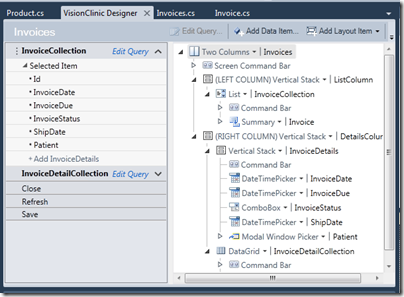
2. There is no visual form designer – at least, not in the traditional Microsoft style we have become used to. Here’s a screen in the designer:
image

Now, on one level this is ugly compared to a nice visual designer that looks roughly like what you will get at runtime. I can imagine some VB or Access developers will find this a difficult adjustment.

On the positive side though, it does relieve the developer of the most tedious part of building this type of forms application – designing the form. LightSwitch does it all for you, including validation, and you can write little snippets of code on top as needed.

I think this is a bold decision – it may harm LightSwitch adoption but it does make sense.

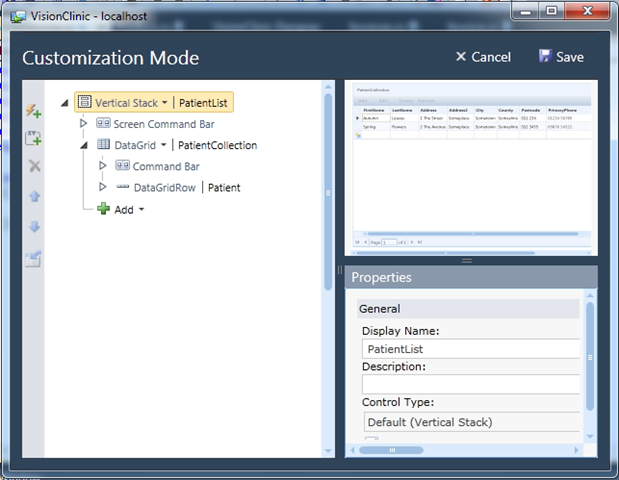
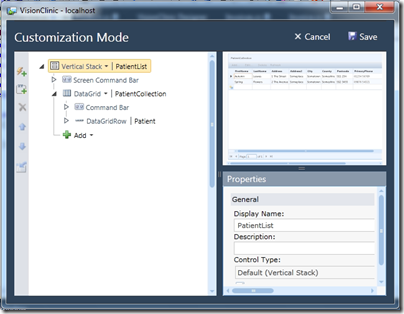
3. LightSwitch has runtime form customization. Actually it is not quite “runtime”, but only works when running in the debugger. When you run a screen, you get a “Customize Screen” button at top right:

image

which opens the current screen in Customization Mode, with the field list, property editor, and a preview of the screen.
image

It is still not a visual form designer, but mitigates its absence a little.

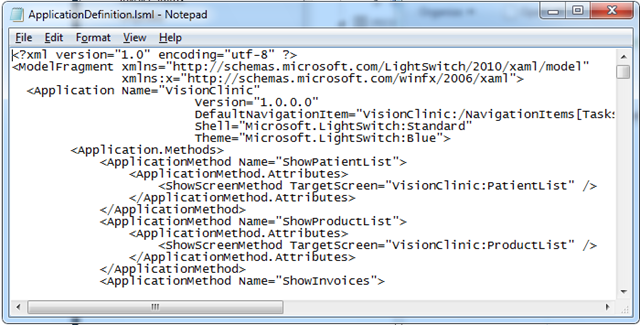
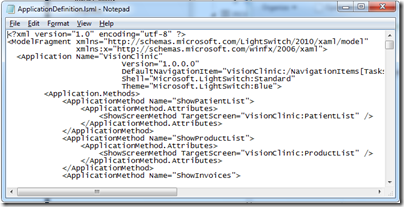
4. LightSwitch is model driven. When you create a LightSwitch application you are writing out XAML, not the XAML you know that defines a WPF layout, but XAML to define an application. The key file seems to be ApplicationDefinition.lsml, which starts like this:
image

Microsoft has invested hugely in modelling over the years with not that much to show for it. The great thing about modelling in LightSwitch is that you do not know you are doing it. It might just catch on.

Let’s say everyone loves LightSwitch, but nobody wants Silverlight apps. Could you add an option to generate HTML and JavaScript instead? I don’t see why not.

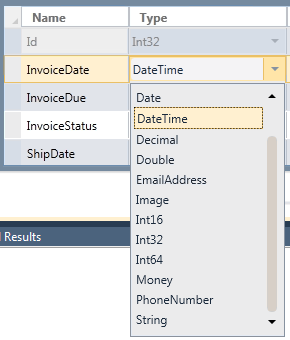
5. LightSwitch uses business data types, not just programmer data types. I mean types like EmailAddress, Image, Money and PhoneNumber:

image

I like this. Arguably Microsoft should have gone further. Do we really need Int16, Int32 and Int64? Why not “Whole number” and “Floating point number”? Or hide the techie choices in an “Advanced” list?

6. LightSwitch is another go at an intractable problem: how to get non-professional developers to write properly designed relational database applications. I think Microsoft has done a great job here. Partly there are the data types as mentioned above. Beyond that though, there is a relationship builder that is genuinely easy to use, but which still handles tricky things like many-to-many relationships and cascading deletes. I like the plain English explanations in the too, like “When a Patient is deleted, remove all related Appointment instances” when you select Cascade delete.

image

Now, does this mean that a capable professional in a non-IT field – such as a dentist, shopkeeper, small business owner, departmental worker – can now pick up LightSwitch and and write a well-designed application to handle their customers, or inventory, or appointments? That is an open question. Real-world databases soon get complex and it is easy to mess up. Still, I reckon LightSwitch is the best effort I’ve seen – more disciplined than FileMaker, for example, (though I admit I’ve not looked at FileMaker for a while), and well ahead of Access.

This does raise the question of who is really the target developer for LightSwitch? It is being presented as a low-end tool, but in reality it is a different approach to application building that could be used at almost any level. Some features of LightSwitch will only make sense to IT specialists – in fact, as soon as you step into the code editor, it is a daunting tool.

7. LightSwitch is a database application builder that does not use SQL. The query designer is entirely visual, and behind the scenes Linq (Language Integrated Query) is everywhere. Like the absence of a visual designer, this is a somewhat risky move; SQL is familiar to everyone. Linq has advantages, but it is not so easy to use that a beginner can express a complex query in moments. When using the Query designer I would personally like a “View and edit SQL” or even a “View and edit Linq” option.

8. LightSwitch will be released as the cheapest member of the paid-for Visual Studio range. In other words, it will not be free (like Express), but will be cheaper than Visual Studio Professional.

9. LightSwitch applications are cloud-ready. In the final release (but not the beta) you will be able to publish to Windows Azure. Even in the beta, LightSwitch apps always use WCF RIA Services, which means they are web-oriented applications. Data sources supported in the beta are SQL Server, SharePoint and generic WCF RIA Services. Apparently in the final release Access will be added.

10. Speculation – LightSwitch will one day target Windows Phone 7. I don’t know this for sure yet. But why else would Microsoft make this a Silverlight tool? This makes so much sense: an application builder using the web services model for authentication and data access, firmly aimed at business users. The first release of Windows Phone 7 targets consumers, but if Microsoft has any sense, it will have LightSwitch for Windows Phone Professional (or whatever) lined up for the release of the business-oriented Windows Phone.
Measuring start-up time for .NET, Java, C++

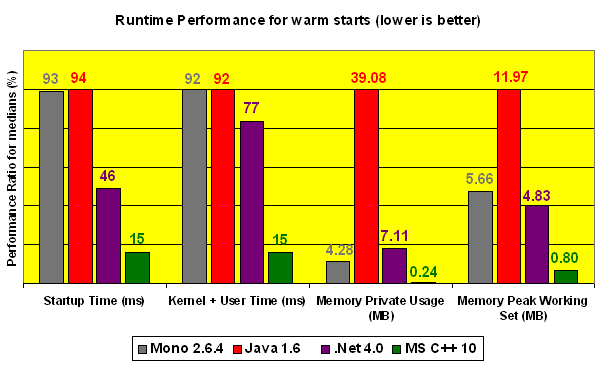
A comment here points me to this comparison by Decebal Mihailescu of start-up times for processes on Windows using different runtimes: .NET in several versions, Java 1.6, Mono 2.6.4, and Visual C++ 2010 (native code).

image

It is notable that native code is much faster than the runtimes, and that .NET is ahead of Java – to be expected, perhaps, since Windows is its native environment.

The test application is tiny and when we are talking about a time of less than a tenth of a second, users are unlikely to care much. I would like to see tests based on a larger application; on the other hand it becomes increasingly difficult to make a fair comparison.

It’s a shame Embarcadero Delphi was not included, though I’d expect similar figures to those for Visual C++.

Start-up time is critical to perceived performance. One reason I use an ancient version of Paint Shop Pro for simple image manipulation is that I can double-click an image and be editing it instantly, whereas alternatives like Adobe PhotoShop or the free paint.net make me wait. Unless I need the extra features these provide, I stick with fast and simple.

New Delphi, RAD Studio XE announced

Embarcadero has announced RAD Studio XE and will be showing a number of “sneak peaks” during August prior to release in “early September”. You can see the previews and further information here.

The suite includes Delphi XE, C++Builder XE, Delphi Prism XE (Delphi for Visual Studio and .NET) and RadPHP XE.

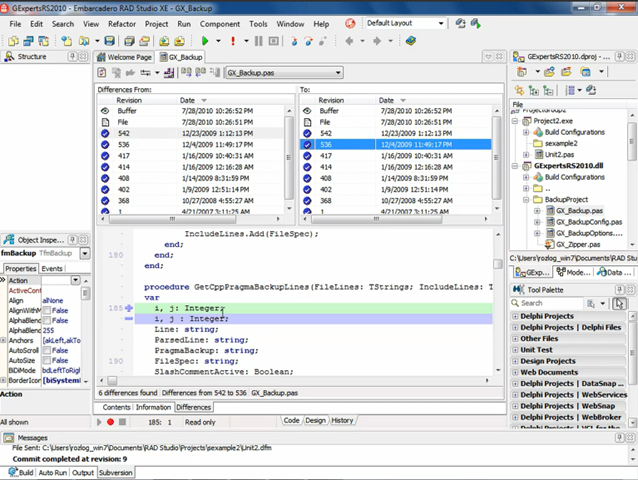
The first preview focuses on integrated Subversion support, a nice feature but hardly a game changer – most IDEs have had this for years, though this looks comprehensive with differencing, file history and so on within the IDE.

image

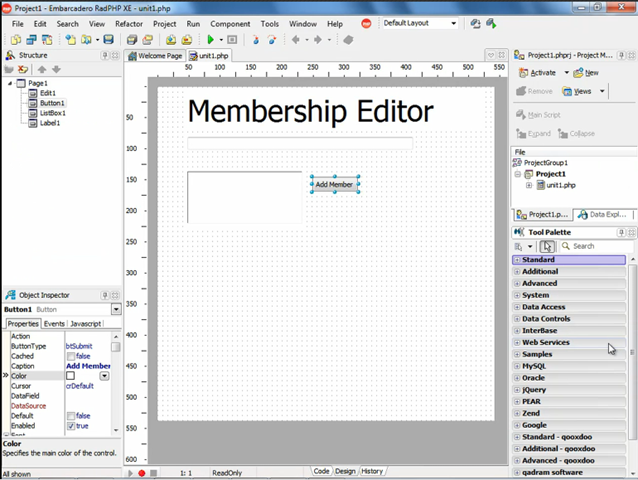
There’s also a look at RadPHP, which is a new version of Delphi for PHP. It is reminiscent of ASP.NET Web Forms, in that it gives a drag-and-drop visual designer and lets you quickly hook up code to event handlers such as a button click. There’s also a component model and the ability to set breakpoints for debugging. We even get the old listbox and editbox demo which I recall from Delphi 1 days.

image

Embarcadero’s Mike Rozlog blogs about the new product here.

I am a big fan of Delphi and C++ Builder, but my initial reaction is that developers are going to say, where is cross-platform for Mac and Linux that was talked about last year, where is 64-bit Delphi? None of this looks remotely cutting-edge.

The published Roadmap is short on dates, but I’m guessing some of this may come next year.

Where is phpinfo() for .NET?

I’m moving an ASP.NET project to a different ISP, and rather than grill the ISP about the setup I cast around for a .NET equivalent to phpinfo(), which generates a web page giving comprehensive information about the server configuration.

The closest I’ve found so far is this Codeplex project by Aarron K Jackson. I downloaded the source, compiled (I had to delete the private key included by the author) and ran it on the new server. It did in fact answer most of my questions. Information includes the Windows and .NET version, number of CPU cores, memory available and used, environmental variables, path to the web site, IIS version, trust level, and all the server variables; there is even a test email form.

image

According to Codeplex the project has fewer than 100 downloads so I thought it deserved a plug. One caveat: I suggest you password-protect it or delete after use, since the information could be valuable to hackers.

Developing for Windows Phone 7

I spent some time today watching parts one and two of Windows Phone 7 Jump Start presented by Rob Miles and Andy Wigley. After a slow start there were clear demos of basic coding for Microsoft’s new phone; and I’d guess that most Microsoft platform developers would be reassured that if they can code for Silverlight, or do games in XNA, they will not have any problem coding for Windows Phone 7. The further implication is that it will be relatively easy, with the proviso that complex applications with good performance and excellent design are never easy. There is also the challenge of learning Expression Blend, if needed.

All participants were asked to state what other mobile platforms they had developed for; and while we were not shown the results of these polls there was a comment to the effect that “Windows mobile and None are neck and neck”, which I found interesting. It suggests that iPhone and Android developers are in no hurry to learn about Microsoft’s phone. If Microsoft gets enough customers they may then take an interest. Competing with Apple was always a given; but it is the rise of Google Android which must be most troubling to Microsoft, since it has given the non-Apple phone vendors what they need.

Still, the combination of Visual Studio plus Windows Phone 7 does make sense for .NET developers.

An early slide presented the Windows 7 hardware, which is worth reviewing as it is a reasonable specification. Supposedly Microsoft is taking a hard line with OEMs to keep the spec at or better than this minimum:

Display

480×800 QVGA
320×480 HVGA

Capacitive touch

4 or more contact points

Sensors

A-GPS, Accelerometer, Compass, Light

Camera

5 mega pixels or more

Hardware buttons

Start, Search, Back

Memory

256 MB RAM or more

8GB Flash storage or more

GPU

DirectX 9 acceleration

Dysfunctional Microsoft?

Microsoft watchers have been scrutinising the fascinating Mini-Microsoft post on the Kin smartphone debacle and what it says about the company. If it is even slightly accurate, it is pretty bad; and it must be somewhat accurate since we know that the hopeless Kin launch happened and that the product was killed shortly afterwards. Of course it would have been better to kill the project before rather than after the launch; the negative PR impact has affected the strategically important Windows Phone 7 launch.

Handsome profits from Windows and Office have enabled Microsoft to survive and even prosper despite mistakes like Kin, or the Xbox 360 “red ring of death”, or the Vista reset and related problems – mistakes on a scale that would sink many companies.

I see frequent complaints about excessively bureaucratic management with too many layers, and a tendency towards perplexing, ineffective but expensive advertising campaigns.

There are also questions about CEO Steve Ballmer’s suitability for the task. He nearly indulged in a disastrously over-priced takeover of Yahoo, saved only by the obstinacy of the target company’s leadership. He habitually dismisses the competition, such as Apple’s iPhone, and is proved wrong by the market. He failed to see the importance of cloud computing, and even now that the company is at least partially converted he does not set the right tone on the subject. I watched his keynote at the Worldwide Partner Conference (WPC) where he sounded as if he were trying unsuccessfully to imitate Salesforce CEO Marc Benioff from ten years’ ago. Microsoft needs to present a nuanced message about its cloud initiative, not someone shouting “oh cloud oh cloud oh cloud”.

Microsoft is also copying its competition as never before. Bing has a few innovations, but is essentially a recognition that Google got it right and an attempt to muscle in with a copy of its business model – search, advertising and data mining. Windows Phone 7 occupies a similar position with respect to Apple’s iPhone and App Store. Windows 8 also seems to borrow ideas from Apple.

Nevertheless, Microsoft is not yet a dying company, and it would be a mistake to base too much analysis of the company on something like comments to Mini-Microsoft’s blog – good though it is – since it is a magnet for disaffected employees.

While Ballmer’s effort at the WPC was poor, he was followed by Bob Muglia, president of server and tools, who was excellent. Windows Azure has come on remarkably since its half-hearted preview at PDC 2008; and Muglia comes over as someone who knows what he is trying to achieve and how he intends to get there. The Azure “Appliance” idea, shipping a pre-baked cloud infrastructure to Enterprise customers, is a clever way to exploit the demand for a cloud application model but on hardware owned by the customer.

The eBay announcement at WPC was also quite a coup. eBay will “incorporate the Windows Azure platform appliance into two of its datacenters” later this year; and while it is not clear exactly how much of eBay will run on Azure, these appliance kits represent significant hardware.

We’ve seen other strong releases from Microsoft – server 2008 R2, Exchange 2010, SQL Server 2008 R2, SharePoint 2010 which whatever you think of SharePoint is a solid advance on its predecessor, and of course Windows 7 which has done a lot to rescue Microsoft’s performance and reputation after the Vista disappointment.

I also continue to be impressed by Visual Studio 2010, which is a huge release and works pretty well in my experience.

What about Windows Phone 7? With the market focused on iPhone vs Android, clearly it is in a tough market. If there is something slightly wrong with it on launch, instability or some serious hardware or software flaw, it might never recover. Nevertheless, I do not write it off. I think the design effort is intelligent and focused, and that the Silverlight/XNA/.NET development platform along with Visual Studio is an attractive one, especially for Microsoft Platform developers. VP Scott Guthrie describes the latest SDK here. People still switch phones frequently – something I dislike from an environmental point of view, but which works in favour of new entrants to the market. If Windows Phone 7 is a decent device, it can succeed; I’d rate its long-term chances ahead of HP WebOS, for example, and will be keen to try it when it becomes available.

phonedev

Is there a lot wrong with Microsoft? Yes. Does it need a fresh approach at the very top? Probably. Nevertheless, parts of the company still seem to deliver; and even the Windows Phone 7 team could be among them.