Category Archives: .net

Ten years of Microsoft .NET – but what about the next ten?

Technology products have many birthdays – do you count from first announcement, or release to manufacturing, or general availability? Still, this week is a significant one for Microsoft .NET and the C# language, which was first unveiled to the world in detail at Tech-Ed Europe on July 7th, 2000. The timing was odd; July 7th was the last day of Tech-Ed, whereas news at such events is normally reserved to the first day or two – but the reason was to preview the announcement at the Professional Developers Conference in Orlando the following week. It was one of the few occasions when Europe got the exclusive, though as I recall most of the journalists had already gone home.

It is interesting to look back, and I wrote a piece for The Register on .NET hits and misses. However you spin it, it’s fair to say that the .NET platform has proved to be one of Microsoft’s better initiatives, and has delivered on at least some of its goals.

It is even more interesting to look forward. Will we still be using .NET in 2020?

There is no sign of Microsoft announcing a replacement for .NET; and little sign of .NET catching on in a big way outside the Microsoft platform, so in part the question is about how the company will fare over the coming decade. Still, it is worth noting that the role of the .NET framework  in that platform still seems to be increasing.

Most predictions are wrong; but the general trend right now is towards the cloud+device computing model. The proposition is that both applications and data belong in the cloud, whether public, private or hybrid. Further, it seems plausible that we will fall out of love with personal computers, with all their complexity and vulnerability to malware, and embrace devices that just work, where the operating system is locked down, data is just a synchronised local cache, and applications are lightweight clients for internet services. Smartphones are already like this, but by the end of this year when Apple’s iPad has been joined by other slates and small computers running Google Android, Google ChromeOS, Intel/Nokia MeeGo and HP WebOS, it may be obvious that traditional laptop and desktop computers will decline.

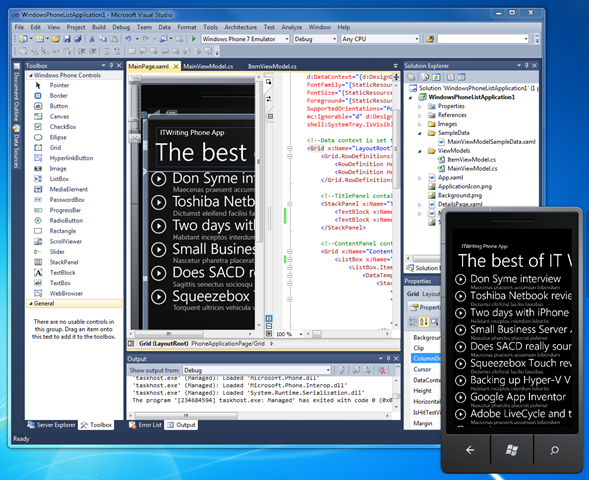
It turns out that the .NET Framework is well suited to this model, so much so that Microsoft has made it the development platform for Windows Phone 7. Why stop at Windows Phone 7 – what about larger devices that run only .NET applications, sandboxed from the underlying operating system and updated automatically over the Internet? Microsoft cannot do that for Windows as we know it, because we demand compatibility with existing applications, but it could extend the Windows Phone 7 OS and application model to a wider range of devices that take over some of the tasks for which we currently use a laptop.

In theory then, with Azure in the cloud and Silverlight on devices, the next ten years could be good ones for the .NET Framework.

That said, it is also easy to build the case against. Microsoft has it all to do with Windows Phone 7; the market is happily focused on Apple and Google Android devices at the high end. Microsoft’s hardware partners are showing signs of disloyalty, after years of disappointment with Windows Mobile, and HP has acquired Palm. If Windows Phone 7 fails to capture much of the market, as it may well do, then mobile .NET will likely fail with it. Put this together with a decline in traditional Windows machines, and the attraction of .NET as a cloud-to-client framework will diminish.

Although developer platform VP Scott Guthrie, C# architect Anders Hejlsberg and others are doing an excellent job of evolving the .NET framework, it is the success or failure of the wider Microsoft platform that will determine its future.

Why we love to hate Microsoft

Mary Branscombe has an excellent ZDNet post on Why do we (love to) hate Microsoft, and asks:

What would Microsoft need to do and say to you for you to be happy to call yourself a fan?

In part she’s reacting to Frank Shaw’s Microsoft by the Numbers in which he highlights the success of Windows 7, and makes the point that Windows netbooks will likely outsell Apple iPads by 7 or 8 times in 2010, that Linux has not ousted Windows either on the desktop or the server, and that Nokia smartphones will likely outsell iPhones by 2.5 times in 2010.

That last one is interesting. Why is Shaw puffing Nokia, when he is VP corporate communications for Microsoft? Well, the enemy of my enemy applies; it’s a jibe at Apple.

Unfortunately for Shaw, Nokia itself admits that Apple iPhone and Google Android are hurting its market share, or at least that is how I interpret this remark:

Nokia now expects its mobile device value market share to be slightly lower in 2010, compared to 2009. This update is primarily due to the competitive situation at the high-end of the market and shifts in product mix.

Nokia is being driven down-market. The same thing has happened to Microsoft in the laptop market, with the high-end going to Apple. This is a worry for both companies, since if a company becomes known as “the best” in a particular sector, it may well extend its market share simply by lowering prices or introducing cheaper product variants. This happened to some extent in the portable music player market – only to some extent, because Apple is still more expensive than most of its competitors, but its market share is now huge.

I digress. Here are a few observations on the ZDNet post. First, has Microsoft really changed as stated?

Microsoft is still paying for the bad old days of arrogance and dubious business practices. I think they’re the bad old days – I spend a lot of time talking to Microsoft insiders, partners and competitors and the attitudes I see have changed, inside and out.

The trouble is, Microsoft is so large and complex that it is hard to generalise. I think of it more as a set of united (or disunited) states than as a single corporate entity. This has always been the case – at least, as long as I can remember, and I don’t go back to the very early days.

I can believe that regulation has mitigated the worst practices of the past. But why on earth is Microsoft suing Salesforce.com (and getting itself counter-sued)? It’s terrible PR; it looks as if Microsoft wants to compete in the courts and not on product quality. If it wins and hurts Salesforce.com, what is the benefit to the industry? I realise Microsoft is not a charity, but we are talking business ethics here.

More broadly, there are two separate topics that need to be addressed. One is about the quality and prospects for Microsoft’s products and services, and the other is about how it is perceived and why.

I’ll take these in reverse order. Microsoft has history, as Mary Branscombe says, and more history than just Clippy. It’s the perceptions of the web community that are most visible to many of us, and the piece of history that counts for most is over the web browser. Microsoft beat off the competition, then froze development, an evil act that is particularly hard to forgive because of its cost in terms of devising workarounds for web pages. Yes, that’s changed now, and we have had IE7, IE8, and the promising IE9; but has Microsoft convinced the community that it would not do the same again if it had the opportunity?

There are other things I can think of. The whole Office Open XML (OOXML) saga, and hints that Microsoft is not following through on its promises. The BlueJ incident.

There is also the question of pricing, especially for business users. When I reviewed a Toshiba Netbook recently I figured that installing Windows Pro (to join a domain) and Office would cost more than the hardware. I suppose you cannot blame a company for charging what the market will bear; but when the commodity software costs more than the commodity hardware, you have to wonder whether monopolistic pricing is still present.

OK, what about product quality? I tend to agree that Microsoft often does better than it is given credit for. Windows 7 is good; Visual Studio 2010 is great; Silverlight 4 was a bit rushed but still impressive, to mention three offerings about which I know a good deal.

Nevertheless, Microsoft still had deep-rooted problems that I’ve not yet seen addressed. I’ll mention a couple.

First Microsoft still has an OEM problem. Going back to that Toshiba Netbook: it was nearly wrecked by poor OEM software additions and the user experience of a new Windows machine often remains poor. Many users do minimal customisation and as a result get a worse experience of Windows than they should. Apple will carry on winning if this is not addressed.

Second, Microsoft is conflicted, caught between the need to preserve its profits from Windows and Office, and the need to keep up with the new Cloud + Device model of computing. It is drifting towards the cloud; and developments like Office Web Apps and other one about which I am not allowed to tell you yet are encouraging (wait until next month). This issue will not go away though.

Third, mainly as a result of the above, Microsoft still does not convince when it comes to cross-platform. Silverlight is cross-platform, sure; except on the Mac you don’t have the COM integration or any equivalent, sorry, and on Linux, well there’s Moonlight or maybe we’ll work something out with Intel. It is the Windows company. Having said that, I put the Live Messenger app on the iPhone 4 I’ve been trying and it’s great; so yes, it sometimes gets it.

What can Microsoft do in order to be better liked? The key to it is this: ensure that our interactions with the company and its products are more often pleasurable than painful. Windows Phone 7 will be an interesting launch to watch, a product where Microsoft has made its best effort to break with past and deliver something users will love. We’ll see.
Java versus C/C++ performance – which is really faster?

Cliff Click of Azul Systems has an excellent post on Java vs C/C++ performance:

Is Java faster than C/C++?  The short answer is: it depends.

He then presents three categories of cases: the first C/C++ beats Java, the second where Java beats C/C++, and the third and longest, where C/C++ proponents claim Java is slower but in reality it is not.

My quick summary: there are few cases where Java (or C#) is so much slower that it matters, save for one big issue which Click mentions early on – start-up time:

Flash games beat Java games mostly because it took 30+sec to load the JVM from disk… and so now the web-game developer community has settled on Flash as the standard (and it still takes 10+sec to load the JVM).

Start-up time makes a big difference to usability, for reasons which I cannot entirely explain. Just for fun, I’ve been running Microsoft Office 95 in a virtual instance of Windows XP recently, and the fact that Word 95 loads in a blink makes it feel much faster than Word 2010, which takes 5-10 seconds on first load, even though the productivity difference must be negligible.

If I had to theorise about this, I’d say it is to do with the way humans learn from experience. We don’t like waiting, and if an application take a while to start then part of our brain tells us to avoid it in future. We override that instinct when it is an app we need to run, but it contributes to a negative impression.

The opposite is also true. If an application starts instantly – I mean to the point where we can use it, not just a splash screen – it contributes to a positive impression and we are more inclined to use it in future.

Incidentally, Click thinks that Java is generally faster than C#, though he adds that he is “not able to give C# a fair treatment” because he does not track it closely.

Microsoft – make up your mind about Moonlight

I’ve been trying out Microsoft’s Office Web Apps, as provided for the release version of SharePoint 2010. The cross platform story is uneven, whether across Mac/Windows/Linux, or across different browsers, or even across different versions of Windows and Office. So far it does mostly work though, even if there are problems with certain tasks like printing or opening an online document in a desktop application.

The biggest problem I’ve had is on Linux. Supposedly Firefox 3.5 on Linux is supported. I ran up Ubuntu and Firefox 3.5, and went to look at a document in Word Web App. When I selected the document, Firefox quit. Every time.

After checking that Firefox was up-to-date it occurred to me that the problem might be related to Moonlight, the Linux implementation of Silverlight done by the Mono team. I disabled it. Suddenly, everything worked, even Edit in browser.

Moonlight is not just an open source project like the original Mono. It has a certain amount of official blessing from Microsoft. Here’s what VP Scott Guthrie said back in September 2007:

Over the last few months we’ve been working to enable Silverlight support on Linux, and today we are announcing a formal partnership with Novell to provide a great Silverlight implementation for Linux.  Microsoft will be delivering Silverlight Media Codecs for Linux, and Novell will be building a 100% compatible Silverlight runtime implementation called “Moonlight”.

Moonlight will run on all Linux distributions, and support FireFox, Konqueror, and Opera browsers.  Moonlight will support both the JavaScript programming model available in Silverlight 1.0, as well as the full .NET programming model we will enable in Silverlight 1.1.

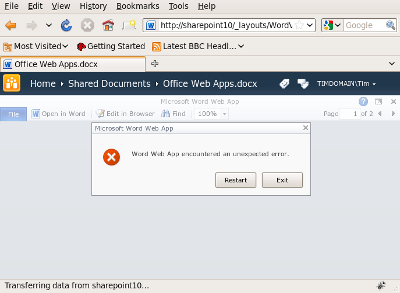
You would think therefore that Microsoft would test the Firefox/Linux/Moonlight combination with its shiny new Office Web Apps. Apparently not. Here’s what the user experience is like for Office Word App. I figured that the solution might be to upgrade Moonlight to the latest version, so I did, installing what is now called Novell Moonlight 2.2. I went back to Word Web App. Firefox no longer crashes, but I now get a blank area where the Word document should be shown, and an error if I resize the browser window:

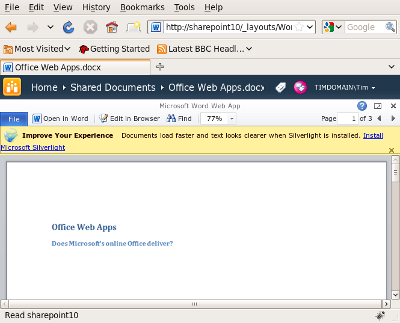
Now let’s see what happens if I disable Moonlight:

Everything is fine – except now there is a banner inviting me to “Improve my experience” by installing Silverlight. If I follow the link I eventually get back to the same Moonlight install that I have just enabled, which would actually break rather than improve Word Web App.

It is obvious that if users have to disable Moonlight to work with Office Web Apps, this will not help Moonlight adoption on Linux.

Office Web Apps are new and I’d hope this is something that Microsoft, Novell and the Mono team can soon fix between them. One reason for highlighting it now is the hope that something could be done before the full roll-out of Office and SharePoint 2010 on May 12th.

The real point though is what this says about the extent to which Microsoft cares about Moonlight and Linux users, and how much or little communication takes place between Microsoft and Novell. Silverlight isn’t required for Office Web Apps – as you can see from the above – but it is used to good effect where available, and this Office release is therefore an important release for Silverlight as well.

Microsoft should make up its mind. Is Novell really a trusted partner for Silverlight on Linux? Or a third-party product that has to take its chances?

DevExpress merges its Silverlight and WPF UI controls, says VS 2010 is light years ahead

Developer Express is a component vendor with add-ons for Visual Studio and Delphi. It has offered a library of components for Silverlight for some time, and a separate set for WPF (Windows Presentation Foundation), but now says that Silverlight and WPF are close enough that it can merge the two into a single codebase to be called XPF (Express Presentation Framework). CTO Julian Bucknall says:

Silverlight in v4 has the ability to create desktop applications that aren’t sandboxed into triviality. In fact, Silverlight, more than ever, resembles a WPF-lite on the desktop side, to the extent of pundits considering their eventual merging. At long last it is possible to write one set of non-trivial code and compile it both for Silverlight and for WPF without having to reinvent so many wheels on the Silverlight side (and to a much lesser extent on the WPF side).

Even though Visual Studio 2010 is only just released, DevExpress is focusing all its new Silverlight and WPF development on the new platform and IDE:

The Silverlight and WPF controls in DXperience v2010.1 will require .NET 4 and VS2010. In particular, you must use the new Silverlight 4 and WPF 4; the controls will not function with the previous versions of WPF and Silverlight, such as Silverlight 3. Similarly, you cannot use VS2008 or earlier, but must use VS2010. To my mind this isn’t that much of a downside: VS2010 is light years ahead of its earlier brethren in terms of user experience and its use is de rigueur if you are creating applications with either Silverlight or WPF.

Of course it’s in Bucknall’s interests to move developers on; he’s keen to sell upgrades. I still find this interesting. Like him, I find Visual Studio 2010 a major advance on earlier versions. More significant though is the idea of a common WPF and Silverlight codebase, though presumably still with added capabilities when running on WPF. I don’t think Windows-only development is dead; the success of Windows 7 may even stimulate the market for applications that take advantage of its new features. That said, for the large subset of applications where cross-platform is desirable, Silverlight seems to me a better choice than WPF.

Microsoft Expression Blend is too hard to learn

Expression Blend is the design tool for Windows Presentation Foundation (WPF) and Silverlight, and thus a key tool for building applications for the current generation of Microsoft’s platform. How good is it? There is a shortage of in-depth reviews, if my quick Google search is anything to go by, though there are plenty of quick write-ups saying that it is not as good as Adobe Flash. Blend got a bit of attention following the 2009 Mix conference thanks to SketchFlow, the prototyping feature built into Blend 3, and which has been well received.

One reason for Blend’s relatively low profile is that it is aimed at designers, whereas Microsoft’s community is more developer-focused. WPF developers can avoid Blend to a large extent, by using the designer built into Visual Studio, which is fine for laying out typical business applications. Now with Visual Studio 2010 the same is true for Silverlight. Another option is to write your own XAML code, which works for laying out controls though it is inconceivable for drawings. XAML is verbose

It is just as well you can avoid it, because although Blend is very capable, it is not easy to learn. I’m guessing there are quite a few developers who have opened it up, clicked around a bit, and retreated gratefully back to Visual Studio. This was a problem for Adobe Flash Professional as well, and one of the reasons for the creation of Flex and Flex Builder, a code-centric IDE for the Flash runtime.

You can argue that a design tool does not need to be easy for developers to use; it needs to be good enough for designers to create great designs. That’s true; but the developer/design divide is not a absolute one, and ideally Blend should be something a developer can dip into easily, to create or enhance a simple layout, without too much stress.

Maybe some developers can; but I have not found Blend particularly intuitive. The user interface is busy, and finding what you want or getting focus on the right object can be a challenge.

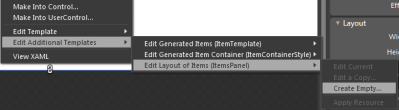
As evidence of this, take a look at Adam Kinney’s Through the Eyes of Expression Blend tutorial, which is among the best I have found. Try lesson 9, Styling and working with design-time data. Then ask yourself how easy it would be to discover the way to do this without the step-by-step instructions. Would you have known to right-click the StackPanel and choose Change Layout Type > Grid? What about step 8, right-clicking the ListBox, and selecting Edit Additional Templates > Edit Layout of Items (Items Panel) > Create Empty?

image  

And notice how in step 9 you have to click the “small grey square next to the Source property”, that’s the one called Advanced Options:

image

Overall it is a nice tutorial, but you might need an evening or two with a couple of fat books, one on XAML and one on Blend itself (if you can find a good one), in order to understand the features you have have been using.

It is probably worth it, if you intend to work with Silverlight or WPF. Blend has one great advantage over Flash Professional: it authors XAML, and you can open it up in Visual Studio and continue working on it there. Microsoft has no need for something like Adobe Catalyst to bridge the XML/Designer divide.

Still, Microsoft had a clean slate with Blend, which is only a few years old, and it is a shame it could not come up with something a bit more user-friendly.

The other implication is that the new visual designer in Visual Studio 2010 makes Silverlight applications a great deal easier to create. You can Blend if you want to; but the Visual Studio effort is far more approachable.

How do you find Blend? I’d be interested in other perspectives.

Silverlight 4 vs Silverlight 3: a little bit faster?

Microsoft’s Scott Guthrie spoke of “twice as fast performance” in the newly-released Silverlight 4, thanks to a new just-in-time compiler.

Performance is a hard thing to nail down. Maybe he meant that compilation is twice as fast? I’m not sure; but I tried a couple of quick tests.

First, I looked at my Primes test. Version 3 running in Windows Vista took around 0.40 seconds (the exact figure varies on each run, thanks to background processes or other factors). I then upgraded to version 4.0. No significant difference, on average over several runs. I used Vista because I’d already upgraded my Windows 7 install.

Next I tried Bubblemark. I maxed it out at 128 bubbles. On Vista with Silverlight 3 I got about 240 fps; on the same machine with Silverlight 4 about 260fps; about 8%.

image

Next I tried on an Apple Mac. My Mac Mini is less powerful, though not that bad, an Intel 1.83 Ghz Core Duo. On the Prime test I got 0.54 secs before, and 0.50 secs after the upgrade to 4.0, about 7.5% improvement. On Bubblemark, it was only 24 fps before and after.

I guess the vast difference in graphics performance is also interesting. It is not just Mac vs Windows; the Nvidia GeForce 6800 on the PC is more powerful than whatever is in the Mac Mini.

If anyone can tell me in what respect version 4.0 is twice as fast, I’d be grateful.

Update: prompted by the comment from David Heffernan below, I also tried the Encog Silverlight Benchmark. I used an older core duo laptop, since I am running out of machines to upgrade. I ran the test twice before upgrading, and twice after. Lower is better:

Silverlight 3.0: 22.0

Silverlight 4.0: 12.7

That’s about 42% better, where “twice as fast” would be 50% better, much closer to Guthrie’s claim. I guess it depends what you measure.

Silverlight 4.0 released to the web; tools still not final

Microsoft released the Silverlight 4.0 runtime yesterday. Developers can also download the Silverlight 4 Tools; but they are not yet done:

Note that this is a second Release Candidate (RC2) for the tools; the final release will be announced in the coming weeks.

Although it is not stated explicitly, I assume it is fine to use these tools for production work.

Another product needed for Silverlight development but still not final is Expression Blend 4.0. This is the designer-focused IDE for Silverlight and Windows Presentation Foundation. Microsoft has made the release candidate available, but it looks as if the final version will be even later than that for Silverlight 4 Tools.

Disappointing in the context of the launch of Visual Studio 2010; but bear in mind that Silverlight has been developed remarkably fast overall. There are huge new features in version 4, which was first announced at the PDC last November; and that followed only a few months after the release of version 3 last summer.

Why all this energy behind Silverlight? It’s partly Adobe Flash catch-up, I guess, with Silverlight 4 competing more closely with Adobe AIR; and partly a realisation that Silverlight can be the unifying technology that brings together web and client, mobile and desktop for Microsoft. It’s a patchy story of course – not only is the appearance of Silverlight on Apple iPhone or iPad vanishingly unlikely, but more worrying for Microsoft, I hear few people even asking for it.

Even so, Silverlight 4.0 plus Visual Studio 2010 is a capable platform; it will be interesting to see how well it is taken up by developers. If version 4.0 is still not enough to drive mainstream adoption, then I doubt whether any version will do it.

That also raises the question: how can we measure Silverlight take-up? The riastats charts tell us about browser deployment, but while that is important, it only tells us how many have hit some Silverlight content and allowed the plug-in to install. I look at things like activity in the Silverlight forums:

Our forums have 217,426 threads and 247,562 posts, contributed by 77,034 members from around the world. In the past day, we had 108 new threads, 529 new posts, and 70 new users.

it says currently – substantial, but not yet indicative of a major platform shift. Or job stats – 309 UK vacancies right now, according to itjobswatch, putting it behind WPF at 662 vacancies and Adobe Flash at 740. C# on the other hand has 5349; Java 6023.

Book Reviews: Programming F# and Beginning F#

I’ve been working with Microsoft’s new language F# recently and enjoying it. If it catches your interest, you might turn to a book in order to familiarise yourself with the basics. Here are two which I’ve looked at. They are both aimed at experienced developers who are new to F#.

Programming F# by Chris Smith

Programming F# comes from O’Reilly. It kicks off with Hello World and an introduction to the interactive console in Visual Studio 2010 – a great way to try out F#. Next we get a summary of types, and a brief explanation of how to write an F# program – stuff you have to know.

Chapter 3 is an introduction to functional programming, and also mentions type inference, an important F# feature. The following chapter explains mutable programming in F# – yes, you can do it; it is just not the default behaviour – and also covers exceptions. Chapter 5 turns to object-oriented programming in F#, another distinctive feature, while chapter 6 covers aspects specific to .NET such as garbage collection. That’s about half the book, and gets you up and running with the language.

The second half of the book is more interesting, looking at ways of using F#. Smith looks at applied functional programming, including pattern matching, recursion, continuations and closures. Next, there’s a look at applied object orientation. Chapter 9 covers scripting with F# – an interesting use case – and includes welcome examples for things like copying files and automating Microsoft Office. Chapter 10 is a key one, explaining computation expressions that let you create workflows and all-but extend the language. It’s “a very advanced concept that even expert developers can have a hard time grasping,” admits the author, though he presents it clearly.

Next we get a section on a likely reason for picking up F#: asynchronous and parallel programming. There’s a wide-ranging chapter explaining both .NET and F# asynchronous techniques, including the .NET Parallel Extensions. It’s a little confusing, especially since Smith observes that F# asynchronous workflows are sub-optimal for CPU parallelism; he recommends the .NET Parallel Extensions because of the better thread management it offers.

The last chapters cover .NET Reflection, code analysis and generation with Quotations – “deep wizardry”, says the author. An appendix summarises .NET Libraries and F# interop with COM and native code.

While this is an excellent language introduction, and thorough within the topics it covers, some aspects disappointed me. I cannot find any mention of F# agents, based on the MailboxProcessor class (nothing to do with email), which is a surprising omission; F# designer Don Syme sees it as a critical feature for scalable web development. Nor is there anything on graphics processing, another common usage, or any hint about how you might use F# for financial analysis. I also found it rather dry overall – hard to avoid with so much plumbing to cover, but I feel the author could have conveyed a little more excitement about what F# enables. Don’t make this the only F# book you read.

Beginning F# by Robert Pickering

This Apress title covers similar ground as the O’Reilly book, but with a slightly more hands-on and informal style, which on the whole I enjoyed. It starts with an introduction including a quote from Ralf Herbrich at Microsoft Research describing how he converted 1000 lines of C# into 100 lines of F# which performed just as well – this is the kind of real-world touch that makes you want to read on. The second chapter explains how to install F#, including different versions of Visual Studio, the open source SharpDevelop, and Mono on Linux – excellent diversity. Chapter 3 introduces functional programming, in effect a brisk overview of the core of F#. Read it slowly!

The author goes on to look at imperative programming and mutability in F#, and then object orientation, just as Smith did in his book. Chapter 6 is useful overview of how code is organised into modules and namespaces, and also covers comment annotations. Next, Pickering looks at F# libraries, including a brief look at math programming. Chapter 8 covers user interface coding – completely lacking in Smith’s book – complete with a quick look at GTK#, which works on Linux. There’s also a quick look at ASP.NET, Microsoft’s web server platform. Although this little introductions are too brief to be really useful, they do spark ideas about how you might use F#.

Data Access is next, another important real-world topic, covering XML, LINQ (Language Integrated Query) and ADO.NET.

Chapter 10 is when we get to parallel programming and reactive programming – code that waits for an external event before running. Pickering introduces F# agents and the MailboxProcessor class. Next comes a look at distributed applications using sockets, HTTP requests, web services, and Windows Communication Foundation.

Chapter 12 has the intriguing title Language-Oriented Programming, and should be taken together with the next chapter on parsing text. This is where we look at using data structures as little languages, parsing and interpreting text, and extending F# syntax. Finally, chapter 14 is the interop chapter, covering interop with C# as well as platform invocation for COM and native code.

Of the two books, this is the more lively and wide-ranging read, and more likely to enthuse you about the possibilities F# offers, though it skims the surface in places; many topics receive only shallow coverage.

View on Amazon.com


View on Amazon.co.uk


Anders Hejlsberg on functional programming, programming futures

At TechDays in Belgium Micrososft’s C# designer and Technical Fellow Anders Hejlsberg spoke on trends in programming languages; you can watch the video here.

I recommend it highly, not so much because of any new or surprising content, but because in his low-key way Hejlsberg is a great communicator. The talk is mostly not about the far future, and much of what he covers relates directly to C# 4.0 and F# as found in Visual Studio 2010. Despite his personal investment in C#, Hejlsberg talks cheerfully about the benefits of F# and gives perhaps the best overview of functional programming I have heard, explaining what it is and why it is well suited to concurrency.

image

I will not try and summarise the whole talk here; but will bring out its unifying thought, which is that programming is moving towards a style that emphasises the “what” rather than the “how” of the tasks it encodes. This fits with a number of other ideas: greater abstraction, more declarative, more use of DSLs (domain-specific languages).

The example he gives early on describes how to get a count of groups in a set of data. You can do this using a somewhat manual approach, iterating through the data, identifying the groups, storing them somewhere, and incrementing the count as items belonging to each group are discovered.

Alternatively you can code it in one shot using the count keyword in LINQ or SQL (though Hejlsberg talked about LINQ). This is an example of using a DSL (Domain Specific Language), and also demonstrates a “what” rather than “how” approach to code. It is easier for another programmer to see your intention, as there is no need to analyse a set of loops and variables to discover what they do.

There is another reason to prefer this approach. Since the implementation is not specified, the compiler can more easily optimise your code; you do not care provided the result is correct. This becomes hugely important when it comes to concurrency, where we want the compiler or runtime to utilise many CPU cores if they are available. He has a screenshot of Task Manager running on a 128-core machine which apparently exists in Redmond (I can’t quite read the figure for total RAM but think it may be 128GB):

image

Hejlsberg says there was a language doldrums between 1995 and 2005, when many assumed that Java was the be-all and end-all. I wonder if this is a tacit admission that C#, which he was working on during that period, is not that different in philosophy from Java? The doldrums are over and we now have an explosion of new and revived languages: Ruby, Groovy, Python, Clojure, Boo, Erlang, F#, PowerShell and more. However, Hejlsberg says it makes sense for these to run on an existing framework – in practice either the Java or .NET runtime – since the benefits are so great.

Hejsberg also predicts that distinctions such as dynamic versus static languages will disappear as each language absorbs the best features from other languages. “Traditional taxonomies of languages are breaking down as languages pick paradigms from each other,” he says. The new language paradigm is multi-paradigm.

Just as C# has now acquired dynamic features, we can expect it to get better support for immutability in future (borrowed from functional languages).