Category Archives: software development

Microsoft CEO Satya Nadella introduces Microsoft Office for iPad, talks up Azure Active Directory and Office 365 development

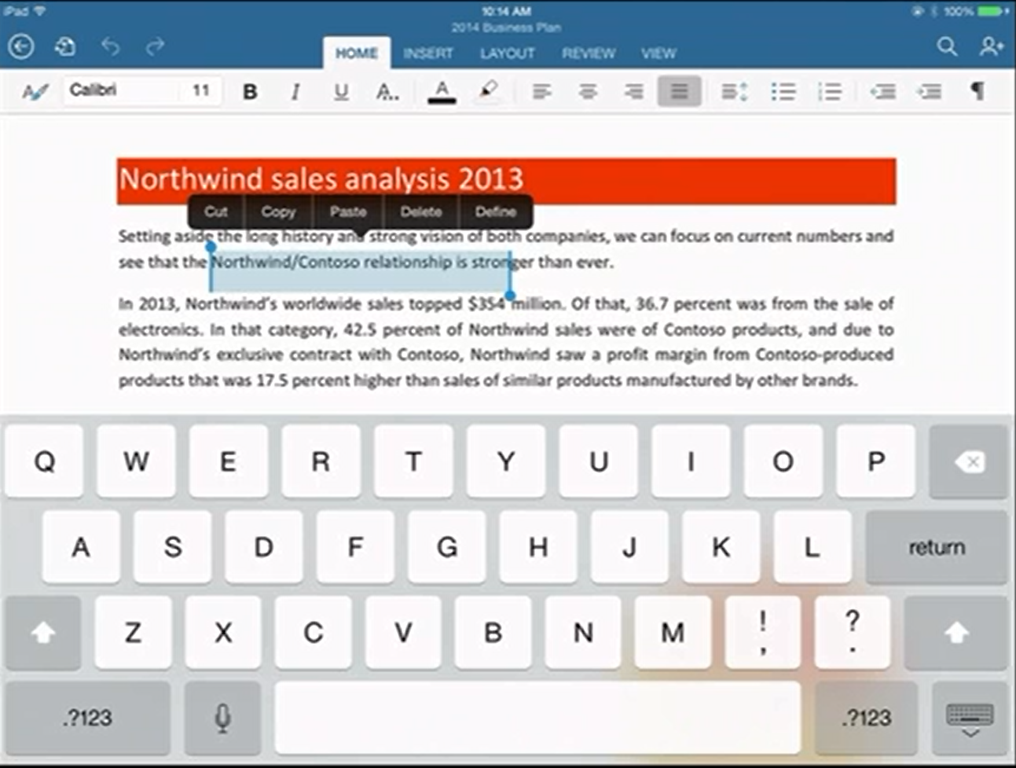
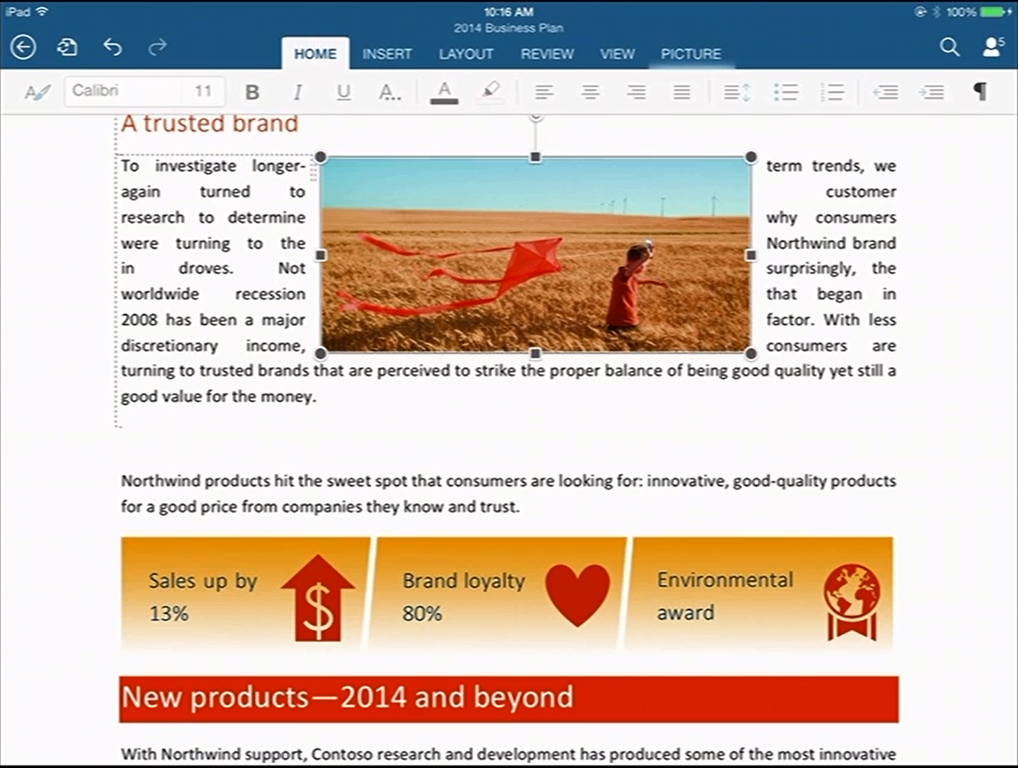
New Microsoft CEO Satya Nadella has announced Office for iPad at an event in San Francisco. Office General Manager Julie White gave a demo of Word, Excel and Powerpoint on Apple’s tablet.
image

White made a point of the fidelity of Office documents in Microsoft’s app, as opposed to third party viewers.
image

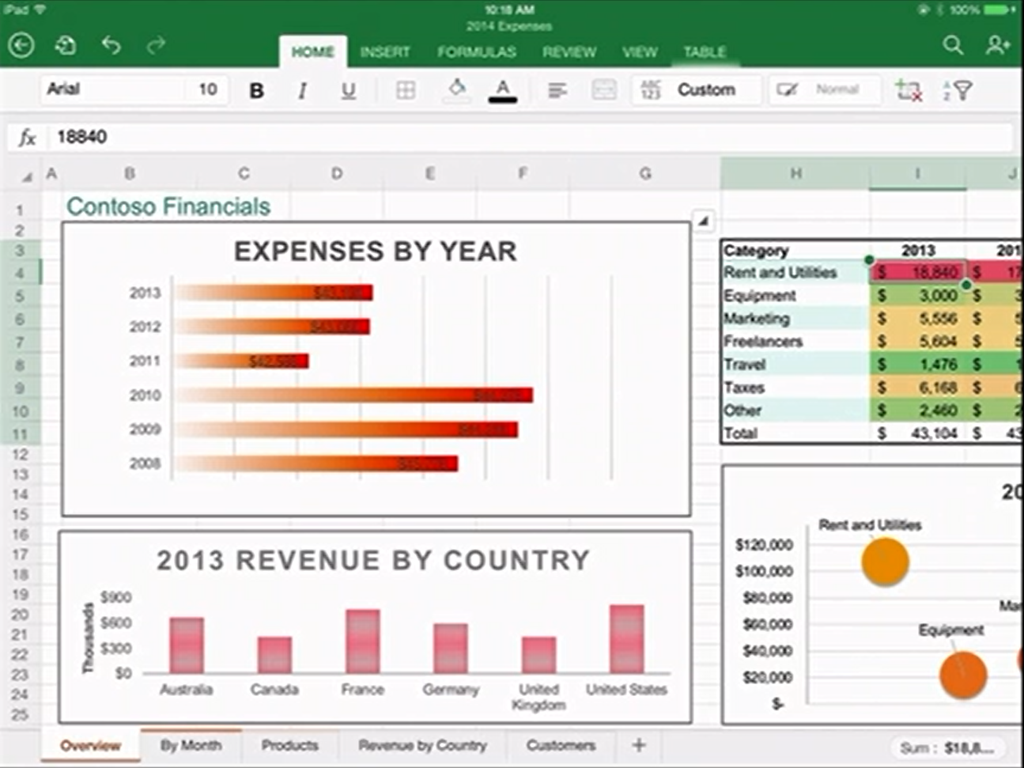
Excel looks good with a special numeric input tool.
image

Office will be available immediately – well, from 11.00 Pacific Time today – and will be free for viewing, but require an Office 365 subscription for editing. I am not clear yet how that works out for someone who wants full Office for iPad, but does not want to use Office 365; perhaps they will have to create an account just for that purpose.

There was also a focus on Office 365 single sign-on from any device. This is Azure Active Directory, which has several key characteristics:

1. It is used by every Office 365 account.

2. It can be synchronised and/or federated with Active Directory on-premise. Active Directory handles identity and authentication for a large proportion of businesses, small and large, so this is a big deal.

3. Developers can write apps that use Azure Active Directory for authentication. These can be integrated with SharePoint in Office 365, or hosted on Azure as a separate web destination.

While this is not new, it seems to me significant since new cloud applications can integrate seamlessly with the directory already used by the business.

Microsoft already has some support for this in Visual Studio and elsewhere – check out Cloud Business Apps, for example – but it could do more to surface this and make it easy for developers. Nadella talked about SDK support for iOS and other devices.

Microsoft hardly mentioned Android at the event, even though it has a larger market share than iOS. That may be because of the iPad’s popularity in the enterprise, or does it show reluctance to support the platform of a bitter competitor?

Microsoft is late with Office for iPad; it should perhaps have done this two years ago, but was held back by wanting to keep Office as an exclusive for Windows tablets like Surface, as well as arguments with Apple over whether it should share subscription income (I do not know how that has been resolved).

There was also a brief introduction to the Enterprise Mobility Suite, which builds on existing products including Azure Active Directory, InTune (for device management) and Azure Rights Management to form a complete mobility management suite.

Nadella made a confident performance, Office for iPad looks good.

What is coming up at Build, Microsoft’s developer conference next week? Nadella said that we will hear about innovations in Windows, among other things. Following the difficulties Microsoft has had in marketing Windows 8, this will be watched with interest.

Flash developers fret as Adobe doubles down on PhoneGap


Adobe has announced Experience Manager Apps for Marketers and Developers. This comes in two flavours: Experience Manager Apps is for marketers, and PhoneGap Enterprise is for developers. The announcements are unfortunately sketchy when it comes to details, though Andre Charland’s post has a little more:

  • Better collaboration – With our new PhoneGap Enterprise app, developer team members and business colleagues can view the latest version of apps in production, development and staging

  • App editing capabilities – Non-developer colleagues can edit and improve the app experience using a simple drag-and-drop interface from the new Adobe Experience Manager apps; this way developers can focus on building new features, not on making updates.

  • Analytics & optimization – Teams can immediately start measuring app performance with Adobe Analytics; we’re also planning to incorporate functionality so teams can start A/B testing their way to higher app engagement and monetization using Adobe Target.

  • Push notifications – Engage your customers on-the-go with push notifications from Adobe Campaign

  • Support and training – PhoneGap Enterprise comes with SLA and support so customers can be rest assured that Adobe PhoneGap has their back.

Head over to the PhoneGap Enterprise site and you get nothing more than a “Get in touch” button.

image

Announcement-ware then. Still, enough to rile Flash and AIR (Adobe Integrated Runtime) developers who feel that Adobe is abandoning a better technology for app development. Despite the absence of the Flash runtime on Apple iOS, you can still build mobile apps by compiling the code with a native wrapper.

Adobe… this whole thread should make you realize what an awesome platform and die hard fans you have in AIR. Even after all that crap you pulled with screwing over Flex developers, mitigating Flash to just games, retreating it from the web, killing AS4 and god knows what else you’ve done to try to kill the community’s spirit. WE STILL WANT AIR!

says one frustrated developer.

Gary Paluk has also posted on the subject:

I have invested 13 years of my own development career in Adobe products and evangelized the technology over that time. Your users can see that there is a perfectly good technology that does more than the new HTML5 offerings and they are evidently frustrated that you are not supporting developers that do not understand why they are being forced to retrain to use inferior technologies.

Has Adobe in fact abandoned Flash and AIR? Not quite; but as this detailed roadmap shows, plans for a next-generation Flash player have been abandoned and Adobe is now focused on “web-based virtual machines,” meaning I guess JavaScript and other browser technologies:

Adobe will focus its future Flash Player development on top of the existing Flash Player architecture and virtual machine, and not on a completely new virtual machine and architecture (Flash Player "Next") as was previously planned. At the same time, Adobe plans to continue its next-generation virtual machine and language work as part of the larger web community doing such work on web-based virtual machines.

From my perspective, Adobe seemed to mostly lose interest in the developer community after its November 2011 shift to digital marketing, other than in an “apps for marketing” context. Its design tools on the other hand go from strength to strength, and the transition to subscription in the form of Creative Cloud has been brilliantly executed.

Entering Microsoft’s XAML labyrinth: is it worth it?

I spent some time at the weekend working on a Bridge game for the Windows Store. I am writing it in XAML and C#. The UI is hardly demanding, given that Bridge is a card game, but it has made me take a fresh look at XAML, the markup language for a Windows Store App user interface (unless you use HTML and JavaScript). XAML is also used in Windows Presentation Foundation and in Silverlight/Windows Phone.

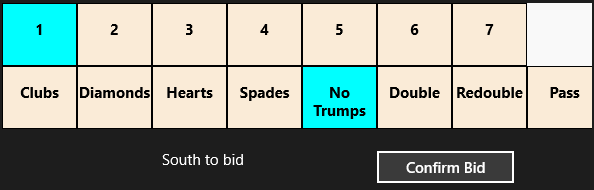
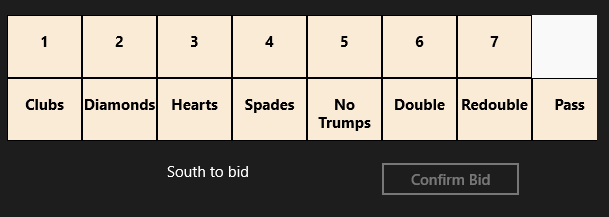
As part of the game, the user selects a “bid” which consists of a number from 1 to 7 and a suit of cards (or double, redouble or pass). Most bridge games show this as a grid though functionally it is like a combo-box (choosing from a pre-defined range of options).

Naturally I looked for the easiest way to accomplish this. The solution I came up with was to nest TextBlock controls in Border controls in Grid cells. Then I wrote C# code that detects which cell the user taps and updates the background of the selected Border accordingly.

image

I have in mind to replace the text with graphics and make the numbers a bit smarter at some future date. My solution works fine; here it is at runtime:

image

At the weekend I happened to be chatting with a developer more expert in XAML than myself, who told me I had done it wrong. In XAML everything should be in Style definitions. I should use a ListView and design it in Blend.

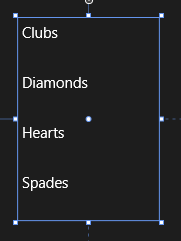
Well, I knew that I had somewhat subverted how XAML is meant to work, so I sat down to investigate this different approach. A ListView looks nothing like what I want out of the box.

image

However, with the magic of XAML it can be transformed. I made the ListView horizontal by defining an ItemsPanelTemplate in Application.Resources:

<ItemsPanelTemplate x:Key="ItemsPanelTemplate1">
  <StackPanel Orientation="Horizontal"/>
</ItemsPanelTemplate>

and adding 

ItemsPanel="{StaticResource ItemsPanelTemplate1}

as an attribute of the ListView.

Then I added an ItemTemplate to draw the kind of block that I wanted:

<ListView.ItemTemplate>
    <DataTemplate>
        <Border BorderThickness="1" Height="130" Width="130" BorderBrush="Black">
            <TextBlock FontSize="24" FontWeight="Bold" HorizontalAlignment="Center" VerticalAlignment="Center"
                       Text="{Binding Name}" Foreground="Black" />
        </Border>
    </DataTemplate>
</ListView.ItemTemplate>

Note that I am using a DataTemplate because the ListView is bound to an ObservableCollection in the proper XAML way.

At this point I am close to what I want – never mind that the numbers are missing, they can easily be added with a second ListView:

image

However I do not want that little tick mark appearing, the selected background colour is not to my taste, and the spacing of the items is wrong. How do I fix that?

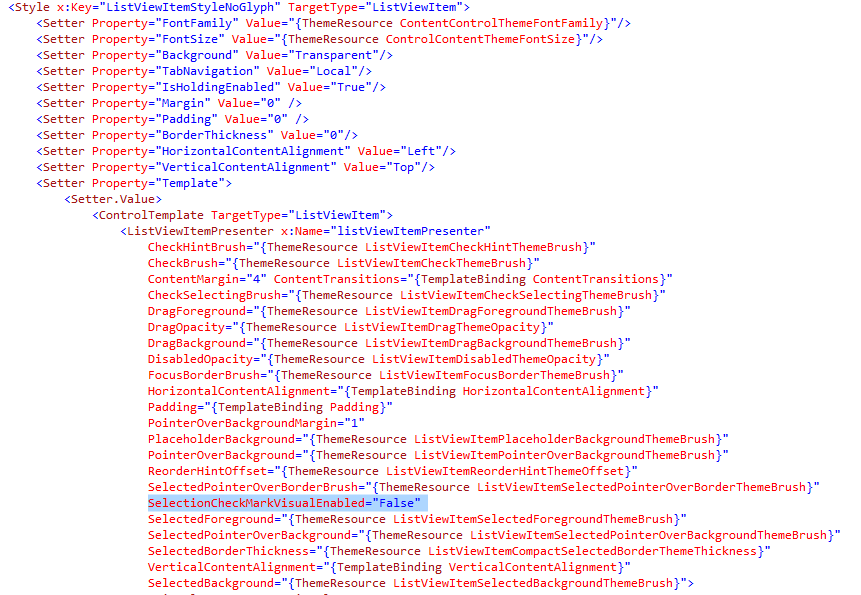
My search led me to this post which explains a far-from-obvious series of steps you can take in Blend. The steps did not quite work for me but got me on track to create a new Style resource which I called ListViewItemStyleNoGlyph and which lets me adjust the margin and also a previously hidden property called SelectionCheckMarkVisualEnabled. Blend generated a substantial block of code for this:

image

This has helped and now my ListView looks like this:

image

Well, it is nearly there and I can see that with a bit more effort I can get what I want. Even so, I am beginning to wonder whether my initial approach, in which I understood all the code, had advantages over this exploration into the labyrinth.

Is XAML well loved out there? I came across this post by Paul Stovell from a couple of years back which seems relevant. “I’ve lived and breathed the technology for the last six years”, he says, but writes:

What’s disappointing is that WPF started out quite positively during its time. Concepts like dependency properties, styles, templates, and the focus on data binding felt quite revolutionary when Avalon was announced.

Sadly, these good ideas, when put into practice, didn’t have great implementations. Dependency properties are terribly verbose, and could have done with some decent language support. Styles and templates were also verbose, and far more limited than CSS (when WPF shipped I imagined there would be a thousand websites offering high quality WPF themes, just like there are for HTML themes; but there aren’t, because it is hard).

Data binding in WPF generally Just Works, except when it doesn’t. Implementing INotifyPropertyChanged still takes way too much code. Data context is a great concept, except it totally breaks when dealing with items like ContextMenus. ICommand was built to serve two masters; the WPF team who favored routed commands, and the Blend team who favored the command pattern, and ended up being a bad implementation for both.

Stovell mentions the verbosity of XAML, and that it is hard, both of which sound right to me. He contrasts the way ASP.NET has evolved, with ASP.NET MVC a great improvement on web forms. Read the full post for more detail.

It seems to me that XAML does offer much that is wonderful: flexibility, capability, and the ability to separate presentation from data. At the same time, neither XAML nor Blend are intuitive tools for developers; they may make more sense to designers, but it seems to me that removing a tick mark from a ListViewItem should be more straightforward. Perhaps it is, in which case there is a failure of documentation or tooling rather than functionality, but it makes little difference to the developer.

How to crash your Windows Store XAML app

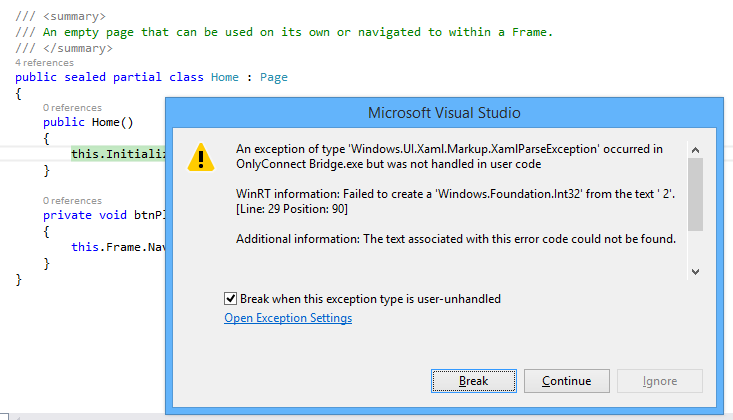
I am working on a Windows Store app, of which more soon. I am writing the app in XAML and C#. I was tweaking the page design when I hit a problem. Everything was fine in the designer in Visual Studio, but running the app raised an exception:

image

WinRT information: Failed to create a ‘Windows.Foundation.Int32’ from the text ‘ 2’.

along with the ever-helpful:

Additional information: The text associated with this error code could not be found.

The annoying this about this error is that debugging is not that easy. The exception is in Framework code, not your own code, and Microsoft does not supply the source. Once again, everything is fine in the designer and there are no compiler errors.

Puzzling. I resorted to undoing bits of my changes until I found what triggered the problem.

This was it. In the XAML, I had somehow typed a leading space before a number:

Grid.Row=" 2"

The designer parses this OK (it would be better if it did not) but the runtime does not like it.

Actually, I know why this happens. If you are typing in the XAML code editor (which I find myself doing a lot), then auto completion inserts the blank space for you:

image

I wish all bugs were this easy to solve, though I regard it as a bug in the Visual Studio editor. Posted here mainly in case others hit this problem; but I also observe that Windows Store development still seems less solid in Visual Studio than the tools for desktop or web apps.

Other problems I have hit include the visual designer changing to read-only of its own accord; and a highly irritating issue where the editor for a XAML code-behind class sometimes forgets the existence of all the controls you have declared in XAML, covering your valid code with red squiggly lines and reporting numerous errors, which disappear as soon as you compile. Once this starts happening, the problem persists for the rest of the editing session.

It is not all bad. I am pleased with the way I have been able to put together a touch-friendly game UI relatively easily. Now comes the fun part: writing the logic for the AI (Artificial Intelligence).

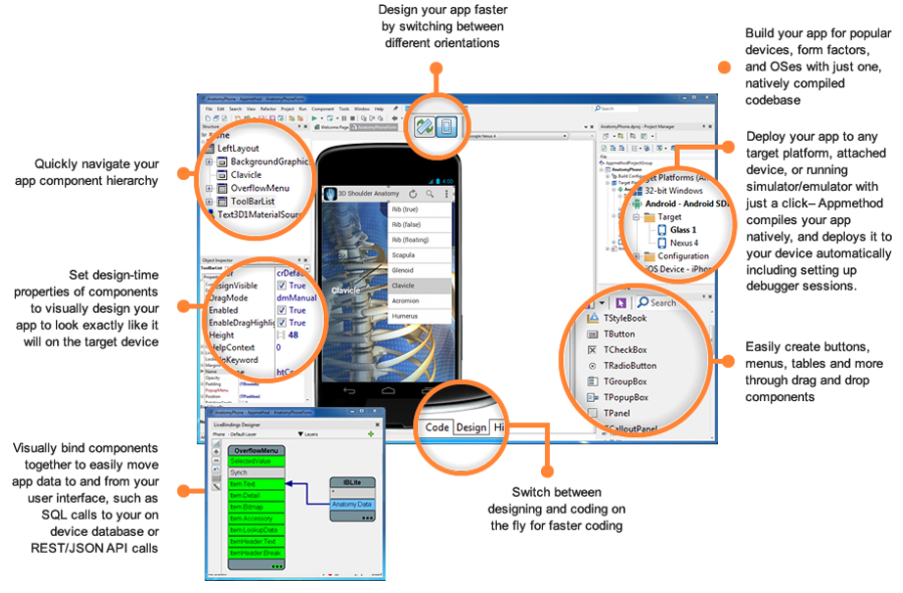
Embarcadero pre-announces AppMethod cross-platform development tool: Delphi repackaged?

Embarcadero is spilling the beans on a new development tool called AppMethod, which has its own site here and a little more information on TechCrunch. A fuller reveal is promised at SXSW, which kicks off on March 7 in Austin, Texas.

image

But what is AppMethod? The IDE looks very like Delphi, the languages are Object Pascal (like Dephi) or C++ (like C++ Builder), and target platforms include Windows, Mac, iOS and Android. It would be extraordinary if the GUI framework were not some variant of FireMonkey, the cross-platform and mobile framework in Delphi.

Just Delphi (and C++ Builder, which is Delphi for C++) repackaged then? In a comment Embarcadero developer evangelist David Intersimone says that is “way off base” though the only firm fact he offers is that AppMethod is less capable than Delphi for Windows, which presumably means that Delphi’s VCL (Visual Component Library) framework for Windows applications is not included.

Lack of a feature is not a compelling reason to buy AppMethod rather than Delphi so Object Pascal enthusiasts must hope there is more good stuff to be revealed.

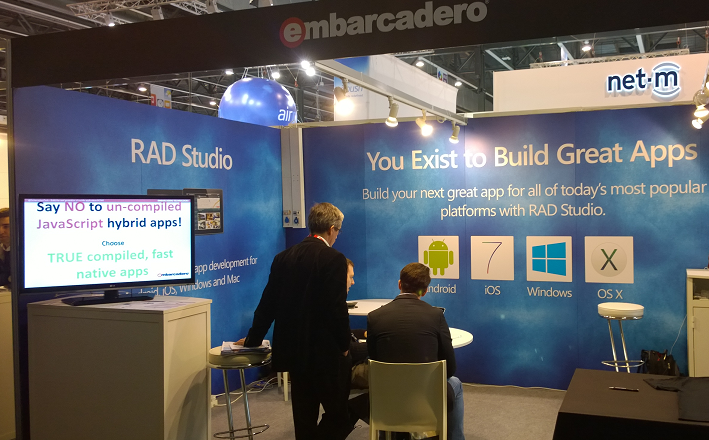
I looked out for the Embarcadero stand at Mobile World Congress (MWC), which was a small affair tucked away in the corner of one of the vast halls.

image

The stand was hardly bustling and was overshadowed by a larger stand next to it for another app building tool, AppMachine. While I would not read much into the size of a stand at MWC, that accords with my general sense that while the recently added cross-platform and mobile capabilities in Delphi have won some take-up, it is a small player overall. Embarcadero may feel that a new name and a bit of distance between FireMonkey/Delphi and the original Windows-only tool will help to attract new developers.

Why you cannot prove software correctness: report from QCon London

I’m at QCon London, an annual developer conference which is among my favourites thanks to its vendor-neutral content.

One of the highlights of the first day was Tom Stuart’s talk on impossible programs. Using a series of entertaining and mostly self-referential examples, Stuart described why certain computing problems are uncomputable. He also discussed the “Halting problem”: unless you emasculate a computing language by removing features like While loops, you cannot in general answer the question “will this program ever finish”.

All good fun; but the dark side of the talk comes at the end, when Stuart proves with a flourish that a consequence is that you cannot prove software correctness.

In a world that is increasingly software-driven, that is a disturbing thought.

Nokia’s puzzling Android announcement: Nokia X

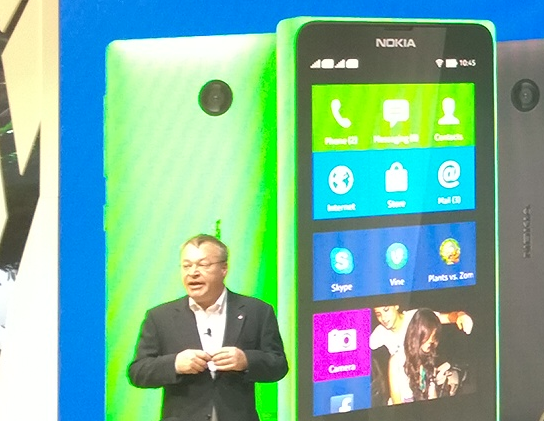
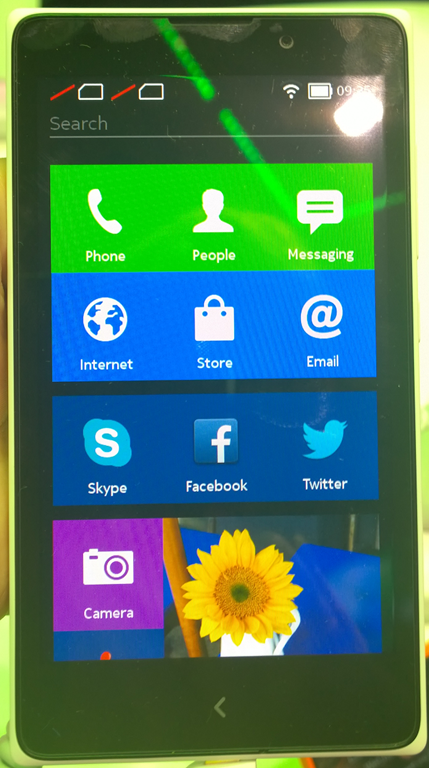
Nokia has announced the X range: Android smartphones connected to Microsoft/Nokia services including Bing search, OneDrive cloud storage, Nokia Here maps, and Nokia Music.

image

The phones, according to Nokia, are aimed at the “affordable” market especially in “growth markets” or in other words, less developed territories.

image

The stated reason for Nokia X is combine the rich Android app ecosystem – apart from Google’s own apps which largely will not run because of their dependence on proprietary Google Play services – with a “feeder” for the cloud services which are shared with the Lumia range. The UI is tiled and the phones have the look and feel of cut-down Lumia more than Android. Nokia’s Stephen Elop stated that Lumia and Windows Phone remains Nokia’s primary smartphone strategy.

Note that although Nokia is being acquired by Microsoft, the deal is not complete, and Nokia’s management is equally as independent of Microsoft as it was this time last year.

Here’s the puzzle though. Elop also announced that the low-end Windows Phone, Lumia 520, outsells Android in the €75-150 price range, exactly the range also occupied by Nokia X. It is no more affordable than Windows Phone. The real rationale then is about the Android app ecosystem rather than affordability.

There are several reasons why Nokia X might not be a big hit.

First, consumers will pick up that these do not offer the same experience as mainstream Android devices running Google services. This might not matter if the Microsoft/Nokia services were superior to those from Google, but that is hard to see. Bing vs Google for search?, Nokia Music vs Google Play music? Google Now vs no equivalent? Play Store vs Nokia Store?

Second, if you want a Microsoft services device, how likely is it that the supporting apps on Android will be superior to those on Windows Phone? Take Office 365, for example. Windows Phone has better support than Android, and that is part of Microsoft’s differentiation.

If Nokia X is a worse Android than Android, and a worse Windows Phone than Windows Phone, what is the point of it and why will anyone buy?

Here is where Nokia X does make sense. It is a strong Plan B for a company that is having second thoughts about the long-term prospects of Windows Phone. Perhaps it could also replace Asha at the low end, if in time Nokia manages to drive the cost down. The Android operating system is free, if you leave out the proprietary Google bits, so there is some cost saving versus Windows Phone.

Unfortunately there is also a negative impact on Lumia, in that Nokia is seen to be wavering in its commitment to Windows Phone and distracted by supporting too many mobile operating systems. There was no Lumia announcement today at Mobile World Congress, which is odd considering that Nokia has a reasonable story to report in terms of platform growth.

Microsoft improves its web app builder for Windows Phone, but where is it going with this?

Microsoft has improved its browser-based Windows Phone App Studio beta and added the ability to generate Windows Store apps. The changes are described here.

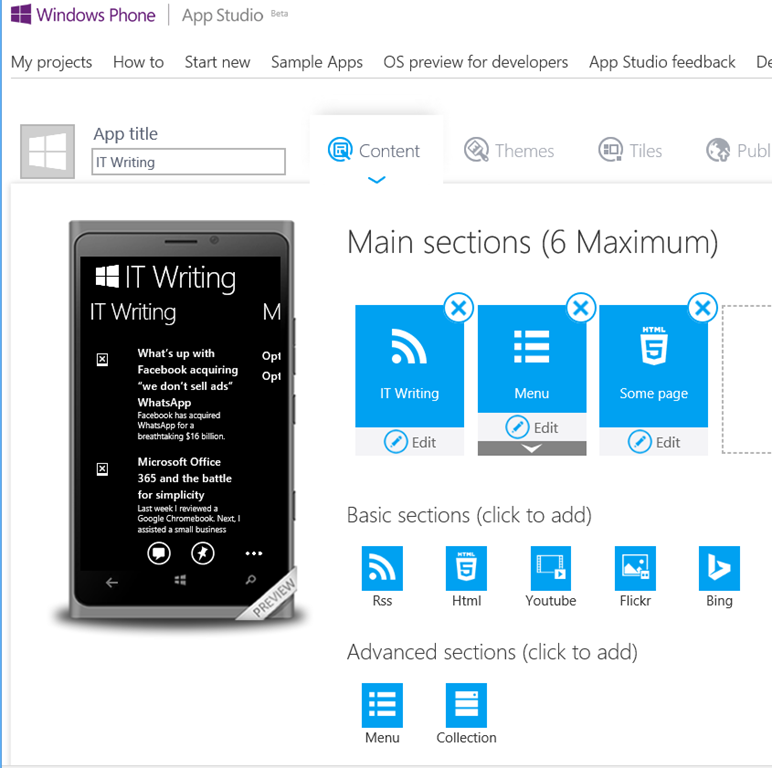
First, a quick tour. App Studio is carefully described as a tool for building “content-based apps”. The personal use case is an app to show off your recent holiday, favourite band, movie or team, and for businesses, a showcase for your company or a menu for your restaurant.

I find this curious. What is the point of this kind of app? If I want to create a fan project, wouldn’t a mobile-friendly web site or blog be better? And for businesses, what is the value of an app that lacks intelligence? For example, a restaurant might want an app linked to a loyalty scheme where you collect points towards a free meal or qualify for offers, but how many will want an app just to check a menu, which they could easily do online?

Still, I like the idea of an app that will make it easier to read this blog on Windows Phone, so I went in and built an app.

Microsoft is continuing its peculiar and infuriating aversion to proper documentation, but there is a a how to that is somewhat informative. “You can also create a custom action”, it says, but does not tell you what such an action can do or how to use it.

That said, the development environment is reasonably intuitive. There is no interface builder at the level of buttons and listboxes; rather, you drag high-level elements into sections and the user interface is built for you. For example, I added an RSS feed, entered the URL for this blog, and it built a UI to browse and read blog entries.

image

Everything is data bound, and the data can be stored either locally or else hosted by Microsoft, in which case you can amend it dynamically:

App Studio Data Services means the data is stored in App Studio and depends on an internet connection. If you update your data in App Studio, your app will automatically update. This allows you to create live apps that don’t need to be updated when you want to change data.

Large or sophisticated data sets are not the target here though. You could store a short list of addresses, for example.

You can also add elements including HTML text, RSS feeds, YouTube videos, Flickr photos, and Bing searches. You can add actions including initiating a phone call or email, searching Nokia music, or getting directions from Nokia HERE maps.

As you work, a live preview of the app appears alongside your work, a nice feature.

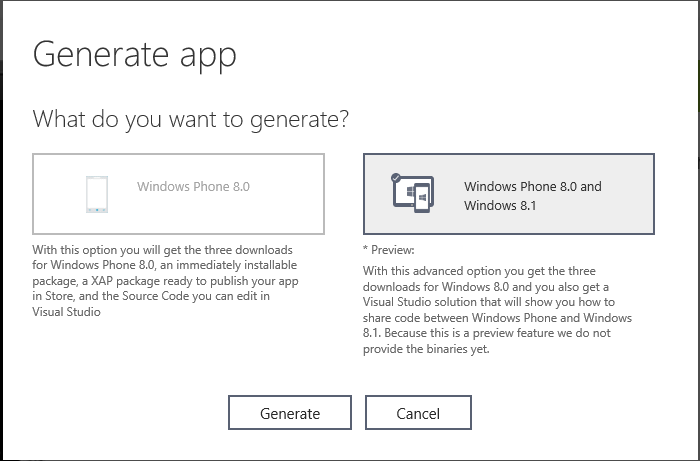
Once done, you can generate the app.

image

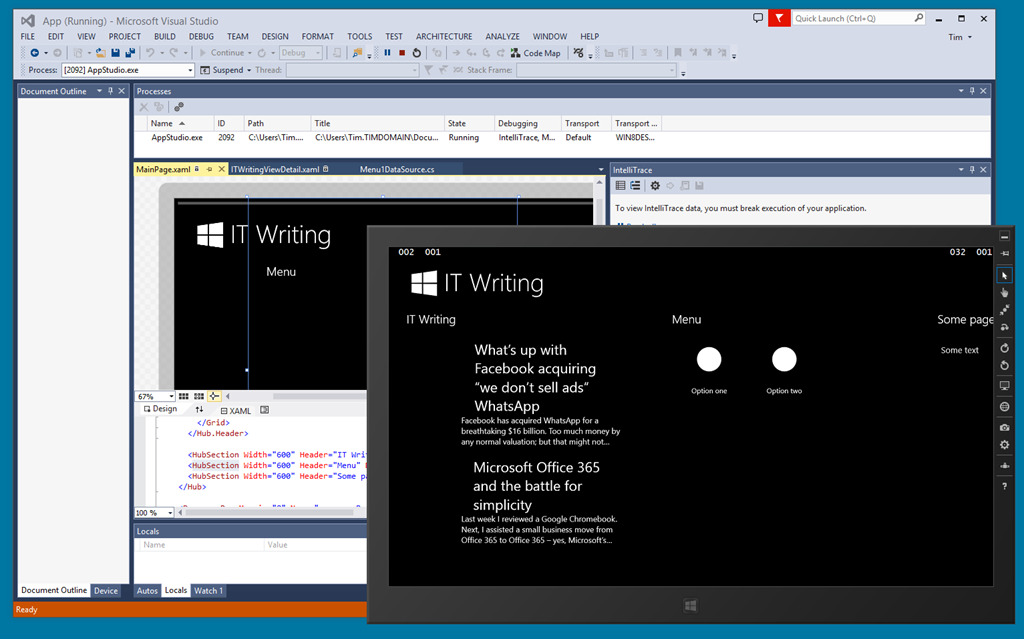
New in this version is the ability to generate a Windows Store App for Windows 8.1, as well as a phone app. Once in Visual Studio, you can do what you like, though there is no way back to the visual builder. Apps generated use XAML and C#.

image

App Studio also compiles a Windows Phone binary package (not yet for Windows Store apps) which you can install immediately, provided you have added the necessary certificate. You can install the app by scanning a QR code.

image

There is good work here, and if by any chance you do want to build a “content app” of the type envisaged, it is great.

I have a couple of reservations though.

First, it is too limited to be useful for real-world apps, unless you just use it as a starting point for a Visual Studio project. It needs the ability to write snippets of code, and the ability to link to business data sources like Azure Mobile Services and SQL Server. It also needs a login facility supporting at least Office 365 and Microsoft IDs.

Second, it seems to me that Microsoft is working simultaneously on several projects with overlapping purpose, which is to simplify app building.

Project Siena is a visual app builder implemented as a Windows 8 app; I looked at it here.

Visual Studio Lightswitch is a visual app builder in Visual Studio, which builds apps for Silverlight and HTML.

Access 2013 Web Apps let you build custom databases that hook into Office 365. I looked at these here. This is one easy app builder that really makes sense to me, allowing reasonably sophisticated data models and using Office 365 identities for log-in and permissions.

Windows Phone App Studio as described above.

Now, I appreciate that there are slightly different target markets in each of these. Lightswitch cannot build store apps, Access Web Apps require SharePoint or Office 365, Project Siena cannot build phone apps, and so on.

However, Microsoft needs to unify its development platform, and a proliferation of tools all going for the supposed non-technical app developer is not helping its cause. I also suspect that the demand for consumer “content-based apps” is vanishingly small.

Personally I think Microsoft should both improve and shout from the rooftops about the under appreciated Access 2013 web apps, scrap at least two of the other three, and integrate their functionality so that we have one easy to use app builder that can target Windows Store apps and Windows Phone apps.

Microsoft and developer trust

David Sobeski, former Microsoft General Manager, has written about Trust, Users and The Developer Division. It is interesting to me since I recall all these changes: the evolution of the Microsoft C++ from Programmer’s Workbench (which few used) to Visual C++ and then Visual Studio; the original Visual Basic, the transition from VBX to OCX; DDE, OLE and OLE Automation and COM automation, the arrival of C# and .NET and the misery of Visual Basic developers who had to learn .NET; how DCOM (Distributed COM) was the future, especially in conjunction with Transaction Server, and then how it wasn’t, and XML web services were the future, with SOAP and WSDL, and then it wasn’t because REST is better; the transition from ASP to ASP.NET (totally different) to ASP.NET MVC (largely different); and of course the database APIs, the canonical case for Microsoft’s API mind-changing, as DAO gave way to ADO gave way to ADO.NET, not to mention various other SQL Server client libraries, and then there was LINQ and LINQ to SQL and Entity Framework and it is hard to keep up (speaking personally I have not yet really got to grips with Entity Framework).

There is much truth in what Sobeski says; yet his perspective is, I feel, overly negative. At least some of Microsoft’s changes were worthwhile. In particular, the transition to .NET and the introduction of C# was successful and it proved an strong and popular platform for business applications – more so than would have been the case if Microsoft had stuck with C++ and COM-based Visual Basic forever; and yes, the flight to Java would have been more pronounced if C# had not appeared.

Should Silverlight XAML have been “fully compatible” with WPF XAML as Sobeski suggests? I liked Silverlight; to me it was what client-side .NET should have been from the beginning, lightweight and web-friendly, and given its different aims it could never be fully compatible with WPF.

The ever-expanding Windows API is overly bloated and inconsistent for sure; but the code in Petzold’s Programming Windows mostly still works today, at least if you use the 32-bit edition (1998). In fact, Sobeski writes of the virtues of Win16 transitioning to Win32s and Win32 and Win64 in a mostly smooth fashion, without making it clear that this happened alongside the introduction of .NET and other changes.

Even Windows Forms, introduced with .NET in 2002, still works today. ADO.NET too has been resilient, and if you prefer not to use LINQ or Entity Framework then concepts you learned in 2002 will still work now, in Visual Studio 2013.

Why does this talk of developer trust then resonate so strongly? It is all to do with the Windows 8 story, not so much the move to Metro itself, but the way Microsoft communicated (or did not communicate) with developers and the abandonment of frameworks that were well liked. It was 2010 that was the darkest year for Microsoft platform developers. Up until Build in October, rumours swirled. Microsoft was abandoning .NET. Everything was going to be HTML or C++. Nobody would confirm or deny anything. Then at Build 2010 it became obvious that Silverlight was all-but dead, in terms of future development; the same Silverlight that a year earlier had been touted as the future both of the .NET client and the rich web platform, in Microsoft’s vision.

Developers had to wait a further year to discover what Microsoft meant by promoting HTML so strongly. It was all part of the strategy for the tablet-friendly Windows Runtime (WinRT), in which HTML, .NET and C++ are intended to be on an equal footing. Having said which, not all parts of the .NET Framework are supported, mainly because of the sandboxed WinRT environment.

If you are a skilled Windows Forms developer, or a skilled Win32 developer, developing for WinRT is a hard transition, even though you can use a familiar language. If you are a skilled Silverlight or WPF developer, you have knowledge of XAML which is a substantial advantage, but there is still a great deal to learn and a great deal which no longer applies. Microsoft did this to shake off its legacy and avoid compromising the new platform; but the end result is not sufficiently wonderful to justify this rationale. In particular, there could have been more effort to incorporate Silverlight and the work done for Windows Phone (also a sandboxed and touch-based platform).

That said, I disagree with Sobeski’s conclusion:

At the end of the day, developers walked away from Microsoft not because they missed a platform paradigm shift. They left because they lost all trust. You wanted to go somewhere to have your code investments work and continue to work.

Developers go where the users are. The main reason developers have not rushed to support WinRT with new applications is that they can make more money elsewhere, coding for iOS and Android and desktop Windows. All Windows 8 machines other than those running Windows RT (a tiny minority) still run desktop applications, whereas no version of Windows below 8 runs WinRT apps, making it an easy decision.

Changing this state of affairs, if there is any hope of change, requires Microsoft to raise the profile of WinRT among users more than among developers, by selling more Windows tablets and by making the WinRT platform more compelling for users of those tablets. Winning developer support is a factor of course, but I do not take the view that lack of developer support is the chief reason for lacklustre Windows 8 adoption. There are many more obvious reasons, to do with the high demands a dual-personality operating system makes on users.

That said, the events of 2010 and 2011 hurt the Microsoft developer community deeply. The puzzle now is how the company can heal those wounds but without yet another strategy shift that will further undermine confidence in its platform.

Visual Studio 2013 update 1: avoid the RC if you use C++

Microsoft has released Visual Studio 2013 Update 1 RC which I installed for a look. It has a “go-live” license, which means you can use it in production, and when the final version comes out you will be able to install it over the top, so it sounded safe enough.

Update 1 is only a bug-fix release – the fixes are listed in the link above. “When you edit multiple resources in Resource Editor, Visual Studio crashes randomly,” is one, so if that affects you, you might want to install it.

Unfortunately the RC introduces a new problem. The syntax highlighting in the C++ editor is broken. Here is a snippet of code before the update:

image

and after

image

Microsoft is aware of the issue and apparently the RTM update will be OK.

While investigating this, I discovered another issue. Visual Studio 2013 was crashing whenever I tried to open a C++ project. If I tried to debug Visual Studio with a new instance, the new instance would crash too. I uninstalled Update 1 RC but that did not fix it. This post on StackOverflow does not describe exactly the same issue, but did lead me to suspect Xamarin, an add-on for Android and iOS development with C#. I uninstalled Xamarin and the problem disappeared; Visual Studio seems to start up more quickly too. A shame as I like the product.

Update: the final Update 1 is now available. What’s in Update 1: http://support.microsoft.com/kb/2911573

Download: http://go.microsoft.com/fwlink/?LinkId=301714