Category Archives: software development

Figuring out Project Siena: a Windows 8 app to build Windows 8 apps

A couple of weeks back I took a look at Project Siena, a preview of a new tool for building Windows 8 apps. Project Siena features a simplified user interface builder, an Excel-like expression language, and data-bound controls. It generates Windows 8 JavaScript apps. Project Siena is itself a Windows Store app, and runs fine on Windows RT (the ARM version). I have been using it successfully on Surface 2, on which it runs sweetly.

When I first looked at Project Siena I tried to build the same first app that I have used for numerous simple tests of development tools over the years: a to-do list. I was impressed by how easy it was to create the user interface, but unable to work out the code to complete it. Unless I missed it, the key information is not included in any of the initial documentation. I found this disappointing, since it has been easy to work out the code in every other programming environment I have tried.

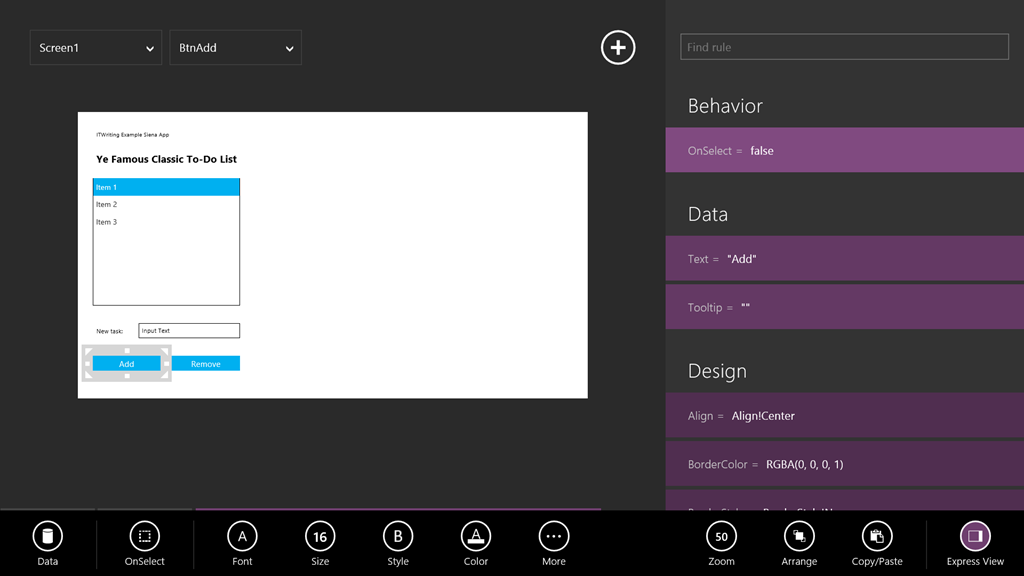
I gradually worked it out. Here is the app:
image

The idea is that you have a listbox, an input box, and two buttons. One button takes the contents of the input box and adds it to the list. The other button removes the selected item in the list. All the functionality you need for a to-do list (actually a simple memo control would do, but that would be a bit too simple).

In Siena, data is stored in Collection objects, and you can bind a listbox to a collection. By default, a new listbox is bound to an object called ListboxSample, but you cannot use it for this; if you try, you get a squiggly line error with the message that ListboxSample is not a collection.
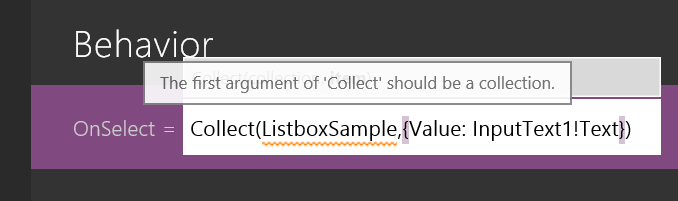
image

Instead, you have to create your own collection object. In Siena, you declare a variable by using it and its type is inferred. Enter this for the OnSelect property of the Add button:

Collect(mycollection,{Value: InputText1!Text})

This is the code that took me so long to work out. The Collect function adds an item to a collection. If the collection does not already exist, it creates it. The first argument to Collect is a collection object, and the second, an item. What is an item? In effect, a record or row in a table. The syntax for an item in Siena is:

{Fieldname1: fieldvalue1,Fieldname2: fieldvalue2,…}

where the dots represent additional fields as required. Therefore, the code I entered for the Add button creates or appends an item with a single field, called Value, to a collection called mycollection.

Now you can select the listbox and tap Data and then Items. The collection called mycollection magically appears for selection. Select it. In the case of multi-field collections, you can also choose which field appears in the list. Only one field it seems; yes, Siena needs a grid control.

Then you can run the app, tap Add, and see the content of the input box added to the list.

The Remove button is easy:

Remove(mycollection, Listbox1!Selected)

However, our app has a flaw. The data does not persist. Next time you run the app, the list will be empty. This is easy to fix too. Go back to the OnSelect property of the Add button. Type a semicolon after the existing line of code, and then:

SaveData(mycollection,"mycollection")

This saves the collection to isolated storage on your PC. Alternatively, you could call a web service and save to the cloud, but I am not sure of the code for that yet.

Next, we have to load the data when the app starts. You can use the OnVisible property of the screen for this. Type:

Clear(mycollection);Collect(mycollection,LoadData("mycollection"))

Note that since Collect appends to the collection, we have to clear it first, to avoid duplicate items.

Now the app is complete.

What do I think of Siena after doing this? It certainly has its frustrations, but I like it. I do think that the designers have gone too far in pretending that code is unimportant; it is silly that you have to type into a single line editor. It would also have saved me time if Microsoft had provided a syntax guide and programming guide, rather than concentrating on how to show pretty pictures.

Who is going to use Siena, if anyone? That is the harder question.
Do you miss manuals? Why and why not …

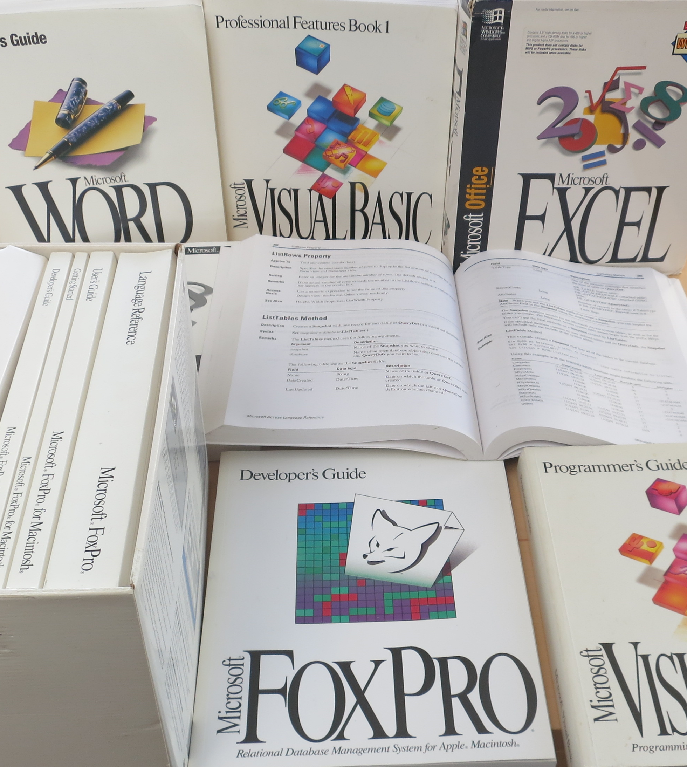
It’s that time of year. I keep more than I should, but now and again you have to clear things out. I don’t promise to dispose of all of these though: they remind me of another era, when software came in huge boxes packed with books.

image

If you purchased Microsoft Office, for example, you would get a guide describing every feature, as well as an Excel formula reference, a Visual Basic reference and so on.

If you purchased a development tool, you would get a complete language reference plus a guide to the IDE plus a developer guide.

The books that got most use in my experience were the references – convenient to work on a screen while using a book as reference, especially in the days before multiple displays – and the developer guides. You did not have to go the way the programmer’s guide suggested, but it did give you a clue about how the creators of the language or tool intended that it should be used.

Quality varied of course, but in Microsoft’s case the standard was high. When something new arrived, you could learn a lot by sitting down with just the books for a few hours.

What happened to manuals? Cost was one consideration, especially as many were never opened, being duplicates of what you had already. Obsolescence went deeper than that though. Manuals were always out of date before they printed, especially when update distribution was a download rather than a disk sent out by support (which means from the nineties onward).

Even without the internet, manuals would have died. Online help is cheaper to distribute and integrates with software – press F1 for help.

Then add the power of the web. Today’s references are online and have user comments. Further, the web is a vast knowledgebase which, while not wholly reliable, is far more productive than leafing through pages and pages trying to find the solution to some problem that might not even be referenced. In many cases you could post a question to StackOverflow and get an answer more quickly.

Software has bloated too. I am not sure what a full printed documentation set for Visual Studio 2013 would look like, but it would likely fill a bookshelf if not a room.

When software companies stopped sending out printed manuals, the same books were produced as online (that is, local, but disk-based) help. Then as the web took over more help went to the web, and F1 would either open the web browser or use a help viewer that displayed web content. There are still options for downloading help locally in many development tools.

Nothing to miss then? I am not so sure. It strikes me that the requirement to deliver comprehensive documentation was a valuable discipline. I wonder how many bugs were fixed because the documentation team raised a query about something that did not seem to work right or make sense?

Another inevitable problem is that since documentation no longer has to be in the box (or in the download), some software is delivered without adequate documentation. You are meant to figure it out via videos, blog posts, online forums, searches and questions.

A good documentation team takes the side of the user – whether end user, developer, or system administrator, depending on context. They write the guide by trying things out, and goad the internal developers to supply the information on what does and does not work as necessary. That can still happen today; but without the constraint of having to get books prepared it often does not.

What next for Windows as Microsoft announces Build 2014?

Microsoft has announced Build 2014, its premier developer conference for Windows, April 2-4 in San Francisco.

image

In his blog post on the subject, developer evangelist Steve Guggenheimer mentions the Windows 8 app platform and Xbox One, and promises that Microsoft will talk about “what’s next for Windows, Windows Phone, Windows Azure, Windows Server, Visual Studio and much more.”

How is the buzz around Microsoft right now? Here are a few things that are not so good:

  • The Windows 8 app platform continues to struggle, despite picking up slightly from its dismal launch. Most of the conversation I hear around Windows 8 looks back to Windows 7 rather than forward to the new tablet platform: will the Start menu return?
  • The decline of the PC remains in full flow, while the non-Windows mobile platforms iOS and Android continue to grow
  • Xbox One, with its focus on Kinect and family entertainment, is falling behind Sony’s PlayStation 4 in terms of which console is most desired. Sony’s cheaper price and higher resolution on games like Call of Duty Ghosts make it a better for buy for gamers who can live without Kinect

On the other hand, a few positives:

  • Microsoft’s cloud platforms Office 365 and Windows Azure are growing fast, as far as I can tell
  • Server 2012 R2 is a solid upgrade to an already strong server product, and Hyper-V is making progress versus VMWare in virtualisation
  • Windows Phone 8 is making some progress in market share, though whether it will cross the point at which it becomes important enough for companies with apps to feel they have to support it remains an open question (currently they mostly do not)

What does that mean for Build? We may of course just see more of the same: improvements to Windows 8.x, further convergence with Windows Phone and Xbox platforms, new features for Windows Server and Azure, early previews of the next Visual Studio to support the new stuff.

I wonder though whether we may also see some new directions. Microsoft is supporting Xamarin for cross-platform mobile development and it would not surprise me to see more being made of this, or possibly some new approaches, to promote the use of Microsoft’s cloud services behind apps that run on iOS and Android.

Microsoft still intends for Windows 8/Windows Phone to be a major mobile platform alongside iOS and Android but its progress in reaching that point is slow. The task of building its cloud platform seems to be going better, despite competition from the likes of Amazon and Google, and in this context deep integration with the Windows client could be as much a liability as an advantage.

It may seem perverse; but it could pay Microsoft to focus on improving how well its server offerings (and Office) work with iOS and Android, rather than pushing for Windows everywhere as it has done in the past.

Will Microsoft scrap Windows RT? Here’s why it might not matter

At the UBS Global Technology Conference (aimed at investors, since UBS is an investment bank), Windows Executive Vice President Julie Larson-Green was interviewed about the future of Windows, and Microsoft has helpfully posted the audio and full transcript.

Larson-Green was asked about the viability of the “dual track” for Windows, or put another way, does Windows RT have a future?

I will interject an anecdote here. A neighbour came to me this weekend with a Windows XP laptop. Internet Explorer 8 no longer worked, and as no other web browser was installed, she could no longer get to the web on that machine. Microsoft has advice on reinstalling IE8; you re-run setup. We downloaded the setup from another machine and re-ran setup. It made no difference.

The only clue was an icon in the notification area for secure search. What was it? My neighbour did not know. She mentioned that she had been offered a free backup service and had started installing it. The service informed her that her backup was too large and she would have to pay. She thought she had cancelled and uninstalled it successfully, but maybe this toolbar, which redirects all searches to conduit.com, came along for the ride. Removing the toolbar from add/remove programs brought IE 8 back to life; if she is lucky, that will be end of the incident, if not, there could be other surprises.

It is just hopeless; and although later versions of Windows have improved security, users ultimately have full control of their machines and therefore the ability (with the help of unscrupulous third parties) to break them.

Now listen to Larson-Green’s description of Windows RT, evidence that Microsoft understands these issues very well:

Windows on ARM, or Windows RT, was our first go at creating that more closed, turnkey experience, where it doesn’t have all the flexibility of Windows, but it has the power of Office and then all the new style applications. So you could give it to your kid and he’s not going to load it up with a bunch of toolbars accidentally out of Internet Explorer and then come to you later and say, why am I getting all these pop-ups. It just isn’t capable of doing that by design.

That said, in its first year on the market Windows RT has largely failed. OEMs like Lenovo and Dell, who produced Windows RT tablets last year, have abandoned it. Microsoft is now the only Windows RT vendor, with Surface RT and Surface 2, other than Nokia with the Lumia 2520 – wait, that’s Microsoft too, following the Nokia acquisition.

Why has RT failed? Performance is an issue on most first generation devices (solved on Surface 2), users have been infuriated and/or flummoxed by the inability to install desktop applications, and even those (like myself) who understand and like the Windows RT concept run into functionality gaps, where there is no suitable Windows Store app and nothing built into the desktop that will do.

Nevertheless, something like Windows RT is necessary if Windows is to survive as a mainstream client operating system. What are Microsoft’s plans?

We have the Windows Phone OS. We have Windows RT and we have full Windows. We’re not going to have three. We do think there’s a world where there is a more mobile operating system that doesn’t have the risks to battery life, or the risks to security. But, it also comes at the cost of flexibility. So we believe in that vision and that direction and we’re continuing down that path.

You can read this as saying that Windows RT will be scrapped, to be replaced by Windows Phone OS adapted for larger form factors (which is what some of us thought Microsoft should have done three years ago). Some have drawn that conclusion, even in the mainstream press. However, this is not what Larson-Green said. Rather, she confirmed what has been strongly hinted for some time, that Windows Phone and Windows RT will converge. In fact, the company has already said that there will be a single development platform for Windows Store / Phone apps at some future date. Note that Windows Phone 8 is no longer built on Windows CE, the cut-down version of Windows, but uses the full Windows kernel, so some convergence has already taken place.

There are rumours of a battle within Microsoft: should Windows Phone adopt Windows RT, or vice versa? Windows Phone is increasing its market share, whereas Windows RT struggles, so from a marketing perspective the phone may be the winner here, though from a technical perspective it might be better to adapt Windows RT for the phone so that desktop Office remains possible on future devices.

If Microsoft gets this right, it will not matter to end users which way it goes. Here is what makes sense to me. Microsoft should converge the development platforms for Windows Phone and Windows Store apps so that both types of apps run on both platforms (though developers should be able to specify a minimum display size to avoid issues with apps designed for a larger screen), and a single project in Visual Studio should be able to target both platforms.

The most interesting question is the future of the desktop on Windows ARM tablets. I love having the desktop on Surface RT and Surface 2, because it greatly increases the utility of the devices; my perspective is that it’s great to have the Windows desktop and Office on a locked-down device, rather than lamenting the inability to install new desktop applications. However, it is a compromise that needs keyboard and trackpad or mouse for optimum operation, and means that Windows RT devices suffer from the same dual personality issues as full Windows 8.

If Microsoft managed to implement a decent version of Office as a Windows Store app, could we live without the desktop? Maybe, though I doubt it will be easy to match the full Windows version of Office (even without VBA) in the Windows Runtime environment.

Making sense of Salesforce 1 (it’s all about mobile)

At its Dreamforce conference in San Francisco, Salesforce has been hyping up its newly announced Salesforce 1. The keynote left us in do doubt: it is fantastic, it does mobile, it does cloud, it does “internet of things”.

image

Co-founder Parker Harris describes Salesforce 1 at Dreamforce

But what is Salesforce 1? For those of us who like fluff-free facts, it has been difficult to discern. The APIs that make up the Salesforce 1 platform seemed on the face of it to be the same ones Salesforce has always had; yet the company says it has multiplied the number of APIs by 10 to create Salesforce 1 (a figure I still find hard to understand).

It is beginning to make sense to me. Salesforce 1 is a brand, a platform and an app.

As a brand, Salesforce 1 encompasses all the APIs that form the Salesforce platform. The best place to understand the current state of Salesforce 1 is here, where you can see links to all the APIs, including Force.com, Heroku, ExactTarget, Radian6 (social media listening), Pardot (sales automation), Desk.com (service cloud) and GoInstant (build real-time multi-user apps). Those individual APIs still exist in their own right, but Salesforce 1 is a new brand that encompasses all of them.

There is also a Salesforce 1 app for iOS and Android. This is mainly an HTML5 app, which makes it odd that it is iOS and Android only. As I understand it, you can also use a mobile browser and get a similar experience, so it might not be too bad for Windows Phone users after all.

The Salesforce 1 app is actually an evolution of the Chatter mobile app. As I understand it, it is built with the Aura framework, for creating a responsive user interface, with strong support for touch control. The Chatter app was renamed Salesforce 1 at the start of Dreamforce.

The Salesforce 1 app is built around a feed, and Salesforce describes it as a feed-first approach. Chatter has support for Publisher Actions, which now in Salesforce 1 have a more prominent role, making the feed capable of initiating tasks and being a mobile-friendly centre of operations. Some vendors I have spoken to, such as FinancialForce (wholly owned by Salesforce), see this feed-first approach as being the core of what Salesforce 1 is about. 

When Salesforce talks about creating Salesforce 1 apps, that might refer to either of two things.

One is to create custom apps for your Salesforce users, which you can do without needing much code in some cases, which will be viewed through the Salesforce 1 app.

The other is to use the Mobile SDK for iOS or Android to create a native app. This does not have to be an HTML5 app, but could be if you want the quickest route to something that works.

According to CEO Marc Benioff, speaking to the press, much of the effort behind Salesforce 1 was in making the Salesforce browser UI properly mobile-friendly. He said that this includes mobile client libraries as well as the server APIs. Salesforce has an rapid visual builder for browser apps running on its platform, called VisualForce, and apparently getting these apps working nicely on mobile took huge effort.

Benioff gave the impression that VisualForce now works perfectly on mobile, but the booklet given to developers expresses reservations:

Only VisualForce pages enabled for Salesforce Mobile Apps and attached to a tab can be added to the Salesforce 1 navigation menu. Note that you may have to optimize these pages to work and/or display correctly on a mobile device.

Nevertheless, you can see the intent here, that anything running on Salesforce will work well on a mobile device. Benioff says that he only takes a smartphone with him when travelling, no laptop or even tablet, and he expects to be able to do all his work through it.

You could therefore call Salesforce 1 the optimisation of the Salesforce platform for mobile, subject to the iOS/Android limitation.

According to Salesforce then, the new mobile-enabled platform is more productive than other app-building tools. The idea is that many corporate apps can be implemented to run in the existing Salesforce 1 app, which perhaps more correctly should be called a client, while apps that need to be deployed more broadly, such as to consumers, can be built using the Mobile SDK and deployed to the App Store or Google Play.

Developers of course are used to these kinds of claims and will be sceptical. Still, if you have adopted Salesforce to the extent that all your users are on the system, then it might make sense to build apps with Salesforce 1 and have a lot done for you, including user management and authentication.

There is talk at Dreamforce of the “app gap”, the fact that typical enterprises currently have most of their apps designed for the desktop, but are planning for most of their apps to be mobile. That gap is an opportunity for Salesforce 1.

Against that, note that apps built with Salesforce 1 are not portable to other platform, and there are the usual questions about the extent to which businesses are willing to entrust their business to a third-party cloud platform, and if so, which cloud platform is the best choice.

Is Salesforce 1 the same old stuff repackaged, or something new? It is a bit of each.

As an aside, the focus here on iOS and Android will not be helpful to Microsoft/Nokia trying to sell Windows Phone in the enterprise. You can also understand why Microsoft is partnering with Xamarin to enable its .NET, C# libraries to work on iOS/Android. If enterprises are going mobile and largely not using Windows Phone to do so, Microsoft has no choice but to give full support to those rival mobile platforms.

What does Xamarin’s success say about open source versus proprietary? Miguel de Icaza says he has never been happier

image

Yesterday Xamarin, which offers tools for targeting iOS, Android and Mac with C#, announced a partnership with Microsoft, an announcement which I wrote up on The Register. It drew a few comments, several complaining about the cost:

So it cost more then Visual Studio Pro.

And that is for 1 target platform?

or

Not so useful for little indie developers at those prices.

or

From open source to $999 per developer per year. Monetising Mono seems to have worked, so perhaps PCL being open sourced won’t be such a bargain either.

If you check Xamarin’s pricing you will see that the tools are not cheap for casual users; of course, if you are selling thousands of apps or developing corporate apps at normal rates the tools soon pay for themselves.

Xamarin is doing well as far as I am aware; CEO Nat Friedman told me of rapid growth in the number of customers and I have seen for myself the high interest in the tools at events like Microsoft BUILD earlier this year in San Francisco.

This gives me pause for reflection. What does the success of Xamarin, and the relative lack of success of Mono (the open source C# compiler and .NET Framework on which Xamarin is based) say about how well the open source business model works in the real world?

I was reminded of a conversation I had with Miguel de Icaza, creator of Mono and co-founder of Xamarin, Friedman back in February of this year, when Xamarin 2.0 was launched. I asked de Icaza if the new company publishes the source code for all its products?

“No. Our company does proprietary tools for iOS and Android apps. The entire iOS and Android support is proprietary as well as our commercial Mac support. All those three pieces are proprietary while the IDE and the Mono runtime are open source. Whether the code is open source or not depends on whether it is part of core Mono or core MonoDevelop. Otherwise it tends to end up as proprietary.”

Friedman added: “Mono has a thriving open source community around it, and Xamarin has a thriving community of developers who are building commercial mobile apps. We have 12,000 customers, many of them have never heard of Mono. They came to us because they had a problem to solve, they were C# developers and they wanted to get an iOS or Android app built. We solved that problem and that was worth money to them. The reason we have a business is that Microsoft developers do pay for tools, unlike Web developers for example. It’s been a great market for us. It allows us to invest.”

I asked de Icaza if he gets any grief from the open source community for having proprietary code in his company.

“Actually no. We started doing the proprietary bit at Novell. In fact we’ve been doing proprietary for a long time, even before we were acquired by Novell, at Ximian. We didn’t get a lot of grief from people. I can tell you though that when I was working in the Linux world, they were very stressful days for me, because people constantly complain about a “secret conspiracy” and that thing just went out of control. There are some advocates in the Linux world that don’t like anything that has the label Microsoft on.

“Ever since we did Xamarin which meant we focused on Mac and Windows, all that stress is gone, I don’t think I have ever been happier. In the past I was enduring this constant barrage of senseless attacks, and now I never hear about this.

“One thing that happened in the Linux world is that I was very proud of the four or five big apps that were built with Mono. F-spot that we built, Banshee, and a couple of others. Now with Xamarin I can’t keep track of them any more because they are measured in the thousands. There are thousands of very large apps, over a millions lines of code, that people send us. It’s a very different world, it’s just so much larger than all the work we did in Linux days back then.”

Visual Studio goes online, kind-of

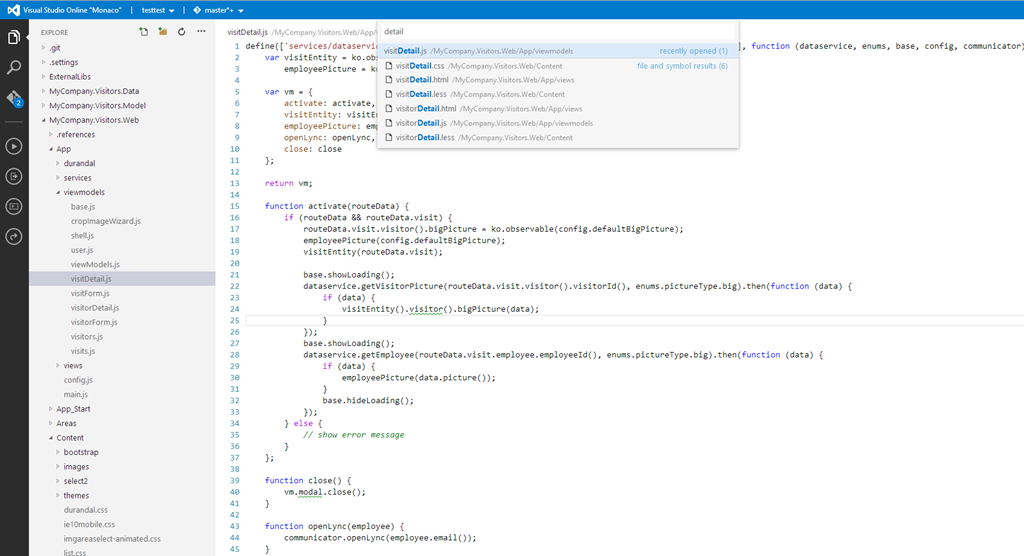
Microsoft held its official launch for Visual Studio 2013 today, at an event in New York, although the product itself has been available since mid-October. VP Soma Somasegar nevertheless made some new announcements, in particular the availability in preview of an online Visual Studio editor, codenamed Monaco. “Developers will now be able to edit their sites directly from the web, from any modern browser, on any device,” said Somasegar on his blog.

Monaco is not intended as a replacement for the desktop IDE. Instead, it parallels what Microsoft has done with Office, which is to provide a cut-down online editor for occasional use. Monaco currently targets only web applications running on Azure, Microsoft’s public cloud platform. The technology is not altogether new, since it is built on the same base as “Napa”, the online editor for Office 365 applications.

image

At the launch, Monaco was demonstrated by Erich Gamma, of Design Patterns and Eclipse fame, who says he uses it for real work. He assured us that it is built on web standards and compatible with iOS and Android tablets as well as desktop browsers.

Online editing with Monaco is only one part of what Microsoft now calls Visual Studio Online. The product also includes a hosted version of Team Foundation Server, offering source code control, collaboration tools, and an online build service. These features were already available as part of Team Foundation Service, which is now replaced by Visual Studio Online. If you are happy with the cut-down Visual Studio Express, or already have Visual Studio, then subscription is free for teams of up to five users, with additional users costing $10 per user/month for an introductory period, and rising to $20 per user/month.

Microsoft is also offering Visual Studio Online Professional, which bundling desktop Visual Studio Professional with these online services, for teams of up to 10 users, at $22.50 per user/month rising to $45.00 per user/month. This follows the same model which Adobe adopted for its Creative Cloud, where you get cloud services bundle with tools that run on the desktop.

Pay even more and you can get Visual Studio Online Advanced, which oddly does not include the Professional IDE, but supports unlimited users and has additional reporting and collaboration features, for $30 rising to $60 per user/month.

When does the introductory offer expire? It’s until further notice – 30 days’ notice will be provided before it ends. Confusing.

Somasegar also announced the preview of a new online service called Application Insights. This service analyses and monitors data from .NET or Java applications running on Windows Server or Windows Azure, and .NET applications on Windows Phone 8, reporting on availability, performance and usage.

Another new service is Elastic Load Test (not to be confused with Amazon’s Elastic Compute Cloud), which simulates multiple concurrent users for testing the performance and behaviour of an application under stress. This requires the expensive Visual Studio Ultimate with MSDN subscription, and offers 15,000 virtual user minutes per month, with additional virtual user minutes at $.001 each.

Finally, he announced a partnership with Xamarin to enable development for iOS and Android in C# and Visual Studio, extending the existing Portable Class Libraries so that non-visual code can be shared across different Windows platforms as well as the new mobile target platforms.

I spoke to Xamarin’s Nat Friedman about this and wrote it up on the Register here.

Microsoft’s strategy here is to persuade existing Windows developers, familiar with C#, Visual Studio, and both desktop and ASP.NET applications, to stick with Microsoft’s platform as they migrate towards cloud and mobile. In this context, the heart of Microsoft’s platform is Windows Azure and Office 365, which is why the company can tolerate iOS or Android clients.

The company will also hope that a proliferation of apps which integrate and extend SharePoint online will help drive subscriptions to Office 365.

The latest Visual Studio includes a new Cloud Business App project type, which is an app that sits on Windows Azure and integrates with SharePoint in Office 365. Coding in Visual Studio and deploying to Azure, both for Cloud Business apps and ordinary web applications, is now an easy process, reducing friction for developers deploying to Azure.

More information on Visual Studio Online is here.

ComponentOne’s TouchToolkit for Windows Forms: another approach to the Windows tablet problem

Software component vendor ComponentOne has released Studio Enterprise 2013 v2.5, the latest in its suite of components, with support for Windows 8.1 and Visual Studio 2013.

The piece that caught my eye is the TouchToolkit for Windows Forms.

image

Here’s the problem. The Windows desktop is poor with touch control, which is why Microsoft created Windows 8 with its alternate, touch-friendly Windows Runtime platform. However users are resistant to the changed user interface, and it does not help with existing desktop apps.

Developers are also faced with a question of simple mathematics. Develop a Windows 8 Store app, get a market of x. Develop a Windows desktop app, get a market of many times x, since Windows 8 can run desktop apps, but Windows 7 cannot run Store apps.

Embarcadero approached this problem with a framework called Metropolis, for Delphi and RAD Studio. It builds apps that mimic the Windows Runtime look and feel, but which are actually desktop apps. Of course they do not run on Windows RT, the ARM version. It is a confusing solution in my opinion, leading users into what Martin Fowler calls the Uncanny Valley, where stuff works almost but not quite how you expect.

I prefer the thinking behind the TouchToolkit. Take your existing Windows Forms apps, or write a new one, using these controls to make them more touch-friendly. They will never be as well suited to touch control as a Store app, but they might be good enough, and of course will run on Windows 7 and earlier versions.

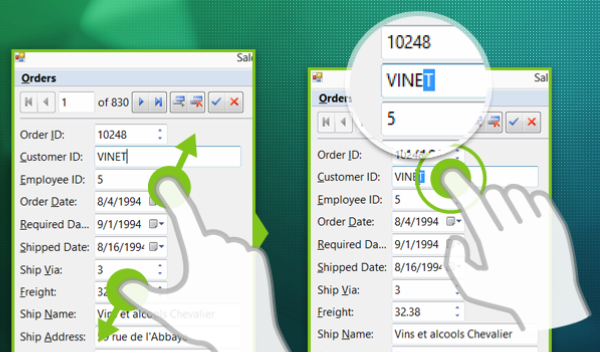
The controls include a magnifier, support for zoom gestures, and a touch event provider that adds gesture support to any control.

Windows Forms, we all know, is not as good as WPF if you want an application that scales nicely and supports modern design. On the other hand, Windows Forms is pragmatic and easy to use framework that remains popular for line of business apps.

Appcelerator plans to rethink Titanium architecture, standardise on WebKit JavaScript engine

Appcelerator CEO Jeff Haynie has posted about his plans for Titanium, the company’s cross-platform mobile development toolkit.

The plan is to completely rewrite the core engine, while maintaining a mostly-compatible API. Central to the plans is the idea of using one JavaScript engine on all platforms:

With Ti.Next, we’ve created a small microkernel design that will allow us to have minimal bootstrap code in the native language (C, Java, C#, etc) that talks to a common set of compilers, tools and a single JavaScript Virtual Machine. We have found a way to make the WebKit KJS VM work on multiple platforms instead of using different VMs per platform. This means we can heavily optimize the microkernel (herein after called the “TiRuntime”) and maintenance, optimizations and profiling can be greatly simplified. We’re talking about ~5K LOC vs. 100K LOC per platform.

This will make it possible to share almost all the Titanium code itself across all platforms. The Titanium runtime itself will be shared code written in JavaScript.

Appcelerator says that Titanium code will be “faster than native code in most situations.”

No date for Ti.Next is given though according to this slidedeck the plan is to have the “first set of developer builds available soon to GitHub repo – possibly in the next 45-60 days”. It adds, “production builds are a ways away.”

Using a WebKit JavaScript engine on Windows Phone, for example, sounds interesting.

Anders Hejlsberg says C# 6.0 to use Roslyn compiler, coming in next Visual Studio after VS 2013

A disappointment at Microsoft’s Build conference last month was lack of news about the next version of C#, version 6.0. C# architect Anders Hejlsberg did present a session, but it was on TypeScript, a language which compiles to JavaScript.

Aside: Hejlsberg talks about the new Xbox music app in Windows 8.1 (and Xbox One) which is written in JavaScript. It is a large app with 500,000  lines of code, and new features are now implemented in TypeScript (30,000 lines so far).

However, Hejlsberg did also talk about C# 6.0 at Build, during this Channel 9 Q&A, though you have to scroll through to reach the C# content (about 34 minutes in).

image

He confirmed that C# in Visual Studio 2013 is the same as before, but there will be new previews of the forthcoming “Roslyn” compiler soon, and that C# 6.0 will be in the “next Visual Studio after” which suggests Visual Studio 2014, presuming Microsoft sticks to its annual release cycle.

“We are at a point where the Roslyn compilers are done,” he said.

Roslyn, Hejlsberg explained, is the new compiler for “C#, and VB, and the language services in the IDE.”

Roslyn performance will be at least as good as the existing native compiler, says Hejlsberg. It is better suited to parallel processing so will take advantage of multi-core machines, “particularly for large projects.”

You can read more about Roslyn here. Microsoft describes it as “opening up the Visual Basic and C# compilers as APIs.” Practical benefits include features like instant porting of VB code to and from C#, and the use of C# and VB as macro languages within a .NET application.

Hejlsberg also says that Roslyn will enable a faster pace of evolution for C# in future.

Another aside: Xamarin, which provides a compiler for C# targeting iOS and Android, gets a nod of approval from Hejlsjberg. “I’m a great fan of their work,” he says.

Blogger (and former Microsoft Excel developer) Wesner Moise provides a transcript of the key points.