Back in January I asked IntelliJ IDEA: the best IDE for programming Android? Google says yes. At the IO conference today, the company announced the official Android Studio – and it a version of IntelliJ IDEA.
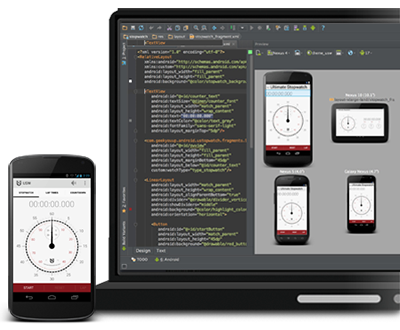
Android Studio is currently in preview.
Back in January I asked IntelliJ IDEA: the best IDE for programming Android? Google says yes. At the IO conference today, the company announced the official Android Studio – and it a version of IntelliJ IDEA.
Android Studio is currently in preview.
Embarcadero has released RAD Studio XE4, its suite of development tools for Window, Web and for the first time, Apple iOS. iOS support first appeared in an earlier release, but in preview, and the current effort works using a new LLVM-based ARM compiler so is somewhat unlike the preview. Individual products such as Delphi XE4 are also available separately.
Looking at what’s new in Delphi and C++ Builder in XE4 it is apparent that iOS support is by far the main change since RAD Studio XE3, though there are two other significant changes:
I ran up the new RAD Studio on a Parallels VM on a Mac, a VM on a Mac being the best way to try cross-platform development for OS X and iOS. The new IDE immediately presents you with instructions on setting up for iOS development (though I am not a fan of videos, preferring clear text instructions) but I no problems configuring the Mac agent (called PAServer) which makes this work. Start a new mobile app and you can pick a starter template or begin with a blank canvas.
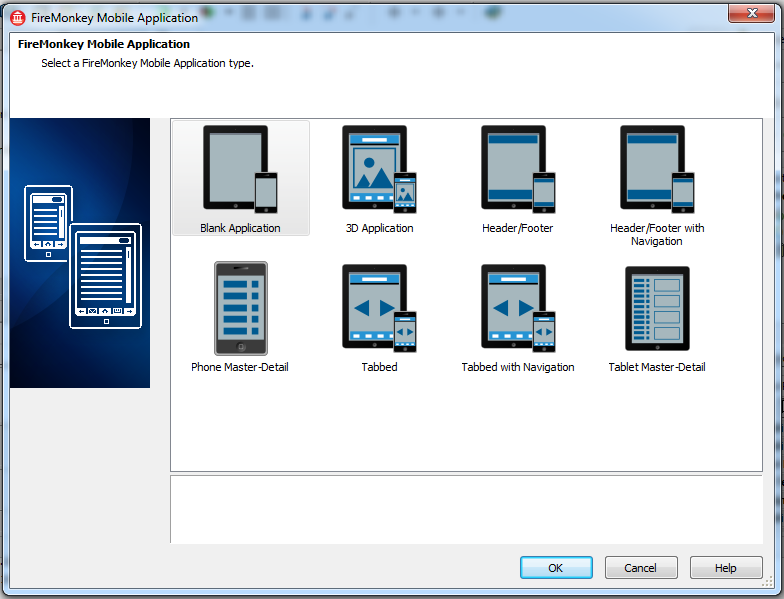
I picked the Tabbed Application and was soon trying out my new app on the iOS simulator
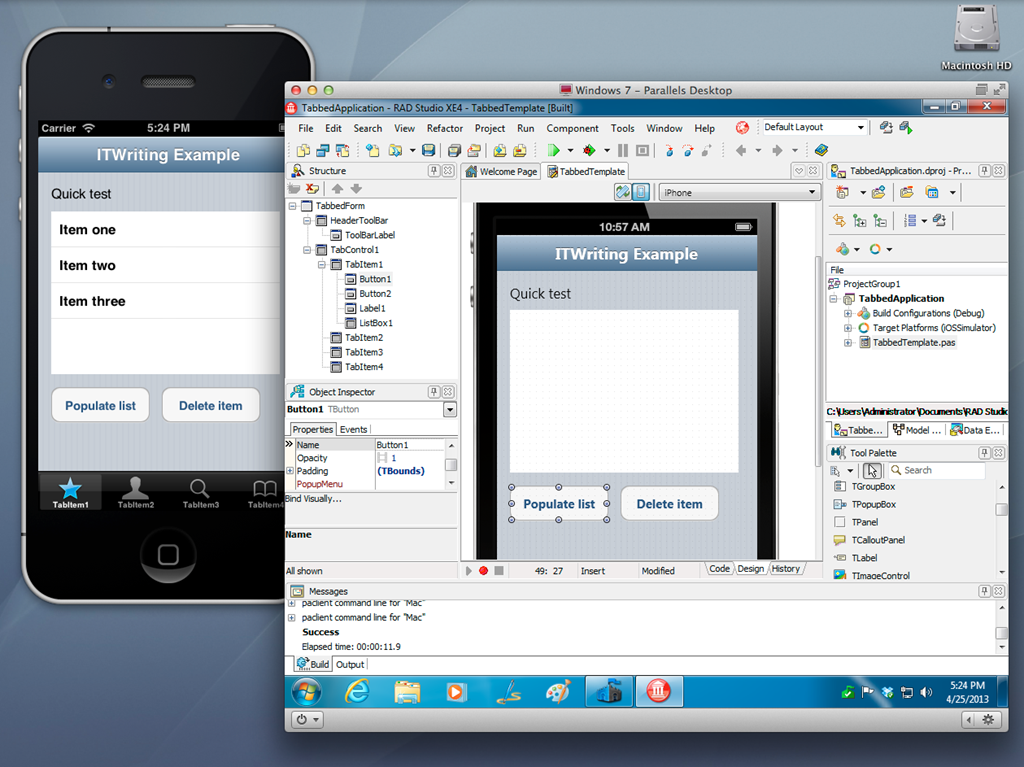
So far so good, though the ability to run up a quick app is no proof of the quality of the development tool. Still, a few reflections.
As I noted earlier, it seems to me that Delphi developers are either Windows developers using the tried and trusted VCL (in which case there is very little for them in XE4), or developers who are targeting mobile platforms and using the cross-platform FireMonkey framework in order to share code between Windows, Mac and mobile. I guess it is also possible that developers targeting iOS alone will be so taken with Delphi or C++ Builder that they will come in as new users.
VCL developers now have 64-bit compilation and a mature framework, and given that the efforts of Embarcadero are now focused elsewhere, and that even Microsoft is going slow on new features for what it now calls “desktop Windows”, there is little reason for such developers to upgrade.
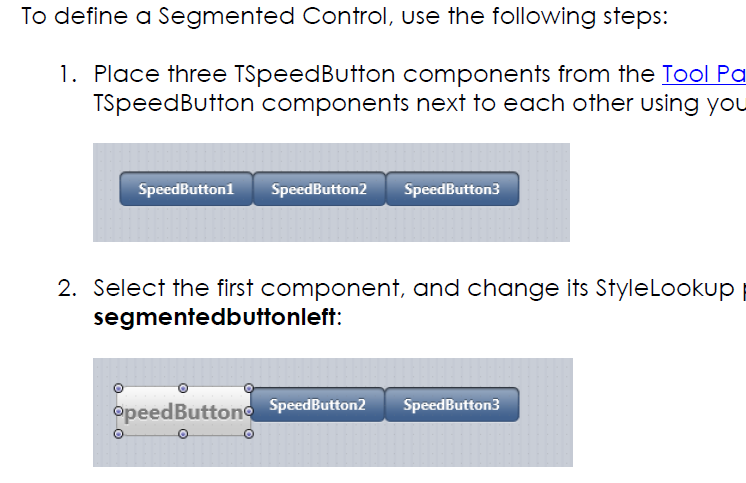
The key questions then are about the quality of the FireMonkey framework and the iOS support. It is hard for me to be objective, since I know Delphi from of old and it is a familiar environment. Delphi or C++ Builder for iOS has obvious attractions for such developers. I would be intrigued though to know what an Objective C or even a JavaScript developer would make of Delphi, coming to it fresh. I am sceptical whether an Xcode developer would find enough productivity benefit in Delphi and FireMonkey to want to move over, and suspect also that many would not be impressed by the FireMonkey approach to iOS controls, which are generally custom drawn rather than true native, or faked completely like the Segmented Control which you are meant to put together from SpeedButtons with segmented styling, as explained in the Delphi iOS tutorial:
Embarcadero is making a big play of being “true native” but native is not just about the executable code (I have written more about this elsewhere) and cross-platform always involves compromise.
There is also some disquiet in the developer community about the cost of keeping up to date with RAD Studio. The full RAD Studio XE4 Architect edition currently costs £2,892.60 ex VAT for a new user, or £1,927.80 to upgrade. If you just want basic Delphi, Delphi XE4 Pro is a more reasonable £642.60 for a new user, or £352.80 to upgrade – but you do not get iOS support for that, that is another £320.40 for the Mobile Add-on, and FireDAC if you need it a further £285.00. When XE3 came out, Embarcadero promised that iOS and Android support would be available later at a “low cost”; of course that is a relative and subjective term, but I can understand if some feel that the price is on the high side. Or you can buy software assurance and get upgrades free; I don’t have prices for that but the cost is significant.
It is unfortunate for Embarcadero that there is intense competition in the iOS tools space, not only from Apple’s excellent and free tools, but also from the likes of Xamarin and Titanium.
None of the above is intended to detract from the achievement of bringing Delphi to iOS, with Android promised, which is considerable.
Delphi developers should note changes in the Delphi language coming as a result of the move towards the LLVM compiler for mobile support. Embarcadero has released a paper describing these in detail. The just-released RAD Studio XE4 includes the ARM compiler for iOS, with an Android compiler to follow later this year.
It seems to me that Delphi developers will now fall into two broad camps:
1. Windows VCL developers for whom the new FireMonkey cross-platform framework is of little interest, either because they are not developing for Mac or mobile, or because they prefer other tools for those platforms.
2. Developers who are embracing the new platform targets, migrating code to FireMonkey or starting new projects there, and planning to share code across all platforms as far as possible.
If you are in the first camp, you need not worry too much about language changes yet. I believe it is Embarcadero’s long-term intention to unify Delphi’s compilers around LLVM on all platforms, but when or whether this will happen for Win32 and Win64 is moot; my guess is that what the company now calls the “classic compiler” will be around for a long time yet. However the Mac compiler may migrate to LLVM sooner. (I am speculating).
Currently, RAD Studio XE4 includes five compilers:
Of these, only the last one currently uses LLVM, though the iOS Simulator compiler behaves as closely as possible like its ARM cousin. In general the language changes are currently only applicable by default for the LLVM and Simulator compilers as far as I can tell.
What are the language changes? My quick summary of the biggest changes is as follows:
In addition, the With statement is now deprecated.
The language changes are described in detail in the paper The Delphi Language for Mobile Development, which you can find here.
Embarcadero is removing Prism from the next version of RAD Studio, XE4, expected later this month.
Prism is actually a third-party product, based on RemObjects Oxygene. Prism and Oxygene let you code in Delphi and compile to .NET or Mono.
Marc Hoffman from RemObjects explains the change here:
Starting with the upcoming release of XE4, Embarcadero Prism will no longer be part of the RAD Studio SKU, and there will be no “XE4″ branded edition of Prism.
But worry not. As you all know, Prism has been nothing more than a re-branded version of our Oxygene for .NET product — and Oxygene will keep going on, stronger than ever.
In fact, Oxygene has long outgrown its Prism-branded edition, first when we introduced full native support for Java and Android to the language over 18 months ago, and of course with our upcoming support for truly native iOS and Mac apps, shipping next month.
The disappearance of Prism is the final chapter in the story of Delphi for .NET. Borland’s Delphi was first released in 1995, and combined a visual interface builder superficially similar to Visual Basic with a native code compiler, enabling full access to the Windows API as well as better performance than Microsoft’s VB.
Delphi built up a strong following, but in 2002 when Microsoft brought out the .NET Framework Borland worried that Delphi would be left behind. In 2002 it brought out CSharpBuilder, an IDE for C# targeting the .NET Framework, and in 2003 Delphi 8 which also targeted .NET.
Other .NET versions followed, but whereas native code Delphi was a compelling alternative to runtime-based platforms like VB and .NET, the .NET versions of Delphi were less distinctive. Developers coding for .NET preferred Microsoft’s Visual Studio, while Delphi developers preferred to stick with native code.
When Embarcadero acquired the Delphi tools from Borland in 2008, it dropped .NET support from Delphi itself and replaced it with Prism.
I doubt that the disappearance of Prism will cause much consternation. Prism developers will simply switch to Oxygene instead.
Xamarin, a company which provides tools for cross-platform development in C#, has announced its acquisition of LessPainful and the creation of cloud-based testing for mobile apps based on LessPainful’s technology and the Calabash scripting language it created.
The Test Cloud will perform automated user-interface tests on real devices, hosted by Xamarin, will provide detailed reports in the event of test failures, and will support Continuous Integration so that bugs are caught as early as possible.
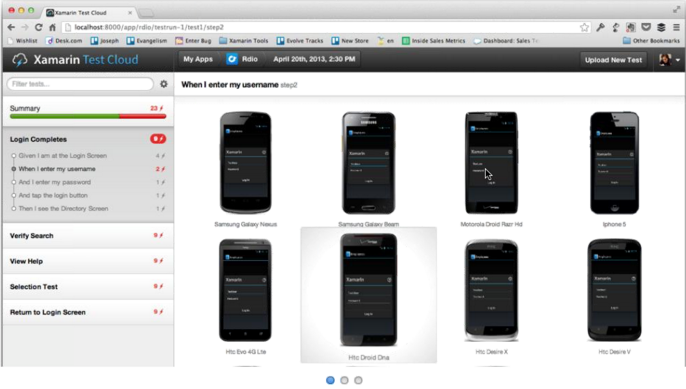
“After you’ve conquered the cross-platform mobile development problem, testing is the next large pain point” says Xamarin CEO Nat Friedman. “You can’t just get by with manual testing. There’s a need for the same level of tools and processes in mobile testing that you have in desktop and web testing.”
“Quality is actually more important on mobile than in other places. Mobile sessions are very short. People are really intolerant of low quality on mobile. The release cycles are shorter too. People are revving more frequently, and testing is a bigger challenge.”
Another issue with mobile testing is the number of devices out there, especially if you throw cross-platform into the mix. “You have on Android all these manufacturers who customise the OS in different ways, you have multiple different versions that are in use, and you have multiple different form factors and device capabilities. The testing permutation matrix is huge.”
“Automated UI testing is the only kind of testing that can ensure that the app does what it is supposed to do.”
Friedman says that the Xamarin UI tests are more robust than competing UI test frameworks because they do not depend on UI image recognition. “The right answer is object-based, you identify user interface elements on the screen by object IDs”.”
How does testing on real devices work? If you have 50 developers testing on 27 devices in Xamarin’s cloud, will there be racks and racks of devices to support them? “That’s what it looks like at our end, racks and racks of devices,” confirmed Friedman. “The service is going to be built based on device/hour usage. We’ll be able to scale up to match what people need.
“We talk to developers who spend $8,000 a month just to get new devices. That’s not counting the labour and everything else they need to do, to set up their own testing infrastructure. It’s a giant pain point.”
Xamarin’s Test Cloud will offer plug-ins for Jenkins, TeamCity, and Microsoft’s Team Foundation Server, to support Continuous Integration.
The scripting language for the Test Cloud is either Calabash , or C# scripting which is under development by Xamarin.
The Test Cloud is not just for applications developed using Xamarin’s C# framework, but also supports other frameworks including those written in native iOS Objective C. However, only iOS and Android are supported.
Availability is set for the third quarter of 2013.
Xamarin’s Evolve conference is currently under way in Austin, Texas, with around 600 developers in attendance. Friedman says the company is growing fast. 1000 developers a day download the tools, there are over 15,000 paid developers, and the company now has 65 employees.
More information on the Xamarin Test Cloud is here.
Today at its Software Conference in Paris Intel presented its HTML5 development tools.
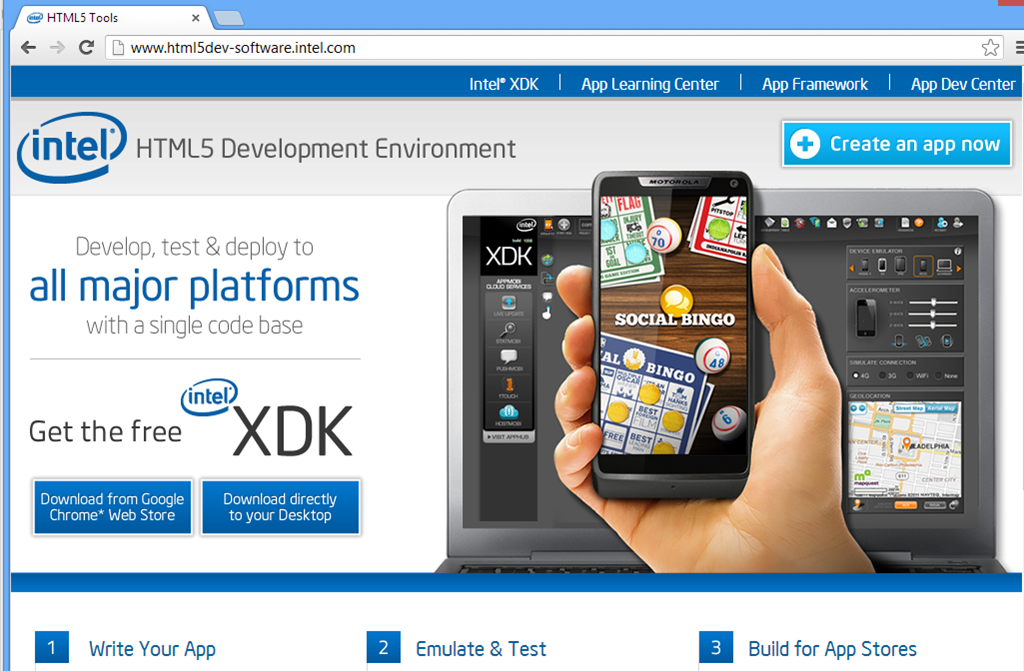
There are several components, starting with the XDK, a cross-platform development kit based on HTML5, CSS and JavaScript designed to be packaged as mobile apps using Cordova, the open source variant of PhoneGap.
There is an intriguing comment here:
The XDK is fully compatible with the PhoneGap HTML5 cross platform development project, providing many features that are missing from the open source project.
PhoneGap is Adobe’s commercial variant of Cordova. It looks as if Intel is doing its own implementation of features which are in PhoneGap but not Cordova, which might not please Adobe. Apparently code that Intel adds will be fed back into Cordova in due course.
Intel has its own JavaScript app framework, formerly called jqMobi and now called Intel’s App Framework. This is an open source framework hosted on Github.
There are also developer tools which run as an extension to Google Chrome, and a cloud-based build service which targets the following platforms:
And web applications:
The build service lets you compile and deploy for these platforms without requiring a local install of the various mobile SDKs. It is free and according to Intel’s Thomas Zipplies there are no plans to charge in future. The build service is Intel’s own, and not related to Adobe’s PhoneGap Build, other than the fact that both share common source in Cordova. This also is unlikely to please Adobe.
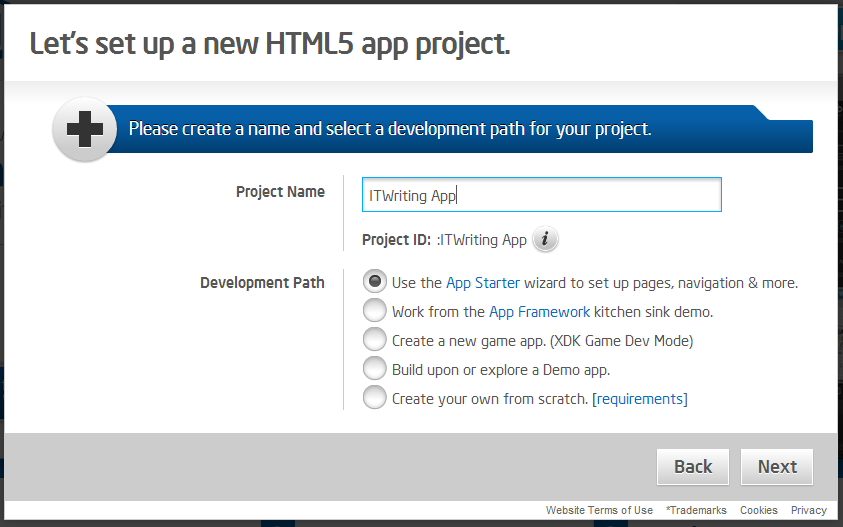
You can start a new app in the browser, using a wizard.
Intel also has an iOS to HTML5 porting tool in beta, called the App Porter Tool. The aim is to convert Objective C to JavaScript automatically, and while the tool will not convert all the code successfully it should be able to port most of it, reducing the overall porting effort.
Given that the XDK supports Windows 8 modern apps and Windows Phone 8, this is also a route to porting from iOS to those platforms.
Why is Intel doing this, especially on a non-commercial basis? According to Zipplies, it is a reaction to “walled garden” development platforms, which while not specified must include Apple iOS and to some extent Google Android.
Note that both iOS and almost all Android devices run on ARM, so another way of looking at this is that Intel would rather have developers work on cross-platform apps than have them develop exclusively for ARM devices.
Zipplies also says that Intel can optimise the libraries in the XDK to improve performance on its processors.
You can access the HTML5 development tools here.
Cloud telephony company Twilio has announced a partnership with Google to integrate its API with App Engine, Google’s platform for cloud applications. Google has a clear explanation of what this enables here. You can have your application respond to incoming SMS texts or voice calls, and send an SMS back, or for voice, play messages, record the call, or ask for further digits to be pressed to route the call appropriately. You can also use the API to initiate calls or send texts.
If you look here there are how-to examples (generic to Twilio, not specific to App Engine) for some of the things you do with Twilio:
and more of course. Help desk applications and other kinds of support are the most obvious applications, but there are no limits: if you want to build voice calls or SMS messaging into your app, Twilio is the obvious solution.
The relationship with Google is not exclusive. Twilio already has integration with Windows Azure, Microsoft’s cloud platform. Google has one-upped Microsoft though. The Azure promotion gets you free credit for 1000 texts or minutes for Azure, while there are free 2000 texts or minutes for Google App Engine customers.
You can also use Twilio on any platform that can use a REST API. There is a module for Node.js, and libraries for PHP, Python, Ruby, C#, Java and Apex (used by Salesforce.com).
NVIDIA CEO Jen-Hsun Huang made a number of announcements at the GPU Technology Conference (GTC) keynote yesterday, including an updated roadmap for both desktop and mobile GPUs.

Although the focus of the GTC is on high-performance computing using Tesla GPU accelerator boards, Huang’s announcements were not limited to that area but also covered the company’s progress on mobile and on the desktop. Huang opened by mentioning the recently released GeForce Titan graphics processor which has 2,600 CUDA cores, and which starts from under £700 so is within reach of serious gamers as well as developers who can make use of it for general-purpose computing. CUDA enables use of the GPU for massively parallel general-purpose computing. NVIDIA is having problems keeping up with demand, said Huang.
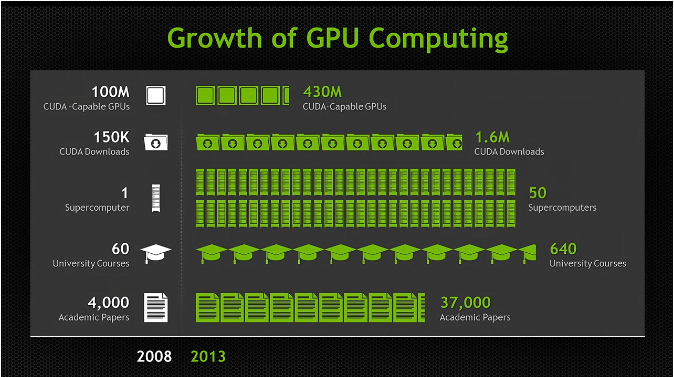
There are now 430 million CUDA capable GPUs out there, said Huang, including 50 supercomputers, and coverage in 640 university courses.
He also mentioned last week’s announcement of the Swiss Piz Daint supercomputer which will include Tesla K20X GPU accelerators and will be operational in early 2014.
But what is coming next? Here is the latest GPU roadmap:
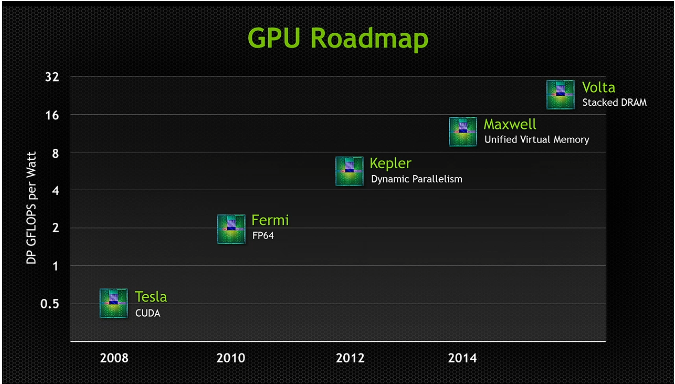
Kepler is the current GPU architecture, which introduced dynamic parallelism, the ability for the GPU to generate work without transitioning back to the CPU.
Coming next is Maxwell, which has unified virtual memory. The GPU can see the CPU memory, and the CPU can see the GPU memory, making programming easier. I am not sure how this impacts performance, but note that it is unified virtual memory, so the task of copying data between host and device still exists under the covers.
After Maxwell comes Volta, which focuses on increasing memory bandwidth and reducing latency. Volta includes a stack of DRAM on the same silicon substrate as the GPU, which Huang said enables 1TB per second of memory bandwidth.
What about mobile? NVIDIA is aware of the growth in devices of all kinds. 2.5bn high definition displays are sold each year, said Huang, and this will double again by 2015. These displays are mostly not for PCs, but on smartphones or embedded devices.
Here is the roadmap for Tegra, NVIDIA’s system-on-a-chip (SoC).
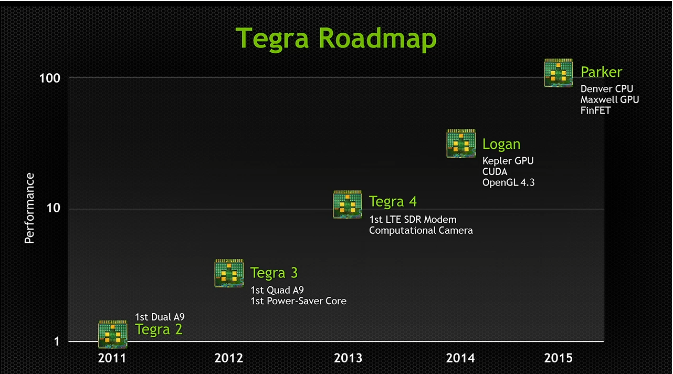
Tegra 4, which I saw in preview at last month’s mobile world congress in Barcelona, includes a software-defined modem and computational camera, able to tracks moving objects while keeping them in focus.
Next is Tegra Logan. This is the first Tegra to include CUDA cores so you can use it for general-purpose computing. It is based on the Kepler GPU and supports full CUDA 5 computing as well as Open GL 4.3. Logan with be previewed this year and in production early 2014.
After Logan comes Parker. This will be based on the Maxwell GPU (see above) and NVIDIA’s own Denver (ARM-based) CPU. It will include FinFET multigate transistors.
According to Huang, Tegra performance will includes by 100 times over 5 years. Today’s Surface RT (which runs Tegra 3) may be sluggish, but Windows RT will run fine on these future SoCs. Of course Intel is not standing still either.
Finally, Huang announced the Grid Visual Computing Appliance, which I will be covering shortly in another post.
Microsoft has launched a “Keep the cash” offer to developers. Publish up to 20 apps, 10 for Windows Phone and 10 for Windows 8, and get $100 for each of them.

The offer is little use for most of the world. The terms state that “Offer good only to legal residents of the 50 United States & D.C. aged 18 or older”.
It is little use for Microsoft either. How much development time does $100 buy? Still, there is a way to make sense of it for hobbyists or developers with some spare time. What you do is to create one of those apps that does very little but is specific to something like a particular sports team or pop star, and maybe searches the web for news about them. Then you replicate it 10 times over for 10 different teams or celebrities. Then you adapt it for both phone and Windows 8 store. That’s 20 apps, $2000.
In other words, the only thing this will achieve is to increase the amount of dross in these two stores. Microsoft is pumping the numbers, so that there is an appearance of success on the most naive analysis, counting the apps.
Incidentally, this is something that Windows Store VP Antoine LeBlond assured me Microsoft would not do, at the launch of Surface RT in New York last year.
Does Microsoft have an app problem? Yes, particularly on Windows 8. Windows Phone 8 is less of a problem; Microsoft’s phone is actually building some momentum from what I can tell and app availability is not too bad, despite some gaps such as Instagram and BBC iPlayer.
The app problem is nothing to do with quantity though. 10 good apps for the Windows Store is worth more to the platform than 10,000 poor ones. In fact, filling the store with junk is a negative that will cement the perception that there is little there that is worthwhile.
Rather, the app problem is the consequence of several factors:
1. The development platform is not good enough. Most things can be done, but not easily, and the default look and feel results in blocky apps that tend to scale badly on big screens. The built-in controls are too primitive. The user interface is insufficiently intuitive and users struggle to discover the menus and features hidden in the Charms bar.
2. Microsoft has so far failed to establish Windows 8 as a tablet platform. The reasons are complex and to do with the Windows heritage, the way OEM and retail partners treat Windows, and the fact that there are other tablet platforms (iOS and Android) out there which meet the need for many people.
3. Windows 8 is out there in reasonable numbers, but most users spend most of there time in the desktop, making the Windows Store app platform less successful than the quantity deployed would suggest.
4. Businesses are mainly standardising on Windows 7, not Windows 8, to the detriment of the new app platform.
In this context, the best thing that could happen for Windows 8 is the appearance of new compelling apps that will drive users to the underused tablet personality. Microsoft could and should do some of those (there are a few efforts, like Fresh Paint).
Those apps, though, will not be developed for $100. They will be developed either by enthusiasts who love the platform (which will not happen until the platform is improved), or by businesses who invest real money and effort in building them.
As it is, this misguided initiative does little other than to draw attention to the problems Microsoft has with its new Windows.
Which is better for massively parallel computing, a GPU accelerator board from NVidia, or Intel’s new Xeon Phi? On the eve of NVidia’s GPU Technology Conference comes a paper which Intel will enjoy. Erik Sauley, Kamer Kayay, and Umit V. C atalyurek from the Ohio State University have issued a paper with performance comparisons between Xeon Phi, NVIDIA Tesla C2050 and NVIDIA Tesla K20. The K20 has 2,496 CUDA cores, versus a mere 61 processor cores on the Xeon Phi, yet on the particular calculations under test the researchers got generally better performance from Xeon Phi.
In the case of sparse-matrix vector multiplication (SpMV):
For GPU architectures, the K20 card is typically faster than the C2050 card. It performs better for 18 of the 22 instances. It obtains between 4.9 and 13.2GFlop/s and the highest performance on 9 of the instances. Xeon Phi reaches the highest performance on 12 of the instances and it is the only architecture which can obtain more than 15GFlop/s.
and in the case of sparse-matrix matrix multiplication (SpMM):
The K20 GPU is often more than twice faster than C2050, which is much better compared with their relative performances in SpMV. The Xeon Phi coprocessor gets
the best performance in 14 instances where this number is 5 and 3 for the CPU and GPU configurations, respectively. Intel Xeon Phi is the only architecture which achieves more than 100GFlop/s.
Note that this is a limited test, and that the authors note that SpMV computation is known to be a difficult case for GPU computing:
the irregularity and sparsity of SpMV-like kernels create several problems for these architectures.
They also note that memory latency is the biggest factor slowing performance:
At last, for most instances, the SpMV kernel appears to be memory latency bound rather than memory bandwidth bound
It is difficult to compare like with like. The Xeon Phi implementation uses OpenMP, whereas the GPU implementation uses CuSparse. I would also be interested to know whether as much effort was made to optimise for the GPU as for the Xeon Phi.
Still, this is a real-world test that, if nothing else, demonstrates that in the right circumstances the smaller number of cores in a Xeon Phi do not prevent it comparing favourably against a GPU accelerator:
When compared with cutting-edge processors and accelerators, its SpMV, and especially SpMM, performance are superior thanks to its wide registers
and vectorization capabilities. We believe that Xeon Phi will gain more interest in HPC community in the near future.