Category Archives: software development

Mobile developer survey: Apple iOS most profitable platform, but even Windows Phone is viable

Vision Mobile has released the results of a survey of 6000 mobile developers, sponsored by Blackberry and Mozilla.

Reading through the survey reminds me that despite the critical importance of apps to mobile platforms, surveys which look at developer intent are poor predictors of the future health of specific platforms. High interest or even affection for some new platform tends to dissipate quickly if platform adoption is poor.

Developers influence the success of a platform by developing (or not developing) desirable apps, but this is only one among many factors. Others include:

  • Mobile operators: which devices are they promoting and subsidising most?
  • Devices: which has the right blend of looks, usability and features?
  • Fashion: which smartphones are my friends using?
  • Price: which devices are best value?
  • Marketing: which vendor is doing the best job?
  • Enterprise: in business, security and manageability are important

The report confirms the dominance of iOS and Android and is generally down on Windows Phone while there are more optimistic remarks than I had expected about Blackberry 10 and Firefox OS (but note the sponsors).

Here is a stat that caught my eye though:

Monthly Revenue per developer per platform:

  • $5,200 iOS
  • $4,700 Android
  • $3,600 Windows Phone
  • $2,900 HTML5
  • $1,200 Blackberry 10

There is more money in iOS and Android, but Windows Phone and to some extent HTML5 is financially viable too. On niche platforms like Windows Phone, I guess there is a benefit in having less competition.

Adobe Creative Cloud giveaway at Microsoft Build: sign of a new alliance?

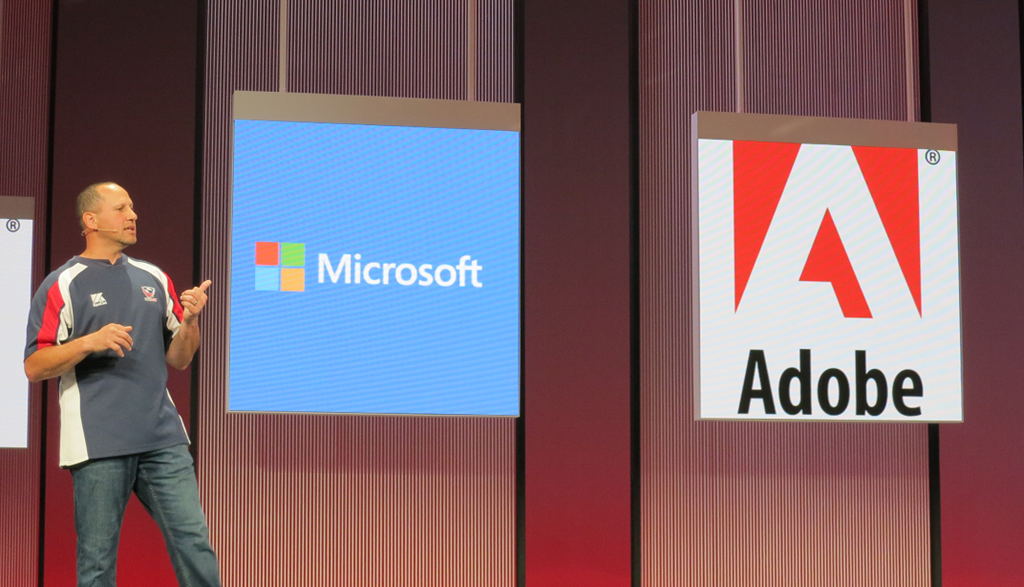
At Microsoft’s Build conference last week, one among a number of giveaways to all attendees was a year’s subscription to Adobe’s Creative Cloud. This was announced by Developer and Platform Evangelism VP Steven Guggenheimer during the day 2 keynote.

image

Creative Cloud costs $49.99 (or £39 + VAT) per month for an individual subscription.

Guggenheimer in effect said that the gift came from Adobe; he suggested that “you guys should send them a nice email”.

The stated purpose of the giveaway is to promote the Digital Publishing Suite (DPS). Creative Cloud comes with DPS Single Edition, which lets you create rich, interactive magazine content and publish it to the iPad and Android. Announced at Build was DPS support for Windows 8.1 in “late 2013”; a sign if nothing else that Adobe is taking Microsoft’s tablet platform seriously.

The odd aspect though is that Build is a developer conference and not quite the right target audience for DPS. On the other hand, there are numerous tools in Creative Cloud that are well suited to developers, including the Edge web content tools, PhoneGap Build, and of course the mighty Photoshop for image editing.

Adobe’s Adam Lehman was interviewed at Build about the Creative Cloud tools, especially Edge, here.

Microsoft is no longer trying to compete with Adobe on design tools. Expression Web and Expression Design have been discontinued. The Flash versus Silverlight wars are also consigned to history, making it easier for these two companies to work together.

Microsoft Build 2013: Love the platform?

The paradox of Microsoft: record revenue and profits, but yes, Windows 8 has been a disaster so far, and the company has lost developer and consumer mind share.

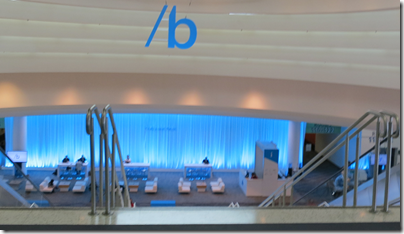
That might explain why there was no lack of availability for tickets to Build in San Francisco. With a smart PR move, Microsoft “sold out” of a limited first allocation, then made more available, and you could register right up to the day before. Attendance estimates are around 4,500.
image

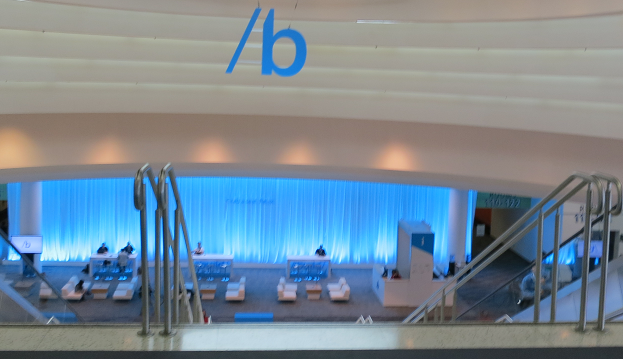
The atmosphere was good though, and someone remarked to me that it felt a bit like an early Mix event, Microsoft’s web and design conference back in Silverlight days.

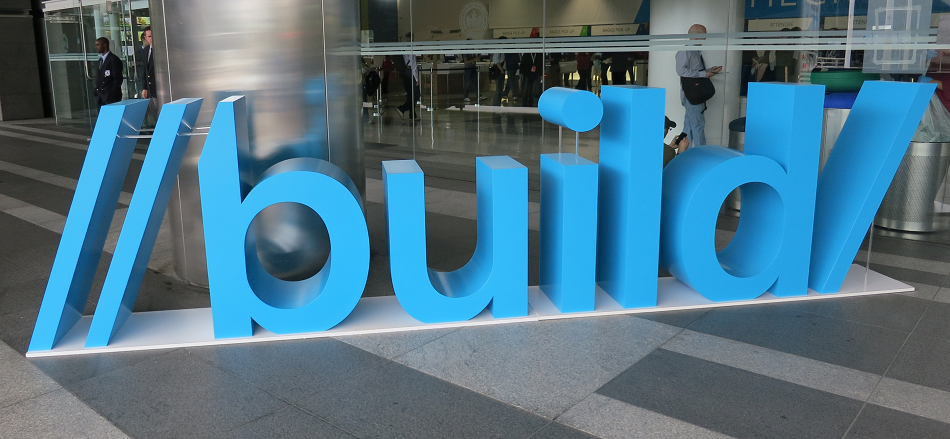
Blue was the colour; and for me Build 2013 was a Windows 8.1 event, though attention was also given to Windows Azure and Windows Phone.

Microsoft has two goals with Windows 8.1.

One is to placate users who essentially want Windows 7.1 and have been wary, confused, or worse, in their reaction to the Windows 8 Modern (or Metro, or Windows Store) user interface.

The other is to establish a new tablet platform, something which has yet to happen despite significant numbers of Windows 8 installations out there since the launch.

There was solid progress on both these fronts at Build, though whether it was enough is of course open to debate. Windows 8.1 is a nicer experience, especially for desktop users, and the user interface feels more elegant and refined than Windows 8.0.

No matter what you may have read elsewhere though, Microsoft is not backtracking. The focus at Build was on the new app platform and its improvements. Developers I spoke to were generally happy with these. “It’s caught up with Silverlight”, one told me.

At Build 2011 and 2012 there was some disappointment among developers, that Microsoft seemed to be pushing HTML and JavaScript above C# and .NET, for its new app platform. There was a perception at Build 2013 that this is no longer the case, though C# architect Anders Hejlsberg spoke on TypeScript (which compiles to JavaScript) rather than C# at his session; and a Microsoft engineer I spoke to denied that there had been any change of direction internally; the official line is that this is developer choice.

In practice, the developer choice tends to be C#, which dominated the session examples, and there was no more gossip about Microsoft abandoning .NET.

Windows seems to be on a one-year refresh cycle now. No date has been announced, but the signs are that Windows 8.1 will follow one year after Windows 8.0, which means RTM (the release build) no later than August and machines on sale in time for the winter season.

Much was already known about Windows 8.1, so were there any surprises? The main one was the evolution of Bing. The key phrase is “Bing as a platform”.

Bing is much more than just a search engine. We’re always a platform company. As we’ve been building this great search experience, we’ve actually been building this rich platform.

said Program Manager David Robinson in this session. Bing services are not just search, but also speech recognition (as seen on Xbox) so that developers can create “natural user interfaces” with voice control, text to speech, and 2D and 3D mapping with driving directions.

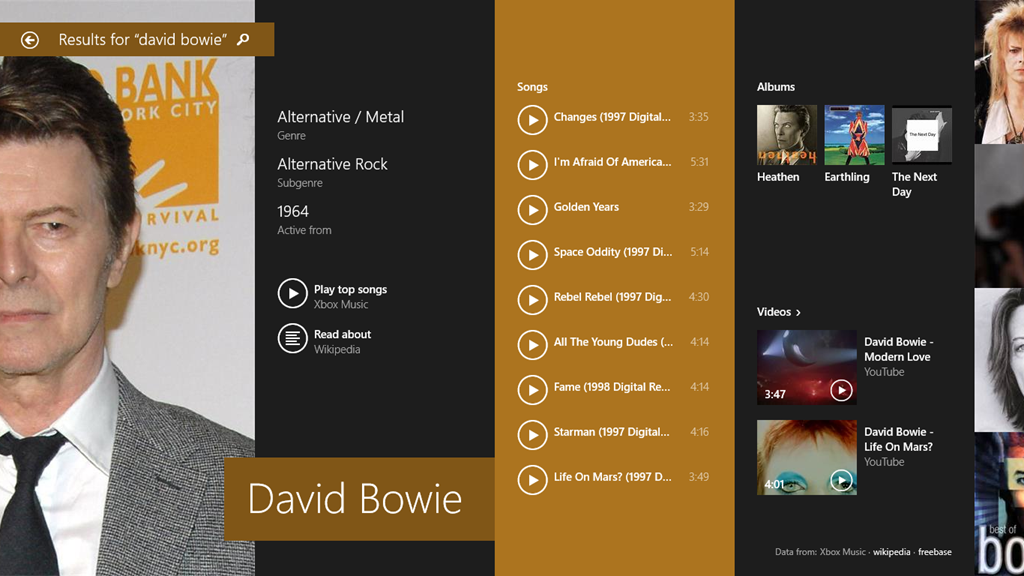
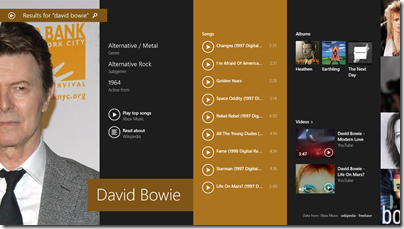
The other twist on this is the new search app in Windows 8.1. The way search works in Windows 8.1 has changed quite a bit. Search within an app should no longer rely on the Charms menu, and developers are expected to put a search box into their user interface. Search in the Charms menu is a system search, that integrates local and web results. Thus, if I search for Build, I get the Build apps, local documents mentioning Build, my own photos, web results relating to the building industry, word definitions, and so on. If I search for “Event viewer”, I get the control panel applet, a Wikipedia entry, a couple of Microsoft support articles, and then a general web search with infinite scrolling to the right. If I search for a celebrity, I get a rich multimedia view.
image

The search engine here is not pluggable; only Bing will work. This is smart strategic thinking, since it is at once a compelling app, an easy way to navigate Windows, and a way of building search share for Bing.

There are some details of search yet to be revealed. In particular, I asked how an app can integrate its own content into an “Everywhere” search, and was told it has yet to be announced (even though Windows 8.0 has a search contract that you would have thought would fit perfectly here).

My own experience of Windows 8.1 is positive, though since I have little difficulty with Windows 8.0 I am not a good test case as to whether it will win over those sticking with Windows 7. The Start button is mostly cosmetic, but I suspect I will find myself right-clicking it frequently to bring up the Win-X menu, now complete with Shutdown option.

Surface RT is greatly improved by the update. There is some performance gain, and the addition of Outlook to the RT desktop makes it twice as useful for businesses using Exchange or Office 365. Windows 8.1 also comes with Internet Explorer 11 with WebGL and some user interface improvements.

Microsoft does feel somewhat diminished these days, thanks to the decline of the PC and its smaller area of dominance, despite its continuing healthy financials. Can the company recover any of that ground? To do so it has to drive adoption of the tablet personality in Windows 8. Microsoft has made a poor start, but it may yet come together.

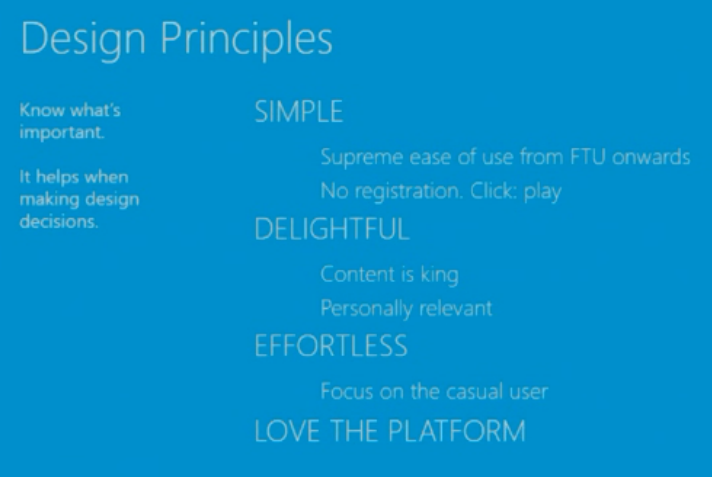
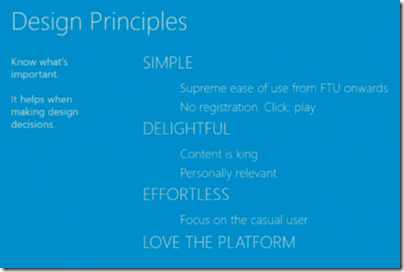
At a sparsely attended session on The Story of Bringing Nokia Music from Windows Phone to Windows 8 the Nokia Design Principles caught my attention:
image

The speakers conveyed real enthusiasm for the last of these, “Love the platform”, which is something I have not often encountered in the context of Windows 8.0, especially as the first release felt rough and not-quite-ready from a developer perspective. There is no doubting its potential though, and if Microsoft can win a bit more developer love with the 8.1 release, then we may see growth. 
Visual C++ will implement all of C++ 11 and C++ 14, some of C99 says Microsoft

Microsoft’s Herb Sutter spoke at Microsoft Build in San Francisco on the future of C++.

image

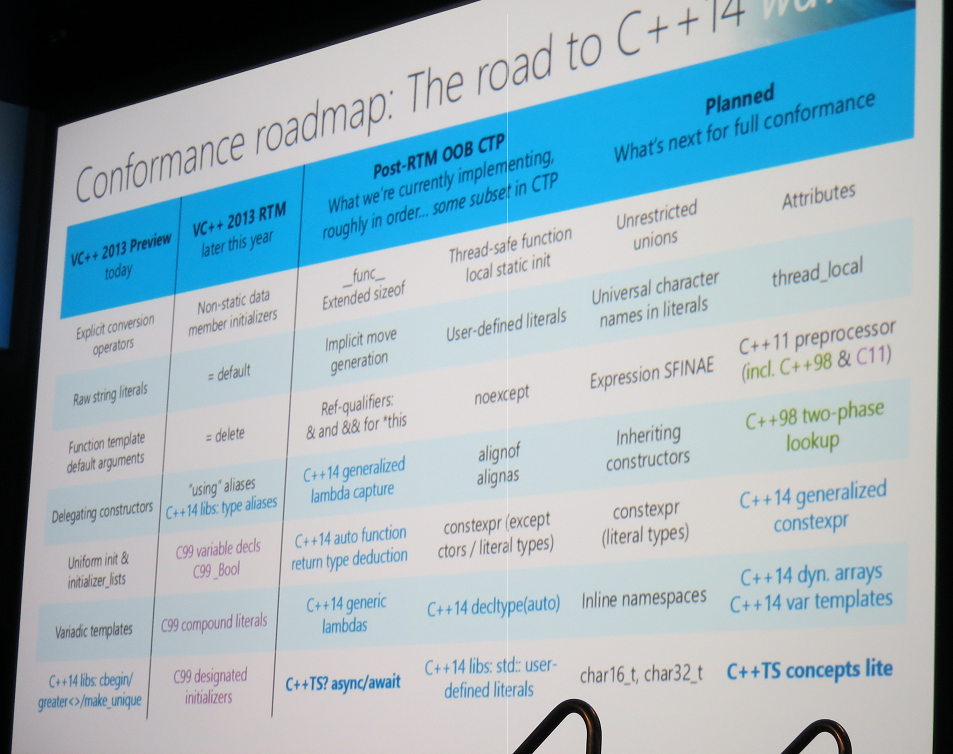
Microsoft has been criticised for being slow to implement all the features of ISO C++ 11. Sutter says most features are now included in the public preview of Visual Studio 2013 – which has a “Go Live” license so you can use it in production – including the oft-requested variadic templates. The full list:

  • Explicit conversion operators
  • Raw string literals
  • Function template default arguments
  • Delegating constructors
  • Uniform int and initializer_lists
  • Variadic templates

More features are coming in the RTM (final release) of Visual Studio 2013 later this year:

  • Non-static member initializers
  • =default
  • =delete
  • ‘using’ aliases

A technical preview will then follow and Sutter listed possible features of which there will be a subset. Full conformance will follow at an unspecified time.

Microsoft is also promising a full implementation of C++ 14, the next update to the standard, even though the exact specification is not yet fully agreed. Some C++ 14 features will be implemented ahead of C++ 11 features, if they are considered to add high value.

Two other points of interest.

Async/await (familiar to C# developers) will be implemented in the post-RTM CTP because it is such a useful feature for Windows Runtime app developers, even though it is not part of the ISO standard.

Finally, Microsoft will also several C99 features in the RTM of Visual Studio 2013:

  • Variable decls
  • C99_Bool
  • compound literals
  • designated initializers

The reason for implementing these is that they are needed to compile popular open source libraries like FFmpeg.

I asked Sutter why Microsoft is not planning full conformance to C99. He said it was a matter of priorities and that work on C++ 11 and C++ 14 was more important. If there are particular additional features of C99 developers would like to see implemented, contacting Sutter with requests and rationale might eventually yield results.

image

Microsoft Build: Windows 8.1 for developers, Visual Studio 2013, Xamarin for cross-platform

Microsoft’s Build developer conference is getting under way in San Francisco.

image

Today Microsoft is expected to announce the public preview of Windows 8.1 together with technical details of what is in the latest Windows update. Sessions include What’s new in the Windows Runtime (the tablet platform in Windows 8), and what’s new in XAML (the interface design language for Windows 8) and WinJS (the interop library for apps written in HTML and JavaScript).

Gartner’s Hype Cycle for new technologies runs from the Peak of Inflated Expectations through the Trough of Disillusionment, eventually settling at the Plateau of Productivity. Inflated expectations for Windows 8 – the iPad killer – expired many months back and we are well down in the trough, with little momentum behind the Windows 8 tablet platform, OEM partners still searching for the right way to package Windows 8 and coming up with unsatisfactory and expensive hybrid creations, and iPad and Android tablets ascendant.

At this point, Microsoft needs to win over its core market, much of which is determined to stick with Windows 7, as well as injecting some life into the tablet side of Windows 8. The platform has promise, but it is fair to say that the launch has been difficult.

The advantage now is that Microsoft is in a period of incremental improvement rather than reimagining Windows, and incremental improvements are easier to pull off. More reports soon.

The schedule also includes news of Visual Studio 2013 and there is likely to be a new preview for this as well. A smoothly integrated development platform across Windows client, Windows Phone, and the Windows Azure cloud, with a dash of XBox One for game developers? Microsoft has all the ingredients but with questions about whether it is able to deliver, as it is currently losing the battle for the client (PC and devices).

One answer for C# developers hedging their bets, or just trying to take advantage of the huge iOS and Android market, is the Xamarin toolset which lets code in C# and .NET and share non-GUI code across all the most popular platforms. Xamarin hosted a large party for Microsoft-platform developers last night in San Francisco. Xamarin’s approach is winning significant support, since it ensures a native GUI on each platform while still sharing a large proportion of your code.  Mono and Xamarin founder Miguel de Icaza was there to evangelise the Xamarin tools.

image

There was also a giant Jenga-like game. Here’s hoping that neither Xamarin’s nor Microsoft’s development stack looks like this.

image

Not just Instagram: the Windows Phone (and BlackBerry, Firefox OS) app problem

I like the Windows Phone OS and use one day to day. However it has become impossible to do my job in technical journalism without either an Apple iOS or Android device alongside it. The reason is that I review gadgets and find increasingly that they come with app support – but only for iOS or Android.

The Fitbit exercise tracking gadget, for example.

image

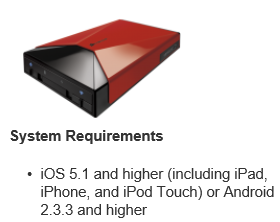
Or the Corsair Voyager Air wireless hard drive, almost inaccessible from Windows Phone (you can do it with a firmware update and DLNA).


image

Or the Seagate Wireless Plus. Actually this one is better as it has a web UI, but no app.

image

My bank is Nationwide and has an app – uh oh.

image

It’s not just Instagram.

image

Where do Microsoft and Nokia go from here? Or other contenders like BlackBerry and Firefox OS? The answer of course is to sell lots of devices so that discontented users beat up the companies that do not support them. But selling lots of devices is difficult when the customer says, “it’s a nice phone, but it does not work with my portable hard drive. Or my bank. Or my Fitbit.”

The Mac survived versus the PC for many years with this kind of problem. It takes a loyal customer base and excellent 1st party and niche apps. There are still areas of strength which Microsoft and its phone partners could exploit (though they have been poor at this to date). Enterprise integration with Windows Server and System Center. Consumer integration with Xbox.

If the company can get it right with Windows tablets that would help too, especially combined with unification of the Windows 8 and Windows Phone app platforms.

Unfortunately for Microsoft though, the market has already decided that only two mobile platforms matter, and that will not be easy to change.

Windows XP Mode hassles for Windows 8 upgraders

One of the reasons for the success of Windows 7 was the provision Microsoft made for customers stuck with applications that only run on Windows XP. Windows XP Mode is a free add-on for Windows 7 Professional that runs Windows XP. It can also hide the XP desktop and run individual applications in their own window, though this is cosmetic and merely hides the desktop. Windows XP Mode uses Virtual PC as its virtualisation platform.

What would expect to happen if you upgraded Windows 7 with XP Mode to Windows 8? Without having researched it, my expectation was that Windows XP Mode would migrate smoothly to Hyper-V in Windows 8.

Not so. Here is the official word:

With the end of extended support for Windows XP in April 2014, Microsoft has decided not to develop Windows XP Mode for Windows 8.  If you’re a Windows 7 customer who uses Windows XP Mode and are planning a move to Windows 8, this article may be helpful to you.  
When you upgrade from Windows 7 to Windows 8, Windows XP Mode is installed on your machine, however Windows Virtual PC is not present anymore. This issue occurs because Windows Virtual PC is not supported on Windows 8. To retrieve data from the Windows XP Mode virtual machine, perform the steps listed in the More Information section.

If you were relying on XP Mode to run some old but essential application, this is definitely worth knowing. Microsoft’s guidance on retrieving the data is unlikely to be much use, since the reason you use XP Mode is to run applications rather than to store data. Some users are not impressed:

This is SHOCKING.  I was using Win 7 Pro and had a fully configured (hours of work) XP Virtual Machine with my complete web development environment in it.  It didn’t even occur to me that it wouldn’t work on Windows 8.  I’ve only just discovered now when I tried to access it to do some updates!

I MUST recover this virtual PC.

Why did the Upgrade Advisor not mention this!?!?  I carefully resolved all the issues highlighted there before moving on.

Of course it is desirable to move off Windows XP completely, even in XP Mode, but the rationale is that it is better to be on a recent and supported version of Windows and to run XP in a virtual environment, than to run Windows XP itself.

Another oddity is that you can run Windows XP on Hyper-V in Windows 8. However you cannot get XP Mode to work unless you perform a repair install that changes the way it is licensed. Yes, it is licensing rather than technical reasons that blocks the XP Mode upgrade:

Note: The Windows XP Mode virtual hard disk will not work on Windows 8 as Windows 8 does not provide the Windows XP Mode license. The Windows XP Mode license is a benefit provided on Windows 7 only.

Users have discovered workarounds. Aside from the repair install mentioned above, you can also use Oracle Virtual Box and trick XP Mode into thinking that it is running on Windows 7 and Virtual PC. You can also run a virtual instance of Windows 7 and run XP Mode within that.

Microsoft and mediocrity in programming

A post by Ahmet Alp Balkan on working as a developer at Microsoft has stimulated much discussion. Balkan says he joined Microsoft 8 months ago (or two years ago if you count when he started as an intern) and tells a depressing tale (couched in odd language) of poor programming practice. Specifically:

  • Lack of documentation and communication. “There are certain people, if they got hit by a bus, nobody can pick up their work or code.”
  • Inability to improve the codebase. “Nobody will appreciate you for fixing styling or architectural issues in their core, in fact they may get offended.”
  • Lack of enthusiasm. “Writing better code is not a priority for the most”
  • Lack of productivity. “I spend most of my time trying to figure out how others’ uncommented/undocumented code work, debugging strange things and attending daily meetings.”
  • Lack of contribution to the community. “Everybody loves finding Stack Overflow answers on search results, but nobody contributes those answers.”
  • Lack of awareness of the competition. “No one I met in Windows Azure team heard about Heroku or Rackspace.”
  • Working by the book. “Nobody cares what sort of mess you created. As long as that functionality is ready, it is okay and can always be fixed later.”
  • Clipboard inheritance. “I’ve seen source files copy pasted across projects. As long as it gets shit done (described above) no one cares if you produced unmaintainable code.”
  • Using old tools. “Almost 90% of my colleagues use older versions of Office, Windows, Visual Studio and .NET Framework.”
  • Crippling management hierarchy. “At the end, you are working for your manager’s and their managers’ paychecks.”

There are a couple of points to emphasize. This is one person in one team which is part of a very large corporation, and should not be taken as descriptive of Microsoft programming culture as a whole. Balkan’s team is in “the test org”, he says, and not making product decisions. Further, many commenters observe that they have seen similar at other organisations.

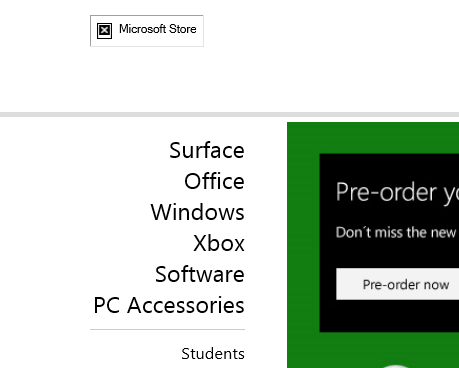
Nevertheless, some of the points chime with other things I have seen. Take this post by Ian Smith, formerly a Microsoft-platform developer, on trying to buy a Surface Pro at Microsoft’s online store. From what he describes, the software behind the store is of dreadful quality. Currently, there is a broken image link on the home page.

image

This is not how you beat the iPad.

Another piece of evidence is in the bundled apps for Windows 8. The more I have reflected on this, the more I feel that supplying poor apps with Windows 8 was one of the worst launch mistakes. Apps like Mail, Calendar and Contacts on the Metro-style side have the look of waterfall development (though I have no inside knowledge of this). They look like what you would get from having a series of meetings about what the apps should do, and handing the specification over to a development team. They just about do the job, but without flair, without the benefit of an iterative cycle of improvements based on real user experience.

When the Mail app was launched, it lacked the ability to see the URL behind a hyperlink before tapping it, making phishing attempts hard to spot. This has since been fixed in an update, but how did that slip through? Details matter.

A lot is known about how to deliver high quality, secure and robust applications. Microsoft itself has contributed excellent insights, in books like Steve McConnell’s Code Complete and Michael Howard’s Writing Secure Code. The Agile movement has shown the importance of iterative development, and strong communication between all project stakeholders. Departing from these principles is almost always a mistake.

The WinRT platform needed a start-up culture. “We’re up against iPad and Android, we have to do something special.” Microsoft can do this; in fact, Windows Phone 7 demonstrated some of that in its refreshing new user interface (though the 2010 launch was botched in other ways).

Another piece of evidence: when I open a Word document from the SkyDrive client and work on it for a while, typing starts to slow down and I have to save the document locally in order to continue. I am not alone in experiencing this bug. Something is broken in the way Office talks to SkyDrive. It has been that way for many months. This is not how you beat Dropbox.

In other words, I do think Microsoft has a problem, though equally I am sure it does not apply everywhere. Look, for example, at Hyper-V and how that team has gone all-out to compete with VMWare and delivered strong releases.

Unfortunately mediocrity, where it is does exist, is a typical side-effect of monopoly profits and complacency. Microsoft (if it ever could) cannot afford for it to continue.

Build Mac and iOS apps in Visual Studio: Oxygene for Cocoa

Remobjects has released Oxygene for Cocoa, which lets you build apps for Mac and iOS using Visual Studio and the Oxygene language.

Oxygene is a Delphi-like language, making this an easy transition for Delphi developers. Until the most recent release, a version of Oxygene, called Prism, was bundled with Delphi, though this targeted .NET rather than Cocoa. Oxygene can also build apps for the Java runtime, making it a three platform solution.

The cross-platform approach is different from that taken by Embarcadero with FireMonkey, a cross-platform framework for Delphi itself. FireMonkey abstracts the GUI as well as the non-visual code, and in many cases controls are drawn by FireMonkey rather than using the native controls on platforms such as iOS. By contrast, Oxygene works directly with the Cocoa frameworks, so you will build the GUI in code or using the Xcode tools on the Mac.

More like Xamarin then? “We do work together with Mono and with Xamarin,” says Remobjects chief Marc Hoffman. “Oxygene for .NET works with the regular Mono framework for desktop or server apps. But when you get to the devices, the benefit with Oxygene is that you get much closer to the framework, you don’t have the weight of providing an abstraction for the classes you want to use.  If you write a UITableViewController to define a view, then you really write a UITableViewController, the same as you would in Objective-C, just the language is different, whereas in Xamarin you write a different class that sits on top and Mono does the mapping.”

Why not just use Xcode? This is in part a language choice. Remobjects says that Oxygene is “better than Objective-C” thanks to features like automatic boxing of integers, floats and strings, and generic arrays. There is more about the language here. Perhaps more important, if you know Pascal or Delphi it will look more familiar. You also get the ability to share code between Windows, Android, Mac and iOS, though this will be the non-visual code. Developers can also work mainly in Visual Studio rather than in Xcode.

The disadvantage is that you need two machines, or a VM running Windows on a Mac, and a remote connection to a Mac in order to debug.

I plan to try out Oxygene for Cocoa soon and of course will report on the experience.

Miguel de Icaza: don’t blame Google for Microsoft’s contempt for developers

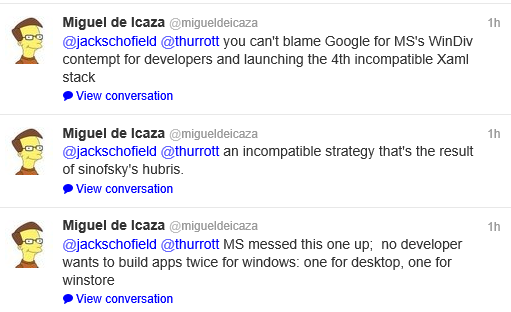
Xamarin’s Miguel de Icaza (founder of the Mono project) has complained on Twitter about Microsoft’s Windows Division’s “contempt for developers” when it created the Windows Runtime and a “4th incompatible Xaml stack”, in a conversation prompted by the company’s spat with Google over the YouTube app for Windows Phone. Google wants this removed because it does not show YouTube ads, to which Microsoft counters that the API for showing these ads is not available.

image 

I am more interested in his general reflections on the wisdom (or lack of it) shown by Microsoft in creating a new platform for touch-friendly apps in Windows 8, that lacks compatibility with previous Windows frameworks. “No developer wants to build apps twice for Windows: one for desktop, one for winstore” he also remarked.

The four XAML stacks are Windows Presentation Foundation, Silverlight (for which de Icaza created a version for Linux called Moonlight), Windows Phone (which runs a slightly different version of Silverlight), and now the Windows Runtime.

Could Microsoft have done this differently, without compromising the goal of creating a new tablet personality for Windows rather than continue with doomed attempts to make the desktop touch-friendly?

The obvious answer is that it could have used more of Silverlight, which had already been adapted to a touch environment for Windows Phone. On the other hand, the Windows division was keen to support native code and HTML/JavaScript as equally capable options for Windows Runtime development. In practice, I have heard developers remark that HTML/JavaScript is better than C#/XAML for the new platform.

It is worth noting that the Windows Runtime stack is by no means entirely incompatible with what has gone before. It still uses the Windows API, although parts are not available for security reasons, and for non-visual code much of the .NET Framework works as before.