Category Archives: software development

Native apps vs HTML 5: no consensus over how to choose

Wondering whether to invest in native apps or HTML5 web apps (maybe wrapped as native) for your next mobile development project? Welcome to plenty of confusion about which is the best path to take. Here are a few pieces of evidence from this month:

A Compuware survey of 3,500 consumers showed a preference for mobile apps over mobile websites:

When consumers were asked about the benefits of using a mobile app versus a mobile website (a website that is specifically designed to be viewed on a mobile device), the majority (85 percent) said they preferred mobile apps primarily because apps are more convenient, faster and easier to browse.

Just 1% expressed a preference for mobile websites over apps. Note that consumers cannot be expected to know whether or not a native app is actually written in HTML5 or not; but here is an intriguing report from Xero, which makes accounting software:

Very early on we chose to build Xero Touch using HTML5 technologies. That choice showed that we care about the future of the open web and its continued success as an application delivery platform and we firmly believe that HTML5 is the future of development across any and all platforms. We do not regret this choice – but we’ve found that building a complicated mobile application in HTML5 has been hard. Even with frameworks as amazing as Sencha Touch, we’ve found the ability to iterate as fast as we would like has become harder as our application has become more complex.

… the lesson we’ve learnt over the last 12 months has been that the cost in time, effort and testing to bring an HTML5 application to a native level of performance seems to be far greater than if the application was built with native technologies from the get-go … Maintaining and iterating a web app was becoming a big impediment – so the next release of Xero Touch will be built with native technologies and we’ve already made a lot of progress. It does feel better.

If a company is so unhappy with its development platform that it is willing to endure the pain and expense of switching, that is evidence of deep dissatisfaction.

On the other hand, here is the UK’s Government Digital Service:

Our position is that native apps are rarely justified. Since November 2012, central government departments and agencies have to get approval from Cabinet Office before starting work on apps. For government services, we believe the benefits of developing and maintaining apps will very rarely justify their costs, especially if the underlying service design is sub-optimal. Departments should focus on improving the quality of the core web service.

Is this because the Government Digital Service is spending public money and therefore apps are an unnecessary luxury? That is arguable, though it has not stopped the BBC (also publicly funded) from delivering a ton of apps, to predictable complaints from owners of less favoured platforms like Windows Phone.

This one will run and run. HTML5 will get better, but so also will native platforms, so I doubt this difficult choice will get easier any time soon.

It may be a matter of whether your particular app is a good fit for HTML5 or not. However, I am not aware of any consensus over what characteristics make an app a good or bad fit for an HTML5 solution, except that for broad reach HTML5 cannot be beaten, and for full access to device and OS features there is no substitute for native.


Internal Windows Runtime apps are prohibitively expensive to deploy, says Microsoft Regional Director

Now we know why Microsoft has been so reluctant to divulge details of how to deploy a business app that uses the Windows Runtime (also known as Metro apps or Windows Store apps; though in this case the Windows Store app designation is particularly silly since these apps are precisely not Store apps).

Presuming Windows MVP and Regional Director Rockford Lhotka is correct, a business that wishes to sideload Windows Runtime apps (in other words, to deploy but not via the Windows Store), a business needs to purchase a $30 sideloading key which, by a stroke of marketing genius, is only available in packs of 100.

image

Note the above screen grab shows a price of more than $30.00. I believe this is because Lhotka’s figures do not allow for any reseller markup, though there could be regional differences as well.

Here is what Microsoft’s Antoine Leblond said back in April 2012:

To enable sideloading of a Metro style app onto a PC:

  • Set Group Policy for “Allow all trusted apps to install”. If you cannot use Group Policy, then you can set this through the following setting: HKEY_LOCAL_MACHINE\Software\Policies\Microsoft\Windows\Appx\AllowAllTrustedApps = 1
  • Verify that the app is signed by a CA that is trusted on the target machines
  • Activate a special product key by using a script on the target machine to enable sideloading. We’ll go into more detail about how the IT admin will acquire the product keys in an upcoming blog post. The product key only needs to be install and activated once on the PC.

I have not seen the promised upcoming blog post but would be interested in doing so if anyone has a link?

Sideloading keys are only valid on Windows 8 Pro or Windows 8 Enterprise.

As a further disincentive, if you want to avoid running a PowerShell script on each target machine, you will need either System Center or InTune to manage the PCs. InTune is the cheaper option, at $6.00 per device per month. Lhotka calculates:

Let’s assume that your organization has 100 Windows RT or Windows 8 Pro devices, so you buy $3000 worth of side-loading keys. And let’s assume you use InTune. Finally let’s assume your devices have a 3 year life – which is pretty typical for corporate devices where you buy a service agreement from Lenovo or Dell or another vendor.

These 100 devices will cost $3000 for keys, plus $6 per device per month. This means that your org with 100 devices will pay around $23,000 extra to deploy a WinRT app just for this licensing.

and he concludes:

Right now it appears that Microsoft has worked very hard to devise a licensing and deployment scheme for WinRT apps designed specifically to discourage the creation of any WinRT business apps. Whether this is intentional or accidental I can’t say, but it is surely the case that no responsible business or IT manager could look at these scenarios and think that a move to WinRT for business app development makes sense at this time

That said, I am not sure he is being completely fair. I doubt a business will subscript to InTune just to support sideloading, and for those who do not want to subscribe, running a PowerShell script is not that hard. It seems to me that the problem could be mostly fixed by offering the sideloading keys in smaller packs.

I would add that now is probably not the moment to deploy a Windows Runtime app. The platform is not as good as it should be, and there is a case for waiting for the first major update in my opinion.

Still, $3000 for a licence pack is substantial, especially for a small business with fewer than 100 PCs.

The “Modern UI” side of Windows 8 has not taken off as yet, and a rational approach would be to encourage rather than discourage corporate developers to target the platform.

Note: a Microsoft Regional Director does not work directly for Microsoft. Lhotka works for Magenic. A Regional Director is an independent professional who is recognized for their ability to train and evangelise development on Microsoft’s platform.

Power shifts at Mobile World Congress: Samsung rises, Apple absent, Google hidden, Microsoft missing

Mobile World Congress, now under way in Barcelona, is a big event. Exact numbers are not available, but I have heard talk of 70,000 trade attendees; it is not something you can safely ignore if you have a presence in the mobile industry.

image

Nevertheless Apple chooses to ignore it, preferring its own exclusive events. This is a strategy that has worked in the past, but this year it may be less clever. Several have said to me that Apple is falling behind, being too slow to innovate its iOS device family. Of course many here are using Apple devices, but the momentum for now is elsewhere, though one magical announcement could change that any time.

Samsung on the other hand has the biggest stand here (actually several stands) and is everywhere. The underlying story is how Samsung is moving on from being an Android device vendor and focusing on Samsung-specific features. In the consumer world that means hooks into Samsung TVs or its new HomeSync media box with a Terabyte of storage, intended to be the place for all your music and video, as well as enabling Android games in your living room.

The bigger Samsung news though is its enterprise offering, called Knox, which creates a secure, encrypted container on your Samsung smartphone or tablet exclusively for business use. IT admins have full control over access and app deployment. This is the same approach used by Blackberry with the Balance feature in its new Blackberry 10 devices. Knox is implemented by third-parties, and links with Active Directory, making this an attractive proposition for businesses getting to grips with the challenge of mobile device management.

Crucially, Knox works only with Samsung devices. It is based on a secure edition of Linux and includes a hardware element so that other device vendors cannot implement Knox, though they could create their own similar system.

Blackberry on the other hand has not taken a stand at this event. Instead, it has parked itself in a hotel across the road, which its staff informally call Blackberry Towers. The symbolism is unfortunate. Last year it had a big stand; this year it is out of the mainstream. Blackberry’s new devices look good but its key business selling point is Balance, which means it will not be happy about Samsung’s Knox.

Microsoft is a puzzle, as is not uncommon for the company. Via Windows Phone it is a premier sponsor (which I imagine means a ton of cost) but does not have a stand. Windows Phone is mainly represented by Nokia, though it can be glimpsed elsewhere such as on the HTC stand. This is a company that wants to convince us that it is a serious force in mobile? Windows 8 is meant to be a new start on tablets; so where is Surface RT or Surface Pro?

I also wonder if the company has left it too late to establish Windows Phone as the best choice for secure mobility. I have been talking to Centrify here at Mobile World Congress, one of the third-parties implementing Knox solutions. Everything in a Centrify Knox deployment is controlled by Active Directory, and it forms an elegant and secure option for enterprises who want to give employees the freedom of a personal device combined with the security and manageability of a mobile device. I also saw how app developers can query Active Directory attributes on Knox Android devices just as they would with a Windows application.

So where is Microsoft with its enterprise smartphone story? It has all the pieces, including Active Directory itself, Bitlocker for device encryption, and System Center for management, but it has not yet assembled them for Windows Phone.

At least it is better than last year when it ran embarrassing "smoked by Windows Phone" demos.

Google is another puzzle. Last year a huge stand and a hall dedicated to Android; this year, nothing. Android may have won the mobile OS wars, but do initiatives like Knox show how Google is failing to reap the benefits? Possibly. It does seem to me that Google is now engaged in differentiating its own products and services from what you might call generic Android; and its absence from Mobile World Congress is likely part of that effort.

Cross-platform frameworks ordered by percentage of shared code

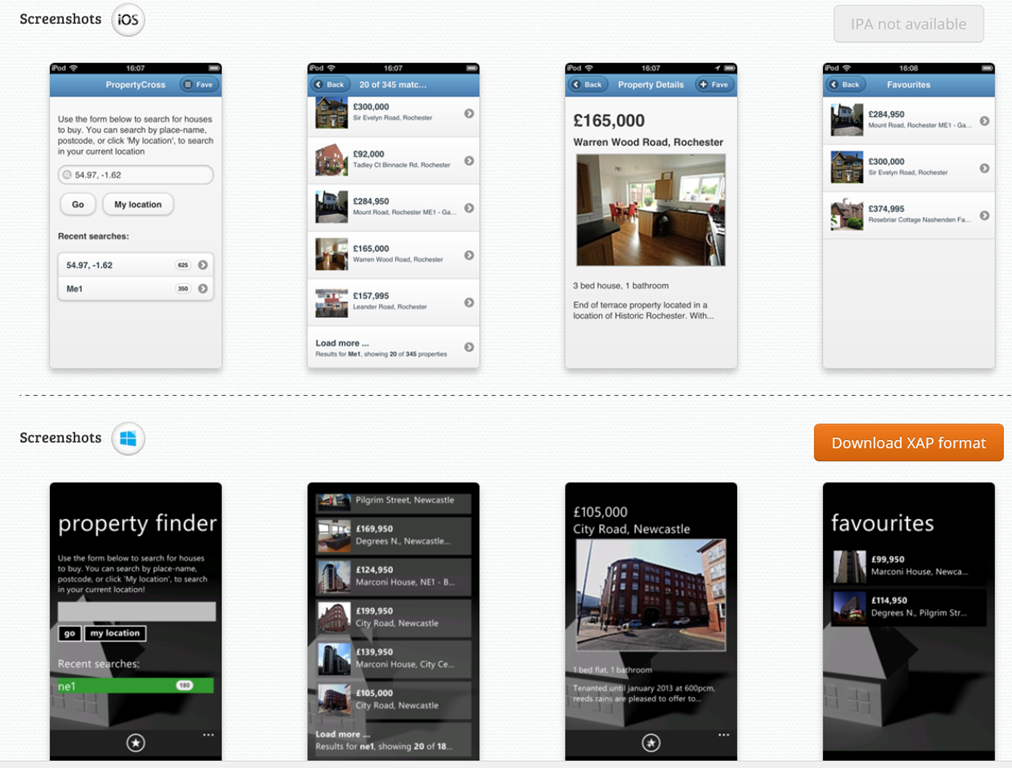
Following my piece on different approaches to building the user interface in cross-platform frameworks, twitter user Sam Hogarth pointed me to the PropertyCross project. This implements a non-trivial application in 8 different cross-platform tools, covering Android, iOS and Windows Phone. Note that only four of the frameworks support Windows Phone.

Using the pie charts presented for each framework, I was able to order them by percentage of shared code as follows:

1= Adobe AIR (100%), JQTouch (100%) , RhoMobile (100%), Sencha Touch (100%)

5. Appcelerator Titanium (around 90%)

6. JQuery Mobile (around 80%)

7. Xamarin (around 40%)

8. Native (0%)

A couple of notes. Of the 100% frameworks, three do not support Windows Phone, and the one which does (Rhomobile) seems to be a bit broken on Windows Phone, judging by the screenshots. The Property Details and Favourites pages do not render properly.

You would get more code sharing with Xamarin if you only supported two rather than three platforms. That is logical: since it does not abstract the GUI.

In most cases (not Rhomobile) it is striking how different Windows Phone appears versus iOS and Android, even with jQuery Mobile which uses HTML5.

image

Xamarin vs Titanium vs FireMonkey: should cross-platform tools abstract the GUI?

Cross-platform development is a big deal, and will continue to be so until a day comes when everyone uses the same platform. Android? HTML? WebKit? iOS? Windows? Maybe one day, but for now the world is multi-platform, and unless you can afford to ignore all platforms but one, or to develop independent projects for each platform, some kind of cross-platform approach makes sense, especially in mobile.

Sometimes I hear it said that there are essentially two approaches to cross-platform mobile apps. You can either use an embedded browser control and write a web app wrapped as a native app, as in Adobe PhoneGap/Cordova or the similar approach taken by Sencha, or you can use a cross-platform tool that creates native apps, such as Xamarin Studio, Appcelerator Titanium, or Embarcardero FireMonkey.

Within the second category though, there is diversity. In particular, they vary concerning the extent to which they abstract the user interface.

Here is the trade-off. If you design your cross-platform framework to include user interface widgets, like labels, buttons, grids and menus, then you can have your application work almost the same way on every platform. You can also have tools that build the user interface once for all the platforms. This is a big win in terms of coding effort. If the framework is well implemented, it will still adopt some of the characteristics native to each platform so that it looks more or less native.

Some tools do this by drawing their own controls. Embarcadero FireMonkey is in this category. Another approach is to use native controls where possible (in other words, to call the API that shows a button, rather than drawing the button with the graphics API), but to use custom drawing where necessary, even sometimes implementing a control from one platform on another. The downside is that because those controls are not in fact native, there will be some differences, perhaps obvious, perhaps subtle. Martin Fowler at ThoughtWorks refers to this as the uncanny valley and argues against emulated controls.

Further, if you are sharing the UI design across all platforms, it is hard to make your design feel equally right in all cases. It might be better to take the approach adopted by most games, using a design that is distinctive to your app and make a virtue of its consistency across platforms, even though it does not have the native look and feel on any platform.

Xamarin Studio on the other hand makes no attempt to provide a shared GUI framework:

We don’t try to provide a user interface abstraction layer that works across all the platforms. We think that’s a bad approach that leads to lowest common denominator user interfaces.*

CEO Nat Friedman told me. He is right; but the downside is the effort involved in maintaining two or more user interface designs for your app.

This is an old debate. One of the reasons IBM created Eclipse was a disagreement with Sun over the best way to design a cross-platform user interface framework. Sun’s Swing framework, derived from Netscape’s Internet Foundation Classes first released in 1996, takes the custom-drawn approach, which is why Swing apps always look like Swing apps (even if you apply the “Windows” look and feel). A team from IBM, some originally from Object Technology International which was a company acquired by IBM, believed it was better to wrap native controls with a Java abstraction layer, created SWT (Standard Widget Toolkit) to do that, and used it to build Eclipse.

Personally I am wary of toolkits which rely heavily on custom-drawn controls rather than native controls, though I see their value. On the other hand, Xamarin Studio is so far in the other direction that it removes some of the benefit of a cross-platform framework.

My prediction is that Xamarin will come up with its own GUI abstraction framework in future, along the lines of SWT. It is a compromise; but one which delivers a lot of value to developers who want to create cross-platform apps with the maximum amount of shared code.

*I have never understood this use of the term “lowest common demominator”. The LCD in maths is the lowest number into which a specific group of numbers divide exactly, so it is an elegant thing. In cross-platform what you should strive for is the highest common intersection: to make available all the features common to each platform.

Update: in April 2014 Xamarin announced Xamarin Forms, a GUI framework which wraps native controls in a XAML implementation (XAML is the presentation language also used by Microsoft, for WPF, Silverlight, Windows Phone and Windows Runtime (Windows 8) apps. There is a quick hands-on here.

Xamarin 2.0 and Xamarin Studio announced, build for OSX, iOS and Android with C#

Xamarin has announced significant updates to its developer platform. Xamarin is the company formed around 18 months ago, when Novell discontinued its investment in Mono, a cross-platform implementation of C# and the .NET Framework. Its focus is on mobile platforms, in particular iOS and Android, though there is also support for the Mac. On Windows and Windows Phone, the presumption is that developers will continue to use Microsoft’s .NET Framework.

“If you look at what you can develop with C#, there’s about 1.2 billion Windows machines out there, but there’s now about a billion Android and iOS devices. Together we can make C# a universal language for application development and reach 2.2 billion devices,” Xamarin co-founder and CEO Nat Friedman told me.

“There’s a wonderful built-in audience of C# developers, millions of them, who need a bridge to mobile. We can help them take their existing skills and tools, and even code they’ve already written, and bring them to mainstream mobile platforms like iOS and Android.”

The key announcements:

  • Xamarin Studio is  an updated version of MonoDevelop, the Mono IDE. It runs on Mac and Windows.#
  • You can now develop iOS apps in Visual Studio for the first time
  • MonoTouch, the framework for iOS, has been renamed Xamarin.iOS
  • Mono for Android is now called Xamarin.Android
  • A new component store has pre-built components for download, some free, some commercial.
  • Xamarin now offers a free Starter edition, and pricing plans for independent developers, smaller businesses, and enterprises. Indie is $299 per platform per year, Business is $999 per platform/year, and Enterprise $1800 platform/year.

The Starter edition is not much use. It has a limited app size, and even the sample project I downloaded, an Employee Directory, exceeded that size and I had to register for a trial.

Xamarin’s philosophy is to share non-visual code, but to create a user interface that is native for each platform. This is a compromise in terms of the effort involved in supporting multiple platforms, but ensures a native experience on each device. “That’s fundamental to our platform,” says Friedman. “We tell our developers to separate the UI layer from the rest of the app. That allows them to share all the non-UI code across platforms, but to deliver a fully native UI, even though the whole app is written in C#. That’s what users demand now, people want native experiences.”

“We’ve been building tools that essentially project the underlying iOS APIs or Java [Android] APIs into C#”, explains co-founder Miguel de Icaza. “What it means is that people need to build a new UI for each platform.” He adds that Microsoft platform developers should be used to this, as Microsoft itself has several similar but incompatible .NET platforms. “There’s the one on Silverlight, the one on WPF, the one on Windows RT, and the one on the phone, it’s four,” he says. “Developers have had to resort to putting their logic into shared libraries, and build a per-platform UI. We’re reusing that knowledge.”

The ability to develop for iOS in Visual Studio is new. “It’s our most-requested feature of all time.” said Friedman.

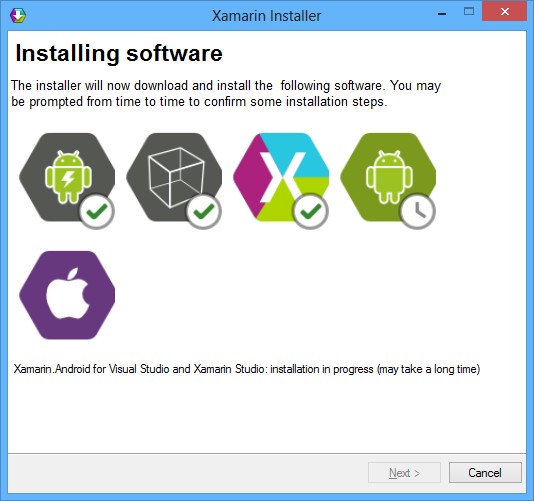
I downloaded Xamarin Studio, which in my case was around 1.3GB including an updated Android SDK.

image

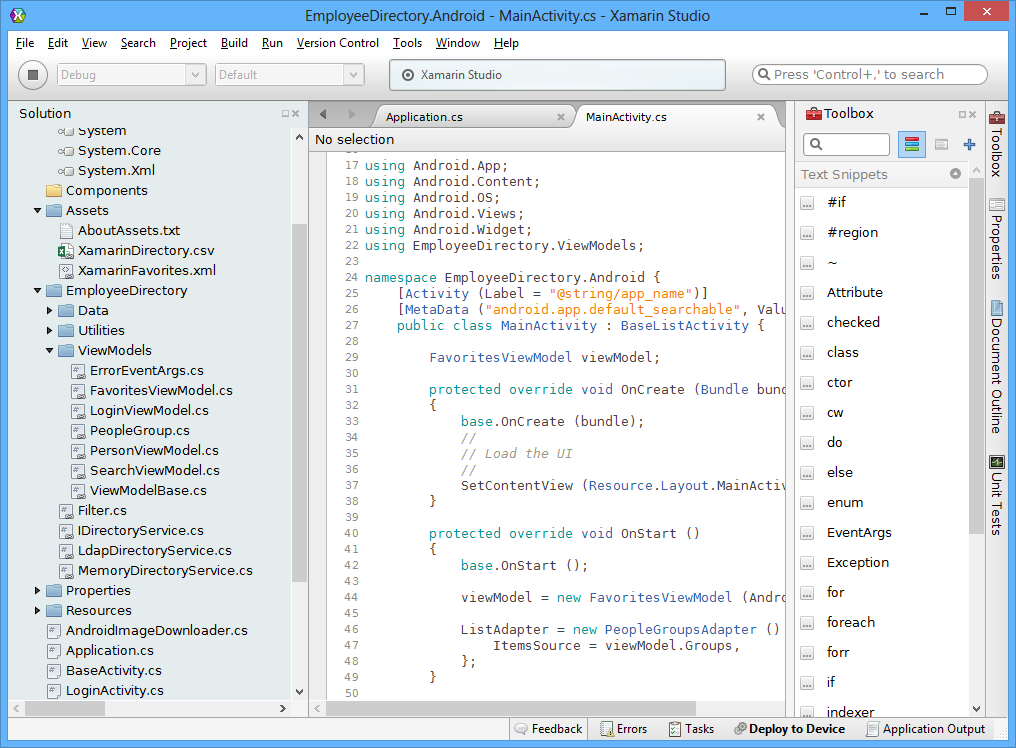
The IDE itself is clean and fast, and very much code-centric. It lacks the bloat of Visual Studio, though you will miss many of the features of Microsoft’s IDE.

image

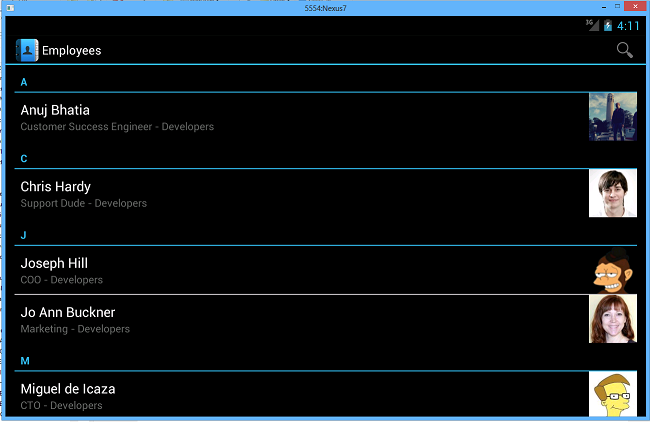
I build the sample Employee Directory app and deployed it to an Android emulator which I use for Nexus 7 development. Deploying the runtime components took a long time, but after waiting patiently the app launched successfully.

image

If you want to do iOS development you will need a Mac of course. Although you can code on Windows, if you then the code is pushed over the the Mac side for compilation and debugging. In order to use Visual Studio, one option is to run Windows in a virtual machine on a Mac, as I have done with reasonable success using Embarcadero’s cross-platform tools.

Xamarin says it is growing fast. There have been 230,000 downloads of its tools, increasing by around 700 per day, and over 12,000 paying customers.

Despite Xamarin’s roots in the open source world (and Mono is still open source), a quick look at the pricing table shows that this is a fully commercial offering and priced accordingly. Presuming customers keep on subscribing, that is a good thing, ensuring the future of the platform; but it is not so good for the smallest developers who might otherwise give it a try.

LocationTech: a new Eclipse working group for location technologies

The Eclipse Foundation has announced a new working group, called LocationTech.

What is it? There is only one project currently, called LocationTech Technology.

Here is what it covers:

LTT projects provide artifacts such as libraries, user interfaces, and methodology logic that enable location aware applications and services. The nature of this work is scoped as follows:

  • Developing and delivering location aware services for web, mobile, and desktop based systems.
  • Storage, exchange, processing, and interpretation of massive data volumes with a component of spatial information
  • Apply Model based design in the context of geospatial information systems, building information modeling, and computer aided design
  • Aggregating and relating data from diverse sources including a spatial component. e.g. Analytics, Geospatial Business Intelligence, Geocoding, Routing
  • The implementation of generally applicable geospatial standards (e.g., Open Geospatial Consortium, ISO TC211, SQL MM, etc.)

The group is sponsored by IBM, Oracle, OpenGeo and Actuate.

Projects hosted at LocationTech benefit from a range of services, including git code repository, bugzilla bug tracking, hudson continuous integration, apache and drupal for a project dashboard, and “intellectual property services” covering licensing and related areas.

LocationTech is seeking involvement from OpenStreetMap (discussed here) and MapBox, among others.

Names not on the list of sponsors include Google and Nokia. Is this, perhaps, an effort to support location-based development in a manner that does not include a dependency on Google?

Microsoft’s Visual Studio and Team Foundation Server get Git integration

Microsoft has announced Git integration in both the Visual Studio IDE and the Team Foundation Service hosted source code management system. According to Technical Fellow Brian Harry:

1. Team Foundation Server will host Git repositories – and more concretely, Team Foundation Service has support for hosting Git repositories starting today.

2. Visual Studio will have Git support – and concretely, we released a CTP of a VSIX plugin for the Visual Studio 2012 Update 2 CTP today.

Git is an open source version control system originally designed by Linus Torvalds to support the development of the Linux operating system. It is a distributed version control system, which means every working directory is itself a full repository, enabling easy forking and offline work.

Team Foundation Service is a version of Team Foundation Server hosted by Microsoft.

Git integration was also recently added to Perforce, another version control system, in the form of the Perforce Git Fusion add-in, emphasising the fact that Git is now a mainstream, enterprise revision control system.

Got a Ruby on Rails application running? Patch it NOW

A security issue has been discovered in Ruby on Rails, a popular web application framework. It is a serious one:

There are multiple weaknesses in the parameter parsing code for Ruby on Rails which allows attackers to bypass authentication systems, inject arbitrary SQL, inject and execute arbitrary code, or perform a DoS attack on a Rails application. This vulnerability has been assigned the CVE identifier CVE-2013-0156.
Versions Affected:  ALL versions
Not affected:       NONE
Fixed Versions:     3.2.11, 3.1.10, 3.0.19, 2.3.15

and also worth noting:

An attacker can execute any ruby code he wants including system("unix command"). This effects any rails version for the last 6 years. I’ve written POCs for Rails 3.x and Rails 2.x on Ruby 1.9.3, Ruby 1.9.2 and Ruby 1.8.7 and there is no reason to believe this wouldn’t work on any Ruby/Rails combination since when the bug has been introduced. The exploit does not depend on code the user has written and will work with a new rails application without any controllers.

You can grab patched versions here.

How quickly can an organisation patch its applications? As Sourcefire security architect Adam J. O Donnell observes, this is where strong DevOps pays dividends:

Modern web development practices have made major leaps when it comes to shortening the time from concept to deployment.  After a programmer makes a change, they run a bunch of automated tests, push the change to a code repository, where it is picked up by another framework that assures the changes play nice with every other part of the system, and is finally pushed out to the customer-facing servers.  The entire discipline of building out all of this infrastructure to support the automated testing and deployment of software is known as DevOps.

In a perfect world, everyone practices devops, and everyone’s devops workflow is working at all times.  We don’t live in a perfect world.

For many organizations changing a library or a programming framework is no small task from a testing and deployment perspective.  It needs to go through several steps between development and testing and finally deployment.  During this window the only thing that will stop an attacker is either some form of network-layer technology that understands how the vulnerability is exploited or, well, luck.

This site runs WordPress, and if I look at the logs I see constant attack attempts. In fact, I see the same attacks on sites which do not run WordPress. The bots that do this are not very smart; they try some exploit against every site they can crawl and do not care how many 404s (error showing page not found) they get. One in a while, they hit. Sometimes it is the little-used applications, the tests and prototypes, that are more of a concern than the busy sites, since they are less likely to be patched, and might provide a gateway to other sites or data that matter more, depending on how the web server is configured.

Hands on Cross-Platform Windows and Mac development with C++ Builder XE3

I have been writing about Embarcadero’s RAD Studio XE3, which includes Delphi and C++ Builder, and as part of the research I set this up for cross-platform development on a Mac.

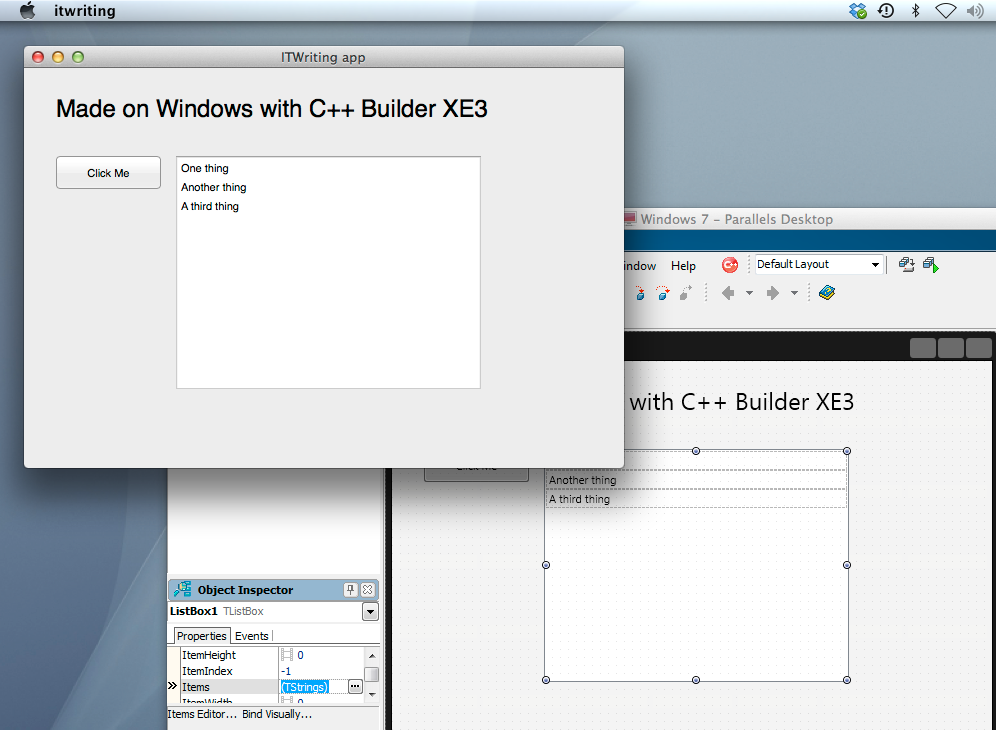
My setup uses a Parallels Virtual Machine to run Windows 7, on which RAD Studio XE3 is installed. This is convenient for Mac development, since the IDE itself is Windows only. That said, if I were doing this in earnest I would use multiple displays or perhaps separate physical machines, since it is no fun debugging in a VM with the application running in another operating system behind it.

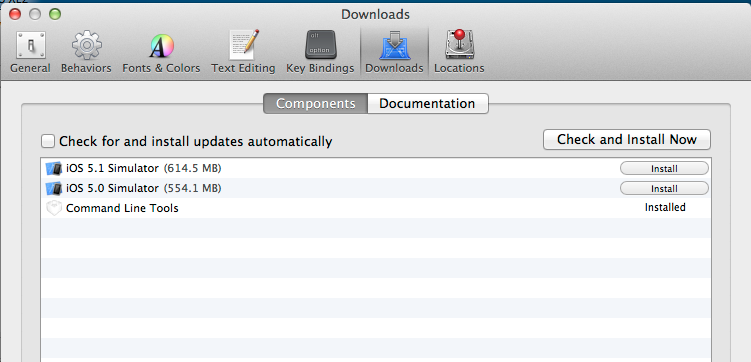
Is it straightforward to configure? Not too bad. You have to install Xcode on the Mac, and in addition, you have to install the Xcode command line tools, which you can do from Xcode itself, in Preferences – Downloads – Components, or as a separate download.

image

Then you need to find the Platform Assistant (paserver), an agent which runs on the Mac to support remote debugging. I was annoyed to find that this has a dependency on Java SE6, which to be fair it downloaded and installed automatically. Actually I find this amusing, after hearing from an Embarcadero VP how native code is all the rage and nobody uses managed code any more. Except Embarcadero for the paserver.

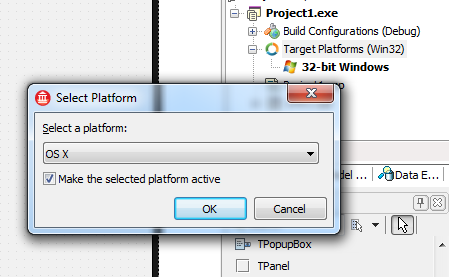
Once that is all up and running you are done on the Mac side. On Windows, you then need to sort out a remote profile, after having installed RAD Studio of course. The way to do this is first to start a new cross-platform project, which means using the FireMonkey framework. Then right-click TargetPlatforms in the project manager and add a platform. If you add OSX but no remote profile exists, you will be prompted to create one.

image

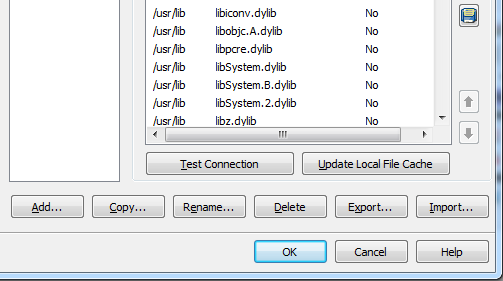
This is where something went slightly wrong. I created a profile and could connect OK. However, when I tried to build the project, I got an error: Unable to open include file ‘CoreFoundation/CoreFoundation.h’. You get this if for some reason the required library files have not been pulled over from the Mac. The fix is to edit the profile and click Update Local File Cache.

image

After that I was away. Set breakpoints if needed, build and debug.

image

Cross-platform is not new in RAD Studio; it was in XE2, and in some ways better, since you could target iOS as well as OSX. C++ Builder XE3 is actually a new generation though. In the 64-bit update 1, it is the first release to use Clang and LLVM, and from what I understand this represents the future for Embarcadero’s tools.

Updates are promised in 2013 for both Delphi and C++Builder – this roadmap is most of what we have to go on – which will add first iOS and later Android support, at what the company calls a “low cost”. Unlike the iOS support in XE2, the coming update will not use the Free Pascal compiler, but the new architecture based on LLVM. This also suggests that the add-on will replace some of the guts of Delphi when it arrives, so it will be significant and somewhat risky.

The cross-platform capabilities look good, though I am somewhat wary of FireMonkey which is less complete and mature than the Windows-only VCL. For example no Webbrowser component is supplied, which is a significant limitation, though I am sure there are ways of hacking this, perhaps through ChromiumEmbedded for which a Delphi FireMonkey exists.

It is worth a bit of effort, since Delphi and C++Builder are productive tools, and the output is true native code which still had advantages.

More information on RAD Studio XE3 is here.