Category Archives: software development

Fresh Paint Windows Store app: in equal parts great and frustrating

Now that the initial shock of “where is the Start menu” is wearing off, some of the real issues and points of interest in Windows 8 are coming to the surface (ha!), one of which is what a good Windows Store (also known as Metro) app is meant to look like. Microsoft has not been helped by the fact that most apps in the Store are either simplistic, or poor quality, or both.

In this respect Fresh Paint is worth a look, since it comes from Microsoft and is the outcome of considerable work and research. There is a post about the history of the app on Steve Clayton’s blog which is good reading.

The title cleverly combines the sense of a new approach to Paint, the Windows app from way back, with the fact that this is a simulation of paint (the liquid stuff). I have not found much in the way of documentation, though there is a FAQ here, but even a few moments playing shows that this is a sophisticated painting tool, especially on a tablet where you can paint with a finger or stylus. It works on both x86 and ARM devices such as Surface RT though performance is laggy compared to that on a modern x86 PC, and the pencil and pastel tools are missing.

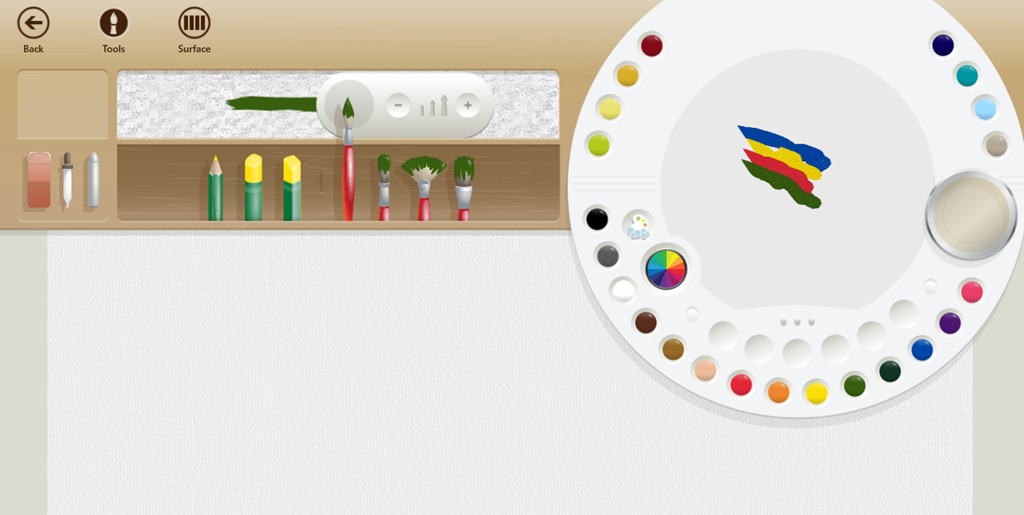
This is an example of immersive UI. While painting, few tools are visible. As a concession, there are five faint tools at the bottom of the screen for undo, redo, show template, centre artwork, and dry. Right-click or swipe in, and you get tools for selecting the painting tool (pencil, brush or pastel), a colour palette that really is like a palette, with the ability to mix your own colours, an eraser, a dropper tool which I have not fully figured out, and a dry paint tool that picks up wet paint from the canvas.
image

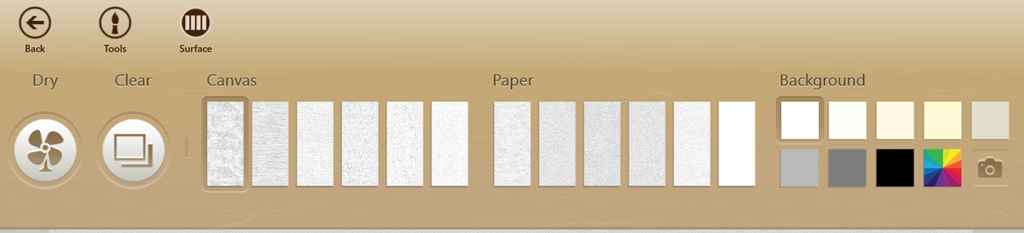
Click or tap surface and you can select the canvas type and background colour. The camera button lets you use an image as the background.
image

Paintings are saved automatically every five minutes or when you return to the home page. You can also export paintings as .PNG files.

You can zoom in and out using the mouse wheel or pinch gestures.

The app is free, but Microsoft offers paid-for add-in packs which provide templates. You can paint over the template, then use the template tool mentioned above to remove it from the canvas. There is a free Fun Pack to get you started.

image

This is not a replacement for the desktop Windows Paint. Features missing in Fresh Paint include selection, fill, cropping, resizing, rotation, clipboard support and printing, to name a few.

Concerning Fresh Paint, three things are obvious.

One is that this is innovative, bold, and excellent in the way it lets you paint in a manner that is much closer to the real thing than most computer graphics software.

Second, users are having real difficulty figuring it out. Some users have not worked out how to get the menus and tools showing at all, hence this is explained in the FAQ mentioned above. Others are like Terry Odell who says:

The problem I have is there’s no "help" or "right click to figure out what things do" in the app. It’s total trial and error, and perhaps if I were 5 like my grandson, I’d be able to figure it out. There are choices on the top of the screen, and more choices/icons on the bottom. The camera on the bottom opens up the ‘real’ camera on my computer, but there’s no ‘click here to take a picture’ (not to mention I have no idea what to do with one.  I’d rather see a tutorial of some sort than have to keep wading through forums to get a question answered. As for ‘dropdown’ I have no idea where that is? The top menu? The bottom menu. Windows 8 is hardly intuitive, and the apps, while great in theory, don’t have enough information provided for how to use them.

It is as if not having documentation is a point of pride, because the app should be so easy to use that documentation is not needed, and if the user does not get it, it is the user’s fault. It puzzles me, since it in a few hours the team could provide some simple documentation that would help users get the best from this app.

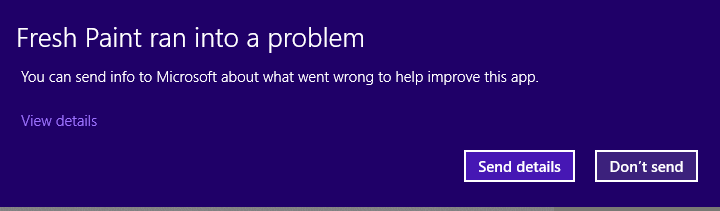
Third, it is not stable. I got several crashes in the course of playing around briefly to write this post.
image

Why is it crashing? There are hints that it may be to do with graphics drivers. I have the latest NVIDIA drivers and other apps and games are solid. It would be interesting to know the reason why it falls over so much, and whether this is caused by buggy app code or problems in the Windows Runtime itself. It is not just my system; take a look at the reviews in the Windows Store for more reports.

I do not mean to be snarky; in many ways this is a brilliant app both for children and for anyone with some artistic talent. It just needs a little more work, and seems to say a lot about the state of Windows 8 apps right now.
Microsoft scraps Expression Web and Design, blends Blend with Visual Studio

Microsoft is giving up its long effort to compete with Adobe in the design tools space. The Expression range of products is being discontinued, in favour of enhanced design capabilities in its developer-focused Visual Studio. Blend for Visual Studio continues, as a design tool for Windows Store apps and Windows Phone apps. A future edition of Blend for Visual Studio, currently in preview, will add WPF (Windows Presentation Foundation), Silverlight, and SketchFlow support. The release version of this upgraded edition is promised for Visual Studio 2012 Update 2.

The new product plans are announced here:

Microsoft is consolidating our lead design and development offerings — Expression and Visual Studio — to offer all of our customers a unified solution that brings together the best of Web and modern development patterns.

Expression Web, the web design tool which evolved out of FrontPage, and Expression Design, a vector drawing tool, will be discontinued completely. Microsoft’s web design tool will now be Visual Studio.

One consequence of this decision is that Expression Web 4 and Expression Design 4 are now free downloads, though unsupported.

Expression Encoder, for converting media for streaming, is also being discontinued, though Expression Encoder Pro will remain on sale throughout 2013. Microsoft says it is still investing in format conversion as part of Windows Azure Media Services.

Is this a good decision? In one sense it is a shame, since Expression Web is a decent product. At least one longstanding user of the product is disappointed:

For Microsoft, the web is dying and the future lies in Windows 8 apps. When asked what we web developers should be doing the answer was the same: Make Windows 8 apps. Which is about as useful as telling a contractor to start erecting tents instead of houses because houses are no longer relevant. Anyone outside the reach of whatever reality distorting force field they have running at the Redmond campus can see how idiotic this is, but that hasn’t stopped the people in charge for pulling the plug on one of the few applications from the company that had something new to offer.

That said, Expression Web has been available for a number of years and made little impression on the market, so how much value is there in continuing with a tool that few use, irrespective of its merits?

The decision makes sense in that Microsoft is shutting down an unsuccessful product line in order to focus on a successful one, Visual Studio.

Further, the end of Expression illustrates the difficulty Microsoft has had in attracting designers to its platform, despite high hopes in the early days of WPF and Mix conferences in Las Vegas.

Mobile: Windows Phone appeal growing, iOS and Android secure say Titanium developers

Appcelerator and IDC have released their latest mobile developer report, in which nearly 3,000 users of the cross-platform development tool Titanium report on their views and intentions.

These reports are always interesting but experience suggests that they are poor predictors. A year ago, the Q4 2011 report told us:

Amazon’s new Kindle Fire ignites developer interest. When surveyed among 15 Android tablets, the lowcost, content-rich eReader was second only to the Samsung Galaxy Tab globally in developer interest. A regional breakdown shows Amazon edging Samsung in North America for the top slot. At 49% very interested in North America, the Kindle Fire is just 4 points less than interest in the iPad (53%) prior to its launch in April 2010.

Now, the Q4 2012 report says:

Amazon’s Kindle continues to struggle for developers’ interest. With less than 22% of mobile application developers “very interested” in building mobile apps for the device, the Kindle just barely breaks into developers’ top 10 app targets.

This is one example; a glance back through previous editions shows plenty of others, showing that developers struggle as much as the rest of us when it comes to guessing the value of future markets.

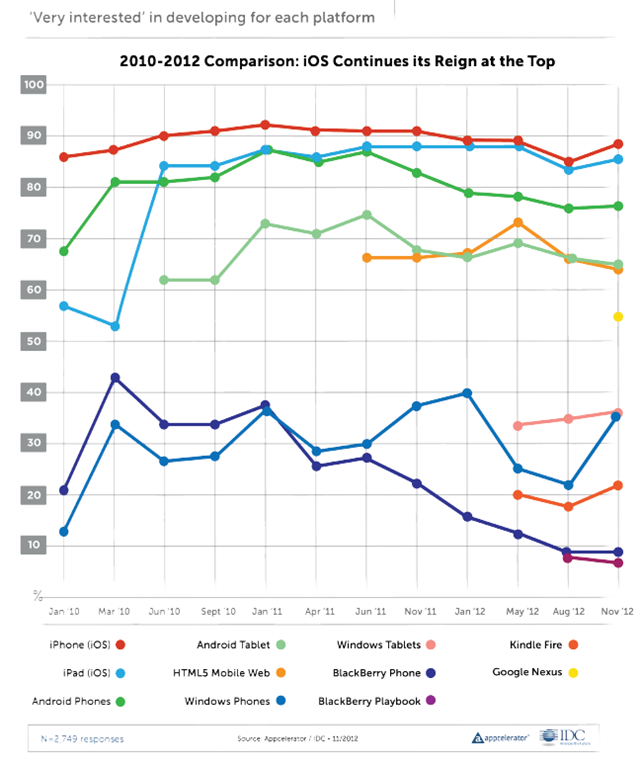
The report is still useful as a snapshot of how things look now, for cross-platform mobile developers. One question which is always asked, and therefore can be compared easily from one report to another, is the proportion of developers who are “very interested” in developing for each platform.

image

The top 5 contenders here are relatively stable, with Apple iOS top (iPhone and iPad), Android next (phone and tablet), and HTML5 Mobile Web also strong at about 65%.

The lower ranges are more interesting, as developers change their minds about prospects for the minority players. Windows Phone dived to around 22% in August 2012 but grew strongly to 36% in this report. Windows tablets, which we should probably take to mean the new Windows 8 app platform, is about the same. BlackBerry has declined from over 40% in March 2010 to 9% today, though I would suggest this will inevitably increase in the next report which will be after the launch of BlackBerry 10.

What else is interesting? One thing is Apple “fragmentation”. The problem here is that Apple iOS now has six screen sizes, once you add iPad mini and iPhone and iPad with or without high-res Retina displays. This gives me pause for thought. The challenge of mobile apps is now closer to that of desktop apps, where you do not know what display will be used or how users will choose to  size the application window. Intelligent layout and scaling is key.

Apple is also increasingly awkward to work with:

More generally, 90% of developers believe that Apple has become more difficult, or about the same, to deal with over the past three years when it comes to application
submission, fragmentation, and monetization.

Part of the report concerns Microsoft Surface. This focus is puzzling, in that it is the Windows 8 app platform which really matters, rather than Surface itself. Another oddity is the questions put, with no option to say “Surface is great”. The most positive option was:

It is a nice piece of hardware, but Windows 8 needs a lot more than that to be successful

A rather obvious statement which apparently won the agreement of 36% of developers.

The report gets even sillier when it comes to market disruption:

The top three companies that developers perceive to be ripe for disruption are a veritable who’s-who of the biggest tech darlings

say Appcelerator and IDC. It is true; but the figures are tiny:

Microsoft (8% of respondents), Google (7% of respondents), and Facebook (7% of respondents).

In other words, over 90% of developers believe these three companies are not likely to be disrupted soon; a figure that strikes me as conservative, especially for Microsoft.

More impressive is that over 60% of developers believe Facebook will lose out in future to a mobile-first social startup. This was also true last time round; 66% in Q3 2012 and 62% in Q4 2012.

The length of time it took Facebook to release just a single native iOS app, coupled with the fact that a corresponding native Android app is still MIA, has proven that the company does not yet have a viable cross-platform mobile strategy.

say Appcelerator and IDC. A fair point; but Facebook’s primary asset is its network of relationships rather than its software and it is not easy to disrupt. I would also guess that disruption is more likely to come from Google as it promotes Google+ and builds it more aggressively, perhaps, into Android, along with apps for iOS and other platforms as needed, than from a startup. But like the developers in this survey, I am guessing.

The Windows 8 app platform: how is it going? A few clues from developers

One way of looking at Microsoft’s Windows 8 strategy is as an attempt to establish a new tablet platform. By welding the tablet platform to the desktop platform, Microsoft ensured that every customer who wanted the latest Windows release would also get the tablet release, though some are stuck with keyboard and mouse to control it. The downside is that some users who would have upgraded to Windows 8 if it had been less radical will stick with Windows 7. Microsoft is betting that despite the controversy, the hybrid operating system is a better bet for the difficult task of creating a new ecosystem than building a completely new tablet operating system that few would have purchased.

So how is the new platform doing? I asked on Twitter for developers with apps on both Windows Phone 8 and Windows 8 to let me know how the rate of sales or downloads compare.

One was the maker of Cineworld, a cinema listing app for the UK and Ireland. He reported:

my cineworld app has about 1.8K downloads a month on WP.. on #win its a few hundred

The other was an app for fans of Manchester United football club called 1st4Fans:

Windows 8 is 70/day. Windows Phone is 130/day

Another was the maker of Barcode Generator:

Barcode Generator stats say 32K download since Aug and several hundreds dwn/day. Looks pretty good, isn’t it?

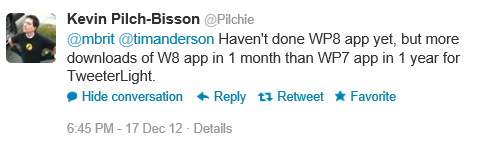
The author of TweeterLight says that he has “more downloads of W8 app in 1 month than WP7 app in 1 year”, showing that not everyone is finding the phone platform bigger than the tablet platform, though a key factor is that there is an official Twitter client for the phone but not for new-style Windows 8:

image

TweeterLight is also a paid-for app, which means fewer downloads and perhaps avoidance of the Twitter throttling that has afflicted the free clients.

Others are reporting a boom in Windows Phone downloads, like Lestyn Jones who says:

I’m finding that my #win8 app downloads are slowly growing where as my #wp8 have skyrocketed.

Put that together with the Cineworld stats – 1.8K per month for an app that is only relevant in the UK and Ireland. It does look as if Windows Phone has been considerably reinvigorated by the launch of Windows Phone 8.

Returning to Windows 8 though, my initial reaction was that these responses are not an impressive start for Microsoft’s new platform, considering the wide usage of Windows on the desktop.

My further reflection though is this. I find myself more willing to try out new-style apps on Windows 8 than desktop apps either on Windows 8 or previous versions, thanks to the ease of installation and removal, discovery through the store, and the additional security of the app sandbox. An interesting question to ask then: if Microsoft had not created this new app platform, how many of these niche apps would have been downloaded as desktop applications?

Despite its imperfections and mixed reception, at least Windows 8 now has an app platform.

This is a small sample and other reports would be welcome.

Xamarin brings C# to development of apps for the Mac App Store

Xamarin has released Xamarin Mac which adds Mac support to the existing iOS and Android compilers from the company:

  • MonoTouch: apps for iPhone and iPad using the MonoDevelop IDE on the Mac
  • Mono for Android: apps for Android using either Visual Studio or MonoDevelop
  • Xamarin.Mac: apps for Mac OS X using MonoDevelop on the Mac

The major platforms missing from the above are Windows and Linux (unless you count Android), even though Mono began as a Linux implementation of Microsoft’s .NET platform.

Xamarin says that a Windows version is not necessary since you can use Microsoft’s tools to code in C# for Windows desktop and Windows phone.

You can also get Mono for Windows, Mac and Linux from the old Mono project site.

Why would you bother with paid-for Xamarin.Mac when you can get Mono for Mac as a free download? There is even a Mac packager which lets you create a standalone package for your Mono app. A good question, but I guess the answer is the benefit of Xamarin-specific libraries and support from the company. Xamarin has also done the work to ensure that you can distribute your app via the Mac App Store.

Xamarin.Mac costs $399 for personal use, or $999 for an enterprise license which allows internal as well as app store distribution. A one year, one seat license with priority support costs $2,499.

Xamarin knows how to charge then, and in the end that may be a key reason why the project is working, whereas Mono struggled as an open source project that never had the resources it deserved.

The Mono Project site now says that it is “sponsored by Xamarin” so open source developers are getting some benefit from the commercial offshoot.

Xamarin is important for the C# language, since it represents a viable implementation which is independent of Microsoft.

RIM BlackBerry 10 SDK is now gold


BlackBerry 10 developers can now download the release version of the various SDKs.


image

There are three primary SDKs: native C/C++, Cascades which includes a C++ app and user interface framework, and WebWorks for HTML5 and JavaScript.

If that is not enough, there is also an Adobe AIR SDK, and a Java SDK which is compatible with the Android Runtime.

RIM has made a huge effort to attract developers to its new platform, though how it will fare versus iOS, Android, and a somewhat reinvigorated Windows Phone is open to speculation.

Trial apps and in-app purchases easy to hack on Windows 8 says Nokia engineer

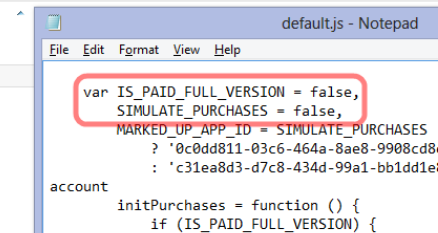
A principal engineer at Nokia, Justin Angel, has written a piece showing how to hack apps on Windows 8, undermining their potential revenue for the app vendors. “This is an educational article written in the hope both developers and Microsoft can benefit from an open exchange of knowledge,” he says, adding that the article was written in his own time and has nothing to do with his employer.

The hacks he describes cover:

  • Compromising in-app purchases by modifying data held locally, such as app currency.
  • Converting trial apps to full versions without paying
  • Removing ads from games
  • Reducing the cost of items offered for in-app purchase
  • Injecting Javascript  into the Internet Explorer 10 process in order to bypass trial restrictions

image

There is an inherent security weakness in any app that has to work offline, since the decryption keys also have to be stored locally; this inherent weakness is not unique to Windows 8. However, Angel argues that Microsoft could do more to address this, such as checking for tampered app files and preventing Javascript injection. Code obfuscation could also mitigate the vulnerabilities.

Although Angel is writing in his own time, the issues are relevant to Nokia, which makes Windows Phone devices and may make Windows 8 tablets in future.

Should Angel have revealed the cracks so openly and in such detail? This is an old debate; but it is sure to increase pressure on Microsoft to improve the security of the platform.

Embarcadero launches C++ Builder XE3: first built on Clang

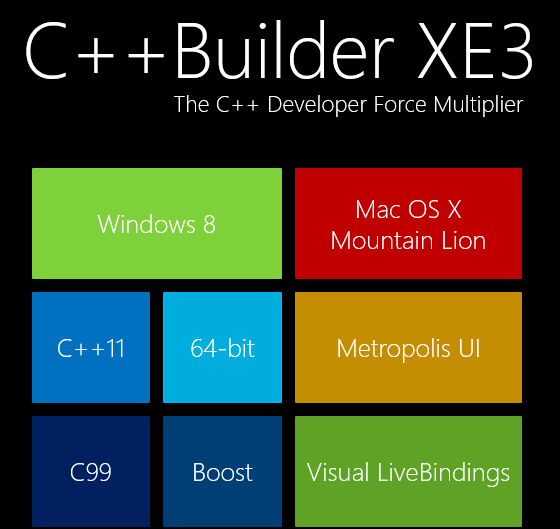
Embarcadero has released C++ Builder XE3, the first version built on the open source clang front end for the LLVM compiler. This has enabled the product to support many new features, including extensive C++ 11 support and a 64-bit compiler.

image

While it is a shame that the old Borland C/C++ Compiler is no more, it makes sense for Embarcadero to bring its VCL (Visual Component Library) and FireMonkey framework to Clang rather than continuing to work on its own compiler.

The other big change is cross-platform support. Through FireMonkey, C++ Builder XE3 supports Windows (including Windows 8) and Mac OS X, with iOS and Android promised for 2013.

Although Windows 8 is supported on the desktop, there is no official support for the Windows Runtime (Windows Store apps). Instead, Embarcadero has a curious application framework called Metropolis which fakes the Windows 8 style but with desktop applications, as if the Windows 8 world were not already sufficiently confusing.

The big question is how compatible VCL applications created for earlier versions of C++ Builder are with the XE3 release. With a new compiler and major changes to the VCL in order to support the new compiler, you might expect some issues.

“That’s what we’ve been spending all of our time on,” Embarcadero VP Michael Swindell told me. “This is fully compatible with all our previous C++ dialects. We’ve completely re-engineered the C++ front end but it’s engineered to be compatible with C++ Builder applications and Borland C++ applications.”

I would rather hear that from developers though, rather than from Embarcadero.

Although C++ Builder is a cross-platform compiler, it only runs on Windows. A common scenario is to run in Windows emulation on a Mac, using VMware Fusion or Parallels.

Similar changes are on the way for Delphi, which uses the same VCL and FireMonkey frameworks but with the Delphi language based on Object Pascal.

Note that the new Clang-based compiler is 64-bit only. You are meant to continue using the old Borland compiler for 32-bit, making it hard to maintain a single code base for both.

Microsoft Silverlight: shattered into a million broken urls

There has been some Twitter chatter about the closure of silverlight.net, Microsoft’s official site for its lightweight .NET client platform. multimedia player and browser plug-in.

image

I am not sure when it happened, but it is true. Silverlight.net now redirects to a page on MSDN. Some but not all of the content has been migrated to MSDN, but Microsoft has not bothered to redirect the URLs, so most of the links out there to resources and discussions on Silverlight will dump you to the aforementioned generic page.

One of the things this demonstrates is how short-sighted it is to create these mini-sites with their own top-level domain. It illustrates how fractured Microsoft is, with individual teams doing their own thing regardless. Microsoft has dozens of these sites, such as windowsazure.com, windowsphone.com, asp.net, and so on; there is little consistency of style, and when someone decides to fold one of these back to the main site, all the links die.

What about Silverlight though? It was always going to be a struggle against Flash, but Silverlight was a great technical achievement and I see it as client-side .NET done right, lightweight, secure, and powerful. It is easy to find flaws. Microsoft should have retained the cross-platform vision it started with; it should have worked wholeheartedly with the Mono team for Linux-based platforms; it should have retained parity between Windows and Mac; it should never have compromised Silverlight with the COM support that arrived in Silverlight 4.

The reasons for the absence of Silverlight in the Windows Runtime on Windows 8, and in both Metro and desktop environments in Windows RT, are likely political. The ability to run Silverlight apps on Surface RT would enhance the platform, and if COM support were removed, without compromising security.

XAML and .NET in the Windows Runtime is akin to Silverlight, but with enough differences to make porting difficult. There is an argument that supporting Silverlight there would confuse matters, though since Silverlight is still the development platform for Windows Phone 8 it is already confusing. Silverlight is a mature platform and if Microsoft had supported it in the Windows Runtime, we would have had a better set of apps at launch as well as more developer engagement.

I posted that Microsoft’s Silverlight dream is over in October 2010, during Microsoft’s final Professional Developers Conference, which is when the end of Silverlight became obvious. It lives on in Windows Phone, but I would guess that Windows Phone 8.5 or 9.0 will deprecate Silverlight in favour of the Windows Runtime. A shame, though of course it will be supported on the x86 Windows desktop and in x86 Internet Explorer for years to come.

Adobe launches Game Developer Tools including Scout profiler

Adobe is reminding developers that Flash is still around as a game development platform, with the release of a Game Developer Tools package including a Gaming SDK, the Flash C++ Compiler which translates C++ to ActionScript, Flash Professional CS6 and Flash Builder 4.7.

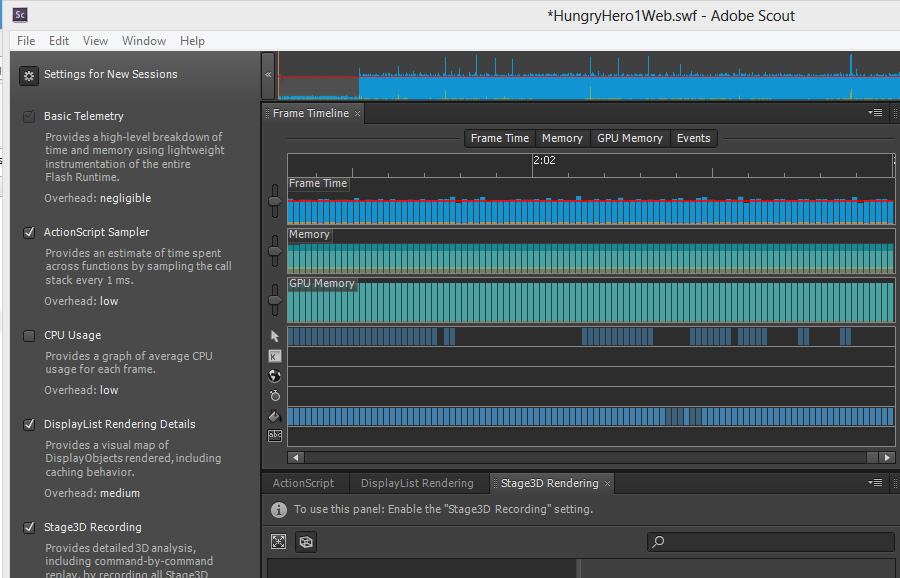
The new thing here is the Scout profiler, previewed as Monocle, which is now available for Creative Cloud subscribers. Scout is a desktop app which profiles Flash apps that have telemetry enabled. The app has to be running in Flash Player 11.4 or higher and have Advanced Telemetry enabled for most of the features to work. You can analyse the time taken for ActionScript code to execute, CPU usage, rendering time for the Flash DisplayList, and record Stage3D commands (hardware accelerated 2D and 3D graphics).

Normally Scout analyses Flash content running on the same machine, but there is a companion agent that you can use on iOS and Android for remote profiling of mobile apps.

image

I downloaded and installed the Game Development but with only partial success, since I mainly use Windows 8 and the Flash Player there is behind that used on Windows 7 and Mac. The reason is that Flash Player is now updated via Windows Update, and this additional step seems to mean delays. I was able to try out Scout using Google Chrome, which has a Flash Player 11.5 installed, but have not yet figured out how to update the default Flash Player for the system which is used by Flash Professional and Flash Builder. At the time of writing this is Flash Player 11.3, which is insufficient for the Game Development Tools.

Flash is a strong platform for game development, though it has lost momentum now that Adobe is betting mainly on HTML 5. I also hear a lot about Unity for cross-platform game development. Unity lets you publish to Adobe Flash Player, giving you more choices than with pure Flash development.