Category Archives: software development

A year of blogging: another crazy year in tech

At this time of year I allow myself a little introspection. Why do I write this blog? In part because I enjoy it; in part because it lets me write what I want to write, rather than what someone will commission; in part because I need to be visible on the Internet as an individual, not just as an author writing for various publications; in part because I highly value the feedback I get here.

Running a blog has its frustrations. Adding content here has to take a back seat to paying work at times. I also realise that the site is desperately in need of redesign; I’ve played around with some tweaks in an offline version but I’m cautious about making changes because the current format just about works and I don’t want to make it worse. I am a writer and developer, but not a designer.

One company actually offered to redesign the blog for me, but I held back for fear that a sense of obligation would prevent me from writing objectively. That said, I have considered doing something like Adobe’s Serge Jespers and offering a prize for a redesign; if you would like to supply such a prize, in return for a little publicity, let me know. One of my goals is to make use of WordPress widgets to add more interactivity and a degree of future-proofing. I hope 2010 will be the year of a new-look ITWriitng.com.

So what are you reading? Looking at the stats for the year proves something I was already aware of: that the most-read posts are not news stories but how-to articles that solve common problems. The readers are not subscribers, but individuals searching for a solution to their problem. For the record, the top five in order:

Annoying Word 2007 problem- can’t select text – when Office breaks

Cannot open the Outlook window – what sort of error message is that? – when Office breaks again

Visual Studio 6 on Vista – VB 6 just won’t die

Why Outlook 2007 is slow- Microsoft’s official answer – when Office frustrates

Outlook 2007 is slow, RSS broken – when Office still frustrates

The most popular news posts on ITWriting.com:

London Stock Exchange migrating from .NET to Oracle/UNIX platform -  case study becomes PR disaster

Parallel Programming: five reasons for caution. Reflections from Intel’s Parallel Studio briefing – a contrarian view

Apple Snow Leopard and Exchange- the real story – hyped new feature disappoints

Software development trends in emerging markets – are they what you expect?

QCon London 2009 – the best developer conference in the UK

and a few others that I’d like to highlight:

The end of Sun’s bold open source experiment – Sun is taken over by Oracle, though the deal has been subject to long delays thanks to EU scrutiny

Is Silverlight the problem with ITV Player- Microsoft, you have a problem – prophetic insofar as ITV later switched to Adobe Flash; it’s not as good as BBC iPlayer but it is better than before

Google Chrome OS – astonishing – a real first reaction written during the press briefing; my views have not changed much though many commentators don’t get its significance for some reason

Farewell to Personal Computer World- 30 years of personal computing – worth reading the comments if you have any affection for this gone-but-not-forgotten publication

Is high-resolution audio (like SACD) audibly better than than CD – still a question that fascinates me

When the unthinkable happens: Microsoft/Danger loses customer data – as a company Microsoft is not entirely dysfunctional but for some parts there is no better word

Adobe’s chameleon Flash shows its enterprise colours – some interesting comments on this Flash for the Enterprise story

Silverlight 4 ticks all the boxes, questions remain – in 2010 we should get some idea of Silverlight’s significance, now that Microsoft has fixed the most pressing technical issues

and finally HAPPY NEW YEAR

More patent nonsense: Microsoft loses in Office custom XML appeal

Microsoft has lost its appeal in a case where a small company called i4i claims that Office 2003 and 2007 infringes its patent on embedding custom XML within a Word document. This is not the XML that defines the content and layout of the document. It is XML contained within the document that Word itself does not understand, because it conforms to a custom schema, and which will not be displayed unless you write code to parse it and output some sort of result to the document.

Microsoft now says:

With respect to Microsoft Word 2007 and Microsoft Office 2007, we have been preparing for this possibility since the District Court issued its injunction in August 2009 and have put the wheels in motion to remove this little-used feature from these products. Therefore, we expect to have copies of Microsoft Word 2007 and Office 2007, with this feature removed, available for U.S. sale and distribution by the injunction date.  In addition, the beta versions of Microsoft Word 2010 and Microsoft Office 2010, which are available now for downloading, do not contain the technology covered by the injunction.

The key phrase here is “little used feature”. It is true, in that the vast majority of Word documents do not use it; the only users who will be affected will be those who have built custom solutions which use it in some kind of workflow or for data analysis.

Why did Microsoft lose? Here I have to admit my lack of legal knowledge; though I’m aware that Microsoft’s track record in court is not good. One interesting aspect of the case reported here is that Microsoft was proven, by an email from January 22 2003, to have been aware of the patent and products from i4i:

we saw [i4i’s products] some time ago and met its creators. Word 11 will make it obsolete

says the internal email; Word 11 is another name for Word 2003.

That said, intuitively both the patent and the decision seem odd to me, in that XML is specifically designed to allow data with a custom schema to be embedded within a document defined by another schema. But does the i4i patent cover every XML document out there that does this – such as, for example, XHTML documents that include microformats? The answer, as I understand it, is no, because the patent is about how the custom XML is stored, not that it exists. Here’s a quote from the patent itself:

The present invention is based on the practice of separating encoding conventions from the content of a document. The invention does not use embedded metacoding to differentiate the content of the document, but rather the metacodes of the document are separated from the content and held in distinct storage in a structure called a metacode map, whereas document content is held in a mapped content area … delivering a complete document would entail delivering both the content and a metacode map which describes it.

In other words, the custom XML is not stored directly within the containing document, but in a separate file, together with an instruction that says “please insert me at location x”.

Is that really any different? Intuitively, I doubt it. What we think of as single files are often in reality a number of sections bundled together, such as a header part and a content part. Further, what we think of as a single file may be stored in several locations, with metadata that defines how to get from one part to the next.

An Office 2007 document such as .docx is in reality a ZIP archive which contains several separate files, organised according to the Open Packaging Convention; if the i4i patent has wider implications, it strikes me that they would be for the OPC rather than for XML itself.

I don’t claim any expertise in whether or not i4i has a valid claim against Microsoft or others. I do have an opinion though, which is that this kind of patent litigation does not benefit either the industry or the general public. This particular case concerns me, because the patent strikes me as generic, and one that could be applied elsewhere, which means more effort expended to workaround legal issues rather than in improving the software we use; and because even if the feature in Word is “little used”, the concept is an important one that still has great potential – though now probably not in Microsoft Office.
Technorati Tags: ,,,

Moonlight 2 released; no Microsoft codecs unless you get it from Novell

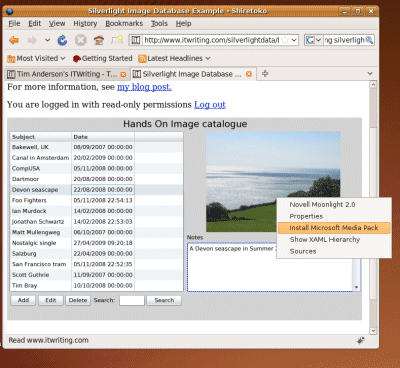
The Mono Project has released Moonlight 2, its implementation of Silverlight for Linux. I tried my own database application and was pleased to find that it works fine; better than it did with the earlier release.

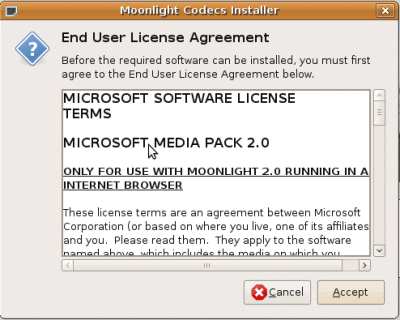
Note the right-click menu which offers some handy debugging features as well as the invitation to “Install Microsoft Media Pack”. If you choose this, you get a dialog offering the Microsoft codecs which are downloaded from Microsoft, not from Mono servers. You have to agree a EULA that restricts use to Moonlight running in a web browser.

That last bit is intriguing; it seems Microsoft is trying to prevent desktop or out-of-browser Moonlight (or Mono) from taking advantage of its codecs.

So what is in Moonlight 2? Miguel de Icaza explains:

Moonlight 2 is a superset of Silverlight 2. It contains everything that is part of Silverlight 2 but already ships with various features from Silverlight 3.

Those additional features include the pluggable pipeline, easing animation support, writeable bitmaps, and partial out-of-browser support. Further, de Icaza says:

We are moving quickly to complete our 3 support. Microsoft is not only providing us with test suites for Moonlight but also assisting us in making sure that flagship Silverlight applications work with Moonlight.

There is also a new patent covenant that:

ensures that other third party distributions can distribute Moonlight without their users fearing of getting sued over patent infringement by Microsoft

That said, the media pack is a source of friction. Only the Novell Moonlight distribution will raise the above dialog to install the Microsoft codecs; others will have to make their own arrangements; at least that is how I understand de Icaza’s post.

It seems an odd restriction, and means that most users should download from Novell.

COM automation in Silverlight 4 is not an “edge case”

I wrote a piece for The Register about the arrival of Windows-specific features in Silverlight, which attracted some comments both on the Reg and also on Slashdot. Plenty of people said it was just what they expected from Microsoft, some of them misunderstanding the point that this only applies to out-of-browser applications that are trusted: the user has to pass a dialog box granting the application permission to access the local system. A few defended Microsoft’s decision; and this Slashdot comment on COM automation in Silverlight 4 strikes me as a good encapsulation of the official line:

This is a fairly obscure feature, and I’m fairly surprised that it was included at all, but doubt it’ll be of use to the vast majority of current and future Silverlight developers out there. Like the html control, it’s a crutch, to allow developers that want to use Silverlight a way to leverage existing investments. The mantra I’ve heard out of the Silverlight team is to focus on unblocking customer scenarios (scenarios they cannot unblock themselves) without compromising the overall feature goals (like keeping the runtime download small) … it’s an edge case feature that doesn’t affect Silverlight’s over all "Cross-Platforminess".

The idea that COM automation is merely an “edge case” surprises me, even though I also recall it being described like that at PDC. Access to COM automation gives a Silverlight desktop application on Windows substantial extra capability. At PDC program manager Joe Stegman showed how Silverlight 4 can integrate with Office, sending data into an Excel spreadsheet: an example with obvious value for real applications. I also heard developers at PDC discussing how they might wrap up a Silverlight application with a COM DLL, creating an application which in effect has full access to the local operating system. Although Silverlight cannot access the Windows API directly, there are no such restrictions on the COM DLL, so the combination means that pretty much anything is possible.

Let’s also bear in mind that Microsoft’s Brad Becker is on record saying that one day WPF and Silverlight might simply become different .NET profiles. He told me this at Mix earlier this year; and said a similar thing to Mary Jo Foley at PDC:

Some day — Microsoft won’t say exactly when — Silverlight and WPF are going to merge into one Web programming and app delivery model that, most likely, will be known as Silverlight, Brad Becker, Director of Product Management for Microsoft’s Rich Client Platforms, told me this week

If Microsoft is contemplating such a thing, then clearly full access to the native features of Windows will have to be possible.

I am not entirely negative about this prospect. Even if you are only targeting Windows, Silverlight has a lot to commend it: a small runtime, easy setup, and options for browser-hosted or desktop deployment. If you have ever wrestled with the Windows installer or tackled a failed .NET runtime installation you will like the simplicity of running a Silverlight application.

Nevertheless, with version 4.0 Microsoft is changing its Silverlight story. It is no longer a pure cross-platform play; rather, it is a runtime where some features are cross-platform, and others Windows only. Microsoft calls this developer choice; I see it as evolving into the inverse of Sun’s aim with Java. Sun tried strenuously to guide developers towards cross-platform, but provided a way out – via Java Native Interface – if absolutely necessary. Microsoft will provide cross-platform where we really need it, but make it easy to slip into Windows-only development in order to get some nice feature like a location API, or Office integration.

I see this as an advantage for Flash, because developers know that Adobe has no incentive to prefer one operating system over another – except to the extent that minority platforms (like desktop Linux) tend to receive less investment.

Personally I think Microsoft should at least provide a way for Mac users to get similar benefits – perhaps by implementing something like the native process API in Adobe AIR 2.

I also think Microsoft will have to get real about Linux support. It is wrong that Microsoft will cheerfully state:

Silverlight 4 runs across all platforms and major browsers

as it does in the “Fact sheet” handed out at PDC; while leaving Linux implementation to a third-party process uncertain in both features and timing. Here is the reality of cross-platform Silverlight, in a screenshot taken seconds ago from Linux:

Right now it is a two-platform play – admittedly, the two platforms that matter most, especially in a Western world business context, but never forget that Google Chrome OS is coming.

PDC day two: Silverlight 4 and a free laptop

There were two big themes at PDC in Los Angeles today. One was the Silverlight 4 beta, the subject of the most impressive section at the keynote. The other was the announcement of free laptops for every attendee – aside from press and government. It is remarkable how a generous gift can change the atmosphere. The lack of breakfast or Universal Studios party was soon forgotten as the audience cheered its own good fortune.

There is actually some justification for handing out this hardware. It’s a decent machine, a modified Acer Aspire 1420P with Windows 7 x64, 2GB RAM, multi-touch display, and accelerometer. Most of us do not have multi-touch machines, and giving them to the core Windows developers who attend PDC may help stimulate the creation of applications that properly support this feature.

Otherwise, it was a Silverlight day. Although SharePoint 2010 was also in the keynote, the cheers it received felt more like relief, that it finally has sensible development and debugging tools in Visual Studio, than real enthusiasm. Somehow the keynote did not capture the potential of the product.

Silverlight though was well received. It is a huge release that opens up many new possibilities, though I am discovering some details that look awkward. There is also one troubling aspect, which is that Microsoft is introducing imbalance in its cross-platform story. The Windows version of Silverlight 4.0 supports COM automation, enabling integration with local APIs such as location on Windows 7, and Microsoft Office. There is no equivalent in the Mac release. It would not be so bad if Microsoft offered some route to similar functionality on the Mac, but there is none that I am aware of.

Microsoft folk that I spoke to about this dismissed it as a minor point, but it is not. Cross-platform is a discipline; this is a failure to observe that discipline and hands an advantage to Adobe Flash for developers that require broad reach.

PDC day one: Windows in the cloud

Today was cloud day at PDC. Microsoft announced that Windows Azure will become a production platform on January 1st, with billing starting from February 1st. It also announced the beta of Windows Server AppFabric role, for on-premise apps that can either stay on-premise or be deployed to Azure later; and some new developments like the Windows Server Virtual Machine role on Azure, a pre-configured Windows Server VM into which you will be able to deploy an application.

Azure was first announced at the 2008 PDC, and had a stuttering start, with a CTP (Community Tech Preview) that was difficult to use, major changes to SQL Server Data Services – a simplified cloud database that was scrapped and replaced with full SQL Server – and generally poor marketing from Microsoft. I was not sure whether the company was serious about Azure, or merely trying to tick the cloud box.

I do now think it is serious, and delivering some interesting technology for easily scalable cloud-hosted applications. Microsoft does not sees its cloud services as replacing your in-house servers (no surprise there), but more as a way of deploying certain kinds of web applications. A great feature is that thanks to Active Directory Federation Services in combination with the new .NET library called Windows Identity Foundation you can relatively easily have use your Azure applications authenticated against your internal Active Directory.

The surprise of the day was when Matt Mullenweg of WordPress fame turned up to demo WordPress running on Azure, which now supports PHP and MySQL as well as Java applications. Another unexpected guest was Loic Le Meur of Seesmic, who introduced Seesmic for Windows and also talked about a coming Silverlight version.

That said, the keynote did not exactly crackle with excitement. Microsoft seemed almost to downplay what is now possible with Azure, perhaps sensing that it could be disruptive to its own business model. A telling moment came during a press briefing when Doug Hauger, Azure General Manager, denied that Windows or Office were in any sort of decline. Despite his position he seems to be under the illusion that we will happily continue with our fragile on-premise, single platform, micro-managed IT systems.

I enjoyed the day though. The beauty of PDC is that Microsoft rolls out its best speakers; it was great to hear Mark Russinovich explain the kernel changes in Windows 7 and Server 2008 R2 – same kernel of course – and I will be writing more about the session shortly.

I’m expecting more focus on Office, Silverlight and Visual Studio tomorrow, when Steven Sinofsky, Scott Guthrie and Kurt DelBene will be giving the keynote, and hoping for some compelling announcements.

Miguel de Icaza on eight years of Mono, its future, and the Silverlight desktop

Mono founder Miguel de Icaza spoke at the Monospace conference – 250 enthusiasts in Austin, Texas – on the past and future of the project. I wasn’t there but enjoyed listening to the keynote as posted by Redmonk’s Michael Coté.

“Never ask for permission, ask for forgiveness – that’s how we’ve done a lot of things in the Mono world,” said de Icaza, who also remarked that in the beginning “we thought it would be a walk in the park, we thought it would up and running in 6 months.” His motivation: “We think that .net is a fantastic development platform – we were envious when Microsoft came out with it.”

Eight years on and the Mono team is now around 35 people at Novell, plus 30-70 external contributors. “We don’t dictate the direction of mono, it’s mandated by the direction of the community,” says de Icaza. He talks about MonoDevelop, the Mono IDE, which is now licensed under LGPL allowing commercial plug-ins; about MonoTouch which lets you develop for Apple’s iPhone and “will expand towards Android”; and about XNATouch, a Mono game framework for iPhone.

The task of keeping up with Microsoft – insofar as Mono succeeds – has become easier thanks to open source. “In the last couple of years Microsoft has become very open-source friendly in some areas,” says de Icaza. “For example ASP.NET MVC, we don’t have to do anything, it just runs on our ASP.NET implementation.”

Someone asked about Mono’s plans for WPF, which is becoming more important on Windows, and this led to some intriguing comments on Moonlight/Silverlight and its future. “I think Silverlight has more potential than WPF has, because it runs on the Mac, it runs on Linux, it runs on Windows, and Silverlight is easier to learn than WPF is. We like the Silverlight model but we don’t like that it is limited to a sandbox on the browser,” he said.

“Moonlight can be used in two modes. One of them is moonlight in the plug-in, like you do with Microsoft, and you can out-of-browser if you want, but you are still restricted by the sandbox. We also offer the same graphical engine that we use for Silverlight [Moonlight] but with the .NET 4.0 APIs. You have full access to .NET 4.0 with the Silverlight UI. Isn’t that awesome?”

“WPF is interesting but a lot of work, and we don’t have the bandwidth and the resources. Our best possible option is to use Silverlight with the .NET 4.0 APIs. Our wish is to bring this expanded Silverlight to Windows and Mac OS. Maybe we’ll gently push Microsoft in that direction.”

One of his team is working on “the whole desktop rendered by Silverlight.”

In general I agree that Silverlight is more significant than WPF, particularly if Microsoft keeps up its current energetic level of development. I will be surprised if we don’t hear from Microsoft about an enhanced desktop Silverlight at the forthcoming PDC and Mix conferences.

There is another side to this though: if you can do your cross-platform .NET development in Microsoft Silverlight, do you still need Mono? Particularly if official ports to Linux start appearing?

Of course there is more to Mono than Moonlight. Running ASP.NET on Linux web servers is an attractive proposition, though historically its performance and reliability hasn’t matched that of Microsoft .NET – not surprising given its relatively small resources. Eight years on, and Mono has done more than just survived, yet has not quite tipped over into a platform popular enough to attract the level of contributions it needs.

WPF not Windows Forms gets the Windows 7 love

Microsoft’s Scott Guthrie has a blog post today about what’s new in Windows Presentation Foundation 4, and one of the things he mentions is Windows 7 multitouch support – as also described in this walkthrough – and integration with the Windows 7 taskbar, jump lists, icon overlays and so on. Taskbar support is wrapped in the System.Windows.Shell namespace in PresentationFramework.dll.

This means that Microsoft is making it easy for .NET developers to support Windows 7 in WPF applications. However it is not extending the same love to developers using Windows Forms, the older GUI framework. That said, there is always the Windows API Code Pack which covers many Windows 7 features including the taskbar and jump lists, or you can do your own COM and native code interop. No doubt with a bit of effort all the features can be be integrated into a Windows Forms application.

Still, there’s no doubt that Microsoft is now steering us towards WPF rather than Windows Forms for new desktop development. About time, you may say, considering that WPF first arrived in 2006. While that’s true, there have been good reasons to be cautious about adoption. WPF apps use more resources than Windows Forms applications, require the .NET Framework 3.0 or higher, and for a long time were talked down even by Microsoft as unsuitable for line of business applications.

That tune has now changed, though when you consider the large numbers of existing Windows Forms applications, and the fact that developers contemplating radical revisions or new projects may well be looking at web or rich internet clients, WPF is still something of a hard sell.

On the other hand, the improvements Guthrie describes are significant, not only for Windows 7 features, but also key areas like cached composition for graphics, which can greatly improve performance, and a new text rendering API.

It’s also worth noting that Windows Forms was never a great framework. It wraps the old Windows GUI API which makes resizable layouts and scaling for different display resolutions difficult, as well as lacking all the multimedia and effects goodness in WPF. Another factor is that WPF is designer friendly, with its own Expression Blend design tool. Windows Forms has nothing like that.

WPF has a family connection to Silverlight, which was originally called WPF Everywhere. Microsoft’s idea is that we code in WPF for the desktop, and transition to Silverlight for applications that require broad reach. So far though, mass migration to WPF has not happened, and Silverlight has an independent life as a platform for browser-hosted .NET applications that work cross-platform. Developers have many other choices for broad reach applications, including HTML and JavaScript, Java, and Adobe Flash.

Is it possible that broad adoption for Windows 7 could see renewed interest in WPF and Windows development? I think it will happen to a limited degree, but will not really disrupt the underlying trend towards web and cross-platform.

Visual Studio 2010 and .NET Framework 4.0 – a simply huge release

I’ve been exercising the new beta 2 of Visual 2010. It is hard to encapsulate in a few words because this is a simply huge release. OK, so I did download the Ultimate version; but the changes at every level seem greater than in Visual Studio 2008. One of the reasons is that this is the first full update to the .NET Framework since version 2.0 in late 2005. Versions  3.0 and 3.5 extended 2.0 but did not replace it. Another factor is that Visual Studio 2010 has a new editor built with Windows Presentation Foundation, and has a different look and feel than its predecessor. In addition, there is a new language, Visual F#, though I don’t hear much buzz about it; I think elevating IronRuby or IronPython to this status would have attracted more interest – but they are dynamic languages, whereas Visual F# is a functional language. 

When you are assessing Visual Studio you are in part assessing Microsoft’s platform, and as that platform has sprawled, so too has the tool. It is now so large that it is difficult to have in-depth knowledge of the entire thing. I also notice this when speaking to Microsoft folk about the product.

So what is new?

If you need to acclimatise, I suggest you start with What’s new in .NET Framework 4.0. This is a large topic in itself. Some of the things to look out for are What’s new in the Base Class Library, including Complex numbers, Location API, IObservable<T> for observable collections, and other tweaks and enhancements.

Then there are things like in-process side-by-side execution – the ability to run two versions of the Framework at once in the same process, which is remarkable.

Parallel programming with PLINQ and the Task Parallel Library is another major topic.

COM interop is changing; you no longer need to deploy Primary Interop Assemblies, because the compiler can include only the types you need in your application.

Next, take a look at what’s new in specific frameworks, such as WPF version 4 and ASP.NET MVC 2.

After that, you might be ready to look at new stuff in specific languages: including the dynamic keyword in C#, implicit line continuation in VB, lambda expressions in VC++, the concurrency runtime, and the arrival of Visual F#.

With that sorted, check out the new tools in the Visual Studio IDE. I’m thinking of the new code editor, the updated WPF visual designer, the new visual designer for Silverlight, and the Tools for SharePoint development; and not forgetting the updated modelling and application lifecycle management tools.

But isn’t this the era of cloud computing? That’s another part of the problem; the Windows-oriented tools seem less important if you are immersed in the latest cloud news. That said, don’t forget Windows Azure, though I was disappointed to find that the Windows Azure Tools for Visual Studio are a separate download, and not done yet.

I’m impressed that Microsoft seems to be pulling all this together successfully; it is a significant integration task. And as ever I’d be interested in what developers think – was the new code editor really necessary? Is Microsoft addressing the right areas? Has Microsoft done enough to support new Windows 7 features? And is performance OK in this version (it was a problem in beta 1)?

Salesforce.com partners with Adobe for Flash Builder for Force.com

Adobe and Salesforce.com have announced Flash Builder for Force.com, a special version of Flash Builder that lets you create Flex applications that interact with Force.com web services. The preview will be available for download today from developerforce.

I asked Dave Gruber from Adobe and Eric Stahl from salesforce.com what is really new here, since force.com has always exposed a SOAP web service API, and Flash Builder has the ability to import WSDL service descriptions in order to call them. In addition, a Force.com Toolkit for Adobe AIR and Flex has been available for some time.

Gruber explained that there is now a “custom interface to the Force API” that reduces the amount of code you have to write to wrap these services. In addition – and this may be more significant – some parts of LiveCycle Data Services have been integrated into the Force.com platform, including the data synchronisation piece. The illustration above shows an AIR application with a Sync tab, and this is the kind of online/offline application that should now be easier to build.

“We have a lot of customers asking us for that desktop connected, disconnected scenario. We want to give people a great set of tools for building those kind of apps,” says Stahl.

According to Gruber, Flex developers who want to take advantage of the new framework will have to purchase Flash Builder for Force.com even if they already have Adobe Flash Builder. “It’s a unique offering, this is not going to be built into the standard Flash Builder product”, he told me.

Salesforce.com has toolkits for many client platforms, but offering a custom IDE for Flex demonstrates a significant partnership. “Adobe is clearly the leader in rich internet applications, it’s a synergistic relationship,” says Stahl.