Category Archives: software development

Palm Ares: an online IDE for WebOS development

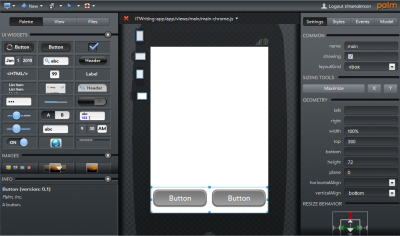
I spent a few minutes trying out Ares, Palm’s web-based IDE for WebOS, the OS used in the Palm Pre smartphone.

Ares is in public beta and I’m not going to pretend I found it smooth going. No doubt it will be fine after a little patient learning. It is amazing, with drag-and-drop visual interface builder, code editor, source code management, debugger, and logging.  Microsoft’s Internet Explorer is not supported in any version; you need Mozilla Firefox 3.5 or higher, Apple Safari 4.0 or higher, or Google Chrome 3 or higher.

image

The online IDE uses a bit of Java but seems to be mostly HTML and Javascript. If you try to launch the application, you need a Palm emulator running locally, but you can preview in a browser without any local dependencies.

In order to try Ares, you have to sign up for Palm Developer Center. As part of the process, it appears that you have to give Palm permission to charge fees to your PayPal account, which I disliked, though membership is free for the time being. Of course you hope that any fees will be more than offset by the steady chink-chink of income from your app sales.

Is this the future? My immediate reaction was to be very impressed; a little further in and I was greatly missing the comfort of Eclipse.

Still, this stuff will get better; and the idea of just browsing to an URL to continue development is compelling.

Pros and cons of Adobe’s LiveCycle services in the cloud

Adobe has fully released LiveCycle Managed Services, offering a hosted platform for LiveCycle applications. The software is configured and managed by Adobe, but runs on Amazon’s EC2 (Elastic Compute Cloud) virtual servers.

LiveCycle is a suite of applications which I think of as two things combined. On the one hand, it forms a server platform for business process or workflow applications based on Adobe PDF forms and documents. On the other hand, it provides data services for Rich Internet Applications, usually but not necessarily to client applications on the Flash runtime, either in or out of the browser. It is a little confusing, but these two aspects are essentially the old Adobe Enterprise platform merged with Macromedia’s work in support of Flash, combined into one suite after Adobe’s takeover of Macromedia in 2005.

The usual arguments in favour of hosted services apply and this is a smart move from Adobe. Still, customers are currently forced to use Amazon for the actual virtual servers, even though others such as Rackspace Cloud Servers are substantially cheaper than Amazon EC2. Is that a problem? According to Adobe’s John Carione, senior enterprise product marketing manager at Adobe, “when we were evaluating vendors, we think that one of the areas Amazon excels in is around security.” I noticed that the security topic also occupies around one-third of this introductory video, suggesting that this remains a significant barrier to adoption for many potential customers.

So how will managed LiveCycle work? “We’re providing a fully managed service, and part of that is going to be delivered with what we’re calling  the Adobe Network Operations Center … which is going to provide 24×7 monitoring of the applications, backup and recovery, upgrades. They’ll be one contact at Adobe to talk to about everything,” says Carione. Apparently the Network Operations Center is based on a piece aquired with Omniture last year. Ominiture was a web analytics business which was based on hosted applications and services; maybe that was an important factor driving the acquisition.

When I asked Carione about ease of scaling, I got a slightly defensive answer. “This is a v1, we have the opportunity for customers to buy additional instances. In the future we’ll have more of that dynamic scaling.” Another issue is integrating with on-premise resources such as databases and directory services, which Carione says is a matter for business integrators; in other words, a significant challenge. And what if Amazon goes down? Carione did not answer directly, but said that 99.5% uptime is guaranteed.

What’s new in Visual Studio 2010 – more than you may realise

I’m beginning to think Microsoft has under-sold Visual Studio 2010. Of course it is a huge product, as I observed back in October, especially since it includes a major new release of the .NET Framework as well as updated tools, but I thought I had discovered most of the significant new features. Still, when I sat down recently to write up an extended review, I found a lot that I had missed.

One of my reflections on this is that Microsoft has done of poor job of communicating what is new. I attended the Professional Developer’s Conference in 2008 and 2009. The developer-focused keynote on the second day last November should have hyped the best of what is new; but instead we got Steven Sinofsky on Windows 7 quality control – hardly the most exciting of topics – a sneak preview of IE 9, an unconvincing tour of Sharepoint and Office 2010, and Scott Guthrie on Silverlight 4. Guthrie was fantastic, leading us blow by blow through Silverlight’s new capabilities, but much else was neglected.

It doesn’t help that Microsoft’s home page for Visual Studio 2010 has meaningless headlines. “Set your ideas free”, “Simplicity through integration”, “Quality tools help ensure quality results.” Pure fluff, which saps your will to read further.

Here are a few things that I found interesting – nothing like comprehensive, just features that perhaps have not had the attention they deserve.

Microsoft F# – a new language from Microsoft Research, integrated into Visual Studio with remarkable speed. The people I’ve spoken to who have taken the time to discover what it does are truly enthusiastic. Some of its strengths are parallelism, asynchronous programming, graphics manipulations, and maths. You probably won’t write a complete application in F#, but it will be great for assembling libraries.

Windows Workflow Foundation 4.0 – potentially a new and effective approach to visual programming and long-running state management. Flow charts are often used to teach programming, since they express common concepts like if conditions visually. WF lets you draw a process as a flow chart – or there are other types of chart – using the nice new WPF design tools, and then execute it in the runtime, which is part of the “Dublin” extensions to IIS, now known as Windows Server AppFabric (I have no clue why this confusing name was chosen). To get the idea, I suggest reading David Chappell’s Workflow Way. For applications that fit this kind of model, it is a compelling approach, and integrates well with Windows Communication Foundation for messaging.

Dotfuscator – I know this is a third-party thing, but this is no longer just a tool for obscuring your .NET assemblies in the hope of preventing decompilation. The new Dotfuscator does runtime analytics, and can report back to a portal when your application runs, what features you use, what operating system it is on, whether it crashed, and so on. It also supports application expiry, known as “shelf life”, and can detect if assemblies have been tampered with. Some of this sails close to the spyware wind, but this is a matter of getting informed user consent. These are interesting features for Windows desktop developers, if there are any left, and even the free edition is quite capable.

Test and Lab management – a challenge to set up and configure, but when it works, amazing. Lab Management uses Visual Studio, Hyper-V and System Center Virtual Machine Manager to automate deploying an application over one or more VMs, so you can run tests against it. This hooks into Team System so you can file a bug report with a link that actually shows the bug happening at runtime, with a snapshot of the virtual environment.

Step backwards through code – IntelliTrace is a new feature of the Visual Studio debugger. Configure it to collect IntelliTrace events and call information, and you can then step backwards as well as forwards from a breakpoint, examining variable values as they change.

Team Foundation Server Basic – what this means is that even a solo Visual Studio developer can have TFS running locally or on a networked machine for source code management, issue tracking and so on. It’s worth considering because of the way it integrates with the IDE. I admit, I still like Subversion which I have on a remotely hosted server, since it acts as an effective off-site backup, but I’d much rather use TFS Basic than nothing.

UML – Microsoft has finally done what it should have done years ago, and implemented a wide range of up-to-date UML diagram tools. Nothing revolutionary, just useful.

Not everything is wonderful in the new Visual Studio. Deploying to Azure remains clunky in Beta 2 – when is this going to get better? SharePoint is another one; I appreciate the value of F5 debugging, but you still need SharePoint installed locally, with great potential for mucking up IIS, and the whole thing feels unwieldy.

Apple’s lock-in works. Can anyone improve on App Store?

Timothy B Lee writes of the App Store/iPhone and now iPad lock-in:

The store is an unnecessary bottleneck in the app development process that limits the functionality of iPhone applications and discourages developers from adopting the platform.

While instinctively I agree, the evidence for the damaging effect of the App Store is not there. On the contrary, the locked-in iPhone has transformed the mobile app market and expanded it remarkably.

Reason: the user experience is great, the approval process at least weeds out apps that would be intrusive or harm performance, and installing an app from the store is less risky than installing an app onto Windows or OS X.

Ironically, Apple’s own iTunes is an example of an app that installs services you do not necessarily want or need. Personally I keep it off PCs and use a Mac Mini for gadgets that require it.

Is it possible to find a app distribution model that avoids the monopolistic and dictatorial model of App Store, but delivers an equally good user experience during and after purchase and installation?

A good question, but to my mind an open one.

A Silverlight UI for Windows Mobile 7, backward compatibility in doubt

Note: speculative post; I have no official information on this.

It’s been rumoured for ages; but at this point I would be surprised if the Windows Mobile 7 UI were not built with Silverlight. Consider:

  • Silverlight has to be supported – it should have been in 6.5 – otherwise nobody will take mobile Silverlight seriously
  • WM7 has to have excellent UI design; and WPF/Silverlight is Microsoft’s designer-friendly UI framework
  • Silverlight 4 already supports touch control in the current beta
  • Scaling/Zooming is baked into Silverlight and ideal for a mobile UI
  • If Silverlight is present on the device it would make sense to build the UI with it

If this is right, there are a couple of interesting aspects for developers. It will make Silverlight a more attractive platform in scenarios such as Enterprise roll-outs where the device can be specified.

The awkward question: what about all those existing Windows Mobile apps built either with native code or with the compact framework? Again, there are rumours of lack of backward compatibility. Does that mean that all Windows Mobile 7 apps with a UI will have to be done in Silverlight? That’s what John Biggs says:

WinMo 7 will not run 6.x code. End of story. It is based on Silverlight and .Net. Everything save a few basic programs will not work under WinMo 7. There is no expectation that this will be a “business device” and the focus is currently on games including some XBox Live functionality for gaming and messaging. There will be a Microsoft App store with an easy approval process.

I find this a stretch. I can believe that Microsoft might initially target the consumer market, or have crippled “consumer” versions; but not that it would give up on mobile business apps – we heard at PDC (to the point of tedium) how Microsoft is supporting “three screens and a cloud”, unified for developers by Visual Studio. There’s no reason why Silverlight should not be used for business apps.

What about backward compatibility though? Traditionally Microsoft does a good job of keeping your old stuff running, within reason; possibly too good – Windows is full of compatibility hacks that may be to its detriment overall.

Another point to bear in mind: WM7 needs a browser, and I don’t see Microsoft re-implementing IE in Silverlight.

So I’m sceptical about this too; but with Windows Mobile at such a low ebb could the company decide it has little to lose?

Windows Azure is too expensive for small apps

I’m researching Windows Azure development; and as soon as you check out early feedback one problem jumps out immediately. Azure is prohibitively expensive for small applications.

Here’s a thread that makes the point:

Currently I’m hosting 3 relatively small ASP.net web applications on a VPS. This is costing about $100 per month. I’m considering transitioning to Azure.
Q: Will I need to have 1 azure instance per each ASP.net application? So if I have 3 web apps, then I will need to run 3 instances which costs about $300 per month minimum, correct?

The user is correct. Each application consumes an “instance”, costing from $0.12 per hour, and this cost is incurred whenever the application is available.

Amazon also charges $0.12 per hour for a Windows instance; but the Amazon instance is a virtual machine. You can run as many applications on there as you like, until it chokes.

Google App Engine has a free quota for getting started, and then it is charged according to CPU time. If the app is idle, you don’t pay.

In addition, all these services charge extra for storage and data transfer; but in a low-usage application these are likely to be a small proportion of the total.

Summary: Azure’s problem is that it does not scale down in a way that makes business sense. There is no free quota, unless you count what is bundled with an MSDN subscription.

I realise that it is hard to compare like with like. A cheap Windows plan with a commodity ISP will cost less than either Amazon EC2 or Azure, but it is worth less, because you don’t get a complete VM as with Amazon, or a managed platform as with Azure, or the scalability of either platform. The point though is that by cutting out smaller businesses, and making small apps excessively expensive for customers of any size – even enterprises run small apps – Azure is creating a significant deterrent to adoption and will lose out to its rivals.

Check out the top feature request for Azure right now: Make it less expensive to run my very small service.

Silverlight 4 with COM can do anything – on Windows

At PDC Microsoft played down the significance of adding COM support to Silverlight 4 when run out of the browser and fully trusted (you can also be out of the browser and not fully trusted). The demos were of Office automation, and journalists were told that the feature was there to satisfy the requests of a few Enterprise customers.

Now former Microsoft Silverlight program manager Justin Angel, who has implemented his blog in Silverlight, has spelt out what we all knew, that Silverlight with COM support can do just about anything. His richly-illustrated blog post has code examples for:

  • reading and writing to any file (subject I guess to the permissions of the current user)
  • executing any command or file
  • emulating user input with WShell.SendKeys
  • pinning files to the Windows 7 taskbar
  • reading any registry values
  • adding an application to the Windows startup folder
  • doing text to speech using Windows built-in engine
  • accessing local databases with ODBC
  • automating scanners and cameras
  • using the Windows 7 location API, accessing the full .NET Framework
  • and of course … automating Microsoft Office.

Well, fully trusted means fully trusted; and these are great features for powerful though Windows-only Silverlight applications, though I hope no user installs and trusts one of these applets thinking it is “only Silverlight” and can’t do much harm.

The post also has comments on the lack of any equivalent feature for the Mac in Silverlight 4:       

If Microsoft chooses to not go ahead with Mac support in Silverlight 4 RTM, well, it’s not because they couldn’t

says Angel, suggesting that it would be easy to add AppleScript support. (I had to type that quote – no clipboard support in Silverlight 3).

Of course there is time for Microsoft to unveil such a feature, say at Mix10 in March, though I wouldn’t count on it.

Why F# rather than IronPython in Visual Studio 2010?

Dynamic languages are all the rage; and after JavaScript, Python is perhaps the dynamic language of the day, loved by Google and gaining increasing attention. IronPython, built on .NET, is stable and at version 2.6. Now Visual Studio 2010 turns up with an additional language in the box, but it is not IronPython; rather it is a little-known language out of Microsoft Research called F#.

Now, F# is very interesting and brings real diversity to Visual Studio; it is great for mathematics and for parallel programming. But wouldn’t IronPython have sparked more immediate interest from the .NET community? Judging by this feature request, with 500 votes, it would. It’s is a little embarrassing for Microsoft that the favoured IDE for IronPython work is SharpDevelop. Plenty of IronPython enthusiasts are pressing for Visual Studio support.

Here’s what IronPython MVP Jeff Hardy says:

I think I can safely say that adding full, high-quality support for IronPython to Visual Studio would require at least a couple of man-years of work. The rabbit hole goes pretty deep when you consider all of the functionality that VS offers, not to mention the difficulty of doing IntelliSense well. I estimate they’d have to at least double the IronPython team to get full support into VS11. IronRuby would require the same commitment.

Hardy is hopeful for VS 2012.

I still find it odd. Official Visual Studio integration would do a lot to raise awareness and usage of IronPython; and make Microsoft’s commitment to dynamic languages more visible – though I guess F# supporters will be happy with Microsoft’s priorities here.

Windows Presentation Foundation now ready, too late

The immortal film The Railway Children has a scene in which a band plays during an award presentation. Unfortunately a series of false starts delay the performance, until finally it all comes together and the music begins. The camera pans – the audience has already departed.

Is it like that for WPF (Windows Presentation Foundation), Microsoft’s user interface framework which is built on .NET and DirectX and was intended to replace the ancient GDI (Graphics Device Interface) and GDI+?

In this new post I make the case that with WPF 4.0 is the framework is now truly ready to use, not least because Microsoft itself is using it in Visual Studio and the interaction between these two teams has solved a number of problems in WPF.

But who now wants to develop just for Windows? Well, it makes sense in some contexts, though I note that in the Thoughtworks paper on emerging technology and trends about which I wrote yesterday, neither Windows nor WPF gets a mention. Nor for that matter does the Mac, Linux, or OS X, though iPhone and Android feature strongly. The only emerging desktop technology that interests Thoughtworks is the browser.

Technology trends: Silverlight, Flex little use says Thoughtworks as it Goes Google

Today Martin Fowler at Thoughtworks tweeted a link to the just-published Thoughtworks Technology Radar [pdf] paper, which aims to “help decision makers understand emerging technologies and trends that affect the market today”.

It is a good read, as you would expect from Thoughtworks, a software development company with a bias towards Agile methodology and a formidable reputation.

The authors divide technology into four segments, from Hold – which means steer clear for the time being – to Adopt, ready for prime time. In between are Assess and Trial.

I was interested to see that Thoughtworks is ready to stop supporting IE6 and that ASP.NET MVC is regarded as ready to use now. So is Apple iPhone as a client platform, with Android not far behind (Trial).

Thoughtworks is also now contemplating Java language end of life (Assess), but remains enthusiastic about the JVM as a platform (Adopt), and about Javascript as a first class language (also Adopt). C# 4.0 wins praise for its new dynamic features and pace of development in general.

Losers? I was struck by how cool Thoughtworks is towards Rich Internet Applications (Adobe Flash and Microsoft Silverlight):

Our position on Rich Internet Applications has changed over the past year. Experience has shown that platforms such as Silverlight, Flex and JavaFX may be useful for rich visualizations of data but provide few benefits over simpler web applications.

The team has even less interest in Microsoft’s Internet Explorer – even IE8 is a concern with regard to web standards – whereas Firefox lies at the heart of the Adopt bullet.

In the tools area, Thoughtworks is moving away from Subversion and towards distributed version control systems (Git, Mercurial).

Finally, Thoughtworks is Going Google:

At the start of October, ThoughtWorks became a customer of Google Apps. Although we have heard a wide range of opinions about the user experience offered by Google Mail, Calendar and Documents, the general consensus is that our largely consultant workforce is happy with the move. The next step that we as a company are looking to embrace is Google as a corporate platform beyond the standard Google Apps; in particular we are evaluating the use of Google App Engine for a number of internal systems initiatives.

A thought-provoking paper which makes more sense to me than the innumerable Gartner Magic Quadrants; I’d encourage you to read the whole paper (only 8 pages) and not to be content with my highlights.