Category Archives: windows

Microsoft Build 2012 is done. Now the market gets to judge Windows 8 and Windows Phone 8

I am just back from Microsoft’s Build conference, at the company’s headquarters near Seattle. This is a company in transition and the event had that feel to it. There was not much that we did not know about before, but this is the moment of full release into the market for some key products, and in some cases – Windows 8 and Windows Phone 8 to be specific – you could sense some nervousness about how they might be received.

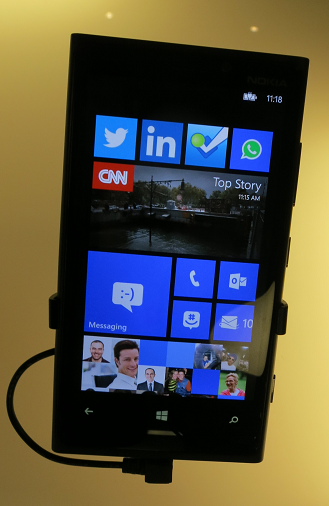
Attendees were handed Surface RT devices (running Windows on ARM) as well as Nokia 920 Windows Phone 8 phones.

Here are a few quick reflections.

First, Windows 8. I picked up less resistance to the new big bold tiled touch user interface than was the case last year when it was unveiled, though arguments about its merits continue. Personally I am fine with it, though my experiments with developing an app or two have shown me that it is version one and could be made better for developers. I still think there are too many expensive hybrid tablet/laptops being pushed out by Microsoft’s hardware partners, and not enough simple slates.

An encouraging sign for Microsoft was that sessions on line of business apps for the new interface (which still lacks a proper name) were packed and had to be repeated.

What about Windows RT? I am in a minority since I like the concept; most Microsoft-platform folk want their x86. Leaving that aside though, the big issue with Windows RT is performance. Visual C++ expert Herb Sutter said to me that the ARM compiler is version 1.0 and less well optimised than the one for x86, which may account for the disappointing performance of the Surface RT. I cannot help liking the device, which is beautifully made and a lot of fun, but watching an MP4 video on the flight home I had difficulty getting smooth playback. It really should not be hard to play an MP4.

Another puzzle with Surface RT is that Microsoft has not made the best of the simple appliance concept. Windows update errors and crashing apps make you wonder whether Microsoft has learned anything from Apple. There is no excuse when the company has such complete control over hardware and software. Signs of haste I think, and it will get better, but if Surface RT had the potential to show how smooth and easy Windows 8 can be, that opportunity has been missed at the launch.

An uncertain launch for Surface RT then; but Microsoft is on surer ground with Windows Phone 8. I have looked in detail at the SDK and like it better than the Windows Phone 7.x SDK which is Silverlight and XNA only. I have not tried an actual device yet, but my sense is that the platform is all there now, for business as well as consumer. The problem is that the market is contented with iOS and Android and breaking in will not be easy.

Windows Azure had a good Build. In keeping with the client focus, Azure Mobile Services got the most attention, an easy way to create a back-end for mobile clients or Windows Store apps. The new Azure management portal, first seen this summer, gets better and better; and the combination of an admin-friendly portal and a solid infrastructure underneath seems to me a strong one.

Azure specialist Mark Russinovich told us that Azure demand was growing fast, and I can believe it.

What about the organization of Build? Frankly, I am puzzled why Microsoft decided to run the event on its own campus, which is not really suitable for an event of this size. Further, the event sold out quickly which suggests that the company could easily have attracted a bigger attendance. Even as it was though, there were tedious bus journeys between two buildings where the sessions and exhibits were located. It was not helped by the near-constant rain, and as time went on the tents started to leak a little and you had to watch where you sat in case of drips. My suggestion: either go very small, as for PDC 2010, or go back to a proper conference venue as for Build 2011.

Still, there were some excellent sessions about which I have more to write. Some of my favourites:

Scott Guthrie on Windows Azure

image

Mark Russinovich again on Azure – excellent insights into what it takes to keep a cloud running (and why it failed with a leap year bug).

image

Anders Hejlsberg enthused about TypeScript, a new way to write JavaScript applications.

image

Herb Sutter talked about what is coming in C++ and the new Standard C++ Foundation.

image

Jeffrey Snover talked about Windows Server 2012 and the Cloud OS (this was a press-only session)

image

More on these coming soon.

How to test and debug an app on Surface RT in a hotel room

I wanted to test an app on Surface RT this morning, though I am out of the office with just a Samsung Slate (has Visual Studio), the Surface, and hotel wi-fi.

You can do remote debugging on Surface RT as explained here, however you need a private network.

I set up an ad-hoc network from the Samsung Slate as described here:

Open an elevated command prompt

netsh wlan show drivers

netsh wlan set hostednetwork mode=allow ssid="wireless name" key="password"

netsh wlan start hostednetwork

This allowed me to connect the Surface RT to a private network with the Slate.

Next, I needed to download and install the remote debugging tools for ARM from here.

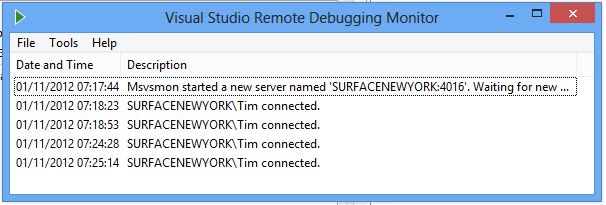
I ran the remote debugger and was able to connect from Visual Studio on the Slate, but ran into a small issue. I needed a developer license for the Surface, but while on the private network it was not on the internet. When the remote debugger prompted to install a developer license, it could not retrieve it.

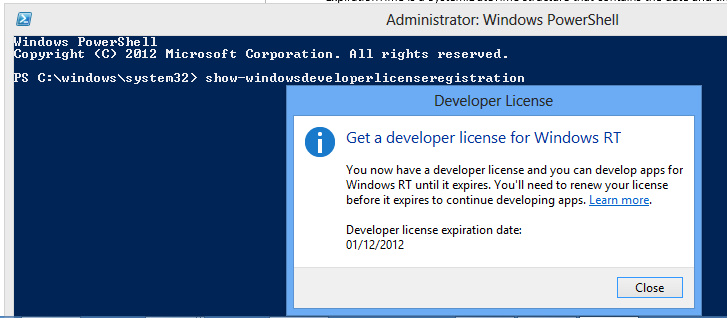
The solution was to disconnect, connect to the internet, then install the developer license using PowerShell. Run show-windowsdeveloperlicenseregistration from an elevated PowerShell window.

image

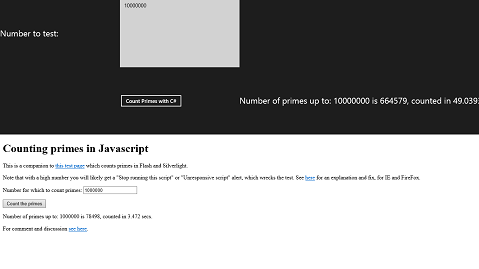
Then I returned to the private network and was able to launch my beautifully designed test app:

image

image

Note that for the actual test I did not run the app attached to Visual Studio. Rather, I deployed in release mode and then ran separately, to avoid the slowdown from the debugger. Once deployed, the test app remains in the Start screen for launching.

A puzzle: why did Microsoft hold back Windows RT previews from developers?

Surface RT is out, along with a few other Windows RT devices such as the Asus Vivo Tab RT, and for most people (developers included) it is their first opportunity to have hands-on time with Windows 8 on ARM. What is odd here is that at the same moment that users can try (or in some cases buy) apps that those same developers have built, on Windows RT. The idea was that if you code for the Windows Runtime, which is common to both Intel and ARM versions of Windows, then the same app will just work.

Of course it is not that simple. The problem is that Windows RT has different performance characteristics than x86 Windows, such as a much slower JavaScript engine, and an app that runs fine on x86 Windows 8 may not give a good user experience on Windows RT.

Microsoft’s store process ensures that apps which do not work at all on ARM – such as those which include x86 native code – are not listed for download on Windows RT; but these other apps which work, but not well enough, have generally been made available.

The puzzle is why Microsoft did not offer developers some kind of preview hardware, such as RIM makes available for Blackberry 10, so that these issues could have been addressed, either by fixing the performance with further optimisation, or if necessary by marking apps as x86 only.

As it is, the developers of these poorly-performing apps will get the blame for a problem that is not of their making.

Post written and posted on Surface RT using the Word 2013 blog template

Steve Ballmer shows off Windows 8 in Build keynote

Microsoft’s BUILD conference has kicked off in Redmond with a keynote featuring CEO Steve Ballmer, Developer evangelist Steven Guggenheimer, and Kevin Gallo from the Windows Phone team. There were also a few guest appearances, including Tony Garcia from Unity, a cross-platform games engine.

The company has a lot to talk about, with Windows 8 just launched – four million upgrades sold so far, we were told, which seems to me a middling OK but not great result – and Windows Phone 8 also fully announced for the first time.

The keynote opened with a performance by Jordan Rudess from Dream Theatre, enjoyable and somewhat relevant given that he has helped create two music apps for Windows 8, Morphwiz and Tachyon, which he talked briefly about and played on a Surface RT and Lenovo desktop.

image

Then Ballmer came on and gave what I can only describe as a hands-on tutorial in how to use Windows 8 apps. I found this odd but it was well received; my conclusion is that many people have not bothered to look closely at Windows 8, or have been put off by the Start menu issue, and much of what Ballmer showed was new to them. It was not to me, so I was not gripped by this section of the keynote.

I preferred the presentation from Steven Guggenheimer; most of what he presented is also covered here, and included the announcement of forthcoming Windows 8 apps from Disney, ESPN and Dropbox. The Dropbox announcement is particularly significant, since I have heard complaints about its absence from Surface RT, which is unable to run the usual desktop client for Dropbox. Another app that is on the way is from Twitter. Guggenheimer also described a new PayPal API for Windows Store apps.

I do wonder why key services like Dropbox and Twitter are only now announcing Windows 8 apps. Windows 8 has been available in preview versions since last year’s Build event, and has not changed that much as a developer platform.

Gallo introduced some of the new features in Windows Phone 8, and claimed that Microsoft has delivered the majority of developer requests in the new Phone SDK which is available from today. He emphasised the possibility of sharing code between Windows Phone 8 and Windows 8, using Visual Studio to ensure compatibility.

Garcia presented Unity for Windows Phone, which is potentially a big deal, since it is widely used. The demo of immersive gaming graphics on Windows Phone 8 was impressive.

image

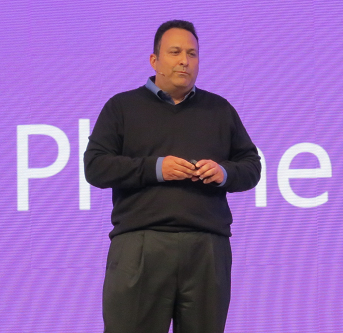
Finally, Nokia’s Richard Kerris came on, mostly to announce a giveaway of the new 920 Windows Phone 8 device for Build attendees.

image

This raised a loud cheer as you would expect, though it may be significant that the free phone won an even warmer reception than the earlier announcement of a free Surface RT.

The cost of signing up for a Windows Phone developer account has been reduced to just $8.00 for the next few days; see here for more details.

Did Microsoft do enough in this keynote? Personally I would like to have seen more technical depth, and a more convincing presentation of why the company thinks these new devices have what it takes to take on Apple and Google. Still, this is all about partners, and the arrival of Dropbox and Twitter as Windows 8 apps, and Unity for Windows Phone 8, are all significant events.

Slow JavaScript performance in Microsoft Surface RT

Outlook Web Access is useful on Microsoft’s Surface RT, since the built-in mail client is only basic. However I noticed sluggish performance, which made me wonder if Microsoft’s “Chakra” JavaScript engine is slow on Windows RT.

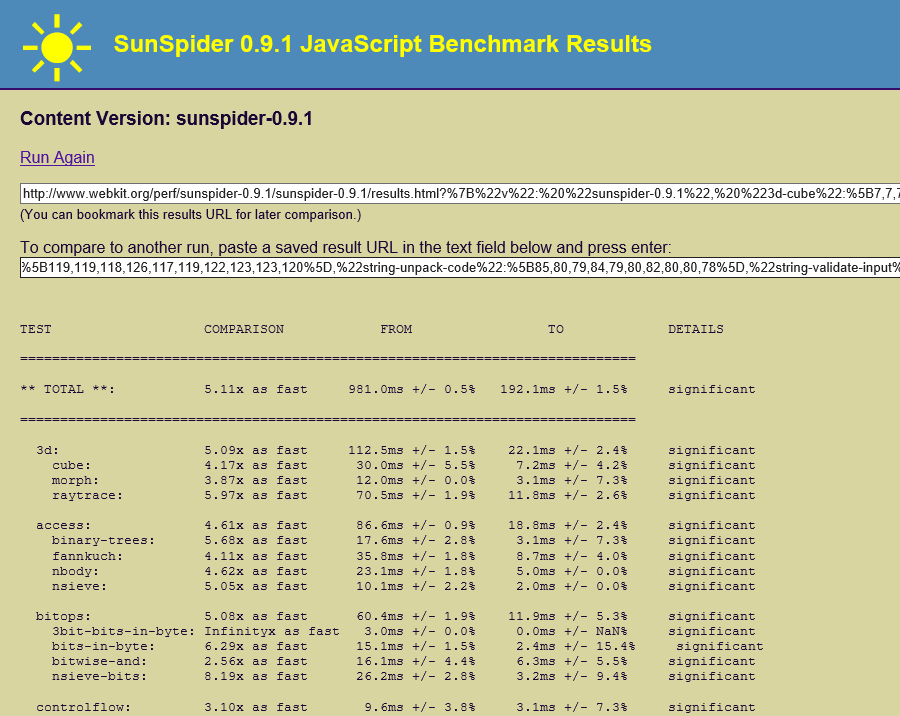
I ran the Sunspider JavaScript performance test on the Samsung Slate 7 I bought back in February, which has a 1.6Ghz Core i5, and compared it to the same test on Surface RT, which has a 1.3 Ghz NVidia Tegra 3 chipset.

The Samsung slate was 5.11 times as fast. Question: how much of that is down to the Core i5 being a faster CPU, and how much is down to a less well optimized Chakra engine?

image

Incidentally, the Apple iPad 2 which has an Apple A5 processors running at around 890 Mhz is approximately 33% slower on the SunSpider test. Since the CPU is clocked 45% slower that is a good result for the iPad 2 and Safari.

A Google Nexus 7 on the other hand which has the same Tegra 3 chipset as the Surface is about 55% slower than the Surface, which is poor.

Windows Phone 8 launches: is it enough?

Microsoft has launched Windows Phone 8 at a press event in San Francisco, streamed around the world. Joe Belfiore presented the new features in his usual enthusiastic style (complete with kids on stage to show Kids Corner), and the phone was endorsed by CEO Steve Ballmer and celebrity Jessica Alba.

image

Key new features:

  • Built on Windows 8 kernel rather than Windows CE
  • Data Sense is for optimizing (ie reducing) mobile data usage and offers visibility about which apps are using data and how much, as well as a data compression feature that enables up to 45% more web browsing for the same amount of data transfer. The compression feature requires operator support and some details are not yet clear.
  • People hub has “Rooms” which let you group contacts, a feature that seems close to what Google+ offers with circles, though Microsoft also has a limited sharing feature that lets trusted contacts see a Room schedule on an iPhone.
  • New Skype app which runs in the background in an efficient manner – you wonder how popular this will be with operators
  • Kids Corner lets you create a kind of secondary login for children, with apps, games and music that you select. Your normal Start screen is protected by a password, so no embarrassing calls or tweets.

image

  • Apps can now display content on the lock screen and integrate into hubs and with Windows Phone Wallet.
  • More apps are coming, and Belfiore told us that 46 of the 50 most popular apps across all platforms are available for Windows Phone 8. Pandora, Urbanspoon and Temple Run got a mention.
  • There is an iTunes import feature which will copy unprotected music from iTunes to SkyDrive for use on the phone and with Xbox Music.
  • 7GB SkyDrive cloud storage comes for free.
  • OneNote has a new voice transcription feature.
  • Now support for 50 languages, with apps in 191 countries

This was not an event for developers, though we did learn that the SDK will be made available to everyone from tomorrow 30th October.

Phones themselves will be available from this weekend in Europe and from November 14th in the USA.

I got a quick look at the HTX 8x, and was struck by how slim it is, with a 720X1280 4.3″ screen.

image

It is curved at the back and has a quality feel, though I am not sure HTC quite matches Nokia for hardware design.

image

I like Windows Phone and there are some tempting new features here. Will this improve Microsoft’s market share and Nokia’s fortunes? This may sound like ducking this issue, but I do not think the fortunes of Windows Phone depend on its features or even the quality of the phones. It is all about operator and retail partnerships, and what customers get told when they walk in to buy a phone and a contract. Windows Phone launched to near-invisibility on the high street. Matters have improved a little since then, especially after Nokia came out with the Lumia (Ballmer said that Nokia sells more Windows Phones than any other vendor), but Microsoft’s phone was still an also-ran after iOS and Android. How does Microsoft get into those in-store conversations, yet alone win them?

I also think Windows 8 is a factor here. If devices like Surface RT are popular, then Live Tiles and other elements of Windows Phone 8 will become familiar. On the other hand if Windows 8 users rush to install substitute Start menus and ignore the new app platform, not much will have been achieved.

Surface Reflections: it can only get better

Microsoft has released Surface RT, its first own-brand PC (if you can call it that) and also one of the first few devices to run Windows on ARM, formally known as Windows RT. I have been using Surface RT with the “Touch” keyboard cover intensively since its launch; it is a fascinating device, and the reactions to it from early purchasers is also interesting to watch.

Surface has various problems. It is designed for the new-style apps called Metro, or Windows Store apps, but the truth is that the selection of apps currently available is small and many are trivial or poor. There are many gaps. On the other hand, I have found workarounds for most issues, and there is plenty to like too.

Right now we are seeing Surface at its worst. Here’s why:

  • This is the first release of Windows on ARM. I have not found Surface particularly buggy or slow, but I would guess that performance will improve and bugs will be fixed as updates flow.
  • This is Windows 8, which is unfamiliar to many. It is not unfamiliar to me; but my guess is that for someone new both to Surface and to Windows 8, there will be some initial struggles. This will get better as users become more familiar with the operating system.
  • Better apps will come. Most developers are now seeing Windows RT for the first time; and it is remarkable that apps built for x86 Windows – like the ITWriting app – work as well as they do on ARM. On the other hand, I have also heard of performance issues, and certainly Pinball FX2 seems less smooth on Surface than on a Core i5 (not a surprise).

Here are a few details.

Annoying things

Password management. I use Password Safe, which does not run on Windows RT. I resorted to VPN and Remote Desktop to another machine to use Password Safe. There are some Windows Store password managers and I need to investigate; ideally I need one which supports Password Safe import.

Live Writer. My preferred blogging tool does not run on Surface RT. I am making do with Word. The only other option I know of is to post through the browser (self-hosted WordPress).

SSH connection. As part of the setup for blogging with Word, I needed to make an SSH connection to a Linux server. There is an SSH app for Apple iOS, but not for Surface. Not knowing any other way, I went the Remote Desktop route again.

Printing. I am staying with a friend and needed to print a boarding pass. He has a shared printer attached to a Mac. Windows RT found the printer, using the old-style Control Panel, but gave a message about a missing network driver and to consult my administrator. Next, it gave me a driver selection dialog and I picked one I thought might work. It seemed to install, but when I tried to print, I got nothing: no error, but nothing printed either.

Windows Update. I discovered that the final version of Office 2013 is available through Windows Update. I used Control Panel to find it. The update, which had to be selected manually, gave me an installation error. I looked this up and discovered it was because the Office Upload Center was running – thanks to my making a connection to SharePoint earlier. I terminated the Upload Center. Then the update failed with a different error. Now I am in limbo with this; Office 2013 final seems to be installed, but it is not listed in update history except as a failed update; however I cannot remove it nor reinstall it.

Word save error. Following a successful blog posting, I was unable to save the Word document. I got this file permission error:

Send As missing in Mail. The Mail app is working for me, connecting to my self-hosted Exchange server. However I make use of Send As in order to send mail as a different user. This works in Outlook but not in Mail. The workaround is to use Outlook Web Access, which does support Send As.

Good things

The hardware seems excellent. I love that the Touch keyboard gives me the ability to type at a decent speed and use a trackpad, but without adding significant bulk. I like the solid feel of the device and the kickstand. I am also realising that the reason Microsoft talks so much about the hardware is that there is less to show off about on the software side.

Skype. I have made several phone calls with the new Metro Skype client and it has worked very well, even without using a headset.

Music. Microsoft handed out Xbox music passes to early Surface customers. The music app works, and while I do not love the user interface, there is a lot of music available to stream.

USB. I’ve plugged wireless mouse adapters and storage devices into the USB port and they have worked fine.

Battery life. I debated whether to put this as Good or Mixed. I’d like longer, but at 8 hours or so it is decent. A good sign is that Surface seems to run nice and cool. No fan needed, so it is silent too.

Office and SharePoint. The presence of Office makes a huge difference to how I use Surface. One thing I managed to do was to link up Explorer with my self-hosted SharePoint so I can easily open documents there. Unfortunately the way to do this is not something you are likely to discover by accident, but it does work, although with more prompts than I would like.

Split/Snapped view can be very useful. For example, Mail app docked while working on the desktop.

Mixed things

Windows desktop. I find I spend a lot of time in the Windows desktop. Applications I use regularly include not just Office but also Paint, Notepad, Explorer, Control Panel, Snipping tool, VPN and Remote Desktop. These apps greatly increase the usefulness of the Surface; but it should not be this way; ideally I should be able to get most things done in the Metro user interface. Desktop apps still have the problems that Windows has always had, like the ability to throw up mystifying and useless error messages such as the one from Word shown above. Surface cannot be the true breakthrough device it needs to be until that is the case.

Performance. Generally I have found performance fine, and slowness when it occurs usually the fault of a slow internet connection or site. It could be snappier though, and I am not sure how good it will be with long Word documents or large Excel spreadsheets. If you resize the Word window, you can see a slight delay as it repaints.

Some apps seem slower than they should be; I have had problems with Tweetro, a Twitter client, though this may be partly due to issues with the Twitter API. An Atom windows 8 machine I tried at an HP event was more sluggish than Surface; but who knows, perhaps that was an issue with that particular device. I intend to do some measuring to get a better understanding of this.

Price. By the time you have added a keyboard cover, Surface is expensive considering its specs. The quality of design and manufacture, and the inclusion of Office, mitigate that; but current price levels will limit the market.

Final reflections

Surface is a step forward for Windows, but this is a journey and the device as it is today does not fulfil all its promise. Even as it is though, it is highly capable and will probably get a lot of use from me as a device that does enough to make carrying a laptop or x86 tablet unnecessary. I recognise that some of that utility is only possible if you have knowledge of Windows, a flaw which needs Microsoft’s urgent attention.

I like the fact that you cannot install desktop apps, despite its inconvenience, not only for security and stability, but also because it forces Microsoft and its users into the new Metro world.

The worry is that so far Microsoft has failed to convince most software vendors and developers that this new platform is worth their attention. If that does not change, then Windows will continue its slow decline.

I like Surface RT though; it deserves to succeed, and I will be interested to see if a significant community gets behind it and make it better.
Blogging with Surface

I generally post to this site using Windows Live Writer. Unfortunately this does not run on Microsoft’s new Surface tablet, since it is a desktop executable and Windows RT only allows Windows Store apps to be installed. So how to blog?

This site runs WordPress, and of course you can post using the browser. However I prefer to use an offline editor, and the only choice in this respect that I know of is Microsoft Word. I looked at this years ago and decided it was poor; but needs must.

One of the issues with using Word is that while it can connect successfully to the WordPress api for posting, it cannot apparently post images using the WordPress upload API – though if you know a way of configuring Word for this, please let me know. It does support FTP, so I set up an FTP server for this purpose. I did all this on the surface, though in order to make an SSH connection to the web server to sort out the DNS I resorted to VPN and Remote Desktop so I could use Putty, another Windows utility that does not work on Surface RT.

If you can see the image above, then it worked.

The Surface RT desktop: more here than I had expected

I have been surprised by how much of the Windows 8 desktop is present in Windows RT. I had been expecting something more cut-down, to support Office, Explorer, Control Panel and a few other utilities. In fact, it seems to me pretty much the desktop we are used to, though there are differences such as the inability to join a domain. Here are a few screen grabs.

Control Panel is here, though despite the presence of Office 2013, it claims that no programs are installed.

clip_image002[6]
PowerShell is there – interesting, since you could write your own desktop utilities as scripts, making the desktop less locked down (and possibly less secure) that I had expected. The Windows Scripting Host is here too.

clip_image004[4]

and a command prompt, of course:

image

Incidentally, for screen grabs the Snipping Tool is present. There is no Print Screen key on the touch keyboard cover, but this works fine with a Bluetooth keyboard (I don’t have a Type keyboard).

I’m intrigued by the presence of Windows Easy Transfer. Who might be upgrading their PC to Windows RT?

clip_image006[4]

Not quite everything is here. There is no Windows Media Player; you have to use the new-style apps.

Regedit is here, and prompts for UAC elevation just like on x86.

clip_image008[4]

Remote Desktop Connection is here. So is VPN connection, which works fine for me from the USA to my ISA Sever in the UK, but will depend on your setup (I am trying to clarify this point).

Broadly, everything seems to be here other than a few bits Microsoft chose to pull out. I had thought the reverse would be true.

Note: I attempted to write this post on Surface with Word as the blog authoring tool, but got stuck with the images. Live Writer is far better, which is a concern.