Category Archives: windows

Visual Studio 2012 gets Windows XP targeting, Team Foundation Server fixes

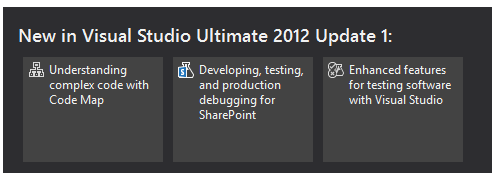
Microsoft has released Update 1 for Visual Studio 2012. New in this update is the ability to target Windows XP with C++ applications. Brian Harry has a list of what has changed here, based on the preview from a month ago.

image

There are many updates and fixes for Team Foundation Server (TFS), including support for the Kanban development methodology in TFS Web Access. You can now do load testing, unit testing and coded UI tests for SharePoint apps. Another notable fix is that you can do mixed managed/native debugging in Windows Store (that is, Metro) apps.

The TFS update is not seamless, as Harry explains:

It’s actually a full new install (though it will silently uninstall the older version and install the update so it feels like a “patch”).  However, we still have some work to do to make this as seamless as possible.  If you’ve done any customization of your TFS install (enabling https, changing ports, etc) you will need to reapply those customizations after installing the update.

Harry also says there will not be an SP1, except that there might be:

As we are currently thinking about it, there will be no SP1.  We have changed the model from a single Service Pack between major releases to a sequence of “Updates”.  So you can, kind of, think of Update 1 as SP1.  I suppose it’s possible that, at some point, we will decide to name one of the Updates as an “SP” but that won’t really change anything.

Confused? Surely not.

You can get the update here or an offline (complete) installer is here.

Finally, I was interested to see some of the issues which developers find annoying highlighted in the comments to Soma Somasegar’s blog:

  • XAML 2009 is not supported in the editor
  • Expression Blend is still in preview
  • The need for a developer license to build Windows Store apps is a constant irritation. The complaint is not about needing a license to deploy to the Store, but about Visual Studio refusing to build Windows Store apps unless you obtain a free online license, which installs some sort of key on your machine, and which expires after a few months.

No complaints about monochrome icons though, so I guess the new look has been accepted if not actually loved by developers.

Kingston DataTraveler Workspace and Hands On with Windows to Go

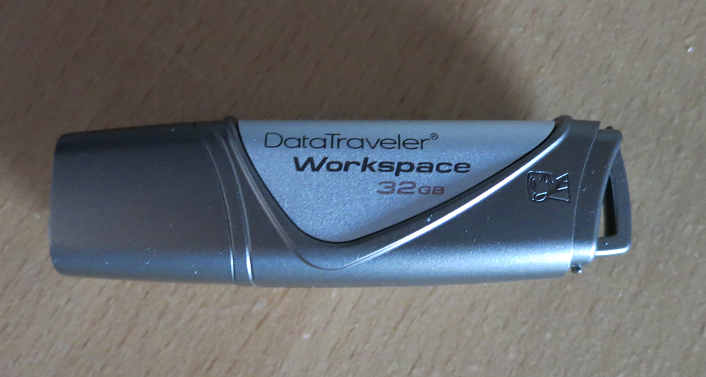
I received a Kingston DataTraveler Workspace for review, one of the few devices supported for use as a Windows to Go drive. Windows to Go is a way of running Windows 8 from a USB drive. If you need to take work home and continue on a home PC, Windows to Go lets you do so in an isolated environment. It is also a useful way to protect sensitive data, since there is an option to encrypt the drive with Bitlocker, the encryption method built into recent versions of Windows.

image

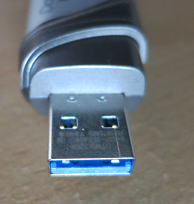
The DataTraveler Workspace is a 32GB USB 3.0 drive. It follows the usual convention of having a blue connector to indicate USB 3.0 support.

image

USB 3.0 is recommended but not required for Windows to Go. If you run from USB 3.0, the performance should be equal or better than running from a hard drive. It will work with USB 2.0, but will be slower.

Microsoft’s documentation for Windows to Go is not that great. Still, it is easy to get started. All you need is a supported USB drive and Windows 8 Enterprise (or any x86 version if you do not mind using the command line).

First, mount the Windows 8 Enterprise install DVD. Identify install.wim from the Sources folder on the DVD and make sure it is accessible.

Next, connect the USB drive to a USB 3.0 port if possible.

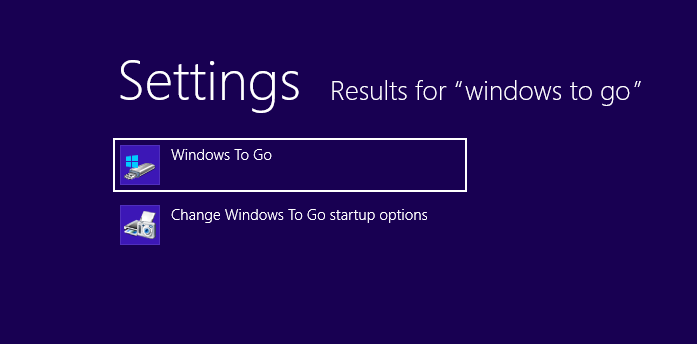
Then start the Windows To Go wizard – to find it search Settings and not Apps on the Start screen. [If you do not have Windows 8 Enterprise, check the scripting guide as well as the licensing requirements.]

image

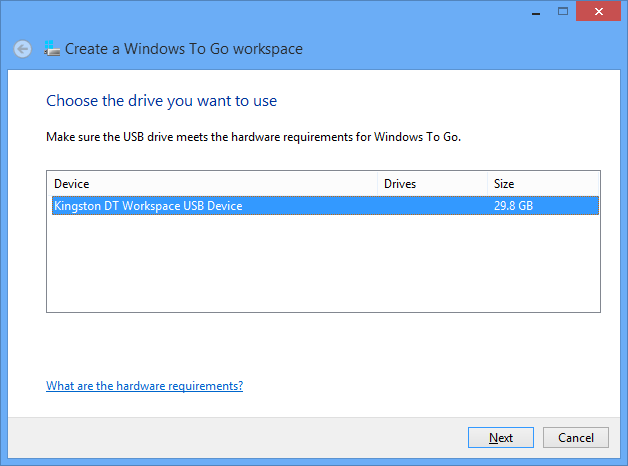
Run the wizard and select the target USB drive

image

The wizard will find install.wim automatically, or you can help it out if necessary.

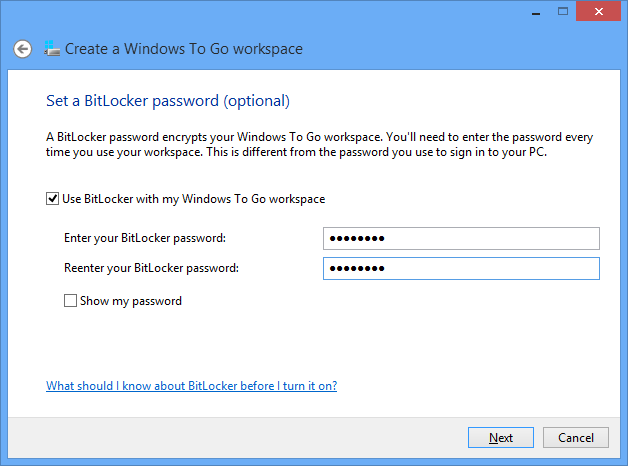
Optionally set a BitLocker password. Recommended, or why do you need Windows to Go? Do not forget it though.

image

Finish the wizard and after a few minutes you have a Windows to Go device ready.

I stuck it into a Dell laptop running Windows 7 and booted. This is essentially a new install of Windows 8, so it did all the detecting devices and welcome stuff. I signed in with a Microsoft account and despite only having USB 2.0 on this laptop, was pleased with the performance.

image

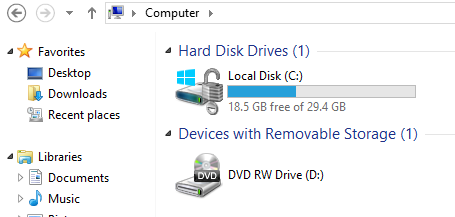
I noticed that the normal SSD drive on the laptop was invisible in Explorer.

image

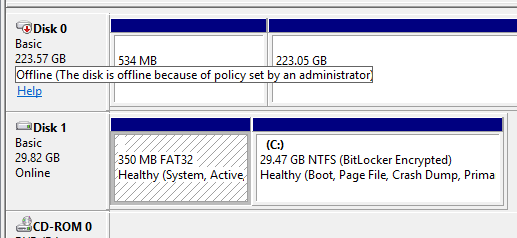
On further investigation, I found it had been marked offline by my system policy – I don’t recall setting this, so it is a default.

image

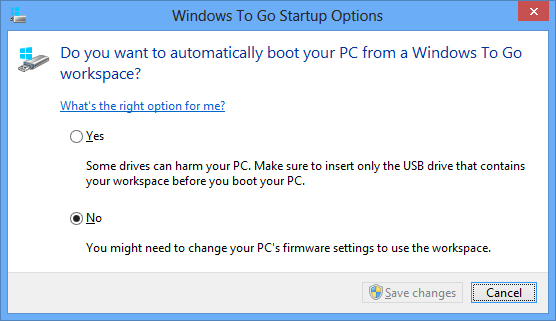
For my next experiment, I shut down, stuck the USB drive into a Samsung Slate, and rebooted. The slate did not boot from USB by default, but I did find Windows To Go startup options, which I believe are in all versions of Windows 8, which let you set an option to use it.

image

That worked. Then – disaster. The slate has no keyboard, and only one USB port. I was prompted for the Bitlocker password, but no matter where I tapped, the on-screen keyboard did not pop up for me to enter it. I had to find the dock for the slate, which has an additional USB port, plug in a USB keyboard, and retry. I can see this being a showstopper in some scenarios.

That worked though, and although I am not yet clear from the documentation how free and easy you can be moving Windows To Go between different hardware, I was impressed by how quickly and easily it started. The only inconvenience is that I had to re-enter the wifi key, presumably because the wifi adaptor on the slate is detected as a different device from the one on the Dell.

Pretty good, but this being a new install of Windows 8 I have considerable work ahead of me to make it useful by installing Office and other applications. How does this work in a business where you need stuff pre-installed?

The answer is here, if you can make sense of it: Microsoft’s instructions on creating a custom Windows image that you can use for multiple Windows To Go drives. It is not trivial; you start by downloading and install the Windows ADK (Windows Assessment and Deployment Kit) for Windows 8.

Another day maybe. For now, I am impressed. The main snag is that few of my PCs have USB 3.0.

Windows To Go does not work on Microsoft’s Surface RT tablet, but will work on Surface Pro when that is released.

Update: another issue with Windows To Go turned up when I tried running it on a netbook. I was impressed with the performance and that it worked, after a few minutes “detecting devices”. However when I launched Word 2013 it said Office needs activation because of changed hardware. Presumably this will be a real problem if you regularly use your Windows To Go device on different PCs, which as I understand it is how it is meant to be used.

Office activation is part of Microsoft’s copyright protection for Office and I presume that after a certain number of activations it will no longer activate.


Information density in Metro apps on Windows 8

A common complaint about apps written for the Windows Runtime, also known as Metro by those outside Microsoft, is that they tend to show only a small amount of data per screen. The most information-dense Metro app I have found is a game, Wordament, which shows a fair amount of data in its results screen.

image

The word lists scroll, and so does the list of players. Which proves that you can create an information-dense screen in a Metro app; though it is all custom-drawn.

Apps sell better with Live Tiles, says Nokia, with other tips for phone developers

I attended an online seminar by Nokia’s Jure Sustersic on Windows Phone 8 development. It was a high level session so not much new, though Sustersic says the 7.8 update for existing 7.x Windows Phones  is coming very soon; he would not announce a date though.

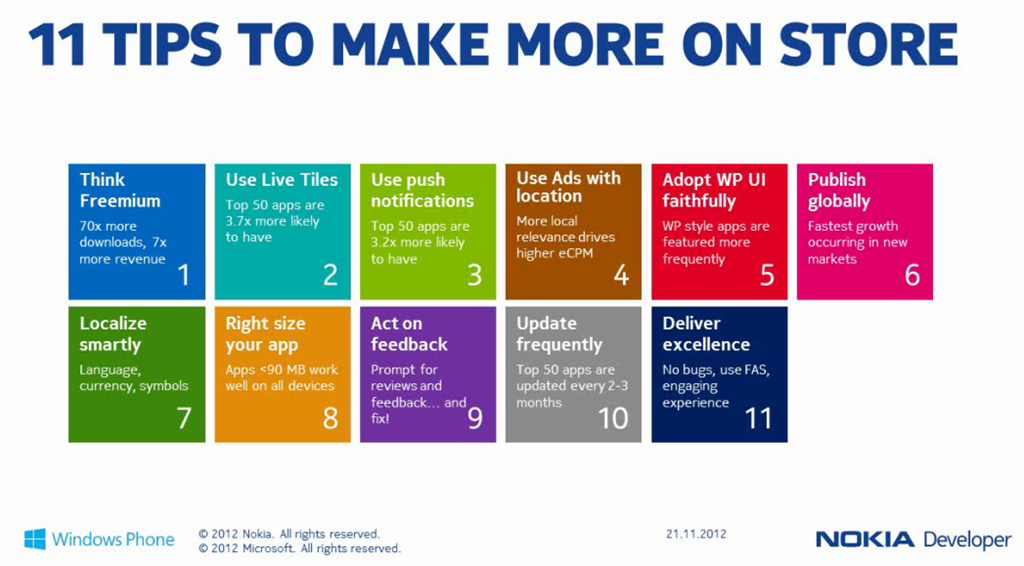
The slide that caught my eye was one on how to make more profitable apps, including some intriguing statistics. In particular, according to Sustersic:

  • Freemium apps (free to download but with paid upgrades or in-app purchases) achieve 70 times as many downloads and 7 times more revenue
  • The top 50 apps are 3.7 times more likely to have Live Tiles
  • The top 50 apps are 3.2 times more likely to use Push Notifications
  • The top 50 apps are updated every 2-3 months
  • The fastest growth is in new markets, so localize


image

Of course what Windows Phone developers want most is a larger market, so for Nokia to sell more phones. Random reboots aside, Windows Phone 8 has been well received, but it an uphill task.

I covered the Windows Phone 8 development platform in summary here.

Microsoft’s Design Language – Tiles and Chromelessness – Prospects for Windows 8

Among the most illuminating sessions at Microsoft’s BUILD conference earlier this month was Will Tschumy’s presentation on the Microsoft Design Language.

Tschumy says that Microsoft began a new focus on design back in 2003 (think Office Ribbon). Then came Windows Phone and Metro (only he did not call it that), and now:

Microsoft is the only organization with a single, consistent design language across each screen we touch

he explained., noting that Xbox as well as the phone uses this same design language.

So what is it? The core idea, he says, is “content before chrome”. This is an old idea, which Google drew attention to with its 2008 web browser called Chrome – a playful title for something which properly should have been called Chromeless. Chrome sported a minimal user interface, putting the focus on the web content, and laying the foundations for web applications where the browser disappears and you forget that you are looking at a web page.

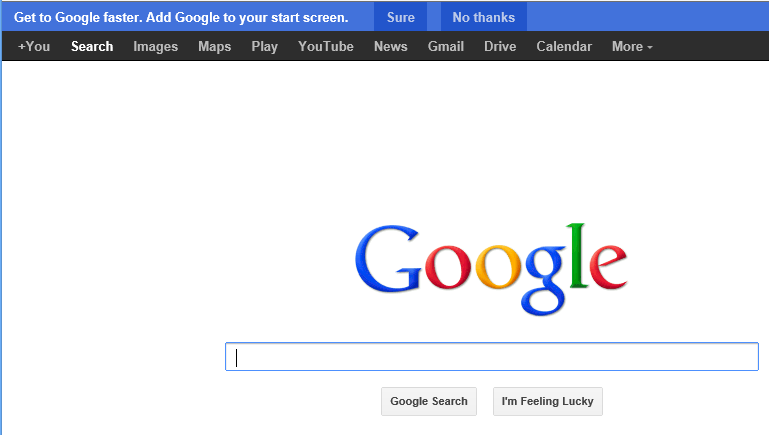
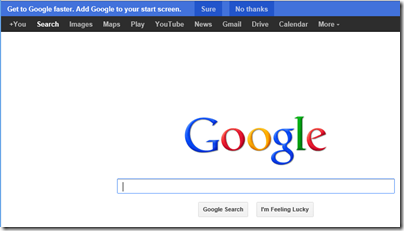
This is actually consistent with Google’s approach from its earliest days, when the Google home page was just a search box and a couple of buttons – a purity of design now spoilt by a menu bar and nagging ads, but you can still see it.
image

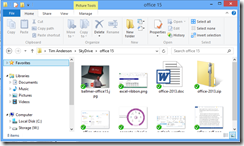
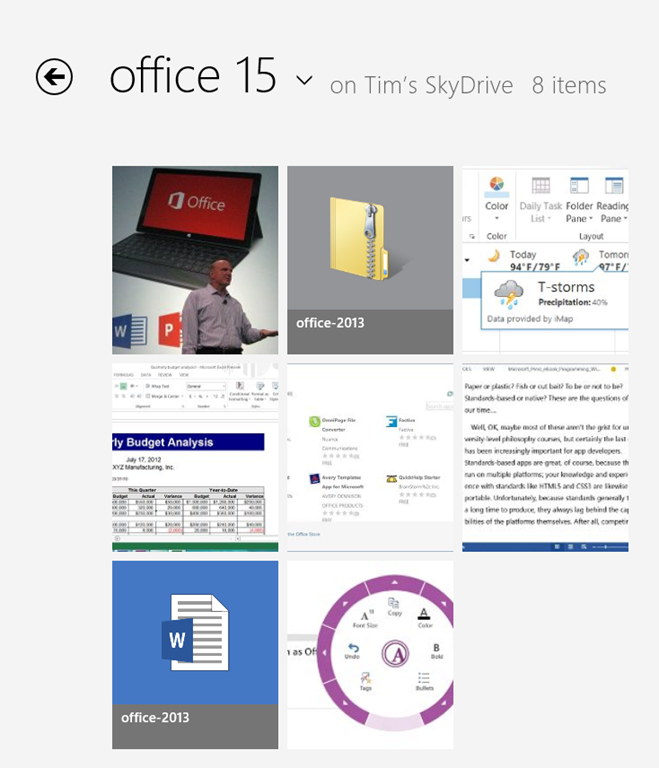
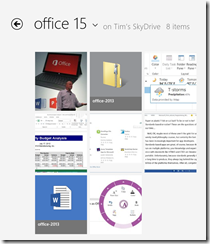
But I digress. What has Microsoft done with the concept? A good example is to compare the SkyDrive “Metro” app with the same folder in Windows File Explorer. Here is Skydrive:
image

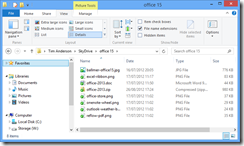
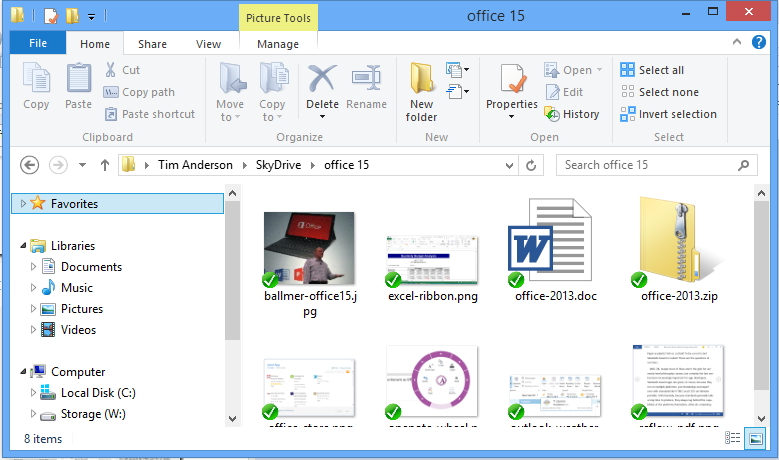
and here is Windows File Explorer:

image

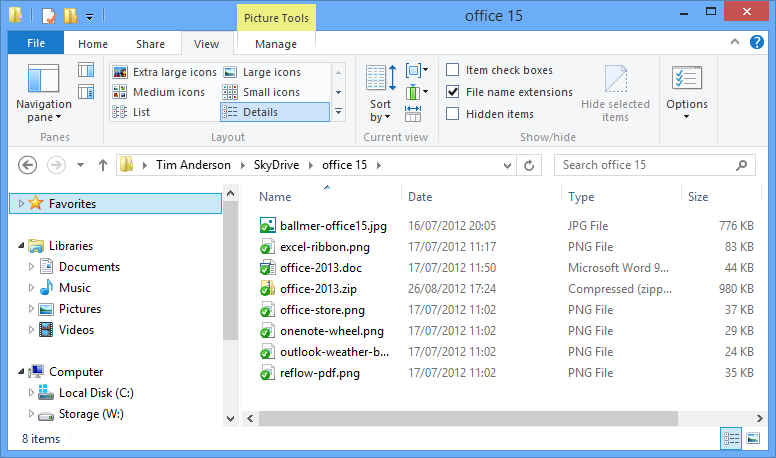
Or possibly:

image

if you are like me and prefer the “Details” view.

The point here is that the “Modern” SkyDrive app has a high ratio of content to chrome, and large icons which preview the content where possible make the content stand out, whereas in File Explorer there is more UI. Of course this is the Windows 8 File Explorer which is also influenced by the same design language. My Details view, which I like because I get higher information density, is closer to an old-style computer approach where the focus is on the number of bytes in the file above what the image happens to look like.

Mixed feelings them, but I do understand what Microsoft is driving at. Spend some time with Microsoft’s Surface RT – no, not on the desktop, on the Metro side – while using some of the better new apps and you begin to appreciate the idea.

Tschumy spelt out five design principles, though only three of these seem to be substantial:

  • Pride in Craftsmanship: fluff
  • Be fast and fluid: Performance matters
  • Authentically digital: not skeuomorphic
  • Do more with less: minimalism
  • Win as one: fluff

No mention then of the “signposting” inherent in the metro transport signs which gave Metro its now-forsaken name, and in fact discoverability is a weakness of Microsoft’s design language; it seems hard to create a UI that is both “content before chrome” and highly discoverable. The common functionality encapsulated in the Windows 8 Charms bar, where features like Search are handled by a UI that is the same in every app, is one attempt to fix this, though first you have to learn how to use the Charms bar. Note the number of users who thought the Wikipedia app had no search function.

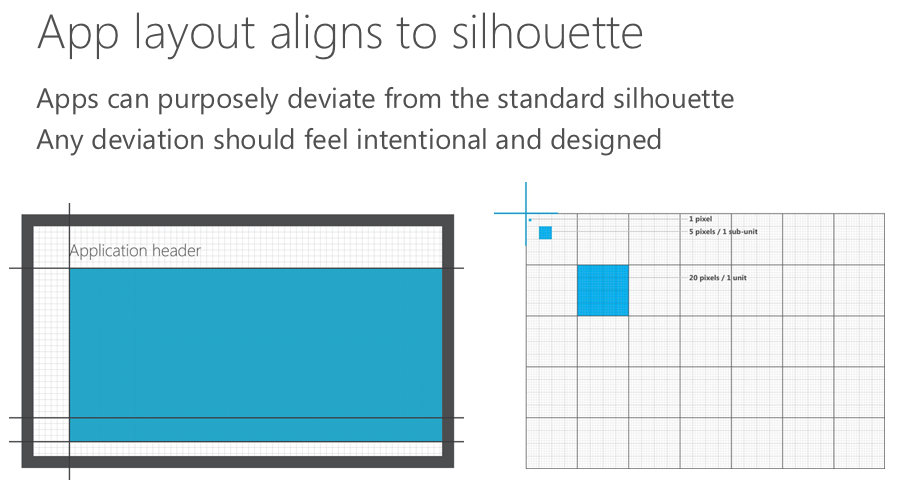
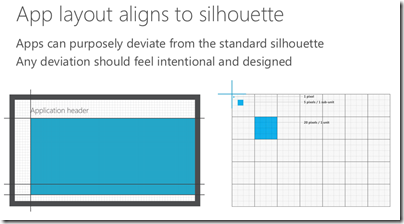
There is also a visual aspect to Microsoft’s design language, which Tschumy does a good job of explaining. Align to a standard grid, he said, unless you need to deviate from it for good reasons.
image

From here we get the tiled look which characterises Metro and which certainly has merits; it tends to be clear though not always beautiful.

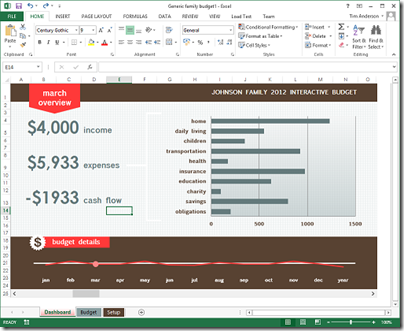
Understanding the rationale behind these design principles helps to make sense of new Microsoft products such as Office 2013 and Visual Studio 2012, both of which have been met with mixed reactions on the grounds that they look a bit washed-out, the user interface is hard to focus on. The thinking is that this helps the content, which is what you care about, to stand out more.
image 

That said, I am not convinced by this approach in the context of a productivity tool like Office or Visual Studio. You may care more about the content; but if you want to change the content, then you also care about the tools and want to find them quickly. Scroll bars that fade into the background are great, until you need to scroll the document.

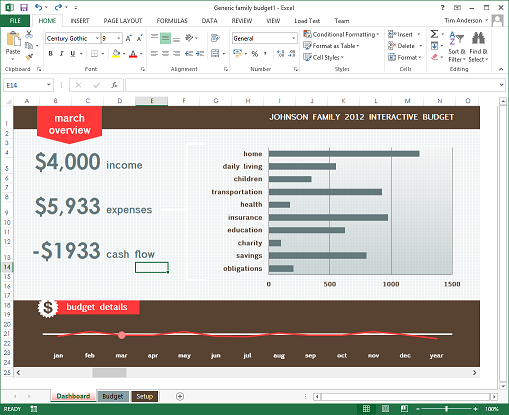
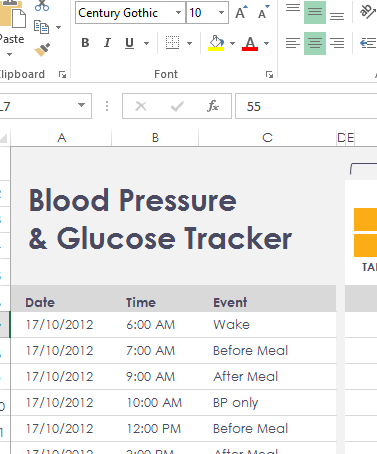
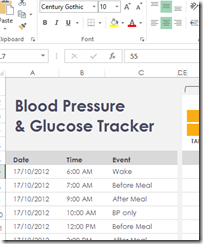
It is also interesting to browse the sample templates in Excel 2013. I grabbed the above screen from there, which seemed to illustrate the design principle of content before chrome, but in other cases I notice that the designers have gone for a washed-out look in the content as well.
image

This makes no sense to me, other than that the designer, observing the fade-into-the-background theme in the chrome, decided to match the content to it in order to get a consistent appearance. Now you cannot see the content or the chrome – uggh! This is what happens when you try to get a very large company working together on a common but somewhat counter-intuitive vision; not everybody gets it.

Which brings me neatly back to Windows 8. I mentioned the Surface RT above; I will be writing more about this, but I do find it a delightful device and one which expresses the Windows 8 and Microsoft Design Language vision better than any other aside from perhaps a Windows phone – unfortunately I have not yet got my hands on a Windows 8 phone to review but hope to do so eventually. It is also a flawed device of course, partly because the performance is less than “fast and fluid” in some cases (like Excel), but mainly because the apps are lacking.

It does seem to me though that Windows 8 has great potential and brings something new to the tablet world. Unfortunately there is uncertainty about whether either Microsoft or its OEM and retail partners have the will and the vision to get past the current hump of unfamiliarity and immaturity for that potential to be fulfilled. Microsoft has spent eye-wateringly huge amounts of money marketing Windows 8 and Surface RT; but I do not think that money has been spent strategically, it has just been thrown at the usual agencies. Many are still flummoxed by what Windows 8 is for, and that is apparent even amongst the OEMs that are manufacturing and selling it.

What will now happen post-Sinofsky, the man whose balls of steel brought Windows 8 to market? In his memo noting the appointment of Julie Larson-Green as head of Windows engineering, Ballmer says:

Her unique product and innovation perspective and proven ability to effectively collaborate and drive a cross company agenda will serve us well as she takes on this new leadership role.

The highlighting is mine. A cross company agenda is exactly what Microsoft needs; but if the new Windows leadership is less determined than the old, it could equally easily pull apart rather than together.

Steven Sinofsky leaves Microsoft – but why?

Microsoft has announced that Windows chief Steven Sinofsky is leaving the company:

Microsoft Corp. today announced that Windows and Windows Live President Steven Sinofsky will be leaving the company and that Julie Larson-Green will be promoted to lead all Windows software and hardware engineering. Tami Reller retains her roles as chief financial officer and chief marketing officer and will assume responsibility for the business of Windows. Both executives will report directly to Microsoft CEO Steve Ballmer.

image

Here are some quick thoughts.

One line of thought is that Windows 8 and Surface RT are failing because users do not like the dramatic changes, with the new tiled personality and disappeared Start menu, and therefore its architect is departing.

I do not believe this for several reasons. One is that the promoted Julie Larson-Green is a key creator and proponent of the new design (call it Metro if you like). She worked with Sinofsky on the Office Ribbon way back, a project that has some parallels with Windows 8: take a critically important product and revamp its user interface in ways that customers are not requesting or expecting.

My further guess is that Microsoft was braced for some level of storm on the release of Windows 8. There was plenty of warning that the new tablet-friendly platform would be a hard sell to longstanding Windows users.

The time to judge the success of Windows 8 is not today, but in two or three years time, when we can observe how the platform is faring in the new world of mobile and cloud.

It is my opinion that the remaking of Windows is more brilliant than blunder. Without “reimagining” it was doomed to slow decline. Microsoft now has a tablet operating system, and one that is in the hands of millions thanks to its integration with desktop Windows. The storm will die down and there is at least some chance that the outcome will be an app platform that will keep the company in the tablet game.

That said, it seems to me that Microsoft has had problems in execution. Windows 8 is fairly solid, but there are signs of haste in the building blocks of Metro, as you discover if you write an application, while Surface RT is not the fast, easy to use appliance that it should be. Key apps like Mail and Xbox Music are short of features and too hard to use, while Windows-isms such as update errors have not been expunged as they should. Such issues can be fixed, but the moment to get this right is at launch, not six months or a year later.

You might also ask: why is Microsoft allowing its brand new store to fill with rubbish apps, seemingly with the knowledge and encouragement of employees at the company?

Were these execution problems Sinofsky’s fault then? Again I doubt that. My perception is that Microsoft is a dysfunctional company to some degree, but one in which there are islands of immense talent and teams which deliver. It is huge and bureaucratic though, and getting everyone motivated and energised to deliver top quality is likely impossible without radical reform. Bureaucracy tends to result in employees who work by the letter not from the heart, which results in mediocrity, and there is evidence of that everywhere.

In this context, the fact that Sinofsky delivered twice, once with Office 2007 and again with Windows 7, with judgment on Windows 8 not yet possible, shows his ability.

If failure is not the reason then, why?

Well, another reason for staff to leave suddenly is that there was some sort of internal conflict. Sinofsky achieved by taking a firm line and sticking to it, which made him enemies. I do not have any inside information; but two moves to reflect on would be the move of ASP.NET and Silverlight guy Scott Guthrie to Windows Azure, and deep Windows internals guy Mark Russinovich also to Azure.

Sinofsky was no friend to .NET, which led to some perplexing decisions. A little sign of this I witnessed at Build was why XNA, a .NET wrapper for Direct X hardware acceleration, is not supported in Windows Phone 8. Except it is, as a member of the phone team explained to me, it is just that you have to target Windows Phone 7 in your project, but it will run fine on Phone 8. Why the workaround? Because .NET is now discouraged for games development, for no technical reason.

Still, this war has been going on for a while and Sinofsky has won every battle. Why has he now left?

I have no inside knowledge, but would conjecture that the effort of forcing through Windows 8 and native code versus .NET built up pressure against him, such that there was instability at the top. In this context, even relatively small failures or falling behind projections can be significant, as resources for opponents to use against you.

CEO Steve Ballmer of course is still in place. Did have a change of heart about Sinofsky, or a row with him over what comes next for Windows? That is the kind of thing which is plausible; and the uncertain market reaction to Windows 8, while not unexpected, would make it possible to push him out.

If I were a shareholder though, the departure of this key executive at this moment would worry me. This is the company which has transformed Windows Azure for the better and delivered the fantastic Windows Server 2012; it is also the company which is guilty of the Kin mobile phone debacle, and forgetting its agreement with the EU to offer a browser ballot to Windows 7 users at perhaps substantial financial cost. Evidence, one would judge, that deep change is needed, but not the kind of change that will be achieved by the departure of one of the most capable executives.

Postscript: Mary Jo Foley notes that Sinofsky did not present at the Build keynote right after the Windows 8 launch, raising the possibility that Sinofsky’s departure was already planned, before the Windows 8 launch. That is further evidence that this is not a reaction to poor initial sales (if indeed they are poor).

Improving Windows Server: the really hard problem

At Microsoft’s Build conference last week I attended a Server 2012 press event led by Jeffrey Snover, the Lead Architect for the Windows Server Division.

He and others spoke about the key features of Server 2012 and how it justifies Microsoft’s claim that it is the cornerstone of the Cloud OS.

It is a strong release; but after the event I asked Snover what he thought about a problem which is at the micro-management level, far removed from the abstractions of cloud.

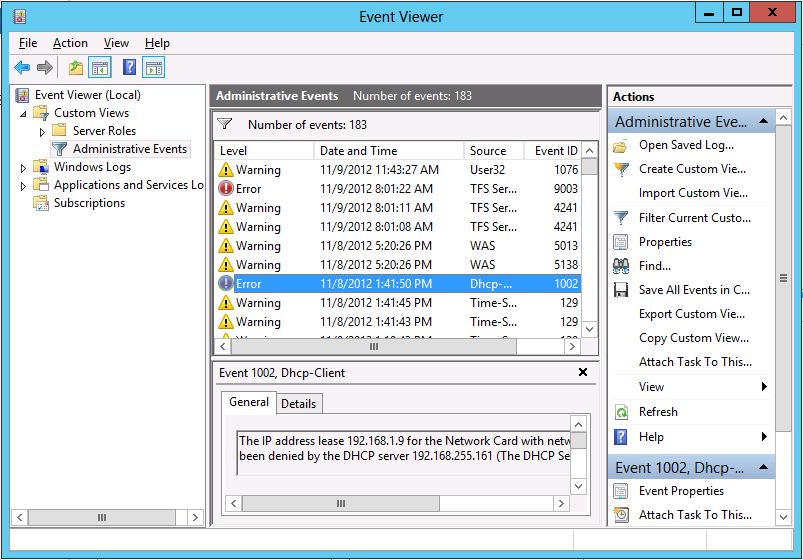
The Windows event log, I observed, invariably fills with errors and warnings. Many of these are benign; but conscientious administrators spend significant effort investigating them, chasing down knowledgebase articles, and trying to tweak Windows Server in order to fix them. It is a tough and time-consuming task.

When, I asked, will we see an edition of Windows Server that does a better job of eliminating useless and unnecessarily repetitive log entries and separating those which really matter from those which do not?

[I realise that the Event Viewer makes some effort to do this but in my experience it falls short.]

image

That’s hard he said. It will take a long time.

Which is better than saying that the problem will never be solved; but you wonder.

I also realise that this issue is not unique to Windows. Your Linux or Mac machine also has logs full of errors and warnings. There is an argument that Windows makes them too easy to find, to the extent that scammers exploit it by cold-calling users (generally not server admins) to persuade them that they have a virus infection. On the other hand, ease of access to logs is a good thing.

What is hard is discerning, with respect to any specific report, whether it matters and what action if any is required. One reason, perhaps, why we will always need system administrators.

Rubbish apps in Windows Store – encouraged by Microsoft?

Someone (and you wonder who) has taken it upon themselves to document rubbish apps in the new Windows Store. The stated reason:

Here we call out all the trash in the hopes that someone at Microsoft is listening and can remove them.

He or she has found plenty of examples – like the developer who submitted 20 trivial conversion apps and a tapping game that does not work; another who has got dozens of identical SDK samples listed as apps with different names; or the memory game listed 28 times complete with spelling errors and images suspected to be lifted from Disney.

Initially the puzzle was why apps which breach Windows Store guidelines are getting listed. But then there is more:

I feel like I’ve uncovered a conspiracy and I have no idea what to do with the information!

I emailed both Kusuma Sruthi and Pavan Kumar asking them why they had felt the need to submit their game multiple times to the Windows 8 store. I wasn’t really expecting a response. Yet both replied, pretty quickly, saying that they were told to do it but would remove the duplicates if I told them to. Was my email written with such authority?

Both claim to have been contacted by POOJA PATIL and told “to upload our apps with DIFFERENT NAMES and with SAME SOURCE CODE”. Whilst Pavan Kumar claimed not to have contact details he did say that she was from Microsoft. Kusuma Sruthi was more forthcoming with both a microsoft.com email address and an Indian mobile number. A brief Googling confirms the existence of a Pooja Patil with this phone number working for Microsoft to organise the Windows 8 Guiness World Record attempt in Bangalore.

Why would someone from Microsoft have told these two developers to submit their game multiple times? Were they really so desperate for apps that they encouraged this cloning? Were they really expecting that no one would notice?

Yesterday the blog author says two similar emails appears from these developers now denying that they were instructed by Patil to submit the apps:

at 6:05am I received 2 emails. Yes, at exactly the same moment. From Pavan and Kusuma. Both would now like to retract their previous comments about Pooja and would like it known that she’s great, and very supportive, and didn’t tell them to submit the same app over and over. It was all just a misunderstanding. Apparently.

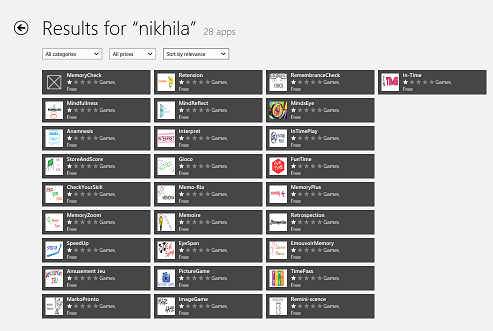
Is all this made up? Not entirely, since you can verify that the apps mentioned exist, like these 28 apps by Nikhila Grandhi:

image

though it looks to me that some of the apps from Kusuma Sruthi have been removed suggesting that someone at Microsoft has noticed the issue and is trying to clean up.

Microsoft is a large company and although I was assured by Microsoft Store VP Antoine LeBlond that the new Store is not about the numbers, I can believe that some over-enthusiastic employees went too far in obeying some corporate directive to promote Metro-style app development and Store submissions.

That does not explain though why so many guidelines appear to have been ignored.

The company should do the right thing and clean out the rubbish.

Update: see also Drunk Compliance Tester. “The Windows 8 Store will continue to be a horrible experience for everybody if the level of quality doesn’t rise”

How bad is the Surface RT?

I have just read this piece on Slate entitled Why is the Surface so bad? after using the device for most of yesterday, on a train and at a technical event.

image

Oddly, I like the Surface RT increasingly, though I too am puzzled by some of its shortcomings.

Here are some of the issues I am aware of:

  • The apps. This is the biggest issue. Where are the delightful apps? For example, the mail client is barely adequate. The music app is annoying, though there is plenty to stream if you have an Xbox Music Pass. It cannot play FLAC files, which I use for my Squeezebox-based system at home.

    How hard is it for a company the size of Microsoft to write a superb mail app and a superb music app for its critical new product? I would guess that a small fraction of the advertising budget would have been enough. Why was there no one at Microsoft with the guts to throw them back at the team that developed them and say, “Not good enough, we do not have a product.”

  • Performance is so-so. It is not terrible in my experience, but at times makes you wonder if Windows 8 is too much on a Tegra 3; or whether it needs a whole lot more optimisation. Battery life is also OK but could be better. I got 7 hours or so yesterday, with wi-fi on constantly, and some of the time powering a phone being used as a wi-fi hotspot.
  • I got errors updating Microsoft Office. Mostly fixed by exiting the Office Upload Center. There’s no excuse for that. This is the appliance model. Microsoft knows exactly what hardware I have and what software I have, and has locked it down so I can only install sandboxed apps from the Store. Testing various update scenarios is easy.
  • For that matter, why is there an Office Upload Center? It is dreadful error-prone software. Dropbox has no Upload Center. Is it so hard to sync documents with SkyDrive or SharePoint – how long has Microsoft been batting at this problem?
  • I am concerned by reports of early keyboard disintegration, though mine is still OK

Enough griping though. Here is why I like this device.

First, I have no problem with the weight and I like the solid feel of the unit. The Surface is compact. The Surface with its keyboard is about 350g lighter and 4mm slimmer than my Samsung Slate without a keyboard; I am including the cover because I would never travel with a slate without a cover.

Second, unlike the Slate (magazine) reviewer, I do think the keyboard cover is a breakthrough. The Touch keyboard provides a usable full keyboard and trackpad while not adding any significant bulk; it forms a useful cover when closed, and when folded back it does not get in the way while you use Surface as a slate. I find myself using it in Slate mode frequently. Do not believe those who say you need keyboard and mouse to operate a Surface; there is only an argument for this if you never venture out of the desktop.

I can do more than occasional typing on the Touch keyboard; it is fine for longer documents as well.

Third, I can do real work with the Surface. Yesterday I sat with Surface on my lap, typing notes into Word, with Mail docked to the left, and Twitter open in desktop IE alongside Word. For all its faults, I found that the Surface worked well in this context.

Fourth, if you know Windows, there are things you can do that are difficult with other tablets. VPN to my office and remote desktop to a Windows 7 machine there is built in and works well. SharePoint via WebDAV is a shortcut in the Windows File Explorer.

Of course you could do all this with a laptop. So why not have a laptop, which you can buy for less money than a Surface? It is certainly an option; but as I have adapted first to the Samsung Slate running Windows 8, and now to the Surface, I find laptops bulky and inconvenient. I think of a laptop more as I used to perceive a desktop PC, something which is best suited to permanent siting on a desk rather than being carted around.

Further, the Surface really is a tablet. Imagine you want to show some photos to a friend or colleague. On a laptop that is awkward. The keyboard gets in the way. On a tablet like the Surface it is easy; just open the folder in the full-screen photo app and swipe through the images, with the keyboard cover folded back. Pretty much any tablet will do that equally well – or better if you have a Retina iPad – but it shows that Surface is not just a laptop in disguise.

There are reasons why I get better results from the Surface than some. One is that I know Windows 8 well, having used it intensively for many months. Another is that I am familiar with Windows foibles, so when these appear in the Surface I am likely to know what to do. Of course they should not appear at all; see above.

Microsoft seems to have created a device with many flaws, but one that is useful and sometimes delightful even despite those flaws.

Microsoft answers Windows Runtime questions

I watched the Windows Runtime (WinRT) “Ask the Experts” session from Build 2012; I did not get to attend in person as it conflicted with Herb Sutter’s session on C++. The session was chaired by Martyn Lovell.

image

Here is what I thought most significant or interesting.

  • Microsoft knows that certain types of apps cannot be implemented as Windows Store apps. The implication is either that the desktop will never go away, or that some future version of Windows Runtime will have extended capabilities. Kamen Moutafov: “There are certain types of system management, system configuration applications that you cannot write a Windows 8 style app for. The platform is not well suited for this type of application.”
  • The WebView control is a problem. An attendee reported z-order, memory, input, and performance issues. This is not only because it hosts the IE10 engine, but also because the system does not cope well with the runtime layers involved: JavaScript running within XAML in a C# app, for example.
  • Someone asked why WinRT apps cannot span or support multiple monitors. The answer, only half joking, “Jensen Harris said that is how it is supposed to be!” Second answer is that this may change in future, and perhaps was just too hard to do well in version 1.0.
  • There was considerable discussion of usage of asynchronous APIs (typically using Async and Await). Can you use them too much? The answer is that you can, and some apps perform badly as a result. An example of a bad usage would be to iterate through many hundreds of files in a directory and fire off an async call for each of them. Lots of aysnc calls returning together will choke your app. Advice is to try limiting the number you fire off, for example, only processing the first page or two that is visible in the user interface.
  • Someone asked how can WinRT apps communicate with desktop apps? This is meant to be restricted to protocol handlers and file types, so that the user is in control. Microsoft attempted to block all other routes.
  • Someone had an app in the marketplace that worked on x86 Windows 8, but he discovered that it crashes (does not even load) on Surface RT. How did it pass certification? Answer: Microsoft has seen instances where apps do not behave the same. Certification is not an exhaustive test. Even so, disappointing to make available an app that will not even load.
  • Can a WinRT app create UIs on multiple threads? Yes you can create two views on different threads. See CoreApplication.CreateNewView.
  • How can you detect if a file exists without raising an exception? Apparently this can’t be done. It may be addressed in future.
  • If you are creating a component to be used by other apps including JavaScript apps, it is best to create in in C++. JavaScript to C# to WinRT is apparently sub-optimal.

Watch the session yourself here.