Category Archives: windows

Fixing a Small Business Server 2008 broken by updates

I had a call last night from a small business whose email no longer worked. They had applied updates to the server but Exchange had failed to restart.

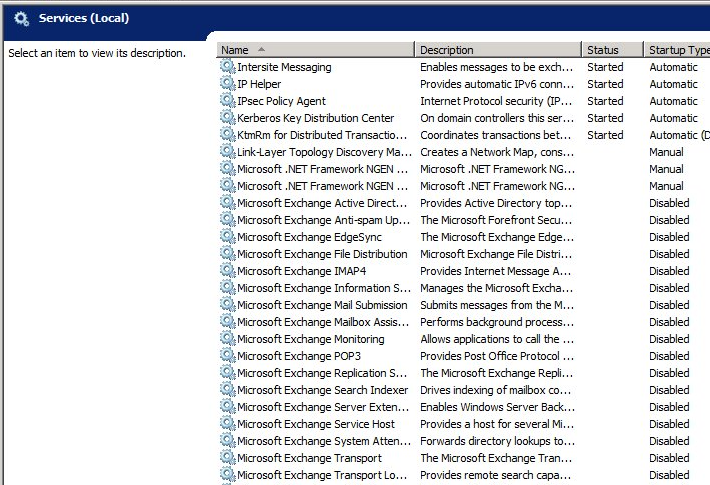
Looking at the services it was easy to see why. All the Exchange services and certain others including the IIS web server were set to disabled:

image

The likely culprit was Update Rollup 5 for Exchange Server 2007 Service Pack 3 (KB 2602324) – or rather, the mechanism which applies the patch, since this seems to be an issue that others have run into as far back as 2008 with other Exchange patches, though it is rare:

I installed the Update Rollup 4 and did a reboot of my Exchange Server 2007. But since then, all my services are disabled. Is this a known issue?

My guess is that the patch disables the services in order to update the binaries and then, for some unknown reason not fixed by Microsoft over these last four years, fails to re-enable them.

It seems that no harm was done other than that the services were disabled, but how can you know which services are meant to be running, which should be set to manual, and which should stay disabled?

I contemplated doing a quick test install of SBS 2008 on a VM just  to see how it is set out of the box, but fortunately found this post by Susan Bradley which shows default SBS 2008 running services.

There were a few other things wrong.  SharePoint Services was raising event 5586:

Unknown SQL Exception 33002 occured. Additional error information from SQL Server is included below. Access to table dbo.Versions is blocked because the signature is not valid.

and there was the related event 33002 from the internal SQL Server used by SharePoint. The cause of this was SharePoint Services 3.0 Service Pack 3. When you apply a major update to SharePoint Services, you have to re-run the SharePoint Products and Technologies Configuration Wizard. This is by design, though it seems odd to me that you apply an update and it silently breaks the product it is updating until you run a further manual process. Of course the error itself does not give you much clue about what is really wrong.

The third major issue was a JRNL_WRAP_ERROR from the NTFrs File Replication Service. You have to be careful with this one, since the advised fix in the event log presumes the presence of a good replica elsewhere, which in the case of SBS is unlikely. See this article for details. With SBS which it is the sole domain controller you should set the BurFlags registry key to D4. Further comment on ServerFault here.

The incident reminds me of how prickly SBS can be. It is great value for what it does, but has all the complexity of Microsoft’s server stack plus the further disadvantage of being crammed onto one machine. I prefer a pseudo multi-server approach, even for small businesses, with at least two physical servers and separate VMs for Exchange, SharePoint, domain controller, backup DC on the other physical machine, and so on. Of course this has complexity of its own.

I would guess that when upgrade time comes around, companies like this will be looking carefully at Office 365. Or Google Apps; but the advantage of Office 365 is that you can make the transition from SBS with relatively little impact on users: just migrate the Active Directory, Exchange and SharePoint. You lose flexibility and some local performance, but hand over the maintenance issues to Microsoft.

Microsoft financials: Windows under stress, Server and Office making up

If we are really in the post-PC era, then one of two things will happen. Either Microsoft will make a big success of non-PC products, or it will start delivering shocking financial results. Neither is yet true. Here are the results just announced, broken down into a simple table.

Quarter ending December 31st 2011 vs quarter ending December 31st 2010, $millions

Segment Revenue Change Profit Change
Client (Windows + Live) 4736 -320 2850 -64
Server and Tools 4772 +484 1996 +285
Online 784 +71 -458 +101
Business (Office) 6279 +169 4152 +65
Entertainment and devices 4237 +539 528 -138

A few observations. Server revenue (though not profit) exceeded client revenue; I am not sure if this is the first time it has done so, but it is unusual. The Office division enjoyed a remarkable quarter, and the press release mentions 10% growth in Exchange and SharePoint, and 30% growth (from a smaller base) in Lync and Dynamics CRM. Azure? Not mentioned so I presume revenue is small.

Where is Office 365? Somewhere in the Office figures I would guess; and once again, since it is not mentioned, I think we can assume it is not delivering a large amount of revenue yet. I would like to know more though.

What Microsoft calls Online is formed of Bing search and services and advertising income. Another hefty loss, but revenue is up, loss somewhat reduced, and Microsoft claims that  “Bing-powered US market share, including Yahoo! properties, was approximately 27%”. Not bad.

This is the big quarter for gaming and Xbox delivered accordingly. The faltering Windows Mobile and Windows Phone 7 are somewhere lost in those Xbox numbers, and again its revenue is not mentioned in the press release.

Meet Resilient File System (ReFS), a new file system for Windows

Microsoft has announced the Resilient File System (ReFS), a replacement for the NTFS file system which has been used since the first release of Windows NT in 1993.

The new file system increases limits in NTFS as follows:

  NTFS ReFS
Max file size 2^64 -1 2^64-1 bytes
Max volume size 2^40 bytes 2^78 bytes
Max files in a directory 2^32 –1 (per volume) 2^64
Max file name length 32K unicode (255 unicode) 32K unicode
Max path length 32K 32K

I have done my best to set out the NTFS limits but it is complicated, and there are limitations in the Windows API as well as in NTFS. See this article for more on NTFS limits; and this article for an explanation of file name and path length limits in the Windows API.

Microsoft’s announcement focuses on two things. One is resilience, with claims that ReFS is better at preserving data in the event of power failure or other calamity. Another is how ReFS is designed to work alongside Storage Spaces, about which I posted earlier this month.

Of the two, Storage Spaces will be more visible to users. In addition, it sounds as if ReFS will not be the default in Windows 8 client:

…we will implement ReFS in a staged evolution of the feature: first as a storage system for Windows Server, then as storage for clients, and then ultimately as a boot volume. This is the same approach we have used with new file systems in the past.

Note that there are losses as well as gains in ReFS. Short file names are gone, so are quotas, so is compression:

The NTFS features we have chosen to not support in ReFS are: named streams, object IDs, short names, compression, file level encryption (EFS), user data transactions, sparse, hard-links, extended attributes, and quotas.

Overall ReFS strikes me as a conservative rather than radical upgrade. This is not the return of WinFS, an abandoned project which was to bring relational file storage to Windows. It will not help, in itself, with the biggest problem client users have with their file system: finding their stuff. Nor does it have built-in deduplication, which can make storage substantially more efficient. Microsoft says the file system is pluggable (as is NTFS) so that features like deduplication can added by other providers or by Microsoft with other products.

OEMs are still breaking Windows: can Microsoft fix this with Windows 8?

Mark Russinovich works for Microsoft and has deep knowledge of Windows internals; he created the original Sysinternals tools which are invaluable for troubleshooting.

His account of troubleshooting a new PC purchased by a member of his family is both amusing and depressing, though I admire his honesty:

My mom recently purchased a new PC, so as a result, I spent a frustrating hour removing the piles of crapware the OEM had loaded onto it (now I would recommend getting a Microsoft Signature PC, which are crapware-free). I say frustrating because of the time it took and because even otherwise simple applications were implemented as monstrosities with complex and lengthy uninstall procedures. Even the OEM’s warranty and help files were full-blown installations. Making matters worse, several of the craplets failed to uninstall successfully, either throwing error messages or leaving behind stray fragments that forced me to hunt them down and execute precision strikes.

I admire his honesty. What he is describing, remember, is his company’s core product, following its mutilation by one of the companies Microsoft calls “partners”.

Russinovich adds:

As my cleaning was drawing to a close, I noticed that the antimalware the OEM had put on the PC had a 1-year license, after which she’d have to pay to continue service. With excellent free antimalware solutions on the market, there’s no reason for any consumer to pay for antimalware, so I promptly uninstalled it (which of course was a multistep process that took over 20 minutes and yielded several errors). I then headed to the Internet to download what I – not surprisingly given my affiliation – consider the best free antimalware solution, Microsoft Security Essentials (MSE).

Right. I do the same. However, the MSE install failed, probably thanks to a broken transfer application used to migrate files and settings from an old PC, and it took him hours of work to identify the problem and complete the install.

What interests me here is not so much the specific problems, but Microsoft’s big problem: that buying a new Windows PC is so often a terrible user experience. Not always: business PCs tend to be cleaner, and some OEMs are better than others. Nevertheless, although I have had Microsoft folk tell me a number of times that its partners were getting the message, that to compete with Apple they need to deliver a better experience, the problem has not been cracked.

There is something about the ecosystem which ensures that users get a bad product. It goes like this I guess: customers are price-sensitive, and to get the price required OEM vendors have to take the money from malware companies and others desperate to drive users towards their products. Yet in doing so they perpetuate the situation where you you have to buy Apple, or be a computer professional, in order to get a clean install. That describes a broken ecosystem.

Microsoft’s Signature PCs are another option, but they are only available from Microsoft stores.

The next interesting question is whether Microsoft can fix this with Windows 8. It may want to follow the example of Windows Phone 7, which is carefully locked down so that OEMs and operators can add their own apps, but their ability to customise the operating system is limited, protecting the user experience. It is hard to see how Microsoft can achieve the same with the x86 version of Windows 8, since this remains an open platform, though it may be possible to insulate the Metro side from too much tinkering. Windows 8 on ARM, on the other hand, may well follow the Windows Phone pattern.

Storage Spaces coming to Windows 8 client as well as server

Steven Sinofsky has posted on the Building Windows 8 blog, making it clear that this feature is coming to the Windows 8 client as well as to Windows Server 8.

I took a hands-on look at Storage Spaces back in October.

The feature lets you add and remove physical drives from a pool of storage, create virtual disks in that pool with RAID-like resiliency if you have more than one physical drive available. There is also “thin provisioning”, which lets you create a virtual disk bigger than the available space. It sounds daft at first, but makes sense if you think of it as a resource to which you add media as needed rather than paying for it all up-front. It

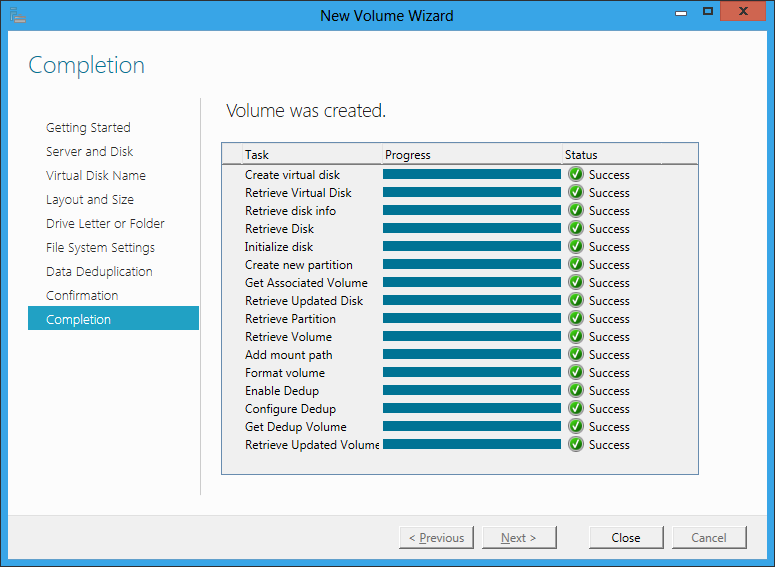
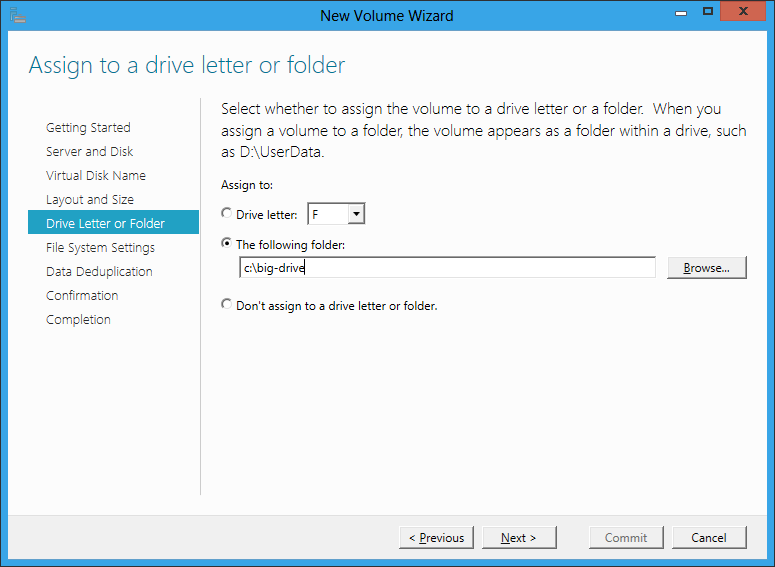
The server version includes data deduplication so that similar or identical files occupy less physical space. Another feature which is long overdue is the ability to allocate space to a virtual folder rather than to a drive letter.

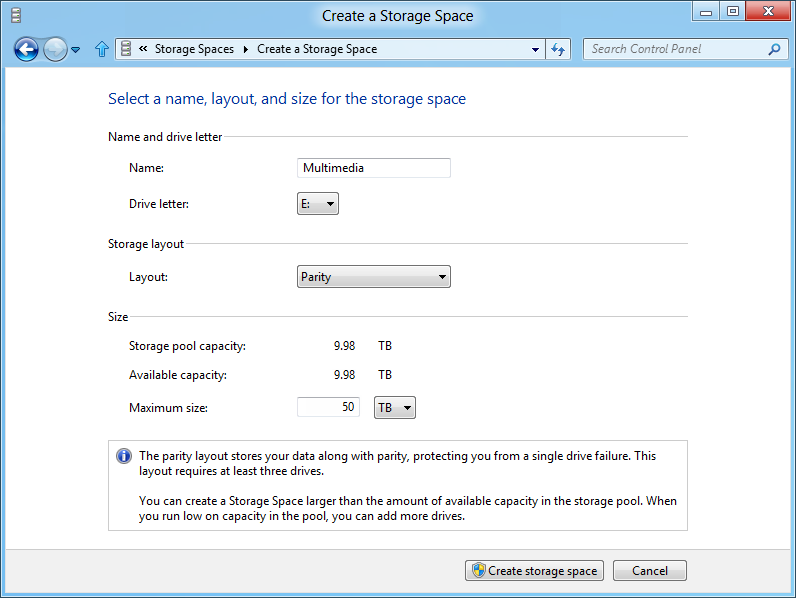
I do not know if all these features will come to the Windows 8 client version, but as data deduplication is not mentioned in Sinofsky’s post, and the dialog he shows does not include a folder option, it may well be that these are server-only. This is the new Windows 8 dialog:

image

Storage Spaces occupies a kind of middle ground in that enterprises will typically have more grown-up storage systems such as a Fibre Channel or iSCSI SAN (Storage Area Network). At the other end of the scale, individual business users do not want to bother with multiple drives at all. Nevertheless, for individuals with projects like storing large amounts of video, or small businesses looking for good value but reliable storage based on cheap SATA drives, Storage Spaces look like a great feature.

Most computer professionals will recall seeing users struggling with space issues on their laptop, not realising that the vendor (Toshiba was one example) had partitioned the drive and that they had a capacious D drive that was completely empty. It really is time that Microsoft figured out how to make storage management seamless and transparent for the user, and this seems to me a big step in that direction.

NVIDIA plans to merge CPU and GPU – eventually

I spoke to Dr Steve Scott, NVIDIA’s CTO for Tesla, at the end of the GPU Technology Conference which has just finished here in Beijing. In the closing session, Scott talked about the future of NVIDIA’s GPU computing chips. NVIDIA releases a new generation of graphics chips every two years:

  • 2008 Tesla
  • 2010 Fermi
  • 2012 Kepler
  • 2014 Maxwell

Yes, it is confusing that the Tesla brand, meaning cards for GPU computing, has persisted even though the Tesla family is now obsolete.
image
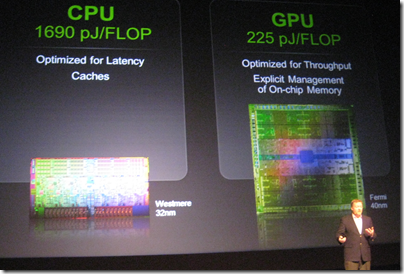
Dr Steve Scott showing off the power efficiency of GPU computing

Scott talked a little about a topic that interests me: the convergence or integration of the GPU and the CPU. The background here is that while the GPU is fast and efficient for parallel number-crunching, it is of course still necessary to have a CPU, and there is a price to pay for the communication between the two. The GPU and the CPU each have their own memory, so data must be copied back and forth, which is an expensive operation.

One solution is for GPU and CPU to share memory, so that a single pointer is valid on both. I asked CEO Jen-Hsun Huang about this and he did not give much hope for this:

We think that today it is far better to have a wonderful CPU with its own dedicated cache and dedicated memory, and a dedicated GPU with a very fast frame buffer, very fast local memory, that combination is a pretty good model, and then we’ll work towards making the programmer’s view and the programmer’s perspective easier and easier.

Scott on the other hand was more forthcoming about future plans. Kepler, which is expected in the first half of 2012, will bring some changes to the CUDA architecture which will “broaden the applicability of GPU programming, tighten the integration of the CPU and GPU, and enhance programmability,” to quote Scott’s slides. This integration will include some limited sharing of memory between GPU and CPU, he said.

What caught my interest though was when he remarked that at some future date NVIDIA will probably build CPU functionality into the GPU. The form that might take, he said, is that the GPU will have a couple of cores that do the CPU functions. This will likely be an implementation of the ARM CPU.

Note that this is not promised for Kepler nor even for Maxwell but was thrown out as a general statement of direction.

There are a couple of further implications. One is that NVIDIA plans to reduce its dependence on Intel. ARM is a better partner, Scott told me, because its designs can be licensed by anyone. It is not surprising then that Intel’s multi-core evangelist James Reinders was dismissive when I asked him about NVIDIA’s claim that the GPU is far more power-efficient than the CPU. Reinders says that the forthcoming MIC (Many Integrated Core) processors codenamed Knights Corner are a better solution, referring to the:

… substantial advantages that the Intel MIC architecture has over GPGPU solutions that will allow it to have the power efficiency we all want for highly parallel workloads, but able to run an enormous volume of code that will never run on GPGPUs (and every algorithm that can run on GPGPUs will certainly be able to run on a MIC co-processor).

In other words, Intel foresees a future without the need for NVIDIA, at least in terms of general-purpose GPU programming, just as NVIDIA foresees a future without the need for Intel.

Incidentally, Scott told me that he left Cray for NVIDIA because of his belief in the superior power efficiency of GPUs. He also described how the Titan supercomputer operated by the Oak Ridge National Laboratory in the USA will be upgraded from its current CPU-only design to incorporate thousands of NVIDIA GPUs, with the intention of achieving twice the speed of Japan’s K computer, currently the world’s fastest.

This whole debate also has implications for Microsoft and Windows. Huang says he is looking forward to Windows on ARM, which makes sense given NVIDIA’s future plans. That said, the I get impression from Microsoft is that Windows on ARM is not intended to be the same as Windows on x86 save for the change of processor. My impression is that Windows on ARM is Microsoft’s iOS, a locked-down operating system that will be safer for users and more profitable for Microsoft as app sales are channelled through its store. That is all very well, but suggests that we will still need x86 Windows if only to retain open access to the operating system.

Another interesting question is what will happen to Microsoft Office on ARM. It may be that x86 Windows will still be required for the full features of Office.

This means we cannot assume that Windows on ARM will be an instant hit; much is uncertain.

Why there are no tablets running Windows Phone 7

Once again people are asking why Microsoft has not allowed OEMs to build tablets running Windows Phone 7. Matthew Baxter-Reynolds says it is to do with income from OEM licenses:

Now, Microsoft charges OEMs far less for Windows Phone licenses (about $15 per unit) than for full-on Windows licenses (on average, working out to about $56 per unit) …  But for Ballmer and the team, this is the bad news scenario. Only $15 per licence? And even less in profit? Compared to $37 in profit? It’s a money-loser, people.

While I agree that Microsoft has a problem with its business model in the new world of mobile devices, I do not follow this reasoning. There is nothing to stop Microsoft charging more for Windows Phone OS on tablets than on phones if it could get away with it. Nor is it necessarily true that Microsoft will succeed in charging as much for Windows 8 on tablets as it does for Windows 8 on PCs. In fact, that is unlikely to be be true; they will be cheaper, especially on ARM.

If it is not this then, that still leaves the question of why Microsoft has not licensed the Windows Phone 7 OS for tablets.

Microsoft has undoubtedly fumbled tablet computing and this was a costly mistake. Nevertheless, it is a company capable of strategic thinking. I think it goes something like this, in no particular order.

First, I reckon Microsoft is thinking beyond the initial OEM license income for its profits from Windows 8 tablets. It is all about the apps – 30% of the income from every app sold on the locked-down ARM edition of Windows 8. Apps tend to be cheap, and there is cost in running the store, but there is potential for ongoing income that will exceed the initial license sale. Especially if, like Apple, Microsoft insists on a cut of subscription income, in-app advertising income, and so on.

Second, Microsoft is also betting on cloud computing. Windows Phone 7 is marketed mainly as a consumer device, but Microsoft is going to play the “this is the device for professionals” card at some point. You can bet that Windows 8 tablets, and their successors, will be promoted as the ideal client for Office 365, as well as for on-premise Exchange, SharePoint and Lync. Sell a tablet, buy a customer for Office 365. Lock customers into Office 365, and sell them other cloud applications and services. Plenty of opportunity for profit.

Third, my guess is that the Windows team at Microsoft does not consider the Windows Phone 7 OS good enough to be the foundation of its future mobile platform. They respect it enough to borrow its Metro design language, along with many aspects of the development model, but in the end Sinofsky and his team were not willing to hand over the future of Windows on devices to Windows CE and Silverlight.

What we are getting with the forthcoming Windows Runtime is a more deeply thought-through new platform in which .NET, native C++ code, and HTML 5 are equally well supported, and in which developers are forced to use asynchronous APIs that keep the user interface responsive. It will be a better app platform than the current Windows Phone OS; in fact, I fully expect Windows Runtime to migrate to the phone in some future version.

If Microsoft had allowed Windows Phone 7 onto tablets, it would have the difficult task of explaining to its customers how Windows 8 tablets differ from Windows Phone OS tablets as well as from those old Windows tablets from Bill Gates days.

Therefore Microsoft took the decision to wait until Windows 8 was ready. That was a bold decision, and it may be too late, but the reasoning is plausible.

image

Windows Phone, Exchange, and self-signed certificates

I am setting up a Nokia Lumia phone, which runs Windows Phone 7.5 “Mango”. I am impressed with the smoothness of the setup experience, though I had one slight hassle which I do not blame on Nokia or Microsoft because it is is not typical.

I run an Exchange Server (and SharePoint) for test purposes with a self-signed certificate. On the iPhone and I think Android, you just get a warning the first time you connect and after that it all works. Windows Phone though gives you a certificate error when Outlook tries to connect and will not let you proceed further.

Which of these approaches is right is a moot point: convenience versus security I guess.

Fortunately it is not too hard to get Windows Phone to trust your certificates. Here is what I did:

1. Email the certificate(s) to myself on Google Mail.

2. Go to Google Mail in the phone’s browser. For this to work I found I had to use the Basic HTML view, as the mobile view did not let me download the attachments.

3. Open the email you sent to yourself. Tap the attachment. Windows Phone offers to install the certificate, tap to install.

4. Now go back to Outlook and synchronise, everything works.

You will also need this for SharePoint if you want to use Office on the device.

Of course if your Exchange and SharePoint use a certificate from a trusted certificate provider then these steps are not necessary.

HTML5 scorecard: Amazon Kindle Fire weak, iOS 5 great, IE10 preview one of the best

The Sencha blog has a great series of posts on HTML5 support on various devices. This is of direct interest to Sencha because its products are JavaScript and CSS application frameworks, Sencha Touch for mobile and ExtJS for any browser. The latest post is on the Amazon Kindle Fire – and it is weak:

The Amazon Kindle Fire doesn’t seem designed to run HTML5 apps as a primary goal. It does a good job of displaying ordinary web pages and its resolution and rendering capabilities meet that need well. But there are too many sharp edges, performance issues, and missing HTML5 features for us to recommend that any developer create web apps primarily for the Kindle Fire. The iPad 2 running iOS 5 continues to be the tablet to beat, with the PlayBook a respectable runner-up in HTML5 capabilities.

Part of the problem is that the Fire runs Android 2.3.4 (Gingerbread) which has a weaker browser than later versions. That is not the only source of disappointment though. According to Sencha’s Michael Mullany, the GPU is not used for hardware acceleration of browser content, the JavaScript timer is laggy, there is no embedded HTML5 video (videos launch in a separate player), and CSS corners are not properly anti-aliased.

But what about the Kindle’s cloud-accelerated browsing that we heard so much about when it was announced? This is the biggest disappointment:

One of the main selling points of the Kindle browser is supposed to be its cloud-caching and pipelined HTTP connection that uses the SPDY protocol. This does seem to speed up normal page browsing a little, but it’s not very noticeable and we didn’t test this rigorously. But for HTML5 web apps, where code is downloaded and executed, there doesn’t seem to be any performance difference when we tested with acceleration on and off. It doesn’t appear as if client JavaScript is executed on the server-side at all, so the Kindle does not seem to have Opera Mini-style server-side execution. And SunSpider scores were essentially the same when accelerated browsing was turned on or off.

Moving on from Kindle, it is interesting but not surprising to see a great report for HTML5 in Apple’s iOS 5. Less expected though is a big thumbs-up for HTML5 in Microsoft’s IE10 preview on Windows 8:

Simply put, (and with the caveat that we were running on the notably overpowered developer preview hardware) the IE10 HTML5 experience is one of the best we’ve seen on any platform to date. After a decade of web neglect, Microsoft is back with a vengeance.

image

The main caveat is the absence of WebGL. Microsoft is supporting its own 3D graphics library.

Another worry for Microsoft is simply the level of hostility towards the company and IE in particular, among the developer and designer community it so much wants to reach. You can get a flavour of this from some of the comments to Mullany’s post, for example:

I never really like Windows and I absolutely despise Internet Explorer. There are so many exceptions in code to be made for Internet Explorer that i stopped trying so hard to make it look the same as other browsers. Hopefully, IE 10 will stop all of these exceptions and weird additions that are made to websites that make everything instantly awful so I can actually go back to trying to make things look nice in IE. It’s really sad though that so many people use Windows and IE that we cannot ditch it for a better system and better browser.

What about Android? The most recent offering covered in the Sencha series is Motorola Xoom which is a disaster:

We were excited about the first true Android operating system for tablets and had high hopes for a mobile browser that was as powerful as the platform. Sadly, the Xoom and Honeycomb are a real disappointment. We found consistent and reproducible issues in CSS3 Animations and CSS3 Transitions among other things. We had issues where the browser either hung or crashed. Regular scrolling was slow or below full framerate. We had issues where media playback failed or performed incorrectly. At times it felt like we were using a preproduction device, but we bought our test device from a Verizon Wireless store.

I have a hunch that the latest Galaxy Tab might fare better. Sencha did like the HTML5 support in the BlackBerry PlayBook though.

With Adobe Flash now in decline on mobile devices (Adobe is no longer working on the mobile Flash player) HTML5 support is all-important for rich browser-hosted apps; I will be watching with interest for future Sencha reports.

Quick thoughts on Xcode and Objective C versus Microsoft’s tools

I have been trying out JetBrains’ AppCode which meant working in an Apple development environment for a time. I took the opportunity to implement my simple calculator app in iOS native code.

image

Objective C is a distinctive language with a mixed reputation, but I enjoy coding with it. I used Automatic Reference Counting (ARC), a feature introduced in Xcode 4.2 and OSX 10.7, iOS 5; ARC now also works with 10.6 and iOS 4. This means objects are automatically disposed, and I did not have to worry about memory management at all in my simple app. This is not a complete memory management solution (if there is such a thing) – if you use malloc you must use free – but it meant that the code in my app is not particularly verbose or complex compared to other languages. Apple’s libraries seem to favour plain English method names like StringByAppendingString which makes for readable code.

I was impressed by how easy it is to make an app that looks good, because the controls are beautifully designed. I understand the attraction of developing solely for Apple’s platform.

I also love the integrated source control in Xcode. You find yourself using a local Git repository almost without thinking about it. Microsoft could learn from that; no need for Team Foundation Server for a solo developer.

I did miss namespaces. In Objective C, if you want to remove the risk of name collision with a library, you have to use your own class prefix (and hope that nobody else picked the same one).

image

Interface Builder, the visual UI designer, is great but many developers do not use it, because coding the UI without it is more flexible. It is a shame that you have to make this choice, unlike IDE’s with “two way tools” that let you edit in code or visually and seamlessly keep the two in synch. I found myself constantly having to re-display windows like the Attributes Inspector though it is not too bad once you learn the keyboard shortcuts. The latest Interface Builder has a storyboard feature which lets you define several screens and link them. It looks useful, though when I played with this I found it difficult to follow all the linking lines the designer drew for me.

It is interesting to compare the Mac and iOS development platform with that for Windows. Microsoft promotes the idea of language choice, though most professional development is either C# or C++, whereas on Apple’s platform it is Objective C and Cocoa or you are on your own. Although Mac and Windows are of a similar age, Microsoft’s platform gives a GUI developer more choices: Win32, MFC, WTL, Windows Forms, Windows Presentation Foundation and Silverlight, and in Windows 8 the new WinRT.

I get the impression that Microsoft is envious of this single-minded approach and trying to bring it to Metro-style Windows 8, where you still have a choice of languages but really only one GUI framework.

That said, Visual Studio is an impressive tool and both C# and C++ have important features which are lacking in Objective C. I would judge that Visual Studio is the more productive tool overall, but Apple’s developer platform has its own attractions.