Tag Archives: azure

Windows Azure get new hybrid cloud, infrastructure as a service features

Microsoft has announced new preview features in Windows Azure, its cloud computing platform, which introduce infrastructure as a service features as well as improving its support for hybrid public/private clouds.

The best summary is in the downloadable Fact Sheet (Word document). One key piece is that virtual machines (VMs) can now be persistent. Previously Azure VMs were all conceptually stateless. You could save data within them, but it could be wiped at any time since Azure may replace it with the original you created when it was first deployed.

Supported operating systems are Windows Server 2008 R2, Windows Server 2012 RC, and four flavours of Linux.

One of the features mentioned by VP Bill Laing is the ability to migrate VHDs, the virtual hard drives used by Hyper-V and Azure, between on-premise and Azure:

Virtual Machines give you application mobility, allowing you to move your virtual hard disks (VHDs) back and forth between on-premises and the cloud. Migrate existing workloads such as Microsoft SQL Server or Microsoft SharePoint to the cloud, bring your own customized Windows Server or Linux images, or select from a gallery.

Windows Azure Virtual Network lets you extend your on-premise network to Azure over a VPN. This sounds like the existing feature called Windows Azure Connect first announced at the end of 2010, though since Azure Virtual Network is also a preview this seems to be talking a long time to come to full release.

Windows Azure Web Sites is a new web hosting offering. Previously, Azure was focused on web applications rather than generic web sites. This new offering is aimed at any website, running on Internet Information Server 7 with supported frameworks including ASP.NET, PHP and Node.js. MySQL is supported as well as Microsoft’s own Azure SQL Database based on SQL Server.

There is also a new management portal in preview. Azure SQL Reporting is out of preview, and there are also new services for media, caching, and geo-redundant storage.

My guess is that Microsoft-platform customers will welcome these changes, which make Azure a more familiar platform and one that will integrate more seamlessly with existing on-premise deployments. No doubt Microsoft also hopes to compete more effectively with Amazon’s EC2 (Elastic Compute Cloud).

One thing which I will would like to know more about is Azure’s elasticity, the ability to scale on demand. Laing describes Azure Web Sites as a “highly elastic solution,” and the Fact Sheet mentions:

the ability to scale up as needed with reserved instances.

It is not clear though whether Microsoft is offering built-in load balancing and scaling on demand, an area where both Azure and System Center 2012 (Microsoft’s private cloud management suite) are relatively weak. That is, scaling is possible but complex to automate.


Microsoft’s platform nearly invisible at QCon London 2012

QCon London ended yesterday. It was the biggest London QCon yet, with around 1200 developers and a certain amount of room chaos, but still a friendly atmosphere and a great opportunity to catch up with developers, vendors, and industry trends.

Microsoft was near-invisible at QCon. There was a sparsely attended Azure session, mainly I would guess because QCon attendees do not see that Azure has any relevance to them. What does it offer that they cannot get from Amazon EC2, Google App Engine, Joyent or another niche provider, or from their own private clouds?

Mark Rendle at the Azure session did state that Node.js runs better on Windows (and Azure) than on Linux. However he did not have performance figure to hand. A quick search throws up these figures from Node.js inventor Ryan Dahl: 

  v 0.6.0 (Linux) v 0.6.0 (Windows)
http_simple.js /bytes/1024 6263 r/s 5823 r/s
io.js read 26.63 mB/s 26.51 mB/s
io.js write 17.40 mB/s 33.58 mB/s
startup.js 49.6 ms 52.04 ms

These figures are more “nothing to choose between them” than evidence for better performance, but since 0.6.0 was the first Windows release it is possible that it has swung in its favour since. It is a decent showing for sure, but there are other more important factors when choosing a cloud platform: cost, resiliency, services available and so on. Amazon is charging ahead; why choose Azure?

My sense is that developers presume that Azure is mainly relevant to Microsoft platform businesses hosting Microsoft platform applications; and I suspect that a detailed analysis would bear out that presumption despite the encouraging figures above. That said, Azure seems to me a solid though somewhat expensive offering and one that the company has undersold.

I have focused on Azure because QCon tends to be more about the server than the client (though there was  a good deal of mobile this year), and at enterprise scale. It beats me why Microsoft was not exhibiting there, as the attendees are an influential lot and exactly the target audience, if the company wants to move beyond its home crowd.

I heard little talk of Windows 8 and little talk of Windows Phone 7,  though Nokia sponsored some of the catering and ran a hospitality suite which unfortunately I was not able to attend.

Nor did I get to Tomas Petricek’s talk on asynchronous programming in F#, though functional programming was hot at QCon last year and I would guess he drew a bigger audience than Azure managed.

Microsoft is coming from behind in cloud -  Infrastructure as a Service and/or Platform as a Service – as well as in mobile.

I should add the company is, from what I hear, doing better with its Software as a Service cloud, Office 365; and of course I realise that there are plenty of Microsoft-platform folk who attend other events such as the company’s own BUILD, Tech Ed and so on.

Update:

This is the basis for the claim that node.js runs better on Windows:

IOCP supports Sockets, Pipes, and Regular Files.
That is, Windows has true async kernel file I/O.
(In Unix we have to fake it with a userspace thread pool.)

from Dahl’s presentation on the Node roadmap at NodeConf May 2011.

PHP Developer survey shows dominance of mobile, social media and cloud

Zend, a company which specialises in PHP frameworks and tools, has released the results of a developer survey from November 2011.

The survey attracted 3,335 respondents drawn, it says, from “enterprise, SMB and independent developers worldwide.” I have a quibble with this, since I believe the survey should state that these were PHP developers. Why? Because I have an email from November which asked me to participate and said:

Zend is taking the pulse of PHP developers. What’s hot and what matters most in your view of PHP?

There is a difference between “developers” and “PHP developers”, and much though I love PHP the survey should make this clear. Nevertheless, If you participated, but mainly use Java or some other language, your input is still included. Later the survey states that “more than 50% of enterprise developers and more than 65% of SMB developers surveyed report spending more than half of their time working in PHP.” But if they are already identified as PHP developers, that is not a valuable statistic.

Caveat aside, the results make good reading. Some highlights:

  • 66% of those surveyed are working on mobile development.
  • 45% are integrating with social media
  • 41% are doing cloud-based development

Those are huge figures, and demonstrate how far in the past was the era when mobile was some little niche compared to mainstream development. It is the mainstream now – though you would get a less mobile-oriented picture if you surveyed enterprise developers alone. Similar thoughts apply to social media and cloud deployment.

The next figures that caught my eye relate to cloud deployment specifically.

  • 30% plan to use Amazon
  • 28% will use cloud but are undecided which to use
  • 10% plan to use Rackspace
  • 6% plan to use Microsoft Azure
  • 5% have another public cloud in mind (Google? Heroku?)
  • 3% plan to use IBM Smart Cloud

The main message here is: look how much business Amazon is getting, and how little is going to giants like Microsoft, IBM and Google. Then again, these are PHP developers, in which light 6% for Microsoft Azure is not bad – or are these PHP developer who also work in .NET?

I was also interested in the “other languages used” section. 82% use JavaScript, which is no surprise given that PHP is a web technology, but more striking is that 24% also use Java, well ahead of C/C++ at 17%, C# at 15% and Python at 11%.

Finally, the really important stuff. 86% of developers listen to music while coding, and the most popular artists are:

  1. Metallica
  2. = Pink Floyd and Linkin Park

Wow.

Which Microsoft cloud? Windows Server 8 shows Azure is not everything

I was fortunate to attend a two-day drilldown into what is coming in Windows Server 8 last week, just before the BUILD conference under way in Anaheim, California. It is an impressive release, with two things standing out for me.

One is that Microsoft has successfully re-engineered Windows Server so that it is both sufficiently modular that you can transition from Server Core to full Server and back without reinstall, and also sufficiently detached from the Windows GUI that everything runs and can be configured without the need to log on to the Windows desktop on the server itself. This is a huge achievement.

Second, much of the engineering in Server 8 is focussed on making it better for cloud hosting. This the focus of changes in both Hyper-V and IIS, isolation of virtual networks, proper bandwidth and CPU quotas and throttling, and the ability to move VMs freely between hosts without taking them offline, and to replicate them for failover purposes. You can read more in my piece on The Register.

The question this raises for me is about Windows Server clouds and Azure. Of course Azure runs on Windows Server, but Azure is a platform, all the VMs are stateless, and when you use Azure you are buying into a whole set of services that might or might not match your needs. At a developer event yesterday, one explained how he could not use Azure because he needed to install a third-party application. The Hyper-V role helps a little, but it is not ideal as you still need to solve the stateless problem; at any time, changes you make to the server may be reverted.

If you simply rent plain Windows Server VMs in the cloud, you lose some of the benefits of cloud computing since you are responsible for everything about how the server is configured and maintained; but you also get complete freedom to set it up as you want.

One of the issues with moving from running your own Exchange and SharePoint, for example, to a cloud-hosted service like Office 365 is that you lose control of your destiny. If the service goes down, you have to beg and plead with support to get information and to speed recovery.

Now consider a scenario in which you have your Exchange and SharePoint on hosted Hyper-V VMs with replication (now coming in Server 8) to an alternate provider such as Amazon Web Services, or to your own on-premise servers. If the service goes down, you failover to the replicas.

Another compelling idea relates to live migration. Imagine you have a VM running on premise, and want to move it to the cloud. Without interruption of service, you could in principle migrate it from on-premise to the cloud and back at will. You need a fast connection of course, but this aspect is constantly improving.

The bottom line: plain Windows Server on a VM has many attractions versus an entire platform like Azure.

The snag is, Microsoft does not offer this type of hosting at the moment. Well, that is not necessarily a snag depending on what you think about hosting with Microsoft; but for some there is considerable reassurance in hosting with a company of Microsoft’s size, and which should in theory have the best understanding of what it takes to host Windows Server.

My guess is that Microsoft will either add this capability to Azure – without the limitations of the Hyper-V role, but with replication and failover – or else develop a new cloud service alongside Azure for this purpose.

My further guess is that it would be popular, possibly more so than Azure is today.

Microsoft releases Visual Studio LightSwitch: a fascinating product with an uncertain future

Microsoft has released Visual Studio LightSwitch, a rapid application builder for data-centric applications.

image

LightSwitch builds Silverlight applications, which may seem strange bearing in mind that the future of Silverlight has been hotly debated since its lack of emphasis at the 2010 Professional Developers Conference. The explanation is either that Silverlight – or some close variant of Silverlight – has a more important future role than has yet been revealed; or that the developer division invented LightSwitch before Microsoft’s strategy shifted.

Either way, note that LightSwitch is a model-driven tool that is inherently well-suited to modification for different output types. If LightSwitch survives to version two, it would not surprise me to see other application targets appear. HTML 5 would make sense, as would Windows Phone.

So LightSwitch generates Silverlight applications, but they do not run on Windows Phone 7 which has Silverlight as its development platform? That is correct, and yes it does seem odd. I will give you the official line on this, which is that LightSwitch is not aimed primarily at developers, but is for business users who run Windows and who want a quick and easy way to build database applications. They will not care or even, supposedly, realise that they are building Silverlight apps.

I do not believe this is the whole story. It seems to me that either LightSwitch is a historical accident that will soon be quietly forgotten; or it is version one of a strategic product that will build multi-tier database applications, where the server is either Azure or on-premise, and the client any Windows device from phone to PC. Silverlight is ideal for this, with its modern presentation language (XAML), its sandboxed security, and its easy deployment. This last point is critical as we move into the app store era.

LightSwitch could be strategic then, or it could be a Microsoft muddle, since the official marketing line is unconvincing. I have spent considerable time with the beta and doubt that the supposed target market will get on with it well. Developers will also have a challenge, since the documentation is, apparently deliberately, incomplete when it comes to writing code. There is no complete reference, just lots of how-to examples that might or might not cover what you wish to achieve.

Nevertheless, there are flashes of brilliance in LightSwitch and I hope, perhaps vainly, that it does not get crushed under Microsoft’s HTML 5 steamroller. I set out some of its interesting features in a post nearly a year ago.

Put aside for a moment concerns about Silverlight and about Microsoft’s marketing strategy. The truth is that Microsoft is doing innovative work with database tools, not only in LightSwitch with its model-driven development but also in the SQL Server database projects and “Juneau” tools coming up for “Denali”, SQL Server 2011, which I covered briefly elsewhere. LightSwitch deserves a close look, even it is not clear yet why you would want actually to use it.

image

Hands on debugging an Azure application – what to do when it works locally but not in the cloud

I have been writing a Facebook application hosted on Microsoft Azure. I hit a problem where my application worked fine on the local development fabric, but failed when deployed to Azure. The application was not actually crashing; it just did not work as expected. Specifically, either the Facebook authentication or the ASP.NET Forms Authentication was failing; when I tried to log on, the log on failed.

This scenario, where the app works locally but not on Azure, is potentially a bad one because you do not have the luxury of breakpoints and variable inspection. There are several approaches. You can have the application write a log, which you could download or view by using Remote Desktop to the Azure instance. You can have the application output debug messages to HTML. Or you can use IntelliTrace.

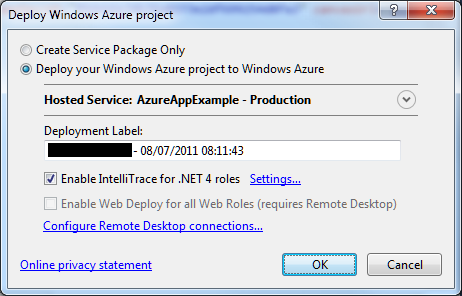
I tried IntelliTrace. It is easy to set up, just check the box when deploying.

image

Once deployed, I tried the application. Clicked the Log On button, after which the screen flashed but still asked me to Log On. The log on had failed.

image

I closed the app, opened Server Explorer in Visual Studio, drilled down into the Windows Azure Compute node and selected View IntelliTrace Logs.

image

The logs took a few minutes to download. Then you can view is the IntelliTrace log summary, which includes a list of exceptions. You can double-click an exception to start an IntelliTrace debug session.

image

Useful, but I still could not figure out what was wrong. I also found that IntelliTrace did not show the values for local variables in its debug sessions, though it does show exceptions in detail.

Now, if you really want to debug and trace an Azure application you had better read this MSDN article which explains how to create custom debugging and trace agents and write logs to Azure storage. That seems like a lot of work, so I resorted to the old technique of writing messages to HTML.

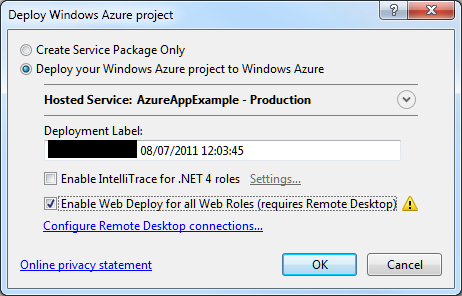
At this point I should mention something you must do in order to debug on Azure and remain sane.  This is to enable WebDeploy:

image

It is not that hard to set up, though you do need to enable Remote Desktop which means a trip to the Azure management portal. In my case I am behind a firewall so I needed to configure Web Deploy to use the standard SSL port. All is explained here.

Why use Web Deploy? Well, normally when you deploy to Azure the service actually builds, copies and spins up a new virtual machine image for your app. That process is fundamental to Azure’s design and means there are always at least two copies of the VM in existence. It is also slow, so if you are making changes to an app, deploying, and then testing, you will spend most of your time waiting for Azure.

Web Deploy, by contrast, writes to your existing instance, so it is many times quicker. Note that once you have your app working, it is essential to deploy it properly, since Azure might revert your app to the last VM you created.

With Web Deploy enabled I got back to work. I discovered that FormsAuthentication.SetAuthCookie was not working. The odd thing being, it worked locally, and it had worked in a previous version deployed to Azure.

Then I began to figure it out. My app runs in a Facebook canvas. Since the app is served from a different site than Facebook, cookies may be rejected. When I ran the app locally, the app was in a different IE security zone, so different rules applied.

But why had it worked before? I realised that when it worked before I had used Google Chrome. That was it. IE worked locally; but only Chrome worked when deployed.

I have given up trying to fix the specific problem for the moment. I have dug into it a little, and discovered that cookie handling in a Facebook canvas with IE is a long-standing problem, and that the Facebook C# SDK may have bugs in this area. It is not essential for my sample; I have found I can get by with the Facebook session. To get the user ID, for example:

FacebookWebContext.Current.Session.UserId

The time has not been wasted though as I have learned a bit about Azure debugging. I was also amused to discover that my Azure VM has activation problems:

image

Microsoft Office 365: the detail and the developer story

I attended the UK launch of Office 365 yesterday and found it a puzzling affair. The company chose to focus on small businesses, and what we got was several examples of customers who had discovered the advantages of storing documents online. We were even shown a live video conference with a jerky, embarrassing webcam stream adding zero business value and reminding me of NetMeeting back in 1995 – which by the way was a rather cool product. Most of what we saw could have been done equally well in Google Apps, except for a demo of the vile SharePoint Workspace for offline editing of a shared document, though if you were paying attention you could see that the presenter was not really offline at all.

There seems to be a large amount of point-missing going on.

There is also a common misconception that Office 365 is “Office in the cloud”, based on Office Web Apps. Although Office Web Apps is an interesting and occasionally useful feature, it is well down the list of what matters in Office 365. It is more accurate to say that Office 365 is for those who do not want to edit documents in the browser.

I am guessing that Microsoft’s focus on small businesses is partly a political matter. Microsoft has to offer an enterprise story and it does, with four enterprise plans, but it is a sensitive matter considering Microsoft’s relationship with partners, who get to sell less hardware and will make less money installing and maintaining complex server applications like Exchange and SharePoint. The, umm, messaging at the Worldwide Partner Conference next month is something I will be watching with interest.

The main point of Office 365 is a simple one: that instead of running Exchange and SharePoint yourself, or with a partner, you use these products on a multi-tenant basis in Microsoft’s cloud. This has been possible for some time with BPOS (Business Productivity Online Suite), but with Office 365 the products are updated to the latest 2010 versions and the marketing has stepped up a gear.

I was glad to attend yesterday’s event though, because I got to talk with Microsoft’s Simon May and Jo Carpenter after the briefing, and they answered some of my questions.

The first was: what is really in Office 365, in terms of detailed features? You can get this information here, in the Service Description documents for the various components. If you are wondering what features of on-premise SharePoint are not available in the Office 365 version, for example, this is where you can find out. There is also a Support Service Description that sets out exactly what support is available, including response time objectives. Reading these documents is also a reminder of how deep these products are, especially SharePoint which is a programmable platform with a wide range of services.

That leads on to my second question: what is the developer story in Office 365? SharePoint is build on ASP.NET, and you can code SharePoint applications in Visual Studio and deploy them to Office 365. Not all the services available in on-premise SharePoint are in the online version, but there is a decent subset. Microsoft has a Sharepoint Online for Office 365 Developer Guide with more details.

Now start joining the dots with technologies like Active Directory Federation Services – single sign-on to Office 365 using on-premise Active Directory – and Windows Azure which offers hosted SQL Server and App Fabric middleware. What about using Office 365 not only for documents and email, but also as a portal for cloud-hosted enterprise applications?

That makes sense to me, though there are still limitations. Here is a thread where someone asks:

Does some know if it is possible to make a database connection with Office365, SharePoint (Designer) and SQL Azure database ?

and the answer from Microsoft’s Mark Kashman on the SharePoint team:

You cannot do this via SharePoint Designer today. What you can do is to create a Silverlight or javaScript client application that calls out to SQL Azure.

In the near future, we are designing a way to make these connections using the base SharePoint technology called BCS (Business Connectivity Services) where then you could develop a service to service to SQL Azure.

If you cannot wait, check out the Cloud Connector for SharePoint 2010 from Layer 2 GmbH.

It seems obvious that Office 365 and Azure together have potential as a developer platform.

What about third-party applications and extensions for Office 365? This is another thing that Microsoft did not talk about yesterday; but it seems to me that there is potential here as well. It is not well integrated, but you can search Microsoft Pinpoint for Office 365 applications and get some results. If Office 365 succeeds, and I think it will, there is an opportunity for developers here.

Microsoft partners with Joyent to bring node.js server-side JavaScript to Windows

Microsoft will port node.js to Windows in partnership with Joyent. This will work on Windows Azure as well as other versions of Windows back to Server 2003.

But can you not already run node.js on Windows? This is possible using Cygwin and instructions are here. Cygwin makes Windows more like Linux by providing familiar Linux tools and a Linux API layer. Cygwin is a great tool, though it can be an awkward dependency, but a true Windows port should be higher performance and more robust, particularly as the intention is to use the IOCP API. See here for an explanation of IOCP:

With IOCP, you don’t need to supply a completion function, wait on an event handle to signal, or poll the status of the overlapped operation. Once you create the IOCP and add your overlapped socket handle to the IOCP, you can start the overlapped operation by using any of the I/O APIs mentioned above (except recv, recvfrom, send, or sendto). You will have your worker thread block on GetQueuedCompletionStatus API waiting for an I/O completion packet. When an overlapped I/O completes, an I/O completion packet arrives at the IOCP and GetQueuedCompletionStatus returns.

IOCP is the Windows NT Operating System support for writing a scalable, high throughput server using very simple threading and blocking code on overlapped I/O operations. Thus there can be a significant performance advantage of using overlapped socket I/O with Windows NT IOCPs.

I was impressed by node.js when I saw it presented by author Ryan Dahl at a pre-Dreamforce event last year. Since then it has become better known. This is an interesting move, particularly in the context of an greater focus on JavaScript in the forthcoming version of Windows known as Windows 8. End to end JavaScript for your next-generation real time networking applications?

Would you consider running PHP on Azure? Microsoft faces uphill battle to convince customers.

Yesterday Microsoft announced Windows Azure SDK for PHP version 3.0, an update to its open source SDK for PHP on Windows Azure. The SDK wraps Azure storage, diagnostics and management services with a PHP API.

Microsoft has been working for years on making IIS a good platform for PHP. FastCGI for IIS was introduced partly, I guess, with PHP in mind; and Microsoft runs a dedicated site for PHP on IIS. The Web Platform Installer installs a number of PHP applications including WordPress, Joomla and Drupal.

It is good to see Microsoft making an effort to support this important open source platform, and I am sure it has been welcomed by Microsoft-platform organisations who want to run WordPress, say, on their existing infrastructure.

Attracting PHP developers to Azure may be harder though. I asked Nick Hines, CTO for Innovation at Thoughtworks, a global IT consultancy and developer, what he thought of the idea.

I’d struggle to see any reason. Even if you had it in your datacentre, I certainly wouldn’t advise a client, unless there was some corporate mandate to the contrary, and especially if they wanted scale, to be running a Java or a PHP application on Windows.

Microsoft’s scaling and availability story around windows hasn’t had the penetration of the datacentre that Java and Linux has. If you look at some of the heavy users of all kinds of technology that we come across , such as some of the investment banks, what they’re tending to do is to build front and middle tier applications using C# and taking advantage of things like Silverlight to get the fancy front ends that they want, but the back end services and heavy lifting and number crunching predominantly is Java or some sort of Java variant running on Linux.

Hine also said that he had not realised running PHP on Azure was something Microsoft was promoting, and voiced his suspicion that PHP would be at a disadvantage to C# and .NET when it came to calling Azure APIs.

His remarks do not surprise me, and Microsoft will have to work hard to persuade a broad range of customers that Azure is as good a platform for PHP as Linux and Apache – even leaving aside the question of whether that is the case.

The new PHP SDK is on Codeplex and developed partly by a third-party, ReadDolmen, sponsored by Microsoft. While I understand why Microsoft is using a third-party, this kind of approach troubles me in that you have to ask, what will happen to the project if Microsoft stops sponsoring it? It is not an organic open source project driven by its users, and there are examples of similar exercises that have turned out to be more to do with PR than with real commitment.

I was trying to think of important open source projects from Microsoft and the best I could come up with is ASP.NET MVC. This is also made available on CodePlex, and is clearly a critical and popular project.

However the two are not really comparable. The SDK for PHP is licensed under the New BSD License; whereas ASP.NET MVC has the restrictive Microsoft Source License for ASP.NET Pre-Release Components (even though it is now RTM – Released to manufacturing). ASP.NET MVC 1.0 was licensed under the Microsoft Public License, but I do not know if this will eventually also be the case for ASP.NET MVC 3.0.

Further, ASP.NET MVC is developed by Microsoft itself, and has its own web site as part of the official ASP.NET site. Many users may not realise that the source is published.

My reasoning, then, is that if Microsoft really want to make PHP a first-class citizen on Azure, it should hire a crack PHP team and develop its own supporting libraries; as well as coming up with some solid evidence for its merits versus, say, Linux on Amazon EC2, that might persuade someone like Nick Hine that it is worth a look.

Three questions about Microsoft’s cloud play at TechEd 2011

This year’s Microsoft TechEd is subtitled Cloud Power: Delivered, and sky blue is the theme colour. Microsoft seems to be serious about its cloud play, based on Windows Azure.

Then again, Microsoft is busy redefining its on-premise solutions in terms of cloud as well. A bunch of Windows Servers on virtual machines managed by System Center Virtual Machine Manager (SCVMM) is now called a private cloud – note that the forthcoming SCVMM 2012 can manage VMWare and Citrix XenServer as well as Microsoft’s own Hyper-V. If everything is cloud then nothing is cloud, and the sceptical might wonder whether this is rebranding rather than true cloud computing.

I think there is a measure of that, but also that Microsoft really is pushing Azure heavily, as well as hosted applications like Office 365, and does intend to be a cloud computing company. Here are three side-questions which I have been mulling over; I would be interested in comments.

image

Microsoft gets Azure – but does its community?

At lunch today I sat next to a delegate and asked what she thought of all the Azure push at TechEd. She said it was interesting, but irrelevant to her as her organisation looks after its own IT. She then added, unprompted, that they have a 7,000-strong IT department.

How much of Microsoft’s community will actually buy into Azure?

Is Microsoft over-complicating the cloud?

One of the big announcements here at TechEd is about new features in AppFabric, the middleware part of Windows Azure. When I read about new features in the Azure service bus I think how this shows maturity in Azure; but with the niggling question of whether Microsoft is now replicating all the complexity of on-premise software in a new cloud environment, rather than bringing radical new simplicity to enterprise computing. Is Microsoft over-complicating the cloud, or it is more that the same necessity for complex solutions exist wherever you deploy your applications?

What are the implications of cloud for Microsoft partners?

TechEd 2011 has a huge exhibition and of course every stand has contrived to find some aspect of cloud that it supports or enables. However, Windows Azure is meant to shift the burden of maintenance from customers to Microsoft. If Azure succeeds, will there be room for so many third-party vendors? What about the whole IT support industry, internal and external, are their jobs at risk? It seems to me that if moving to a multi-tenanted platform really does reduce cost, there must be implications for IT jobs as well.

The stock answer for internal staff is that reducing infrastructure cost is an opportunity for new uses of IT that are beneficial to the business. Staff currently engaged in keeping the wheels turning can now deliver more and better applications. That seems to me a rose-tinted view, but there may be something in it.