Tag Archives: google

Review: Acer C720 Chromebook and reflections on Chrome OS

When I saw the first announcement of Chrome OS I was amazed and wrote a breathless post:

I’m watching Google’s press briefing on the forthcoming Chrome OS. It is amazing. What Google is developing is a computer that answers several of the problems that have troubled users since the advent of the personal computer.

That was in November 2009. Unfortunately it has taken me a while to try a Chromebook (the generic name for a computer running Chrome OS) for myself; but I have been trying out an Acer C720 and what follows is in part a review of this machine, and in part some wider reflections on the Chrome OS and Chromebook concept.

image

In terms of hardware, a Chromebook is another take on the netbook idea: a small, light laptop but running Linux rather than Windows. The earliest netbooks also ran Linux but the mass market could not cope with it; Google has done what is necessary to make it work for non-technical people, not least by hiding almost all of the operating system other than the browser.

I have given detailed specifications at the end of this post, but in summary this is an 11.6″ traditional clamshell laptop/netbook with 1.4Ghz Intel Haswell processor, 2GB RAM and 16GB SSD. It weighs just 1.2Kg

It’s cheap. You can pick one up for just under £200 at Amazon; it’s smart looking and does not feel as cheap as it is.

At left we have power input, HDMI out, USB 3.0 port and a standard headset socket.

image

On the right there is an SD card slot, USB 2.0, and a lock attachment point.

image

You can get a touchscreen version for an additional £80 or so but it does not seem worth it to me.

When you turn on for the first time, you have to accept the Google agreement. You won’t read it all, but here is something you should note:

You acknowledge and agree that Google may stop (permanently or temporarily) providing the Services (or any features within the Services) to you or to users generally at Google’s sole discretion, without prior notice to you…

You acknowledge and agree that if Google disables access to your account, you may be prevented from accessing the Services, your account details, or any files or other content which is contained in your account.

More on this later.

You can sign in as guest, and use the device to browse the web, or you can sign in with a Google account. If you sign in as guest, none of your activity (including any files you download) will be preserved when you sign out. This is a nice feature for, literally, guests for whom you want to give internet access while protecting both your privacy and to some extent theirs.

Normally you will sign in with a Google account. If you have used Google’s Chrome browser, much will be familiar. What you get is the browser, which you can run full screen or in a resizable window, and a taskbar along the bottom which shows running apps, date and time, network connection, battery status, and notifications.

Local storage is accessible via a file browser. This gives access to a Downloads folder, Google Drive which is cloud storage but includes offline files that are available locally, and USB storage devices that you attach.

I attached a drive full of media files and was able to play MP4 video and FLAC audio without any problems. Some file types, such as PDF and Microsoft Office, open in the browser. This aspect can be disorienting; there is no Quit option, but you just close the browser tab when you are done.

At the left of the taskbar is an Apps button which you might think of as a Start button since it has the same purpose. Click it, and app shortcuts appear in a window. You can also press the Search key, which sits where you would expect to see Caps Lock.

image

A Chrome OS app is a web app, though it can take advantage of Chrome features like access to local storage or NaCl (Native Client), which lets you run compiled native code in the browser. NaCl is enabled by default.

I actually have a web app in the Chrome Store – apologies it is not very good, but it was a demonstration to support this how-to; it is really not difficult to adapt a web site though as ever, excellence is more challenging.

As an app platform, it would be wrong to think of a Chromebook as “crippled”, though it does require a change of mind-set if you are used to apps on Windows, OSX, iOS or Android. Apps are sandboxed, of course, and run in the browser, but native performance is possible and there are ways to access devices like the camera and local storage. Adobe Flash is also available. This is a physics demo using Native Client:

image

and this is an audio editor:

image

Can you get your work done? Probably, but if you are like me you will miss a few things like Microsoft Office or equivalent, or the Live Writer blog authoring tool (for which I have not found a good replacement on any platform). Of course you have full access to Google Docs, for browser-based document editing.

It also turns out that a Chromebook is a rather good Microsoft SkyDrive or Office 365 client. Perhaps it is just familiarity, but I prefer Office Web Apps to the Google Docs equivalents.

image

I did experience an oddity in Office 365. I clicked a link to a recently opened document, which was an URL to a .docx file. This should have opened the document in Word web app, but instead it opened in a beta of Quickoffice running as a Chrome extension. This is bad, since editing the document and hitting save opened a Save As dialog for the local drive, or Google Drive, not the SharePoint site, and when I tried a document including an image, it was reported as corrupt.

It is possible to do some coding on a Chromebook, for example using the rather good online scripting IDE at script.google.com. This is a debugging session using the example script, which creates a document in Google Apps and emails a link:

image

If you get stuck, there is always remote desktop to a Windows box as a fallback. There are several clients to choose from, of which I used 2X:

image

Although the Linux shell is hidden unless you enable developer mode, you can press Ctrl-Alt-T and open crosh (Chrome OS Shell), enabling simple network testing with ping as well as an ssh client. More features magically appear if you do enable developer mode.

image

Chromebook pros and cons

A Google Chromebook has several big advantages.

One, it’s safe; not entirely safe perhaps, but relatively immune from malware given that most users never get deeper into the operating system than the web browser, and therefore neither does anything else – though the machine is in fact hackable (in a good way) if you switch to Developer mode, and you can do things like getting shell access or installing Ubuntu if you want.

Second, it is good value. You are not paying for Windows or Office, and whatever deal Google makes with OEMs like Acer must be generous enough to allow for low prices.

It would actually make sense for Google to subsidise Chromebooks if it needed to, since they drive users to its services.

Third, a Chromebook is cloud-centric. If you lose it, or upgrade to a new machine, all your data will be there on Google’s cloud and you will hardly notice, with seamless sync of settings when you log in.

Fourth, Google and its hardware partners (in this case Acer) have done a good job. Sleep and resume works reliably – more so than any Windows machine I have known – and boot from cold takes seconds. Performance is fine, provided you have a strong internet connection.

There is no unwanted third-party software here unless you count Google’s own services; but if you did not want them you probably should not have bought a Chromebook. The out of box experience is good.

What are the annoyances? Here are a few.

The user interface is effective and not difficult to learn, though I do find that the screen fills with multiple tabs which is ugly and not that easy to navigate. You can float a browser window by dragging it down, in which case you get something that behaves as a new instance, and you can switch between instances with alt-tab.

Printing is awkward in that you have to set up Google Cloud Print and send your documents to Google and back even if the printer is right next to you.

Working offline is a problem but maybe not as bad as you have heard. The app store has a section devoted to apps that work offline, and you can create and edit documents offline other than spreadsheets, which are read-only. There is no problem with playing some videos or music from the built-in storage or from a USB drive when on the move and offline. If you are going to be offline a lot though, this is probably not the best choice.

Is this machine locked to Google? Maybe not as much as you would expect. There is no alternative web browser, but you can set your search engine to Bing, DuckDuckGo or anotehr if you prefer. Or you can enable developer mode and you install Linux, either in place of, or alongside Chrome OS. The two obvious choices are ChrUbuntu and Crouton, and setup is nicely explained here

http://www.kitware.com/blog/home/post/498

Does this machine breach your privacy? That is tough to answer; but it is worth noting that Chromebook offers, as far as I can tell, the same privacy settings that are in the Chrome browser. If you are happy using the Chrome browser in Windows or elsewhere, there is no reason not to be happy with a Chromebook from this perspective.

That said, this machine is committed to, on the one hand, cloud and web apps, and alongside that, the Google life. The two main objections to the Google life, it seems to me, are that Google’s business model depends on advertising and mining personal data for that purpose; and that it has been known for individuals to get locked out of their Google accounts for what might be arbitrary reasons whereupon comeback is difficult. It may be though that I worry too much, since this is uncommon, and trusting everything to Google is probably not high on the list of the most stupid things to do in IT.

Summing up

This is not a machine for every task. It is not a powerhouse, and in case you had not noticed, will not run apps other than browser apps. Either of those could be deal-breakers and might mean that you need a different device.

It is early days for laptops that run only browser apps, and there are areas of immaturity. Some file types are not supported or badly supported. The app store has limitations, and although there is a browser-based solution to most common tasks, it may not equal what can be done with a conventional app. The user interface is reasonable but utilitarian. Tastes vary, but personally I do not find Google Apps the equal of Microsoft Office yet, and I even miss Outlook, despite its many annoyances.

There are compromises then; but this is still a great little laptop, light and convenient, quick and responsive, and almost immune to PC-style problems and slowdowns.

In business or education, it is easy to see the attraction of a machine that is low maintenance and simple to replace if it breaks, provided that its capabilities match the tasks that are required.

The comparison with Windows RT is interesting and will be the subject of a separate post.

Watch this space. Chromebooks are already making inroads into the market for budget laptops, and in education, and I would expect this momentum to gather force as the platform matures.

Detailed specification:

  • Intel Celeron 2955U 1.4 GHz processor
  • 2GB RAM
  • SD card slot
  • 16GB SSD
  • 11.6″ 1366 x 768 TFT screen
  • Intel GMA HD Graphics
  • Webcam and Microphone
  • 3.5mm headset socket
  • HDMI out, 1USB 3.0, 1 USB 2.0
  • Wireless: 802.11a/b/g/n, Bluetooth 4.0 +HS (High Speed)
  • 3950 mAh battery, quoted 8.5 hr battery life
  • Weight: 1.25 Kg

Platform Wars: Google injects Chrome OS into Windows, never mind the poor users

Google announced its Chrome browser in September 2008. Its stated goal was to run web applications better:

What we really needed was not just a browser, but also a modern platform for web pages and applications, and that’s what we set out to build.

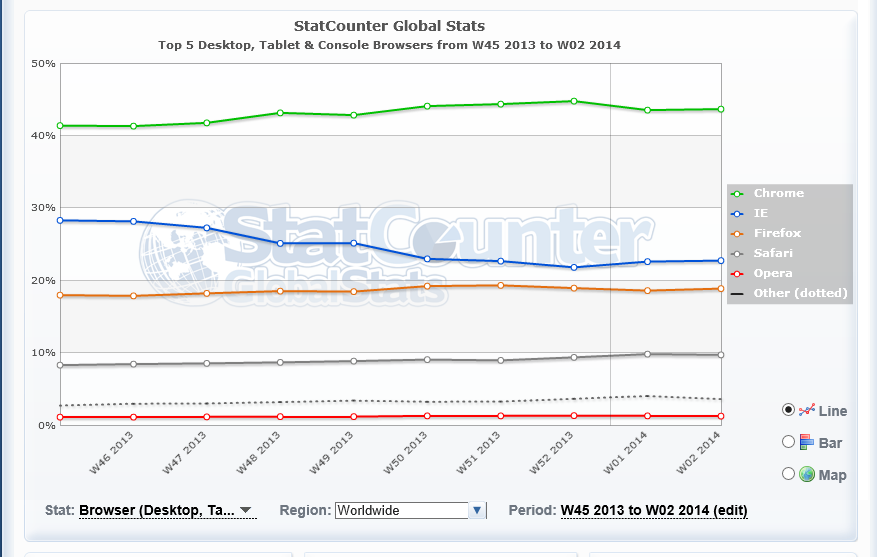
Chrome was a hit, thanks to easy install, fast performance, and Google’s ability to advertise it on its own search pages and web applications (as well as some deals with OEM Windows vendors). Today, Chrome is the most popular browser worldwide, according to figures from Statcounter covering desktop, tablet and console browsers:

image

That’s 43.64% versus 22.76% for Microsoft Internet Explorer in second place and 18.9% for Firefox in third.

Most of those users are on Windows. Statcounter also reports that Windows worldwide has a 79.1% market share worldwide – not quite dead – though Windows 8 has a measly 7.29% share, just behind OS X.

Note that these figures are for usage, not current sales, which is one reason why Google’s Chrome S is lost somewhere in “other”.

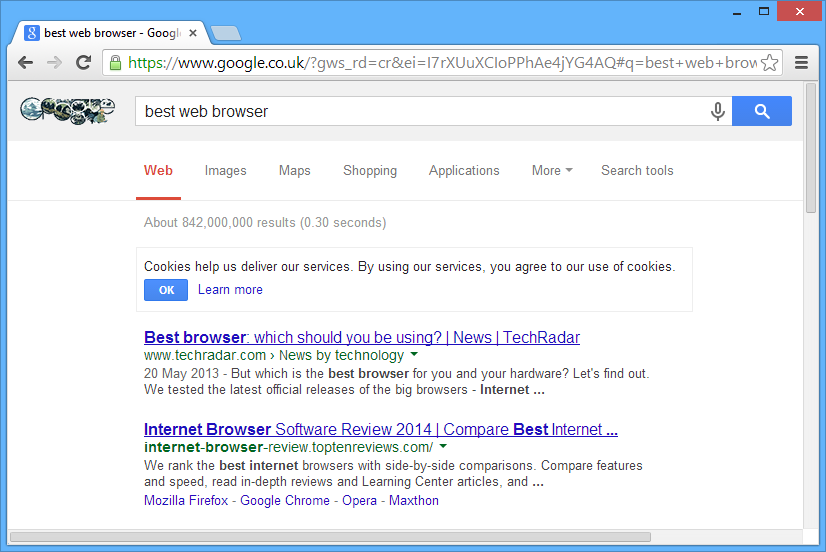
Today though we are seeing the force of Google’s intention to introduce a “modern platform for web pages and applications”. Chrome version 32, which comes as an automatic update for most users, no longer has the look and feel of Windows. It has thin scroll bars that lack the standard single-step arrows:

image

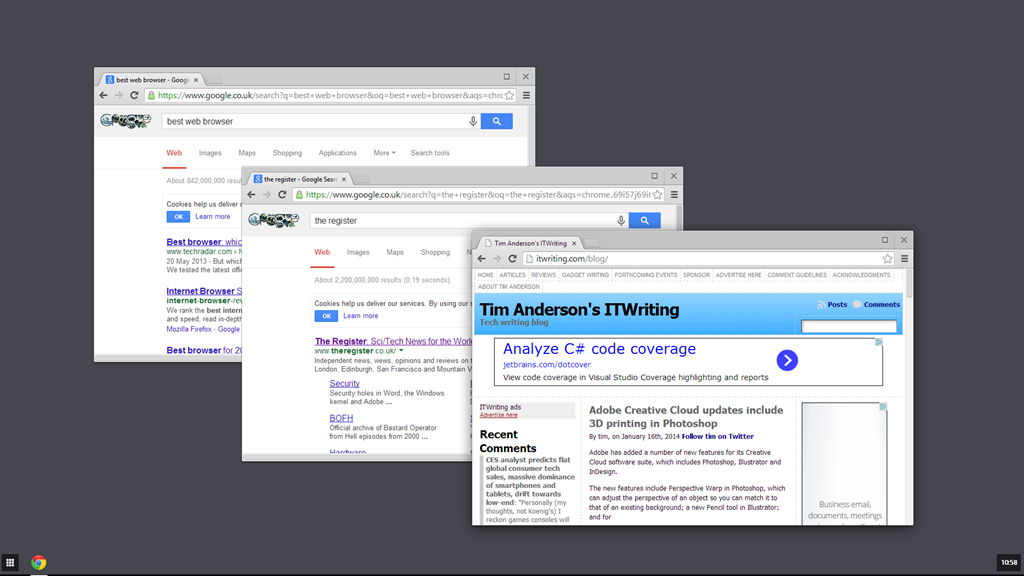
If you choose the new “Windows 8 mode” which you will find on the Chrome menu, you get something which is neither like desktop Windows, nor like Windows 8. Instead, it is ChromeOS, injected into Windows.

image

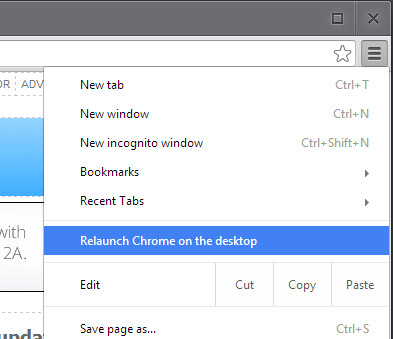
Chrome’s “Windows 8” mode only works if you set it as the default browser, and if you choose the Windows 8 mode you lose the desktop version until you select “Relaunch Chrome on the desktop” from its menu.

image

What is the effect of “Windows 8 mode”? It has several advantages for Google:

  • It serves as an introduction to Chrome OS, increasing the chance of selling a Chrome OS device (Chromebook) that does not run Windows at all
  • It hides the desktop, making it more likely that you will choose a Google web app rather than a desktop or Windows 8 app for your next task

However, considered as a “modern” style Windows 8 app, it is poor. It is not touch friendly, it is multi-window, and it ignores the conventions of Windows 8 apps – this is really Chrome OS, remember.

Users are not impressed. The thing they hate most is losing the paging arrows on the scroll bars. Check the long comment thread here. For example:

This is ridiculous, and the "just deal with it" from some developers is really grating. I am -terrified- of when my Chrome will update because even using this page now I’ve used the sidebar & steppers. I have vision problems and I fear this update will make Chrome unusable for me. I’m using Windows and should have my scrollbar harmonised with Windows instead of an operating system I do not use.

This is a strategic move though and unlikely to change. Here are the key official statements in that thread. Here:

This is because we’re switching to the chromeos style. Passing to review-ui to make sure they are ok with this.

and here:

There is no easy way to go back to the previous scrollbars. There was a big change in the graphics stack from chrome 31 to chrome 32 which meant to unify 3 platforms: windows, chromeos and linux and that includes a shared widget theme.

Chrome may lose a few users to IE or Firefox, but it takes lot to get people to switch browsers.

The purpose of this post is to highlight Google’s strategy, rather than to pass judgement on whether or not it is a bad thing. It is part of a strategy to kill the Windows ecosystem, oddly echoing Microsoft’s own strategy of “Embrace, Extend, Extinguish”:

"Embrace, extend, and extinguish", also known as "Embrace, extend, and exterminate", is a phrase that the U.S. Department of Justice found was used internally by Microsoft o describe its strategy for entering product categories involving widely used standards, extending those standards with proprietary capabilities, and then using those differences to disadvantage its competitors.

says Wikipedia.

Speaking personally though, if I am running Windows then I want to take full advantage of Windows, not to have it morph into another OS to suit the goals of a competitor.

2013: the web gets more proprietary. So do operating systems, mobile, everything

There may yet be an ITWriting review of the year; but in the meantime, the trend that has struck me most this year has been the steady march of permission-based, fee-charged technology during the course of the year, even though it has continued trends that were already established.

The decline of Windows and rise of iOS and Android is a great win for Unix-like operating systems over Microsoft’s proprietary Windows; but how do you get apps onto the new mobile platforms? In general, you have to go through an app store and pay a fee to Apple or Google (or maybe Amazon) for the privilege of deployment, unless you are happy to give away your app. Of course there are ways round that through jailbreaks of various kinds, but in the mainstream it is app stores or nothing.

The desktop/laptop model may be an inferior experience for users, but it is more open, in that vendors can sell software to users without paying a fee to the operating system vendor.

Microsoft though is doing its best to drive Windows down the same path. Windows Phone uses the app store model, and so does the “Metro” personality in Windows 8 – hence the name, “Windows Store apps”.

What about the free and open internet? That too is becoming more proprietary. Of course there is still nothing to stop you putting up a web site and handing out the URL; but that is not, in general, how people navigate to sites. Rather, they enter terms into a search engine, and if the search engine does not list your site near the top, you get few visitors.

In this context, I was fascinated by remarks made by Morphsuits co-founder Gregor Lawson in an interview I did for the Guardian web site. His business makes party costumes and benefits from a strong trademarked brand name. Yet he finds that he has to pay for Google ads simply to ensure that a user who types “morphsuits” into a search engine finds his site:

Yes, it is galling, it really is galling," he says. "We are top of the organic search, but we also have to pay. The reason is that some people like organic, some people like to click on ads. Google, in their infinite wisdom, are giving more and more space to the ads because they get money for the ads. So I have to pay to be in it.

It is also worth noting that when you click a link on Google, whether it is a search result or an ad, it is not a direct link to the target site. Rather, it is a link which redirects to that site after storing a database record that you clicked that link. If you are logged into Google then the search giant knows who you are; if you are not logged in, it probably knows anyway thanks to cookies, IP numbers or other tracking techniques. It does this in order to serve you more relevant ads and make more money.

Of course there are other ways to drive traffic, such as posting on Facebook or Twitter – two more proprietary platforms. As this internet properties grow and become more powerful, they change the rules in their favour (which they are entitled to do) but it does raise the question of how this story will play out over time.

For example, Lawson complains in the same interview that if he posts a message on Facebook, it will not be seen by the majority of Morphsuits fans even though they have chosen to like his Facebook page. Only if he pays for a promoted post can he reach those fans.

The power of Facebook must not be understated. One comment I heard recently is that mobile users on average now spend more time in Facebook than browsing the web and by some margin.

Twitter is better in this respect, though there as well the platform is changing, with APIs withdrawn or metered, for example, to drive users to official Twitter clients or the web site so that the user experience is controlled, ads can be delivered and so on.

These are observations, not value judgements. Users appreciate the free services they get from platforms like Google, Facebook and Twitter, and are happy to give up some freedom and share some personal data in return.

The question I suppose is how much power we are ceding to these corporations, who have the ability to make or break businesses and to favour their own businesses at the expense of others, and the potential abuse of that power at some future date.

I appreciate that most people do not seem to care much about these issues, and perhaps they are right not to care. I will give a shout out though to Aral Balkan who is aware of the issues and who created indiephone as a possible answer – an endeavour that has only small chance of success but which is at least worth noting.

Meanwhile, I expect the web, and mobile, and operating systems, to get even more proprietary in 2014 – for better or worse.

Google Compute Engine: good enough to take on Amazon?

A week ago, Google make its Compute Engine generally available. The service offers virtual machine instances as a cloud service, at prices from $0.114 per hour for a single-core VM with 3.75 GB RAM. In addition, you pay for outgoing network traffic and persistent storage. Reflecting the shortage of IP addresses, a static IP costs $0.01 per hour – but only if it is not in use. Linux is the only available operating system.

The service seems similar to Amazon’s Elastic Compute Cloud (EC2), but there are a couple of reasons why Google has the potential to take on Amazon. One is that it has the scale: just as Amazon, prior to the launch of EC2, had datacenters already in place to run its ecommerce business, Google has them to run its search and advertising business, as well as services like the Android Play Store, Google Mail, Docs and other cloud services.

Second, Google can afford Amazon-like commodity pricing. It could even afford to lose money on cloud hosting for an extended period, thanks to its dominance in web advertising, if it needed to do so in order to win market share (though I am not suggesting that it is in that position).

Why though would anyone use Google rather than Amazon? A post on Quora highlights some of the reasons, including sub-hour billing, live migration of VMs (no downtime), persistent disks that can be mounted read-only by multiple VMs, more integrated virtual networking, and better network throughput. This last point is interesting: the suggestion is that Google can use its own private connections between datacenters, where Amazon is more dependent on the public internet.

Amazon also has advantages, including a larger portfolio of cloud computing infrastructure services thanks to its greater maturity. Unlike Google Compute Engine, Amazon supports Windows VMs, for example.

Some large customers will want to spread VMs across multiple cloud providers for resilience, and it will not surprise me if Amazon plus Google becomes a popular combination.

Salesforce 1 and the cloud platform wars

Salesforce has announced Salesforce 1, but what it is? Something new, or the same old stuff repackaged?

image

Even if it is something new, the ingredients are familiar. Salesforce 1, I have been told,  is a new brand over the Salesforce platform, though it does not replace individual components like Force.com or Heroku.

At heart, Salesforce is a multi-tenant cloud database and web services API, designed originally for CRM but easily adapted for other purposes, and easily extended by third-party partners with their own apps. If you review the components of Salesforce 1 you will find the same core platform and services as before.

If you want a quick overview of what makes up Salesforce 1, I recommend this list of platform services, including quick app development using browser-based tools, Heroku for code-centric development using Ruby, Java, Node.js or Python, web site development with site.com, a mobile SDK for iOS, Android or HTML5,  role-based user access management, private app portal, translation services, custom databases, social and collaboration services, reporting and analytics.

There is a new Salesforce 1 mobile app announced which you can customize. It only runs on iOS or Android; no support for Windows Phone.   

The Salesforce 1 proposition is that user identities are managed in the Salesforce database and that you build your cloud applications around them. Therefore the minimal Salesforce 1 product is One Enterprise App, at $25 per user/month, which gives you identity services (and a few others) and the app platform.

I would imagine that most Salesforce 1 customers will also use other Salesforce 1 products such as CRM or the Service Cloud. CRM, for example, runs from $5.00 per user/month for contact management to $300 per user/month for the Performance Edition, including the Service Cloud, workflow approval and unlimited custom apps. There is feature overlap between the various Salesforce products which may explain why the company encourages you to ask for a custom quote.

My immediate reflection on the Salesforce 1 announcement is that it is a cloud platform play. If you agree that the future of business IT is in cloud and mobile, then it follows that the future competitive landscape will be largely formed around the companies that offer cloud platforms. Large scale tends to win in the cloud, so for better or worse only a few companies will be able to compete effectively. Hence the cloud platform wars.

In this context, Amazon is strong on the app platform and cloud infrastructure side, but does not offer a complete enterprise platform, though recent announcements seem to me a move in that direction.

Google has immense scale and Android, but its strong focus on advertising and consumers perhaps hold back its enterprise offerings. If you run Android you are already hooked into Google’s identity platform.

Microsoft, perhaps oddly given its vast desktop legacy, seems to me a close competitor to Salesforce. Where Salesforce has CRM, Microsoft has Office 365, and where Salesforce has its own identity platform, Microsoft has Azure Active Directory. Apps for Office hook into SharePoint and Azure Active Directory in the same way Salesforce 1 apps hook into the Salesforce platform. There is no love between Salesforce and Microsoft, and constant sniping from Microsoft’s Dynamics CRM team. At the same time, there must be many businesses attracted to Office 365 for email and Office, and to Salesforce for CRM, which may lead to some difficult choices down the road. No wonder Salesforce is ignoring Windows Phone.

A great big phone: Samsung Galaxy Mega review

How big can a phone go? Samsung seems to be testing the limits with the 6.3″ Samsung Galaxy Mega. How big is that? Here it is laid over a paperback book:

image

In fact, open the book, and the Galaxy Mega proves to be almost exactly the size of the printed area on the page, suggesting that this would make an excellent e-reader. I installed Amazon Kindle and so it does, though the screen is a little too glossy and the battery life too short for perfection.

Hold it to your ear though, and the Mega is big enough to feel faintly ridiculous, outside of places like San Francisco where daft-looking gadgets are the norm. That said, it is slim and smooth in the hands – maybe a bit too silky, it would be easy for it to slip out of your hands – so carries its bulk with good grace.

If you are constantly on the phone, and do not use a headset, the Mega is unlikely to be for you. Still, for many of us voice calls are a long way down the list of reasons for carrying a smartphone. Internet, games, email, text messaging and photography may well be higher.

What about writing and spreadsheeting? I got out my favourite Logitech Bluetooth keyboard, installed OfficeSuite Pro from Mobile Systems Inc, and started to type.

image

I can get real work done on this; but I am unlikely to choose to do so. In fact, the screen size is not the problem. There are other issues. One is that the Galaxy Mega should be supplied with a prop-up cover or stand, since for functions like word processing with a keyboard, or watching YouTube or BBC iPlayer, it is best stood up on its side. Another is that the Android OS and its applications seem primarily designed for touch. The on-screen keyboard seems to pop-up even when not required, though ESC usually dismisses it, and getting at the formatting controls is just a bit awkward.

I also found that I could easily out-type OfficeSuite Pro on the Mega. I thought this might be an OS issue, but Infraware’s Polaris Office (which comes free for download with the Mega) is better in this respect, though less good overall than OfficeSuite Pro.

As a productivity device then, the Mega is not quite there and I will still want to take a Surface RT or some other suitable device on the road. It does work though, which has some appeal, and note that these Office suites also work well as viewers for Microsoft Office formats.

The hardware

Open the box, and you will see that, other than size, there is little else notable. Mine came with a 4GB SD card included.

image

The device feels solid and well-made. The audio and headset jack is on the top edge, volume rocker on the left, and power on the right. On the front, at the base, is the home button. There are also soft buttons to its right and left for Menu and Back. These are backlit, but the backlight is usually off, which means you have to remind yourself at first that they really are there. I am not sure why Samsung does not put a little etching to indicate their presence.

The screen is great, though I would prefer less gloss, but it is bright and responsive so no real complaint.

The camera is decent but unspectacular. Good enough that most users will be happy, but not good enough to attract photo enthusiasts.

Battery life is decent, though not outstanding. 24 hours of normal usage will be fine, but over two days you will likely need a charge.

One thing worth emphasising: the Galaxy Mega may be bigger than the S4, but it is less powerful. The S4 has a quad-core 1.9GHz chipset, 13MP rear camera, 16GB memory, 1920×1080 resolution, and so it goes on. You are going to buy the Mega over the S4 for only two reasons: price, or because you really want that big screen.

Software

The Galaxy Mega runs Android 4.2 Jelly Bean with Samsung’s TouchWiz interface. I doubt anyone will have trouble with basic navigation, but it fails to delight.

One of its notable features is called Multi-Window. This runs as a pull-out application launcher, by default docked to the left of the screen. Here is the tab, which annoyingly obscures some text:

image

and here it is pulled out:

image

If you perform the right gestures with the right apps (not all of them work) you can get two apps running side by side by pulling them out from the bar:

image

The vertical bar lets you resize the apps freely.

I think this whole thing is a mistake. While having two apps to view seems useful, even the Mega’s screen is not large enough to make it work with desktop-style convenience, and Android apps are designed for full-screen use. Nor do I like the bar as an alternative app launcher; it is unnecessary and gets in the way. This is another example of an OEM trying to improve an OS and making it worse. It is not too bad though, as you can easily disable it (drag down from the top and tap Multi-Window so it fades).

Incidentally, I had trouble getting a screenshot of the multi-window bar. The normal approach failed as touching any button makes it retreat. I used the deprecated DDMS in the ADK (Android Developer Kit). This required finding the Developer Options on the device. Bizarrely, you enable Developer Options by repeatedly tapping Build number in About Device. Odd.

Samsung store and apps

In its effort to make its devices distinct from other Android devices, Samsung is building its own ecosystem, including the Samsung app store which is prominent in the default configuration.

 image

What is the value for the user in this, given that the official Google Play store is also available? None, other than that it is good that Google has some competition. That said, this is where you can get Polaris Office for free, which is worth having.

Similar examples of duplication versus Google’s ecosystem are evident elsewhere, for example Samsung’s ChatOn versus Google Talk (now Google+ Hangout), though ChatOn does not do voice or video; and Samsung cloud backup versus Google’s cloud backup. For example, photo backup to Samsung’s cloud (once you register) is on by default; but this feature is also available in Google+, for Google’s cloud.

Overall this is confusing for the user and I am not sure how this game ends. It contributes to a sense that Android remains messy and disorganised versus Apple iOS or even Windows Phone, though in compensation it has wonderful functionality.

Samsung Air View is an attempt to bring the benefits of mouse hover to a touch interface by detecting the finger over the screen. For example, you can preview an email message.

image

Plenty of potential here; though I found it unreliable. I still have not got magnification in web pages to work, despite turning this on in settings.

WatchOn lets you control your TV via an app that shows what is on. This worked for me though it feels like solving a problem I do not have.

The Music app isupports DLNA; but while it detected my Logitech Media Server I had trouble playing anything without stuttering.

Summary

There is a lot packed into the Mega and I have not done it justice above, but picked out some highlights. It is highly capable; but I hesitate to recommend it unless the combination of a large screen and a smartphone is perfect for you; if you do lots of web browsing, email and YouTube, but not many phone calls, or if your eyesight is such that having everything a bit larger is an advantage, it could be just the thing.

The disappointment is that Samsung has not made more sense of the large screen. The Multi-Window feature is not good, and in the end it just feels like a big phone. The fact that its spec is well behind that of the Galaxy S4 is another disadvantage.

The Galaxy Mega also exhibits the Samsung/Android problem of duplicated functionality, contributing to a user experience that is less tidy and more confusing than it needs to be.

Personally I am hopeful for the day when a single device will simplify my life and I will no longer have to carry phone, camera and tablet or laptop. This one does not get me there; but maybe with a bit more refinement a future iteration will.

Technical summary

  • Android 4.2.2 (Jelly Bean)
  • 6.3″ 1280 x 720 LCD screen
  • USB 2.0
  • MicroSD slot
  • MHL support (enables HDMI out from USB port)
  • GPS and GLONASS
  • 720p video supports MPEG4, H.263, H.264, VC1, WMV7 etc.
  • Cameras: 8 megapixel rear, 1.9 megapixel front, LED Flash
  • Video recording up to 30fps
  • Audio support including MP3,AAC,WMA,FLAC,OGG etc.
  • Qualcomm Snapdragon 400 with Krait 1.7GHz dual core CPU and Adreno 305 GPU
  • Comms: FDD LTE, HSPA-PLUS,HSDPA,HSUPA,EDGE,GPRS,FDD LTE,802.11 a/b/g/n/ac,Bluetooth 4.0 LE,NFC
  • RAM: 1.5GB
  • Storage: 8GB on board
  • 3200mAh battery
  • Size: 167.6 x 88 x 8mm
  • Weight: 199g

Acknowledgement: thanks to Phones4u for loan of the review sample.

Google forks WebKit into Blink: what are the implications?

Yesterday Google announced that it is forking WebKit to create Blink, a new rendering engine to be used in its Chrome browser:

Chromium uses a different multi-process architecture than other WebKit-based browsers, and supporting multiple architectures over the years has led to increasing complexity for both the WebKit and Chromium projects. This has slowed down the collective pace of innovation – so today, we are introducing Blink, a new open source rendering engine based on WebKit.

Odd that not long ago we were debating the likelihood and merits of WebKit becoming the de facto standard for HTML. Now Google itself is arguing against such a thing:

… we believe that having multiple rendering engines—similar to having multiple browsers—will spur innovation and over time improve the health of the entire open web ecosystem.

Together with the announcement from Mozilla and Samsung of a new Android browser which, one assumes, may become the default browser on Samsung Android phones, there is now significant diversity/competition/fragmentation in the browser market (if you can call it a market when everything is free).

The stated reason for the split concerns multi-process architecture, with claims that Google was unwilling to assist with integrating Chromium’s multi-process code into WebKit:

Before we wrote a single line of what would become WebKit2 we directly asked Google folks if they would be willing to contribute their multiprocess support back to WebKit, so that we could build on it. They said no.

At that point, our choices were to do a hostile fork of Chromium into the WebKit tree, write our own process model, or live with being single-process forever. (At the time, there wasn’t really an API-stable layer of the Chromium stack that packaged the process support.)

Writing our own seemed like the least bad approach.

Or maybe it was the other way around and Apple wanted to increase its control over WebKit and optimize it for the OSX and iOS rather than for multiple platforms (which would be the Apple way).

It matters little. Either way, it is unsurprising that Apple and Google find it difficult to cooperate when Android is the biggest threat to the iPhone and iPad.

The new reality is that WebKit, instead of being a de facto standard for the Web, will now be primarily an Apple rendering engine. Chrome/Chromium will be all Google, making it less attractive for others to adopt.

That said, several third parties have already adopted Chromium, thanks to the attractions of the Chromium Embedded Framework which makes it easy to use the engine in other projects. This includes Opera, which is now a Blink partner, and Adobe, which uses Chromium for its Brackets code editor and associated products in the Adobe Edge family.

The benefit of Blink is that diverse implementations promote the importance of standards. The risk of Blink is that if Google further increases the market share of Chrome, on desktop and mobile, to the point where it dominates, then it is in a strong position to dictate de-facto standards according to its own preferences, as suggested by this cynical take on the news.

The browser wars are back.

Twilio integrates with Google App Engine for cloud telephony applications

Cloud telephony company Twilio has announced a partnership with Google to integrate its API with App Engine, Google’s platform for cloud applications. Google has a clear explanation of what this enables here. You can have your application respond to incoming SMS texts or voice calls, and send an SMS back, or for voice, play messages, record the call, or ask for further digits to be pressed to route the call appropriately. You can also use the API to initiate calls or send texts.

If you look here there are how-to examples (generic to Twilio, not specific to App Engine) for some of the things you do with Twilio:

  • Automated reminder calls
  • Click to call on your web site
  • Company directory
  • IVR (Interactive Voice Response) for automated support
  • Conferencing
  • Phone polls
  • Voice mail
  • Voice transcription

and more of course. Help desk applications and other kinds of support are the most obvious applications, but there are no limits: if you want to build voice calls or SMS messaging into your app, Twilio is the obvious solution.

The relationship with Google is not exclusive. Twilio already has integration with Windows Azure, Microsoft’s cloud platform. Google has one-upped Microsoft though. The Azure promotion gets you free credit for 1000 texts or minutes for Azure, while there are free 2000 texts or minutes for Google App Engine customers.

You can also use Twilio on any platform that can use a REST API. There is a module for Node.js, and libraries for PHP, Python, Ruby, C#, Java and Apex (used by Salesforce.com).

Power shifts at Mobile World Congress: Samsung rises, Apple absent, Google hidden, Microsoft missing

Mobile World Congress, now under way in Barcelona, is a big event. Exact numbers are not available, but I have heard talk of 70,000 trade attendees; it is not something you can safely ignore if you have a presence in the mobile industry.

image

Nevertheless Apple chooses to ignore it, preferring its own exclusive events. This is a strategy that has worked in the past, but this year it may be less clever. Several have said to me that Apple is falling behind, being too slow to innovate its iOS device family. Of course many here are using Apple devices, but the momentum for now is elsewhere, though one magical announcement could change that any time.

Samsung on the other hand has the biggest stand here (actually several stands) and is everywhere. The underlying story is how Samsung is moving on from being an Android device vendor and focusing on Samsung-specific features. In the consumer world that means hooks into Samsung TVs or its new HomeSync media box with a Terabyte of storage, intended to be the place for all your music and video, as well as enabling Android games in your living room.

The bigger Samsung news though is its enterprise offering, called Knox, which creates a secure, encrypted container on your Samsung smartphone or tablet exclusively for business use. IT admins have full control over access and app deployment. This is the same approach used by Blackberry with the Balance feature in its new Blackberry 10 devices. Knox is implemented by third-parties, and links with Active Directory, making this an attractive proposition for businesses getting to grips with the challenge of mobile device management.

Crucially, Knox works only with Samsung devices. It is based on a secure edition of Linux and includes a hardware element so that other device vendors cannot implement Knox, though they could create their own similar system.

Blackberry on the other hand has not taken a stand at this event. Instead, it has parked itself in a hotel across the road, which its staff informally call Blackberry Towers. The symbolism is unfortunate. Last year it had a big stand; this year it is out of the mainstream. Blackberry’s new devices look good but its key business selling point is Balance, which means it will not be happy about Samsung’s Knox.

Microsoft is a puzzle, as is not uncommon for the company. Via Windows Phone it is a premier sponsor (which I imagine means a ton of cost) but does not have a stand. Windows Phone is mainly represented by Nokia, though it can be glimpsed elsewhere such as on the HTC stand. This is a company that wants to convince us that it is a serious force in mobile? Windows 8 is meant to be a new start on tablets; so where is Surface RT or Surface Pro?

I also wonder if the company has left it too late to establish Windows Phone as the best choice for secure mobility. I have been talking to Centrify here at Mobile World Congress, one of the third-parties implementing Knox solutions. Everything in a Centrify Knox deployment is controlled by Active Directory, and it forms an elegant and secure option for enterprises who want to give employees the freedom of a personal device combined with the security and manageability of a mobile device. I also saw how app developers can query Active Directory attributes on Knox Android devices just as they would with a Windows application.

So where is Microsoft with its enterprise smartphone story? It has all the pieces, including Active Directory itself, Bitlocker for device encryption, and System Center for management, but it has not yet assembled them for Windows Phone.

At least it is better than last year when it ran embarrassing "smoked by Windows Phone" demos.

Google is another puzzle. Last year a huge stand and a hall dedicated to Android; this year, nothing. Android may have won the mobile OS wars, but do initiatives like Knox show how Google is failing to reap the benefits? Possibly. It does seem to me that Google is now engaged in differentiating its own products and services from what you might call generic Android; and its absence from Mobile World Congress is likely part of that effort.