Tag Archives: microsoft

Windows 8 FAQ: the real Frequently Asked Questions

Since there is a certain amount of puzzlement around concerning Microsoft’s new version of Windows, or I should say, two new versions of Windows, here are the answers to the questions many are asking.

Why is Windows 8 so odd?

Windows is the most popular desktop operating system in the world; but is on a trajectory of slow decline. A combination of Macs at the high end and iPad or Android tablets in mobile is eroding its market share. You might not mind that, but Microsoft does, and Windows 8 is its answer. It has a tablet personality which is Microsoft’s tablet play, and a desktop personality which lets you run your existing Windows applications. The two are melded together, which makes Windows 8 a little odd, but ensures that neither one will be ignored.

Why did Microsoft not make a separate tablet version of Windows, like Apple’s iOS and OSX?

Many users think Microsoft should have made the tablet personality in Windows 8 a separate operating system. However, when they say that this would have made more sense and be less odd and intrusive, what they mean is that if it were a separate operating system they could ignore it and get on with their work in old-style Windows. That would achieve nothing for Microsoft, since the tablet-only OS would fail in the market.

Furthermore, Microsoft did in fact make a separate tablet version of Windows. It is called Windows RT (see below).

Why did Microsoft make the desktop side of Windows 8 impossible to use without touch input?

Actually it is fine to use with keyboard and mouse, it just takes some getting used to. When people say it is impossible to use, they mean that they have only tried it for five minutes in a virtual machine and did not like it. If you stick at it, you discover that Microsoft actually thought hard about keyboard and mouse users, and that the new Start screen is a better application launcher than the old Start menu, particularly in combination with the most used applications pinned to the taskbar. Some will not get that far, in which case they will stick with Windows 7 or even buy Macs. That is Microsoft’s calculated risk.

Why didn’t Microsoft simply make desktop Windows easy to use with touch input?

Microsoft tried, in Tablet PC and in Windows 7, but could not make it work. The biggest problem is that while Microsoft conceivably could have made the Windows desktop work well with touch input alone, it had no chance of fixing third-party applications, or older versions of Microsoft’s own software like Office.

Why did Microsoft remove the Start menu from the desktop?

This was not just to annoy you; but Microsoft would rather risk annoying you than have the new app platform in Windows be ignored. That said, there are third-party utilities that put something very like the Start menu back on the desktop if you prefer.

Why is the tablet side of Windows 8 locked down so you can only install apps from the Store?

Well, there are ways. But Microsoft observed Apple’s success with this model on the iPhone and iPad. Easy app discovery, no malware, and a stream of income from third-party sales. Aiming for lock-down was an easy decision; but the Intel version of Windows 8 will never be truly locked down.

Why are the apps in the Windows Store so few and so poor?

This is because the tablet personality in Windows 8 is a new and unproven platform. Software vendors and app developers are not sure whether it will succeed; and they are busy making apps for the two tablet platforms that already have a market, iOS and Android. If Windows 8 takes off, then the apps will start to flow. Unfortunately, the poor quality of the apps so far makes that less likely. Microsoft is countering by seeding the market with a few high quality apps, like OneNote MX, and hoping that Windows 8 users will create a strong demand for apps as the operating system becomes well-known.

What is Windows RT?

Windows RT is Windows 8 running on the ARM processor. The difference from the user’s perspective is that only new-style tablet apps will run on Windows RT. Your existing Windows apps will not run. It is not all bad news though. A Windows RT tablet or notebook will be more secure and run more efficiently than Windows 8 on Intel. If Microsoft has done its job, it should be more stable too, since apps are isolated from each other and from the operating system. Another bonus is that Windows RT comes with Microsoft Office bundled for free – though business users should beware of licensing issues which prohibit commercial use, unless you have an additional license to use Office.

Why are there so few Windows RT devices?

Microsoft’s third-party partners are not sure that Windows RT will succeed. They are a conservative bunch, and think that users will prefer compatibility with the past over the advantages in security, efficiency, and usability with touch, that Windows RT offers.

Why are most Windows 8 tablets complex and expensive hybrids with twisty screens and keyboards?

See above. Most of Microsoft’s hardware partners are not sure that users will buy into the idea of using Windows with simple touch-only slates, so they are playing safe, as they think, with hybrid devices that can be used either as slates or like laptops. Unfortunately the high price of such complex devices will limit demand. Microsoft is doing its own devices, called Surface, as examples of hardware that shows off Windows 8 to best advantage.

Should I upgrade to Windows 8?

If you don’t mind trying something new, yes. It runs better than Windows 7 in most respects. Yes, it is a little odd and has some annoyances, but nothing too serious. Give yourself a little time to learn it. If you hate change though, stick with what you like.

Will Windows 8 succeed, or is it the beginning of the end for Windows?

Ask me that a year from now. Let me add though, that the thing to watch is the Windows Store. If the Store flourishes and quality apps start to flow, it is working. If not, then Microsoft will have failed to achieve its goal with Windows 8, which is to establish a new app ecosystem.

See also:

Windows 8 survival guide for keyboard and mouse users

Windows 8 survival guide for tablet and touch users
Microsoft posts decline in revenue and profits on the eve of Windows 8 launch

Microsoft has announced its results for the first quarter of its financial year. The quote from Chief Financial Officer Peter Klein sums it up pretty well:

While enterprise revenue continued to grow and we managed our expenses, the slowdown in PC demand ahead of the Windows 8 launch resulted in a decline in operating income

Except that is for one thing. Klein implies that the PC slowdown is something to be expected ahead of the launch of a new edition of Windows, but I suggest there is more to it than that. First though, here are the figures, in the summary form that I have used before:

Quarter ending September 30th 2012 vs quarter ending September 30th 2011, $millions

Segment Revenue Change Profit Change
Client (Windows + Live) 3244 -1630 1646 -1624
Server and Tools 4552 +336 1748 +183
Online 697 +56 -364 150
Business (Office) 5502 -133 3646 -71
Entertainment and devices 1946 -15 19 -321

What is notable here is a significant reduction in revenue from the Windows client, while the enterprise-focused server and tools continue to grow. The Office products are bumping along fine, despite a small reduction in revenue, and despite the fact that we are on the eve of a new edition of Office as well as Windows.

Note that I am not a financial analyst, so take the following observations in that light.

I suggest that falling revenue from the Windows client is not just because Windows 8 is on the way, but because of a shift in the market towards mobile and tablets – Apple iPad and Google Android devices. See this post for an example of that in the consumer market.

Will Windows 8 deliver the hoped-for boost in PC and Windows sales? I am sceptical, especially in the short term (in other words, the next quarter). I discussed some of the issues here. Microsoft is making radical changes both to Windows and to its business model. It is doing the right thing, bringing Windows into the tablet era, and venturing into Windows device manufacture in order to pull quality of hardware design into its own hands rather than trusting entirely to OEM partners.

That transition may or may not work long-term, but in the short term it is likely to be costly. In Windows 8 Microsoft has concentrated on establishing a new ecosystem around the new tablet-friendly Windows Runtime platform. The consequence is that it does not deliver much benefit to users of desktop applications – in other words, all Windows applications other than those in the new Windows app store. Further, moving to Windows 8 is difficult at first for those familiar with Windows, so much so that many users react against it.

This means that Windows 8 will not deliver the upgrade rush that Windows 7 enjoyed, following on from the unpopular Vista. Rather, its success rests on the new elements in Windows: tablet use and Windows 8 apps.

Right now though, there is very little in the Windows Store that is good enough to drive sales. Developers are waiting to see if the platform succeeds before diving in.

The Windows 8 platform does have plenty of potential; and Microsoft is putting a huge promotional push behind it. Against that, there are powerful forces that will tend to suppress demand. It is going to be a battle, and one for which the outcome is hard to predict.

Amazon.com sales stats snapshot shows why Microsoft is reinventing Windows

Anyone who questions the need for Microsoft’s radical reinvention of Windows need look no further than Amazon’s sales stats.

I was on Amazon.com checking out the specs for Samsung’s new Ativ slate, and happened to click the link for best sellers in Computers and Accessories.

On the morning of 17th October 2012, here is how the top 20 looked:

  • Six Android tablets including Samsung Galaxy Tab at number 1 and Google Nexus 7 at 3
  • Four varieties of Apple iPad at number 4, 7, 9 and 13
  • Two Apple MacBooks (Pro and Air) at positions 2 and 16
  • One solitary Windows laptop at number 10 (Dell Inspiron).

A mix of networking devices, screens and accessories make up the other eight places; I chose the entire sector because it puts tablets and laptops alongside each other.

image

This is not about price. That Dell laptop is $429.99, little different from the 16GB iPad 2 at $399.99 and 42.5% of the cost of the MacBook Pro.

Windows still outsells the Mac overall. Gartner gave Apple just 13.6% of the US PC market (excluding tablets) for the third quarter of 2012. However, Windows is boosted by large corporate sales, where the Mac is still a minority taste; Amazon is largely a consumer vendor.

Further, Amazon’s figures change hourly and I may have hit a low spot; check out the current list yourself.

Finally, the large number of Windows laptops on offer dilute the ranking of any one – though there are a lot of Android tablets on sale too.

For Microsoft though, this is still a worrying list to see. Today’s Windows 7 devices are not what consumers want. Reinventing Windows for tablets was the right thing to do – though that does not, of course, prove that Windows 8 will succeed. Windows 8 pre-orders are not high on the list either – and yes, they are on the list; the Samsung Ativ convertible is currently at 60.

Microsoft Surface is coming: Windows, but not as you know it

Today Microsoft showed full details and prices for its Surface RT tablet with an ARM processor – an Intel variant is to follow – and you can order now.

image

Surface is a distinctive device. Here are the key points:

  • Surface RT runs an NVidia ARM chipset – which means not one of your existing Windows 7 or earlier apps will run. Only new Windows Store (Metro-style) apps can be installed.
  • Microsoft Office 2013 comes preinstalled. It is the Home and Student edition, no Outlook and no license for commercial use, though individuals who use it for work are unlikely to be pursued. Businesses will need to cover Office usage with a volume license.
  • This is a true tablet. There are two different styles of keyboard cover, but it is designed for touch control. How successful this is for Office is moot (and we have not yet seen the final Office 2013) but it should at least be tolerable.

I doubt you will buy Surface RT for its specs: not bad, but not special either:

  • 10.6″ 1366 x 768 display (no Retina claims here)
  • 5-point multitouch
  • 2GB RAM
  • 1.5lbs weight – pretty lightweight
  • Wifi and Bluetooth but no 3G or 4G
  • Front and rear 720p cameras
  • Two microphones, stereo speakers
  • USB 2.0 (not 3.0)
  • MicroSDXC card slot (a nice differentiator from the Apple iPad)
  • 32GB or 64GB built-in storage
  • HD video out
  • Sensors: ambient light, accelerometer, Gyroscope, Compass
  • Estimated 8 hour battery life – a bit disappointing, but decent

On the plus side, this should be the most reliable Windows yet. With desktop application installs blocked and only sandboxed Windows Runtime apps allowed, there is little opportunity for badly behaved applications or OEM foistware to foul up the system.

Surface RT realises the Windows 8 vision more fully than the Intel models, which are less efficient, less secure, and odd hybrids of old and new Windows. There is still a desktop in Surface RT, but it is limited and it would not be surprising if it disappears in future versions.

This means that Surface RT is in some respects better than the x86 Surface Pro which is promised at a later date. Surface Pro is heavier (up to 2lbs total), more power hungry, does not come with Office bundled, and will not be as secure. Further, Surface Pro will have greater need of keyboard and mouse thanks to those old desktop applications that users will install. I know which one I would rather take on a plane.

The problem with Surface RT: the Windows Store currently has around 3000 apps, most of them trivial and/or poor. How viable is Surface RT right now for getting all your work done when on the road?

That is an open question, and makes this a risky purchase for most users right now.

Then again, with Office, a web browser and a remote desktop client you are covered for many needs.

As the Windows 8 app ecosystem matures, Surface RT will get correspondingly more attractive. If Microsoft has got the design right (and early reports are good) this could be the ideal device for work and play. I want one.

Adapting the Items Page template in a Windows Runtime app

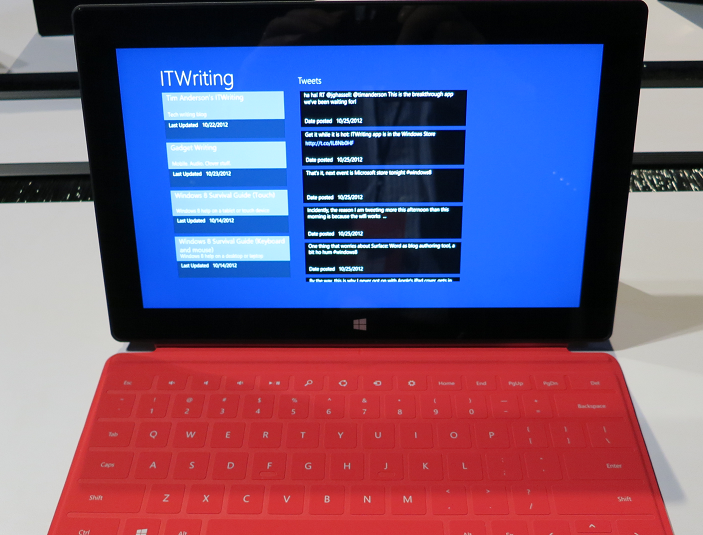
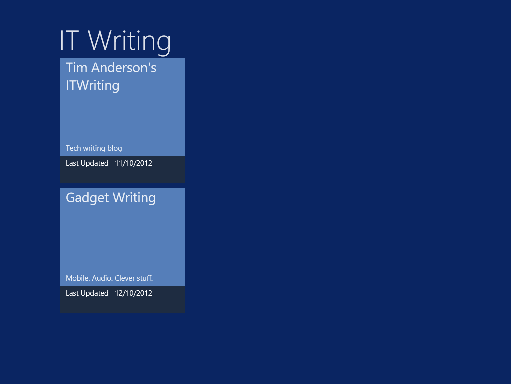
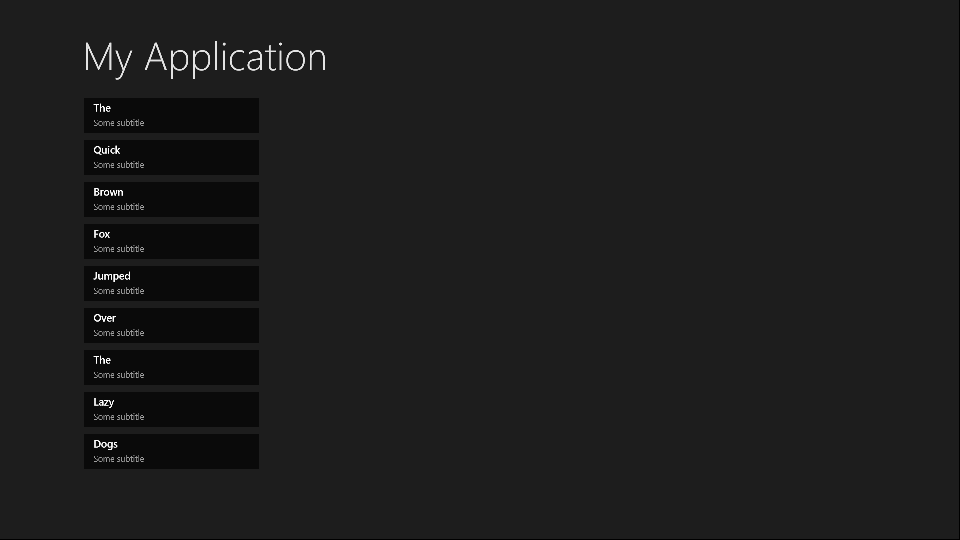
A while back I adapted a sample application in order to create an app for Windows 8. I am mulling over putting it in the Windows Store, but it needed some work. In particular, I wanted to add a Twitter feed to the front page. There is plenty of space:

image

Sounds easy; but inspecting the layout code I realised that I did not understand it all that well at first.

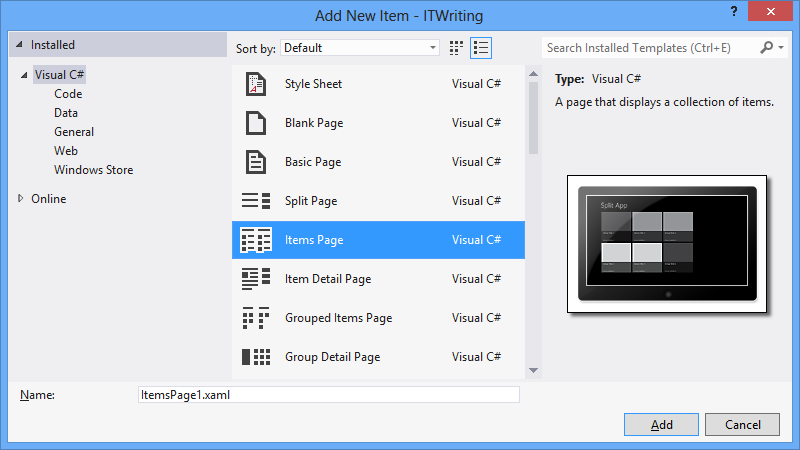
It is based on the Items Page template in Visual Studio 2012, and there is a fair amount going on in that template:

image

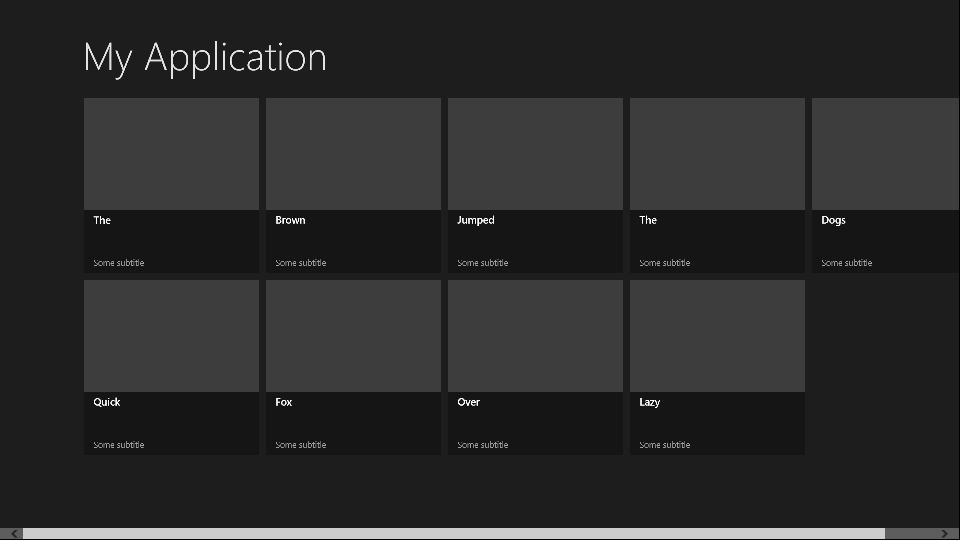
  • The contents are data-bound, which is great at runtime but inconvenient at design time as the page is empty.
  • The contents are layout-aware which means that they account for the four views possible in a Windows Runtime app: landscape, portrait, snapped, and filled. The “filled” name is a little misleading; this is an app which occupies most (but not all) of the screen when another app is snapped to one side.
  • The page uses resources and templates for its element styling, which are defined either in the page itself, or in StandardStyles.xaml which resides in the Common folder in your project (added automatically in projects which use the ItemsPage template).

It’s worth adding some dummy data early on so you can see what the page really looks like:

image

For example, imagine that you want to use a smaller item size that the default 250 x 250 size. Proceed as follows:

  1. Copy the DataTemplate called Standard250x250ItemTemplate from StandardStyles.xaml. Place it in the Page.Resources section of ItemsPage1.xaml (or whatever you called your ItemsPage). Rename it to, say, “MyItemTemplate”.
  2. Modify it to use a smaller size. You will probably want to adjust the bound elements as well, plus change the references to the standard Brush elements like  ListViewItemPlaceholderBackgroundThemeBrush as well.

Here is how the page looks with the space for the image removed, the DataTemplate height set to 50, and the height of the bound Title field set to 20:

image

Note that this template is not used by the Snapped view. For that, you will need to copy and modify the Standard80ItemTemplate, or make your own template suitable for an item in the Snapped view.

The code that determines which templates are used in which state is in the VisualStateManager.VisualStateGroups element. This has a Storyboard animation for the Portrait and Snapped views. The way this works:

  1. The default view is landscape. This is why in the XAML there is a GridView called itemGridView which is visible, and a ListView called itemListView which is hidden (Visibility="Collapsed").
  2. In the Snapped view there is only room for a single-column list, not the grid. Therefore the Storyboard for the Snapped view sets the itemListView to visible and the itemGridView to hidden.
  3. When you change back to a non-Snapped landscape view, the layout reverts to the default. Code for this in in LayoutAwarePage.cs, also in the Common folder.

After working this out I was better able to adapt my own page. More on that another time!

Will Windows 8 save the PC? Gartner reports 8% year on year sales decline

Gartner has reported on third quarter worldwide PC sales and they do not look good:

  • At 87.5 million units, they have declined 8.3% compared with the same quarter in 2011
  • HP is down 16.4%, Dell is down 13.7%. Lenovo managed 9.8% growth and is now number one with 15.7% of the market

Key quote: “The third quarter has historically been driven by back-to-school sales, but U.S. PC shipments did not increase, not even sequentially, from the second quarter of 2012. Channels were conservative in placing orders” said Gartner’s Mikako Kitagawa.

Gartner researchers add that ultrabooks have failed to turn round sales because they are not competitively priced. Worth noting when you look at the expensive hybrid docking tablets and convertibles vendors have come up with for Windows 8.

Gartner’s figures exclude “media tablets” such as the Apple iPad or Android tablets.

Of course you would expect a decline on the eve of the launch of Windows 8, as retailers clear their shelves, though Kitagawa says “On the professional side, there was minimum impact from Windows 8 in the quarter because the professional market will not adopt Windows 8 PCs immediately after the release.”

But will consumers rush to buy Windows 8 machines and make the next quarter boom? Let me throw out a few predictions:

  • Kitagawa is right about the professional market. We may see a few Windows 8 tablets show up among execs, but most companies will go the easy route and stick with Windows 7 for the time being.
  • The Windows 8 launch will be fascinating with cries of agony from some while others say it is rather good.
  • Time will be good for Windows 8 as the shock wears off and people learn how to use it.
  • Microsoft’s Surface will be a success and show Windows 8 at its best, though there will be confusion over lack of compatibility with desktop applications.

I am not sure though that this means a strong fourth quarter. Confusion over the new UI and vendors with over-complicated hybrid products will probably prevent sales from taking off immediately. Further, Windows 8 has to compete with Windows 7, which is already pretty good.

Broadly I reckon Microsoft is doing the right thing with Windows 8: reinventing the platform as a tablet OS while keeping faith with the past, on x86 at least.

I have doubts about some aspects of the Metro user interface and expect it will improve in later versions with some softening of the “immersive UI” religion that hides menus and toolbars so effectively that users think apps are broken, or have to click or tap twice when once should be enough – eg the back button in Metro-style Internet Explorer.

Even so, there are a few excellent new-style apps, more will come, and I expect the platform to succeed eventually.

Visual Studio 2012 hits and misses

A few quick reflections after writing a rather large review of Visual Studio 2012, Microsoft’s development tool for everything Windows.

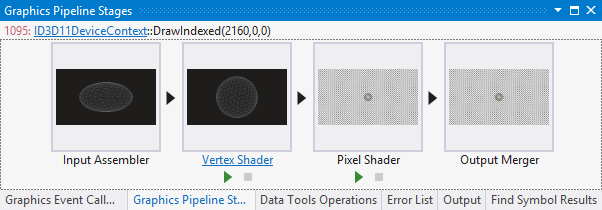
Several things impressed me. The Graphics Diagnostics Tools for Direct3D, for example, is amazing; you can capture a frame, select a pixel, and drill down into why it is the colour it is. See Amit Mohindra’s blog post here. Though admittedly I got “Unable to start the experiment session” on my first go with this; make sure the Debugger Type is set to Native Only.

image

Graphics is not really my area; but web development is more like it, and I continue to be impressed by what Microsoft has done with Windows Azure. You can go from hitting New Project in Visual Studio to an ASP.NET MVC 4.0 web site up and running on Windows Azure in moments. Even if you add an Azure SQL database into the mix it is not much harder. The experience is slightly spoiled by the fact that the new Azure portal for web sites etc is still in preview and seems to be a bit unreliable; I sometimes get an error when logging in and have to refresh before it works. That is a minor detail though; the actual deployed web sites and applications seem to work fine.

That said, it was also apparent to me that Microsoft’s Azure story has become a little confusing. Want an ASP.NET web app on Azure? Choose between a Web Role, a stateful VM, or a web site. Both web roles and web sites can be scaled quite effectively, thanks to the built in load balancer for web sites. Still, choice is good, as long as the differences are understood. It appears that Microsoft is still backing the web role approach as the most architecturally sound; but web sites are so easy to use and understand that it would not surprise me if they are more successful.

Another hit with me is the SQL Server Data Tools (SSDT), once I understood the difference between DACPACs and BACPACs – a DACPAC encapsulates the schema and logins etc for a database in a single file that you can import elsewhere, whereas a BACPAC also stores the data. The approach in SSDT is that a database schema is just a bunch of SQL scripts, and that if you manage it that way it makes a lot of sense in terms of version control, schema comparisons, deployment and maintenance.

On the ALM side I am impressed with Team Foundation Server Express, which is genuinely easy to install and lights up most of the key features of Microsoft’s ALM platform, though it does not handle the full SharePoint team portal or all the reporting features. Cloud hosting is also an option for TFS and that also worked OK for me, though with occasional delays as my code crossed the internet.

I hesitate slightly with TFS though. It feels like a heavyweight solution, whereas most developers like lightweight solutions. I know that open source tools like git and subversion only do a fraction of what you can do with TFS; but they also never keep me waiting.

I also wonder whether TFS simply creates too many artefacts. Work items seem to multiply rapidly as you use the system, which is good for traceability but could also become a bit of a bureaucratic nightmare if you have team members who make every action into a thing that needs comments and deadlines and links to source code and so on.

I guess it is like any other tool; it will work well for a team that already works well, but will not solve problems for a team that is already a bit dysfunctional.

I had not looked at Microsoft’s modelling featurs for a while; I was interested to discover new code generation features in the UML diagramming tools.

I am slowly beginning to understand what Microsoft is doing with apps for SharePoint. Get this: Microsoft is moving SharePoint 2013 towards being more of a service than a platform; you do not build apps on SharePoint; you build apps that use SharePoint services. This means you can at last develop SharePoint apps without having SharePoint installed on the same box as Visual Studio (thank goodness). And you can build SharePoint apps with PHP or Java as well as ASP.NET, because they are calling SharePoint, not running on it. Makes sense.

So what is not to like? There are a few puzzles, like the way Visual C++ has fallen behind in standards compliance despite the presence of Herb Sutter at Microsoft.

I also still find the whole XAML/Visual Studio/Blend thing a bit of a struggle. One day I will open up Blend, Microsoft’s XAML designer, and it will all fall into place as a natural and quick way to build a user interface, but it has not happened yet. I have also heard that developers should find the designer in Visual Studio enough; but at best it is rather slow and a little unpredictable.

Otherwise the tools for Windows Store apps seem decent to me, though I have heard that advanced developers are finding some issues; not surprising considering how new a platform it is. It is a distinctive platform, and my sense it that while there is a lot to like, developers need time to get the best from it, and there is also scope for Microsoft to improve it, maybe a few refinements in Windows 8 SP1?

Considering its scope, Visual Studio was relatively stable in my tests, though I did once get it into a state where it froze every time I tried to debug an application; fixed by a reboot (sigh).

I do not mind the monochrome user interface; I do not like it especially but it is something you get used to and do not notice after a short time.

Overall? Few people will use everything that is in Visual Studio and of course I have missed out most of it in the above, but it is a mighty achievement and still an asset to Microsoft’s platform.

Windows 8 discoverability: users searching for search

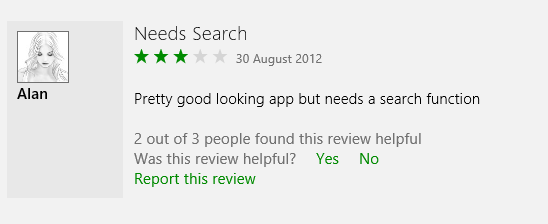
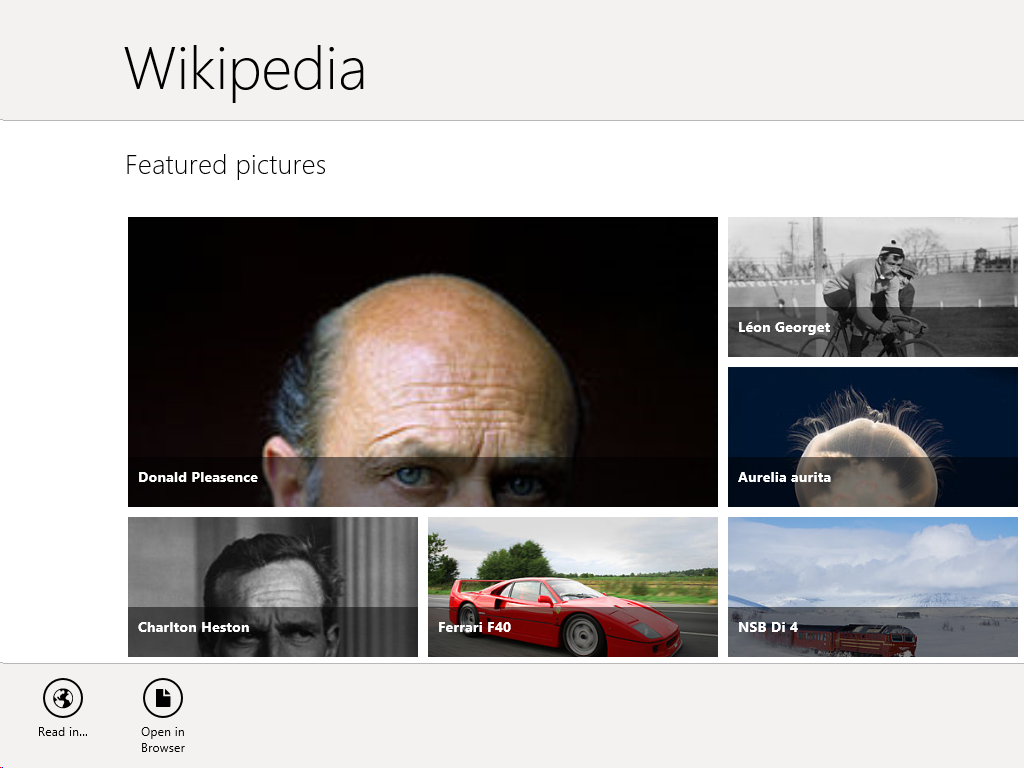
I have been poking around in the Windows Store as the public launch of Windows 8 approaches, and was intrigued by the reviews for the Wikipedia app, which is nicely done. Several users complain about the lack of a search function:

image

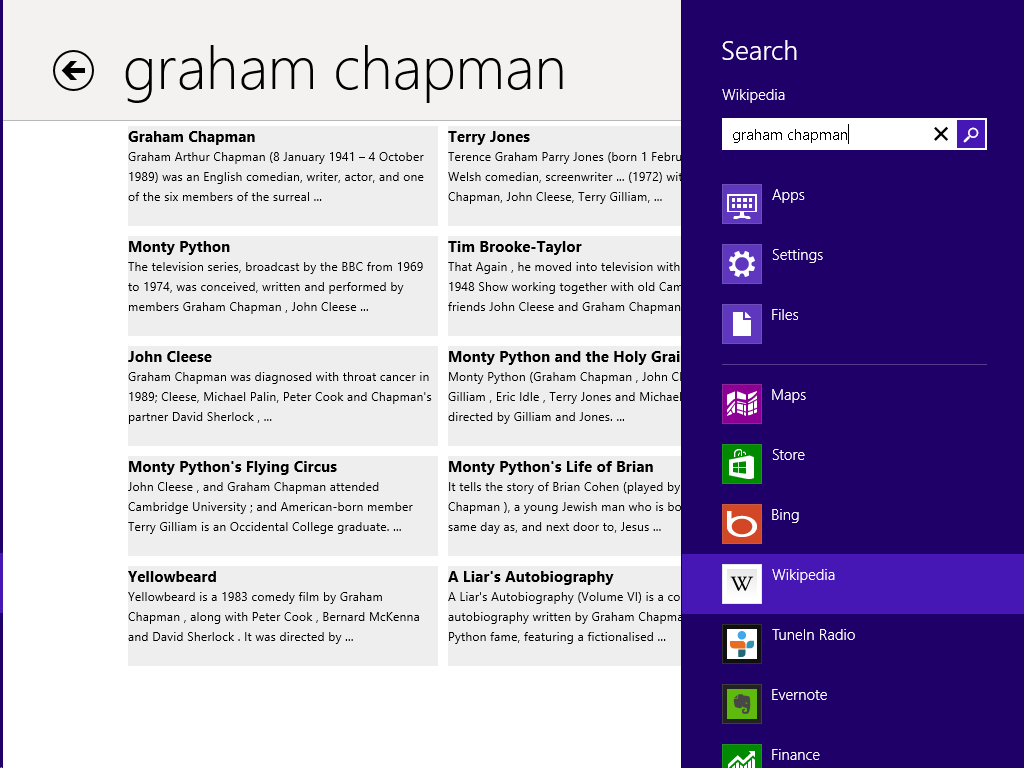
In fact the Wikipedia app has excellent fast search, on the Charms bar:

image

The problem: when you open the Wikipedia app there is no visual clue of where to find Search. Even if you have figured out that you need to right-click, or swipe up, to show the menu bar, it does not show a Search option.

image

The Wikipedia app developers have done the design correctly, in terms of Microsoft’s guidelines. This is the “Immersive user interface” which shows content rather than distracting UI furniture.

Another advantage of having Search on the Charms bar is that you are just a tap away from performing the same search in other apps, such as Internet Explorer.

The concept fails though if users simply do not discover key functions. What is the use of an encyclopaedia without search?

It does not help that the Charms bar, which is where Search lives, is hard to summon with the mouse. It is OK on a tablet (swipe from the right) or with the keyboard (Windows Key + Q). With the mouse, you have to position the pointer vaguely in the top or bottom corner and wait for Charms to fade into view if you have done it correctly. It is a vague movement with no feedback that you have initiated an action, like a button that does not click.

I presume though that as users live with Windows 8, Windows Key + Q will become natural when looking for a Search function (hah!). It is fair to say though that the UI does not score highly for discoverability.

Appcelerator mobile developer survey shows Windows 8 progress, uncertainty

Cross-platform mobile tools vendor Appcelerator has released its latest mobile developer survey (in conjunction with IDC) representing the views of around 5,500 developers using its tools.

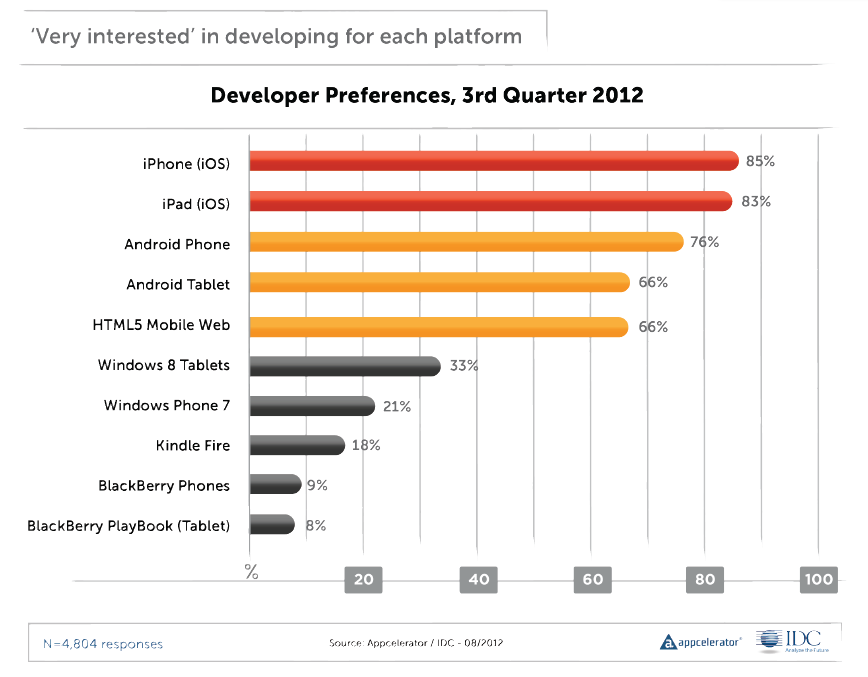
It is worth a read this time around. I was particularly interested to see what Appcelerator developers think of Windows 8, launching later this month. There is a chart showing the percentage of developers who are “very interested” in developing for various mobile platforms, and which shows Apple iOS leading at 85%/83% for iPhone and iPad, Android next, then HTML5, and then Windows 8 Tablets at 33% – already ahead of Windows Phone as well as Amazon and RIM devices (RIM has declined from 40% in January 2011).

image

The report says that potential Windows 8 developers are most interested in the “shared development capabilities between desktop and tablet promised by Microsoft with the launch of Windows 8.” I am not sure exactly what this means, and of course surveys like this are broad-brush and different developers will have meant different things. It could be about code sharing between desktop applications and Windows Runtime (WinRT) apps. It could be about the ability to run WinRT apps on the desktop as well as the tablet. It could be about Visual Studio and its ability to target multiple Windows platforms. However, the the survey goes on to talk about a “single paradigm for both desktop and tablet/smartphone applications” which seems to look forward to a future Windows where desktop applications really are legacy.

There is also a note that there were as many developers convinced that they will not be building apps for Windows 8 or Windows phone, as those who were.

What really counts is in the next paragraph in the report:

A large installed base of devices was the #1 criterion for 53% of developers when asked about why they choose to develop on a platform

This is the simple truth, which is why Microsoft has chosen a strategy which puts WinRT on every Windows 8 box whether or not it is really wanted.

The report also states that developers are dissatisfied with HTML5 for mobile applications, in terms of monetization, security, fragmentation, performance, and more. I suggest not taking too much account of this since Appcelerator’s Titanium tool is an alternative to HTML for mobile apps, so will have attracted those who do not want to use HTML5.

Finally, there is a fun section on what devices developers think they will be targeting in 2015. Televisions head the list, followed by connected cars. Most intriguing though are the final two: foldable screens and Google Glass. Apparently 67.1% believe Google Glass is in their future. Surveys, always entertaining but given the volatility of the results, not something you can rely on as a predictor.

Here comes TypeScript: Microsoft’s superset of JavaScript

Microsoft’s Anders Hejlsberg has introduced TypeScript, a programming language which is a superset of JavaScript and which compiles to JavaScript code.

The thinking behind TypeScript is that JavaScript is unsuitable for large projects.

“JavaScript was never designed to be a programming language for big applications,” says Microsoft’s Anders Hejlsberg, inventor of C#. “It’s a scripting language.”

The ubiquity of JavaScript makes it remarkably useful though, with that now extending to the server thanks to projects like node.js. Microsoft is using node.js for its Azure Mobile Services.

TypeScript therefore lets you use features including type annotations, classes, modules and interfaces to make large projects more robust and maintainable.

Variable names are preserved when TypeScript is compiled. Further, since TypeScript is a superset, any JavaScript code can be pasted into a TypeScript project. The compiler is open source and you can download an early version here.

Microsoft is also trying to stay close to the specification for Ecmascript 6, the proposed next iteration of the official JavaScript standard, where relevant.

There is tooling for Visual Studio including a language service to provide code hinting, syntax highlighting and the like.

TypeScript differs from projects like Google Web Toolkit or Script#, both of which also emit JavaScript, in that it does not compile from one language into another; rather, it compiles into a reduced version of itself.

Why is Microsoft doing this? That is the interesting question. I would conjecture that it is partly self-interest. Microsoft itself has to write increasing amounts of JavaScript, for things like Office Web Apps (apparently written in Script#) and the new Azure portals. Azure Mobile Services uses JavaScript as mentioned above. JavaScript is also one of the options for coding apps for Windows 8. Better tools will help Microsoft itself to be more productive.

That said, the arrival of TypeScript will re-ignite the debate about whether Microsoft, while not anywhere close to abandoning .NET, is nevertheless drifting away from it, towards both native code in Windows and now JavaScript in the managed code space.

More information from Microsoft’s S Somasegar here.