The metro-style hotel bar in Barcelona, ready for the launch of Windows 8 consumer preview.

The metro-style hotel bar in Barcelona, ready for the launch of Windows 8 consumer preview.
At the Showstoppers event just before the Mobile World Congress in Barcelona it was hard to miss the Ford car emblazoned with SYNC Ford Microsoft.

So what is this all about? Apparently, the European launch of in-car computers that hook up to Ford’s cloud services. Cue all the jokes about “if your car ran Windows.”
You have to provide the connectivity, for example by docking your smartphone. You can then stream music with voice control, make calls again with voice control, or if you hear a funny noise, send a diagnostic report on your car to Ford or perhaps your dealer.
Why bother with an in-car computer running Windows embedded, when you could just dock a smartphone and let that do all the work? That was my question too, though there are integration benefits. Some details are being held back for an announcement tomorrow.
By the the way if you think the picture is rubbish, blames the Samsung Slate 7, which was used to create this entire post.
I took advantage of a trip to Seattle to purchase a Samsung 7 Slate, similar to the one given to attendees at Microsoft’s BUILD conference last September, though missing some of its sensors.

It is a decent machine, fast and well-specified, but not one I can recommend unless, like me, you are keen to give Windows 8 Consumer Preview the best chance to impress, and cannot wait the short interval until machines that are actually designed for Windows 8 turn up on the market.
This is a Windows 7 slate, and that is the main thing that is wrong with it, since Windows 7 does not work well with touch control. Samsung’s solution is to cover all the bases:

All these options make this an expensive device, but there are nevertheless a number of flaws and annoyances, some of which make you wonder “what were they thinking?” Here are some I have discovered in a few days of use:
1. There is an illumination sensor towards the top right of the screen bezel. This is a battery-saving measure, which adjusts the screen brightness according to the ambient light. Good thinking; except that if you are right-handed and controlling the slate with touch, your hand will often pass in front of the sensor. When that happens the screen dims, because it thinks the room is darker. The effect is that the screen constantly brightens and darkens in use, which is unpleasant. Fix: disable the feature and set the screen to a fixed brightness.
2. The on-screen keyboard is poor. This is the fault of Microsoft, not Samsung. If you have the keyboard set to float, the keys are too close together for fast typing. If you dock the keyboard, it becomes bigger, but impossible to use because it covers the bottom third of the screen. For example, it covers the search box on the Start menu when docked, so that you will be typing into it blind. Fix: Windows 8.
3. I got the matching Samsung wireless keyboard and found that the first key you press sometimes does not register. This is infuriating, especially for things like passwords. The reason, I discovered, is a setting in the Bluetooth card configuration “Allow the computer to turn off the device to save power.” When set, if you pause typing for 30 seconds, then the next key you press is in effect the on button and does not appear on the screen. Fix: uncheck this setting.

4. When using wifi at a meeting, I found that every two or three minutes I had to re-enter the username and password for the wifi hotspot. Nobody else had this problem. Fix: I am not sure, but updating the driver for the Intel wireless adapter plus sundry other Windows updates fixed it for me.
5. It is difficult to run without full administrator rights on the machine, as several Samsung utilities prompt for elevation.
6. There is no security button. This is the button that emulates Ctrl-Alt-Delete when you log on to Windows. Instead, you hold down the Windows key and press the power on switch – when you have discovered that this is what you have to do. It is not mentioned in the quick start leaflets. To be fair, this is only likely to be an issue if you do as I did and join the machine to a Windows domain. Samsung does include a Touch Logon application which lets you secure your machine with a simple code instead.
7. The pen sometimes stops working, or more precisely, the screen stops responding to the pen. Fix: pressing the screen rotation lock button seems to kick it back into life.
8. There is some clever coding that disables finger control when you are using the pen, which is a Wacom digitiser and not just a stylus. The idea is that you can rest your hand on the screen when using the pen. This mostly works, but I still find pen control less good on this device than on older Tablet PCs which respond only to the digitiser. The problem may be that when you lift the pen away from the screen, touch control turns back on. Whether or not this is the problem, I find it too easy to get unexpected behaviour.
9. Navigating the BIOS is difficult without a USB keyboard. It can be done. Volume up and down substitutes for the cursor keys, the Windows button is ESC and the rotation lock is Enter. The hard bit: switching between pages with volume and rotation button together. Fix: a USB keyboard.
10. The one solitary USB port has a tiny loose plastic cover which will soon get lost. For that matter, I will probably lose the expensive digitizer pen as well since it does not clip into the slate nor into the official Samsung case.
Is this a poor device then? Not at all. It is powerful and light, and works very well indeed if you pop the slate into its dock and use it with a wireless keyboard and mouse. In this guise though, it is more like a desktop PC.
When used purely as a slate though, this machine is far less usable than either an iPad or an Android tablet, both of which are also much cheaper.
Even some of the good ideas do not quite work properly. If you tap with three fingers, a floating panel appears with common actions that are otherwise tricky with touch, such as Ctrl-C for Copy. A great use of multitouch, except that if I do this in Windows Live Writer, it also registers as a zoom command which enlarges the text. Annoying.

All this is thought-provoking on the eve of the Windows 8 beta launch. Windows 8 in metro mode fixes the usability problems in the operating system, but will not prevent OEMs implementing half-baked ideas like Samsung’s illumination sensor. Further, people will buy Windows 8 tablets in part so that they can run desktop applications. How well will that work without docks, keyboards, pens and/or wireless mice, and high prices?
That said, Microsoft is aware of these issues which is why the Metro side of Windows 8 exists. The goal, I imagine, is that you will be able to stay in Metro all the time when using Windows 8 as a slate.
I have been trying out Microsoft’s ForeFront Unified Access Gateway (UAG) recently, partly because it is the only supported way to publish a SharePoint site for Windows Phone. This was my first go with the product, though I am already familiar with the Threat Management Gateway (TMG) and its predecessor Internet Security and Acceleration Server (ISA) – and before that Proxy Server, dubbed “Poxy Server” by admins frustrated with its limitations. All these products are related, and in the case of UAG and TMG, more closely than I realised.
Note that Microsoft has indicated that the current version of TMG, 2010, is the last. What is happening to UAG is less clear.
What I had not realised until now is that TMG installs as part of UAG, though you are not meant to use it other than for a few limited uses. It is mainly there to protect the UAG server. The product positioning seems to be this:
This means that if you want to use Microsoft’s platform for everything possible, you are expected to run both UAG and TMG. That is OK for enterprises but excessive for smaller organisations. It is odd, in that TMG is also a capable reverse proxy. TMG is also easier to use, though that says more about the intricate user interface of TMG than it does about the usability of TMG. Neither product can be described as user friendly.
The complexity of the product is likely to be one of the reasons TMG is now being discontinued. It is a shame, because it is a decent product. The way TMG and ISA are designed to work is that all users have to authenticate against the proxy before being allowed internet access. This gives administrators a high degree of control and visibility over which users access which sites using which protocol.
Unfortunately this kind of locked-down internet access is inconvenient, particularly when there are a variety of different types of device in use. In many cases admins have to enable SecureNAT, or in other words unauthenticated access, partly defeating the purpose, but there is little choice.
ISA Server used to be supplied as part of Small Business Server (SBS); but when I spoke to Microsoft about why it was dropped in SBS 2008, I was told that few used it. Businesses preferred a hardware solution, whether a cheap router modem from the likes of Netgear or Linksys, or a security appliance from a company like Sonicwall, Cisco or Juniper.
The hardware companies sell the idea that a hardware appliance is more secure, because it is not vulnerable to Windows or Linux malware. There is something in the argument, but note that all security appliances are more software than hardware, and that a Windows box will be patched more regularly. ISA’s security record was rather good.
My hunch is that ease of use was a bigger factor for small businesses. Getting ISA or TMG to do what you want can be even more challenging that working out the user interface of a typical hardware appliance, though perhaps not with the more complex high-end units.
As for UAG, I have abandoned the idea of testing it for the moment. One of the issues is that my test setup has only one external IP. UAG is too elaborate for a small network like mine. I am sticking with TMG.
Apple’s CEO Tim Cook spoke at the Goldman Sachs Technology Conference yesterday; Macrumors has what looks like a full transcript. Do not expect hot news; there is little or nothing in the way of announcements. It is interesting though as a recap of how Apple sees its future: iPad, iPhone, iCloud, Apple TV, maybe some future huge acquisition financed by its cash pile.
This is what stands out for me:
From the first day it shipped, we thought that the tablet market would become larger than the PC market and it was just a matter of the time it took for that to occur. I feel that stronger today than I did then.
I agree. The reasons are similar to those that caused laptops to outpace desktops. Mobility and convenience trump the better computing value you get in a desktop PC. Note: we still use desktops, and both desktops and laptops will continue to sell, but in smaller quantity.
Although you can list numerous reasons why tablets are not good enough – no keyboard, small storage capacity, underpowered for cutting-edge gaming, not really expandable, favourite apps not yet available, and more – none of these is sufficient to prevent the tablet taking over in the majority of cases.
You can have a keyboard if you want; build it into the case. Storage is increasing all the time, and we have the cloud. Graphics power is increasing all the time. Most people are happy to sacrifice expandability for the simplicity and reliability of a tablet. If your favourite app is not yet available, it soon will be; or else an equivalent will appear that replaces it.
Tablet benefits? Cost, no flappy screen, light and small, designed for ease of use, reliability of an appliance versus a computer for starters.
In itself, the move from one type of computing device to another is no big deal. The reason this one is such a deep change is because of other factors. I will list three:
Pioneered by Apple, this is the idea that users should not have full access to the operating system on their device in almost any circumstances. The lock down is a cost and a benefit. The benefit: resilience against malware, greater reliability. The cost: loss of control, loss of freedom, handing over even more power to those who do have full access, primarily the operating system vendor. Where UEFI secure boot is enabled, it is not even possible to boot to an alternative operating system.
Hand in hand with the lock down is the store, the notion that apps can only be installed through the operating system vendor’s store. This is not a universal tablet feature. Apple’s iPad has it, Microsoft’s forthcoming Windows 8 on ARM has it, Android devices generally let you enable “unknown sources” in order to install apps via a downloaded package, though sometimes this option is missing. Further, both Apple and Microsoft have schemes whereby corporates can install private apps. Still, the consequence of the lock down is that the ability to install apps freely is something which can be tuned either way. Since store owners take a cut of all the business, they have have a strong incentive to drive business their way.
I have never believed Apple’s line that the iTunes store is intended as a break-even project for the convenience of its hardware customers.
I am at risk of stating the obvious, but the fact that most tablets are iPads and most non-Apple tablets are Android is a monumental shift from the Windows-dominated world of a few years back. Can Microsoft get back in this game? I am impressed with what I have seen of Windows 8 and it would probably be my tablet of choice if it were available now. The smooth transition it offers between the old PC desktop world and the new tablet world is compelling.
That said, this cannot be taken for granted. I watched someone set up a new Android tablet recently, and was interested to see how the user was driven to sign up for a variety of services from Google and HTC (it was an HTC Flyer). Devices will be replaced, but accounts and identities are sticky. Users who switch devices may face having to move documents to a different cloud provider if they know how, re-purchase apps, figure out how to move music they have purchased, re-buy DRM content. A big ask, which is why Microsoft’s late start is so costly. At best, it will be a significant player (I think it will be) but not dominant as in the past.
Late start? Did not Bill Gates wave a slate around and predict that it would be the future of the PC back in 2001:
"So next year a lot of people in the audience, I hope, will be taking their notes with those Tablet PCs … it’s a PC that is virtually without limits and within five years I predict it will be the most popular form of PC sold in America."
Right idea, wrong execution. Microsoft tried again with Origami, the ultra mobile PC, a device that was so obviously flawed that everyone knew it would fail. My belief is that Microsoft, helped by Apple’s example, has a tablet concept that works this time round, but nevertheless the history is discouraging.
One reason for the relative failure of the Tablet PC and the complete failure of Origami was price. Microsoft’s business model depends on selling software licenses, whereas Apple mostly bundles this cost into that of the hardware, and Android is free. Price of the first Windows 8 tablets is unknown, but could again prove to be a problem.
Interesting to debate; but however it shakes out, Windows-only is not coming back .
It follows that as tablet use continues to grow, both business and consumer computing are transforming into something different from what we have become used to. Considering this fact, it would be interesting to analyse affected businesses in terms of how ready they are for this change. It would be fascinating to see companies ordered by some kind of tablet readiness index, and my guess is that those towards the bottom of that hypothetical list are in for a nasty shock.
Microsoft will deliver Windows 8 Consumer Preview shortly, probably on February 29th, since it has been promised by the end of this month and there is a launch event at Mobile World Congress.
The Windows Consumer Preview, the beta of Windows 8 on x86/64, will be available for download by the end of February. This next milestone of Windows 8 will be available in several languages and is open for anyone to download.
says Windows President Steven Sinofsky
The name of the preview suggests that Microsoft intends this release to be broadly downloaded and tried, in contrast to the developer preview with its more specialised role.
In preparation for the preview I looked around for a suitable tablet on which to test it – noting that it must be a Intel x86 or x64 tablet, since the ARM build (WOA) is not for general release, but only for manufacturers.
WOA will not be available as a software-only distribution, so you never have to worry about which DVD to install and if it will work on a particular PC.
Sinofsky writes.
So what is available? A quick Twitter consultation turned up a few options, such as the Acer Iconia Tab W500, the Asus Eee slate B121, and the Samsung Slate 7.
However, of these only the Samsung is really suitable, because it has a 1366 x 768 display. The others have 1280 x 800, and while this will run Windows 8 and the new Metro user interface, it will not support the Snap feature which gives you two applications on screen together:
The resolution that supports all the features of Windows 8, including multitasking with snap is 1366×768. We chose this resolution as it can fit the width of a snapped app, which is 320px (also the width designed for many phone layouts), next to a main app at 1024×768 app (a common size designed for use on the web).
Yes, it’s Sinofsky again.
Unfortunately the Samsung Slate 7 is not fully released in the UK, though I did find it on offer at ebuyer.com, for the not too unreasonable price of £973.19.
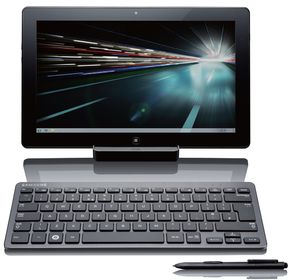
That is still expensive, and it is hard to see it becoming a mass-market bestseller as Windows 8 fans rush to try out the new OS.
The consequence is that most users will try Windows 8 Consumer Preview on a virtual machine, or on an ordinary PC or laptop, or possibly on one of the cheaper 1280 x 800 tablets.
Since Microsoft’s main focus with Windows 8 has been on the new Metro touch user interface, this will not show the new operating system at its best.
I can personally testify to this. The Samsung slate handed out at the BUILD conference last September, which I had on loan for a few days, was delightful to use, whereas Windows 8 Developer Preview (the same build) is nothing special in a virtual machine.
All will be well, one assumes, when Windows 8 launches with both ARM and Intel-based machines available. Nevertheless, it seems to me a significant obstacle as Microsoft tries to build pre-launch enthusiasm; the risk is that users will not take into account how much better it is on a real tablet.
Update: a few other options have been suggested, like the Dell Inspiron Duo, a convertible 10.1” tablet with an Intel Atom N570 Dual Core, 1366 x 768 display and 2GB RAM, and around one third of the cost of a Slate 7, but perhaps under-powered to show off the best of Windows 8.
Vendors who create new platforms work hard to attract developers, because high availability of apps is seen as essential for success. This is why, for example, RIM is offering free PlayBooks to developers who submit apps to BlackBerry App World.
Why then would Microsoft deliberately and consciously choose to release a new family of Windows machines on which existing Windows applications cannot run, even when recompiled? This is what is happening with Windows on ARM (WOA), as Windows President Steven Sinofsky makes clear in his lengthy post on the subject:
Developers wanting to reach WOA with existing apps have two options. Many apps will be best served by building new Metro style front ends for existing data sources or applications, and communicating through a web services API … Other existing applications will be well served by reusing large amounts of engine or runtime code, and surrounding that with a Metro style experience.
This restriction means that WOA cannot benefit from what what might otherwise be its biggest advantage versus the competition: huge numbers of apps that could easily be ported.
Microsoft’s reasoning is that the existing Windows software deployment model is broken so badly that it cannot be fixed:
If we enabled the broad porting of existing code we would fail to deliver on our commitment to longer battery life, predictable performance, and especially a reliable experience over time. The conventions used by today’s Windows apps do not necessarily provide this, whether it is background processes, polling loops, timers, system hooks, startup programs, registry changes, kernel mode code, admin rights, unsigned drivers, add-ins, or a host of other common techniques. By avoiding these constructs, WOA can deliver on a new level of customer satisfaction: your WOA PC will continue to perform well over time as apps are isolated from the system and each other, and you will remain in control of what additional software is running on your behalf, all while letting the capabilities of diverse hardware shine through.
says Sinofsky. It is a view that has merit, particularly when you consider how badly Windows has been damaged by poor quality OEM software.
Note that he is even promising an end to Windows “cruft”, as memorably described by Verity Stob in State of Decay:
Cruft Force 7. Wounded. Description: No longer able to logon using original account as the system freezes, so must logon as "Verity2" or similar
and the like. “Your WOA PC will continue to perform well over time,” Sinofsky promises.
Another reason to like this approach is that the Windows Runtime (WinRT), the platform for which third-parties are allowed to develop, is in my view a great piece of work. The WinRT apps in the Windows 8 Developer Preview perform well, even though they are simple things put together quickly, many of them by students as I recall. The insistence on asynchronous calls for any system API that might be slow to return should ensure responsive applications.
At the BUILD conference last September we were told that the Windows team sat down to create a new platform that avoids the mistakes of the past and while it introduce frustrations of its own, some of which we know about and some of which developers will discover, it does appear to be well thought-through.
Microsoft Office itself is not the best performing of software, particularly Outlook which is prone to long hangs. Fortunately, Outlook is missing from the version of Office 15 which will ship for WOA, and journalist Adrian Kingsley-Hughes reports positively on a recent glimpse at the software.
A sure-fire success then? No, because the downside of WOA is that right now there are no apps for it, beyond what we have seen in the developer preview. It is a brand new platform; and the history of personal computing is littered with good products that failed because they could not achieve sufficient momentum.
I am just back from RIM’s BlackBerry conference in Amsterdam, impressed by what I have seen of the PlayBook and forthcoming BlackBerry 10 platform and its tools for developers, but thinking, is this enough to persuade a customer to buy a BlackBerry tablet instead of the safe choices of Apple iOS or Google Android?
Microsoft has the market presence to make this work, you may think; but the Windows Phone 7 story so far shows that this is not enough. The new phone OS has only a tiny market share after a year, and if it recovers, it will be more to do with Nokia than with Microsoft.
WOA also has interesting competition in the form of Windows 8 on x86, which will also have WinRT, but without the restrictions on desktop apps. If partners focus on Intel Windows 8, as the “full” version, it could be hard for WOA to find its market.
There are problems with Windows 8 on x86 too. Most of existing Windows apps will need a keyboard and mouse to work properly, and expect to find large amounts of storage, not the 16 or 32 GB in a typical tablet. Windows 8 Intel devices may end up like the Samsung tablet given to attendees at BUILD: powerful, but heavy, expensive, with short battery life, and complete with the clutter of a separate keyboard. Such devices have their place, but they are not an answer to the iPad.
It is WOA, not Windows 8 x86, that has to win market share from Apple.
Microsoft is choosing to do WOA right, rather than opening it up to the kinds of problems which have afflicted Windows in the past. That does makes sense, because it is those problems which have made users gladly move away from Windows now that compelling alternatives are available.
I also believe that OS vendors work too hard to pump up the app numbers, and not hard enough to ensure quality, resulting in app stores full of poor to indifferent apps. This is why schemes like the BlackBerry effort mentioned above do as much harm as good, enticing developers to submit rubbish in order to win a new gadget. An app store with 10 great apps is better for users than one with a thousand poor ones.
It is nevertheless true that apps make or break a platform. BUILD attendees and those who have downloaded the Windows 8 developer preview have had the tools to make WinRT apps for a few months now, but my impression is that most are waiting to see how it progresses before investing seriously in WinRT development. Another problem is that Windows 8 developer preview works nicely on a real tablet, but not so well in a virtual machine or on a PC without a touch screen.
I still think WOA may work.
That is a lot of ifs though, and the progress of WOA will be a fascinating tech story throughout 2012.
When Nokia acquired Trolltech back in 2008, it made perfect sense as a way of supporting development on Symbian, its smartphone operating system, and nudging the Qt project, which provides a cross-platform framework for native applications, more towards mobile rather than just desktop application support. It also made sense as Nokia worked on Maemo and then Meego, its Linux for mobile project.
Then came February 2011 and CEO Stephen Elop’s announcement that Nokia would partner with Microsoft and make Windows Phone its primary smartphone operating system. Windows Phone 7 does not support native code development, other than by operators, manufacturers, and of course Microsoft itself. What future for Qt at Nokia now?
Here at Blackberry Devcon Europe, Nokia’s Lars Knoll, Qt Chief Maintainer, has been introducing Qt to Blackberry developers. Qt forms a critical part of RIM’s Blackberry 10 (BBX) platform, based on the PlayBook tablet OS and set to come to Blackberry phones later this year. The Cascades UI framework, for hardware-accelerated 2D and 3D rendering on BBX, uses Qt core and an adaption of QML (Qt Modeling Language). You can use Qt with or without Cascades on BBX.

Given that Nokia makes mobile devices which are in competition with RIM’s devices, it may seem odd that Nokia is supporting Qt on Blackberry. I asked Knoll about the status of Qt within Nokia following the move to Windows Phone.
There’s not too much I can say right now. The only thing I can repeat is that we’re still investing in Qt. We’re actually hiring more people to work on Qt. Qt is an essential part of the strategy for the next billion. That’s all I can say right now, but stay tuned, in time you’ll hear more.
He added later that Nokia is in business to make money; in other words, there are strong business reasons for Nokia to continue with Qt. The “next billion” reference refers to Nokia’s stated intention to bring apps to the next billion.
One possibility is that Qt will in fact support a future version of Windows Phone. It is already clear that Windows Phone 8 will use the same kernel as Windows 8 and we can expect a unified development platform build on the Windows Runtime (WinRT), which does support native code development.
It is not too much of a stretch then to expect a future Qt framework that will target Windows Phone and Windows 8 tablets. Nokia’s Elop has also hinted that it is interested in Windows tablets as well as phones in future.
Laura Merling from Alcatel-Lucent spoke at the Monki Gras conference in London earlier this week, saying in effect that telecommunication companies have a dying business model.
She gave a two-minute summary of Telco history. “First it was all about voice,” she said. “Then the intertubes happened. Now you had data … then it went back to voice, the big push for wireless. Then of course wireless moved, so it’s not about voice any more, it’s about the data.”
She expects the next step to be “connected devices … the phone goes away, everything you do both data and voice happens on other devices.”
What does this mean for telcos? They have become commoditised, she said, suppliers of data plans. “It is a big commoditised business that has no real innovation.”
“In the future, the data plans dies,”, Merling says. “Think about it. How many devices have you got? Think about connecting all of those. You probably want the same data plan. But why pay for a data plan? How will telcos make money? You can’t just keep increasing the data plan.”
Instead, the money is going to come from the APIs and accessing the services.
Enter Twilio, a virtual telco. “I think of twilio as a craft telco”, said Merling, tying in with the beer theme that flowed through Monki Gras. “Do they sell hardware? No. They have software and APIs.” She says the Twilio business model scares the industry: it is based on transactions, not data plans. She also noted how old established vendors are buying up software-based providers, such as BT acquiring Ribbit and Microsoft acquiring Skype.
Tomorrow’s telco, says Merling, is a based on a software stack. “Antennas and towers are not going to go away, but the infrastructure becomes all software based … combining network services with cloud infrastructure.
“At Alcatel-Lucent we sell hardware. We sell big giant boxes. But this is where it is going.” She says the telcos are now aware of this, hence the title of her session “How telcos got API religion.”
Her final prediction? “Jeff Lawson becomes the CEO of AT&T. Why? Because the model has to change.”
It was a thought-provoking talk, though the unspoken question was whether in fact the telcos will successfully transition or whether they will simply become less important, continuing to maintain the pipes while others profit from what flows through them.
I interviewed Twilio CEO Jeff Lawson in October last year.
Today brings the news that Microsoft Office 15 is now in Technical Preview (also known as private beta).
There is little news about what is in it other than this:
With Office 15, for the first time ever, we will simultaneously update our cloud services, servers, and mobile and PC clients for Office, Office 365, Exchange, SharePoint, Lync, Project, and Visio.

So what would you like to see in Office 15? Here are a few things on my wish list:
The problem is that Office is a huge and intricate bag of legacy. The work Microsoft did in replacing the menus with ribbon toolbars was admirable in its way, and potentially more touch-friendly, but if you scratch the surface much is unchanged underneath. All the old commands remain.