Tag Archives: microsoft

Fixing a Small Business Server 2008 broken by updates

I had a call last night from a small business whose email no longer worked. They had applied updates to the server but Exchange had failed to restart.

Looking at the services it was easy to see why. All the Exchange services and certain others including the IIS web server were set to disabled:
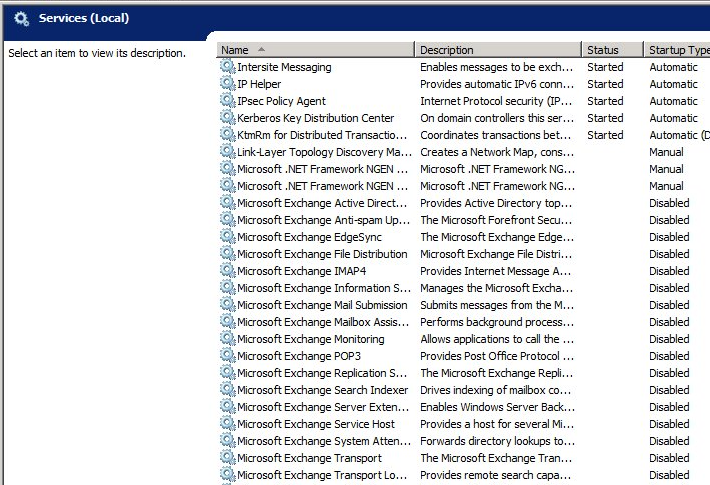
image

The likely culprit was Update Rollup 5 for Exchange Server 2007 Service Pack 3 (KB 2602324) – or rather, the mechanism which applies the patch, since this seems to be an issue that others have run into as far back as 2008 with other Exchange patches, though it is rare:

I installed the Update Rollup 4 and did a reboot of my Exchange Server 2007. But since then, all my services are disabled. Is this a known issue?

My guess is that the patch disables the services in order to update the binaries and then, for some unknown reason not fixed by Microsoft over these last four years, fails to re-enable them.

It seems that no harm was done other than that the services were disabled, but how can you know which services are meant to be running, which should be set to manual, and which should stay disabled?

I contemplated doing a quick test install of SBS 2008 on a VM just  to see how it is set out of the box, but fortunately found this post by Susan Bradley which shows default SBS 2008 running services.

There were a few other things wrong.  SharePoint Services was raising event 5586:

Unknown SQL Exception 33002 occured. Additional error information from SQL Server is included below. Access to table dbo.Versions is blocked because the signature is not valid.

and there was the related event 33002 from the internal SQL Server used by SharePoint. The cause of this was SharePoint Services 3.0 Service Pack 3. When you apply a major update to SharePoint Services, you have to re-run the SharePoint Products and Technologies Configuration Wizard. This is by design, though it seems odd to me that you apply an update and it silently breaks the product it is updating until you run a further manual process. Of course the error itself does not give you much clue about what is really wrong.

The third major issue was a JRNL_WRAP_ERROR from the NTFrs File Replication Service. You have to be careful with this one, since the advised fix in the event log presumes the presence of a good replica elsewhere, which in the case of SBS is unlikely. See this article for details. With SBS which it is the sole domain controller you should set the BurFlags registry key to D4. Further comment on ServerFault here.

The incident reminds me of how prickly SBS can be. It is great value for what it does, but has all the complexity of Microsoft’s server stack plus the further disadvantage of being crammed onto one machine. I prefer a pseudo multi-server approach, even for small businesses, with at least two physical servers and separate VMs for Exchange, SharePoint, domain controller, backup DC on the other physical machine, and so on. Of course this has complexity of its own.

I would guess that when upgrade time comes around, companies like this will be looking carefully at Office 365. Or Google Apps; but the advantage of Office 365 is that you can make the transition from SBS with relatively little impact on users: just migrate the Active Directory, Exchange and SharePoint. You lose flexibility and some local performance, but hand over the maintenance issues to Microsoft.


Nokia results: hope for Windows Phone?

It is almost one year since Nokia’s dramatic announcement that it would transition its smartphone range to Windows Phone. Today the company released its results for the fourth quarter and for the full year 2011, the first since the release of the the Lumia range of Windows Phone devices. How it is doing?

This is one you can spin either way. The negative view: Nokia is losing money. Sales are down 21% year on year for the quarter and 9% for the full year, and the company reported an operating loss of just over a billion Euro for the year, most of which was in the last quarter.

If you look at the quarter on quarter device sales, they are down in both smart devices and mobile phones. The Symbian business has not held up as well as the company hoped:

changing market conditions are putting increased pressure on Symbian. In certain markets, there has been an acceleration of the anticipated trend towards lower-priced smartphones with specifications that are different from Symbian’s traditional strengths. As a result of the changing market conditions, combined with our increased focus on Lumia, we now believe that we will sell fewer Symbian devices than we previously anticipated.

says the press release. As for Windows Phone and Lumia, CEO Stephen Elop says that “well over 1 million Lumia devices” have been sold: a start, but still tiny relative to Apple iOS and Google Android. Elop cleverly calls it a “beachhead”, but given the energy Nokia put into the launch I suspect it is disappointed with the numbers.

Put this in context though and there are reasons for hope. First, Nokia’s speed of execution is impressive, from announcement to the first Windows Phones in nine months or so. Further, the Lumia (judging by the Lumia 800 I have been using) does not feel like a device rushed to market. The design is excellent, and within the small world of Windows Phone 7 hardware Nokia has established itself as the brand of first choice.

Second, despite the dismal sales for Windows Phone 7 since its launch, there are signs that Microsoft may yet emerge from the wreckage inflicted on the market by iOS and Android in better shape than others. WebOS has all-but gone. RIM has yet to convince us that it has a viable recovery strategy. Intel Tizen is just getting started. If Microsoft has a successful launch for Windows 8, Elop’s “third ecosystem” idea may yet come to fruition.

Third, Nokia has already shown that it is better able to market Windows Phone 7 than Microsoft itself, or its other mobile partners. Lumia made a good splash at CES in January, and the platform may gain some market share in the influential US market.

Nokia is not just Windows Phone though, and even if its smartphone strategy starts to work it has those falling Symbian sales to contend with. It will not be easy, even taking an optimistic view.

Nor will it be easy for Windows 8 to succeed in a tablet market owned by Apple at the high end and by Amazon/Android at the low end.

Why Microsoft is scrapping the MIX conference

Microsoft is scrapping its MIX conference, according to General Manager Tim O’Brien:

we have decided to merge MIX, our spring web conference for developers and designers, into our next major developer conference, which we will host sometime in the coming year. I know a number of folks were wondering about MIX, given the time of year, so we wanted to make sure there’s no ambiguity, and be very clear… there will be no MIX 2012.

O’Brien says that MIX started in the aftermath of the 2005 PDC because:

there was a lot of discussion around our engagement with the web community, and how we needed a more focused effort around our upcoming plans for Internet Explorer, the roadmap for our web platform, the work we were starting on web standards (we were shipping IE6 at the time), and so on.

That is not quite how I recall it. PDC 2005 was the pre-Vista PDC, no, not the “three pillars of Longhorn” in PDC 2003, but the diluted version of Longhorn that was actually delivered as Windows Vista. One thing Microsoft really did get around this time was that design mattered. Apple had cool design, Adobe had cool design (and a strong grip on the designer community), but Microsoft did not.

Windows Presentation Foundation (WPF) was intended to win designers to the Windows platform, with its graphically-rich and multimedia-friendly API. In order to do this, the company needed to win designers over to the idea of using Expression Blend rather than Adobe Flash and Photoshop.

This was doubly true when Microsoft decided to bring WPF to the browser in the form of Silverlight, a decision that was announced at PDC 2005 and expanded on at the first MIX in 2006.

One of the things I recall at the first and second MIX events were groups of bemused Flash designers who had been bussed in by Microsoft to enjoy the lights of Vegas and learn about Blend.

General web authoring was a factor as well, as Microsoft sought to bring Internet Explorer back on track and to persuade web designers of the virtues of Microsoft’s web platform.

I enjoyed the MIX events. They were small enough that you could easily get to speak both to attendees and to the Microsoft folk there, and once you allow for the fact that Vegas is Vegas, the atmosphere was good.

As an attempt to appeal to designers though, MIX was a failure. It was all too forced; many of the people attending were developers anyway; and Microsoft itself included more and more developer content in ensuing MIX events.

The 2010 MIX was hijacked by Windows Phone 7, an interesting topic but drifting far from the original intentions.

It comes as no surprise to hear than MIX is no more. It is associated with WPF and Silverlight, neither of which are now strategic for Microsoft in these days of Windows 8 and the Windows Runtime (WinRT).

That said, Microsoft still has difficulty appealing to designers.

What next then? O’Brien says:

we look ahead to 2012 and beyond, the goal is to ensure that global Microsoft developer events are of the caliber that many of you experienced at BUILD last September, in addition to the thousands of online and local developer events we host around the world to support communities and connect directly with developers. We will share more details of our next developer event later this year.

image

Microsoft LocalDB: another option for local databases

Microsoft is launching SQL Server 2012 on  March 7th 2012. In Microsoft’s world “launches” do not always coincide with the availability of release code, which may come before or after, but they are usually not far apart.

The big news in SQL Server 2012 is in new BI (Business Intelligence) features and the ability to import and export from the open source Hadoop framework. Microsoft is also supporting Hadoop on Windows Server and Windows Azure. Robert Sheldon has an excellent article on TechTarget which describes the Hadoop integration.

At the other end of the scale though there is a new approach to local databases, which interests me as this is the kind of thing an application developer might use for local applications. SQL Express LocalDB uses the full SQL Server Express engine but does not require a SQL Server service to be running or even installed. In summary:

  • The LocalDB binaries can be installed with a separate installer or as part of the SQL Server Express.
  • LocalDB instances are isolated to the user.
  • The LocalDB system databases are buried deep in AppData in the user profile. The default location for user databases is the root of the user profile.
  • The old SQL Server User Instances are now deprecated

A driver for LocalDB has to know how to fire up the SQL Server binaries if they are not running, which means that old drivers will not work. Microsoft has patched System.Data.SqlClient in .NET 4 to work with LocalDB.

LocalDB Pros and cons

The advantage of LocalDB over the cut-down Compact Edition is that you get full access to SQL Server features including transactions, stored procedures, geographical data types and so on. It is meant to improve on the old user instances by simplifying matters for the user: no need to run a service, and management of SQL Server completely hidden.

The disadvantage is that your app still has the overhead of SQL Server running in a separate process. A SQL Server LocalDB install also takes around 140MB, which bumps up the download size if your app is distributed on the web.

If you need a local database, it seems to me that Microsoft still has nothing that quite matches SQLite, which runs in-process, is lightning fast, and which does not require any hidden system databases.

On the other hand, it might make sense to use SQL Server if you want to integrate with a server database, or if you are familiar with coding for SQL Server.

I would like to see Windows ship with a local database engine documented as something developers can rely on being there, as with Core Data on the Mac. It would also help if the SQL Server team got together with the Office team and worked out how to get Access and SQL Server Express to use the same database engine – yes, I know Access can use SQL Server data, but it still defaults to its own .ACCDB format and JET database engine.

Microsoft financials: Windows under stress, Server and Office making up

If we are really in the post-PC era, then one of two things will happen. Either Microsoft will make a big success of non-PC products, or it will start delivering shocking financial results. Neither is yet true. Here are the results just announced, broken down into a simple table.

Quarter ending December 31st 2011 vs quarter ending December 31st 2010, $millions

Segment Revenue Change Profit Change
Client (Windows + Live) 4736 -320 2850 -64
Server and Tools 4772 +484 1996 +285
Online 784 +71 -458 +101
Business (Office) 6279 +169 4152 +65
Entertainment and devices 4237 +539 528 -138

A few observations. Server revenue (though not profit) exceeded client revenue; I am not sure if this is the first time it has done so, but it is unusual. The Office division enjoyed a remarkable quarter, and the press release mentions 10% growth in Exchange and SharePoint, and 30% growth (from a smaller base) in Lync and Dynamics CRM. Azure? Not mentioned so I presume revenue is small.

Where is Office 365? Somewhere in the Office figures I would guess; and once again, since it is not mentioned, I think we can assume it is not delivering a large amount of revenue yet. I would like to know more though.

What Microsoft calls Online is formed of Bing search and services and advertising income. Another hefty loss, but revenue is up, loss somewhat reduced, and Microsoft claims that  “Bing-powered US market share, including Yahoo! properties, was approximately 27%”. Not bad.

This is the big quarter for gaming and Xbox delivered accordingly. The faltering Windows Mobile and Windows Phone 7 are somewhere lost in those Xbox numbers, and again its revenue is not mentioned in the press release.

Meet Resilient File System (ReFS), a new file system for Windows

Microsoft has announced the Resilient File System (ReFS), a replacement for the NTFS file system which has been used since the first release of Windows NT in 1993.

The new file system increases limits in NTFS as follows:

  NTFS ReFS
Max file size 2^64 -1 2^64-1 bytes
Max volume size 2^40 bytes 2^78 bytes
Max files in a directory 2^32 –1 (per volume) 2^64
Max file name length 32K unicode (255 unicode) 32K unicode
Max path length 32K 32K

I have done my best to set out the NTFS limits but it is complicated, and there are limitations in the Windows API as well as in NTFS. See this article for more on NTFS limits; and this article for an explanation of file name and path length limits in the Windows API.

Microsoft’s announcement focuses on two things. One is resilience, with claims that ReFS is better at preserving data in the event of power failure or other calamity. Another is how ReFS is designed to work alongside Storage Spaces, about which I posted earlier this month.

Of the two, Storage Spaces will be more visible to users. In addition, it sounds as if ReFS will not be the default in Windows 8 client:

…we will implement ReFS in a staged evolution of the feature: first as a storage system for Windows Server, then as storage for clients, and then ultimately as a boot volume. This is the same approach we have used with new file systems in the past.

Note that there are losses as well as gains in ReFS. Short file names are gone, so are quotas, so is compression:

The NTFS features we have chosen to not support in ReFS are: named streams, object IDs, short names, compression, file level encryption (EFS), user data transactions, sparse, hard-links, extended attributes, and quotas.

Overall ReFS strikes me as a conservative rather than radical upgrade. This is not the return of WinFS, an abandoned project which was to bring relational file storage to Windows. It will not help, in itself, with the biggest problem client users have with their file system: finding their stuff. Nor does it have built-in deduplication, which can make storage substantially more efficient. Microsoft says the file system is pluggable (as is NTFS) so that features like deduplication can added by other providers or by Microsoft with other products.

OEMs are still breaking Windows: can Microsoft fix this with Windows 8?

Mark Russinovich works for Microsoft and has deep knowledge of Windows internals; he created the original Sysinternals tools which are invaluable for troubleshooting.

His account of troubleshooting a new PC purchased by a member of his family is both amusing and depressing, though I admire his honesty:

My mom recently purchased a new PC, so as a result, I spent a frustrating hour removing the piles of crapware the OEM had loaded onto it (now I would recommend getting a Microsoft Signature PC, which are crapware-free). I say frustrating because of the time it took and because even otherwise simple applications were implemented as monstrosities with complex and lengthy uninstall procedures. Even the OEM’s warranty and help files were full-blown installations. Making matters worse, several of the craplets failed to uninstall successfully, either throwing error messages or leaving behind stray fragments that forced me to hunt them down and execute precision strikes.

I admire his honesty. What he is describing, remember, is his company’s core product, following its mutilation by one of the companies Microsoft calls “partners”.

Russinovich adds:

As my cleaning was drawing to a close, I noticed that the antimalware the OEM had put on the PC had a 1-year license, after which she’d have to pay to continue service. With excellent free antimalware solutions on the market, there’s no reason for any consumer to pay for antimalware, so I promptly uninstalled it (which of course was a multistep process that took over 20 minutes and yielded several errors). I then headed to the Internet to download what I – not surprisingly given my affiliation – consider the best free antimalware solution, Microsoft Security Essentials (MSE).

Right. I do the same. However, the MSE install failed, probably thanks to a broken transfer application used to migrate files and settings from an old PC, and it took him hours of work to identify the problem and complete the install.

What interests me here is not so much the specific problems, but Microsoft’s big problem: that buying a new Windows PC is so often a terrible user experience. Not always: business PCs tend to be cleaner, and some OEMs are better than others. Nevertheless, although I have had Microsoft folk tell me a number of times that its partners were getting the message, that to compete with Apple they need to deliver a better experience, the problem has not been cracked.

There is something about the ecosystem which ensures that users get a bad product. It goes like this I guess: customers are price-sensitive, and to get the price required OEM vendors have to take the money from malware companies and others desperate to drive users towards their products. Yet in doing so they perpetuate the situation where you you have to buy Apple, or be a computer professional, in order to get a clean install. That describes a broken ecosystem.

Microsoft’s Signature PCs are another option, but they are only available from Microsoft stores.

The next interesting question is whether Microsoft can fix this with Windows 8. It may want to follow the example of Windows Phone 7, which is carefully locked down so that OEMs and operators can add their own apps, but their ability to customise the operating system is limited, protecting the user experience. It is hard to see how Microsoft can achieve the same with the x86 version of Windows 8, since this remains an open platform, though it may be possible to insulate the Metro side from too much tinkering. Windows 8 on ARM, on the other hand, may well follow the Windows Phone pattern.

Windows Phone, Windows 8, and Metro Metro Metro feature in Microsoft’s last keynote at CES

I watched Microsoft CEO Steve Ballmer give the last in a long series of Microsoft keynotes at the Consumer Electronics Show in Las Vegas.

image

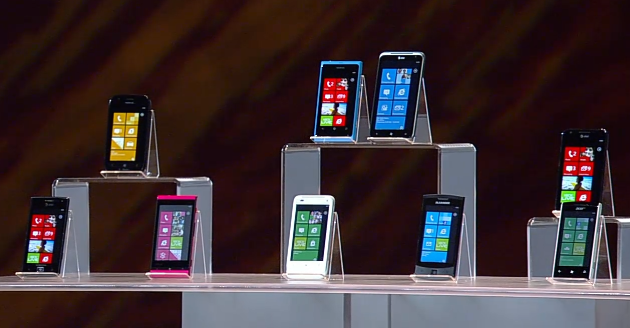
There were three themes: Windows Phone, Windows 8, and Xbox with Kinect. It was a disappointing keynote though, mainly because of the lack of new news. Most of the Windows Phone presentation could have been from last year, except that we now have Nokia involvement which has resulted in stronger devices and marketing. What we have is in effect a re-launch necessitated by the failure of the initial launch; but the presentation lacked the pizzazz that it needed to convince sceptics to take another look. That said, I have enjoyed using Nokia’s Lumia 800 and still believe the platform has potential; but Microsoft could have made more of this opportunity. A failed voice demo did nothing other than remind us that voice control in Windows Phone is no Apple Siri.

image

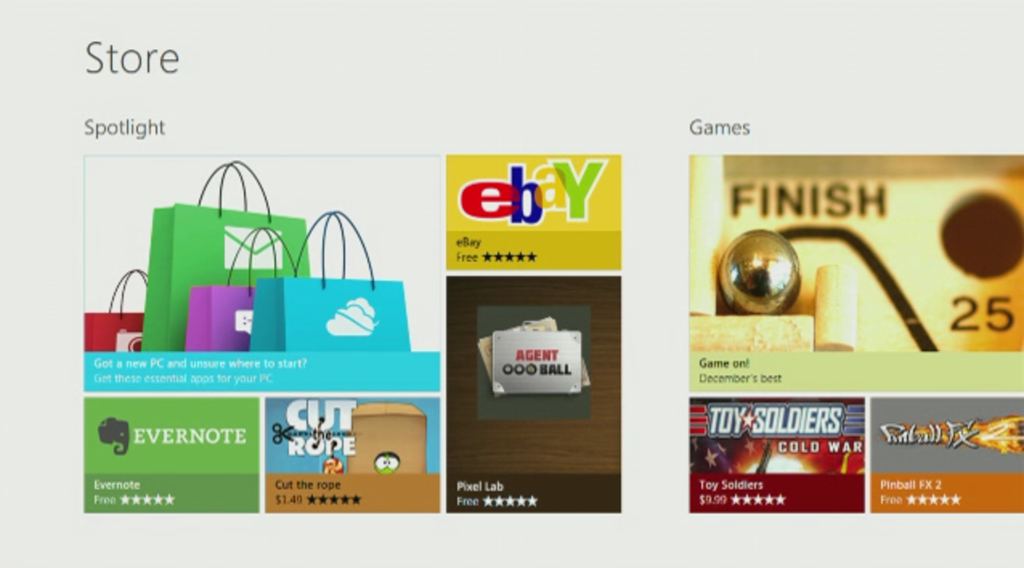
What about Windows 8? Windows Chief Marketing Officer Tami Reller gave a presentation, and I was hoping to catch a glimpse of new stuff since the preview at last year’s BUILD conference. There was not much though, and Reller was using the same Samsung tablet as given to BUILD delegates. We did get a view of the forthcoming Windows Store that I had not seen before:

image

Reller mainly showed the Metro interface, in line with a general focus on Metro also emphasised by Ballmer. She talked about ARM and said that Metro apps will run on both Intel and ARM editions of Windows 8; notably she did not say the same thing about desktop apps, which implies once again that Microsoft intends to downplay the desktop side in the ARM release.

Reller also emphasised that Windows 8 Metro works well on small screens, as if to remind us that it will inevitably come to Windows Phone in time.

Windows 8 looks like a decent tablet OS, but the obvious questions are why users will want this when they already have iOS and Android, and why Microsoft is changing direction so dramatically in this release of Windows? The CES keynote was a great opportunity to convince the world of the merits of its new strategy, but instead it felt more as if Microsoft was ducking these issues.

Xbox and Kinect followed, and proved firmer ground for the company, partly because these products are already successful. There was a voice control demo for Xbox which worked perfectly, in contrast to the Windows Phone effort. We also heard about Microsoft’s new alliance with News Corporation, which will bring media including Fox News and the Wall Street Journal to the console. We also saw the best demo of the day, a Sesame Street interactive Kinect game played with genuine enthusiasm by an actual child.

Microsoft unveiled Kinect for Windows, to be released on 1st February, except that there was not much to say about it. Amazon.com has the product available for pre-order, and there was more to be learned there.

image

The new product  retails at $249.99, compared to $149 for the Xbox version, but seems little different. Here is what the description says:

This Kinect Sensor for Windows has a shortened USB cable to ensure reliability across a broad range of computers and includes a small dongle to improve coexistence with other USB peripherals. The new firmware enables the depth camera to see objects as close as 50 centimeters in front of the device without losing accuracy or precision, with graceful degradation down to 40 centimeters. “Near Mode” will enable a whole new class of “close up” applications, beyond the living room scenarios for Kinect for Xbox 360.

I imagine hackers are already wondering if they can get the new firmware onto the Xbox edition and use that instead. Kinect for Windows does not come with any software.

What is the use of it? That is an open question. Potentially it could be an interesting alternative to a mouse or touch screen, face recognition could be used for personalisation, and maybe there will be some compelling applications. If so, none were shown at CES.

I am not sure of the extent of Microsoft’s ambitions for this first Windows release of Kinect, but at $249 with no software (the Xbox version includes a game) I would think it will be a hard sell, other than to developers. If wonderful apps appear, of course, I will change my mind.

Microsoft puts carriers before users in new Windows Phone update which you might not get

Microsoft has posted a new update for Windows Phone, update 7.10.8107.79. The list of fixes is here, not huge, but including one fix for an issue that has irritated many users:

On-screen keyboard. Fixes an issue to prevent the keyboard from disappearing during typing

But will you get the fix? The real news in Microsoft’s blog post announcing the release is this:

The update, available to all carriers that request it …

Microsoft is also discontinuing its Where’s My Phone update site:

image

Why? Microsoft General Manager Eric Hautala is blaming growth in the number of model, country and carrier variations. That makes the site more work to keep up to date, but no less useful for users.

So what is going on? When Microsoft ditched Windows Mobile for Windows Phone, it sought to learn a lesson from Apple and to provide consistency in user experience, hardware and software. One important part of that is to control updates, so that users do not have to wait for carriers to authorise updates (or not to bother), but get them in a timely manner. This is a potentially a selling point against Android, where users have difficulty getting updates, especially on older devices.

In March last year, Hautala said:

There’s one more thing I want to clear up. I’ve seen a lot of speculation on blogs and forums lately about whether carriers can “block” an update. We work closely with carriers to test and schedule updates. They may ask us for a specific date to start an update. They may ask for updates to be bundled together. But you should ultimately receive all the updates we send out [emphasis mine].

Microsoft now seems to be back-tracking on this commitment, though we need clarification. It is possible that all devices will eventually get the fixes, though not necessarily in this release but in a future roll-up. Check the comments though: users fear the worst.

For background, I recommend you read my piece from February 2010, before the launch of Windows Phone, where Microsoft’s Steve Ballmer, Joe Belfiore and Andy Lees discuss the partner problem.

One further thought: if Microsoft is losing control over its partners, this represents an opportunity for specific partners to make the commitments that Microsoft is backing away from. How about it Nokia?

Update: Microsoft’s Joe Belfiore tweets:

ps – on updates, pls don’t overreact, our focus is on users first! As greg said “nothing has changed” in how we work w carriers on updates.

Greg is Greg Sullivan, Senior Product Manager on Windows Phone.

This still strikes me as a worrying development for users though. The disappearing keyboard bug is troublesome. How can a user find out when they will get the fix? “Ask your carrier” is all very well, but many find carriers unresponsive on this kind of issue.

Storage Spaces coming to Windows 8 client as well as server

Steven Sinofsky has posted on the Building Windows 8 blog, making it clear that this feature is coming to the Windows 8 client as well as to Windows Server 8.

I took a hands-on look at Storage Spaces back in October.

The feature lets you add and remove physical drives from a pool of storage, create virtual disks in that pool with RAID-like resiliency if you have more than one physical drive available. There is also “thin provisioning”, which lets you create a virtual disk bigger than the available space. It sounds daft at first, but makes sense if you think of it as a resource to which you add media as needed rather than paying for it all up-front. It

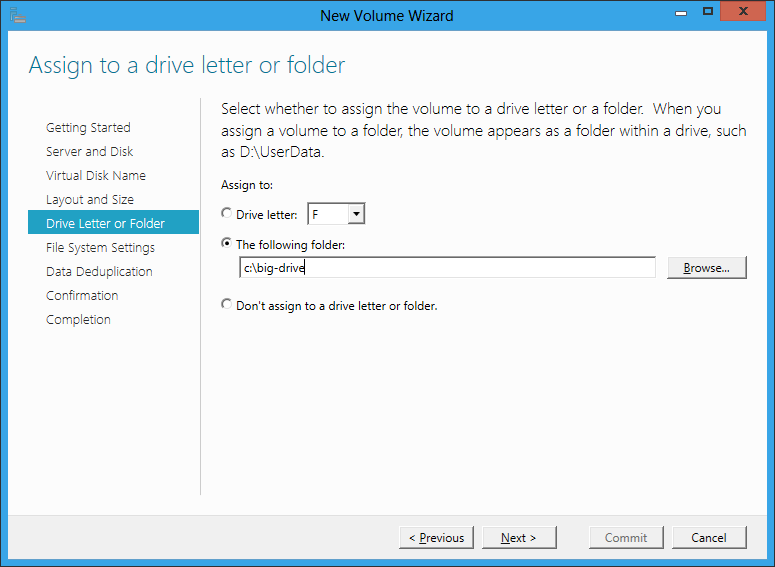
The server version includes data deduplication so that similar or identical files occupy less physical space. Another feature which is long overdue is the ability to allocate space to a virtual folder rather than to a drive letter.

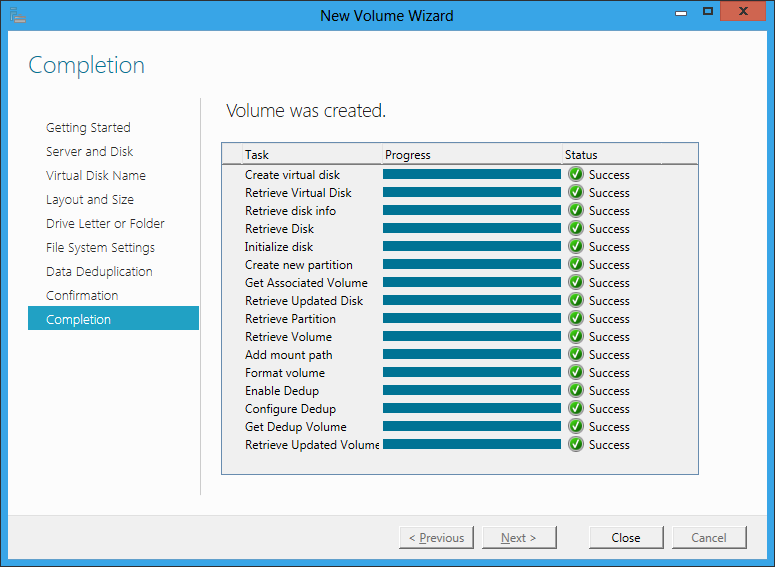
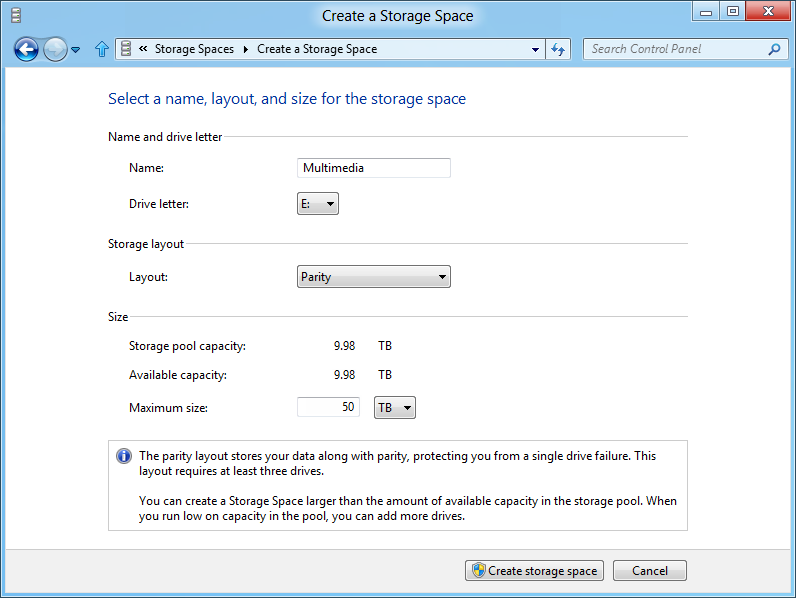
I do not know if all these features will come to the Windows 8 client version, but as data deduplication is not mentioned in Sinofsky’s post, and the dialog he shows does not include a folder option, it may well be that these are server-only. This is the new Windows 8 dialog:

image

Storage Spaces occupies a kind of middle ground in that enterprises will typically have more grown-up storage systems such as a Fibre Channel or iSCSI SAN (Storage Area Network). At the other end of the scale, individual business users do not want to bother with multiple drives at all. Nevertheless, for individuals with projects like storing large amounts of video, or small businesses looking for good value but reliable storage based on cheap SATA drives, Storage Spaces look like a great feature.

Most computer professionals will recall seeing users struggling with space issues on their laptop, not realising that the vendor (Toshiba was one example) had partitioned the drive and that they had a capacious D drive that was completely empty. It really is time that Microsoft figured out how to make storage management seamless and transparent for the user, and this seems to me a big step in that direction.