Tag Archives: windows

Windows 8 is another Vista says Samsung memory guy: is he right?

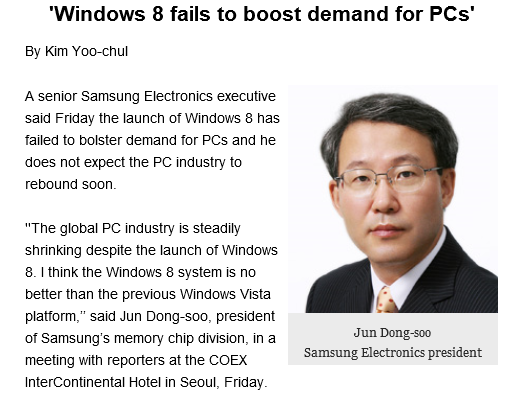
Samsung’s Jun Dong-soo, president of the memory chip division, has likened Windows 8 to Vista and says it has failed to boost PC sales.

”The global PC industry is steadily shrinking despite the launch of Windows 8. I think the Windows 8 system is no better than the previous Windows Vista platform,” he said in a press briefing in Seoul, as reported by the Korea Times. [The link no longer works for me, though the article lives on in Google’s cache].
image

Is he right? I suspect that the tech world from the perspective of a memory chip manufacturer looks different than it does, say, from the perspective of someone considering Microsoft’s Windows strategy more broadly. Has Windows 8 stimulated demand for PCs, and therefore the memory that goes in them? Generally, no.

Equally, just as in the days of Vista, there is plenty of folk wisdom out there advising people to stick with the previous version of Windows, since the new one is more trouble than it is worth.

The parallel is not unreasonable then. Look a bit closer though, and there are as many differences and likenesses. I wondered if this could be expressed as a table, though no doubt there will be debate over the detail and other things that could be included.

  Strategic reasons for failure – necessary annoyances Long-term goal
Windows Vista User Account Control – usability and compatibility problems. Annoying and confusing prompts. Better security in Windows, better behaved applications
  Performance issues, high memory demand caused by Desktop Windows Manager Rich hardware-accelerated graphics, taskbar thumbnails etc
  Bugs and mistakes  
  Stuttering audio caused by poor drivers  
OEM vendors release Vista on underpowered hardware, laden with usual trialware rubbish  
Windows 8 Strategic reasons for failure – necessary annoyances Long-term goal
  Combining new tablet platform with old desktop jarring and confusing for users. Absence of Start menu from desktop disorienting. Establish Windows as a viable tablet platform and one that can plausibly converge with Windows Phone.
  Create ARM build of Windows, locked down so that no new desktop apps can be installed. Windows tablets that benefit from ARM efficiency, are not weighed down with legacy app compatibility issues, and which are more secure and less prone to degrade over time.
  Bugs and mistakes  
  Release Windows 8 with poor Windows Store apps pushing users to desktop alternatives  
  Windows Runtime platform not really ready, too difficult for developers to make great apps  
  Failure to get Windows OEMs and retail channel to understand and promote it as a tablet platform  
  ARM machines including Surface RT too slow; really needs next generation eg Tegra 4  

The point of the above is both positive and negative for Microsoft. On the negative side, it has nobody but itself to blame for some of the problems around the launch of Windows 8. The Windows Runtime platform should have been in a better state for launch, the built-in apps should have been better (especially Mail), and despite ample evidence of the difficulty new users had when first encountering Windows 8, little regard was paid to the problem. OEM and retail partners then compounded the error by simply turning the handle and putting out a bunch of laptops with Windows 8 in place of Windows 7. I regularly see “Windows 8” displays where there is not a single touch-capable machine, which is extraordinary given that support for touch was the primary new feature and goal.

On the other hand, if you look at the pain points in Vista that were strategic rather than blunders, you can see that they did, eventually, succeed. Windows 7 builds on Vista and by general consensus is the best ever version of Windows. While I prefer 8 for various reasons, including its better performance and some useful UI improvements on the desktop side, Windows 7 has the more coherent and satisfying user interface.

The further implication is that the Windows 8 pain may yet prove worthwhile, if Microsoft can fix the annoyances and improve the Windows Runtime platform, and if OEMs can grasp the demand for Windows tablets when done right.

The difficulty with the above is that when Vista came out there was really nowhere to go, other than to the Mac for those looking for high-end personal laptops or desktops (and Vista was generally helpful to Apple). Windows 8 on the other hand has appeared at a time when the PC ecosystem seems under threat from the surge towards mobile and towards Android and iOS tablets. Even if Microsoft gets it right next time, it is unlikely to dominate as before.
HP goes Android: what does that say about Windows 8?

Here at Mobile World Congress in Barcelona HP has announced a 7” Android tablet which will be available in April.

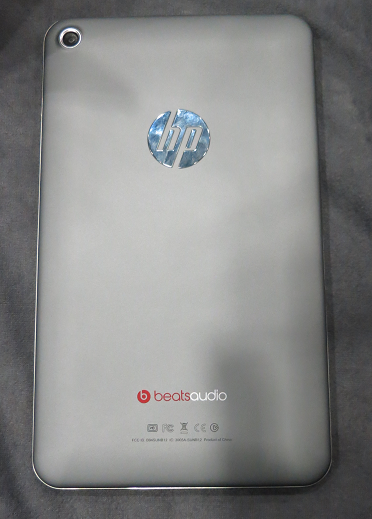
I took a quick look at the Mobile Focus event today. The back of the device is more interesting, showing logos for HP and for Beats Audio.

image

From the front you would be pushed to distinguish it from, say, Google’s Nexus 7. Black screen, runs Android.

I asked the guy on the stand what is distinctive about HP’s little Android slate in a crowded market. He said it had above average build quality, above average sound thanks to Beats Audio (you can find this discussed here), and support for HP’s printing system.

Not much, in other words; but the more interesting question is why HP is doing this. One reason is price. This will be a relatively cheap device, substantially less than any of HP’s windows machines, and without it HP would have little to no presence in the consumer tablet market.

Why not a Windows RT or Windows 8 device? That is the heart of it, and more interesting than the slate itself. HP is not giving up on Windows tablets, but it is positioning them more as business machines whereas the new slate is a consumer device.

The problem is that Microsoft has so far failed to make Windows 8 viable for this kind of market. It is too expensive, too peculiar, and there are too few worthwhile apps. That, and the Windows Runtime platform is not yet good enough, as developers at the sharp end discover. This means that HP has little choice but to go Android.

The form factor is also a problem. 7” seems to be beyond Windows Phone 8 territory, but too small for Windows 8 or RT bearing in mind the desktop and Office aspect. It is an awkward gap in the Windows offering.

The impression I got from several vendors at the show is that Microsoft is on the right lines with Windows 8, but the first release is disappointing on the tablet side.

What if HP starts to experiment with Android tablets that can be used like laptops, with neat keyboard cases and office-style applications? In the end the market will decide on the balance between Android and Windows, with the signs currently that Microsoft will struggle to gain momentum in the consumer tablet market.

Microsoft financials: record revenue, signs of Windows 8 concern

Yesterday Microsoft released its financial figures for the last three months of 2012.

Quarter ending December 31st 2012 vs quarter ending December 31st 2011, $millions

Segment Revenue Change Profit Change
Client (Windows + Live) 5881 +1140 3296 +416
Server and Tools 5186 +171 2121 +409
Online 869 +85 -283 +176
Business (Office) 5691 -619 3565 -623
Entertainment and devices 3772 -466 596 +79

Although Microsoft reported record revenue, I do not consider these figures all that revealing. The transcript of the earnings call is more to the point. A few notable remarks from CFO Peter Klein and General Manager Investor Relations Chris Suh

  • 60 million Windows 8 licenses sold and 100 million apps downloaded. At 1.66 apps per license that shows lack of interest in the new Windows Store and raises suspicions that some of those sales may actually be downgraded to Windows 7. The remarks from Klein confirm that the new platform is off to a slow start:

It’s early days and an ambitious endeavor like this takes time. Together with our partners, we remain focused on fully delivering the promise of Windows 8.

While the number of apps in the Windows Store has quadrupled since launch, we clearly have more work to do. We need more rich, immersive apps that give users’ access to content that informs, entertains and inspires.

  • Suh states that Windows is selling better to businesses than consumers. Declining interest from consumers is obvious if you walk around a few retailers selling Windows PCs:

Within the x86 PC market, we saw similar trends to prior quarters, with emerging markets outperforming developed markets, and business outperforming consumer. The consumer segment was most impacted by the ecosystem transition, as demand exceeded the limited assortment of touch devices available.

  • System Center 18% revenue growth
  • SQL Server revenue 16% growth
  • Online revenue (this is Bing not Azure) up 11%
  • Windows Phone sales 4 times higher than last year
  • Skype calls up 59%

The company says little about Office 365 and Azure, but my perception is that both are growing fast though how significant they are versus traditional software license sales is less clear.

Trouble ahead? With Windows 8 struggling for acceptance, Office under threat from online and device alternatives, the games console business (overall not just Microsoft) probably in permanent decline, and Windows Phone not yet quite mainstream, you would think so. On the other hand, this is a company with a broad and deep product range and looking at the solid performance of the server products and continuing strength of Windows and Office in business, we may continue to be surprised at its resilience.

Hands on Cross-Platform Windows and Mac development with C++ Builder XE3

I have been writing about Embarcadero’s RAD Studio XE3, which includes Delphi and C++ Builder, and as part of the research I set this up for cross-platform development on a Mac.

My setup uses a Parallels Virtual Machine to run Windows 7, on which RAD Studio XE3 is installed. This is convenient for Mac development, since the IDE itself is Windows only. That said, if I were doing this in earnest I would use multiple displays or perhaps separate physical machines, since it is no fun debugging in a VM with the application running in another operating system behind it.

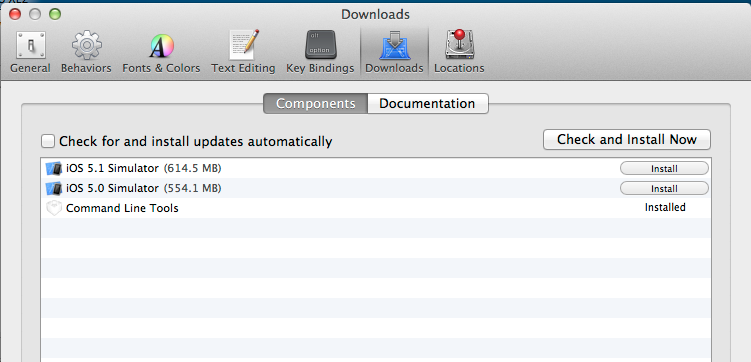
Is it straightforward to configure? Not too bad. You have to install Xcode on the Mac, and in addition, you have to install the Xcode command line tools, which you can do from Xcode itself, in Preferences – Downloads – Components, or as a separate download.

image

Then you need to find the Platform Assistant (paserver), an agent which runs on the Mac to support remote debugging. I was annoyed to find that this has a dependency on Java SE6, which to be fair it downloaded and installed automatically. Actually I find this amusing, after hearing from an Embarcadero VP how native code is all the rage and nobody uses managed code any more. Except Embarcadero for the paserver.

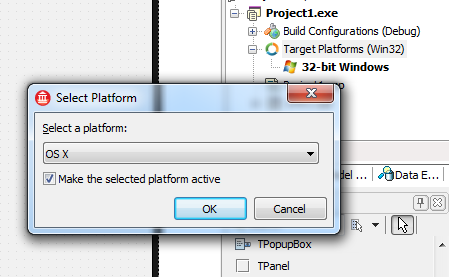
Once that is all up and running you are done on the Mac side. On Windows, you then need to sort out a remote profile, after having installed RAD Studio of course. The way to do this is first to start a new cross-platform project, which means using the FireMonkey framework. Then right-click TargetPlatforms in the project manager and add a platform. If you add OSX but no remote profile exists, you will be prompted to create one.

image

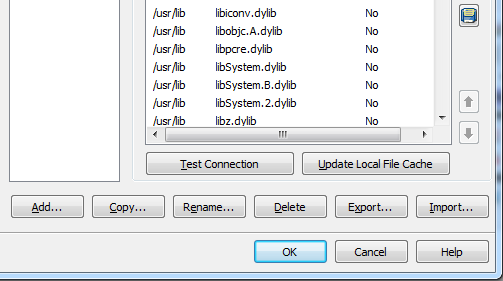
This is where something went slightly wrong. I created a profile and could connect OK. However, when I tried to build the project, I got an error: Unable to open include file ‘CoreFoundation/CoreFoundation.h’. You get this if for some reason the required library files have not been pulled over from the Mac. The fix is to edit the profile and click Update Local File Cache.

image

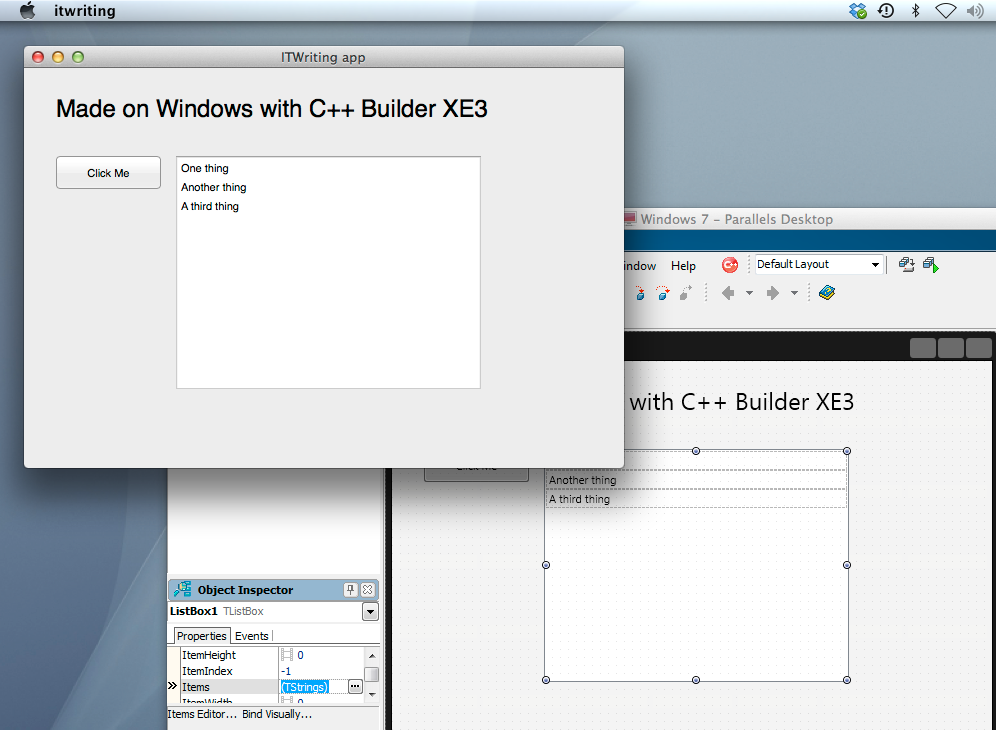
After that I was away. Set breakpoints if needed, build and debug.

image

Cross-platform is not new in RAD Studio; it was in XE2, and in some ways better, since you could target iOS as well as OSX. C++ Builder XE3 is actually a new generation though. In the 64-bit update 1, it is the first release to use Clang and LLVM, and from what I understand this represents the future for Embarcadero’s tools.

Updates are promised in 2013 for both Delphi and C++Builder – this roadmap is most of what we have to go on – which will add first iOS and later Android support, at what the company calls a “low cost”. Unlike the iOS support in XE2, the coming update will not use the Free Pascal compiler, but the new architecture based on LLVM. This also suggests that the add-on will replace some of the guts of Delphi when it arrives, so it will be significant and somewhat risky.

The cross-platform capabilities look good, though I am somewhat wary of FireMonkey which is less complete and mature than the Windows-only VCL. For example no Webbrowser component is supplied, which is a significant limitation, though I am sure there are ways of hacking this, perhaps through ChromiumEmbedded for which a Delphi FireMonkey exists.

It is worth a bit of effort, since Delphi and C++Builder are productive tools, and the output is true native code which still had advantages.

More information on RAD Studio XE3 is here.

The disruption of pay as you go hardware – and I do not mean leasing

Last week Amazon CEO Jeff Bezos spoke at a “Fireside Chat” with AWS (Amazon Web Services) chief Werner Vogels. It was an excellent and inspirational performance from Bezos.

image

If there was a common theme, it was his belief in the merit of low margins, which of necessity keep a business efficient. Low margins are also disruptive to other businesses with high margins. But how low can margins go? In some cases, almost to nothing. Talking of Kindle Fire, Bezos remarked that “We don’t get paid when you buy the device. We get paid when you use the device.” It is the same pay as you go model as Amazon Web Services, he said, trying to remain vaguely on topic since this was an AWS event.

His point is that Amazon makes money when you buy goods or services via the device, not from profit on the device itself. He adds that this makes him comfortable, since at that point the device is also proving its value to the customer.

Google has the same business model with its Nexus range, which is why Google Nexus 7 and Amazon Kindle Fire are currently the best value 7” tablets out there. For Google, there is another spin on this: it makes the OS freely available to OEMs so that they also push Google’s adware OS out to the market. If you are not making much profit on the hardware, it makes no difference whether you or someone else sells it.

We do not have to believe that either Amazon or Google really makes nothing at all on the Kindle Fire or Nexus 7. Perhaps they make a slim margin. The point though: this is not primarily a profit centre.

This is disruptive because other vendors such as Apple, Microsoft, Nokia or RIM are trying to make money on hardware. So too are the Android OEMs, who have to be exceptionally smart and agile to avoid simply pushing out hardware at thin margins from which Google makes all the real money.

Google can lose too, when vendors like Amazon take Android and strip out the Google sales channels leaving only their own. This is difficult to pull off if you are not Amazon though, since it relies on having a viable alternative ecosystem in place.

But where does this leave Apple and Microsoft? Apple has its own services to sell, but it is primarily a high margin hardware company selling on quality of design and service. Apple is under pressure now; but Microsoft is hardest hit, since its OEMs have to pay the Windows tax and then sell hardware into the market alongside Android.

Ah, but Android is not a full OS like Windows or OSX. Maybe not … yet … but do not be deceived. Three things will blur this distinction to nothing:

1. The tablet OS category (including iOS) will become more powerful and the capability of apps will increase

2. An increasing proportion of your work will be done online and web applications are also fast improving

3. More people will question whether they need a “full OS” with all that implies in terms of maintenance hassles

Microsoft at least has seen this coming. It is embracing services, from Office 365 to Xbox Music, and selling its own tablet OS and tablet hardware. That is an uphill struggle though, as the mixed reaction to Windows 8 and Surface demonstrates.

Most of the above, I hasten to add, is not from Bezos but is my own comment. Watch the fireside chat yourself below.

Kingston DataTraveler Workspace and Hands On with Windows to Go

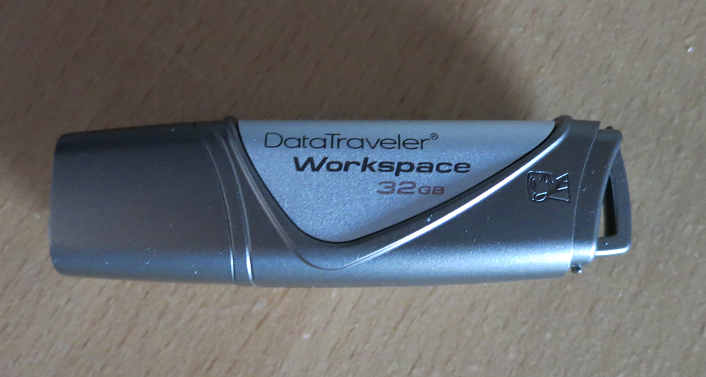
I received a Kingston DataTraveler Workspace for review, one of the few devices supported for use as a Windows to Go drive. Windows to Go is a way of running Windows 8 from a USB drive. If you need to take work home and continue on a home PC, Windows to Go lets you do so in an isolated environment. It is also a useful way to protect sensitive data, since there is an option to encrypt the drive with Bitlocker, the encryption method built into recent versions of Windows.

image

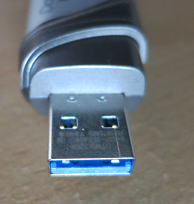
The DataTraveler Workspace is a 32GB USB 3.0 drive. It follows the usual convention of having a blue connector to indicate USB 3.0 support.

image

USB 3.0 is recommended but not required for Windows to Go. If you run from USB 3.0, the performance should be equal or better than running from a hard drive. It will work with USB 2.0, but will be slower.

Microsoft’s documentation for Windows to Go is not that great. Still, it is easy to get started. All you need is a supported USB drive and Windows 8 Enterprise (or any x86 version if you do not mind using the command line).

First, mount the Windows 8 Enterprise install DVD. Identify install.wim from the Sources folder on the DVD and make sure it is accessible.

Next, connect the USB drive to a USB 3.0 port if possible.

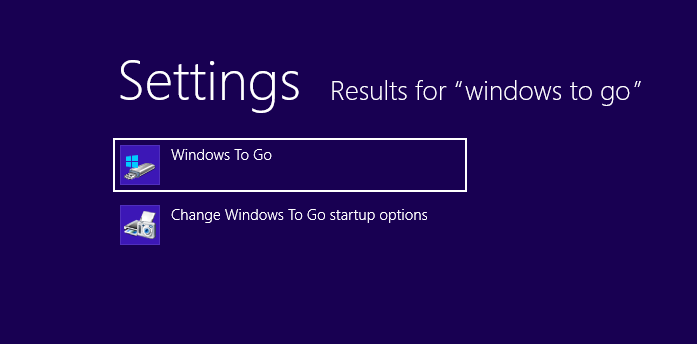
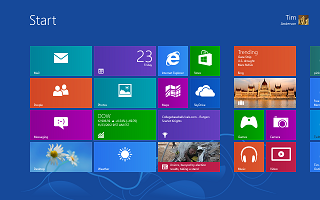
Then start the Windows To Go wizard – to find it search Settings and not Apps on the Start screen. [If you do not have Windows 8 Enterprise, check the scripting guide as well as the licensing requirements.]

image

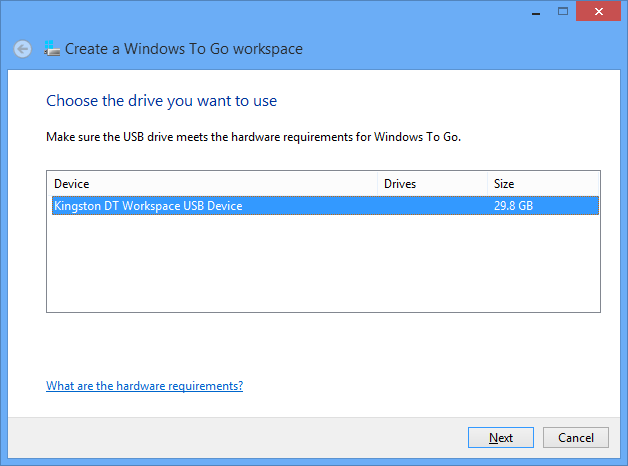
Run the wizard and select the target USB drive

image

The wizard will find install.wim automatically, or you can help it out if necessary.

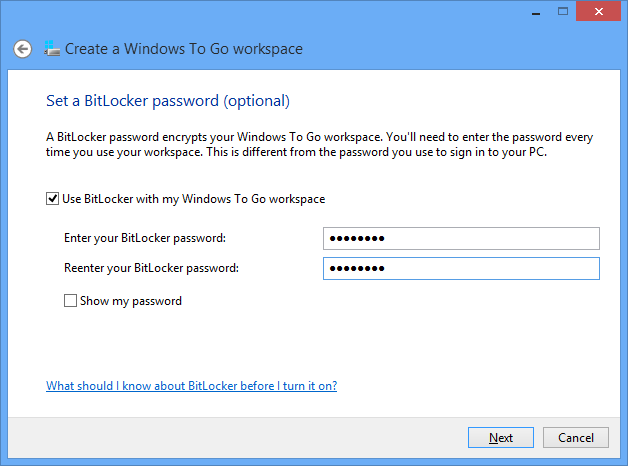
Optionally set a BitLocker password. Recommended, or why do you need Windows to Go? Do not forget it though.

image

Finish the wizard and after a few minutes you have a Windows to Go device ready.

I stuck it into a Dell laptop running Windows 7 and booted. This is essentially a new install of Windows 8, so it did all the detecting devices and welcome stuff. I signed in with a Microsoft account and despite only having USB 2.0 on this laptop, was pleased with the performance.

image

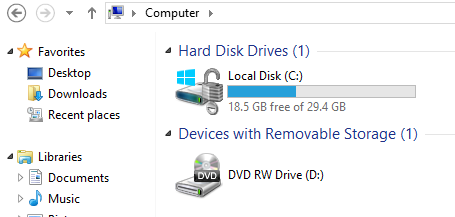
I noticed that the normal SSD drive on the laptop was invisible in Explorer.

image

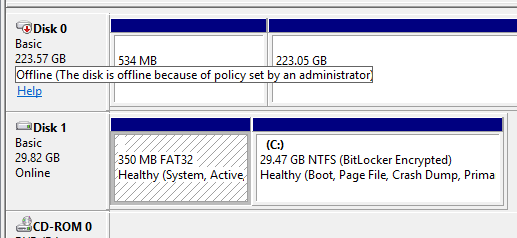
On further investigation, I found it had been marked offline by my system policy – I don’t recall setting this, so it is a default.

image

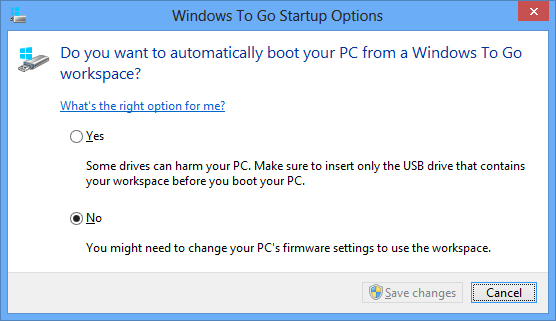
For my next experiment, I shut down, stuck the USB drive into a Samsung Slate, and rebooted. The slate did not boot from USB by default, but I did find Windows To Go startup options, which I believe are in all versions of Windows 8, which let you set an option to use it.

image

That worked. Then – disaster. The slate has no keyboard, and only one USB port. I was prompted for the Bitlocker password, but no matter where I tapped, the on-screen keyboard did not pop up for me to enter it. I had to find the dock for the slate, which has an additional USB port, plug in a USB keyboard, and retry. I can see this being a showstopper in some scenarios.

That worked though, and although I am not yet clear from the documentation how free and easy you can be moving Windows To Go between different hardware, I was impressed by how quickly and easily it started. The only inconvenience is that I had to re-enter the wifi key, presumably because the wifi adaptor on the slate is detected as a different device from the one on the Dell.

Pretty good, but this being a new install of Windows 8 I have considerable work ahead of me to make it useful by installing Office and other applications. How does this work in a business where you need stuff pre-installed?

The answer is here, if you can make sense of it: Microsoft’s instructions on creating a custom Windows image that you can use for multiple Windows To Go drives. It is not trivial; you start by downloading and install the Windows ADK (Windows Assessment and Deployment Kit) for Windows 8.

Another day maybe. For now, I am impressed. The main snag is that few of my PCs have USB 3.0.

Windows To Go does not work on Microsoft’s Surface RT tablet, but will work on Surface Pro when that is released.

Update: another issue with Windows To Go turned up when I tried running it on a netbook. I was impressed with the performance and that it worked, after a few minutes “detecting devices”. However when I launched Word 2013 it said Office needs activation because of changed hardware. Presumably this will be a real problem if you regularly use your Windows To Go device on different PCs, which as I understand it is how it is meant to be used.

Office activation is part of Microsoft’s copyright protection for Office and I presume that after a certain number of activations it will no longer activate.


Rubbish apps in Windows Store – encouraged by Microsoft?

Someone (and you wonder who) has taken it upon themselves to document rubbish apps in the new Windows Store. The stated reason:

Here we call out all the trash in the hopes that someone at Microsoft is listening and can remove them.

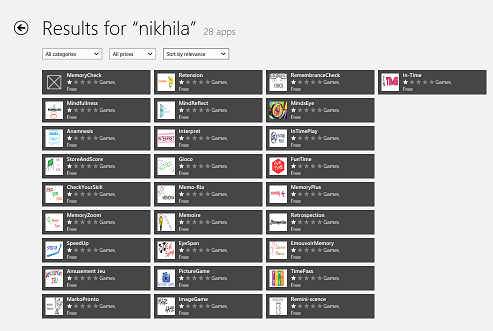
He or she has found plenty of examples – like the developer who submitted 20 trivial conversion apps and a tapping game that does not work; another who has got dozens of identical SDK samples listed as apps with different names; or the memory game listed 28 times complete with spelling errors and images suspected to be lifted from Disney.

Initially the puzzle was why apps which breach Windows Store guidelines are getting listed. But then there is more:

I feel like I’ve uncovered a conspiracy and I have no idea what to do with the information!

I emailed both Kusuma Sruthi and Pavan Kumar asking them why they had felt the need to submit their game multiple times to the Windows 8 store. I wasn’t really expecting a response. Yet both replied, pretty quickly, saying that they were told to do it but would remove the duplicates if I told them to. Was my email written with such authority?

Both claim to have been contacted by POOJA PATIL and told “to upload our apps with DIFFERENT NAMES and with SAME SOURCE CODE”. Whilst Pavan Kumar claimed not to have contact details he did say that she was from Microsoft. Kusuma Sruthi was more forthcoming with both a microsoft.com email address and an Indian mobile number. A brief Googling confirms the existence of a Pooja Patil with this phone number working for Microsoft to organise the Windows 8 Guiness World Record attempt in Bangalore.

Why would someone from Microsoft have told these two developers to submit their game multiple times? Were they really so desperate for apps that they encouraged this cloning? Were they really expecting that no one would notice?

Yesterday the blog author says two similar emails appears from these developers now denying that they were instructed by Patil to submit the apps:

at 6:05am I received 2 emails. Yes, at exactly the same moment. From Pavan and Kusuma. Both would now like to retract their previous comments about Pooja and would like it known that she’s great, and very supportive, and didn’t tell them to submit the same app over and over. It was all just a misunderstanding. Apparently.

Is all this made up? Not entirely, since you can verify that the apps mentioned exist, like these 28 apps by Nikhila Grandhi:

image

though it looks to me that some of the apps from Kusuma Sruthi have been removed suggesting that someone at Microsoft has noticed the issue and is trying to clean up.

Microsoft is a large company and although I was assured by Microsoft Store VP Antoine LeBlond that the new Store is not about the numbers, I can believe that some over-enthusiastic employees went too far in obeying some corporate directive to promote Metro-style app development and Store submissions.

That does not explain though why so many guidelines appear to have been ignored.

The company should do the right thing and clean out the rubbish.

Update: see also Drunk Compliance Tester. “The Windows 8 Store will continue to be a horrible experience for everybody if the level of quality doesn’t rise”

How bad is the Surface RT?

I have just read this piece on Slate entitled Why is the Surface so bad? after using the device for most of yesterday, on a train and at a technical event.

image

Oddly, I like the Surface RT increasingly, though I too am puzzled by some of its shortcomings.

Here are some of the issues I am aware of:

  • The apps. This is the biggest issue. Where are the delightful apps? For example, the mail client is barely adequate. The music app is annoying, though there is plenty to stream if you have an Xbox Music Pass. It cannot play FLAC files, which I use for my Squeezebox-based system at home.

    How hard is it for a company the size of Microsoft to write a superb mail app and a superb music app for its critical new product? I would guess that a small fraction of the advertising budget would have been enough. Why was there no one at Microsoft with the guts to throw them back at the team that developed them and say, “Not good enough, we do not have a product.”

  • Performance is so-so. It is not terrible in my experience, but at times makes you wonder if Windows 8 is too much on a Tegra 3; or whether it needs a whole lot more optimisation. Battery life is also OK but could be better. I got 7 hours or so yesterday, with wi-fi on constantly, and some of the time powering a phone being used as a wi-fi hotspot.
  • I got errors updating Microsoft Office. Mostly fixed by exiting the Office Upload Center. There’s no excuse for that. This is the appliance model. Microsoft knows exactly what hardware I have and what software I have, and has locked it down so I can only install sandboxed apps from the Store. Testing various update scenarios is easy.
  • For that matter, why is there an Office Upload Center? It is dreadful error-prone software. Dropbox has no Upload Center. Is it so hard to sync documents with SkyDrive or SharePoint – how long has Microsoft been batting at this problem?
  • I am concerned by reports of early keyboard disintegration, though mine is still OK

Enough griping though. Here is why I like this device.

First, I have no problem with the weight and I like the solid feel of the unit. The Surface is compact. The Surface with its keyboard is about 350g lighter and 4mm slimmer than my Samsung Slate without a keyboard; I am including the cover because I would never travel with a slate without a cover.

Second, unlike the Slate (magazine) reviewer, I do think the keyboard cover is a breakthrough. The Touch keyboard provides a usable full keyboard and trackpad while not adding any significant bulk; it forms a useful cover when closed, and when folded back it does not get in the way while you use Surface as a slate. I find myself using it in Slate mode frequently. Do not believe those who say you need keyboard and mouse to operate a Surface; there is only an argument for this if you never venture out of the desktop.

I can do more than occasional typing on the Touch keyboard; it is fine for longer documents as well.

Third, I can do real work with the Surface. Yesterday I sat with Surface on my lap, typing notes into Word, with Mail docked to the left, and Twitter open in desktop IE alongside Word. For all its faults, I found that the Surface worked well in this context.

Fourth, if you know Windows, there are things you can do that are difficult with other tablets. VPN to my office and remote desktop to a Windows 7 machine there is built in and works well. SharePoint via WebDAV is a shortcut in the Windows File Explorer.

Of course you could do all this with a laptop. So why not have a laptop, which you can buy for less money than a Surface? It is certainly an option; but as I have adapted first to the Samsung Slate running Windows 8, and now to the Surface, I find laptops bulky and inconvenient. I think of a laptop more as I used to perceive a desktop PC, something which is best suited to permanent siting on a desk rather than being carted around.

Further, the Surface really is a tablet. Imagine you want to show some photos to a friend or colleague. On a laptop that is awkward. The keyboard gets in the way. On a tablet like the Surface it is easy; just open the folder in the full-screen photo app and swipe through the images, with the keyboard cover folded back. Pretty much any tablet will do that equally well – or better if you have a Retina iPad – but it shows that Surface is not just a laptop in disguise.

There are reasons why I get better results from the Surface than some. One is that I know Windows 8 well, having used it intensively for many months. Another is that I am familiar with Windows foibles, so when these appear in the Surface I am likely to know what to do. Of course they should not appear at all; see above.

Microsoft seems to have created a device with many flaws, but one that is useful and sometimes delightful even despite those flaws.

Steve Ballmer shows off Windows 8 in Build keynote

Microsoft’s BUILD conference has kicked off in Redmond with a keynote featuring CEO Steve Ballmer, Developer evangelist Steven Guggenheimer, and Kevin Gallo from the Windows Phone team. There were also a few guest appearances, including Tony Garcia from Unity, a cross-platform games engine.

The company has a lot to talk about, with Windows 8 just launched – four million upgrades sold so far, we were told, which seems to me a middling OK but not great result – and Windows Phone 8 also fully announced for the first time.

The keynote opened with a performance by Jordan Rudess from Dream Theatre, enjoyable and somewhat relevant given that he has helped create two music apps for Windows 8, Morphwiz and Tachyon, which he talked briefly about and played on a Surface RT and Lenovo desktop.

image

Then Ballmer came on and gave what I can only describe as a hands-on tutorial in how to use Windows 8 apps. I found this odd but it was well received; my conclusion is that many people have not bothered to look closely at Windows 8, or have been put off by the Start menu issue, and much of what Ballmer showed was new to them. It was not to me, so I was not gripped by this section of the keynote.

I preferred the presentation from Steven Guggenheimer; most of what he presented is also covered here, and included the announcement of forthcoming Windows 8 apps from Disney, ESPN and Dropbox. The Dropbox announcement is particularly significant, since I have heard complaints about its absence from Surface RT, which is unable to run the usual desktop client for Dropbox. Another app that is on the way is from Twitter. Guggenheimer also described a new PayPal API for Windows Store apps.

I do wonder why key services like Dropbox and Twitter are only now announcing Windows 8 apps. Windows 8 has been available in preview versions since last year’s Build event, and has not changed that much as a developer platform.

Gallo introduced some of the new features in Windows Phone 8, and claimed that Microsoft has delivered the majority of developer requests in the new Phone SDK which is available from today. He emphasised the possibility of sharing code between Windows Phone 8 and Windows 8, using Visual Studio to ensure compatibility.

Garcia presented Unity for Windows Phone, which is potentially a big deal, since it is widely used. The demo of immersive gaming graphics on Windows Phone 8 was impressive.

image

Finally, Nokia’s Richard Kerris came on, mostly to announce a giveaway of the new 920 Windows Phone 8 device for Build attendees.

image

This raised a loud cheer as you would expect, though it may be significant that the free phone won an even warmer reception than the earlier announcement of a free Surface RT.

The cost of signing up for a Windows Phone developer account has been reduced to just $8.00 for the next few days; see here for more details.

Did Microsoft do enough in this keynote? Personally I would like to have seen more technical depth, and a more convincing presentation of why the company thinks these new devices have what it takes to take on Apple and Google. Still, this is all about partners, and the arrival of Dropbox and Twitter as Windows 8 apps, and Unity for Windows Phone 8, are all significant events.