Category Archives: development

Using Windows Runtime (WinRT) APIs from desktop applications

After trying out Windows 8 notifications from a Windows Forms application, I did a bit of research into using the Windows Runtime (WinRT) API from desktop applications.

It turns out that this is something Microsoft planned for:

Desktop apps should for the most part be able to use WinRT. This is an area where we should have more information moving forward.

says Microsoft’s David Lamb, in Developer Support. He was answering a question about the Proximity APIs.

How do you do it? In C/C++, according to Steve Harne:

For this to build, you’ll need to set the following compiler switches in the the C++ Win32 Console wizard generated project:

C/C++ / General Settings
    Enable Windows Runtime Extensions (/ZX)
    Additional #Using Directories (/AI) -> set this to "C:\Program Files (x86)\Windows Kits\8.0\Windows Metadata" (modify as per your installation)

C/C++ / Code Generation
    Disable Minimal Rebuild (/Gm-)  -> this is not compatible with /ZX

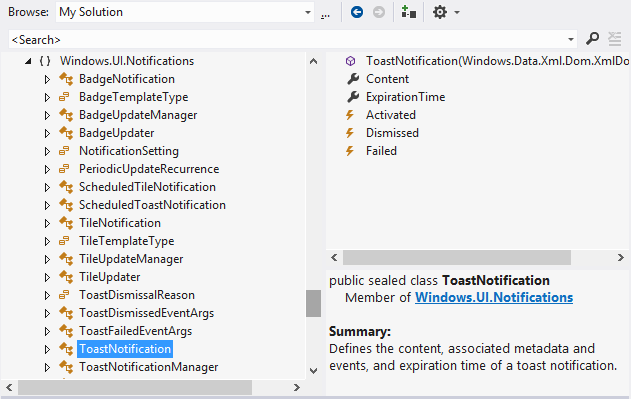
In .NET applications you can set a reference to Windows.winmd. This is a WinRT metadata file, which you can browse in the Visual Studio object browser.

image

You even get a short summary describing each class and class member.

Note that as Microsoft’s Larry Osterman explains here:

there is absolutely no (zero) il in the windows.winmd file – it’s a metadata-only assembly. This is important because winmd files only describe structure, they don’t contain code (note that the C# compiler can produce hybrid winmd files that also contain some code, this was to support certain C# scenarios)

While a lot of stuff works, there will be WinRT API calls that make no sense other than for real WinRT apps. It is also worth noting that all of this is specific to Windows 8 (and higher, I presume). Since most desktop apps will need to be compatible at least with Windows 7, this requires some care. Lamb also says:

WinRT APIs may be tied to Metro style apps, Desktop apps or potentially available to both. The documentation will list which environments (Desktop, Metro style or both) a given API works in.

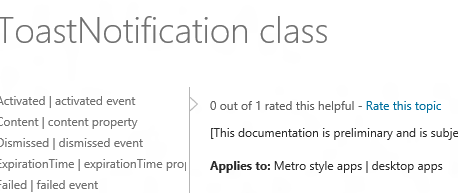
and in fact you can see this in the documentation. For example, the docs for the ToastNotification class states:

Applies to: Metro style apps | desktop apps

image

whereas if you look at the ContactPickerUI class, it says:

Applies to: Metro style apps only

For those APIs where desktop use is supported, you can go right ahead.

Valve announces Steam-powered apps beyond games as well as embracing Linux

Steam maker Valve has announced that it is expanding beyond games, to sell software titles that “range from creativity to productivity”.

image

The Steam software is more than just a store. The platform handles updates, digital rights management, and supports multiplayer gaming. It also forms a chat network. The Steam overlay lets users access Steam features while playing a full-screen game.

Users can install a Steam title on multiple computers but can only play while logged in, and can only log in on one device.

Steam launched first on Windows, but also has clients for Mac and, via Wine compatibility, on Linux. There are also mobile clients for Android and iOS, and some support for PlayStation 3, though these have limited features. The mobile clients do not let you buy and run games for the mobile device itself.

With Apple, Google and now Microsoft backing their own app stores for their respective platforms, Valve has some tricky manoeuvring ahead if it is to avoid being squeezed out. Valve founder Gabe Newell made headlines recently by calling Windows 8 a “catastrophe”, though he is hardly a disinterested party. Note that he should not worry too much about Windows 8 in the short term, since Microsoft’s store does not support desktop titles other than by links to third-party sites, including Steam. However the general trend towards locked-down platforms with software installed only through an official store must be a concern to Newell.

Valve is turning towards Linux as a possible solution. It is talking at the Siggraph conference this week in Los Angeles about its work on OpenGL and Linux, and it seems that a native Linux Steam client is in prospect.

Could Windows gamers, or others disillusioned with Windows 8, turn to Linux in significant numbers as an alternative? While this is possible, it seems more likely that the Mac would benefit. You would also imagine that skilled gamers will be smart enough to operate the Windows 8 Start menu and discover that most of their stuff still runs fine on the new desktop.

The Steam platform is a strong one though, and with Microsoft not supporting desktop apps through its own Store, Valve has a good opportunity to extend its reach.

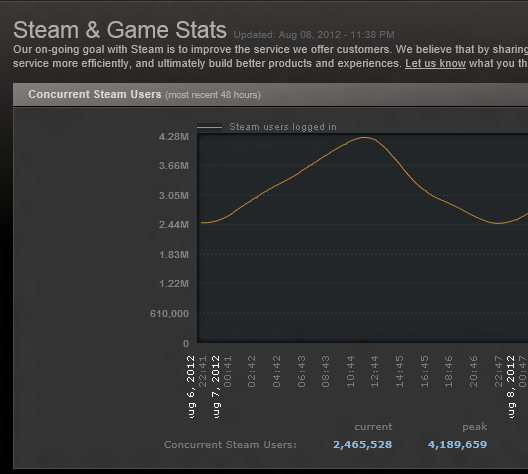
According to its own stats, Steam has peaked at over 4 million concurrent users this month.

image

Interview: Salesforce.com exec Parker Harris on the technology behind the platform

A couple of months ago, I attended Cloudforce in London, where I spoke to Salesforce.com co-founder Parker Harris, Executive Vice President, Technology.

The Salesforce.com platform is interesting for all sorts of reasons. The company has been a powerful advocate of cloud computing from before its adoption by other industry giants, and its service is as far as I can tell well liked by its customers. The technology is interesting as well. The CRM (Customer Relationship Management) application that is the core of the Salesforce.com offering is both a web application and a web service API, with more transactions conducted programmatically than through the browser. The Force.com platform is multi-tenanted, and the company believes that only this type of platform delivers the full benefits of cloud computing. In December 2010 the company acquired Heroku, at the time a company dedicated to running Ruby applications in the cloud, though it now has a broader offering. Salesforce.com was also where I first heard the term “Social Enterprise”, a phrase now taken up by others such as IBM and Microsoft; in fact, Social Enterprise was the dominant theme at Cloudforce.

image

I asked Harris how the company copes with scaling its platform as demand grows.

“We’ve gone through a few changes. We came up years ago with a concept we call a ‘pod’, which is one set of multi-tenant customers. There’s a database in there, there’s application servers, search servers, all kinds of things. So that was a unit of scale. And we invested heavily in capacity planning, just to watch and see how those grow, and so we fill them up to a certain size and then we grow horizontally and add more.”

Harris adds that pods are organised in sets called super-pods, which provides isolation in the event of a failure.

One of the goals is to make the system scale horizontally, whereas the Oracle database on which the platform is built tends to be a vertical unit of scale. "

“We’re doing a lot of research work in looking at horizontal scalable systems like Hbase for example, to look at how can we do more horizontal stores. And then finally we’re in the middle of a process of moving a lot of our processing to completely asynchronous handling, so that as transactions come in they’re being handled in an asynchronous way. Even though the consumer feels like it’s synchronous, the back end will be completely asynchronous, which will then give us even more control and capability to scale.”

In the past I have thought of the Force.com platform as in effect a big database. I asked Harris if that is still the case?

“We have big databases, but I think of it more as a meta-data platform. Behind that meta-data we do have a big database, we also have a big file store, we have a big search engine, which is another unit. That’s really what you know as Salesforce.com. And that’s fully multi-tenant, it’s way at the extreme end of multi-tenancy.

“Heroku is really virtualised single tenancy. So it’s more towards an infrastructure as a service layer. For some workloads and some use cases that’s fine. If you want the predictability of ‘the software I wrote on my computer needs to run exactly the same here’, that’s where that takes place. But you don’t have the higher-level capabilities of Force.com, you don’t have everything working out of the box.

“Where we’re headed is, you’ll have the 4GL of Force.com, you’re going to have the 3GL of Heroku, and you’ll be able to choose.”

At one time Salesforce has a partnership with VMWare called VMForce. What happened to that?

“We don’t have a technical partnership with VMWare, but we do have a close relationship with them. We want to have applications that work in VMWare’s cloud able to move into Heroku or vice versa. Really what happened is, we started the relationship with VMWare and then we discovered Heroku. We were just blown away by the technology there and the team, and that was when we ended up acquiring Heroku, but we still see VMWare as a huge partner. We’re a big customer of VMWare, they’re a big customer of ours.”

You talked at Cloudforce about HTML mobile apps versus native apps, and you seem to be more on the HTML side?

“I was making the point of HTML versus native code. This is an argument that goes on inside of Salesforce, it is a religious debate, but I believe that you can build some extremely rich applications with native code, and you can build them very quickly. The complexity for me happens when you introduce business systems that are on an enterprise platform. If you think about our metadata engine, it’s very powerful, and I can create triggers, I can change the UI, I can do all these magic things, and immediately it works. Change the UI into Japanese, it immediately works.

“If I’m building something 100% native, I have to replicate that platform in the native code, and that’s for me a no-win situation, because this is going to keep moving, and the native code will be behind, it will be playing catch-up. So if it’s for an enterprise business system on a platform like ours that’s metadata driven, you really need to have that be directly from the cloud.

“If you think about the Chatter feed or the business forms, that I believe needs to be HTML5. But I want to use the camera, I want to have files local to the device, that I can open, and various programs, I want location to work, and maybe I want to use the map application: so there are some native assets too. And then when you think of security, I don’t want to have to go to a web page and enter my username and password, and maybe have to VPN in, I don’t want to do that every time I use the application.

“So instead what you do is have a native container that wraps all this HTML5 code, gives you access to things like the camera, but also is a way to store an Oauth token, it now has the right to access my data, and from then on I can just use the application. It’s really high usability.

“I also think we still have a sometimes-disconnected world. That’s frustrating. So I do think there should be a cache, a recent cache of what you’re working on. That’s my view of where we should be going with these disconnected use cases.

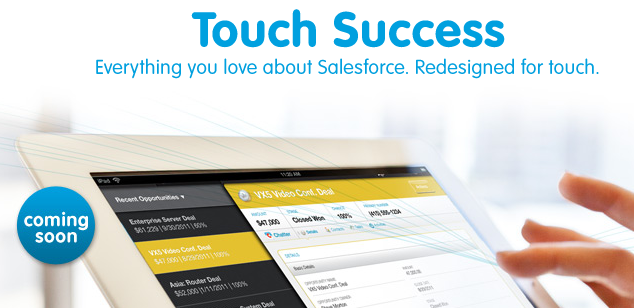
“So that’s where we’re going, and we’re open sourcing a lot of this. We have a native container and we’re open sourcing it so people can see how we built it and add to it. We’ve got a UI framework that we’re going to be open sourcing. It’s an HTML5 component framework. Touch, that we announced last year and is going beta now, Touch is built with that framework, and that’s the framework that we will eventually open source so people can use it with their own applications.”

image

Do you use PhoneGap/Cordova for the native wrapper?

“We do. We do a lot on WebKit-enabled browsers, and when you think of the native container, it’s really going through PhoneGap to get to some of the local resources.”

What about your SOAP and REST APIs?

“We have backward compatibility for all of our APIs, because we don’t want to force people to rewrite their code. We do see lots of use  cases for SOAP, but more and more people are doing RESTful interfaces, and when their writing these mobile applications they really want REST APIs so we’re building a lot more of our own.”

How has Heroku evolved since you made that acquisition?

“There are a couple of huge events. One is, they were just a Ruby platform when we acquired them, and now they are a polyglot platform, so they can run many different languages. They’ve also shown how they’ve built support for these other languages, so other people are able to write support for other languages.

“The other big change was when Facebook on their developer page said, if you want to build a Facebook page or application, here’s how to do it, and if you want it hosted in the cloud, use Heroku. There may be others by now, but we saw a massive uptake in the number of applications being created. We’ve seen a huge number of applications grow from when we acquired it to now and with a big spike through that Facebook relationship.

“We have Heroku enterprise bundles that are available now. People are buying Heroku as part of a SELA, or a Social Enterprise License Agreement.

“Developer adoption is still very important. We want to monetise it, but we don’t want to lose this huge asset of the appeal to the developer community. It’s still early for Heroku.”

I also spoke to Harris about the Social Enterprise concept, but will post that separately.
Microsoft SQL Azure versus SQL Server on Amazon AWS

Amazon RDS for Microsoft SQL Server offers cloud instances of SQL Server. Amazon’s offering even supports “License Mobility”, Microsoft jargon that lets volume licensing customers use an existing SQL Server license for an Amazon’s instance. But how does Amazon’s cloud SQL Server compare with Microsoft’s own offering, SQL Database running on Azure?

Peter Marriott has posted on the subject here (registration required). The key point: despite the obvious similarity (both are SQL Server), these two offerings are radically different. Amazon’s RDS SQL is more IaaS (infrastructure as a service) than PaaS (platform as a service). You choose an edition of SQL Server and rent one or more instances. The advantage is that you get full SQL Server, just like the on-premise editions but hosted by Amazon.

Microsoft’s Azure-hosted SQL on the other hand is more abstracted. You do not rent a SQL Server instance; you rent a database. Under the covers Microsoft provides multiple redundant copies of the data, and if traffic increases, it should scale automatically, though the database size is limited to 150GB. The downside is that not all features of SQL Server are available, as I discovered when migrating data.

Marriott adds that SQL Azure supports encrypted connections and has a more usable administration interface.

A further twist: you can also install SQL Server on an Azure Virtual Machine, which would get you something more like the Amazon approach though I suspect the cost will work out higher.

DevExpress offering Metro-inspired Tile control for Delphi VCL, plans to drop support for Delphi 7

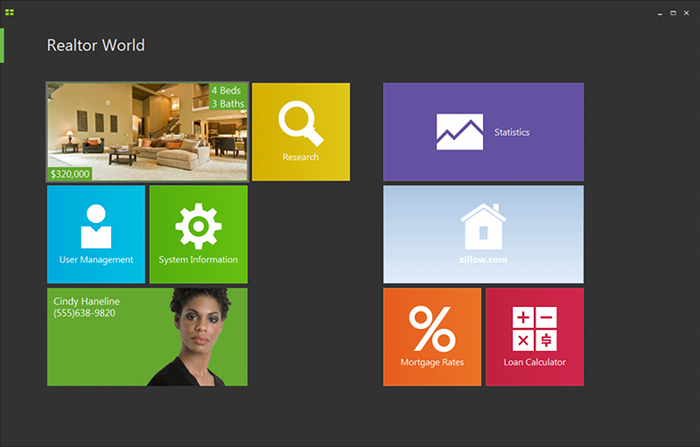
DevExpress has released an update to its VCL component suite, version 12.1, which includes a Metro-inspired tile control. That is, it looks like a Windows 8  Metro-style application, but in reality it runs as a desktop application. The VCL components support Embarcardero’s Delphi and C++ Builder, but not the FireMonkey library that runs cross-platform.

image

The new release also adds a “Server Mode” for  the ExpressQuantumGrid grid control, which retrieves only those rows needed to populate the current view.

DevExpress CTO Julian Bucknall has posted about the update. He says it is time to drop support for Delphi 7 (though this is supported in 12.1):

12.1 will be the last version to support Delphi and C++Builder 2010. I will sound a further note of caution: it’s likely that in 2013 we shall drop support for Delphi 7 and Delphi 2007 (what you might call the “ASCII IDEs”), so that we can concentrate on the latest run-times and environments.

Delphi 7 is significant because it was the last version to use its own dedicated IDE built with Delphi itself, and by today’s standards is delightfully small and fast.

Bucknall has reservations about Embarcadero’s move to Clang and LVVM for 64-bit C++ Builder and eventually for the other languages too:

I’m going to say we shall treat it with kid gloves. Re-engineering a compiler so fundamentally says “breaking changes” to me, especially given the necessary extensions that are present in the current C++Builder to interface with Delphi. So, fair warning: if the changes are too severe, we shall not support 64-bit C++Builder in 12.2. It took us long enough to support 64-bit Delphi across our entire product line, and this year we don’t have the resources. That doesn’t mean we won’t ever do this (after all, Embarcadero are saying that they’ll switch completely to Clang/LVVM at some point), just that we won’t this year.

Returning to the Tile Control: it will be fascinating to see if this sort of approach, mimicking Metro with a desktop app, becomes popular. Microsoft is promising some of the same with Office 15, though we have not seen much of this officially yet. The advantage is that you can make desktop apps just as touch-friendly as Metro apps. The disadvantage is that you do not get Windows Store support, Contracts, app isolation, or other benefits of the Windows Runtime which underlies the Metro side. Users may be confused.

I doubt Microsoft will mind though. It all helps to promote the Metro style which is the distinctive feature of Windows 8.

Book Review: Smashing UX Design (a great read for developers too)

That the abbreviation UX can appear in a book title without expansion says a lot about the extent to which user-focused design is now embedded in the web development industry. The theory behind it is that User Experience is primary when designing a web site. The word "experience" suggests that this is not just about usability, or attractiveness, or performance, or enjoyment, but rather about all those things and how they combine when the end user is navigating your site.

image

This book is for professional designers who want techniques for putting UX design into practice. The authors, Jesmond Allen and James Chudley, work for UX consultancy Cxpartners, based in Bristol in the UK, and the book is written from their perspective, including tips on how to work with your clients. That said, this is an excellent read even if you do not fall into that niche, thanks to the expertise and professionalism which informs the content.

There is a note right at the start of the book about the interaction between development and design teams which seems to me of key importance:

In order to produce designs that development teams can utilize, it is helpful for UXers to understand the development process they will be using. As external consultants, we do not always have the opportunity to work with development teams on a daily basis as they create a functional product from our designs, although we always strive to make ourselves available to developers as they work. Internal UX staff will likely have a much closer relationship with their development teams.

Some developers may see UX activities as troublesome big design up front. However, UX activities contribute to requirements gathering and backlog prioritization activities. These activities typically take place long before development sprints begin.

In order to produce robust products, it is important that UX research and design activities take place throughout the design and build cycle, whether it is product managers, UXers, or developers who perform the activities.

The emphasis is mine. A bad scenario, for example, runs like this. The project is initiated and handed to a design team, who come back with good-looking sketches and mock-ups. The developers then implement the design, but discover that it does not quite work as-is, maybe because the designers did not appreciate every nuance of the workflow, or because of evolving new requirements, or performance problems, or any number of other issues.

At this point the developers may endeavour to match the not-quite-working design as closely as possible, blaming shortcomings on the “bad design”. Or they may adapt the design to work better technically, potentially wrecking the design concept and delivering something which users will perceive as odd. This scenario is more likely to occur when budgets are particularly constrained and the design team external.

Note that Agile methodology has always emphasized that the team is the whole team – stakeholders, developers, designers, users, everyone – so it makes sense to keep designers involved right through the process. Put another way, do not allocate a design budget and spend it all up-front, before development begins.

It all comes down to communication, respect and understanding between team members, which is why this book is one that developers as well as designers should read.

Be clear: this is not a book about technology, so look elsewhere (perhaps to one of the other Smashing titles) if you want help with making beautiful web pages using CSS, or a how-to guide for building web sites. Smashing UX Design is about the process rather than the outcome, though there are plenty of practical tips along the way.

The book is in four parts. Part one is a general introduction to the concepts behind UX design and planning UX projects. Part two covers tools and techniques for UX research and evaluation, such as running requirements workshops, usability tests, surveys, analytics, and expert reviews.

The third part is about tools and techniques for UX design. If you are wondering what an Ideation Workshop is, you will find out how to run one here. Another technique described is how to create a "user persona", a fictional user who represents a category of users. There is also a discussion of wireframes, sketches and prototypes.

Finally, the fourth part looks in more detail at UX design for specific site pages, including the home page, search, product pages, shopping carts, images and tables. This is the section of most general interest, being full of practical suggestions and thought-provoking comments on what makes web pages work well for the user.

There is a too-brief chapter on mobile UX and this is a weakness of the book: not much on how tablets and smartphones are impacting UX design.

If you run or plan to run a web design business, then the book is perfect. It is also a great read for professional web developers. Individuals who are doing their own web design, or just want to understand it better, will find good content here but also a rather jargon-heavy style and probably more information than they need about working with clients and running workshops of various kinds.


Updating the world’s most widely deployed SQL database engine: welcome to SQLite 4

A new version of SQLite is in preparation. If you are not a developer, you might not have heard of SQLite, but you have almost certainly used it. It is built into Mac OS X and numerous web browsers, used by many applications which run on Adobe’s Flash runtime, and is the obvious choice if you want a small, fast and reliable database engine to embed into an application. It is open source and as free as you can get:

Anyone is free to copy, modify, publish, use, compile, sell, or distribute the original SQLite code, either in source code form or as a compiled binary, for any purpose, commercial or non-commercial, and by any means.

SQLite3 is the current version; but now there is an update to version 4:

SQLite4 is an alternative, not a replacement, for SQLite3. SQLite3 is not going away. SQLite3 and SQLite4 will be supported in parallel. The SQLite3 legacy will not be abandoned. SQLite3 will continue to be maintained and improved. But designers of new systems will now have the option to select SQLite4 instead of SQLite3 if desired.

The reason for the new version is that some issues in version 3 could not be fixed without breaking compatibility.

So what is new? On a quick read, these seem to be the highlights:

  • A global configuration object (sqlite4_env) which eliminates all use of global and static variables.
  • A new key/value storage engine which has a “greatly simplified” interface and which is pluggable, so you can use a different one if required. The default storage engine is described as a “log-structured merge database”. A B-Tree engine may also be offered later.
  • Primary keys are now real primary keys, as opposed to unique constraints. This speeds up primary key searches.
  • Decimal maths. “All numeric values are represented internally as an 18-digit decimal number with a 3-digit base-10 exponent.” This is advantageous for currency calculations and for cross-platform consistency.
  • Foreign key constraints and recursive triggers on by default
  • Covering support in indexes (when required), to increase the number of queries that can be resolved by querying the indexes alone, at the expense of greater duplication of data

When will SQLite 4 be ready? Code is available but Author D Richard Hipp says:

Everything is still pretty makefile-touchy. Remember, this is like pre-alpha code. It works, but just barely. And things are changing rapidly.

Porting an application from SQLite3 to SQLite4 should be straightforward, according to the author. “An hour or two search-and-replace.”

image

Microsoft’s Scott Guthrie on what has happened to Silverlight

I spoke to Microsoft’s Scott Guthrie last week, during his trip to the UK for a couple of Windows Azure events in Cambridge and London.

Guthrie is now Corporate VP Windows Azure Application Platform, a job he took up in May 2011. Before that he worked on .NET technologies including Silverlight, and I asked if he had any reflections on the subject. He was scrupulously tactful.

“In terms of looking at our XAML stack right now, if you look at some of the announcements we’ve made in terms of Windows 8, Metro, Surface, tablets and desktops, and Windows Phone, XAML is alive and well and being used for more things than ever.

“Silverlight 5 shipped after I moved on to Azure. We did an update to Silverlight 5 about a month ago. For XAML developers, and developers using Silverlight or WPF XAML technologies, there is a long roadmap ahead.”

He seemed to me to be saying that even if Silverlight is dead (nobody expects a Silverlight 6), XAML lives on.

I observed that in the new (and much improved) Windows Azure admin portal, the Silverlight UI has gone, replaced by an HTML 5 user interface.

“It’s actually HTML, it’s not HTML 5. It works with non HTML 5 browsers as well.“ he said. “That was less of a technology statement, it was more that, historically Azure had 5 or 6 admin tools that were fairly disjoint. One of the decisions we made as part of the new Azure that we’re building was, let’s have a single admin tool framework that connected everything. We decided to do it with HTML, partly because we did want to get reach on tablets like iPads and Android devices.

“It was less a technology statement, it was more that we wanted a single admin tool, and we decided to go with an HTML-based approach. We still use Silverlight for some of our admin experiences like database management tools, and for streaming and other capabilities.”

It is true that Silverlight remains in the Azure database design tool, if you use the portal. It is also used extensively in System Center 2012 – yes, I have actually installed it – and in Windows InTune.

It is as if, back in 2009 and early 2010, the memo went out: use Silverlight for everything. Then, later in 2010, the memo went out: use HTML for everything; but too late for the current generation of server admin products.

Microsoft has announced that Visual Studio LightSwitch, which generates Silverlight applications, is being revised to offer HTML applications as well. I expect this process of Silverlight removal and de-emphasis to continue over the next couple of years. Note that Microsoft’s own Windows RT does not support Silverlight (as far as I am aware), nor does Windows 8 on the Metro side.

BlackBerry 10: QNX multitasking goodness

I attended the London BlackBerry Jam, one of around 500 developers (the event was sold out) who showed up to learn about developing for Blackberry 10 and in the hope of snagging a prototype of RIM’s next smartphone, the BlackBerry 10 Dev Alpha. The event is part of a tour of 26 cities worldwide. I also spoke to Vivek Bhardwaj, Head of Software Portfolio EMEA for RIM. Does BlackBerry 10 have what it takes to  compete against Apple iPhone and Google Android?

A few quick observations. The event was split into native and web tracks, with the native track focusing on  C/C++ development and the Cascades UI framework, and the web track covering WebWorks, the HTML 5 developer tools which you can use to target mobiles as far back as BlackBerry 5, or to create apps that share code between BlackBerry and other mobile platforms.

There was also a tour of various mobile JavaScript libraries. One that caught my attention was Zepto.js, which implements most of the jQuery API in just 8.4k of compressed code, around 25% of the size of jQuery. The trade-off, aside from some missing features, is lack of support for Internet Explorer, though support for IE 10 is under consideration. Thought-provoking: the price of legacy platforms?

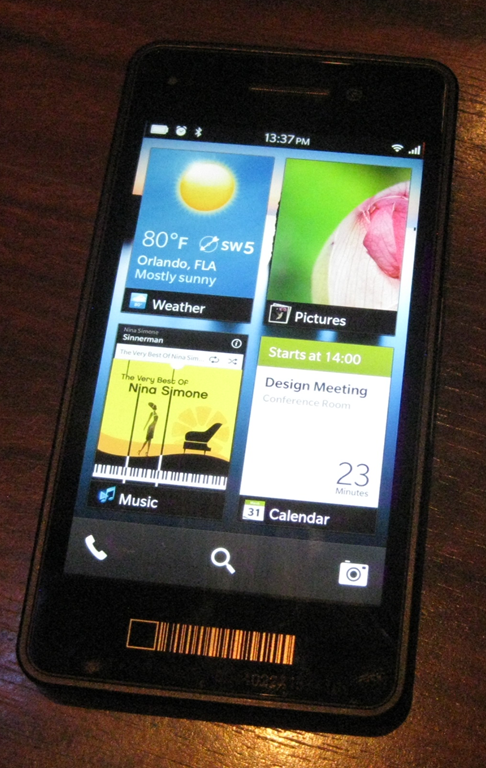
It turned out that the device Bhardwaj was holding, though pretty much the same hardware as the Dev Alpha giveaway, was more revealing as a glimpse of the next-generation BlackBerry. The Dev Alpha, which has an impressive 1280 x 768 screen, comes with no applications other than the web browser and its user interface is pretty much that of the PlayBook. Bhardwaj’s demo device on the other hand is a complete early version of BlackBerry 10 though there were parts that he would not demonstrate. I went to compose an email and he said, “we are not ready to show that yet.”

image

So what is distinctive about BlackBerry 10? One of its key features is multitasking, thanks to the processor scheduling capabilities of QNX, the embedded operating system which underlies both PlayBook and BlackBerry 10. According to Bhardwaj, this enables up to 8 apps to run at once. “Applications all run simultaneously. We don’t need to pause them,” he said. “It’s much more about flow.”

Although apps do run full screen, you can take advantage of the multitasking by “peeking” at a background app. This means holding your finger towards the corner of an app and dragging it left to see a little of what is underneath. In the pic below this is another image.

image

Talking to developers at the event I picked up considerable enthusiasm for BlackBerry 10, though compatibility is a headache. If your customer asks you to support all versions of BlackBerry back to the 5.0 series, you are stuck with WebWorks and the pre-WebKit browser in 5.0. If you can convince your customer to forget 5.0, then you can develop for WebKit. If you want to use Cascades then you are restricted to PlayBook and BlackBerry 10.

BlackBerry 10 also supports Adobe AIR, for Flash-based apps, and an Android runtime for repackaged Android apps.

The prototype BlackBerry 10 phone looks good, but as a brand new platform is it sufficiently exciting to revive RIM’s fortunes? “I don’t believe that in a trillion-dollar plus industry there can only be two players. I think there is more than enough space for four or five platforms. It’s very short-sighted if we think there can only be three ecosystems,” said Bhardwaj.  

Developers like coding in the dark

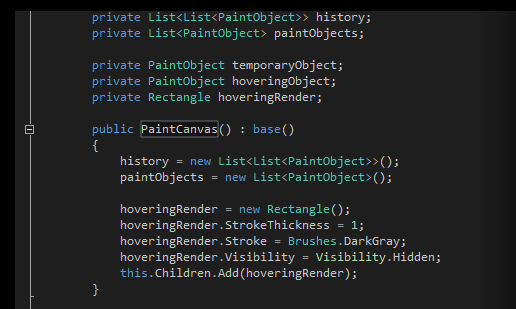
Many developers prefer to code against dark backgrounds, according to this post by Monty Hammontree, Director of User Experience in Microsoft’s developer tools division.

Many of you have expressed a preference for coding within a dark editor. For example, dark editor themes dominate the list of all-time favorites at web sites such as http://studiostyl.es/ which serve as a repository for different Visual Studio styles.

Chief among the reasons many of you have expressed for preferring dark backgrounds is the reduced strain placed on the eyes when staring at the screen for many hours. Many developers state that light text on a dark background is easier to read over longer periods of time than dark text on a light background.

image

Personally I am not in this group. A white-ish background works well for me, and if it is too bright, simply reducing the monitor brightness is an effective fix.

Interesting post though, if only for the snippets of information about the new Visual Studio. Apparently it has around 6000 icons used in 28,000 locations. Another little fact:

Visual Studio’s UI is a mix of WPF, Windows Forms, Win32, HTML, and other UI technologies which made scrollbar theming a challenging project.

If you will be using Visual Studio 2012, are you on the dark side?