Category Archives: microsoft

Windows Runtime must come to Windows Phone

I’ve been trying Windows Phone 7 in its latest “Mango” version over the last couple of days and mostly enjoying it. One thing I am not impressed by though is the range of apps available. Have a look at the Marketplace – Microsoft may claim 30,000 apps, but given how unexciting even the “top” selections are, you can imagine how bad the bottom ones must be. Microsoft I guess has been guilty of accepting almost anything to puff up the numbers.

What would fix this? Sell more phones, of course; but also improve the platform for developers. Windows Phone 7.x is not a bad platform: you get Silverlight, XNA, C# and Visual Studio.

By contrast though, the Windows Runtime (WinRT) shown at the BUILD conference earlier this month is a platform mobile developers can love. Here are what seem to me three great features:

  • Three first-class languages and programming platforms – C#/.NET, JavaScript and HTML 5, C++ and native code. All three are strategic platforms. I particularly like the native code option, as many mobile developers like native code and it is a weakness of Windows Phone 7.
  • Asynchrony built into the platform. This is a smart move: make every API call that might cause a delay an async-only call. On top of that, build easy async programming into the languages. The result should give apps a responsive user interface almost by default; developers will need to make an effort to freeze the UI.
  • Contracts which integrate apps with the operating system and with one another. There are five contracts: search, share, play to, settings, and app to app picking (for example, file selection).

Microsoft’s Windows chief Steven Sinofsky says Windows 8 is for tablets but not for phones. But he has to say that, because if Microsoft announced that the current Windows Phone 7.5 is a platform without a future, it would further dampen enthusiasm for the product.

Is there any reason why WinRT should not come to Windows Phone? A few:

  • Windows Phone is currently built on Windows CE, a cut-down version of Windows, whereas WinRT runs on top of the full Windows API.
  • The Metro-style UI is designed for tablets rather than phones.
  • Finally, the existence of Desktop Windows is presumed in the current Windows 8 design. If Microsoft has not had time to work out a Metro-style UI for something, you simply use the Desktop version.

All of these are good reasons why the arrival of WinRT on the phone will be delayed, but none are insuperable. Long-term, I find it inconceivable that Microsoft will persevere with a different programming platform for the phone and for tablets.

What are the implications for Windows Phone developers today? Well, WinRT and Metro borrow from the phone OS, so the porting effort should not be too bad, except in the case of XNA, a .NET wrapper for DirectX which WinRT does not support.

Of course this post is entirely speculative, and I have no insight into Microsoft’s plans beyond what is publicly stated, so there might be other compatibility options when and if the time comes.

And it is time that is Microsoft’s biggest enemy. Fumbling tablet computing has been a costly mistake, and the big question is whether anyone will care how good some future Windows Phone will be, if the ecosystem which Nokia likes to talk about is firmly established as Android vs Apple.

A few observations on Windows Phone 7.5 “Mango”

I received a Windows Phone running version 7.5 “Mango” for review yesterday. Here are some initial observations; I am not going to call it a review after such as short time.

image

There is still no screen capture utility – well, there is this one but it requires a developer accounts. So no screens, sorry. Microsoft should fix this – how difficult can it be?

Microsoft says there over 500 updates in Mango, and it does feel like a significant update, though retaining the look and feel of the first release. A half-version upgrade is about right.

Some things I noticed:

  • Task switching. Press and hold the back button, and swipe through running apps. This is excellent, better than iPhone or Android.
  • Voice control. This is expanded in Mango to include web search, text messaging and more. Tip: to see the commands, hold down the Windows key to go into speech mode, and click the help icon.

    It has great potential, especially with a bluetooth headset for true hands-free. I have a Plantronics Voyager Pro bluetooth headset, reviewed here. Using this guy, I can press and hold the call button on the headset, to put the phone into speech mode.

    I found this works well for calling people or simple searches, but general speech to text is not too good. I tried texting someone the message “Your parcels have arrived”. After several attempts, all of which were interpreted as various strings of garbage starting “George”, I gave up. I would still use it for making calls though; it seems that when the scope is narrowed to people in your contacts list, the interpretation is more reliable.

  • The search button is no longer contextual – it always takes you to Bing search. I think this is a retrograde step.
  • Local Scout is a feature that is meant to find restaurants, shops, things to do, and other handy information based on your location or the current map location. This is a neat idea, but when I tried it for my home town it did not work well. The first problem: I found that tapping the Local Scout tile is unreliable, and sometimes reports that Bing cannot find the location even when the location button in Bing Maps works fine.

    Fortunately you can also use Local Scout from Bing Maps. The Local Scout listing was not good though. Of the top 20 food and drink places, one had been closed for years, others were duplicated under old and new names, and there were hardly any ratings or reviews. Tap “Suggest changes” and you can submit changes to the address details or report closure, but you cannot add a review or rating, which seems a severe omission.

    I downloaded the TripAdvisor app which is a great deal more useful, mainly because of the amount of user-generated content.

    Maybe I’m missing something, but it seems to me that Microsoft needs to join a few dots here; Local Scout is only as good as its data.

  • Office and SharePoint integration. As soon as I gave Windows Phone my Live ID, it picked up my SkyDrive account and was able to open, edit and save documents there. I also hooked up Outlook to my own Exchange server, and added an Office 365 SharePoint account as well.

    SkyDrive support is new and a huge feature, especially considering that it is a free service. Editing features on the phone are limited, but you can include basic formatting.  More important, you can easily access what could be a large document repository.

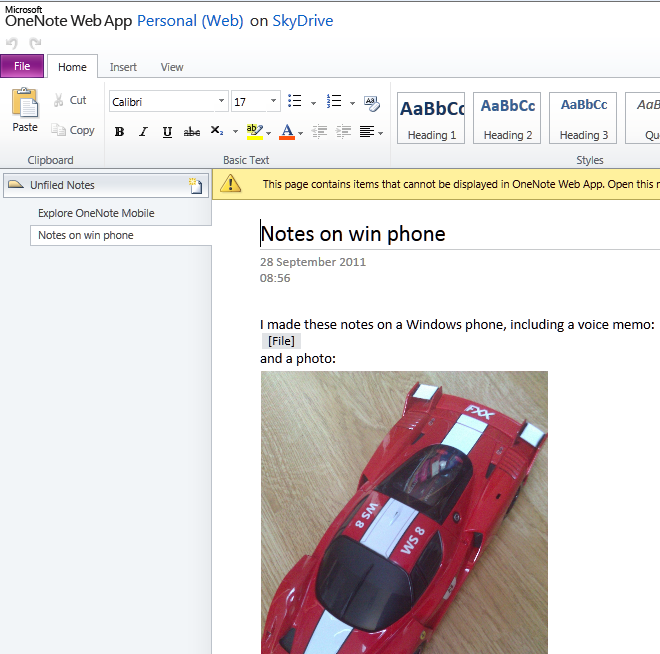
    OneNote support is good, and notes made on your phone sync automatically to SkyDrive, where you can further view and edit them in a browser, or in desktop OneNote. I guess I can show a grab of the browser, which shows that the voice memo is inaccessible:

    image

    I discovered a few oddities. I was unable to link Windows Phone to my own SharePoint 2010 test server, receiving a message “We don’t support this authentication scheme”. Later I found this information:

Unless your organization uses a Microsoft Forefront Unified Access Gateway (UAG) server, you can only access a SharePoint 2010 site if you’re in the office and connected to your organization’s Wi-Fi network.

That is a considerable limitation. It did work OK with SharePoint on Office 365, except that for some reason I can find no way to create new documents on Office 365 – well, maybe in the browser. The Office Hub can create new documents on SkyDrive, but not on SharePoint, which is odd as the two have a lot in common.

Despite these issues, you get a lot out of the box for using Office on the move, particularly if you use a supported SharePoint configuration or SkyDrive. The on-screen keyboard is good too.

  • Music search. This is a fun feature. Go to Bing search, click the music icon, and it will try to recognize what is playing. It had no problem finding Katy Perry’s Teenage Dream. It struggled a bit with the more obscure Strangely Strange but Oddly Normal by Dr. Strangely Strange; but on the second attempt it found that too.
  • The social media features seem strong to me, though you are limited to the baked-in services which are Twitter, LinkedIn, Facebook and Windows Live (no Google+). You do have to link each service to your Live ID for full features; for example, you give permission to Windows Live to post to your Twitter account. The integration is smooth and if you spend your time juggling with these four services then this may well the phone for you. For example, you can post a message to all of them at once. I found the People hub good enough as a Twitter client.
  • Apps are still lacking. The issue is not the quantity of apps available, but their quality, and the lack of certain key apps. There is no official Dropbox app, for example, so you will need to use the web or a third-party workaround. On the positive side, the free Guardian app is great, especially since you can pin a section to the Start screen – I did this for Technology – and there are apps for WordPress, Amazon Kindle, the ubiquitous Angry Birds and some other essentials.

    I noticed that TripAdvisor has 61 ratings on the Windows Phone Marketplace, whereas the Android version has 39,930. That illustrates the scale problem Microsoft is facing.

  • Still no Adobe Flash.
  • Microsoft’s new Windows Phone site is clean and informative. Not always the case with Microsoft’s sites. The My Windows Phone site lets you find your, lock or erase your phone, once configured.
  • Internet sharing, which makes your phone into a wireless hotspot, is coming but subject to operator support and approval. This means you will likely pay extra for “tethering”. I have a free app which does this on my Android phone and find it useful, though whether it is worth paying extra every month is another matter.
  • Microsoft has introduced some features aimed at enterprises. In particular, Information Rights Management is now supported for Outlook and Office mobile documents. Another important feature is the ability to deploy custom applications as hidden apps, which do not appear in Marketplace searches, but can be downloaded from a link circulated internally. There is now a Lync (business messaging and conferencing) client for both Office 365 and on-premise Lync servers.

Future of Windows Phone?

My guess is that Microsoft is badly disappointed by the sales performance of Windows Phone to date. The problem is not so much the phone itself, but that it has failed to convince either the operators, or the retailers, or the general public, that it is something special and worth choosing ahead of either an Apple iPhone or Google Android device. In fact, typically retailers have few if any Windows Phones on display, and even customers asking specifically for one may be redirected to something else. The truth is, there is a disadvantage in having a minority-choice device, most obviously in the selection of apps available, but also in features that rely on user-generated content.

I asked about this problem at the Mango press launch and was told that the Nokia partnership will be the solution.

My review device is a first-generation HTC Trophy, and while it is decent enough it is not outstanding. Give Windows Phone some truly desirable hardware and a few must-have apps, and its fortunes will change, but that is not an outcome that I take for granted.

I do like the SkyDrive and Office 365 integration though, with the caveats noted above, and if I were Microsoft I would be pushing the value of those features.

The Adobe Flash and Windows Phone 7 mystery

I attended Microsoft’s Mix event in March 2010, where Microsoft gave us the first detailed preview of Windows Phone 7 from the developer perspective. At that time, Microsoft made it clear that the Adobe Flash plug-in would not be supported in the first release, but implied that it would follow.

Did Microsoft ever announce that Flash support would definitely come? I am not sure that it was quite promised, though I do recall Microsoft spokespersons including Charlie Kindel explaining that native code development would not be possible for developers, other than for operators customising the device – the HTC Hub is an example – and for Adobe building Flash.

Adobe’s Mike Chambers did state that:

Adobe and Microsoft are working together to bring Flash Player 10.1 to Internet Explorer Mobile on Windows Phone 7 Series

In June, still pre-release, I spoke to Adobe’s Michael Chaize who told me that work on Flash for Windows Phone 7 was well advanced and that it would follow “within months” of the initial release.

There has also been contrary evidence. Microsoft’s Andy Lees explained to Mary Branscombe:

There is no ActiveX plug-in extensibility [in the browser] because of the security model; we’re not going to do that. And with no ActiveX plug-in model, how would we do Flash?

Fair enough and even sensible, but why did Microsoft imply earlier that Flash was on the way if in fact the security architecture made it impossible? Plans change of course, but I have never been able to get a clear statement on the matter other than vague expressions of cooperation between Adobe and Microsoft. Like this one from Microsoft’s Joe Marini:

We are working with Adobe, but it has not yet been decided the last time I checked – part of that is Adobe is doing what they have to do and we’re doing what we have to do. The last I checked the team is working with them but I don’t think they have any announcement whether it’s going to definitely work or not.

Now Microsoft has just released Windows Phone 7.5 “Mango”, the first major update to the the Phone OS, and Flash is still not supported. Either because Adobe has not yet done “what they have to do”, or because Microsoft has not done “what we have to do”, or because the architecture prevents it, who knows?

You can debate of course whether Flash support is a selling point or a burden for a smartphone – but it would be good to have clarity on the matter.

My own best guess is that if it has not come by now, it never will. Although Microsoft will not say so, for obvious reasons, I also think it is inevitable that the Windows Runtime and the Metro-style development model found in Windows 8 will form the operating system for a future Windows Phone, though I am not sure if it will be Windows Phone 8 or later, but that will change the rules. Currently IE in Metro does not support plug-ins, so I would say the prospects for Flash in the browser on Microsoft’s phone are not good.

What about Adobe AIR for Windows Phone? Interesting question, though it might be difficult given that Adobe would have to in effect create a Flash to Silverlight conversion tool which might hurt a bit. This would be easier on Metro since native code development is supported.

Adobe’s MAX conference is on next week so there may be further information on this long-running topic then.

Miguel de Icaza talks about Windows 8 and the failure of Linux on the desktop

At Microsoft BUILD earlier this month I arrived early to hear Anders Hejlsberg talk about the future of C#, and found myself next to Miguel de Icaza, co-creator of the GNOME desktop and of Mono, the open source implementation of Microsoft .NET. I took the opportunity to ask a few questions, which I have his permission to post.

I recall that when .NET was first announced in 2000, it was not long before de Icaza announced Mono. I was interested therefore to know his reaction to Windows 8 and the new Window Runtime which powers “Metro-style” apps. Will we get an open source implementation of Metro-style on Linux?

I don’t think so. To be honest, with Linux on the desktop, the benefits of open source have really played against Linux on the desktop in that we keep breaking things. It is not only incompatibilities between Red Hat, Unbuntu, Suse, but even between the same distribution.  Ubuntu from this week is incompatible with the one nine months ago. And then there are multiple editions, the KDE version, the Gnome edition, the one that is the new launching system.

When you count how many great desktop apps there are on Linux, you can probably name 10. You work really hard, you can probably name 20. We’ve managed to piss off developers every step of the way, breaking APIs all the time.

I’m heartbroken, that’s the bottom line.

What about compiling your Metro app for iOS or Android?

I think that Linux has a tough time on the desktop. And the desktop is starting to not matter any more. On the other hand, building WinRT is going to be a significant amount of work. A large chunk probably could be reused from Moonlight. But it is a lot of work, to be able to reuse existing Windows apps, and in the case of iOS they already have their own stack, and Mac has its own, Cocoa is really nice and we have .NET bindings for it.

So I think we’ll learn interesting lessons from Metro. There is stuff that will be useful on other platforms like the JSON reader. But I’m not going to spend any time on WinRT for other systems.

And we can speculate about how well Metro will work in the market …

They are Microsoft, it’s going to succeed. In three years they are going to have this thing on half a billion computers, so it will be out there.

It seems like they are going to use their muscle for two things. It’s going to be a tempting space [for developers], but if you want to go into the right distribution channel for that half a billion computers, you need to abide by the Metro guidelines. They are not going to give you full API access, they are going to give you the sandboxed version. Which is good, because it can finally fix the security problems on Windows. They are going to use their muscle to reset the rules for Windows.

Especially on ARM

Right, and it is needed, they definitely need to fix this mess, a lot of malware, spyware, and the fact that everybody is sysadmin, and has to reinstall their machine every so often.

I’ve heard the word “safe” a number of times.

Right, and think of an iPad, you don’t need to be a sysadmin.

Now, you could argue that by WPF not being available to everybody and being bound to .NET they limited the effect WPF would have had, whereas Metro gives this to C++ developers, but they’re saying, hey, you can’t call Win32, there is all the Win32 stuff you can’t call. You have to use Metro. So they might be repeating that [mistake], but maybe it’s eclipsed by the fact that there’s going to be a rush to the app store. It seems like there is a big enough carrot now.

How are you getting on with the Windows 8 tablet?

I have to say, I actually like Windows 8. I am not a Windows user. It’s probably the first time that I would use a Windows machine.

Miguel de Icaza is now at Xamarin, providing cross-platform tools for using C# and .NET to build apps for Apple iOS and Google Android.

A simple example of async and await in C# 5

I have been playing with the Visual Studio 11 developer preview and exploring its asynchronous features, specifically the async and await keywords which are new to C# 5.0. These features have actually been available as a CTP (Community Tech Preview) since October 2010, but I had not found time to try it.

I like to keep examples as simple as possible. I have a Windows Forms application which has a long-running task to perform, and I do not want to lock the UI while it runs. Here is my long-running function:

 private int slowFunc(int a,int b)       
 {          
 System.Threading.Thread.Sleep(10000); 
 return a + b;
 }

Yes, it takes 10 seconds! I am going to click a button on a form, call the function, and show the result on a label control.

Now, here is how I might try to achieve the goal of not locking the UI using Visual Studio 2010 and C# 4.0:

 private void button1_Click(object sender, EventArgs e)
 {            
 this.button1.Enabled = false; //prevent re-entry 
 var someTask = Task<int>.Factory.StartNew(() => slowFunc(1, 2));
 this.label1.Text = "Result: " + someTask.Result.ToString(); //oops, blocks calling thread 
 this.button1.Enabled = true;       
 }

Oops, this did not work at all! The reason is that although I have gone to the trouble of creating a Task in order to run the slow function on a background thread, my work is undone when I call the Result property of the Task object – since this blocks the thread until the Task completes.

Here is how you can fix it in Visual Studio 2010 – remember, there is an easier way in C# 5.0 coming up soon:

 private void button1_Click(object sender, EventArgs e)        
 {
 this.button1.Enabled = false;          
 var uiScheduler = TaskScheduler.FromCurrentSynchronizationContext(); //get UI thread context 
 var someTask = Task<int>.Factory.StartNew(() => slowFunc(1, 2)); //create and start the Task 
 someTask.ContinueWith(x =>     
   {                                          
   this.label1.Text = "Result: " + someTask.Result.ToString();   
   this.button1.Enabled = true;   
   }, uiScheduler  
  );        
 }

This one works. I click the button and the UI does not lock up at all; I can minimize the form, move it around the screen, and so on.

However, I have had to do some extra work. The ContinueWith method tells the Task to run some other code after the background thread has completed. By default this code will not run on the UI thread, which means it will raise an exception when it updates the UI, but you can pass in a TaskScheduler object so that it continues on the UI thread.

Now here is a look at the same problem using C# 5.0. The slowFunc is the same, so I will not retype it. Here is the code for the button click:

 private async void button1_Click(object sender, EventArgs e)
 {
 this.button1.Enabled = false; 
 var someTask = Task<int>.Factory.StartNew(() => slowFunc(1, 2)); 
 await someTask;  
 this.label1.Text = "Result: " + someTask.Result.ToString(); 
 this.button1.Enabled = true;
 }

Less code, same result, which is usually a good thing.

What is going on here though? First, the async modifier is added to the click event handler. This does not mean that the method runs asynchronously. It means that it contains code that will run asynchronously using await. As Eric Lippert explains, it tells the compiler to rewrite the method for you.

Second, there is the await keyword. I cannot improve on Lippert’s explanation so here it is:

The “await” operator … does not mean “this method now blocks the current thread until the asynchronous operation returns”. That would be making the asynchronous operation back into a synchronous operation, which is precisely what we are attempting to avoid. Rather, it means the opposite of that; it means “if the task we are awaiting has not yet completed then sign up the rest of this method as the continuation of that task, and then return to your caller immediately; the task will invoke the continuation when it completes.

If you refer back to the Visual Studio 2010 examples, you will see that the code is very close to my first, non-working example. In other words,using await makes the code work in the way that intuitively I hoped that it might, without specifically called the ContinueWith method and messing around with the thread context as in the second example.

This is still concurrent programming though. One thing that C# 5.0 cannot prevent is an impatient user clicking several times on the button when the result does not appear immediately, so in all the examples I have disabled the button while the background thread runs.

Adobe to ship Flash 11 and AIR 3, repositions Flash vs HTML 5

Adobe has announced that Flash 11 and AIR 3 will ship in early October.

There are significant changes in this release.

  • Flash gets Stage 3D (previously codenamed Molehill), a set of low-level 3D APIs, GPU accelerated where hardware allows, which will make console-like 3D graphics and games possible in Flash. Stage 3D wraps DirectX on Windows and OpenGL on desktop and mobile platforms.
  • 64-bit Flash is here at last, supporting 64-bit Internet Explorer and other browses on Windows, Mac and Linux.
  • AIR, which uses Flash as a runtime for desktop and mobile applications, now supports native extensions for better device support, operating system integration, and the ability to speed performance-critical code or use open source libraries.
  • In addition, the AIR packager for iOS, which lets you wrap your application as a native executable, is now a feature called Captive Runtime which is available for Windows, Mac and Android as well as iOS. Users who install a packaged application will not know it uses AIR, and will not need to install or update the AIR runtime as it is packaged with the application, though it is not actually a single file (on Windows at least).

These new options make the Flash and AIR combination an interesting comparison with other cross-platform development tools, such as Embarcadero’s new Delphi XE2, which targets Windows, Mac and iOS with a new framework called FireMonkey; or Appcelerator’s Titanium tool for cross-platform desktop and mobile development. Note though that Adobe is not promising any performance improvement. This is just another way to package the same runtime.

Adobe’s advantage is its high quality design and development tools and the maturity of the Flash runtime. For application size and performance, it will likely fall short of true native development tools. The ActionScript language could do with updating, and I would not be surprised if Adobe addresses this in the next major Flash release.

But do we still need Flash? Flash in the browser is in decline, thanks to the influence of Apple and the rise of HTML 5. Adobe’s MAX conference is coming up soon, and I noticed in the schedule [Flash needed] a defensive note in some of the sessions; there is even one called “The Death of Flash” which talks about “the misinformation that’s percolated through the web over the past year”.

That may be so; but even Adobe is re-positioning Flash and recognizing the rise of HTML 5. “Customers see significant advantages for Flash in a few focused areas,” said Adobe’s Danny Winokur, VP and General Manager of Platform , in a press briefing. He identified these areas as gaming, media apps, and “sophisticated data-driven applications” – think data visualisation rather than just forms over data. “For everything else it is very clear that … HTML 5 is a mature enough technology that it is a really good solution.”

Adobe is therefore investing in HTML 5 tools as well as Flash tools, and Winokur mentioned the Edge motion design tool as well as the venerable Dreamweaver.

I asked Winokur, given that HTML 5 is maturing fast, how Adobe sees the picture vs Flash in say two years time. He replied that Adobe is actively working to advance HTML 5, but that “there will continue to be opportunities for innovation in Flash, where we can … enable new possibilities that did not previously exist on the Web.” He makes the case for Flash as a kind of leading edge for HTML, with features that eventually become part of the HTML standard.

It is a fair point, but it is obvious that the niche for Flash is getting smaller rather than larger.

Adobe has never charged for the Flash runtime, and while the Flash vs HTML path is tricky to navigate, Adobe mainly makes its money from design tools, server applications and web analytics, and while Flash plays some client role in many of these products, Adobe can tune them over time to make less use of the runtime. I believe we can see this happening.

More positively, Adobe is benefiting from the demand for rich content across both web and applications, and has just reported decent financial results, showing the company’s resilience.

Finally, everyone is asking what Adobe will do about Microsoft’s WIndows 8 Metro platform for tablets, given that browser plug-ins are not supported. Here is the answer:

… we expect Flash based apps will come to Metro via Adobe AIR, much the way they are on Android, iOS and BlackBerry Tablet OS today

though I hope this will be delivered more quickly than the promised Flash runtime for Windows Phone 7, which is not a subject either Adobe or Microsoft seems willing to talk about.

Update: Adobe has also announced the Flex 4.6 SDK and Flash Builder 4.6, which supports these new capabilities including Captive Runtime and Native Extensions, and has new controls specifically aimed at tablet apps.

Installing Windows 8 developer preview on VirtualBox

I have installed the Windows 8 developer preview on Oracle VirtualBox. It does not work on Virtual PC since 64-bit guests are not supported. It is probably fine on Hyper-V, but I don’t have spare Hyper-V capacity for it at the moment.

image

I had a few hassles and thought it would be worth sharing my notes.

I gave the VM 2GB of RAM, 2 processors, and the maximum amount of video ram, but these settings are up to you.

The main problem I encountered was with the mouse. I found that it worked a bit in the Windows 8 guest, but only a bit. The pointer jumped around and was too frustrating to use.

The solution I found was to remote desktop to the VM from my Windows 7 desktop. I could not get the remote desktop built into VirtualBox to work, on a brief try, so I used pure Windows to Windows.

In order to do this, I first set networking in VirtualBox to Bridged. This means it is on the same subnet as the host computer. Then I enabled remote desktop access in the Windows 8 control panel. I opened a command prompt to check the IP address – Windows key + R opens the Run prompt and is a useful combination when the mouse is not working.

Then I was able to use remote desktop to that IP address. Note that unless you join the Windows 8 machine to a domain, the username is:

machinename\email address

or alternatively

WindowsLiveID\email address

presuming you do the default thing, which is to hook up Windows 8 to a Live ID.

Now, if you do this you will have two GUIs showing, which is untidy. You can fix this by running the VM headless. Shut down the VM, navigate to the VirtualBox directory and run the following command:

vboxheadless –startvm yourvmname

Now you can log on to the Windows 8 VM without having any other instance on the screen.

You might not have the same problem with the mouse, of course.

Incidentally, I am not sure what is the best way to shutdown the VM, but I use a command prompt or WindowsKey – R and type:

shutdown /s

My final observation: Windows 8 with just mouse and keyboard is a lot less fun than on a real tablet. It raises the question of just how much value there is in Windows 8 for non-tablet users. I suspect rather little, which is why Windows 7 is set for a long life on the corporate desktop, and for other users who do not have touch screens.

Reflections on Microsoft BUILD 2011

I’m just back from Microsoft’s BUILD conference at Anaheim in California, which lived up to the hype as a key moment of transition for the company. Some said it was the most significant PDC – yes, it was really the Professional Developers Conference renamed – since 2000, when .NET was introduced; some said the most significant ever.

image

“Significant” does not necessarily mean successful, and history will judge whether BUILD 2011 was a new dawn or the beginning of the end for Windows. Nevertheless, I have not heard so much cheering and whooping at a Microsoft conference for a while, and although I am no fan of cheering and whooping I recognise that there was genuine enthusiasm there for the new direction that was unveiled.

So what happened? First, let me mention the Windows Server 8 preview, which looks a solid upgrade to Server 2008 with a hugely improved Hyper-V virtualisation and lots of changes in storage, in IIS, networking, in data de-duplication, in modularisation (enabling seamless transition between Server Core and full Server) and in management, with the ascent of PowerShell scripting and recognition that logging onto a GUI on the server itself is poor practice.

The server team are not suffering the same angst as the client team in terms of direction, though the company has some tricky positioning to do with respect to Azure (platform) and Server 8 (infrastructure) cloud computing, and how much Microsoft hosts in its own datacentres and how much it leaves to partners.

What about Windows client? This is the interesting one, and you can almost hear the discussions among Microsoft execs that led them to create the Windows Runtime and Metro-style apps. There is the Apple iPad; there is cloud; there are smartphones; and Windows looks increasingly like a big, ponderous, legacy operating system with its dependence on keyboard and mouse (or stylus), security issues, and role as a fat client when the industry is moving slowly towards a cloud-plus-device model.

At the same time Windows and Office form a legacy that Microsoft cannot abandon, deeply embedded in the business world and the source of most of the company’s profits. The stage is set for slow decline, though if nothing else BUILD demonstrates that Microsoft is aware of this and making its move to escape that fate.

Its answer is a new platform based on the touch-friendly Metro UI derived from Windows Phone 7, and a new high-performance native code runtime, called Windows Runtime or WinRT. Forget Silverlight or WPF (Windows Presentation Foundation); this is a new platform in which .NET is optional, and which is friendly to all of C#, C/C++, and HTML5/JavaScript. That said, WinRT is a locked-down platform which puts safety and lock-in to Microsoft’s forthcoming Windows Store ahead of developer freedom, especially (and I am speculating a little) in the ARM configuration of which we heard little at BUILD.

BUILD attendees were given a high-end Samsung tablet with Windows 8 pre-installed, and in general the Metro-style UI was a delight, responsive and easy to use, and with some fun example apps, though many of the apps that will come as standard were missing and there was evidence of pre-beta roughness and instability in places.

The client strategy seems to me to look like this:

Windows desktop will trundle on, with a few improvements in areas like boot time, client Hyper-V, and the impressive Windows To Go that runs Windows from a bootable and bitlocker-encrypted USB stick leaving no footprint on the PC itself. Many Windows 8 users will spend all their time in the desktop, and I suspect Microsoft will be under pressure to allow users to stick with the old Start menu if they have no desire or need to see the new Metro-style side of Windows..

A new breed of Intel tablets and touch-screen notebooks will make great devices towards the high end of mobile computing. This is something I look forward to taking with me when I need to work on the road: Metro-style apps for when you are squashed in an aeroplane seat, browsing the web or checking a map, but full Windows only a tap away. These will be useful but slightly odd hybrids, and will tend to be expensive, especially as you will want a keyboard and stylus or trackpad for working in desktop Windows. They will not compete effectively with the iPad or Android tablets, being heavier, with shorter battery life, more expensive and less secure. They may compete well with Mac notebooks, depending on how much value Metro adds for business users mainly focused on desktop applications.

Windows on ARM, which will be mainly for Metro-style apps and priced to compete with other media tablets. This is where Microsoft is being vague, but we definitely heard at BUILD that only Metro-style apps will be available from the Windows Store for ARM, and even hints that there may be no way to install desktop apps. I suspect that Microsoft would like to get rid of desktop Windows on ARM, but that it will be too difficult to achieve that in the first iteration. One unknown factor is Office. It is obvious that Microsoft cannot rework full Office for Metro by this time next year; yet offering desktop Office will be uncomfortable and (knowing Microsoft) expensive on a lightweight, Metro-centric ARM device. Equally, not offering Office might be perceived as throwing away a key advantage of Windows.

Either way, Windows on ARM looks like Microsoft’s iPad competitor, safe, cloud-oriented, inexpensive, long battery life, and lots of fun and delightful apps, if developers rush to the platform in the way Microsoft hopes.

There are several risks for Microsoft here. OEM partners may cheapen the user experience with design flaws and low-quality add-ons. Developers may prove reluctant to invest in an unproven new platform. It may be hard to get the price down low enough, bearing in mind Apple’s advantage with enormous volume purchasing of components for iPad.

Still, one clever aspect of Microsoft’s strategy is that everyone with Windows 8 will have Metro, which means there will be a large installed base even if many of those users only really want desktop Windows.

I also wonder if this is an opportunity for Nokia, to use its hardware expertise to deliver excellent devices for Windows on ARM.

Finally, let me mention a few other BUILD highlights. Anders Hejlsberg spoke on C# and VB futures (though I note that there were few VB developers at BUILD) and I was impressed both by the new asynchronous programming support and the forthcoming compiler API which will enable some amazing new capabilities.

I also enjoyed Don Syme’s session on F#, where he focused on programming information rather than mere algorithms, and showed how the language can query internet data sources with IntelliSense and code hints in the IDE, inferred from schemas retrieved dynamically. You really need to watch his session to understand what this means.

In the end this was a great conference, with an abundance of innovation and though-provoking technology. In saying that, I do not mean to understate the challenges this huge company still faces.

No plugins in Metro-style IE, and here is why

This evening was Ask the Experts time at Microsoft’s BUILD conference in Anaheim, California, so I took the opportunity to ask the Internet Explorer (IE) team why the Metro-style IE does not support plugins such as Adobe Flash and even Microsoft’s own Silverlight.

I find it puzzling since the desktop IE in Windows 8 does support plugins, and when a page is open in Metro-style IE there is an option to open it in desktop Windows, in which case all the ActiveX controls start working.

The reason I was given is that Microsoft cannot control or predict the user experience if these plugins are running. For example, a Silverlight applet might have a user interface designed for mouse and keyboard. Microsoft has built in touch gestures that work for HTML in IE but cannot do so for plugins.

Once a user takes the decision to open in desktop Windows, these considerations change since desktop Windows is a mouse and keyboard environment.

I expect performance was also a consideration.

I was also told that Apple has made the no-plugins option viable by taking the same line in the iPad. Sites have been forced to offer iPad-friendly versions of their sites, which will also work in Windows 8 Metro.

Data Access in Windows 8 WinRT

I’ve been teasing out details about the Windows Runtime (WinRT) here at Microsoft’s BUILD conference in Anaheim, California.

WinRT is the runtime for touch-friendly Metro-style apps, in effect Microsoft’s operating system for tablets, though it has a dual personality and full desktop Windows is also available.

Microsoft experts told me that there is no client for SQL Server or other network databases in WinRT. To access such databases, you have to create a web service and call that. This is similar to the Silverlight model. The .NET Framework in WinRT will support WCF RIA Services, which is one option for this.

If you only want to store and retrieve data locally, there seems to be a JET API, or you could use something like SQLite or roll your own simple database manager. HTML and JavaScript apps support IndexedDB. All these options read and write data to the app’s isolated storage; they do not enable free access to the file system.

LINQ (Language Integrated Query) is supported but of course that is only as useful as the data it can connect to.