Category Archives: microsoft

Office Web Apps better then Open Office for .docx on Linux

I’ve been reviewing Office and SharePoint 2010, and trying out Ubuntu Lucid Lynx, so I thought I would put the two together with a small experiment.

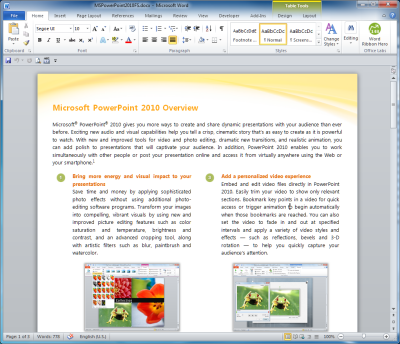
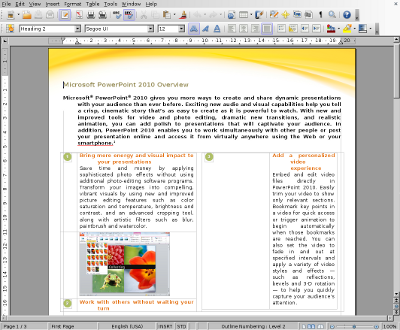
I borrowed a document from Microsoft’s press materials for Office 2010. Perhaps surprisingly, they are in .doc format, not the Open XML .docx that was introduced in Office 2007. That didn’t suit my purposes, so I converted it to .docx using Save As in Office 2010.

image

Then I stuck it on SharePoint 2010.

Next, I downloaded it to Ubuntu and opened it in Open Office. It was not a complete disaster, but the formatting was badly messed up.

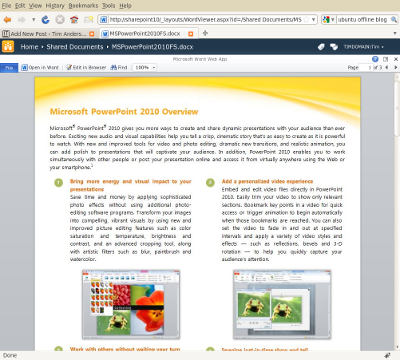
Finally, still in Ubuntu, I navigated to SharePoint and viewed the same document there. It looked fine.

Even better, I was able to click Edit in Browser, make changes, and save. The appearance is not quite WYSIWYG in edit mode, but is the same as in IE on Windows.

The exercise illustrates two points. One is that Open Office is not a good choice for working with Open XML – incidentally, the document looked fine when opened in the old binary .doc format. The other is that SharePoint 2010 and Office Web Apps will have real value on mixed networks suffering from document compatibility issues with Office and its newer formats.

HP hedges mobile bets by buying Palm and webOS

I love that this industry is full of surprises. This week has brought a couple. One is HP getting seriously into mobile by buying Palm – I think this is good news since webOS, based on JavaScript and the W3C DOM, is an interesting platform that was otherwise near to death. But surely HP is Microsoft’s trusted partner and might be expected to back Windows Phone 7? That’s the other intriguing aspect. HP has suffered as Windows Mobile has stuttered, and with mobile fast becoming the computing client that matters most, Microsoft’s platform does not look like a safe bet.

HP’s problem though is that webOS does not look like a safe bet either. In the context of HP’s overall business, Windows Mobile, now Windows Phone, makes more sense; and it cannot afford not to do the Windows stuff alongside whatever is planned for webOS. As HP told the Reg:

HP intends to continue selling Windows-based devices. "We believe in choice," Bradley said. But it sees a brighter future in offering Windows phones and tablets alongside systems based on webOS, which debuted earlier this year on the Palm Pre. "With Palm, HP acquires a strong operating system to deliver a unique customer experience," Bradley said.

It’s a mixed message, which means it is hard to articulate, and hard to make it work.

Nor it is the first time HP has wavered over Windows for mobile devices. Remember when HP rebadged the iPod, back in 2004? It was a short-lived experiment, to nobody’s surprise. This deal makes more sense than becoming an Apple OEM, but it will still be hard for HP to pull off.

The other surprise, also mobile related? Apple no longer lovers Mac developers.

Microsoft – make up your mind about Moonlight

I’ve been trying out Microsoft’s Office Web Apps, as provided for the release version of SharePoint 2010. The cross platform story is uneven, whether across Mac/Windows/Linux, or across different browsers, or even across different versions of Windows and Office. So far it does mostly work though, even if there are problems with certain tasks like printing or opening an online document in a desktop application.

The biggest problem I’ve had is on Linux. Supposedly Firefox 3.5 on Linux is supported. I ran up Ubuntu and Firefox 3.5, and went to look at a document in Word Web App. When I selected the document, Firefox quit. Every time.

After checking that Firefox was up-to-date it occurred to me that the problem might be related to Moonlight, the Linux implementation of Silverlight done by the Mono team. I disabled it. Suddenly, everything worked, even Edit in browser.

Moonlight is not just an open source project like the original Mono. It has a certain amount of official blessing from Microsoft. Here’s what VP Scott Guthrie said back in September 2007:

Over the last few months we’ve been working to enable Silverlight support on Linux, and today we are announcing a formal partnership with Novell to provide a great Silverlight implementation for Linux.  Microsoft will be delivering Silverlight Media Codecs for Linux, and Novell will be building a 100% compatible Silverlight runtime implementation called “Moonlight”.

Moonlight will run on all Linux distributions, and support FireFox, Konqueror, and Opera browsers.  Moonlight will support both the JavaScript programming model available in Silverlight 1.0, as well as the full .NET programming model we will enable in Silverlight 1.1.

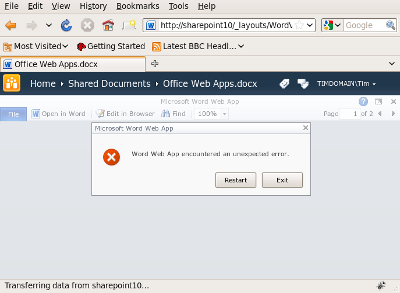
You would think therefore that Microsoft would test the Firefox/Linux/Moonlight combination with its shiny new Office Web Apps. Apparently not. Here’s what the user experience is like for Office Word App. I figured that the solution might be to upgrade Moonlight to the latest version, so I did, installing what is now called Novell Moonlight 2.2. I went back to Word Web App. Firefox no longer crashes, but I now get a blank area where the Word document should be shown, and an error if I resize the browser window:

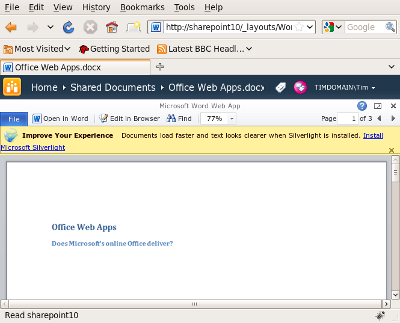
Now let’s see what happens if I disable Moonlight:

Everything is fine – except now there is a banner inviting me to “Improve my experience” by installing Silverlight. If I follow the link I eventually get back to the same Moonlight install that I have just enabled, which would actually break rather than improve Word Web App.

It is obvious that if users have to disable Moonlight to work with Office Web Apps, this will not help Moonlight adoption on Linux.

Office Web Apps are new and I’d hope this is something that Microsoft, Novell and the Mono team can soon fix between them. One reason for highlighting it now is the hope that something could be done before the full roll-out of Office and SharePoint 2010 on May 12th.

The real point though is what this says about the extent to which Microsoft cares about Moonlight and Linux users, and how much or little communication takes place between Microsoft and Novell. Silverlight isn’t required for Office Web Apps – as you can see from the above – but it is used to good effect where available, and this Office release is therefore an important release for Silverlight as well.

Microsoft should make up its mind. Is Novell really a trusted partner for Silverlight on Linux? Or a third-party product that has to take its chances?

DevExpress merges its Silverlight and WPF UI controls, says VS 2010 is light years ahead

Developer Express is a component vendor with add-ons for Visual Studio and Delphi. It has offered a library of components for Silverlight for some time, and a separate set for WPF (Windows Presentation Foundation), but now says that Silverlight and WPF are close enough that it can merge the two into a single codebase to be called XPF (Express Presentation Framework). CTO Julian Bucknall says:

Silverlight in v4 has the ability to create desktop applications that aren’t sandboxed into triviality. In fact, Silverlight, more than ever, resembles a WPF-lite on the desktop side, to the extent of pundits considering their eventual merging. At long last it is possible to write one set of non-trivial code and compile it both for Silverlight and for WPF without having to reinvent so many wheels on the Silverlight side (and to a much lesser extent on the WPF side).

Even though Visual Studio 2010 is only just released, DevExpress is focusing all its new Silverlight and WPF development on the new platform and IDE:

The Silverlight and WPF controls in DXperience v2010.1 will require .NET 4 and VS2010. In particular, you must use the new Silverlight 4 and WPF 4; the controls will not function with the previous versions of WPF and Silverlight, such as Silverlight 3. Similarly, you cannot use VS2008 or earlier, but must use VS2010. To my mind this isn’t that much of a downside: VS2010 is light years ahead of its earlier brethren in terms of user experience and its use is de rigueur if you are creating applications with either Silverlight or WPF.

Of course it’s in Bucknall’s interests to move developers on; he’s keen to sell upgrades. I still find this interesting. Like him, I find Visual Studio 2010 a major advance on earlier versions. More significant though is the idea of a common WPF and Silverlight codebase, though presumably still with added capabilities when running on WPF. I don’t think Windows-only development is dead; the success of Windows 7 may even stimulate the market for applications that take advantage of its new features. That said, for the large subset of applications where cross-platform is desirable, Silverlight seems to me a better choice than WPF.

Keeping track of Microsoft financials

I’m in the habit of drawing up a simple table to summarise Microsoft’s quarterly results.

Quarter ending March 31st 2010 vs quarter ending March 31st 2009, $millions

Segment Revenue Change Profit Change
Client (Windows + Live) 4415 +967 3061 +788
Server and Tools 3575 +84 1255 +31
Online 581 +59 -713 -302
Business (Office) 4243 -265 2622 -134
Entertainment and devices 1665 +36 165 +206

Windows 7 booming, Office a bit slow prior to the release of the 2010 version, Online still draining money. Xbox doing OK. In other words, nothing much of interest.

First look Outlook 2010 RTM – speed good, conversation view bad

I’ve been trying Office 2010. I use Outlook with Exchange 2007 and was interested to see how it compares to Outlook 2007.

In terms of things I care about, not much has changed. That said, it took me a long time to wrest good performance out of Outlook 2007 – which is why this blog is a top Google hit on “slow outlook 2007” – whereas the speed of Outlook 2010 seems fine right out of the box. I haven’t tried all the permutations though: cached and non-cached, 32 or 64 bit, and so on, so consider this only a preliminary impression.

One of the reasons is that the Outlook team has abandoned integration with Windows Desktop Search for online mailboxes:

The Search Toolbar add-in setup code is removed in Outlook 2010. The Search Toolbar add-in enables local indexing of online mode Exchange Server mailbox stores by using Windows Desktop Search. As a result of this change, e-mail in online Exchange mailboxes will not appear in the results of Windows Explorer searches. The online indexing add-in is a legacy component that adversely affects performance of Outlook during startup and shutdown. With this removed in Outlook 2010, users will experience improved Outlook reliability and significantly lower Exchange bandwidth usage. For fast search, use Cached Exchange Mode or for online mode, use Exchange Search in Exchange 2007 and later versions.

So what else is new? You can see a technical summary here. Outlook has now had the full Ribbon treatment, which I suppose is good for consistency, though plenty of annoyances remain. For example, let’s say you’re trying to figure out whether an email is genuine or not. I had one that gave me pause for thought, supposedly from Amazon.com. The first thing I check is the message header – no, not the thing Outlook still calls the “message header”, which adds a couple of fields to the top bar. What I need to see is the email header, showing the origin of the message and its path across the Internet. I clicked around hopefully. Eventually I found it – you have to click the down arrow at bottom right of the Tags (huh?) section of the ribbon:

image

This opens what Outlook calls Properties, including the “Internet headers” which are what I want to see. The message was spam, by the way – it came from a domain that has nothing to do with Amazon:

image

Fortunately you can add this dialog to the Quick Access Toolbar. Simply go to Customize Quick Access Toolbar –> More commands, and add the Properties command. Except it’s not called Properties. The dialog is called Properties, but the command is called Message Options…

image

I am so used to this sort of thing with Outlook that I expect it; Outlook 2010 is no worse than its predecessor.

[Update: Ed Bott points out in the comments that you can also get to the Properties dialog through the File tab.]

Other new features include Quick Step macros – could be handy though I can’t think of a reason I will use it; connection to multiple Exchange accounts which will be excellent for those who need it, especially if you can use cached mode with all of them (I’ve not checked); and a bunch of stuff that only lights up if you have Exchange Server 2010, such as (at last) server-based archiving – no more archive.pst files littered around every machine you ever use.

I do want to mention one persistent disappointment though. Conversation view. Why can’t Outlook behave like a discussion forum, where each thread is grouped? In theory it can: just switch on Conversation View. In practice it is useless, because instead of using the In-Reply-To field that identifies a message which is a reply to another message, Outlook 2010 uses the subject line.

The subject line is hopeless as a means of defining conversations. Worse, it’s dangerous. Let’s say you’ve got an unimportant “conversation” with the subject “June 20th” – it’s about a meeting you don’t need to attend. Then you get an email also entitled “June 20th” from someone else; this one is critically important. By grouping it into the existing “conversation”, Outlook disguises its importance.

I recall being told at Microsoft’s PDC last November that the Outlook team was aware of this problem in the preview and it would be fixed somehow. However, when I switched Conversation View on briefly in Outlook 2010 RTM I saw exactly the same problem. I suppose there is a chance that upgrading to Exchange 2010 magically fixes it; this on the to-do list for me. For now, the solution is not to use Conversation View at all.

Office 2010 offers choice of Open Document or Microsoft XML formats

I was surprised to see the following dialog after an in-place upgrade of Office 2007 to Office 2010:

image

Admittedly there is a strong steer towards the Microsoft formats which, we are told, are “designed to support all the features of Microsoft Office”.

On the other hand, this was an in-place upgrade and default save options were already present in Office 2007. Given that most in-place upgrades preserve settings – which is part of the point of an in-place upgrade – you would expect it just to keep the old defaults.

I’m guessing therefore that this is aimed at appeasing/convincing regulators and governments that Microsoft Office plays nice with standards.

That said, there is little reason to choose the ODF format unless it is required. It will cause problems with formatting and content, and is especially risky with Excel spreadsheets.

If you want to use ODF, save money and get more complete support by using OpenOffice.

Update: Neowin has some background here.

Microsoft warns against installing 64-bit Office 2010 unless you really need it

Microsoft has released 64-bit Office 2010, at least to MSDN and Technet subscribers, with general availability to follow shortly. Now that 64-bit Windows is commonplace, you would think that 64-bit Office is the obvious choice.

Apparently not. Take a read of this technical note before installing 64-bit Office 2010. In essence, it recommends installing 32-bit Office, even on 64-bit systems, except in the following case:

If some users in your organization are Excel expert users who work with Excel spreadsheets that are larger than 2 gigabytes (GB), they can install the 64-bit edition of Office 2010. In addition, if you have in-house solution developers, we recommend that those developers have access to the 64-bit edition of Office 2010 so that they can test and update your in-house solutions on the 64-bit edition of Office 2010.

That’s a small niche. So what can go wrong if you decide to go 64-bit? First, it might not install:

If 32-bit Office applications are installed on a computer, a 64-bit Office 2010 installation is blocked by default.

says the tech note. In addition, if you manage to install it, you will have problems with 32-bit Access applications, 32-bit ActiveX controls and COM add-ins, in-place activation of documents where the OLE server is 32-bit, and VBA code that calls the Windows API. VBA deliberately disables API calls defined with the Declare statement; they must the updated with a PtrSafe attribute before they will run.

The Office install DVD includes both 32-bit and 64-bit versions, and the 32-bit version installs by default irrespective of the version of Windows.

Of course I will be trying 64-bit Office on a spare machine. I’m interested to know, for example, whether Outlook benefits from all that extra RAM, since it is notoriously slow. But overall, 64-bit Office 2010 looks more like a release to prepare the ground for the future, than one for normal use.

Microsoft Expression Blend is too hard to learn

Expression Blend is the design tool for Windows Presentation Foundation (WPF) and Silverlight, and thus a key tool for building applications for the current generation of Microsoft’s platform. How good is it? There is a shortage of in-depth reviews, if my quick Google search is anything to go by, though there are plenty of quick write-ups saying that it is not as good as Adobe Flash. Blend got a bit of attention following the 2009 Mix conference thanks to SketchFlow, the prototyping feature built into Blend 3, and which has been well received.

One reason for Blend’s relatively low profile is that it is aimed at designers, whereas Microsoft’s community is more developer-focused. WPF developers can avoid Blend to a large extent, by using the designer built into Visual Studio, which is fine for laying out typical business applications. Now with Visual Studio 2010 the same is true for Silverlight. Another option is to write your own XAML code, which works for laying out controls though it is inconceivable for drawings. XAML is verbose

It is just as well you can avoid it, because although Blend is very capable, it is not easy to learn. I’m guessing there are quite a few developers who have opened it up, clicked around a bit, and retreated gratefully back to Visual Studio. This was a problem for Adobe Flash Professional as well, and one of the reasons for the creation of Flex and Flex Builder, a code-centric IDE for the Flash runtime.

You can argue that a design tool does not need to be easy for developers to use; it needs to be good enough for designers to create great designs. That’s true; but the developer/design divide is not a absolute one, and ideally Blend should be something a developer can dip into easily, to create or enhance a simple layout, without too much stress.

Maybe some developers can; but I have not found Blend particularly intuitive. The user interface is busy, and finding what you want or getting focus on the right object can be a challenge.

As evidence of this, take a look at Adam Kinney’s Through the Eyes of Expression Blend tutorial, which is among the best I have found. Try lesson 9, Styling and working with design-time data. Then ask yourself how easy it would be to discover the way to do this without the step-by-step instructions. Would you have known to right-click the StackPanel and choose Change Layout Type > Grid? What about step 8, right-clicking the ListBox, and selecting Edit Additional Templates > Edit Layout of Items (Items Panel) > Create Empty?

image  

And notice how in step 9 you have to click the “small grey square next to the Source property”, that’s the one called Advanced Options:

image

Overall it is a nice tutorial, but you might need an evening or two with a couple of fat books, one on XAML and one on Blend itself (if you can find a good one), in order to understand the features you have have been using.

It is probably worth it, if you intend to work with Silverlight or WPF. Blend has one great advantage over Flash Professional: it authors XAML, and you can open it up in Visual Studio and continue working on it there. Microsoft has no need for something like Adobe Catalyst to bridge the XML/Designer divide.

Still, Microsoft had a clean slate with Blend, which is only a few years old, and it is a shame it could not come up with something a bit more user-friendly.

The other implication is that the new visual designer in Visual Studio 2010 makes Silverlight applications a great deal easier to create. You can Blend if you want to; but the Visual Studio effort is far more approachable.

How do you find Blend? I’d be interested in other perspectives.

Silverlight 4 vs Silverlight 3: a little bit faster?

Microsoft’s Scott Guthrie spoke of “twice as fast performance” in the newly-released Silverlight 4, thanks to a new just-in-time compiler.

Performance is a hard thing to nail down. Maybe he meant that compilation is twice as fast? I’m not sure; but I tried a couple of quick tests.

First, I looked at my Primes test. Version 3 running in Windows Vista took around 0.40 seconds (the exact figure varies on each run, thanks to background processes or other factors). I then upgraded to version 4.0. No significant difference, on average over several runs. I used Vista because I’d already upgraded my Windows 7 install.

Next I tried Bubblemark. I maxed it out at 128 bubbles. On Vista with Silverlight 3 I got about 240 fps; on the same machine with Silverlight 4 about 260fps; about 8%.

image

Next I tried on an Apple Mac. My Mac Mini is less powerful, though not that bad, an Intel 1.83 Ghz Core Duo. On the Prime test I got 0.54 secs before, and 0.50 secs after the upgrade to 4.0, about 7.5% improvement. On Bubblemark, it was only 24 fps before and after.

I guess the vast difference in graphics performance is also interesting. It is not just Mac vs Windows; the Nvidia GeForce 6800 on the PC is more powerful than whatever is in the Mac Mini.

If anyone can tell me in what respect version 4.0 is twice as fast, I’d be grateful.

Update: prompted by the comment from David Heffernan below, I also tried the Encog Silverlight Benchmark. I used an older core duo laptop, since I am running out of machines to upgrade. I ran the test twice before upgrading, and twice after. Lower is better:

Silverlight 3.0: 22.0

Silverlight 4.0: 12.7

That’s about 42% better, where “twice as fast” would be 50% better, much closer to Guthrie’s claim. I guess it depends what you measure.