Category Archives: microsoft

Silverlight 4.0 released to the web; tools still not final

Microsoft released the Silverlight 4.0 runtime yesterday. Developers can also download the Silverlight 4 Tools; but they are not yet done:

Note that this is a second Release Candidate (RC2) for the tools; the final release will be announced in the coming weeks.

Although it is not stated explicitly, I assume it is fine to use these tools for production work.

Another product needed for Silverlight development but still not final is Expression Blend 4.0. This is the designer-focused IDE for Silverlight and Windows Presentation Foundation. Microsoft has made the release candidate available, but it looks as if the final version will be even later than that for Silverlight 4 Tools.

Disappointing in the context of the launch of Visual Studio 2010; but bear in mind that Silverlight has been developed remarkably fast overall. There are huge new features in version 4, which was first announced at the PDC last November; and that followed only a few months after the release of version 3 last summer.

Why all this energy behind Silverlight? It’s partly Adobe Flash catch-up, I guess, with Silverlight 4 competing more closely with Adobe AIR; and partly a realisation that Silverlight can be the unifying technology that brings together web and client, mobile and desktop for Microsoft. It’s a patchy story of course – not only is the appearance of Silverlight on Apple iPhone or iPad vanishingly unlikely, but more worrying for Microsoft, I hear few people even asking for it.

Even so, Silverlight 4.0 plus Visual Studio 2010 is a capable platform; it will be interesting to see how well it is taken up by developers. If version 4.0 is still not enough to drive mainstream adoption, then I doubt whether any version will do it.

That also raises the question: how can we measure Silverlight take-up? The riastats charts tell us about browser deployment, but while that is important, it only tells us how many have hit some Silverlight content and allowed the plug-in to install. I look at things like activity in the Silverlight forums:

Our forums have 217,426 threads and 247,562 posts, contributed by 77,034 members from around the world. In the past day, we had 108 new threads, 529 new posts, and 70 new users.

it says currently – substantial, but not yet indicative of a major platform shift. Or job stats – 309 UK vacancies right now, according to itjobswatch, putting it behind WPF at 662 vacancies and Adobe Flash at 740. C# on the other hand has 5349; Java 6023.

Dancing on a pin: Microsoft belatedly answers Open XML critics

Microsoft’s Doug Mahugh has replied to accusations from ISO expert Alex Brown that the company is doing little to implement its own Open XML standard. The issue is that the XML document formats in Office 2007 are, from the ISO perspective, meant to be “Transitional” – a compromised format designed to interoperate with existing binary documents – and that the standard Microsoft is meant to be implementing is “Strict”, an improved standard that can more easily be implemented by others.

Mahugh says:

I’d like to state clearly and unequivocally at this time that we will support reading and writing of ISO/IEC 29500 Strict no later than the next major release of Office, code-named Office “15.”

He doesn’t say whether or not it “Strict” will be the default in Office 15, which we can expect to see in around 2013. This is the real pain-point for users: if the default changes, the result is the frustration of sending or receiving unreadable documents.

Microsoft is dancing on a pin. On the one hand, it wants to convince governments, academics and other standards-sensitive organisations that Microsoft Office does the right thing. On the other hand, the benefit to users of breaking document compatibility for the sake of ISO compliance is rather invisible.

Document compatibility is the thinking behind having read-only support for Strict in Office 2010 (and coming to Office 2007). If Microsoft can get read-only support widely deployed, then in 2013 the Strict documents that start to circulate will not be so problematic.

The approach is not completely unreasonable; these things take time. That said, Microsoft’s communication of its intentions has been poor. Further, Mahugh does not answer the parts of Alex Brown’s post that address quality:

It is also a worrying commentary on the standards-savvyness of the Office developers that the first amateur attempts of part-time outsiders find problems with documents which Redmond’s internal QA processes have missed. I confidently predict that fuller validation of Office document is likely to reveal many problems both with those documents, and with the Standard itself, over the coming years.

My perspective on this as a journalist is that Microsoft did not consider Open XML or standards compliance even worth a mention in its publicity so far and its detailed reviewers’ guide for Office 2010. That suggests it is not much of a priority.

So full support in 2013 or thereabouts. My expectation is that by then saving and editing documents online will be more common than it is today, and that the assumptions the Office team seems to make about the steady progress of its huge desktop suite are likely to prove faulty.

Book Reviews: Programming F# and Beginning F#

I’ve been working with Microsoft’s new language F# recently and enjoying it. If it catches your interest, you might turn to a book in order to familiarise yourself with the basics. Here are two which I’ve looked at. They are both aimed at experienced developers who are new to F#.

Programming F# by Chris Smith

Programming F# comes from O’Reilly. It kicks off with Hello World and an introduction to the interactive console in Visual Studio 2010 – a great way to try out F#. Next we get a summary of types, and a brief explanation of how to write an F# program – stuff you have to know.

Chapter 3 is an introduction to functional programming, and also mentions type inference, an important F# feature. The following chapter explains mutable programming in F# – yes, you can do it; it is just not the default behaviour – and also covers exceptions. Chapter 5 turns to object-oriented programming in F#, another distinctive feature, while chapter 6 covers aspects specific to .NET such as garbage collection. That’s about half the book, and gets you up and running with the language.

The second half of the book is more interesting, looking at ways of using F#. Smith looks at applied functional programming, including pattern matching, recursion, continuations and closures. Next, there’s a look at applied object orientation. Chapter 9 covers scripting with F# – an interesting use case – and includes welcome examples for things like copying files and automating Microsoft Office. Chapter 10 is a key one, explaining computation expressions that let you create workflows and all-but extend the language. It’s “a very advanced concept that even expert developers can have a hard time grasping,” admits the author, though he presents it clearly.

Next we get a section on a likely reason for picking up F#: asynchronous and parallel programming. There’s a wide-ranging chapter explaining both .NET and F# asynchronous techniques, including the .NET Parallel Extensions. It’s a little confusing, especially since Smith observes that F# asynchronous workflows are sub-optimal for CPU parallelism; he recommends the .NET Parallel Extensions because of the better thread management it offers.

The last chapters cover .NET Reflection, code analysis and generation with Quotations – “deep wizardry”, says the author. An appendix summarises .NET Libraries and F# interop with COM and native code.

While this is an excellent language introduction, and thorough within the topics it covers, some aspects disappointed me. I cannot find any mention of F# agents, based on the MailboxProcessor class (nothing to do with email), which is a surprising omission; F# designer Don Syme sees it as a critical feature for scalable web development. Nor is there anything on graphics processing, another common usage, or any hint about how you might use F# for financial analysis. I also found it rather dry overall – hard to avoid with so much plumbing to cover, but I feel the author could have conveyed a little more excitement about what F# enables. Don’t make this the only F# book you read.

Beginning F# by Robert Pickering

This Apress title covers similar ground as the O’Reilly book, but with a slightly more hands-on and informal style, which on the whole I enjoyed. It starts with an introduction including a quote from Ralf Herbrich at Microsoft Research describing how he converted 1000 lines of C# into 100 lines of F# which performed just as well – this is the kind of real-world touch that makes you want to read on. The second chapter explains how to install F#, including different versions of Visual Studio, the open source SharpDevelop, and Mono on Linux – excellent diversity. Chapter 3 introduces functional programming, in effect a brisk overview of the core of F#. Read it slowly!

The author goes on to look at imperative programming and mutability in F#, and then object orientation, just as Smith did in his book. Chapter 6 is useful overview of how code is organised into modules and namespaces, and also covers comment annotations. Next, Pickering looks at F# libraries, including a brief look at math programming. Chapter 8 covers user interface coding – completely lacking in Smith’s book – complete with a quick look at GTK#, which works on Linux. There’s also a quick look at ASP.NET, Microsoft’s web server platform. Although this little introductions are too brief to be really useful, they do spark ideas about how you might use F#.

Data Access is next, another important real-world topic, covering XML, LINQ (Language Integrated Query) and ADO.NET.

Chapter 10 is when we get to parallel programming and reactive programming – code that waits for an external event before running. Pickering introduces F# agents and the MailboxProcessor class. Next comes a look at distributed applications using sockets, HTTP requests, web services, and Windows Communication Foundation.

Chapter 12 has the intriguing title Language-Oriented Programming, and should be taken together with the next chapter on parsing text. This is where we look at using data structures as little languages, parsing and interpreting text, and extending F# syntax. Finally, chapter 14 is the interop chapter, covering interop with C# as well as platform invocation for COM and native code.

Of the two books, this is the more lively and wide-ranging read, and more likely to enthuse you about the possibilities F# offers, though it skims the surface in places; many topics receive only shallow coverage.

View on Amazon.com


View on Amazon.co.uk
 

Anders Hejlsberg on functional programming, programming futures

At TechDays in Belgium Micrososft’s C# designer and Technical Fellow Anders Hejlsberg spoke on trends in programming languages; you can watch the video here.

I recommend it highly, not so much because of any new or surprising content, but because in his low-key way Hejlsberg is a great communicator. The talk is mostly not about the far future, and much of what he covers relates directly to C# 4.0 and F# as found in Visual Studio 2010. Despite his personal investment in C#, Hejlsberg talks cheerfully about the benefits of F# and gives perhaps the best overview of functional programming I have heard, explaining what it is and why it is well suited to concurrency.

image

I will not try and summarise the whole talk here; but will bring out its unifying thought, which is that programming is moving towards a style that emphasises the “what” rather than the “how” of the tasks it encodes. This fits with a number of other ideas: greater abstraction, more declarative, more use of DSLs (domain-specific languages).

The example he gives early on describes how to get a count of groups in a set of data. You can do this using a somewhat manual approach, iterating through the data, identifying the groups, storing them somewhere, and incrementing the count as items belonging to each group are discovered.

Alternatively you can code it in one shot using the count keyword in LINQ or SQL (though Hejlsberg talked about LINQ). This is an example of using a DSL (Domain Specific Language), and also demonstrates a “what” rather than “how” approach to code. It is easier for another programmer to see your intention, as there is no need to analyse a set of loops and variables to discover what they do.

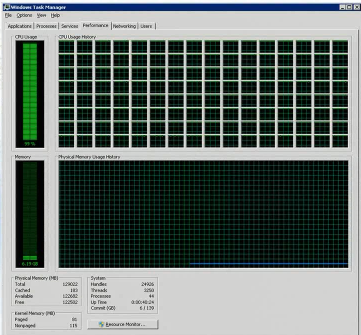
There is another reason to prefer this approach. Since the implementation is not specified, the compiler can more easily optimise your code; you do not care provided the result is correct. This becomes hugely important when it comes to concurrency, where we want the compiler or runtime to utilise many CPU cores if they are available. He has a screenshot of Task Manager running on a 128-core machine which apparently exists in Redmond (I can’t quite read the figure for total RAM but think it may be 128GB):

image

Hejlsberg says there was a language doldrums between 1995 and 2005, when many assumed that Java was the be-all and end-all. I wonder if this is a tacit admission that C#, which he was working on during that period, is not that different in philosophy from Java? The doldrums are over and we now have an explosion of new and revived languages: Ruby, Groovy, Python, Clojure, Boo, Erlang, F#, PowerShell and more. However, Hejlsberg says it makes sense for these to run on an existing framework – in practice either the Java or .NET runtime – since the benefits are so great.

Hejsberg also predicts that distinctions such as dynamic versus static languages will disappear as each language absorbs the best features from other languages. “Traditional taxonomies of languages are breaking down as languages pick paradigms from each other,” he says. The new language paradigm is multi-paradigm.

Just as C# has now acquired dynamic features, we can expect it to get better support for immutability in future (borrowed from functional languages).

Jewels from the loft: launch of Delphi, Netscape’s Constellation, HTML to die, Longhorn for developers

It’s the Easter holiday in the UK and I’ve suffered a bout of spring-clean fever. It is time, I decided, to clear out a mountain of old books and magazines.

A job like this always prompts reflections, the first of which is the sad decline of print journalism in the field of software development. It hurt to send piles of Byte, Exe, Dr Dobbs’s Journal, Application Development Advisor and others off for recycling.

image

A few things caught my eye. Exe June 1995, and there is a young Anders Hejlsberg talking to Will Watts about his new creation: Borland Delphi:

Before Delphi, you always had to make a choice. Do I go for the performance of a native code compiler, or the ease of use of a visual development environment? Do I go for a powerful object-oriented language, or a proprietary 4GL client/server tool? What programmers really want is all of the above, in one package. That’s what we set out to do.

What is striking about Delphi is that this was not hype. It delivered on that promise. It was better than its obvious rival, Microsoft’s Visual Basic, in almost every way (I will give VB a point for sheer ubiquity, especially in VBA guise). Delphi is still with us today, not bad after fifteen years. However, it never came close to VB’s market share, which shows that quality has never been the sole or even the most important determinant of sales success.

Next up is Byte, March 1998. “Reinventing the Web”, the cover proclaims. “XML and DHTML will bring order to the chaos”.

image

Inside there is a breathless description of how XML will change everything, and a quote from Jon Bosak:

HTML, this so-called ‘hypertext markup language,’ implements just a tiny amount of the functionality that has historically been associated with the concept of hypertext systems. Only the simplest form of linking is supported – unidirectional links to hard-coded locations. This is a far cry from the systems that were built and proven during the 1970s and 1980s.

Indeed. “We need to start replacing simple HTML with more powerful alternatives”, the article concludes. “The migration to XML must begin. The future of the Web depends on it.”

Here’s one thing that mostly did not work out as planned. The W3C tried to retire HTML, failed, and is now belatedly engaged in specifying HTML 5.

Byte March 1997 is also intriguing. Netscape’s Marc Andreessen smiles out of the cover.

image

Jon Udell, in the days before he disappeared into some Microsoft corridor, writes about Netscape’s “Constellation: the network-centric desktop”:

Netscape’s Constellation takes a less Windows-centric approach and puts more emphasis on location-independent computing, regardless of the platform. No matter what kind of system you’re using or where you are, Constellation presents a universal desktop called the Homeport. Although the Homeport can appear in a browser window, Netscape usually demonstrates it as a full-screen layer that buries the native OS – certainly one reason Microsoft is not embracing Constellation.

Netscape got a lot of things right, a true pioneer of what we now call cloud computing. What went wrong? Well, Microsoft went all-out to conquer Netscape by removing its browser dominance. Microsoft’s weapon was the free Internet Explorer.

It is all a pre-echo of what is happening now with Google and Microsoft, the difference being that Google has huge financial power thanks to its marriage of internet search and internet advertising. Unlike Netscape, Google is winning.

This blog is long enough; but I’ll give a brief mention to another jewel from the archives: a book given out at PDC 2003 entitled Introducing Longhorn for Developers.

image

It describes Microsoft’s vision for Longhorn: a radical new application model for Windows, building on XAML, WinFS and “Indigo”, the communication framework. It bears little resemblance to what eventually appeared as Vista, which is a shame as it was compelling in many ways.

Microsoft accused of failure to observe Open XML standards process

XML specialist Alex Brown, who was involved in the ISO standardisation of Microsoft’s Open XML – still perhaps best known as OOXML – says Microsoft has failed to honour the commitments it made when the standard was approved. In particular, it seems little progress has been made between Office 2007 and Office 2010. The key problem is that Microsoft implemented Open XML before it was standardised. There were numerous changes made during the standardisation process, but what to do about the existing implementation? Loosely, the existing unacceptable format was given a “Transitional” status, while the more satisfactory, corrected format was called “Strict”. Microsoft promised to implement the “Strict” variant as soon as it could. Brown adds:

I was convinced at the time, and remain convinced today, that the division of OOXML into Strict and Transitional variants was the innovation which allowed the Standard to pass. Enough National Bodies could then vote in good conscience for OOXML knowing that their preferred, Strict, variant would be under their control into the future while the Transitional variant (which – remember – they had effectively rejected in 2007) would remain purely for the purpose of accurately specifying old documents: a useful aim in itself.

It is now two years since Open XML was approved, and Microsoft is on the brink of releasing a new version of Office. So does Office 2010 implement Open XML Strict? Apparently not – it’s the Transitional version. That is bad enough; worse still, according to Brown, it does not even conform correctly to that:

It is also a worrying commentary on the standards-savvyness of the Office developers that the first amateur attempts of part-time outsiders find problems with documents which Redmond’s internal QA processes have missed. I confidently predict that fuller validation of Office document is likely to reveal many problems both with those documents, and with the Standard itself, over the coming years.

Note that Brown is basing his remarks on the preview of Office 2010; we have not seen the final release yet. I can believe that Microsoft may fix some issues, but it looks vanishingly unlikely that Office 2010 will implement the “Strict” standard which ISO approved.

Brown’s remarks shed light on something I noticed when reviewing the preview:

As for Open XML, it’s notable that Microsoft neglects to mention it at all in its Reviewer’s Guide, even though this is supposedly the release that will fully implement ISO/IEC 29500. It is odd how this has gone from a cause to campaign for, to not-worth-mentioning in just over a year. To be fair, few users ever cared about XML formats themselves: it is only when documents get scrambled or fail to open that such things become important.

No wonder Microsoft said nothing about it, if in reality it has lost interest in conformance.

I think it is a good thing for Microsoft to standardise its Office formats. Selfish manipulation of standards committees on the other hand is not acceptable. One thing is for sure: if Brown is right and

without a change of direction, the entire OOXML project is now surely heading for failure.

then the company will only have itself to blame. Its nightmare will re-emerge: entire governments mandating OpenOffice for the sake of  standards conformance.

That said, and despite the hype, I regard Office 2010 as a minor release. 64-bit Excel, a few tweaks, and a first foray into browser-hosted versions. Microsoft often displays this pattern, following up a release with major changes – Office 2007, for example – with one that is really just a refinement of what went before. It is not impossible that somewhere in the corridors of Redmond a team is working on a new Office that does a much better job with the Open XML standard.

Over to Microsoft – serious about Open XML? Or just doing the minimum necessary to protect a lucrative market dominance – maybe a bit less than the minimum?

Update: Microsoft’s Doug Mahugh has replied to Brown’s comments here. I am writing separately about this.

Building for multiple mobile platforms with one codebase

Individuals may have strong opinions about the merits of Apple iPhone versus Google Android versus the struggling Palm WebOS versus the not-yet Windows Phone 7; but sit them round a table to discuss app strategy and those diverse platforms change from a debating point to a problem. Presuming a web app won’t cut it, how do you target all those devices without the unreasonable expense and complication of managing multiple projects? The native languages are all different; Objective-C for iPhone and iPad, Java for Android and RIM BlackBerry, JavaScript for WebOS, C# for Windows Phone 7.

There are three possibilities that come to mind. One is that all the platforms will eventually allow you to write in C or C++, making this the unifying language, though you still have some fancy footwork to do overcoming library differences. Android now allows this via the NDK, and Palm via the PDK. There is currently no alternative to Java for Blackberry, and Microsoft says native code won’t be possible on Windows Phone 7, but well, you never know.

The second is Adobe Flash. This is an interesting one, because Apple prohibits Flash on the iPhone, but Adobe has a Packager for iPhone that builds native iPhone apps from Flash projects. Another issue is that although Flash is available or promised for all the main non-Apple devices – Apple’s gift of a selling point to its rivals – it is not Flash alone that does what it needed, but AIR, the “desktop” or out-of-browser runtime. This has been previewed for Android and promised for other devices including Blackberry. AIR for Windows Phone 7? Maybe, though I’ve not seen it mentioned.

A third idea is a clever framework that does the necessary cross-compilation under the covers. This cannot depend on deploying a runtime, nor compiling to native code, because these approaches are blocked by some mobile platforms. Rhomobile has the Rhodes framework, where you code your app in HTML and Ruby and compile for devices including iPhone, Windows Mobile, RIM Blackberry, Symbian, and Android. Rhodes includes an MVC (Model View Controller) framework and an ORM (Object Relational Mapper) to wrap database access. There is also a RhoSync server component to enable offline data with synchronisation back to the server when reconnected; and the RhoHub hosted IDE for buildings apps with a web browser.

Rhomobile tells me that Palm WebOS support is in the works. They also promise Windows Phone 7 support, which intrigued me because Rhodes says it compiles to “true native device applications”. Has Rhomobile gotten round Microsoft’s opposition to native code? Apparently not; VP Rob McMillen eventually told me that this will mean a .NET IL (intermediate language) implementation.

The Rhomobile approach reminds me of AppForge, a company which produced the well-regarded Crossfire add-on for Visual Studio and compiled Visual Basic to a wide variety of mobile platforms. Unfortunately AppForge was acquired by Oracle, and its new owners showed callous disregard for existing customers. Not only did development cease; it also became impossible to renew existing licenses. Thanks to an activation component, that also blocked new deployment of existing applications – every developer’s nightmare.

That said, there is no activation requirement for Rhodes that I know of, and the framework is open source, so I don’t mean to suggest it will suffer a similar fate.

What about Java? On the face of it, Java should be ideal, since multi-device support is what it was designed for. It is a measure of how far Java has fallen that we hear far more about the lack of Flash on the iPhone, than the lack of Java. Microsoft says yes to Flash on Windows Phone 7, though not on first release, but nothing about Java.

Java as a mobile runtime needs a strong dose of lobbying and evangelism from its new stewards Oracle if it is not to fall by the wayside in this context. Hmm, AppForge.

Bill Buxton, Windows Phone 7 hits at Mix10, say attendees

I recall seeing conversations on Twitter about whether it is worth going to conferences, especially vendor-led ones such as Microsoft’s Mix10 which took place earlier this month. It’s expensive, it’s marketing, and many of the sessions are available for free online soon after they take place.

In that context it’s interesting to see some off-the-cuff comments from attendees about what they liked at Mix. Networking comes high on the list, something you cannot get from a distance. There is general boredom with slide-driven presentations, and enthusiasm for interactive panels. One attendee says:

I always find the panels more exciting, and I like the open dialogs where people can ask questions and get real world opinion and advice

As for the content, the name that comes up most often is Bill Buxton, the design expert who joined Microsoft specifically to introduce greater design-consciousness into a company whose track record in this respect is poor. It was a fascinating appointment, and I believe you can see traces of his work in Windows 7 and much more in Windows Phone 7. I talked to Buxton briefly about this and wrote it up here. When I say “his work”, I don’t mean hands-on screen designs, rather a different approach to product development.

Buxton apparently made a considerable impression at Mix10. His session An hour with Bill Buxton (the link has the video) is also one that is interactive, and worth watching if you have an interest in where design fits into the development process. The fact that Microsoft-platform developers are engaging with his ideas is encouraging, given the usability issues that spoil so many Windows applications and machines.

Overall it also seems that Windows Phone 7 went down well – remarkable when you consider that Windows Mobile was all-but dismissed as irrelevant a few months ago – though I did smile at the Microsoft employee (I think) who shows an iPhone with a Mix scheduling app installed. Its special feature: shake the iPhone and it displays a Windows Phone 7 screen, handy if Ballmer appears in the corridor:

image

One final point: an attendee says IronRuby was shown running on Windows Phone 7 in one of the sessions, something I was told elsewhere was not possible.

Windows Phone 7 emulator yields its secrets

So that didn’t take long. Microsoft has made a Windows Phone 7 emulator available to all, explaining that it is a virtual machine running the real device OS. While it works fine for debugging applications, most of the phone UI is mysteriously absent, the exception being Internet Explorer (needed for testing web applications). However, Dan Ardelean has done some nifty work with the emulator image, discovering that a lot more of the UI is present and can be exposed if you make a few modifications. He posted his modified ROM but has since removed it because of copyright concerns. I doubt it will be hard to find.

image

Applications available in the hacked emulator include Mobile Office with Word, Excel, PowerPoint, OneNote and Sharepoint Workspace (undermining Microsoft’s claim that this is only a consumer device), games including a version of Times Reader – full circle for this one, which started out in WPF, moved to Silverlight for Mac, deserted and went to Adobe Flash, and may now reappear in Silverlight – and music/video via a Zune section.

image

My tip to Microsoft: if you don’t want these things to leak, best not put them in the publicly-available image.

Ardelean has also figured out how to amend the native C# port of SQLite, satisfying demand for a local SQL database engine. SQL Server Compact Edition is actually present in Windows Phone 7, but not available to custom applications.

Visual Studio software factories to emerge from Microsoft deep freeze

Last night at the Microsoft Mix party in Las Vegas I happened across Michael Lehman, a senior architect, who told me he had been working for the last six years on a Visual Studio add-on called Feature Builder. This turns out to be the evolution of the very same project which Microsoft’s Jack Greenfield told me about back in March 2007, at an architecture conference in the UK, though back then it had a more exalted status (in Greenfield’s eyes at least) – he described it as a platform rather than merely an add-on. Now Feature Builder is to appear as an extension in the Visual Studio 2010 Gallery, only discoverable by those who seek it out. If enough developers find it and like it, it may end up as part of a future Visual Studio release.

It’s all part of Microsoft’s desperately confused architecture and modelling story. Note that Greenfield in 2007 denigrated the UML:

The UML is a collection of useful abstractions. Unfortunately it’s been peddled as a universal modelling language, but the U never stood for Universal. We subscribe to Michael Jackson, author of Problem Frames, who says that there is no such thing as a universal solution. It’s a childish approach. This is where the Universal Modelling Language marketing pitch fails. UML was never properly extensible. It also has the problem that it was designed by a committee.

So what do we have actually shipping with Visual Studio 2010? Standard UML modelling, the best Microsoft has yet come up with.

Reading between the lines, this likely means that the UML faction within Microsoft outvoted the non-UML faction. However, each release of Visual Studio seems to have its own unique approach to modelling and architecture tools, so it would be no great surprise if Visual Studio 2012, say, replaced them with something different.

As for Feature Builder, it does sound interesting – read the Greenfield interview referenced above for why it has potential. Lehman says it is a simpler approach than previous software factory tools from Microsoft, and named Feature Builder to avoid association with past efforts.

Update: Lehman has blogged about the project here, and you can download the preview here.