Category Archives: mobile

Microsoft Surface is coming: Windows, but not as you know it

Today Microsoft showed full details and prices for its Surface RT tablet with an ARM processor – an Intel variant is to follow – and you can order now.

image

Surface is a distinctive device. Here are the key points:

  • Surface RT runs an NVidia ARM chipset – which means not one of your existing Windows 7 or earlier apps will run. Only new Windows Store (Metro-style) apps can be installed.
  • Microsoft Office 2013 comes preinstalled. It is the Home and Student edition, no Outlook and no license for commercial use, though individuals who use it for work are unlikely to be pursued. Businesses will need to cover Office usage with a volume license.
  • This is a true tablet. There are two different styles of keyboard cover, but it is designed for touch control. How successful this is for Office is moot (and we have not yet seen the final Office 2013) but it should at least be tolerable.

I doubt you will buy Surface RT for its specs: not bad, but not special either:

  • 10.6″ 1366 x 768 display (no Retina claims here)
  • 5-point multitouch
  • 2GB RAM
  • 1.5lbs weight – pretty lightweight
  • Wifi and Bluetooth but no 3G or 4G
  • Front and rear 720p cameras
  • Two microphones, stereo speakers
  • USB 2.0 (not 3.0)
  • MicroSDXC card slot (a nice differentiator from the Apple iPad)
  • 32GB or 64GB built-in storage
  • HD video out
  • Sensors: ambient light, accelerometer, Gyroscope, Compass
  • Estimated 8 hour battery life – a bit disappointing, but decent

On the plus side, this should be the most reliable Windows yet. With desktop application installs blocked and only sandboxed Windows Runtime apps allowed, there is little opportunity for badly behaved applications or OEM foistware to foul up the system.

Surface RT realises the Windows 8 vision more fully than the Intel models, which are less efficient, less secure, and odd hybrids of old and new Windows. There is still a desktop in Surface RT, but it is limited and it would not be surprising if it disappears in future versions.

This means that Surface RT is in some respects better than the x86 Surface Pro which is promised at a later date. Surface Pro is heavier (up to 2lbs total), more power hungry, does not come with Office bundled, and will not be as secure. Further, Surface Pro will have greater need of keyboard and mouse thanks to those old desktop applications that users will install. I know which one I would rather take on a plane.

The problem with Surface RT: the Windows Store currently has around 3000 apps, most of them trivial and/or poor. How viable is Surface RT right now for getting all your work done when on the road?

That is an open question, and makes this a risky purchase for most users right now.

Then again, with Office, a web browser and a remote desktop client you are covered for many needs.

As the Windows 8 app ecosystem matures, Surface RT will get correspondingly more attractive. If Microsoft has got the design right (and early reports are good) this could be the ideal device for work and play. I want one.

Boom time for audio?

The hi-fi industry is on its knees, or so I had thought. That may be true for traditional home stereos; but at a gadget briefing for UK press yesterday I saw more audio stands and stands highlighting audio products than I can recall. The themes: headgear (both headphones and earbuds) and wireless speakers.

As an example, Cygnett was highlighting its noise cancelling headphones and various earbuds, and told me that this is a fast-growing market.

I enjoyed the exotic things more of course, like the Edifier Spinnaker Bluetooth speakers – that little round thing is a wireless remote.

image

Even more striking are the Opalum wall speakers, like this FLOW.4810 model, with an array of 48 1″ drivers in each active speaker.

image

You can hang them on your wall like this:

image

At the other end of the scale, BoomBotix showed its Boombot2 Bluetooth mini attached to the handlebars of a bike; a good way to make yourself unpopular, perhaps, but fun to see.

image

Canadian speaker company PSB was showing its high-end M4U noise cancelling headphones

image

I had a quick listen and they sounded good, though it is always hard to tell for sure in a crowded room. Neat feature: a press-button remote on the cable enables an external microphone so you can hear someone talking to you without removing the headphones.

Audyssey was there with its excellent powered speakers and docks; search this site for some reviews.

Another company with striking designs was Libratone, showing its Zipp AirPlay portable wireless speakers.

image

One thing I did not see much of: old-style iPhone / iPod speaker docks that charge while you play. One exhibitor told me that users will think twice about buying docks with physical connectors now that Apple has changed the design and made everything incompatible without an adapter. In any case, wireless is more stylish. Bluetooth seems most favoured, since it is widely compatible; Android is making its mark and Apple-specific devices are becoming less attractive.

Also worth a mention is Urbanista, which showed its stylish headphones and earbuds, though the focus seems more on fashion than sound; like the London earbuds designed, I was told, to look like cuff links.

image

The home stereo may be dead; but there is still innovation in audio. One factor is that almost any portable device – whether dedicated music player, smartphone or tablet – is capable of producing a high quality signal. Connect to the right headphones or active speakers and the magic begins.

Appcelerator mobile developer survey shows Windows 8 progress, uncertainty

Cross-platform mobile tools vendor Appcelerator has released its latest mobile developer survey (in conjunction with IDC) representing the views of around 5,500 developers using its tools.

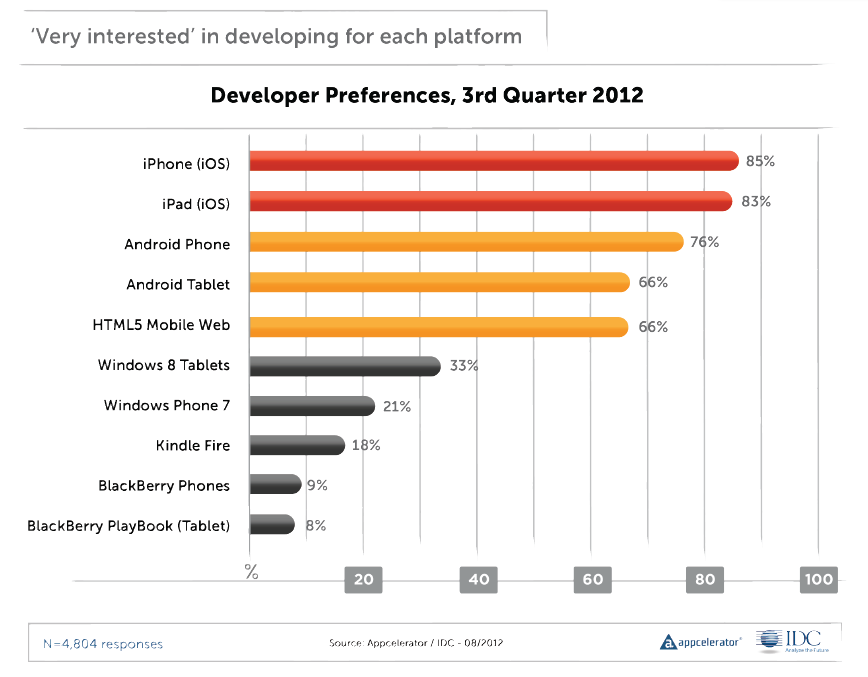
It is worth a read this time around. I was particularly interested to see what Appcelerator developers think of Windows 8, launching later this month. There is a chart showing the percentage of developers who are “very interested” in developing for various mobile platforms, and which shows Apple iOS leading at 85%/83% for iPhone and iPad, Android next, then HTML5, and then Windows 8 Tablets at 33% – already ahead of Windows Phone as well as Amazon and RIM devices (RIM has declined from 40% in January 2011).

image

The report says that potential Windows 8 developers are most interested in the “shared development capabilities between desktop and tablet promised by Microsoft with the launch of Windows 8.” I am not sure exactly what this means, and of course surveys like this are broad-brush and different developers will have meant different things. It could be about code sharing between desktop applications and Windows Runtime (WinRT) apps. It could be about the ability to run WinRT apps on the desktop as well as the tablet. It could be about Visual Studio and its ability to target multiple Windows platforms. However, the the survey goes on to talk about a “single paradigm for both desktop and tablet/smartphone applications” which seems to look forward to a future Windows where desktop applications really are legacy.

There is also a note that there were as many developers convinced that they will not be building apps for Windows 8 or Windows phone, as those who were.

What really counts is in the next paragraph in the report:

A large installed base of devices was the #1 criterion for 53% of developers when asked about why they choose to develop on a platform

This is the simple truth, which is why Microsoft has chosen a strategy which puts WinRT on every Windows 8 box whether or not it is really wanted.

The report also states that developers are dissatisfied with HTML5 for mobile applications, in terms of monetization, security, fragmentation, performance, and more. I suggest not taking too much account of this since Appcelerator’s Titanium tool is an alternative to HTML for mobile apps, so will have attracted those who do not want to use HTML5.

Finally, there is a fun section on what devices developers think they will be targeting in 2015. Televisions head the list, followed by connected cars. Most intriguing though are the final two: foldable screens and Google Glass. Apparently 67.1% believe Google Glass is in their future. Surveys, always entertaining but given the volatility of the results, not something you can rely on as a predictor.

A glimpse into the internal battles that set the future of Windows and .NET

A couple of posts from Hal Berenson give insight into the internal battles at Microsoft as the company worked out its strategy to rescue Windows from irrelevance in the world of mobile and tablets. Berenson is now President of True Mountain Group LLC but was formerly at Microsoft where his roles included SQL Server development and architecture, Mobile Development Tools strategy, and General Manager of Forefront identity and security products.

image

Berenson left Microsoft in October 2010, but by that time the strategy behind Windows 8 and Windows Phone 8 would have been in place.

According to Berenson, there were two core options for evolving Windows. There may have been others, but the heart of it is this: what to do with .NET. One option was to make .NET the app model for Windows, which is what was planned for the original Longhorn, before it was reset and became the less radical update that was Windows Vista. The other was to create a new app model based on native code. Steven Sinofsky, the Windows President, chose the latter, which is why .NET is only one of three options for programming the new tablet personality in Windows 8. This meant going down the opposite path from that of Windows Phone 7, which has an entirely .NET-based programming model.

You may recall from other sources that Steven Sinofsky has never been known to be a .NET fan.  While others within Microsoft, and even senior people in the (pre-Windows 8) Windows organization, wanted to move to an entirely .NET app model for Windows Steven did not.  He (and others fyi) wanted to re-engage the native code C++ developers that Microsoft had been neglecting.  And they wanted to co-opt the huge base of web developers to create apps for the Windows platform.  Well, what had the Windows Phone guys done?  They’d implemented a .NET only app platform.  Could the Windows Phone app platform evolve to address the native and web developers?  Sure.  But with no existing library of apps and a desire not to have .NET-centric platform at the core of Windows Sinofsky apparently felt pretty comfortable ignoring the Windows Phone team’s work.

This goes a long way to explain the puzzlement many of us experienced when it transpired that having created in Windows Phone 7 the basis for a touch-friendly operating system that could easily be extended to larger form factors such as tablets, Microsoft chose instead to do a new thing entirely for its tablet strategy.

One take on this is that Berenson’s account illustrates the chaos at Microsoft. Windows Phone was created in a mad hurry in reaction to the iPhone and the ascendance of touch UIs, reusing pieces of .NET, Silverlight and Zune to bring something to market quickly. Then the company’s next move was not to build on that, but to throw it away, even in the context of a mobile and device revolution that was and is a huge threat to its core business. And where was CEO Steve Ballmer in all of this?

The other take though is how this shows the determination and strategic focus of Windows boss Steven Sinofsky. He did not believe that rebuilding the Windows user interface on .NET would save it, with the Longhorn experiment no doubt a factor in that conviction, so he refused to go down that path again, despite the cost in terms of time and, perhaps more seriously, the impact on the developer ecosystem. Microsoft platform developers were asked first to bet on .NET and Silverlight, and now to bet on this new thing the Windows Runtime, and many are disillusioned or even angry. A hard decision; but putting long term strategy ahead of the immediate demands of your customers may be the right thing, in fact the only right thing.

Berenson also confirms what many of us have always assumed: that the removal of the Start menu on the Windows 8 desktop is all about making the new personality in Windows hard to avoid:

The Start menu, and indeed the entire desktop, are legacies that will have to be removed from Windows over time.  While the desktop itself is probably with us for a couple of additional major Windows releases (though there may be truly desktop-free editions sooner than that) the start menu was something that Steven has bet he could get away with not bringing forward into Windows 8.  By doing so he forces users to start living in the new usage paradigm rather than totally avoiding it.  Yes you can still set up a system to avoid leaving the desktop most of the time.  But you can’t avoid the new world completely.  In doing so he sets people up to eventually accept systems without the desktop at all (or at least Windows RT systems for personal use even if they need the desktop at work, for example).

Personally I no longer miss the Start menu; but its absence is certainly a barrier to adoption for Windows 8, as new users struggle to navigate the operating system.

Note: Berenson has kindly commented below. Note his point that merely working at Microsoft does not give you detailed knowledge of all decisions made there.

AT&T partners with Twilio to offer cloud communication apps

Telecommunications giant AT&T has partnered with Twilio to offer cloud communication apps through a web portal:

Powered by Twilio’s cloud communications services and API platform, ACS offers a Web portal for AT&T business customers to browse from a collection of voice and SMS-enabled apps — such as appointment reminder services, polling & surveying data collection tools, ad-hoc workgroup calling & messaging, business continuity, and geo-smart messaging.

When I read the announcement I was reminded of this talk by Laura Merling at the Redmonk Monki Gras conference last year:

Her final prediction? “Jeff Lawson becomes the CEO of AT&T. Why? Because the model has to change.”

Microsoft’s Azure Mobile Services: node.js and more in beginnings of easy cloud to device development

Microsoft announced Azure Mobile Services last month and it was mentioned by Microsoft Server and Tools boss Satya Nadella at the launch of Visual Studio 2012, as an example of where Microsoft is going with its “Modern app” vision, continuous services and connected devices (but with a Windows 8 or Windows Phone 8 flavour).

Azure Mobile Services is in some ways a reworking of the WCF RIA Services developed to support Silverlight applications, and in fact I swear I saw a reference to RIA Services flash past when I was opening my first Azure Mobile Services project in Visual Studio. It consists of a service type in Microsoft’s Azure cloud combined with a client SDK which is currently for Windows Runtime apps in Windows 8, though the REST protocol used could be called from any client platform.

image

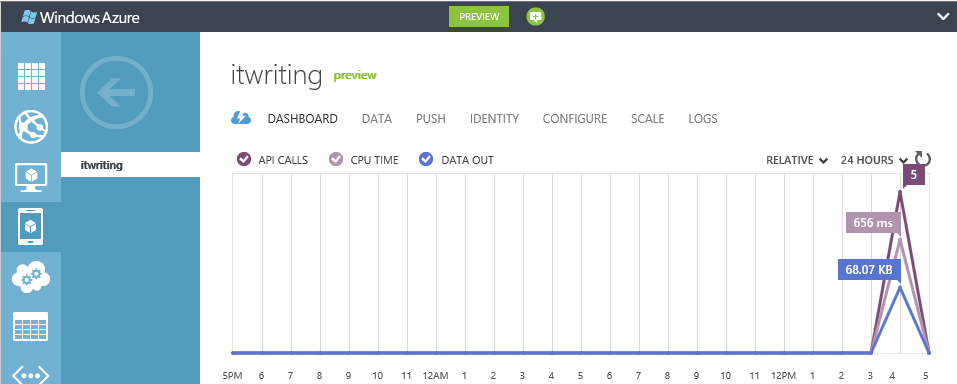
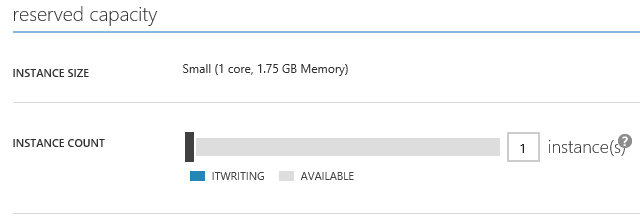
Looking at the dashboard for a Mobile Services project in the Azure portal, you can see what Microsoft is going for here. Mobile Services handles authenticated access to data stored in SQL Server Azure. It is designed to be simple and cost-effective to get started, but can be scaled out by moving from a service on a shared host, to a dedicated VM with multiple instances.

image

It is easy to think of cases where the cloud component of a cloud plus device app need do little more than authenticate users, and retrieve and update data. Azure Mobile Services also provides for server-side scripts which you can modify to handle validation and other tasks.

I was interested to see that the server-side scripts are written in JavaScript and executed by node.js. Node.js is fantastic, and one of the benefits is that if you have an HTML and JavaScript client, you can use JavaScript both on the client and on the server. On the other hand, I wonder if Microsoft’s community would rather work with C# on the server, which is more mature and more familiar. Scott Guthrie’s introductory tutorial does not mention node.js.

I had a quick go at creating my own Azure Mobile Service. I have only been partially successful so far.

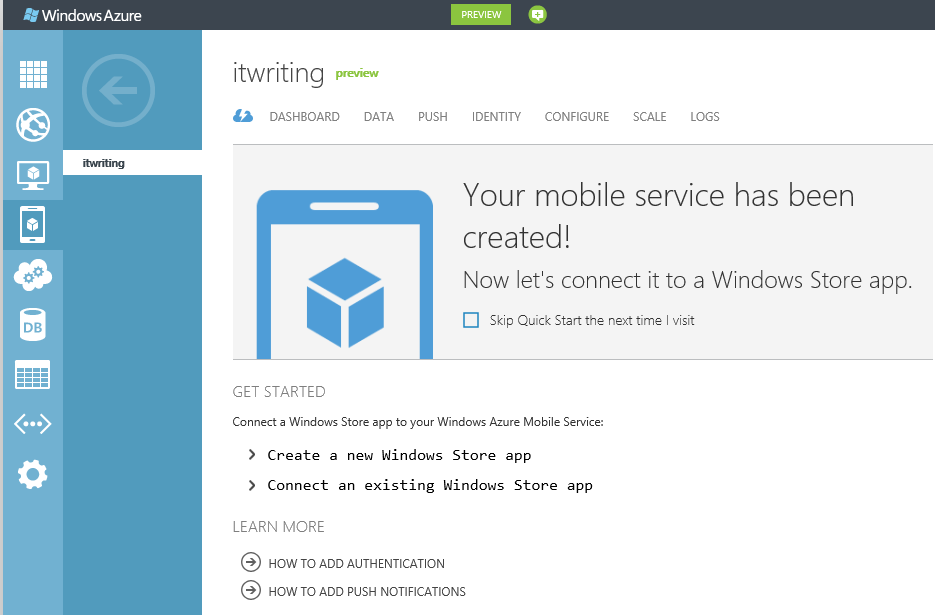
Things started well enough. I created a mobile service and the Quick Start opened.

image

Both Guthrie’s blog and the Quick Start wizard in the Azure portal are based on a todo list app. I went slightly off-piste here, deciding instead to create an app to track my articles on the web. I wanted to see how Azure Mobile Services copes with related tables, as opposed to a single table.

I had a frustrating time trying to create the database tables. I had to add my IP address to a firewall rule, enable popups, and deal with connection failures caused by unknown network issues.

Finally I was able to get into the database designers. I created an Articles table joined to a Publications table, with a very few fields.

Next I downloaded an automatically generated Windows 8 app from the portal. I had hoped this would magically work with my data. Unfortunately though, it seems to be hard-coded for the todo list app. If you do not want a todo list, you have to write your own code; and so far I have not had time to figure out from the reference what to do next. I looked at the Get started with data article, and guess what, it is the todo list again.

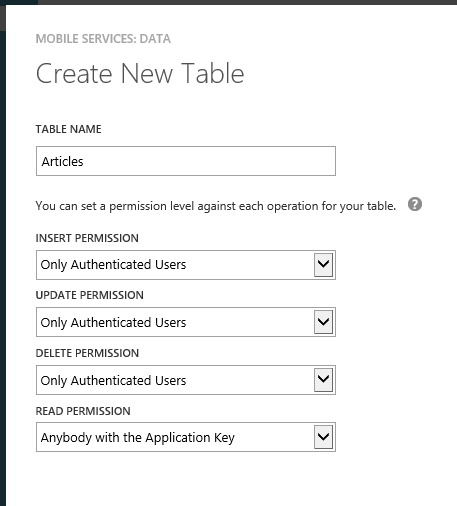
When you create a database, you can specify simple permissions. The todo list example depends on an application key stored in your app and sent over SSL, to grant permission to read and modify data. I selected authenticated user access instead.

image

There is an article explaining how to add authentication, though note that it presumes use of a Microsoft Live ID (the service formerly known as passport). This is perfect in the context of Windows 8 and Windows Store apps, but businesses will want to use Active Directory instead, whether hosted in Azure or Office 365 or on premise. I presume Microsoft will add this at some point though it is not mentioned currently.

My initial conclusion is that Azure Mobile Services shows lots of promise, but that the introductory documentation could be usefully improved, for example not to assume that you want to make a single table todo list app.

In this context the partnership with Xamarin, which is extending the SDK to Apple iOS and Google Android, is excellent news. This makes Azure Mobile Services useful more broadly, and I have a hunch that Xamarin’s support will soon improve the documentation and tutorials. The client SDK is open source and on github.

Note that according to Microsoft’s Kirill Gavrylyuk, in answer to a question from Roger Jennings, Microsoft plans to “roll out full support for iOS and Android including native SDKs soon”, rather than leaving the non-windows support entirely to Xamarin and C#.

Apple looks mortal

This has been a bad week for technical journalism. Everything was going according to script; new iPhone announced on 12th September; not really much new but oh, the design, oh, the performance, oh, the small touches. Then those with early access to devices poured forth their reviews: “probably the most beautiful smartphone anyone has ever made,” said The Telegraph, while Walt Mossberg on the Wall Street Journal said that “Apple has taken an already great product and made it better.”

Mossberg did say that the new Maps app in the iPhone5 was “the biggest drawback” though the faults he found were, in retrospect, minor. He observes the lack of public transport information, and add that “while I found Apple’s maps accurate, they tend to default to a more zoomed-in view than Google’s, making them look emptier until you zoom out.”

When iOS 6 was rolled out generally this week though, the public had a different take on the subject. One factor was that they looked at the maps in their own location, whereas early reviewers tend to be located in major cities. The big issue is not the lack of public transport routing, though that is an issue, but the poor quality of the data. It is simply not of release quality. One small example. Birmingham Airport is a significant destination in the UK, but if I search for it here, I get mysteriously directed to Aldridge Airport, 20 miles north.

image

Note: “Aldridge Airport” closed in the sixties and is “Now an open space used for football, dogwalking and the buzz of radio controlled aircraft.”

Birmingham airport itself seems missing.

image

This search is no challenge for Google Maps.

image

Maps are important on a mobile device, and this was an instance where the technical press, labouring as usual under short deadlines and the unrealistic challenge of perfectly encapsulating the qualities of a complex product with a few days of skimpy research and a few hundred words, let the public down.

More significantly, it is the biggest PR disaster for Apple that I can think of in recent years, certainly since the launch of the iPod in 2001, which was in a sense the beginning of Apple’s mobile adventure. When a tube station puts out a notice mocking Apple’s maps you know that this is a problem that everyone is talking about, not just the Twitterati.

Why has Apple done this? It is paying the price for escaping Google dependence, a real problem, but one that you would have thought could have been better addressed by licensing maps from Microsoft or Nokia, both of which have better maps; or by sticking with Google a little longer while putting its own effort out as an alpha preview while it fixes the data.

Apple will no doubt fix its maps and the decision to break with Google may eventually look good, but it is hard to see how it can fix them quickly.

The big reveal here is how Apple is prioritising its long-term industry strategy ahead of the interests of its users. Apple has done this before; but never with such obvious harm to usability.

It is still, no doubt, a beautiful phone, and the maps issue will be solved, if only by using Google’s web maps instead.

Apple looks mortal though, and the script is not playing back as planned. People who once would only have considered Apple will now be more aware that alternatives are in some respects better. The longer the maps issue continues, the more significant will be the effect.

Apple should withdraw its broken maps, go back to Google at least temporarily and reinstate the old maps app.

BBC replaces Flash with Flash in Android iPlayer

The BBC has announced its solution to the lack of mobile Flash on Android devices, which meant that its iPlayer catch-up service did not work on recent devices like Google’s popular Nexus 7 (though there are hacks to make it work).

However, the BBC is not really replacing Flash, but instead creating a media player that is compiled from Flash into a native Android app. This means that the Flash runtime is compiled into the app.

In the end, Flash was still the best choice of media format for us to use. And the only practical technology for us to play this format back on Android is Adobe Air.

says the BBC’s Chris Yanda.

Yanda points out that using HTTP Live Streaming is impractical since it is not supported on versions of Android prior to Honeycomb; and the majority of Android devices in use are Froyo or Gingerbread.

Judging by the comments, users are glad to have something but disappointed with the BBC’s support for Android. The native iOS app is much better, especially considering that it now supports downloads. On a recent flight I took an iPad with me solely for the ability to watch iPlayer content offline.

Microsoft’s forthcoming Windows RT tablets will support Flash, as I understand it, though only for a limited subset of web sites. Presuming BBC iPlayer is on that list, it should work.

image

Nokia and Windows Phone 8: more questions than answers

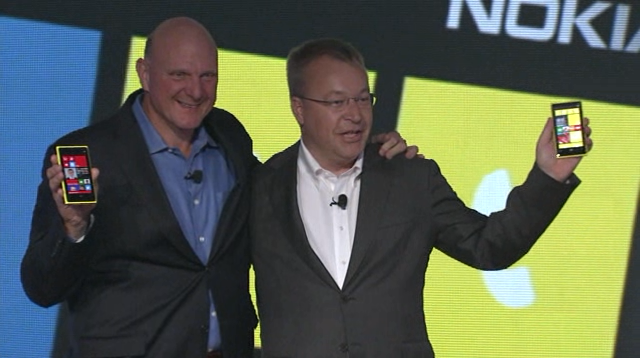
Nokia’s CEO Stephen Elop announced the Lumia 820 and 920 yesterday in New York; new versions of its high-end Windows smartphones and the first to run the forthcoming Windows Phone 8 operating system. Windows Phone 8 runs the same kernel as Windows 8 on PCs and is a significant step towards unification of Microsoft’s development platform.

image

Among the key features announced yesterday:

Wireless charging with the Qi standard and a couple of deals to place charging points in public places. The London Heathrow Virgin Atlantic lounge and the Coffee Bean & Tea Leaf chain will have charging points; not much, but a start. Wireless charging accessories include the JBL PowerUP which combines wireless charging and an audio dock.

PureView imaging technology. This is Nokia’s brand name for a bunch of photo features. Most significant is “floating lens technology” on the larger 920 which, Nokia claims, overcomes camera shake to enable the camera to take in “five times more light”; think of it as a virtual tripod that allows longer exposure without motion blur. If it works it is a huge feature for photo enthusiasts.

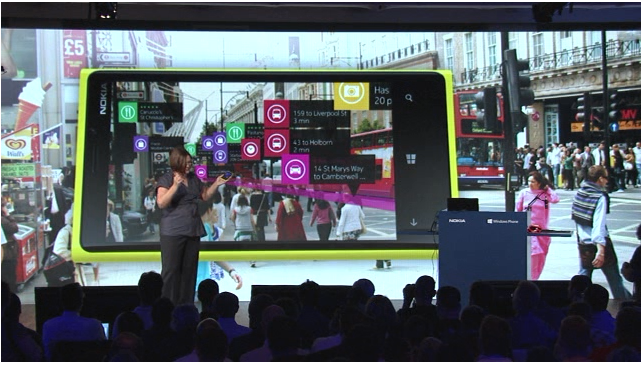
City Lens augmented reality which overlays the view through the phone’s camera with data about what to do and where to go; apparently there is data for indoor as well as outdoor locations.

image

Synaptics ClearPad touch which enables gloved finger support. Since Synaptics is a third-party I guess this feature is unlikely to be exclusive to Nokia for long.

Windows Phone 8 operating system shown off by Microsoft’s Joe Belfiore, including more customizable Live Tiles and a “Blink” feature from Microsoft Research which takes multiple shots in quick succession to enable interesting features like avoiding closed eyes and allowing after-the-event editing using alternate shots.

Screenshots are now a built-in feature. Who cares? Journalists of course; non-availability of this trivial feature meant fewer screenshots of Windows Phone 7 on the web.

Lumia 920 has a 4.5 inch screen, 1.5Ghz dual core Snapdragon S4, front and rear cameras, 1GB RAM, 32GB storage.

Lumia 820 has a 4.3 inch screen,  1.5 Ghz dual core Snapdragon S4, front and rear cameras, 1GB RAM, 8GB storage, microSD slot.

The big disappointment yesterday: no announcement concerning price or availability. Here is what the press release says:

Both phones will be available in pentaband LTE and HSPA+ variants and are expected to start shipping in select markets later in the year. Nokia will announce pricing and specific roll-out dates country by country when sales are due to begin.

Worries about a delay were not relieved by Microsoft’s announcement that the Windows Phone SDK preview will be available to select developers from September 12. “Next Wednesday I’ll share detailed instructions on how current Windows Phone developers with published apps can apply. But I do want to set your expectations that program access will be limited,” says Microsoft’s Todd Bix. He adds that, “The full Windows Phone 8 SDK will be made publically available later this year when we unveil Windows Phone 8.”

That suggests a considerable wait before availability. Even if the Lumias go on sale the same day that the SDK is final, it sounds like November at best; and that gives developers no time at all to work with the new SDK before launch. Key developers have early access of course.

image

Overall the event was less than it should have been, at a time when Android looks vulnerable thanks to Apple’s patent win over Samsung last month.

In some ways though, Nokia’s announcements have little to do with the key questions over Nokia’s Lumia range and Windows Phone 8. Quality is one issue; the launch of the Lumia 800 was damaged by the device’s poor battery life and tendency to sulk and become unchargeable; the rumour is that return rates were unusually high. The knock-on effect is to make it hard for retailers to recommend it to their customers, though firmware updates eventually improved matters. How is battery life on the 820 and 920? What has been done to address quality issues?

Another question, and to me the biggest one, is how Windows 8 for PCs will fare in the market and the impact it will have on Windows Phone. The more time I spend with Windows 8 the more I like it, especially on a tablet, but also on the desktop. There is a barrier to adoption though as the new user interface is a demanding transition for some users. If Windows 8 tablets succeed, there will be instant recognition for the phone user interface and users will have a reason to demand it over iPhone or Android, something that has been lacking up to now.

On the other hand, if appreciation for the nice features of Windows 8 is drowned out by a chorus of “give us back the Start menu”, while vendors focus on expensive fiddly hybrids rather than simple, lightweight tablets, then I doubt Windows Phone 8 will take off either.

Currently I use a Lumia as my main smartphone and (battery life aside) get on well with it. Nokia’s experience with the operating system should mean that this new generation is better, and the phones look good. As Elop himself said though, this is all about ecosystems, and the viability of his third ecosystem is still in the balance.

Nokia City Lens: augmented reality on your Lumia 920 Windows 8 phone

Nokia has announced the Lumia 920 with features including Qi wireless charging, PureView camera, and of course Microsoft’s new Windows Phone 8 operating system.

One eye-catching feature presented by Nokia’s Jo Harlow is City Lens, which uses augmented reality to overlay the view through your phone’s camera with tap-able labels showing information about local restaurants, stations, shops and so on.

image

A great feature; I am sceptical though since Local Scout, a feature in Windows Phone 7 that was meant to find local places of interest including restaurants, shops and so on, was worse than useless in my experience. Information was missing, out of date, and lacked the necessary momentum to have user reviews of any consequence. It was a little better in the most central locations, such as central London.

City Lens could be great though, a practical application of augmented reality (historically a solution looking for a problem) which has obvious appeal.