Category Archives: .net

Full circle for Microsoft database APIs as OLEDB for SQL Server is deprecated

Microsoft’s Eric Nelson has posted about how the OLEDB driver for SQL Server is being deprecated and will not be supported beyond “Denali”, the forthcoming version.

OLEDB was created to be the successor to ODBC – expanding the supported data sources/models to include things other than relational databases. Notably OLEDB was tightly tied to a Windows only technology (COM) whilst ODBC was not (Although we did try and take COM cross platform via partners)

ODBC never did get replaced. What actually happened is that ODBC remained the dominant of the two technologies for many scenarios – and became increasingly used on none Windows platforms and has become the de-facto industry standard for native relational data access.

ODBC was as I recall Microsoft’s first attempt at creating a universal database API.

The death of OLEDB will be slow, according to Nelson. The OLEDB driver for Denali will be supported for seven years following Denali’s release. He also says that OLEDB itself, as opposed to the SQL Server OLEDB driver, is not necessarily being deprecated; though frankly if Microsoft ceases supporting it with its own database I cannot see much future for it.

Note that ADO.NET, which to some extent replaced OLEDB, is not being deprecated. However ADO.NET is only usable from .NET applications. When you consider that Microsoft may be to some extent tilting away from .NET and towards native code, the deprecation of OLEDB becomes even more significant.

ODBC is not particularly easy to use in its raw form. However, you can wrap ODBC with, yes, an OLEDB provider or an ADO.NET provider; or you can wrap the whole lot in an object-relational framework such as Entity Framework.

One more chapter in the long, strange and tortuous history of Microsoft’s data APIs.

Continuous Integration vs Continuous Delivery vs Continuous Deployment: what is the difference?

I am reading the excellent book Continuous Delivery by Jez Humble and David Farley. But what is Continuous Delivery and how does it differ from the other “continuous” development methodologies?

It helps to understand that all these methodologies spring from the Agile software development movement, and the expression Continuous Delivery is a quote from the Agile Manifesto:

Our highest priority is to satisfy the customer through early and continuous delivery of valuable software.

Now, the starting assumption is that most software projects integrate a number of smaller projects, whether from third-parties or from team members. Since these pieces are developed to some extent independently there is a risk that changes made to one piece will require modifications to another piece; hence according to Humble and Farley:

Most software developed by large teams spends a significant proportion of its development time in an unusable state.

The business of getting all the parts to work together is called integration, and if this involves serious work you need to have an integration phase where this is the sole objective. This is a bad idea for all sorts of reasons, slowing development and preventing proper testing other than at the end of these integration phases.

The solution is called Continuous Integration (CI). You have a frequent automated build that assembles all the pieces from all the teams into a working application. If the build fails, or if automated tests run against the build fail, then this is a bug that should be fixed immediately, not later in some separate phase of development.

Tools for CI include Cruise Control, Hudson, TeamCity and others; .NET developers can also configure Visual Studio Team Foundation Server for CI.

The problem with CI alone is that the development environment is not the same as the production environment. What if the CI build works and tests pass, but once deployed the application breaks or performs badly? Perhaps the development environment runs a multi-tier application with all the tiers on a single box, but when deployed onto actual multiple machines or VMs, something goes wrong. Permission problems are another common source of errors.

Continuous Delivery means that you not only build the software, but also deploy it frequently. This usually means provisioning servers, which you can automate using a tool like Puppet for Unix-like servers, or with Virtual Lab Management in a Visual Studio environment. Automation is pretty much essential for this to work. The more closely the test environment matches the production environment, the better.

Generally though, Continuous Delivery means deployment to a test environment. What about taking the next step, and deploying continuously to production? That is the methodology called Continuous Deployment. It sounds risky; but if you have a very extensive and thorough set of automated tests, then the risks are mitigated, especially as the extent of the changes in any one deployment is reduced.

Other suggestions for reducing risk include deploying to a small subset of users first, called “canary testing”; and making rollback easy.

That said, to judge by the Humble/Farley book the distinction between Continuous Delivery and Continuous Deployment is just a little blurred. The authors acknowledge that continuous deployment into production is not always a good idea. They also imply that Continuous Deployment might mean only that your application is always ready and easy to deploy into production, not that you necessarily deploy it constantly:

Your implementation should make it possible to deploy any version of your application that has made it past the automated tests into any of your environments at the push of a button, given the correct credentials.

Compliance and security are also factors that may rightly make it impossible to automate deployment to production completely.

Client-installed applications present some special difficulties which Humble and Farley discuss.

In summary then:

Continuous integration: your application always builds and passes its tests, including all the pieces from different sub-teams.

Continuous delivery: your application always builds and deploys to a test environment and passes its tests.

Continuous deployment: your application is always ready to deploy to production through a largely automated process.

Update: I received an email from Martin Fowler about this post. He refers to Jez Humble’s post on Continuous Delivery vs Continous Deployment and adds:

– I would use your definition of Continuous Deployment for Continuous Delivery

– I would change the definition of Continuous Deployment to say something like "every good build is released to production"

However, I clarified with him that if you building for a test environment but are confident that any build that passes would be OK to deploy to production, then you are still doing Continuous Delivery. In the end, while I am sure you should use Fowler and Humble’s definitions rather than mine, it seems to me a fine distinction and that if you are doing Continuous Delivery properly then the transition to Continuous Deployment is largely a matter of policy.

C++ 11 is approved by ISO: a big day for native code development

Herb Sutter reports that C++ 0x, which will be called C++ 11, has been unanimously approved by the ISO C++ committee. The “11” in the name refers to the year of approval, 2011. The current standard is C++ 98, though amended as C++ 03, so it has taken 8 or 13 years to update it depending on how you count it.

This means that compiler makers can get on with implementing the full C++ 11 standard. Most current compilers implement some of the features already. This Apache wiki shows the current status. A quick glance suggests that the open source GCC is ahead of the pack, followed by Intel C++ and then perhaps Microsoft Visual C++.

C++ 11 is pretty much compatible with C++ 03 so existing code should still work. However there are many new features, enough for Bjarne Stroustrup to say in his feature summary:

Surprisingly, C++0x feels like a new language: The pieces just fit together better than they used to and I find a higher-level style of programming more natural than before and as efficient as ever. If you timidly approach C++ as just a better C or as an object-oriented language, you are going to miss the point. The abstractions are simply more flexible and affordable than before. Rely on the old mantra: If you think of it as a separate idea or object, represent it directly in the program; model real-world objects, and abstractions directly in code. It’s easier now.

Concurrent programming is better supported in C++ 11, important for getting the best performance from modern hardware.

It is curious how the programming landscape has changed in recent year. A few years back, you might have foreseen a day when most programming would be .NET, Java or JavaScript: all varieties of managed code. While those languages do still dominate, native code has come more to the fore, thanks to factors like Apple’s focus on Objective C, and signs of internal conflict at Microsoft over the best language for coding Windows applications.

That said, C++ 11 remains a demanding language to learn and use. As Stroustrup notes, since C++ 11 is a superset of C++ 98 it is technically harder to learn all of it, though new libraries and abstractions should help beginners. The reasons for using or not using C++ are not going to change significantly with this new standard.

Mozilla to take on the cross-platform app challenge

Mozilla is facing an uncertain future. Its problem: basing a business (even a non-profit one) on being the alternative to Microsoft’s Internet Explorer is no longer sensible, given that Apple and Google are now doing this too, and even Microsoft is now investing in HTML 5. I discussed these issues in more detail here.

So what is Mozilla to do? Mozilla Chair Mitchell Baker has posted about a possible new approach, based on being the alternative to Apple for apps. She lists some of the problems with the current “app experience”. Apps are device-specific, require permission at many levels, and a few App Store owners (mainly Apple but also Google) control the business model and customer relationships.

Mozilla is proposing what I presume is a new app platform, which will be cross-platform and cross-device. Instead of discovering apps in a single app store, she envisages multiple providers and the ability to find apps in the same way we find web content.

In other words, if the old Mozilla was about freedom from Microsoft and allowing web technology to progress, the new Mozilla might be about freedom from Apple and allowing app technology to progress.

It is a bold vision and one that in principle would be welcome. That said, Mozilla cannot change the control Apple has over its platform, and its insistence that apps are installed only through its own App Store. Maybe she has in mind a cross-platform toolkit, or browser-based apps, or some combination.

Another snag is that whereas there was widespread dissatisfaction with Microsoft’s Internet Explorer back in 2004 when Firefox was launched, this is not the case with Apple and its app platform today. Apple’s App Store system undoubtedly has a dark side, but the user experience is good and developers are making money, some of them at least. Apple’s control over app installation and the constraints imposed on what apps can do are also good for security.

Nevertheless, having looked at a number of cross-platform mobile toolkits, from PhoneGap to Appcelerator Titanium to Adobe AIR, I can see both the significance of this kind of development and that there is plenty of scope for improvement.

Real-world Microsoft Team Foundation Server: Not very good, says ThoughtWorks

I spoke to Sam Newman, who is European Continuous Delivery Practice Lead at ThoughtWorks, a software development company. Needless to say, we talked extensively about Continuous Delivery and I will be reporting on this separately; but I was also interested in his comments on Microsoft’s Team Foundation Server (TFS).  He told me that ThoughtWorks teams often end up working with it at their .NET clients, but it is problematic. In one case, he said, 6% of productive time was absorbed dealing with TFS.

What was the problem, performance, bugs, features lacking?

When we’ve looked at the problems we’ve had, a lot of it unfortunately comes down to the version control system. It’s not very good. It’s slow, you can’t do rollbacks, sometimes things go missing, you get locks. When we talked about 6% of time, they were things like waiting for a solution to expand in Visual Studio. A lot of those issues are in the version control system.

A frustration is that you cannot use TFS with any version control system other than its own.

Every other build server in the world, from Anthill to Go to Cruise Control to Hudson, you can put in at least 10 version control systems. In TFS they are all coupled. So you can’t take the version control and point it at Subversion. That might resolve a lot of the issues.

Why is TFS so widely used? It is because it comes in the box, says Newman.

I can’t think of a single client that wanted a tool, went out into the marketplace, and selected TFS because it is the right tool for them. Most clients use TFS because it comes with their Enterprise MSDN licence.

I have tried TFS myself and found it pretty good; but then I am just testing it on small projects as a solo developer, so it is hard for me to replicate the experience of a real-world team. You would have thought that performance issues, such as waiting ages for a solution to expand in Visual Studio, could be solved by tracing the reason for the delay; but apparently this is not easy.

This is anecdotal evidence, and of course there may be plenty of TFS installations out there that work very well; I would be interested in hearing of counter examples. I am also not sure to what extent the problems apply to all versions of TFS, or whether there is improvement in TFS 2010.

Newman recognizes that anecdotal evidence is not much use: he says ThoughtWorks is trying to collect some solid data that can be used both to discuss with clients making version control and build system choices, and with Microsoft.

Performance is a feature, and makes a large contribution to user satisfaction. The first release of Outlook 2007 was extraordinarily slow in some setups, and I remember the pain of clicking on a folder and then waiting tapping my fingers while it thought about expanding. It sounds like some TFS users are having a similar experience but in Visual Studio.

GPU Programming for .NET: Tidepowerd’s GPU.NET gets some improvements, more needed

When I attended the 2010 GPU programming conference hosted by NVIDIA I encounted Tidepowerd, which has a .NET library called GPU.NET for GPU programming.

GPU programming enables amazing performance improvements for certain types of code. Most GPU programming is done in C/C++, but Typepowerd lets you run code in .NET, simply marking any methods you want to run on the GPU with a [kernel] attribute:

[Kernel]

private static void AddGpu(float[] a, float[] b, float[] c)

{

// Get the thread id and total number of threads

int ThreadId = BlockDimension.X * BlockIndex.X + ThreadIndex.X;

int TotalThreads = BlockDimension.X * GridDimension.X;

for (int ElementIndex = ThreadId; ElementIndex < a.Length; ElementIndex += TotalThreads)

{

c[ElementIndex] = a[ElementIndex] + b[ElementIndex];

}

}

GPU.NET is now at version 2.0 and includes Visual Studio Error List and IntelliSense support. This is useful, since some C# code will not run on the GPU. Strings, for example, are not supported. Take a look at this article which lists .NET OpCodes that do not work in GPU.NET.

GPU.NET requires an NVIDIA GPU with CUDA support and a CUDA 3.0 driver. It can run on Mac and Linux using Mono, the open source implementation of .NET. In principle, GPU.NET could also work with AMD GPUs or others via a vendor-specific runtime:

image

but the latest FAQ says:

Support for AMD devices is currently under development, and support for other hardware architectures will follow shortly.

Another limitation is support for multiple GPUs. If you want to do serious supercomputing relatively cheaply, stuffing a PC with a bunch of Tesla GPUs is a great way to do it, but currently GPU.NET only used one GPU per active thread as far as I can tell from this note:

The GPU.NET runtime includes a work-scheduling system which can distribute device method (“kernel”) calls to multiple GPUs in the system; at this time, this only works for applications which call device-based methods from multiple host threads using multiple CPU cores. In a future release, GPU.NET will be able to use multiple GPUs to execute a single method call.

I doubt that GPU.NET or other .NET libraries will ever compete with C/C++ for performance, but ease of use and productivity count for a lot too. Potentially GPU.NET could bring GPU programming to the broad range of .NET developers.

It is also worth checking out hoopoe’s CUDA.NET and OpenCL.NET which are free libraries. I have not done a detailed comparison but would be interested to hear from others who have.

Microsoft releases Visual Studio LightSwitch: a fascinating product with an uncertain future

Microsoft has released Visual Studio LightSwitch, a rapid application builder for data-centric applications.

image

LightSwitch builds Silverlight applications, which may seem strange bearing in mind that the future of Silverlight has been hotly debated since its lack of emphasis at the 2010 Professional Developers Conference. The explanation is either that Silverlight – or some close variant of Silverlight – has a more important future role than has yet been revealed; or that the developer division invented LightSwitch before Microsoft’s strategy shifted.

Either way, note that LightSwitch is a model-driven tool that is inherently well-suited to modification for different output types. If LightSwitch survives to version two, it would not surprise me to see other application targets appear. HTML 5 would make sense, as would Windows Phone.

So LightSwitch generates Silverlight applications, but they do not run on Windows Phone 7 which has Silverlight as its development platform? That is correct, and yes it does seem odd. I will give you the official line on this, which is that LightSwitch is not aimed primarily at developers, but is for business users who run Windows and who want a quick and easy way to build database applications. They will not care or even, supposedly, realise that they are building Silverlight apps.

I do not believe this is the whole story. It seems to me that either LightSwitch is a historical accident that will soon be quietly forgotten; or it is version one of a strategic product that will build multi-tier database applications, where the server is either Azure or on-premise, and the client any Windows device from phone to PC. Silverlight is ideal for this, with its modern presentation language (XAML), its sandboxed security, and its easy deployment. This last point is critical as we move into the app store era.

LightSwitch could be strategic then, or it could be a Microsoft muddle, since the official marketing line is unconvincing. I have spent considerable time with the beta and doubt that the supposed target market will get on with it well. Developers will also have a challenge, since the documentation is, apparently deliberately, incomplete when it comes to writing code. There is no complete reference, just lots of how-to examples that might or might not cover what you wish to achieve.

Nevertheless, there are flashes of brilliance in LightSwitch and I hope, perhaps vainly, that it does not get crushed under Microsoft’s HTML 5 steamroller. I set out some of its interesting features in a post nearly a year ago.

Put aside for a moment concerns about Silverlight and about Microsoft’s marketing strategy. The truth is that Microsoft is doing innovative work with database tools, not only in LightSwitch with its model-driven development but also in the SQL Server database projects and “Juneau” tools coming up for “Denali”, SQL Server 2011, which I covered briefly elsewhere. LightSwitch deserves a close look, even it is not clear yet why you would want actually to use it.

image

The strategy behind Mono has shifted: ten years of open source .NET

Yesterday, SUSE and Xamarin announced, in effect, the transfer of all things Mono to Xamarin.

The agreement grants Xamarin a broad, perpetual license to all intellectual property covering Mono, MonoTouch, Mono for Android and Mono Tools for Visual Studio. Xamarin will also provide technical support to SUSE customers using Mono-based products, and assume stewardship of the Mono open source community project.

Xamarin is a startup formed by Mono founder Miguel de Icaza following the acquisition of Novell and SUSE by Attachmate, which ceased Mono development.

Attachmate acquired Novell in November 2010. Mono has been plucked from the abyss with impressive speed.

That said, the strategy behind Mono has shifted. Mono exists because de Icaza liked what Microsoft announced back in 2000 when it introduced C# and the .NET Framework. Microsoft made a show of standardizing the .NET CLI (Common Language Infrastructure), which made PR sense at the time since there was controversy over Sun’s ownership of Java, though nobody really believed that Microsoft knew how to steward an open source development platform or indeed believed that it was really serious about it. History largely justifies that scepticism; but de Icaza called Microsoft’s bluff and forged ahead with Mono, implementing not only the CLI and C# but most of the .NET Framework as well.

The goal of Mono, as I recall, was to bring the benefits of C# and .NET to Linux developers, and to enable developers to move applications freely between Windows and Linux. Apple OS X was also on the radar, though it took longer to become much use. Recalling Mono’s early days, de Icaza said:

Mono to me is a means to an end: a technology to help Linux succeed on the desktop.

Mono worked remarkably well from quite early on, but never quite well enough to persuade mainstream developers it was a sensible choice for applications that would otherwise have run on Windows. It did emerge as a viable and productive toolset and platform for Linux and a number of Mono applications became popular, including Beagle search, Tomboy notes, and F-Spot photo management. Some ASP.NET applications run on Mono; I have one on this site. Another Mono success was its use as the scripting engine in Unity, a game development platform.

A big problem for Mono though was the lack of a business model. There was support and servicing of course, which must have generated some revenue for Novell, but most Mono use is free. Novell possibly had in mind that Mono could be significant as an application server, but it has never become a really trusted platform in the Enterprise. For example, as Alan Radding (Dancing Dinosaur) notes:

DancingDinosaur has not found any SUSE on z user that has successfully implemented .NET apps on the mainframe. A few have tried but reported that Mono on z wasn’t ready for prime time.

Even among the free software and open source community, Mono was hampered by suspicion of Microsoft. If Mono became successful enough to threaten Microsoft, would lawyers appear? Given the way Microsoft is currently behaving with Android, filing legal actions and signing up licensees, those fears might not be unwarranted.

So what is Mono today? The answer is that Mono is now primarily a mobile platform. The Xamarin home page makes this clear, as well as making it apparent that the Mono team has discovered the value of a business model:

image

Xamarin is tapping into two real business needs. One is the need for a cross-platform mobile development platform that works. The second is a way for Windows developers to use their existing C# skills for mobile development, given that they might not be happy with the tiny market share currently achieved by Windows Phone 7.

When I had a quick try with Monotouch I was impressed, and I would like to spend some more time with it and with Mono for Android.

Mono has touch competition though. In particular, PhoneGap, Appcelerator’s Titanium, and Adobe AIR. I was interested to see that Adobe is coming up with a packager for AIR on Android, which may significantly improve it as a cross-platform mobile toolkit.

Still, Xamarin is small and nimble and I expect it to succeed. It has also has Visual Studio integration, which is an advantage. One of the pieces Xamarin has now licensed from SUSE is Mono for Visual Studio.

The downside of these latest developments is that if you depend on Mono for the desktop or for ASP.NET, you may find these parts of the Mono project getting little attention from the new company. But Mobile is all that matters now, right?

I write this on July 19 2011. According to Wikipedia:

Recognizing that their small team could not expect to build and support a full product, they launched the Mono open source project, on July 19, 2001 at the O’Reilly conference.

Well, if there was a launch there it was low-key. It is not mentioned in this report. But de Icaza does recall:

We planned the announcement to come by July 19th 2001, so we could announce this at the O’Reilly conference, as Tim O’Reilly had been very supportive of this effort, and had offered his help since the early stages, when it was still a very young idea. When we announced the project launch we had our team in place, and we were shipping our metadata framework and our C# compiler as well as a few initial classes So officially the Mono project was launched on that date, but it had been brewing for a very long time.

Happy Anniversary!

Hands on debugging an Azure application – what to do when it works locally but not in the cloud

I have been writing a Facebook application hosted on Microsoft Azure. I hit a problem where my application worked fine on the local development fabric, but failed when deployed to Azure. The application was not actually crashing; it just did not work as expected. Specifically, either the Facebook authentication or the ASP.NET Forms Authentication was failing; when I tried to log on, the log on failed.

This scenario, where the app works locally but not on Azure, is potentially a bad one because you do not have the luxury of breakpoints and variable inspection. There are several approaches. You can have the application write a log, which you could download or view by using Remote Desktop to the Azure instance. You can have the application output debug messages to HTML. Or you can use IntelliTrace.

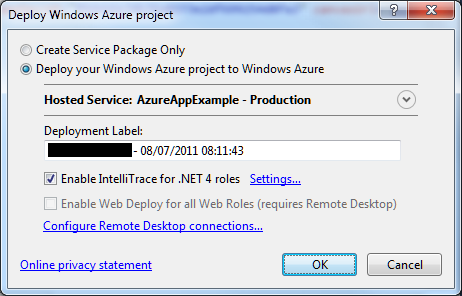
I tried IntelliTrace. It is easy to set up, just check the box when deploying.

image

Once deployed, I tried the application. Clicked the Log On button, after which the screen flashed but still asked me to Log On. The log on had failed.

image

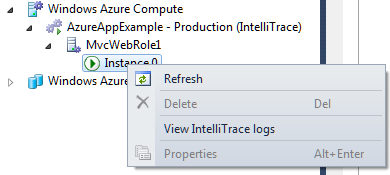
I closed the app, opened Server Explorer in Visual Studio, drilled down into the Windows Azure Compute node and selected View IntelliTrace Logs.

image

The logs took a few minutes to download. Then you can view is the IntelliTrace log summary, which includes a list of exceptions. You can double-click an exception to start an IntelliTrace debug session.

image

Useful, but I still could not figure out what was wrong. I also found that IntelliTrace did not show the values for local variables in its debug sessions, though it does show exceptions in detail.

Now, if you really want to debug and trace an Azure application you had better read this MSDN article which explains how to create custom debugging and trace agents and write logs to Azure storage. That seems like a lot of work, so I resorted to the old technique of writing messages to HTML.

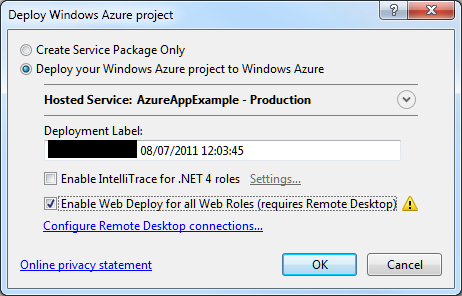
At this point I should mention something you must do in order to debug on Azure and remain sane.  This is to enable WebDeploy:

image

It is not that hard to set up, though you do need to enable Remote Desktop which means a trip to the Azure management portal. In my case I am behind a firewall so I needed to configure Web Deploy to use the standard SSL port. All is explained here.

Why use Web Deploy? Well, normally when you deploy to Azure the service actually builds, copies and spins up a new virtual machine image for your app. That process is fundamental to Azure’s design and means there are always at least two copies of the VM in existence. It is also slow, so if you are making changes to an app, deploying, and then testing, you will spend most of your time waiting for Azure.

Web Deploy, by contrast, writes to your existing instance, so it is many times quicker. Note that once you have your app working, it is essential to deploy it properly, since Azure might revert your app to the last VM you created.

With Web Deploy enabled I got back to work. I discovered that FormsAuthentication.SetAuthCookie was not working. The odd thing being, it worked locally, and it had worked in a previous version deployed to Azure.

Then I began to figure it out. My app runs in a Facebook canvas. Since the app is served from a different site than Facebook, cookies may be rejected. When I ran the app locally, the app was in a different IE security zone, so different rules applied.

But why had it worked before? I realised that when it worked before I had used Google Chrome. That was it. IE worked locally; but only Chrome worked when deployed.

I have given up trying to fix the specific problem for the moment. I have dug into it a little, and discovered that cookie handling in a Facebook canvas with IE is a long-standing problem, and that the Facebook C# SDK may have bugs in this area. It is not essential for my sample; I have found I can get by with the Facebook session. To get the user ID, for example:

FacebookWebContext.Current.Session.UserId

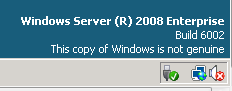
The time has not been wasted though as I have learned a bit about Azure debugging. I was also amused to discover that my Azure VM has activation problems:

image

The frustration of developing for Facebook with C#

I am researching a piece on developing for Facebook with Microsoft Azure, and of course the first thing I did was to try it out.

It is not easy. The first problem is that Facebook does not care about C#. There are four SDKs on offer: JavaScript, Apple iOS, Google Android, and PHP. This has led to a proliferation of experimental and third-party SDKs which are mostly not very good.

The next problem is that the Facebook API is constantly changing. If you try to wrap it neatly in an SDK, it is likely that some things will break when the next big change comes along.

This leads to the third problem, which is that Google may not be your friend. That helpful article or discussion on developing for Facebook might be out of date now.

Now, there are a couple of reasons why it should be getting better. Jim Zimmerman and Nathan Totten at Thuzi (Totten is now a technical evangelist at Microsoft) created a new C# Facebook SDK, needing it for their own apps and frustrated with what was on offer elsewhere. The Facebook C# SDK looks like it has some momentum.

C# 4.0 actually works well with Facebook, thanks to the dynamic keyword, which makes it easier to cope with Facebook’s changes and also lets it map closely to the official PHP SDK, as Totten explains.

Nevertheless, there are still a few problems. One is that documentation for the SDK is sketchy to say the least. There is currently no reference for it on the Codeplex site, and most of the comments are the kind that produces impressive-looking automatic documentation but actually tells you nothing of substance. Plucking one at random:

FacebookClient.GetAsync(System.Collections.Generic.IDictionary<string,object>)

Summary:
Makes an asynchronous GET request to the Facebook server.

Parameters:
parameters: The parameters.

Another problem, inherent to dynamic typing, is that IntelliSense (auto-completion in Visual Studio) has limited value. You constantly need to reference the Facebook documentation.

Finally, the SDK has changed quite a bit in different versions and some of the samples reference old versions.

In particular, I found it a struggle getting OAuth authentication and access token retrieval working and ended up borrowing Totten’s sample code here which mostly works – though note that the code in the sample does not cope with the same users logging out and logging in again; I fixed this by changing his InMemoryUserStore to use a ConcurrentDictionary instead of a ConcurrentBag, though there are plenty of other ways you can store users.

I’m puzzled why Microsoft does not invest more in making this easier. Microsoft invested in Facebook and it is easy to get the impression that Microsoft and Facebook are in some sort of informal alliance versus Google. Windows Phone 7, for example, ties in closely with Facebook and is probably the best Facebook phone out there.

As it is, although I prefer coding in C# to PHP, I would say that choosing PHP as the platform for your Facebook app will present less friction.