Category Archives: .net

ReSharper 6.0 arrives: intelligent editing and decompiling for Visual Studio

JetBrains has released ReSharper 6.0, an add-on for Visual Studio 2008 and 2010 that delivers a remarkable range of tools, mostly focused on code editing and static analysis. There is also a unit test runner and a source code decompiler.

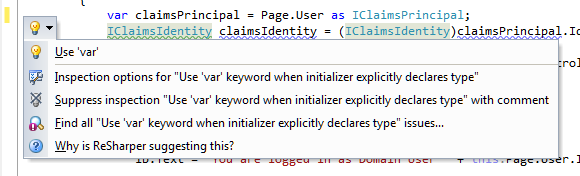
The heart of ReSharper is refactoring, hence the name, and it adds a large number of refactoring options to Visual Studio. These are nicely integrated with the editor, not only as right-click menu options, but with light-bulb suggestions that appear automatically. Here, for example, ReSharper is telling me that I could use implicit type declaration, and offering to make the change for me, or alternatively to suppress this type of suggestion forever if I do not like it:

image

Source code decompiling is also nicely done. In the above code, IClaimsIdentity is part of the .NET Framework so the source code is not normally available. With ReSharper though, I can navigate to decompiled source:

image

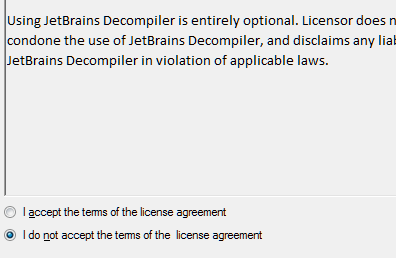
This could be legally sensitive, so I have to pass a Decompiler Legal Notice in which JetBrains attempts to disclaim liability.

image

Then I am in, though the results are not exciting in this instance:

image

If you only want the decompiler, you may find the free dotPeek is all you need.

The what’s new list in ReSharper 6.0 is long. It includes support for JavaScript, ASP.NET Razor, CSS and HTML, better XAML support including creating properties and dependency properties from usage, and macros for file headers which automates things like inserting current date and time.

The pricing is not excessive: in the UK it costs £148 for a personal license or £259 for a commercial license. If you think ReSharper will save you time and improve your code quality, which it likely will, it will soon pay for itself.

Microsoft Office 365: the detail and the developer story

I attended the UK launch of Office 365 yesterday and found it a puzzling affair. The company chose to focus on small businesses, and what we got was several examples of customers who had discovered the advantages of storing documents online. We were even shown a live video conference with a jerky, embarrassing webcam stream adding zero business value and reminding me of NetMeeting back in 1995 – which by the way was a rather cool product. Most of what we saw could have been done equally well in Google Apps, except for a demo of the vile SharePoint Workspace for offline editing of a shared document, though if you were paying attention you could see that the presenter was not really offline at all.

There seems to be a large amount of point-missing going on.

There is also a common misconception that Office 365 is “Office in the cloud”, based on Office Web Apps. Although Office Web Apps is an interesting and occasionally useful feature, it is well down the list of what matters in Office 365. It is more accurate to say that Office 365 is for those who do not want to edit documents in the browser.

I am guessing that Microsoft’s focus on small businesses is partly a political matter. Microsoft has to offer an enterprise story and it does, with four enterprise plans, but it is a sensitive matter considering Microsoft’s relationship with partners, who get to sell less hardware and will make less money installing and maintaining complex server applications like Exchange and SharePoint. The, umm, messaging at the Worldwide Partner Conference next month is something I will be watching with interest.

The main point of Office 365 is a simple one: that instead of running Exchange and SharePoint yourself, or with a partner, you use these products on a multi-tenant basis in Microsoft’s cloud. This has been possible for some time with BPOS (Business Productivity Online Suite), but with Office 365 the products are updated to the latest 2010 versions and the marketing has stepped up a gear.

I was glad to attend yesterday’s event though, because I got to talk with Microsoft’s Simon May and Jo Carpenter after the briefing, and they answered some of my questions.

The first was: what is really in Office 365, in terms of detailed features? You can get this information here, in the Service Description documents for the various components. If you are wondering what features of on-premise SharePoint are not available in the Office 365 version, for example, this is where you can find out. There is also a Support Service Description that sets out exactly what support is available, including response time objectives. Reading these documents is also a reminder of how deep these products are, especially SharePoint which is a programmable platform with a wide range of services.

That leads on to my second question: what is the developer story in Office 365? SharePoint is build on ASP.NET, and you can code SharePoint applications in Visual Studio and deploy them to Office 365. Not all the services available in on-premise SharePoint are in the online version, but there is a decent subset. Microsoft has a Sharepoint Online for Office 365 Developer Guide with more details.

Now start joining the dots with technologies like Active Directory Federation Services – single sign-on to Office 365 using on-premise Active Directory – and Windows Azure which offers hosted SQL Server and App Fabric middleware. What about using Office 365 not only for documents and email, but also as a portal for cloud-hosted enterprise applications?

That makes sense to me, though there are still limitations. Here is a thread where someone asks:

Does some know if it is possible to make a database connection with Office365, SharePoint (Designer) and SQL Azure database ?

and the answer from Microsoft’s Mark Kashman on the SharePoint team:

You cannot do this via SharePoint Designer today. What you can do is to create a Silverlight or javaScript client application that calls out to SQL Azure.

In the near future, we are designing a way to make these connections using the base SharePoint technology called BCS (Business Connectivity Services) where then you could develop a service to service to SQL Azure.

If you cannot wait, check out the Cloud Connector for SharePoint 2010 from Layer 2 GmbH.

It seems obvious that Office 365 and Azure together have potential as a developer platform.

What about third-party applications and extensions for Office 365? This is another thing that Microsoft did not talk about yesterday; but it seems to me that there is potential here as well. It is not well integrated, but you can search Microsoft Pinpoint for Office 365 applications and get some results. If Office 365 succeeds, and I think it will, there is an opportunity for developers here.

Common sense on Windows 8, Silverlight and .NET

I am wary about writing another post on this subject in the absence of any further news, but since there is a lot of speculation out there I thought it would be worth making a few further observations.

Will Windows 8 support Silverlight and/or some other variety of .NET in its new touch-centric mode? I will be astonished if it does not. Aside from other considerations, this is an essential unifying piece between the Windows Phone 7 developer platform and the Windows 8 developer platform, which from what we have seen have a similar user interface. For further evidence, try an internet search for “Jupiter” and “appx”.

Why isn’t Microsoft already shouting about this? A good question. Part of the answer is that Microsoft wants to get developers enthused about the forthcoming build conference in September, and is holding back information.

Another part of the answer is that Windows historically has kept .NET as a layer above the operating system, rather than as part of it. We saw this in Windows 7, where to take advantage of new features like jump lists or thumbnail toolbars, .NET developers had to use a supplementary Windows API Code Pack. The Windows team delivered only native code or COM APIs.

Admittedly, there are differences this time around. The Windows team is not just delivering native code APIs, but also an HTML and JavaScript API. This is a break with the past, hence the talk of a new platform.

When it comes to desktop applications, would not Silverlight or something .NET based be a better choice than HTML5? I can see both sides of this. On one side is all the effort Microsoft has invested in .NET and Silverlight over the past decade. As I’ve noted before, I see Silverlight as what client-side .NET should have been from the beginning, lightweight, secure, simple installation, but with support for C# and much of the .NET Framework which developers know so well.

On the other hand, I can see Microsoft wanting to tap into the wave of HTML5 development and to make it easy for web developers to build apps for Windows 8.

In the end, developers will most likely have the choice. That puts pressure on Microsoft’s developer division to provide strong tools for two different development models; but I think that is what we will get.

Is .NET itself under threat? As far as I am aware, Microsoft has no plan “B” in terms of web and application server technology, and its Azure cloud is largely a .NET platform though there are are efforts to support other things like PHP and Java. Further, this aspect of the Microsoft Platform is under Server and Tools which is 100% behind .NET as far as I can tell. We have also seen Silverlight crop up in the user interfaces for new server products like InTune and System Center. On the server then, there is no evidence for .NET doubts at Microsoft; and considering the trend towards cloud+device computing the server is now at the heart of most business application development.

That said, Microsoft has challenges in sustaining .NET momentum. It cannot afford to fail with Azure, yet other platforms such as Amazon EC2 have greater developer mindshare as cloud computing platforms. VMWare with its Java-based Spring framework is another key competitor. Microsoft was late to the server virtualisation party with Hyper-V. I also see declining market share for IIS versus Apache in Netcraft’s statistics, although these figures are distorted by millions of little-used domains that get shunted from one platform to another by major hosting providers.

Further, it seems to me that the fortunes of .NET on the server cannot be completely separated from what happens on the client. One of the attractions of .NET is the integration between client and server, with Visual Studio as the tool for both. Windows has lost momentum to Apple in mobile, in tablets, and in high-end laptops, making Windows-only clients less attractive. In that context, the decision of the Windows team to favour HTML5 over .NET is a blow, in that it seems to concede that the future client is cross-platform, though I expect there will be some sort of outcry when we see all the proprietary hooks Microsoft has implemented to get HTML5 apps integrated into Windows 8.

Therefore these really are difficult times for .NET. I do not count Microsoft out though; it still dominates business computing, and amongst consumers the Xbox may prove an important new platform as Tom Warren notes.

While I have reservations about Windows 8, it does demo nicely as a new touch-centric operating system and Microsoft surely has chances in the corporate world with new-style tablets that integrate with its system management tools and which run Microsoft Office.

Finally, the angst over the role of .NET in Windows 8 shows that many developers actually like the platform, including Visual Studio, the C# language, the .NET Framework, and XAML for building a rich user interface.

Full circle at Microsoft: from the early days of .NET to the new Chakra JavaScript engine

A discussion with a friend about the origins of Microsoft’s .NET runtime prompted a little research. How did it come about?

A quick search does not throw up any detailed accounts. Part of the problem is that much of it is internal Microsoft history, confidential at the time.

One strand, mentioned here, is Colusa’s OmniVM:

OmniVM was based on research carried out by Steven Lucco at Carnegie Mellon University. Steven co-founded Colusa Software in February 1994 in Berkeley, California. Omniware was released in August 1995. Colusa started working with Microsoft in February 1996. Microsoft acquired Colusa Software on March 12, 1996. Steven is currently a senior researcher at the Microsoft Bay Area Research Center.

OmniVM was appealing to Microsoft because Colusa had already created Visual Basic and C/C++ development environments for the VM. The VM was also claimed to be capable of running Java.

Microsoft took to calling the VM by the name of CVM, presumably for Colusa Virtual Machine. Or perhaps this is where the code name Cool came into being. Other names used at Microsoft include Universal Virtual Machine (UVM), and Intermediate Language (IL).

Microsoft’s Jason Zander, commenting to a story on this blog, does not mention OmniVM:

The CLR was actually built out of the COM+ team as an incubation starting in late 1996. At first we called it the "Component Object Runtime" or COR. That’s why several of the unmanaged DLL methods and environment variables in the CLR start with the Cor prefix.

Still, the timing pretty much matches. If Lucco came to Microsoft in 1996, he could have been part of an incubation project starting later that year.

In June 1999 Microsoft previewed the Common Executable Format for Windows CE:

A demonstration on Common Executable Format (CEF), a new compiler target within the Visual C++® development system for Windows CE, was also presented. This compiler enables cross-processor portability within a category of devices, such as Palm-size PCs or Handheld PCs. A single program executable under CEF is translated to the native code on either the host PC or the device, as desired. This capability eliminates the need for developers to recompile an application for every possible processor on a given Windows CE-based appliance before bringing it to market, thus enabling them to support every version of a device (Palm-size or Handheld PC) quickly and easily.

In 2000 I interviewed Bob Powell, then at Stingray, who told me this in relation to .NET:

There was an early version of the system for Windows CE called the Common Executable Format (CEF). The Pocket PC, which uses around seven different processor types, and which has many different versions of the operating system, is a deployment nightmare. This problem was addressed by the CEF, which was a test case. What is now in the IL is a more refined version of that.

Hmm, now that Windows is coming to ARM alongside x86, this sounds like it could be useful technology … though despite obvious similarities, I don’t think CEF was really an early version of the CLR. Maybe the teams communicated to some extent.

Now this is interesting and brings the story up to date. Lucco is still at Microsoft and apparently his team built Chakra, the new JavaScript engine introduced in Internet Explorer 9:

image

Steven E. Lucco is currently the chief architect for the Microsoft Browser Programmability and Tools (BPT) team. BPT builds the Internet Explorer’s Chakra Javascript script engine, as well as the Visual Studio tools for creating scalable, efficient Web client applications.

Right now, these are dark days for .NET, because Microsoft now seems to be positioning HTML and JavaScript as the new universal runtime.

It seems that the man who perhaps began the .NET Runtime is also at the centre of the technology that might overtake it.

Update: this post has prompted some discussion and the consensus so far is that the OmniVM acquisition probably had little to do with the technology that ended up as .NET. The one thing that is beyond doubt is that the COM team created the .NET CLR as Zander reported. I actually spoke to Zander at TechEd recently and we touched on his early days at Microsoft working with Scott Guthrie:

I was actually one of the original CLR developers. When Scott and I first started working together, he invented ASP.NET and my team invented the CLR.

The history is interesting and if the relevant people at Microsoft are willing to talk about it in more detail it is something I would love to write up – so if that is you, please get in touch!

Gang of Four member Erich Gamma joining Microsoft’s Visual Studio team

Microsoft’s Jason Zander has announced

that Erich Gamma will be joining the Visual Studio team as a Microsoft Distinguished Engineer

Gamma is one of the “Gang of Four” who shook up software development back in 1994 with the book Design Patterns: Elements of Reusable Object-Oriented Software.

The other authors are Richard Helm, Ralph Johnson and John Vlissides.

Gamma has previously been associated with Java rather than .NET. He was co-developer with Kent Beck of the JUnit unit test framework, and also worked on the Eclipse tools platform and at IBM Rational on application lifecycle management (ALM).

It is a prestigious hire and I would expect Gamma’s influence on Visual Studio to be a positive one, especially in areas like software quality, refactoring and ALM.

Considering Windows 8 as an HTML platform

Amongst all the fuss about whether Microsoft is deprecating Silverlight or even client-side .NET, it is easy to lose sight of the other angle on this. What are the implications of Microsoft embracing HTML and JavaScript as a new first-class Windows development platform? Here’s the quote again:

Today, we also talked a bit about how developers will build apps for the new system. Windows 8 apps use the power of HTML5, tapping into the native capabilities of Windows using standard JavaScript and HTML to deliver new kinds of experiences. These new Windows 8 apps are full-screen and touch-optimized, and they easily integrate with the capabilities of the new Windows user interface.

When Microsoft introduced IE9 with hardware-accelerated graphics, support for some key parts of HTML 5, and a new fast JavaScript engine, it was not only trying to recover ground in the browser wars. It also had in mind a new application runtime for Windows, for desktop as well as for web applications.

In order to achieve this, we can expect more hooks between the browser engine and the local operating system. There is potential security risk, but Microsoft of all companies will be sensitive to this and I would expect it to get the security right. The further implication is that some parts of a Windows HTML application will be Windows-specific. It is an “Embrace and extend” strategy, as I noted in this Register article back in September last year when former Silverlight product manager Scott Barnes broke the story of how the Windows team at Microsoft was favouring HTML and JavaScript above .NET.

The rationale for this is two-fold. First, I’m guessing that Microsoft thinks it will work better. Although .NET client apps are now commonplace, especially for custom business applications, problems like slow start-up and heavy memory requirements never really went away, though I would argue that in Silverlight they are almost eliminated.

Second, HTML and JavaScript is a universal programming platform. With the new model, any developer who can code a web page can also code a Windows app. Corporate VP Michael Angiulo said at Computex in Taipei:

Windows 8’s new application platform … is based on HTML 5, JavaScript and CSS, the most widely understood programming languages of all time. These languages form the backbone of the web, so that on day 1 when Windows 8 ships hundreds of millions of developers will already know how to build great apps for Windows 8.

These are both compelling arguments. Nevertheless, there are several reasons why making Windows an HTML platform might not be the instant hit that Microsoft will be hoping for. Here are a few:

  • Microsoft’s Visual Studio is .NET oriented. It does have a web design tool, Expression Web, which is OK but still falls short compared to Adobe Dreamweaver. Web designers tend to use Dreamweaver anyway, thanks to Mac compatibility and integration with other Adobe tools. Even Dreamweaver is not great as an application development tool, as opposed to a web design tool. Tooling is a problem, and it is fair to say that whatever goodies Microsoft comes up with in this area will likely be a step back compared to what it already has for C# or C++.
  • Standards are a mixed blessing if you are trying to sell an operating system. If Microsoft does such a good job of standards support that the same apps run with minor tweaks on an iPad and on Android, users may do just that. If Microsoft encumbers the standards with too many proprietary extensions, the universality of the platform is lost.
  • Windows plus HTML and JavaScript sounds a lot like Palm/HP WebOS, which has gained favourable reviews but has yet to take off in terms of sales. Otherwise, Palm would not have been taken over by HP.
  • The question of whether HTML and JavaScript will really take over app development is open. I certainly hear voices saying so. I interviewed Nitobi’s president André Charland, in charge of PhoneGap, and he makes a good case. On the other hand, App development today is still dominated by platform-specific development, Objective C for Apple iOS and Java on Dalvik, the Google Android virtual machine.
  • The standard in HTML/JavaScript app platforms is not Microsoft’s Internet Explorer, but WebKit, as used in iOS and in Google Android and Chrome. Microsoft did great work in standards support in IE9, but so far it has not stopped its browser share decline. Worldwide figures from StatCounter show Internet Explorer in continuing slow decline overall, and Chrome still growing and set to overtake Firefox in a year or so.

In other words, there is little evidence that embracing HTML and JavaScript as an app platform will ensure success for Windows 8.

That said, other factors count for more. Developers will go where their customers are, and if Microsoft turns out a version of Windows that wins substantial market share in the emerging tablet market as well as on traditional notebooks, the new platform will be a hit.

The risk though is that the market will continue to perceive Windows as an OS for desktop and laptop, and look to iOS or Android for mobile and touch devices. The dual personality of Windows 8 may count against it, if it means devices that are compromised by having to support both user interface models.

Microsoft refuses to comment as .NET developers fret about Windows 8

There is a long discussion over on the official Silverlight forum about Microsoft’s Windows 8 demo at D9 and what was said, and not said; and another over on Channel 9, Microsoft’s video-centric community site for developers.

At D9 Microsoft showed that Windows 8 has a dual personality. In one mode it has a touch-centric user interface which is an evolved version of what is on Windows Phone 7. In another mode, just a swipe away, it is the old Windows 7, plus whatever incremental improvements Microsoft may add. Let’s call it the Tiled mode and the Classic mode.

Pretty much everything that runs on Windows today will likely still run on Windows 8, in its Classic mode. However, the Tiled mode has a new development platform based on HTML and JavaScript, exploiting the rich features of HTML 5, and the fast JavaScript engine and hardware acceleration in the latest Internet Explorer.

Although D9 is not a developer event, Microsoft did talk specifically about this aspect. Here is the press release:

Today, we also talked a bit about how developers will build apps for the new system. Windows 8 apps use the power of HTML5, tapping into the native capabilities of Windows using standard JavaScript and HTML to deliver new kinds of experiences. These new Windows 8 apps are full-screen and touch-optimized, and they easily integrate with the capabilities of the new Windows user interface. There’s much more to the platform, capabilities and tools than we showed today.

Program Manager Jensen Harris says in the preview video:

We introduced a new platform based on standard web technologies

Microsoft made no mention of either Silverlight or .NET, even though Silverlight is used as the development platform in Windows Phone 7, from which Windows 8 Tiled mode draws its inspiration.

The fear of .NET developers is that Microsoft’s Windows team now regards not only Silverlight but also .NET on the client as a legacy technology. Everything will still run, but to take full advantage of Tiled mode you will need to use the new HTML and JavaScript model. Here are a couple of sample comments. This:

My biggest fears coming into Windows 8 was that, as a mostly WPF+.NET developer, was that they would shift everything to Silverlight and leave the FULL platform (can you write a Visual Studio in Silverlight? of course not, not designed for that) in the dust. To my utter shock, they did something much, much, much worse.

and this:

We are not Windows developers because we love Windows. We put up with Windows so we can use C#, F# and VS2010. I’ve considered changing the platform many times. What stops me each time is the goodness that keeps coming from devdiv. LINQ, Rx, TPL, async – these are the reasons I’m still on Windows.

Underlying the discussion is that developers have clients, and clients want applications that run on a platform with a future. Currently, Microsoft is promoting HTML and JavaScript as the future for Windows applications, putting every client-side .NET developer at a disadvantage in those pitches.

What is curious is that the developer tools division at Microsoft, part of Server and Tools, has continued to support and promote .NET; and in fact Microsoft is soon to deliver Visual Studio LightSwitch, a new edition of Visual Studio that generates only Silverlight applications. Microsoft is also using Silverlight for a number of its own web user interfaces, such as for Azure, System Center and Windows InTune, as noted here.

Now, I still expect that both Silverlight and native code, possibly with some new XAML-based tool, will be supported for Windows 8 Tiled mode. But Microsoft has not said so; and may remain silent until the Build conference in September according to .NET community manager Pete Brown:

You all saw a very small technology demo of Windows 8, and a brief press release. We’re all being quiet right now because we can’t comment on this. It’s not because we don’t care, aren’t listening, have given up, or are agreeing or disagreeing with you on something. All I can say for now is to please wait until September. If we say more before then, that will be great, but there are no promises (and I’m not aware of any plans) to say more right now. I’m very sorry that there’s nothing else to share at the moment. I know that answer is terrible, but it’s all that we can say right now. Seriously.

While this is clearly not Brown’s fault, this is poor developer communication and PR from Microsoft. The fact that .NET and Silverlight champion Scott Guthrie is moving to Windows Azure is no comfort.

The developer division, and in fact the whole of Server and Tools, has long been a bright spot at Microsoft and among its most consistent performers. The .NET story overall includes some bumps, but as a platform for business applications it has been a remarkable success. The C# language has evolved rapidly and effectively under the guidance of Technical Fellow Anders Hejlsberg. It would be bewildering if Microsoft were to turn its back on .NET, even if only on the client.

In fact, it is bewildering that Microsoft is being so careless with this critical part of its platform, even if this turns out to be more to do with communication than technical factors.

From the outside, it still looks as if Microsoft’s server and tools division is pulling one way, and the Windows team the other. If that is the case, it is destructive, and something CEO Steve Ballmer should address; though I imagine that Steven Sinofsky, the man who steered Windows 7 to launch so successfully, is a hard person to oppose even for the CEO.

Update: Journalist Mary Jo Foley has posted on what she “hears from my contacts” about Jupiter:

Jupiter is a user interface library for Windows and will allow developers to build immersive applications using a XAML-based approach with coming tools from Microsoft. Jupiter will allow users a choice of programming languages, namely, C#, Visual Basic and C++.

Jupiter, presuming her sources are accurate, is the managed code platform for the new Windows shell – “Tiled mode” or “Tailored Apps” or “Modern Shell – MoSH”; though if that is the case, I am not sure whether C++ in this context will compile to managed or unmanaged code. Since Silverlight is already a way to code using XAML, it is also not clear to me whether Jupiter is in effect a new Windows-only version of Silverlight, or yet another approach.

A pivotal moment for Microsoft as it attempts to escape its Windows legacy

image

Last year I wrote a piece for The Register on 25 years of Windows. I even ran up Windows 1.0 in a DOS box to have a look.

The surprising thing about Windows is not how much has changed in 25 years, but how little. The WIMP model (Windows, Icons, Menus, Pointer) has stayed the same. Inevitably, Windows was completely rebuilt during that period, in the form of Windows NT, but Microsoft was careful to make the user interface reassuringly familiar. Windows NT 3.1 looked the same as Windows 3.1, but did not crash so often. Windows NT 4.0 used the Windows 95 user interface. Further, as far as possible old applications still ran. In fact, Notepad on Windows 1.0 looks very like Notepad on Windows 7.

Then Apple releases the iPhone in 2007, and suddenly Microsoft has a problem. Apple demonstrates that it is possible to create a touch user interface, without a stylus, that really works. Apple does this by creating a new operating system, iOS, which is incompatible with its existing OS X used for desktops and laptops. Yes, much of the underlying code is the same, but OS X applications do not run. Nobody would expect them to on a phone; but then Apple does the iPad, approaching the screen size of a laptop, but still iOS, touch-centric, and incompatible with Mac OS X.

The advantage of Apple’s clean-room approach is that there are no compromises or fudges to make applications built for keyboard and mouse somehow work. iPhone and iPad are huge hits, and users seemingly do not mind sticking with OS X for their productivity applications like Microsoft Office and Adobe PhotoShop, and using the iPad and iPhone for web browsing and for apps that are more about consuming than creating – except that productivity apps like the iWork suite are now creeping onto iOS, and this together with the web application/cloud computing model may mean that OS X gets used less and iOS more over time; but OS X is not going away.

What about Microsoft? It has a big hit with Windows 7, but suddenly it all feels rather legacy. What about the new computing model which is mobile, touch-centric, and enjoyable to use in a way previously unknown in computing? One thing is sure: Microsoft cannot continue with WIMP. It has to break with 25 years of Windows and find a different user interface model.

2010, and Microsoft does Windows Phone 7. This is Microsoft’s iOS: same old Windows underneath, though based on the cut-down Windows CE, but otherwise a complete break from the past. The user interface is a new touch-centric effort called Metro and based on sliding tiles. The main thread of continuity for developers is its app platform based on Silverlight, which runs .NET code written in C# and Visual Basic.

You might have thought that Microsoft would follow Apple by using the phone OS for other form factors as well, and making Silverlight its core app platform for Windows (the cross-platform dream is long gone).

Instead, Microsoft embarked on a third strategy.

“We introduced a new platform based on standard web technologies”, says program manager Jensen Harris in his preview video. Windows 8 uses elements from the Windows Phone 7 UI, but driven by HTML and JavaScript rather than by Silverlight. Well, maybe you can use Silverlight instead; or maybe native code. Not everything is clear yet; but what Microsoft is choosing to focus on is its use of web technology.

Who will buy touch-centric Windows 8 devices? Microsoft’s problem: there is already a touch-centric OS out in the market, supported by countless third-party apps. As it has discovered with Windows Phone 7, it is not enough to do a decent alternative. So what, says the market, we already have iOS, and if we want something non-Apple, there’s Android. And WebOS. And Blackberry PlayBook.

The one thing Microsoft can do that others cannot is run Windows. Not new Windows, but old Windows. There is a reason why Windows 7 was the fastest-selling operating system of all time – most of the business world runs on Windows.

Therefore Windows 8 does both. There’s the new platform, and there’s the old platform, and you just swipe between them.
image

Windows 8 is a migration strategy. Is a mobile, touch-centric UI the future of client computing? Quite possibly, but in the meantime you have all this old stuff to run, not least Microsoft Office. Here is the answer: run both.

There are a few problems with this strategy.

First, while Microsoft will focus on the new HTML-based platform, in the real world people will buy Windows to run their existing Windows apps. That means they will need keyboard and mouse. Windows 8 OEMs will be fighting an old battle: how to make devices that run well as tablets, but also have keyboard and trackpad, and a competitive price. We have seen that approach fail with the old Tablet PC line and its swivel screens.

Alternatively, we will see touch-only devices and users will curse as they try to run Excel.

Second problem: Microsoft’s Windows team is focused on the new UI. The old one will likely be pretty much Windows 7. The success of Windows 7 was driven by innovations and improvements that matter whatever you run, rather than ones that you can only use if you are running apps built for the new platform.

A split personality means divided attention, and one or other or both will suffer. Is Windows 7 now frozen in time as the last of its line? That does look possible.

Third, what is the developer story? Hitherto, the Windows developer story has been pretty simple and single-minded. There is native code and the Windows API, or for the last decade or so there has been .NET. All-conquering C# has been the unifying language from desktop to server, with Silverlight bringing it to the browser.

Now Microsoft is saying HTML and JavaScript. Plaudits from the standards folk – who mostly do not run Windows and still will not – but confusion for the Microsoft-platform community.

That said, I will be surprised if Silverlight is not also an option for new-style apps, enabling Windows Phone apps to be ported easily.

Even so, there must be a reason for Microsoft’s emphasis on HTML and JavaScript for local apps as well as web applications. It does feel as if the one common thread to the company’s developer story has suddenly been cut, and for no good reason given that Silverlight fits perfectly with the new UI model.

Let me add, it is hard to see a future for the Windows Phone 7 OS, given what we have seen in Windows 8. It seems plausible that Windows Phone 8+ will use the same code as Windows 8, which is another reason to suppose that Silverlight will be fully supported.

I can see where Microsoft wants to get to. It wants to succeed in mobile and in the new touch-centric world, as the alternative is gradual erosion of its entire market and Windows ecosystem. Is this the best way, and will it work? Open questions; and the company has some tricky positioning to do, especially to its developers. The forthcoming Build conference will be critical.

Check out these images of Windows 8 – but where is Silverlight?

Microsoft’s Windows President Steven Sinofsky has shown off an early build of Windows 8 at the D9 conference in Rancho Palos Verdes, California. It turns out that the not-so subliminal messaging at the PDC conference late in 2010 was spot on. HTML 5 and JavaScript are at the centre of the new Windows, for apps as well as in the browser:

Windows 8 apps use the power of HTML5, tapping into the native capabilities of Windows using standard JavaScript and HTML to deliver new kinds of experiences.

says program manager Jensen Harris in his introductory video.

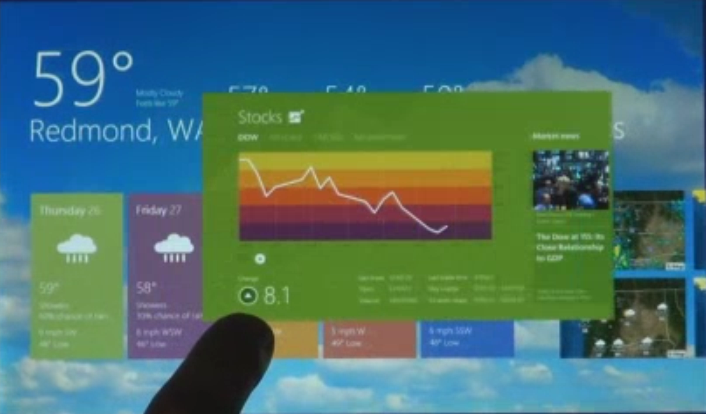
So what is the new Windows like? Here is tour with some screen grabs from the above video. I have deliberately included fingers in several of the shots, because the new Windows is touch-centric.

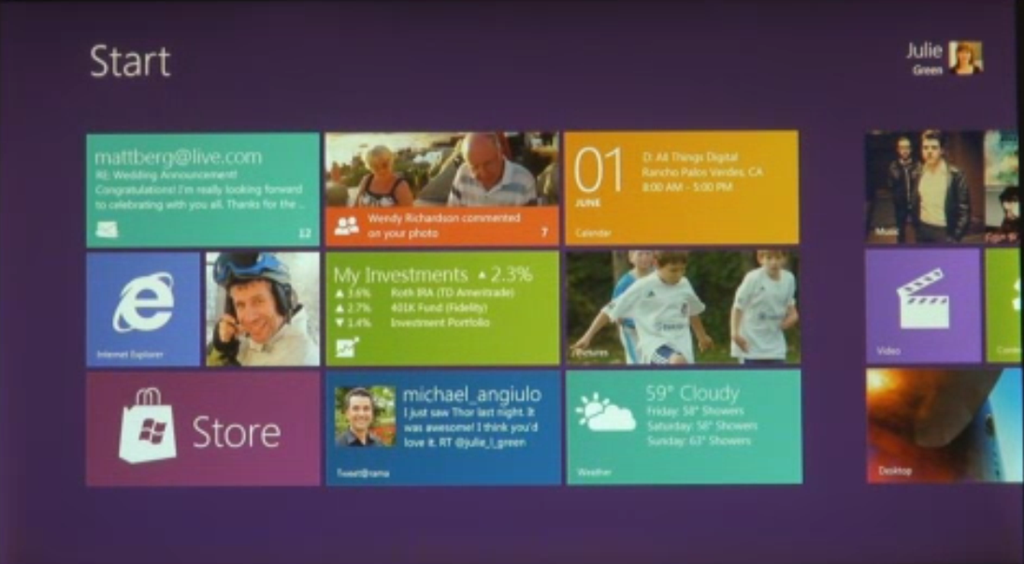
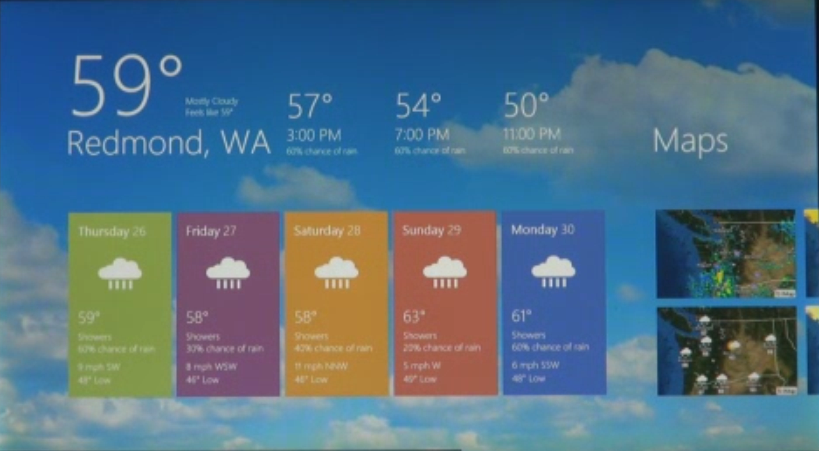
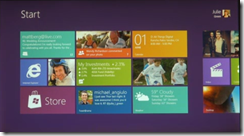
First, Windows 8 borrows from Windows Phone and has a Start screen built with Live tiles:

image

Live tiles, as on Windows Phone, are more than just icons; they can include notifications, video and animations. They are more like app previews.

Apps run essentially full-screen, as on Apple’s iPad:

image

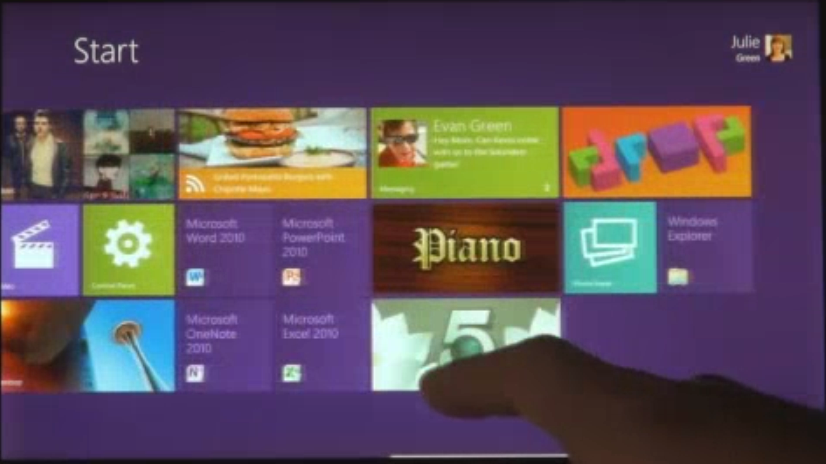
You switch apps by swiping. Here is a screen caught mid-swipe:

image 

However, you can also have two apps on screen. One is the main app, the other is docked to the side:

image

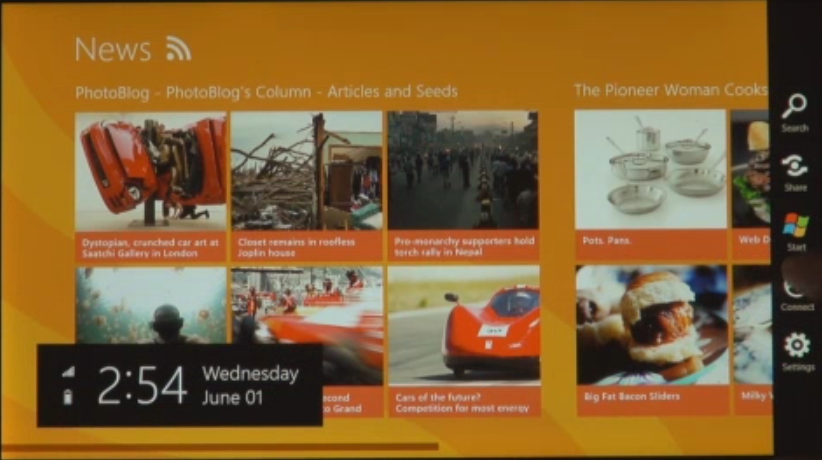
A menu on the right shows Search, Share. Start. Connect and Settings. I am not sure what Connect does.

image

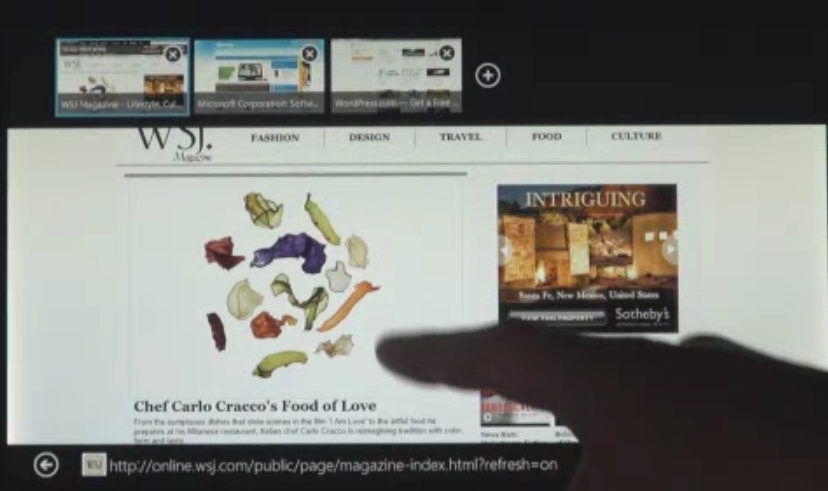
Believe it or not, this is Internet Explorer 10, with tabs along the top that preview each page (nice idea):

image

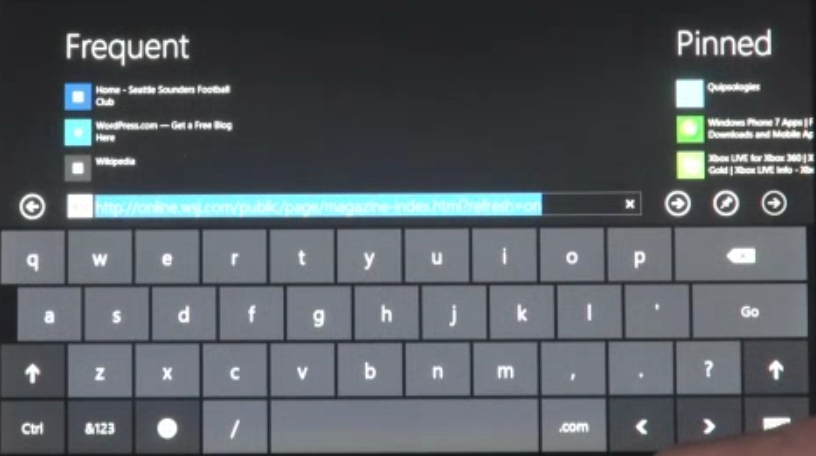
The on-screen keyboard looks like a big phone keyboard:

image

Dual Personality

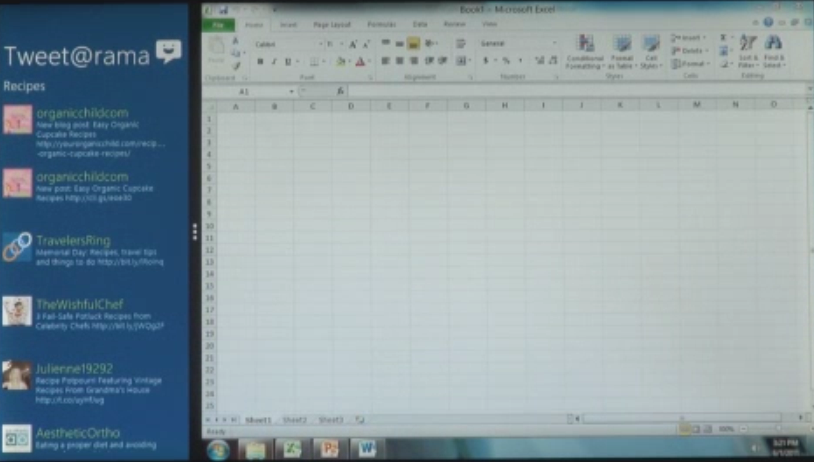
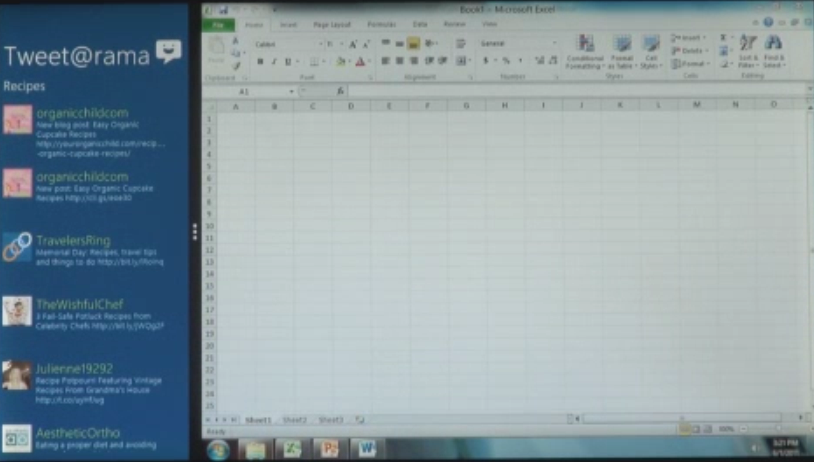
So where is the rest of Windows that we know and love/hate? It is still there; run an “old” Windows app like Excel and presto, it is Windows 7, complete with task bar. This image looks blurry, which actually is a clue to how big and bold the UI shown for the “new” apps really is:

image

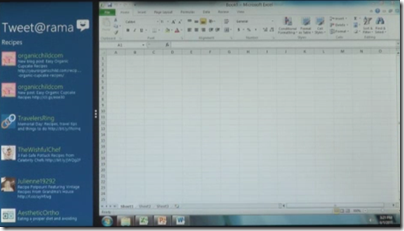
You can run old and new-style apps side by side, using the main/side app model:

image

Windows 8 will run on both Intel x86/x64 processors, and on ARM. Legacy app compatibility on Intel will be great, but on ARM applications will need to be recompiled. There is no x86 emulation layer; Sinofsky said that was too difficult to do. Windows 8 will not require any more hardware than Windows 7.

It looks like Microsoft has created an excellent tablet/slate UI which has the same relation to the iPad that Windows Phone 7 has to the iPhone. It borrows many of the ideas but adds some distinctive features.

The big difference: whereas Apple has chosen to continue a dual line, with desktop/laptop Mac in one stream and iOS for iPhone and iPad in another, Microsoft is combining the two.

At least, it is in Windows 8. What about the current Windows Phone OS, which is built on the Windows CE OS? Will it be replaced by a variant of Windows 8, possibly with “full Windows” option disabled? That is my guess, but there is a lot which Microsoft has not yet explained about its future product plans.

Another question: where is Silverlight and .NET? Clearly these technologies are still supported, at least on x86, since all of Windows is still there. In a report from D9, Sinofsky says:

The browser that we showed runs Silverlight and it will still run on the desktop

That does not answer the question: can developers build apps for the new Windows user interface (and Windows store) using Silverlight, or is it HTML/JavaScript only? What about native code?

I will be surprised if all these options are not available, but it was not explicitly stated at D9. The emphasis is firmly on HTML.

We are promised more details at the BUILD conference in September.

Would you consider running PHP on Azure? Microsoft faces uphill battle to convince customers.

Yesterday Microsoft announced Windows Azure SDK for PHP version 3.0, an update to its open source SDK for PHP on Windows Azure. The SDK wraps Azure storage, diagnostics and management services with a PHP API.

Microsoft has been working for years on making IIS a good platform for PHP. FastCGI for IIS was introduced partly, I guess, with PHP in mind; and Microsoft runs a dedicated site for PHP on IIS. The Web Platform Installer installs a number of PHP applications including WordPress, Joomla and Drupal.

It is good to see Microsoft making an effort to support this important open source platform, and I am sure it has been welcomed by Microsoft-platform organisations who want to run WordPress, say, on their existing infrastructure.

Attracting PHP developers to Azure may be harder though. I asked Nick Hines, CTO for Innovation at Thoughtworks, a global IT consultancy and developer, what he thought of the idea.

I’d struggle to see any reason. Even if you had it in your datacentre, I certainly wouldn’t advise a client, unless there was some corporate mandate to the contrary, and especially if they wanted scale, to be running a Java or a PHP application on Windows.

Microsoft’s scaling and availability story around windows hasn’t had the penetration of the datacentre that Java and Linux has. If you look at some of the heavy users of all kinds of technology that we come across , such as some of the investment banks, what they’re tending to do is to build front and middle tier applications using C# and taking advantage of things like Silverlight to get the fancy front ends that they want, but the back end services and heavy lifting and number crunching predominantly is Java or some sort of Java variant running on Linux.

Hine also said that he had not realised running PHP on Azure was something Microsoft was promoting, and voiced his suspicion that PHP would be at a disadvantage to C# and .NET when it came to calling Azure APIs.

His remarks do not surprise me, and Microsoft will have to work hard to persuade a broad range of customers that Azure is as good a platform for PHP as Linux and Apache – even leaving aside the question of whether that is the case.

The new PHP SDK is on Codeplex and developed partly by a third-party, ReadDolmen, sponsored by Microsoft. While I understand why Microsoft is using a third-party, this kind of approach troubles me in that you have to ask, what will happen to the project if Microsoft stops sponsoring it? It is not an organic open source project driven by its users, and there are examples of similar exercises that have turned out to be more to do with PR than with real commitment.

I was trying to think of important open source projects from Microsoft and the best I could come up with is ASP.NET MVC. This is also made available on CodePlex, and is clearly a critical and popular project.

However the two are not really comparable. The SDK for PHP is licensed under the New BSD License; whereas ASP.NET MVC has the restrictive Microsoft Source License for ASP.NET Pre-Release Components (even though it is now RTM – Released to manufacturing). ASP.NET MVC 1.0 was licensed under the Microsoft Public License, but I do not know if this will eventually also be the case for ASP.NET MVC 3.0.

Further, ASP.NET MVC is developed by Microsoft itself, and has its own web site as part of the official ASP.NET site. Many users may not realise that the source is published.

My reasoning, then, is that if Microsoft really want to make PHP a first-class citizen on Azure, it should hire a crack PHP team and develop its own supporting libraries; as well as coming up with some solid evidence for its merits versus, say, Linux on Amazon EC2, that might persuade someone like Nick Hine that it is worth a look.