Category Archives: .net

DevExpress developers ask for more Windows Forms, say Silverlight and WPF not ready

DevExpress, which creates add-on components and tools for Windows and Delphi, has posted its 2011 roadmap. This shows more convergence between components for Silverlight and WPF:

In essence, by the end of the year, the functionality of DXGrid, DXEditors, DXDocking, and DXRibbon will be the same across both platforms.

As for Windows Forms, or winforms, the roadmap says:

With regard to the Windows Forms controls, it is most likely that there will be a large number of smaller enhancements and new features rather than any large complex new control. The reason for this is simple: we believe that our offerings for this platform are very mature and robust.

Customers posting comments to CTO Julian Bucknall’s blog are not happy:

It is sad to see Winforms pushed back so much. WPF is still too slow on most computers for major apps and SL is not mature enough for a complete ERP app.

says Sigurd Decroos, while Heiko Mueller is more blunt:

Sorry guys, but with this roadmap I will not extend my subscription. I use only WinForms and ASP.NET and I’m not interested in WPF/Silverlight – WPF at this time for me is not suitable for my kind of applications (larger business Apps). Silverlight in my eyes is a dead technology – HTML5 is the future for rich internet applications.

Porting is also an issue says Ioannis Mpourkelis:

I believe that you should put more resources on the WinForms controls for 2011. Winforms is here to stay for many years, especially for the companies who want to support existing Winfroms applications. Currently it is impossible to port WinForms applicaitons to Silverlight and very difficult to port WinForms applications to WPF.

Check the full comments for more.

More evidence for the uncertainty around where Microsoft is going with its rich client API.

Update: Bucknall comments on this specific issue here.

Where is Microsoft going with its Rich Client API? Microsoft drops some clues as developers fret

A discussion taking place in a Windows Presentation Foundation (WPF) newsgroup, in a thread called WPF vNext, shows how Microsoft’s confused rich client development strategy is affecting developers, and offers some clues about what is coming.

Developer Rudi Grobler, who posted on his blog some wishes for Windows Phone, Silverlight and WPF, describes his difficulty in discerning Microsoft’s direction:

The strategy for the future is very vague… I daily get questions about should I use WPF or Silverlight? Is WPF dead? Is Silverlight dead? etc…

Jeremiah Morrill describes his frustration with WPF performance:

Microsoft has known of WPF’s performance problems since the first time they wrote a line of code for it.  You will be hard pressed to find a customer that hasn’t complained about perf issues.  And you will not have gone to a PDC in the last few years and not hear folks bring this up to the WPF team. This is 3rd party info by now, but I’ve been told the issues I have noted have been brought up internally, only to be disregarded.

and remarks his frustration with what has happened to Silverlight:

Silverlight’s strategy USED to be about cross-platform, get-the-runtime-on-every-device-out-there, but it’s obvious that is not the strategy any more.  What happened to Silverlight on set-top-boxes?  Android? I read an article that some people saw it on XBox, but nobody has talked about it since.  Cross-platform with OSX has become symbolic at best.

Developer Peter O’Hanlon describes how the uncertainty has affected his business:

I run a small consultancy, and I bet the company on WPF because I could sell the benefits of faster development time for desktop applications. We have spent a lot of time learning the ins and outs of the platform and saw that Silverlight gave us a good fit for developing web apps. In one speech Microsoft caused me months of work repairing the damage when Muglia seemed to suggest that these technologies are dead and Microsoft are betting the farm on Html 5. We hand our code over to the client once we have finished, and they ask us why they need to invest in a dead technology. I don’t care what you say on this thread, Microsoft gave the impression that html 5 was the way to go.

[…] Muglia’s statement about the future being html caused serious issues for my company. We lost two bids because the managers didn’t want to commit to "dead" technology.

Microsoft’s Jaime Rodrigues, WPF Technical Evangelist, offers the following response:

You are telling us to improve perf in WPF. We hear this loudly and we are trying to figure how to solve it. Unfortunately, there are a few pieces to consider:

1)      First of all,  a lot of our customers are telling us to invest more into Silverlight.  Let’s say (again made up) that demand is  4-to 1. How do we justify a revamp of the graphics architecture in WPF.  This is not trivial work; the expertise in this space is limited, we can’t clone our folks to 5x to meet everyone’s needs.

2)      Let’s assume we did take on the work.  My guess (again, I am not engineering) is that it would take two years to implement and thorougly test a release.  At the stage that WPF is at, a rearchitecture or huge changes on the graphics stack would be 80% about testing and 20% about the dev work.    It is not a trivial amount of work.   Would we get the performance you want across myriad of devices? We don’t know. WPF bet on hardware, and there is new devices out  there that are trading hardware for battery, weight, or simply for cost.  it would suck to do that much work, make you wait a long time, and then not get there. Let’s get real on the asks; you say "improve perf" but you are asking us to do a "significant re-write"; these two asks are different.

3)      By the time we get there, what will be a more powerful framework?  Silverlight, WPF, C++, or SuperNew.Next ??  we don’t know today.  We go back to #1 and look at demand We are in agreement that "customers" is the driving principle.

The WPF has looked at the trade-offs, and risk many times.  We are also looking at what customers need. Jer, to you it is all about graphics.  To many others, it is about data.  So, how do we serve all customers??
The strategy is exactly what you have seen/heard:

1)      WPF 4.5 is going to have some significant data binding performance improvements.

2)      We are not redoing the graphics framework, but we are doing a lot of work to let you interoperate with lower level graphics so that if you need more graphics perf you can get it, and still keep the RAD of the rest of the framework.

[…] Hope it helps; apologies if it does not, and again, wait for Rob Relyea or someone else to make it official.  That is just my 2c as a person who bet heavily on WPF but has seen the data that drives the trade-offs the team has to make.

This will be disappointing to former Microsoft evangelist Scott Barnes, who has initiated a Fix WPF campaign.

The problem though is lack of clarity about the strategy. Look at Rodrigue’s third point above. Nobody can predict the future; but what is Microsoft’s current bet? Silverlight, HTML5, or maybe SuperNew.Next – for example, the rumoured new native code UI for Windows 8 or some variant of it?

My own view is that the current difficulties are rooted in what happened with Longhorn and the fact that the Windows team abandoned WPF back in 2004. I’ve written this up in more detail here.

Lest this post be misinterpreted, let me emphasise that Microsoft has a good track record in terms of supporting its Windows APIs long-term, even the ones that become non-strategic. Applications built with the first version of .NET still run; applications built with Visual Basic 6 mostly still run; applications built for ancient versions of Windows often still run or can be coaxed into running. Build an application with WPF or Silverlight today, and it will continue to work and be supported for many years to come.

My guess is that events like the coming 2011 MVP Summit and Mix 2011 in April will bring some clarity about Microsoft’s mobile, tablet, Windows and cross-platform story for rich clients.

Update: Barnes has his own take on this discussion here.

Trying out MonoTouch – C# for Apple’s iPhone and iPad

I’ve posted an article on trying out MonoTouch, which builds on the open source Mono project to provide a means of developing apps for Apple’s iOS using C# and the .NET Framework.

It is easy to assume that since the .NET Framework is Microsoft’s technology, using a non-Microsoft implementation is risky. Then again, Mono is open source; and the more usage it gets, the better it becomes. MonoTouch is an important development for the project, since it is a commercial project which might actually be making some money for Novell/Attachmate. While it would be nice to get it for free, it is important that Mono makes business sense as well. MonoTouch has given the Mono project a significant boost.

Red Gate to charge for .NET Reflector, runs into storm of protest

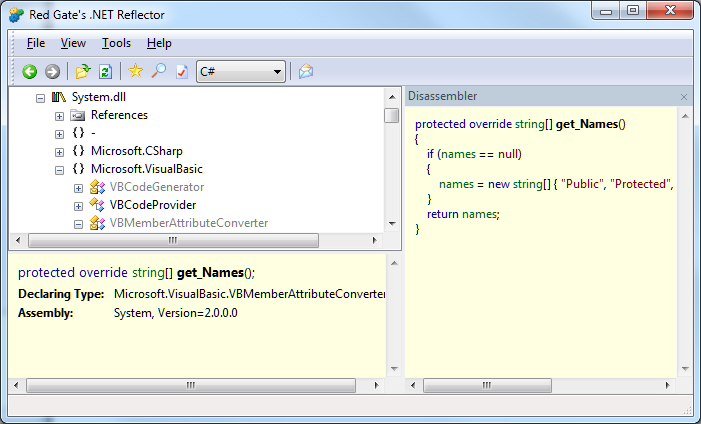
Tools company Red Gate is to discontinue the free version of .NET Reflector, a popular tool for debugging and decompiling .NET code.

image

The tool itself is amazing. It takes advantage of the fact that .NET code is not compiled to native code until runtime. The code that is distributed is in .NET “intermediate language”, which means it can easily be decompiled. Reflector makes this as easy as opening a file. This is invaluable for debugging when you do not have the original source code, though a further implication is that if you want to protect your source code you need to obfuscate it.

Reflector was created by Lutz Roeder, who shared it freely with the community. In 2008 Roeder sold Reflector to Red Gate, stating:

Red Gate will continue to provide the free community version and is looking for your feedback and ideas for future versions.

Red Gate developed Visual Studio integration and some further features, offering a free version as well as a paid-for premium edition. Now it has decided this is no longer viable. Watch this video as distinctly uncomfortable CEO Simon Galbraith answers the question “Didn’t we promise that Reflector was always going to be free?”:

Right now owning Reflector doesn’t make commercial sense. Further development of Reflector doesn’t make commercial sense. Reflector’s a tool that needs to stay up to date. We need to spend money on it. At the moment we can’t do so in a commercially justifiable way.

We’re really regretful that we ever made such a statement that we were going to try not to charge for it. In hindsight we wish we hadn’t done that. It was never a promise by the way. Two years ago we thought we could make a success of it without having to charge for it, it turns out that wasn’t the case.

Galbraith says that Red Gate had expected two benefits from Reflector: sales of other tools to Reflector users, and up-sell to the premium version. Neither has really happened, he says, adding:

We know that people are going to be cross with us.

What has particularly annoyed users in the feedback forum is that the existing free version is time-bombed, and will expire on May 30th. So users will be forced to upgrade.

i have been a happy (paying) customer of red-gate for some time now – sql tools, .net tools.
i have told many other developers of your products – happy to explain how good they are and how awesome red-gate is.
i won’t be doing that any more. IMO you have managed to destroy your company reputation such that purely on principle i won’t be recommending you to anyone anymore.

says one user.

Reflector has actually been time-bombed for years. I have a download from 2008, and if I run it I get this message:

image

If I click Yes, I am told that automatic update is impossible and directed to the Red Gate download page. If I click No, the dialog closes. In either case, the Reflector executable deletes itself. This is not so bad if you can download another free version; but following the change of policy that will not be the case.

Red Gate might not have made money from Reflector, but now it has the opposite problem: bad PR because of withdrawing an existing and popular free tool.

The price for the new Reflector will be just $35.00; not much for such as useful tool. There is nothing wrong with a software company charging for its work. This is a difficult transition though, and the question is: would Red Gate have been better off releasing Reflector back to the community and ceasing its own investment, rather than making a renewed effort to make it a viable commercial product?

How is Windows Azure doing? Few mission critical apps says Microsoft

I attended an online briefing given by Azure marketing man Prashant Ketkar. He said that Microsoft is planning to migrate its own internal systems to Azure, “causing re-architecture of apps,” and spoke of the high efficiency of the platform. There are thousands of servers being managed by very few people he said – if you visit a Microsoft datacenter, “you will be struck by the absence of people.” Some of the efficiency is thanks to what he called a “containerised model”, where a large number of servers is delivered in a unit with all the power, networking and cooling systems already in place. “Just add water, electricity and bandwidth,”, he said, making it sound a bit like an instant meal from the supermarket.

But how is Azure doing? I asked for an indication of how many apps were deployed on Azure, and statistics for data traffic and storage. “For privacy and security reasons we don’t disclose the number of apps that are running on the platform,” he said, though I find that rationale hard to understand. He did add that there are more than 10,000 subscribers and said it is “growing pretty rapidly,” which is marketing speak for “we’re not saying.”

I was intrigued though by what Ketkar said about the kinds of apps that are being deployed on Azure. “No enterprise is talking about taking a tier one mission critical application and moving it to the cloud,” he said. “What we see is a lot of marketing campaigns, we see a lot of spiky workloads moving to the cloud. As the market start to get more and more comfortable, we will see the adoption patterns change.”

I also asked whether Microsoft has any auto-scaling features along the lines of Amazon’s Elastic Beanstalk planned. Apparently it does. After acknowledging that there is no such feature currently in the platform, though third-party solutions are available, he said that “we are working on truly addressing the dynamic scaling issues – that is engineering work that is in progress currently.”

Silverlight native extensions allow deep Windows 7 integration, but forget cross-platform

Microsoft has released Native Extensions for Silverlight, a set of libraries which enable access to Windows 7 features including taskbar Jump Lists; access to attached devices including webcams, cameras and phones; the sensor API for accelerometer support; and even the ability to intercept Windows messages. The ability to intercept Windows messages allows lots of interesting hacks as veteran Visual Basic developers will recall; it was one of the tricks used to overcome limitations in early versions of VB.

The native extensions are only available to out of browser applications running outside the sandbox; the user must consent to trust such applications. Silverlight 4 already had the ability to use COM automation. These new extensions simply build on this existing feature, providing COM automation wrappers for these Windows 7 APIs.

What this means though is that Silverlight developers can create applications that integrate deeply with the Windows 7 desktop and local hardware.

Another way of looking at this is that the subset of Windows applications that can be implemented in Silverlight rather than the full .NET Framework has now increased. It lends some support to the theory which I considered here, that a future version of Silverlight will be the application platform for the Windows 8 app store and for mobile devices running Windows 8. This is speculation though; Microsoft has not said much publicly on the subject. Silverlight is well suited to an app store since installation is easy, updates are near-automatic, and apps are isolated from the rest of the operating system.

The native extensions are Windows 7 only. Forget the Mac, these things do not even work on Windows XP. They only apply to trusted out of browser applications though. Silverlight running in the browser still has similar features on Windows and Mac.

Talk of Windows 8 on an smartphone shows Microsoft’s mobile confusion

During a conference call to discuss Intel’s latest financials, CEO Paul Otellini raised the possibility of putting the full Windows OS onto a smartphone, running a low power Intel SoC (System on Chip). The matter came up with Otellini was asked about the impact of Windows on ARM, announced at CES earlier this month:

The plus for Intel is that as they unify their operating systems we now have the ability for the first time: one, to have a designed-from-scratch, touch-enabled operating system for tablets that runs on Intel that we don’t have today. And secondly, we have the ability to put our lowest-power Intel processors running Windows 8 – or ‘next-generation Windows’ – into phones, because it’s the same OS stack. And I look at that as an upside opportunity for us.

The reasoning seems to be: if Windows 8 is designed to run well on mobile devices with ARM, it will also run well on mobile devices with an Intel SoC, which will let us put it on phones.

Note the point he highlighted: Microsoft unifying its operating systems. No more full Windows vs Windows CE; one OS from mobile to desktop.

Although that sounds compelling, the snag is that Windows is not well suited to low-power mobile devices, which is why Windows CE was invented in the first place. Microsoft can fix this to some extent by fixing the things that make it unsuitable, but it carries a heavy compatibility burden.

It also throws up the question: just what are Microsoft’s long-term plans for Windows Phone 7, which is built on Windows CE, has its own GUI mostly written in native code, and a development platform based on .NET – Silverlight and XNA – plus a native code SDK that only mobile operators and device manufacturers get to use?

At CES Microsoft Steven Sinofsky sort-of denied that Windows will encroach on Windows Phone 7 territory. “Windows Phone 7 is uniquely focused on the small form factor that Windows doesn’t focus on,” he said.

Nevertheless, the company’s decision not to use the Windows Phone 7 OS for tablets may make that inevitable. What is the difference between a smartphone and a small tablet? Does Microsoft expect developers to write apps designed for Windows on a small tablet and then rewrite them for Windows Phone 7 using Silverlight?

It does not make sense; and despite the Windows Phone 7 promotion included in CEO Steve Ballmer’s CES keynote, I was left wondering whether Microsoft’s new mobile OS really has a future.

That said, Silverlight abstracts the OS, so in principle Microsoft could use it to form a consistent mobile development platform irrespective of whether the underlying OS is Windows CE or full Windows. I am not getting that sense from the company though, and I’d expect the primary Windows SDK to remain based on C++.

I am struggling to understand how Microsoft expects this to work. App compatibility is the obvious benefit of full Windows; but two big issues are that most Windows apps are not touch-friendly and are not designed for small screens. Putting Windows on a tablet with a decent screen size and the dreaded stylus works to some extent, but will never compete with Apple’s iPad for usability. On smaller screens most existing apps will not work properly; and if Windows on small devices sprouts a completely new touch-friendly GUI, or borrows the one from Windows Phone 7, then app compatibility with desktop Windows will be limited.

It feels as if Microsoft’s Windows team is saying one thing, the Windows Phone 7 and developer teams saying another, and partners like Intel saying yet another. Windows Phone 7 was meant to be the thing that made belated sense of Microsoft’s mobile strategy, but even that now looks doubtful for the reasons stated above.

Microsoft is still a long way from having a coherent strategy for mobile devices, and that lack is damaging the company and helping Apple and Google to establish their competing operating systems.

Update: Mary-Jo Foley writes about Microsoft “Jupiter” which is a rumoured new user interface and application model designed for Windows 8 and its app store:

Jupiter is going to be a new user interface (UI) library for Windows, built alongside Windows 8. It will be a thin XAML/UI layer on top of Windows application programming interfaces and frameworks for subsystems like graphics, text and input. The idea is Jupiter will bring support for smoother and more fluid animation, rich typography, and new media capabilities to Windows 8 devices.

Is Jupiter a .Net technology, or XAML adapted for native code, or both? Is it one and the same as, say, Silverlight 6? That is not stated, though Senior VP Soma Somasegar helpfully (or not) said that:

some of the information in this post is not right and out of date, not reflecting Microsoft’s current thinking.

That seems to tacitly confirm that it fairly represents Microsoft’s thinking at some time in the not-too-distant past.

It would make sense to me if Microsoft used Silverlight to unify its application platform as mentioned above, and combining the XAML presentation layer with native code could address performance and memory usage concerns with .NET. This is the kind of news that would really give confidence to Silverlight developers, rather than the damage limitation PR that Microsoft has put out since PDC late last year.

On the other hand, I believe Somasegar when he says the information is out of date, so for the time being it is just another dose of uncertainty.

Adobe AIR is user-hostile compared to native apps says BankSimple CTO

Alex Payne, CTO at BankSimple, has written an analysis of Adobe AIR from the user’s perspective. The scenario: his team was looking for a an alternative to Campfire for group chat, and selected HipChat. They liked the features of HipChat, but not the desktop app, which is built using Adobe AIR:

My team experienced a number of the usual problems one has with AIR applications: lousy performance, odd interface bugs, key combinations and UI elements that didn’t conform to our operating system. AIR apps exist in an uncanny valley between a web application and a desktop application, and the result is unsettling and annoying. Pretty soon, we were itching to go back to Campfire (via the native Mac client Propane), even though HipChat has better features and the promise of improved reliability.

Payne investigated further and came to the conclusion that users prefer native apps; and that cross-platform toolkits are for the benefit of software companies not users. Echoes of Steve Jobs’ Thoughts on Flash:

Flash is a cross platform development tool. It is not Adobe’s goal to help developers write the best iPhone, iPod and iPad apps. It is their goal to help developers write cross platform apps.

And lest you think this is bad for AIR but good for Java, note that Payne adds:

For anyone who used a computer in the 1990s, AIR probably brings back scarring memories of Java apps: slow, ugly, inconsistent, awkward.

I was also reminded of Evernote’s experience with .NET versus native code, which I blogged here.

Payne is not all wrong, neither is Jobs. That said, the distinction between what is good for users and what is good for developers is not absolute. Maintaining a single cross-platform code-base, for example, is good for both users and developers, because it reduces bugs and assists feature-compatibility across platforms. It is also good for users of minority platforms who might otherwise have nothing.

Another question: how many of the issues Payne identifies are inherent to using AIR (or another cross-platform runtime), and how many are implementation issues? It is impossible to know without drilling into the details; but I don’t believe that all AIR (or Java, or .NET) apps have “lousy performance”.

It is true that ActionScript code is slower than Java or .NET code, and much slower than compiled C/C++, but speed of script execution is not always the performance bottleneck that users will notice most.

This is seemingly one of those never-ending computing debates; but a post like Payne’s is a reminder that neither Adobe AIR, nor any cross-platform runtime, is a perfect solution to the challenge of multiple client platforms.

Microsoft WebMatrix released: a simple editor for ASP.NET Razor and more, but who is the target user?

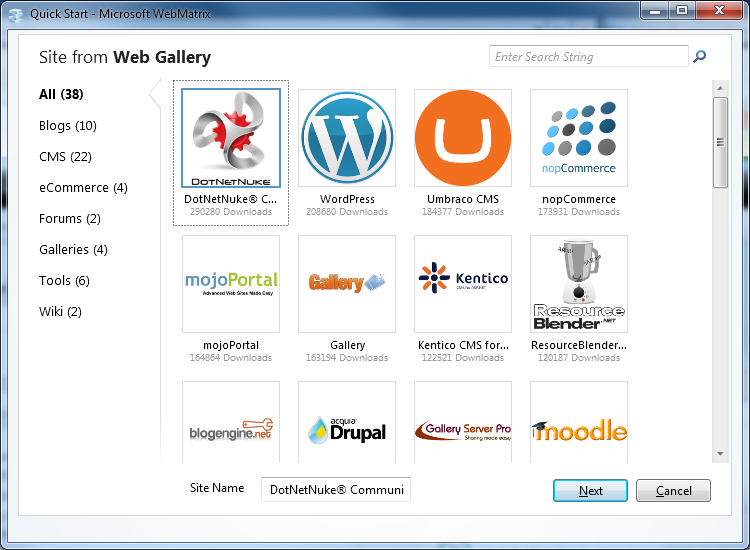
Microsoft has released WebMatrix, a free tool for creating web sites for Microsoft’s web server. It uses the Web Platform Installer and installed smoothly on my Windows 7 64-bit box. What you get is a cleanly-designed tool which lets you start web sites from templates or from standard installs of popular applications including WordPress, Drupal and Moodle.

image

Yes, you can use PHP and MySQL as well as .NET web applications, though the common factor is that all are configured for IIS, Microsoft’s web server.

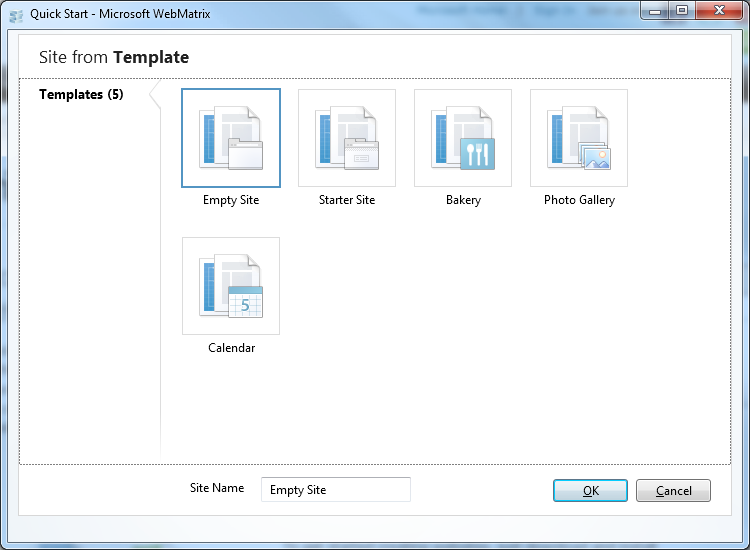
With many ISPs already offering instant installs of apps like WordPress, it is more interesting to look at the site templates in WebMatrix, though the selection is smaller.

image

What is interesting about these is that they create sites based on Razor, an alternative view engine for ASP.NET. Microsoft VP Scott Guthrie describes Razor here. It is odd though: Razor is a feature of ASP.NET MVC 3, currently in release candidate phase, but you cannot create ASP.NET MVC sites in Web Matrix.

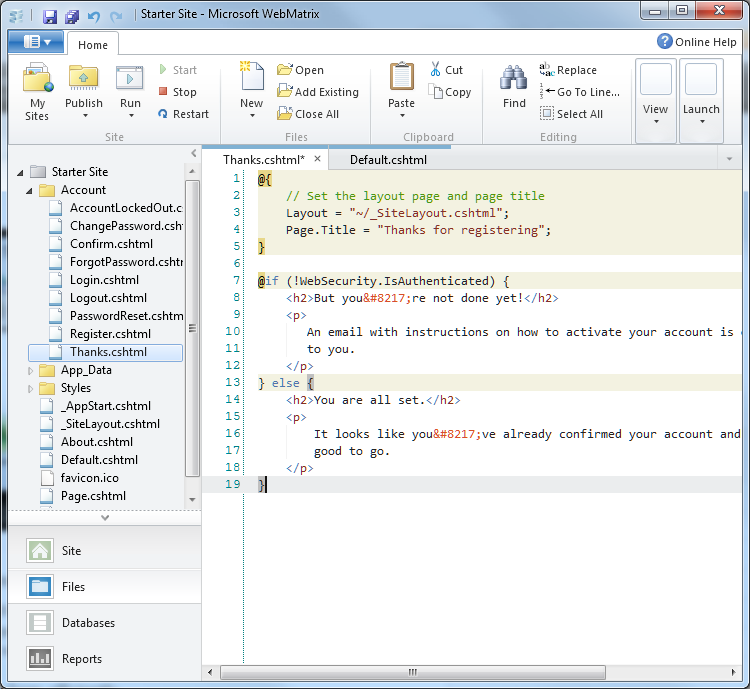
Once a site is created, you can modify it in the WebMatrix editor.

image

You can run the site on IIS Express with one click. WebMatrix will show you all the requests as you run, which could be handy for tracing problems. There is also a database management workspace which uses SQL Server Compact Edition, a reporting workspace which will analyse your site for problems, and the ability to publish a site using  FTP or Microsoft’s Web Deploy.

I like the clean look of WebMatrix, and that it is lightweight and fast; but who is the target user? It appears to be aimed at non-professionals; but this is a techie product that will not appeal to users looking for an easy to use web site builder. There is no visual editor; users are just chucked in at the deep end editing raw HTML and C#. There is not even any intellisense code completion. Clicking Online Help just brings up a Microsoft search form. There is no debugger to speak of; you are expected to upgrade to Visual Studio. Which raises the question, why not just get Visual Web Developer 2010 Express, which is also free, and has a better editor and debugging features? Of course you could use the two together; but Web Matrix is not adding much value. Features like the SEO analysis seem to be be based on the existing Search Engine Optimization Toolkit, which you can install without Web Matrix.

WebMatrix has been available in beta for six months, but its forum is relatively quiet.

Still, if nothing else Web Matrix is a handy way to take a look at Razor, which deserves attention. Shay Friedman has a technical introduction here.

Guthrie has a detailed look at the WebMatrix beta here.

Visual Studio 2010 nine months on: how good has it proved?

Visual Studio 2010 was released on April 12th 2010. Nine months on, how good has it proved to be?

image

I researched deeply into Visual Studio 2010 at the time, and was impressed overall. It was a huge release, partly because the IDE was rebuilt using Windows Presentation Foundation, and partly because of a large number of new features including the F# language. Performance was always going to be an issue with the move to a .NET-based IDE, but on my machines I found it satisfactory.

Others have been less pleased with the performance. The comments to Jason Zander’s announcement of the Service Pack 1 beta last month make interesting reading. Here is the negative:

I am a professional .NET developer and I am really upset with VS 2010. It crashes more often than VS 2008. It is slow as hell. It even crashes when debugging. VS 2010 is built with WPF which is causing all these problems.

and here is the positive:

I don’t know what y’all complaining about – VS2010 is blazingly fast… at least on my machine.

I am not sure whether the performance issues are more dependent on the the type of work you are doing, or the size of the projects, or some other factor. One issue may be graphics performance, since this will make a big difference to WPF whereas not so much with Visual Studio 2008 and earlier.

Thinking back to this time last year, I also recall how Visual Studio 2010 seems so focused on .NET, including Silverlight. Later on we got the announcement of Visual Studio LightSwitch, a RAD database application tool which builds Silverlight clients. It now seems obvious, especially following the PDC (Professional Developers) conference in November, that the vision of the developer team at Microsoft did not align with the vision of the Windows team; and that the Windows team seemed to win that argument internally. It is odd, because Silverlight has the potential to solve problems for the company. It is a technology that extends from the desktop to Windows Phone 7, which is well-suited to app store deployment thanks to the way apps are isolated, and which potentially can run on multiple platforms. Now with Silverlight 5, promised for release this year, Microsoft is adding more Windows-specific features and allowing more fragmentation between versions. Silverlight on Windows Phone 7 is based on version 3, the Mac version has more limited capabilities than the Windows version, and so on.

Microsoft said at PDC that “HTML 5” is its broad-reach platform. That suggests that what Visual Studio needs is HTML 5 designers and JavaScript libraries that integrate with Microsoft’s server technologies and which make it easier to develop HTML application for multiple form factors including small devices.

It is a confusing story, and I would love to know if the subject came up in CEO Steve Ballmer’s discussions with Bob Muglia, VP of Server and Tools, recently. The outcome of those discussions is that Muglia will be leaving Microsoft in the summer.

We will have to wait for Visual Studio 2012, maybe, to discover any change in its direction. In the meantime, SP1 adds a new help viewer, in response to many complaints, as well as a few new features for testing and debugging. There is also a list of bug-fixes, some of which look significant:

and so on. Let me add that while the list looks bad, it is no more than you would expect for a tool of this complexity and in my own testing Visual Studio 2010 has worked well.

I agree though with some of the commenters who note that Microsoft is slow to react when bugs are reported. It will be more than a year after the initial release when SP1 is finished, though you can use the beta for production code if you dare.

I would be interested in hearing from users of Visual Studio 2010. How are you finding it, or did you try it and go back to Visual Studio 2008? I realise that adoption of a new IDE for production work tends to be slow, because developers are reluctant to switch mid-project.