Category Archives: .net

Bob Muglia leaving Microsoft, CEO Steve Ballmer searching for new cloud leadership

Microsoft has announced that Bob Muglia, President of Server and Tools, is leaving Microsoft.

In his memo, Steve Ballmer says:

Bob Muglia and I have been talking about the overall business and what is needed to accelerate our growth. In this context, I have decided that now is the time to put new leadership in place for STB. This is simply recognition that all businesses go through cycles and need new and different talent to manage through those cycles.

It is always hard to tell from the outside, but in my encounters Muglia has been among the most articulate and confident of Microsoft’s top executives. I have also noticed in my regular look at Microsoft’s financials that the Server and Tools business has performed consistently well for as long as I can remember.

Most recently, Muglia took over the Azure business and seemed to know where he was going with it. He is also responsible for developer tools, and while his remarks about Silverlight at Microsoft’s PDC in November were disappointing to developers on that platform, they showed a clear sense of direction.

In this context, it seems surprising that Ballmer is in search of “new and different talent”. It does sound as if Ballmer and Muglia do not see the future of the cloud business – which is the focus of the memo – in the same way.

The key question: in what way did Ballmer and Muglia’s vision differ? I guess we will get some more clues as today’s news is discussed.

Update: Mary Jo Foley has posted Bob Muglia’s internal email to his team:

Later this year, I’m moving on to new opportunities outside of Microsoft, so I wanted to take a few minutes to share with you what’s important to me in life and leadership.

The foundation of who I am is based on living with integrity. Integrity requires principles, and my primary principle is to focus on doing the right thing, as best I can. The best thing, to the best of my ability, for our customers, our products, our shareholders, and of course, our people.

Just sugar, or did Muglia feel that staying at Microsoft would compromise those principles?

Since the announcement, the reaction across the industry has shown the high regard in which he is held, and bewilderment at why he is being let go. Here’s Redmonk analyst James Governor on Twitter:

Another exit: Microsoft server chief Muglia leaving company normally i say so what but this is TERRIBLE for microsoft

Steve Ballmer at CES: Microsoft pins mobile hopes on Windows 8

Microsoft CEO Steve Ballmer gave the keynote at CES in Las Vegas last night. It was a polished performance and everything worked, but was short on vision or any immediate answer to the twin forces of Apple iPad and Google Android which are squeezing out Microsoft in the mobile world – smartphones and tablets – which currently forms the centre of attention in personal computing.

That said, CES stands for Consumer Electronics Show; and Ballmer did a good job showing off how well Kinect is performing, claiming sales of 8 million already. He showed more examples of controlling Xbox through speech and gesture, and said that Kinect is also boosting sales of the console; clearly it is now taking it beyond the hardcore market of first-person shooters.

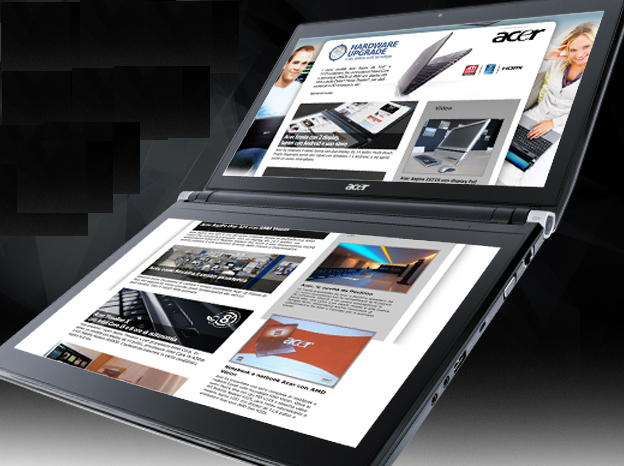
We saw some fun new Windows devices, such as Acer’s dual-screen Iconia laptop.

image

There was also a demonstration of the updated Microsoft Surface which now runs full Windows 7 and does not require hidden cameras, so that it can now be used in more scenarios, such as for interactive digital signage.

All well and good; but what about mobile? We got a Windows Phone 7 demo, but no sales figures, nor any mobile partners on stage; I’m guessing they are too busy promoting their new Android devices. Ballmer did say that the phone is coming on Verizon and Sprint in the first half of this year. Application availability is improving, but how will Microsoft win attention for its smartphone? My local high street is full of mobile phone shops, none of which even stock it as far as I can tell. There is a tie-in with Xbox Live which may help a little.

The problem though is that Microsoft does not seem to be wholeheartedly behind the Windows Phone 7 OS, which is based on Windows CE with a new GUI and Silverlight/XNA runtime for applications. Rather, Microsoft is signalling that full Windows is its future mobile operating system. At CES it announced Windows on ARM, the processor of choice in mobile, and during the keynote we saw the next version of Windows (though with the Windows 7 GUI) running on various ARM devices.

The power available in new System on a Chip packages like NVIDIA’s Tegra 2 leaves me in no doubt that full Windows could technically run on almost any size of device; but that does not make it the sensible choice for all form factors. Note also that while it was not mentioned at CES, NVIDIA has said that Tegra 2 is optimized for Android.

Microsoft could plausibly have released a tablet based on the Windows Phone 7 OS, which is built for touch control, this year. Instead, it will be at least 2012 before we see a Windows 8 tablet, and we are taking it on trust that this will really work nicely with touch and not need a stylus dangling at the side. By then Apple will, I presume, be releasing iPad generation 3.

Putting this in a developer context, what is Microsoft’s mobile development platform? Silverlight and XNA? The full Windows native API? Or HTML 5? Each of these is very different and it seems to me a muddled story.

Windows 8 will run on ARM processors – a natural home for Silverlight?

Microsoft announced today at CES in Las Vegas that the next version of Windows will run on ARM as well as Intel CPUs. But why? The reason is that ARM CPUs have huge momentum in mobile computing, thanks to their low power consumption. Microsoft wants Windows to support System on a Chip (SoC) architectures such as NVIDIA’s Tegra 2, which has two ARM Cortex-A9 CPUs combined with an HD-capable graphics processor in a single package. In its press release, the company is careful not to upset established x86/x64 partners Intel and AMD too much, emphasising that Windows will run on SoC packages based on those CPUs as well.

It is an interesting announcement, but one that raises as many questions as answers. The first concerns Microsoft’s mobile strategy, with Windows now seeming to encroach on territory that you have thought belonged to its embedded operating system, Windows CE, which underlies both Windows Mobile and Windows Phone 7. With all its legacy APIs, full-blown Windows does not seem ideal for low-powered, resource-constrained mobile devices; yet the company seems set on bringing full Windows rather than something based on Windows Phone 7 to the emerging tablet market.

The second issue is that applications will need at least re-compiling, and in many cases some re-coding, in order to run on ARM CPUs. Microsoft says it will deliver Office for ARM:

Sinofsky: Microsoft Office is an important part of customers’ PC experience and ensuring it runs natively on ARM is a natural extension of our Windows commitment to SoC architectures.

Windows and Office alone is enough for a decent business device; but customers who buy Windows on ARM expecting their existing games or applications to run will be disappointed.

We have been here before. In the early days of Windows CE, devices ran a variety of processors such as MIPS or Hitachi SH3, and developers had to compile multiple binaries and create setups that installed the right one on each device. In an attempt to overcome the friction this created, Microsoft introduced the Common Executable Format (CEF) with Windows CE 3.0 in 2000. This was an intermediate language format which was translated to native code by a “translator” when it was installed onto a device.

It sounds  a bit like .NET or Java; and it was indeed a forerunner of the .NET Common Language Runtime, which appeared in 2002. However, CEF never really caught on. Although it solved deployment issues, it introduced performance problems and was troublesome to debug. Most developers preferred to stick with true native code.

Today though .NET is mature; and we also have Silverlight, a cross-platform implementation of the .NET Framework combined with multimedia player and graphics framework. If Microsoft includes .NET and Silverlight in its ARM build of Windows, that would solve some of the deployment problems, especially for business devices. Many custom applications are built for .NET; and these would in principle run without any need to recompile, since a .NET executable is intermediate code which is compiled to native code at runtime, though any code which includes “platform invoke” calls to native APIs would not work.

It is surprising therefore that neither .NET nor Silverlight is mentioned in Windows president Steve Sinofsky’s Q&A about Windows on ARM. Still, we should not read too much into that. It would be madness if Microsoft did not support its .NET technologies on this new platform, would it not?

Ten big tech trends from 2010

This was an amazing year for tech. Here are some of the things that struck me as significant.

Sun Java became Oracle Java

Oracle acquired Sun and set about imposing its authority on Java. Java is still Java, but Oracle lacks Sun’s commitment to open source and community – though even in Sun days there was tension in this area. That was nothing to the fireworks we saw in 2010, with Java Community Process members resigning, IBM switching from its commitment to the Apache Harmony project to the official OpenJDK, and the Apache foundation waging a war of words against Oracle that was impassioned but, it seems, futile.

Microsoft got cloud religion

Only up to a point, of course. This is the Windows and Office company, after all. However – and this is a little subjective – this was the year when Microsoft convinced me it is serious about Windows Azure for hosting our applications and data. In addition, it seems to me that the company is willing to upset its partners if necessary for the sake of its hosted Exchange and SharePoint – BPOS (Business Productivity Online Suite), soon to become Office 365.

This is a profound change for Microsoft, bearing in mind its business model. I spoke to a few partners when researching this article for the Register and was interested by the level of unease that was expressed.

Microsoft also announced some impressive customer wins for BPOS, especially in government, though the price the customers pay for these is never mentioned in the press releases.

Microsoft Silverlight shrank towards Windows-only

Silverlight is Microsoft’s browser plug-in which delivers multimedia and the .NET Framework to Windows and Mac; it is also the development platform for Windows Phone 7. It still works on a Mac, but in 2010 Microsoft made it clear that cross-platform Silverlight is no longer its strategy (if it ever was), and undermined the Mac version by adding Windows-specific features that interoperate with the local operating system. Silverlight is still an excellent runtime, powerful, relatively lightweight, easy to deploy, and supported by strong tools in Visual Studio 2010. If you have users who do not run Windows though, it now looks a brave choice.

The Apple iPad was a hit

I still have to pinch myself when thinking about how Microsoft now needs to catch up with Apple in tablet computing. I got my first tablet in 2003, yes seven years ago, and it ran Windows. Now despite seven years of product refinement it is obvious that Windows tablets miss the mark that Apple has hit with its first attempt – though drawing heavily on what it learnt with the equally successful iPhone. I see iPads all over the place, in business as well as elsewhere, and it seems to me that the success of a touch interface on this larger screen signifies a transition in personal computing that will have a big impact.

Google Android was a hit

Just when Apple seemed to have the future of mobile computing in its hands, Google’s Android alternative took off, benefiting from mass adoption by everyone-but-Apple among hardware manufacturers. Android is not as elegantly designed or as usable as Apple’s iOS, but it is close enough; and it is a relatively open platform that runs Adobe Flash and other apps that do not meet Apple’s approval. There are other contenders: Microsoft Windows Phone 7; RIM’s QNX-based OS in the PlayBook; HP’s Palm WebOS; Nokia Symbian and Intel/Nokia MeeGo – but how many mobile operating systems can succeed? Right now, all we can safely say is that Apple has real competition from Android.

HP fell out with Microsoft

Here is an interesting one. The year kicked off with a press release announcing that HP and Microsoft love each other to the extent of $250 million over three years – but if you looked closely, that turned out to be less than a similar deal in 2006. After that, the signs were even less friendly. HP acquired Palm in April, signalling its intent to compete with Windows Mobile rather than adopting it; and later this year HP announced that it was discontinuing its Windows Home Server range. Of course HP remains a strong partner for Windows servers, desktops and laptops; but these are obvious signs of strain.

The truth though is that these two companies need one another. I think they should kiss and make up.

eBook readers were a hit

I guess this is less developer-oriented; but 2010 was the year when electronic book publishing seemed to hit the mainstream. Like any book lover I have mixed feelings about this and its implications for bookshops. I doubt we will see books disappear to the same extent as records and CDs; but I do think that book downloads will grow rapidly over the next few years and that paper-and-ink sales will diminish. It is a fascinating tech battle too: Amazon Kindle vs Apple iPad vs the rest (Sony Reader, Barnes and Noble Nook, and others which share their EPUB format). I have a suspicion that converged devices like the iPad may win this one, but displays that are readable in sunlight have special requirements so I am not sure.

HTML 5 got real

2010 was a huge year for HTML 5 – partly because Microsoft announced its support in Internet Explorer 9, currently in beta; and partly because the continued growth of browsers such as Mozilla Firefox, and the WebKit-based Google Chrome, Apple Safari and numerous mobile browsers showed that HTML 5 would be an important platform with or without Microsoft. Yes, it is fragmented and unfinished; but more and more of HTML 5 is usable now or in the near future.

Adobe Flash survived Apple and HTML 5

2010 was the year of Steve Jobs’ notorious Thoughts on Flash as well as a big year for HTML 5, which encroaches on territory that used to require the services of a browser plug-in. Many people declared Adobe Flash dead, but the reality was different and the company had a great year. Apple’s focus on design and usability helps Adobe’s design-centric approach even while Apple’s refusal to allow Flash on its mobile computers opposes it.

Windows 7 was a hit

Huge relief in Redmond as Windows 7 sold and sold. The future belongs to mobile and cloud; but Windows is not going away soon, and version 7 is driving lots of upgrades as even XP diehards move over. I’m guessing that we will get first sight of Windows 8 in 2011. Another triumph, or another Vista?
Remote access to files in Microsoft Small Business Server 2011

Among the most interesting features in the new Small Business Server 2011 standard edition – I suspect it is in the Essentials version as well – is the ability to access shared folders remotely via a web application.

This is actually a feature borrowed from Windows Home Server, which also exposes shared folders in its remote access web application.

Note this is different from SharePoint, which is also available in SBS. SharePoint stores files in a SQL Server content database and publishes them in document libraries. Shared Folders by contrast are simple file shares. Although they lack the rich features of SharePoint, such as discussions, or check in and check out, they are faster and more convenient when all you want to do is to share files. Another benefit is that on the local network you can access shared folders directly with Windows Explorer. This can also be done with SharePoint, but under the covers it uses WebDAV – web distributed authoring and versioning – which is slower and can be tricky to get working, especially on Windows XP. SharePoint is also less suitable for files of types that it does not recognise, whereas a shared folder will accept anything you care to put into it.

While these may seem subtle distinctions, in practice they are not, and the matter of SharePoint versus shared folders is one that some businesses struggle with.

Now that you can publish shared folders through the Remote Web Access web site, this issue will be less pressing, since remote access without the need for VPN (virtual private network) is often the key reason for moving files into SharePoint.

The Remote Web Access site is not itself a SharePoint site; it is an ASP.NET application that you can find in C:\Program Files\Windows Small Business Server\Bin\WebApp\RemoteAccess. I noticed two ASP.NET user controls, one called filesgadget.ascx and one called richupload.ascx.

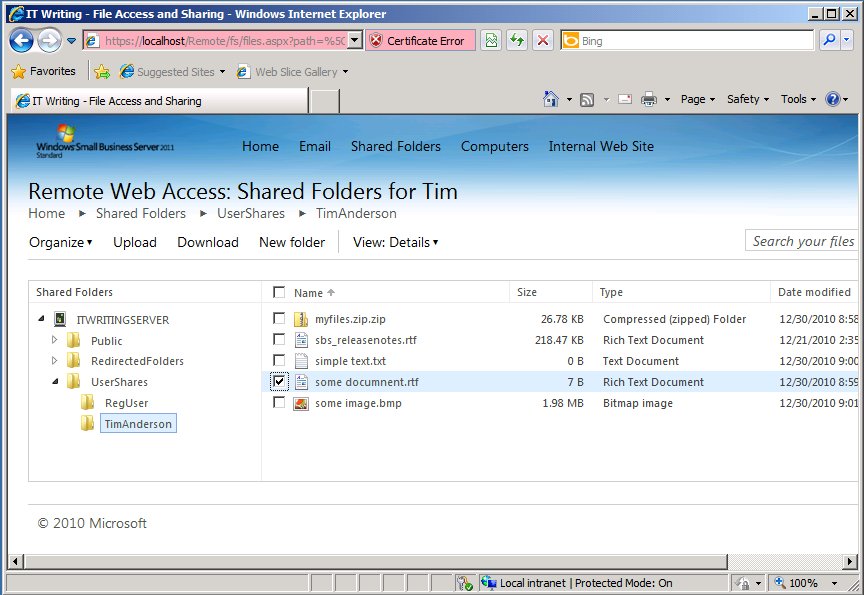
If you browse to this site, you can access folders and files in the SBS Shares to which you have access, controlled by NTFS permissions. The file sharing application will pick up any shared folders on the server. When you open a folder, the files are listed in the browser with options to upload, download, delete, rename, copy, cut or paste.

image

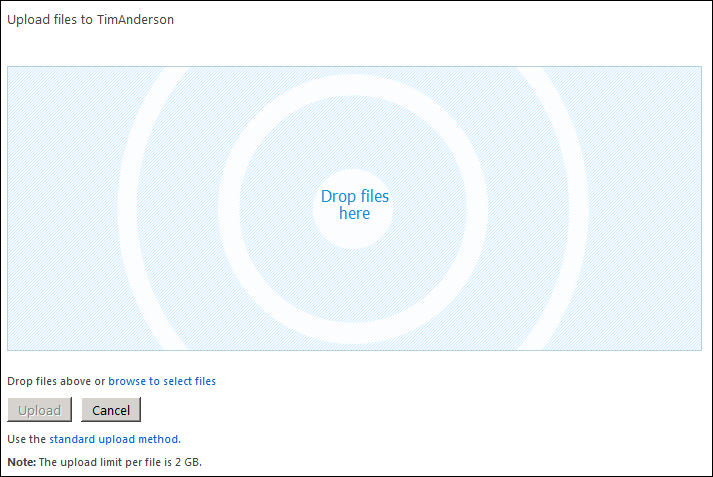
If you choose Upload, you can add documents by dragging them into the browser.

image

I also tried the site in Google Chrome. It worked, though not the drag-and-drop file upload. You can still upload files using a standard file chooser.

This looks to me like a great and overdue feature for Small Business Server. The only snag I can foresee is that some users may still find the SharePoint vs Shared Folder choice confusing and wonder why documents in the “Internal web site” are presented differently and with more features than those in shared folders. It may still be difficult to decide which to use; but at least the choice will no longer be driven solely by whether remote access via the browser is required.

What you read in 2010: top posts on ITWriting.com

With three days to go, traffic on ITWriting.com in 2010 is more than 50% up over that of 2009 with over 1 million unique visitors for the first time. Thank you for your attention in another crazy year in technology.

So what did you read? It is intriguing to look at the stats for the whole year, which are different in character from stats for a week or month. The reason is that over a short period, it is the news of the day that is most read – posts like The Java Crisis and what it means for developers. Over the year though, it is the in-depth technical posts like How to backup Small Business Server 2008 on Hyper-V that draw more readers, along with those posts that are a hit with people searching Google for help with an immediate problem like Cannot open the Outlook window – what sort of error message is that?

The most-read post in 2010 though is in neither category. In July I made a quick post noting that the Amazon Kindle now comes with a web browser based on WebKit and a free worldwide internet connection. Mainly thanks to some helpful comments from users it has become a place where people come for information on that niche subject.

On the programming side, posts about Microsoft’s changing developer story are high on the list:

Lessons from Evernote’s flight from .NET

Microsoft wrestles with HTML5 vs Silverlight futures

Microsoft’s Silverlight dream is over

Another post which is there in the top twenty is this one about Adobe Flash and web services:

SOA, REST and Flash/Flex – why Flash does not PUT

along with this 2009 post on the pros and cons of parallel programming:

Parallel Programming: five reasons for caution. Reflections from Intel’s Parallel Studio briefing

This lightweight post also gets a lot of hits:

Apple iPad vs Windows Tablet vs Google Chrome OS

It is out of date now and I should do a more considered update. Still, it touches on a big theme: the success of the Apple iPad. When you take that alongside the interest in Android tablets, perhaps we can say that 2010 was the year of the tablet. I first thought the tablet concept might take off back in 2003/2004 when I got my first Acer tablet. I was wrong about the timing and wrong about the operating system; but the reasons why tablets are a good idea still apply.

Watching these trends is a lot of fun and I look forward to more surprises in 2011.

Wrestling with Microsoft SharePoint

I do not know what to think about Microsoft SharePoint. It is kind-of inevitable if you live on the Microsoft platform. At some point the question comes up: how do we get to our documents over the Internet; and while VPN works, it is an awkward solution that means opening a VPN tunnel first and arguably opens up too much from a security perspective; direct internet access is easier and works from any device. Microsoft also has Direct Access, which lets you connect to network shares without a VPN; I have not tried it though it requires Windows 7 which is a serious restriction.

In any case, SharePoint does so much more: search, blogs and wikis, company portal, business intelligence, platform for document workflow applications, office web apps for in-browser editing of Office documents, alerts when documents are added or changed, and near-infinite possibilities for customization, to mention a few features.

The downside is that SharePoint is intricate, sometimes slow, and complex to administer.

I run a miniature Microsoft-platform setup for test and development. The servers are on Hyper-V virtual machines, and include Exchange 2007 (2010 upgrade pending), SharePoint 2010, and ISA Server 2006. I have been trying out SharePoint for some time, and once I figured out how to map a drive reliably I have enjoyed using it as a document repository. I have also tried SharePoint WorkSpace 2010 on a netbook, which is useful for offline work, though the user interface needs attention and it has an annoying limit on the number of items it will download.

The problem I have had though is that the internal URL (eg http://sharepoint) was different from the external URL (eg https://sharepoint.mydomain.com). In consequence, it did not work smoothly on a laptop or netbook that is not always on the internal network.

I spent some time fixing this. I am not sure that I found the best solution, but I found one that works. I extended the SharePoint application to a second web site for ssl access; I set up split DNS so that sharepoint.mydomain.com resolves to the internal server on the local network, and to ISA on the internet; I set up a new listener in ISA for the external URL, and a new policy that redirects to the internal server using SSL throughout; I turned off link translation; I removed all the paths except for /*; I set NTLM authentication. Finally I set Alternate Access Mappings for the new external URL which, thanks to split DNS, also works internally.

If that sounds like jargon, welcome to the world of SharePoint administration. Few things are intuitive or straightforward; which is why, for example, you can find a three part series by the Troy Starr on What every SharePoint administrator needs to know about Alternate Access Mappings.

Another thing that is obvious to SharePoint admins but not to occasional visitors: when you patch SharePoint with an official update, it is not enough to run the patch. You also have to update the configuration with psconfig -update or the configuration wizard, to update the metadata.

And after all that, in my very simple SharePoint setup, I still have warnings in Health Analyzer about missing server side dependencies for WebPart class [8d6034c4-a416-e535-281a-6b714894e1aa] – I am not sure why the Analyzer cannot look up the GUID somewhere and present something more meaningful, nor why the “More information about this rule” link in the analyzer takes you to the SharePoint Server home page rather than anywhere useful.

That said, I am pleased with my setup. It makes getting at documents when out and about very easy, particularly with mapped drive integration. I also found several iPhone clients – Steve McDonnell has a round up – and installed the free Moprise to get started. Performance is rather good; and while it has little advantage over Dropbox for an individual, in a corporate environment it makes sense.

My immediate conclusion is that specialising in SharePoint consultancy and administration is probably a smart move if you have the requisite skills; but that tinkering with SharePoint is something non-specialists are unlikely to enjoy. Shifting the administrative burden to Microsoft by using its hosted SharePoint is attractive, as is using an alternative collaboration and document platform such as Google Apps, though the two platforms are not very alike.

The top Silverlight feature request: implement on more platforms

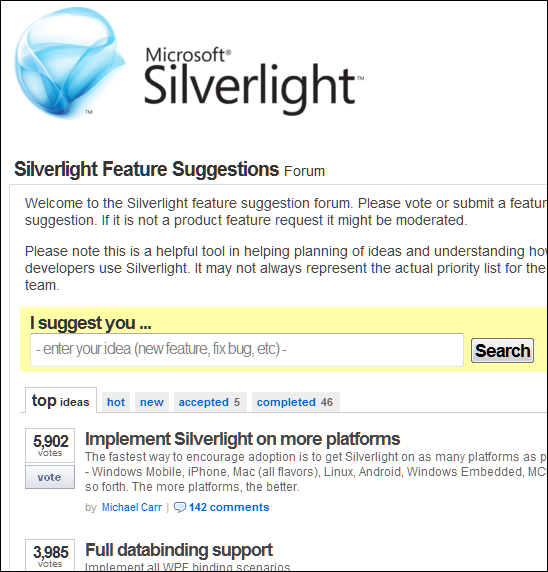
One of the things mentioned by Microsoft VP Scott Guthrie in his Firestarter keynote yesterday was that Silverlight 5, the new version set for release in 2011, implements some 70% of what users have voted for. I presume he means the feedback forum here. But look what the top request is – as noted by a comment to yesterday’s post:

image

Looking at the comments, Android is a common request, and relatively easy for Microsoft to achieve given the open nature of that platform.

This was apparently not part of the 70% though. Instead, Guthrie introduced more Windows-only features – showing that concerns about divergence between Windows and Mac implementations when Microsoft announced COM support at the 2009 PDC were justified.

What if Microsoft had purchased Novell, or purchased Mono from Novell, instead of letting it go to Attachmate? It would have enabled Microsoft to unify the Windows and Linux implementations as well as building on the work the Mono team has done on compilation for iOS.

That dream is over though; the Silverlight application strategy seems focused on making it better for Windows-platform corporations.

Silverlight 5 unveiled: more power, more Windows

Microsoft has announced details of Silverlight 5, a major new release of its browser plug-in and desktop runtime for Windows and Mac. Silverlight is also the primary application runtime for Windows Phone 7, though this update does not apply to the phone yet. Silverlight 5 will go into beta in the first half of 2011, and release is planned for the second half of 2011 – no more than a year or so away.

So what’s in Silverlight 5?

On the media side, there is hardware decoding of H.264 video (an overdue feature) plus enhancements including TrickPlay which enables fast-forward and rewind. There is also remote control support of some kind. According to VP Scott Guthrie, you will be able to stream HD video to a netbook.

The bigger area of change is in Silverlight as an application runtime. Here are the highlights:

  • Text rendering is much improved, with multi-columns, OpenType support, and control of tracking and leading.
  • Postscript vector printing greatly improves printing support, and you can now create a dedicated print view different from what is on screen.
  • A new hardware-accelerated 3D graphics API, as well as immediate mode graphics which lets you render directly to the GPU.
  • There is a 64-bit version of Silverlight 5.
  • WS-Trust support for secure messaging in tandem with Windows Communication Foundation.
  • Databinding enhancements, and support for debugging a binding by setting a breakpoint on it.

Alongside these, trusted Silverlight applications have new capabilities. But what is a trusted application? In the past, Silverlight applications become trusted if they run out of the browser and the user gives permission via a dialog. In Silverlight 5 this changes. A Silverlight application can be trusted within the browser as well, though Microsoft says this only works “when enabled via a group policy registry key and an application certificate”. This implies that the feature is aimed at corporate environments rather than for applets with a broad reach.

Once trusted, an in-browser Silverlight applet has the following additional features:

  • A new web browser control lets you host HTML content within a Silverlight application.
  • Read and write access to My Documents
  • Ability to launch Microsoft Office applications – examples include creating an email message or opening a report in Word
  • Access to COM components – Microsoft gives the example of accessing a USB security key or a bar-code scanner
  • Ability to call native code vith PInvoke (Platform Invoke)

In addition, out of browser applications support multiple windows including child windows, so they can be made to behave even more like normal desktop Windows applications.

You can see the theme here: making trusted Silverlight applications more powerful so that a larger proportion of custom business applications can be implemented in the browser or as Silverlight out-of-browser applications, rather than as traditional Windows applications that require desktop deployment. Put this together with Office 365 and Windows Azure, and you can see how well Silverlight works as a component in Microsoft’s cloud stack – provided users do not have anything inconvenient like an Apple iPad.

But what about the Mac? All these “trusted” features appear to be Windows-only. I asked about Mac support and was told:

We’re evaluating mechanisms for enabling similar trusted applications on the mac.

Fair enough; but the way this is put does suggest that having retreated from any ambitions for broad device reach in statements at the recent PDC conference, it now seems that Microsoft is further retreating from Mac and Windows parity, and moving Silverlight more towards being an application runtime for Windows – though note that there will still be a Silverlight 5 for the Mac and which will have the features that do not require COM or PInvoke.

It is disappointing that there is still no built-in local database support, though there are third-party offerings.

There are a couple of ways to look at Silverlight. Microsoft’s lack of commitment to cross-platform parity and its unwillingness to address broad device support means it does not look good as a broad-reach browser plugin, despite its great features on systems that do support it.

On the other hand, as an alternative to desktop Windows applications Silverlight looks increasingly attractive as its capabilities increase.

More information on the new features here – though note it neglects to mention what will and will not work on a Mac.

What you are saying about the Java crisis

A week or so ago I posted about the Java crisis and what it means for developers. The post attracted attention both here and later on The Guardian web site where it appeared as a technology blog. It was also picked up by Reddit prompting a discussion with over 500 posts.

So what are you saying? User LepoldVonRanke takes a pragmatic view:

I’d much rather have Java given a purpose and streamlined from a central authoritative body with a vision, than a community-run egg-laying, wool-growing, milk-giving super cow pig-sheep, that runs into ten directions at the same time, and therefore does not go anywhere. The Java ship needs a captain. Sun never got a good shot at it. There was always someone trying to wrestle control over Java away. With the Oracle bully as Uberfather, maybe Java has a place to go.

which echoes my suggestion that Java might technically be better of under more dictatorial control, unpalatable though that may be. User 9ren is sceptical:

Theoretically, the article is quite right that Java could advance faster under Oracle. It would be more proprietary, and of course more focussed on the kinds of business applications that bring in revenue for Oracle. It would be in Oracle’s interest; and the profit motive might even be a better spur than Sun had.

But – in practice – can they actual execute the engineering challenges?

Although Oracle has acquired many great software engineers (eg. from Sun, BEA Systems, many others), do they retain them? Does their organizational structure support them? And is Oracle known for attracting top engineering talent in general?

In its formation, Oracle had great software engineers (theirs was the very first commercial relational database, a feat many thought impossible). But that was 40 years ago, and now it’s a (very successful) sales-driven company.

There’s an important point from djhworld:

Java is hugely popular in the enterprise world, companies have invested millions and millions of pounds in the Java ecosystem and I don’t see that changing. Many companies still run Java 1.4.2 as their platform because it’s stable enough for them and would cost too much to upgrade.

The real business world goes at its own pace, whereas tech commentators tend to focus on the latest news and try to guess the future. It is a dangerous disconnect. Take no notice of us. Carry on coding.

On Reddit, some users focused on my assertion that the C# language was more advanced than Java. Is it? jeffcox111 comments:

I write in C# and Java professionally and I have to say I prefer C# hands down. Generics are very old news now in .Net. Take a look at type inference, lambdas, anonymous types, and most of all take a look at LINQ. These are all concepts that have been around for 3 years now in .Net and I hate living without them in Java. With .Net 5 on the horizon we are looking forward to better asynchronous calling/waiting and a bunch of other coolness. Java was good, but .Net is better these days.

and I liked this remark on LINQ:

I remember my first experience with LINQ after using C# for my final-year project (a visual web search engine). I asked a C# developer for some help on building a certain data structure and the guy sent me a pseudocode-looking stuff. I thanked him for the help and said that I’d look to find a way to code it and he said "WTF, I just gave you the code".

From there on I’ve never looked back.

Another discussion point is write once – run anywhere. Has it ever been real? Does it matter?

The company I work for has a large Java "shrinkwrap" app. It runs ok on Windows. It runs like shit on Mac, and it doesn’t run at all on Linux.

write once, run anywhere has always been a utopian pipe dream. And the consequence of this is that we now have yet another layer of crap that separates applications from the hardware.

says tonymt, though annannsi counters:

I’ve worked on a bunch of Java projects running on multiple unix based systems, windows and mac. GUI issues can be a pain to get correct, but its been fine in general. Non-GUI apps are basically there (its rare but I’ve hit bugs in the JVM specific to a particular platform)

Follow the links if you fancy more – I’ll leave the last word to A_Monkey:

I have a Java crisis every time I open eclipse.