Category Archives: .net

Hands On with Visual Studio LightSwitch – but what is it for?

Visual Studio LightSwitch, currently in public beta, is Microsoft’s most intriguing development tool for years. It is, I think, widely misunderstood, or not understood; but there is some brilliant work lurking underneath it. That does not mean it will succeed. The difficulty Microsoft is having in positioning it, together with inevitable version one limitations, may mean that it never receives the attention it deserves.

Let’s start with what Microsoft says LightSwitch is all about. Here is a slide from its Beta 2 presentation to the press:

image

Get the idea? This is development for the rest of us, "a simple tool to solve their problems” as another slide puts it.

OK, so it is an application builder, where the focus is on forms over data. That makes me think of Access and Excel, or going beyond Microsoft, FileMaker. This being 2011 though, the emphasis is not so much on single user or even networked Windows apps, but rather on rich internet clients backed by internet-hosted services. With this in mind, LightSwitch builds three-tier applications with database and server tiers hosted on Windows server and IIS, or optionally on Windows Azure, and a client built in Silverlight that runs either out of browser on Windows – in which case it gets features like export to Excel – or in-browser as a web application.

There is a significant issue with this approach. There is no mobile client. Although Windows Phone runs Silverlight, LightSwitch does not create Windows Phone applications; and the only mobile that runs Silverlight is Windows Phone.

LightSwitch apps should run on a Mac with Silverlight installed, though Microsoft never seems to mention this. It is presented as a tool for Windows. On the Mac, desktop applications will not be able to export to Excel since this is a Windows-only capability in Silverlight.

Silverlight MVP Michael Washington has figured out how to make a standard ASP.NET web application that accesses a LightSwitch back end. I think this should have been an option from the beginning.

I digress though. I decided to have a go with LightSwitch to see if I can work out how the supposed target market is likely to get on with it. The project I set myself was a an index of magazine articles; you may recognize some of the names. With LightSwitch you are insulated from the complexities of data connections and can just get on with defining data. Behind the scenes it is SQL Server. I created tables for Articles, Authors and Magazines, where magazines are composed of articles, and each article has an author.

The LightSwitch data designer is brilliant. It has common-sense data types and an easy relationship builder. I created my three tables and set the relationships.

image

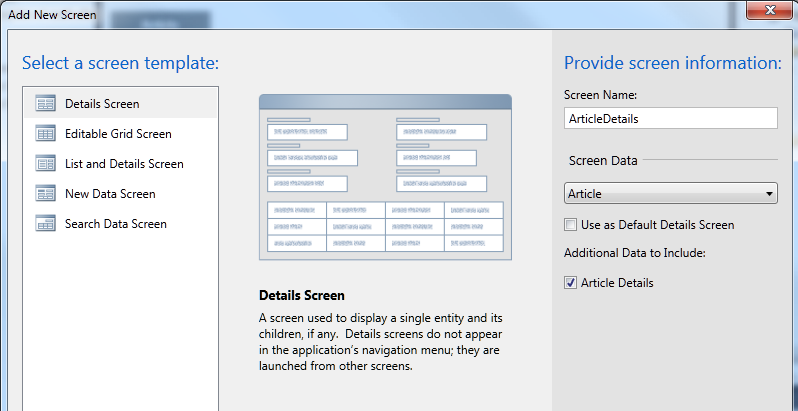
Then I created a screen for entering articles. When you add a screen you have to say what kind of screen you want:
image

I chose an Editable Grid Screen for my three tables. LightSwitch is smart about including fields from related tables. So my Articles grid automatically included columns for Author and for Magazine. I did notice that the the author column only showed the firstname of the author – not good. I discovered how to fix it. Go into the Authors table definition, create a new calculated field called FullName, click Edit Method, and write some code:

partial void FullName_Compute(ref string result)
{
    // Set result to the desired field value
   result = this.Firstname + " " + this.Lastname;

}

Then you set FullName as the “Summary” field for the table.

Have we lost our non-developer developer? I don’t think so, this is easier than a formula in Excel once you work out the steps. I was interested to see the result variable in the generated code; echoes of Delphi and Object Pascal.

I did discover though that my app has a usability problem. In LightSwitch, the user interface is generated for you. Each screen becomes a Task in a menu on the left, and double-clicking opens it. The screen layout is also generated for you. My problem: when I tried entering a new article, I had to specify the Author from a drop-down list. If the author did not yet exist, I had to open an Authors editable grid, enter the new author, save it, then go back to the Articles grid to select the new author.

I set myself the task of creating a more user-friendly screen for new articles. It took me a while to figure out how, because the documentation does not seen to cover my requirement, but after some help from LightSwitch experts I arrived at a solution.

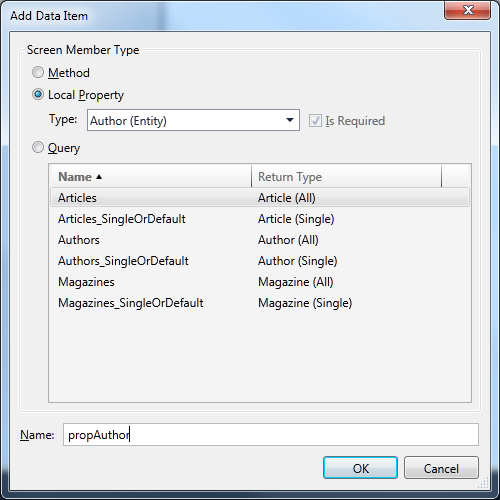
First, I created a New Data Screen based on the Article table. Then I clicked Add Data Item and selected a local property of type Author, which I called propAuthor.
image

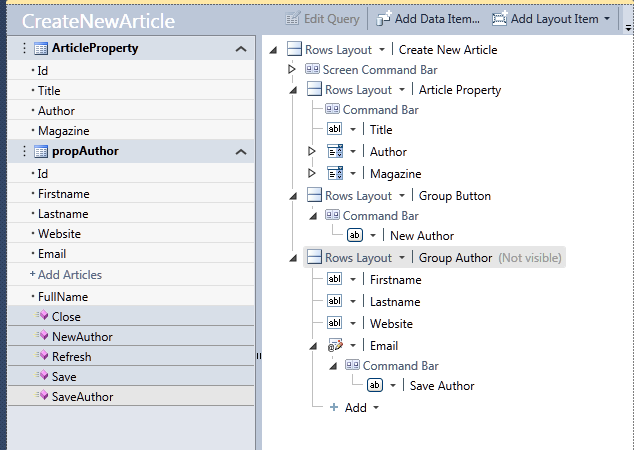
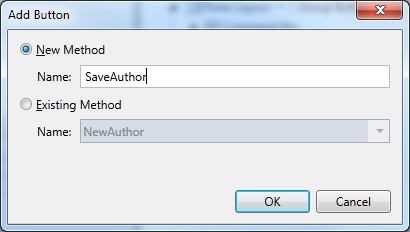
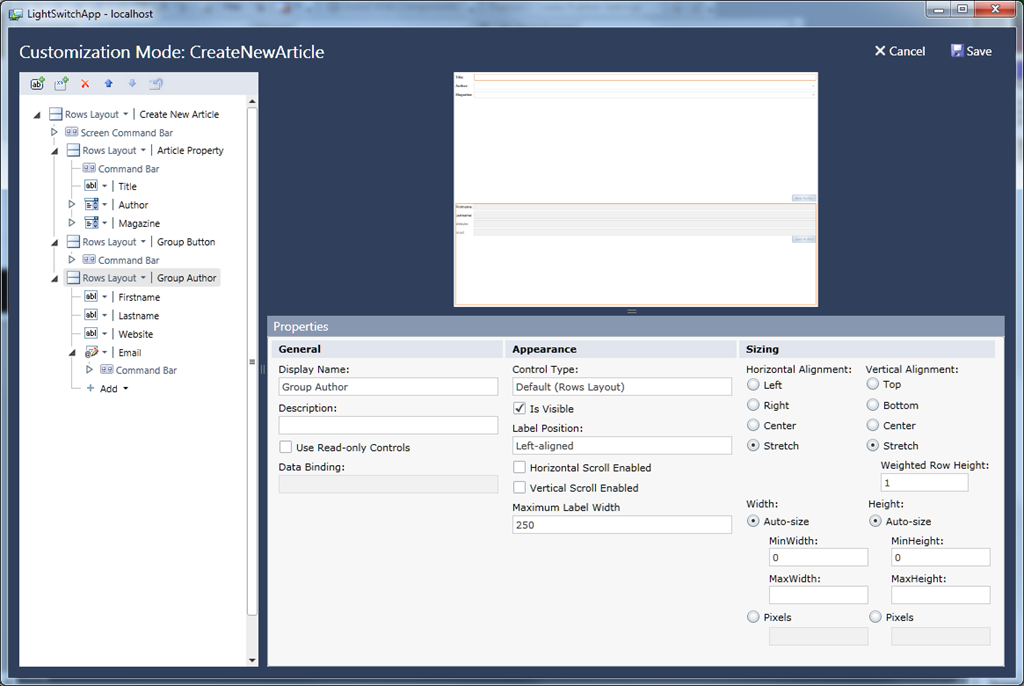
Next, I added two groups to the screen designer. Screen designs in LightSwitch are not like any screen designs you have seen before. They are a hierarchical list of elements, with properties that affect their appearance. I added two new groups, Group Button and GroupAuthor, and set GroupAuthor to be invisible. Then I dragged fields from propAuthor into the Author group. Then I added two buttons, one called NewAuthor and one called SaveAuthor. Here is the dialog for adding a button:
image

and here is my screen design:

image

So the idea is that when I enter a new article, I can select the author from a drop down list; but if the author does not exist, I click New Author, enter the author details, and click Save. Nicer than having to navigate to a new screen.

In order to complete this I have to write some more code. Here is the code for NewAuthor:

partial void NewAuthor_Execute()
{
     // Write your code here.
     this.propAuthor = new Author();
     this.FindControl("GroupAuthor").IsVisible = true;
}

Note the use of FindControl. I am not sure if there is an easier way, but for some reason the group control does not show up as a property of the screen.

Here is the code for SaveAuthor:

partial void SaveAuthor_Execute()
{
    // Write your code here.
    this.ArticleProperty.Author = propAuthor;
    this.Save();
}
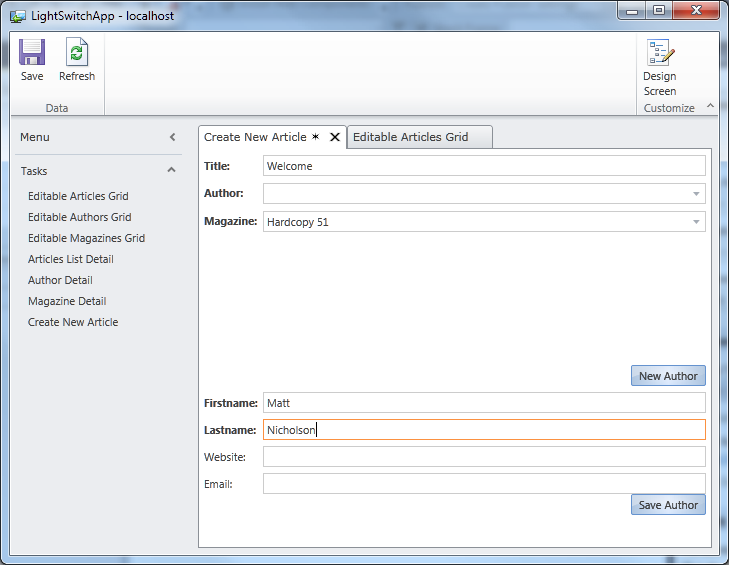
image

This works perfectly. When I click Save Author, the new author is added to the article, and both are saved. Admittedly the screen layout leaves something to be desired; when I have worked out what Weighted Row Height is all about I will try and improve it.
image

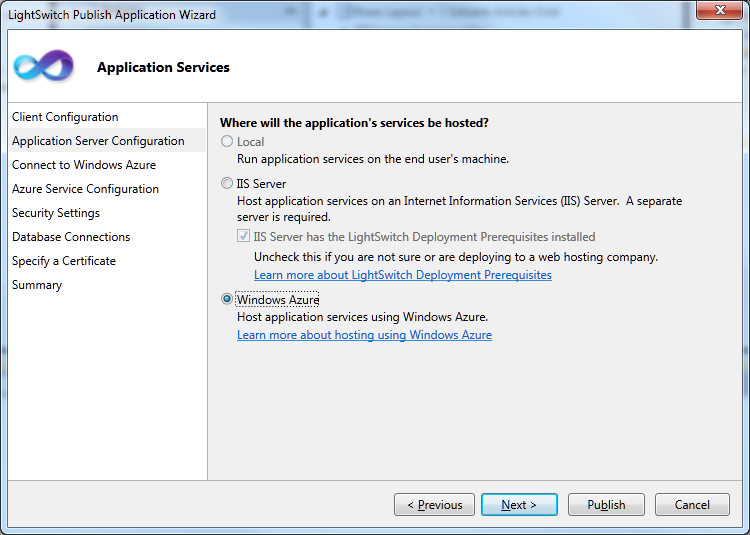
Before I finish, I must mention the LightSwitch Publish Wizard, which is clearly the result of a lot of work on Microsoft’s part. First, you choose between a desktop or web application. Next you choose an option for where the services are hosted, which can be local, or on an IIS server, or on Windows Azure.
image

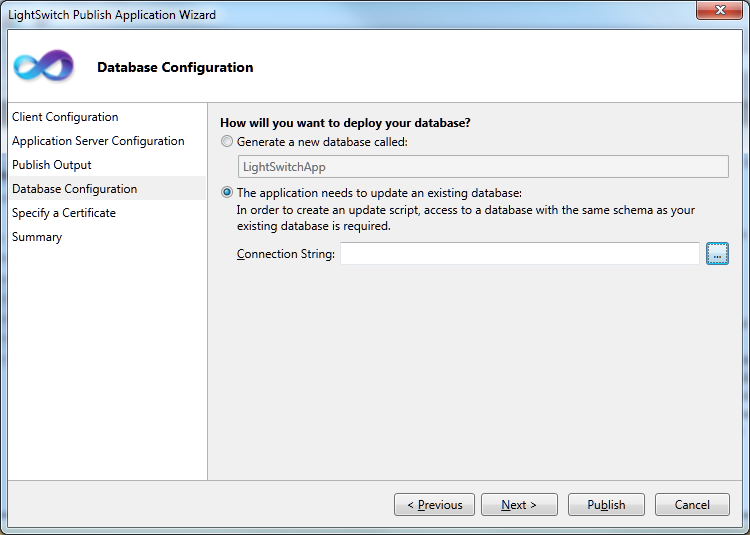
Something I like very much: when you deploy, there is an option to create a new database, but to export the data you have already entered while creating the app. Thoughtful.
image

As you can see from the screens, LightSwitch handles security and access control as well as data management.

What do I think of LightSwitch after this brief exercise? Well, I am impressed by the way it abstracts difficult things. Considered as an easy to use tool for model-driven development, it is excellent.

At the same time, I found it frustrating and sometimes obscure. The local property concept is a critical one if you want to build an application that goes beyond what is generated automatically, but the documentation does not make this clear. I also have not yet found a guide or reference to writing code, which would tell me whether my use of FindControl was sensible or not.

The generated applications are functional rather than beautiful, and the screen layout designer is far from intuitive.

How is the target non-developer developer going to get on with this? I think they will retreat back to the safety of Access or FileMaker in no time. The product this reminds me of more is FoxPro, which was mainly used by professionals.

Making sense of LightSwitch

So what is LightSwitch all about? I think this is a bold effort to create a Visual Basic for Azure, an easy to use tool that would bring multi-tier, cloud-hosted development to a wide group of developers. It could even fit in with the yet-to-be-unveiled app store and Appx application model for Windows 8. But it is the Visual Basic or FoxPro type of developer which Microsoft should be targeting, not professionals in other domains who need to knock together a database app in their spare time.

There are lots of good things here, such as the visual database designer, the Publish Application wizard, and the whole model-driven approach. I suspect though that confused marketing, the Silverlight dependency, and the initial strangeness of the whole package, will combine to make it a hard sell for Microsoft. I would like to be wrong though, as a LightSwitch version 2 which generates HTML 5 instead of Silverlight could be really interesting.
Microsoft promises Silverlight 5 beta soon, more love for HTML 5 in uncertain blog post

Microsoft has promised to deliver a Silverlight 5 beta at the Mix conference next week. The team posting is by Walid Abu-Hadba (Corporate VP of Developer and Platform Evangelism), Soma Somasegar (Senior VP or Developer Division) and Scott Guthrie (Corporate VP of .NET Developer Platform) and seems intended to clarify the company’s much-debated strategy concerning Silverlight vs HTML 5:

we have received questions from the community about the future of plug-ins, and how Silverlight is viewed as part of an overall solution set. We’ll provide clarity, background and context below

Despite the high-powered authorship though, the post tells us little. I mean, can you get vaguer than this?

HTML5 is a solution for many scenarios, and developers should make the appropriate choice based on application needs, knowing that we have a heritage and a future vision of supporting a wide variety of technologies to meet those needs.

This sentence is considered so perfectly nuanced that it is repeated at the end of the post.

If you enjoy reading between lines, there is a phrase to ponder here:

Over the coming months we’ll be particularly demonstrative of our emphasis on HTML 5, in Internet Explorer and in tools.

I’m hearing noises about Visual Studio 2012 now, and I imagine we will see some HTML 5 tooling there. I would expect it to include support for rich ASP.NET clients talking to WCF RIA Services or maybe  WCF Web APIs as well as things like the ASP.NET Membership Framework; and I would expect JQuery and ASP.NET Ajax to figure strongly.

I do not think Silverlight is dead though; apart from its role in Windows Phone, we are hearing rumours about the AppX application model in Windows 8 which looks a lot like Silverlight; and I have already noted the extensive use of Silverlight in Microsoft’s own products. I would rather hear the developer division VPs discuss this aspect of Silverlight, rather than reiterate corporate angst over how it relates to HTML 5. I would also like to see a post signed by the Windows team as well as by developer division.

Windows Phone 8 will run Windows 8, with Silverlight centre stage?

More information on Windows 8 is leaking out now; and it gives some clues about how Microsoft intends to make sense of its two device platforms, Windows tablets and Windows Phone.

Microsoft held back from making its Windows Phone 7 OS available on tablets, which is why most of the numerous tablets being pushed out to compete with Apple run Google Android, and a few of them Windows 7 with its excessive power requirements and a user interface poorly designed for touch control.

Now the strong rumour is that Windows 8 supports two user interfaces, one that is tile-based like Windows Phone 7, and another that is designed for PCs.

In other words, rather than continuing with the Windows Phone 7 OS which is built on Windows CE, Microsoft will build a new version of the Windows Phone 7 UI on top of full Windows.

My further assumption is that Silverlight apps will still run on the new OS, providing continuity with Windows Phone 7 which uses Silverlight or XNA, both based on .NET, for its application platform.

Silverlight might also be used as the platform for apps delivered by the new Windows app store. This is Paul Thurrott, though reported as rumour:

Windows 8 will also include a new app model codenamed Jupiter that will target a new Windows Marketplace app store. The app store will provide access to new, Silverlight based "immersive" applications that are deployed as AppX packages (.appx). The Windows and Office teams are betting very heavily on this new app type, according to my source, and development has already begun using a beta version of Visual Studio 2012. These apps can be written in C#, Visual Basic, and even C++.

We do know that Silverlight 5 supports full platform invoke of native code, a feature which tends to support the idea that it is becoming a key runtime for Windows.

Let me speculate a little further. Imagine you are Adobe, for example, which has said it will deliver the Flash runtime for Windows Phone. Although it competes with Silverlight to some extent, Microsoft needs to tick the Flash box for Windows Phone. But why would Adobe want to invest in Flash for Windows CE, when this OS is not going to be used for Windows Phone 8 and it will have to write new code? I will not be surprised if we hear that Flash is now not coming until Windows Phone 8.

Even within Microsoft itself, I would guess that investment is focused on the next generation rather than the one that is destined to be short-lived.

One partner that is no doubt close to Microsoft’s plans is Nokia. If the above is correct, then Nokia is buying into the Windows OS, not the Windows Phone OS. Will Nokia wait for Windows Phone 8 before launching devices on the platform? I have no idea – and delay will be costly – but I imagine its main plans will be focused on Windows Phone 8 and the possibility of tablet as well as smartphone devices.

The immediate conclusions would be:

  • Silverlight is safe as a development platform, but only for Windows. See also Silverlight the new Windows runtime, HTML 5 the new Silverlight?
  • The Windows Phone 7 OS will be short-lived but the new UI should be a natural progression from what we have now, and apps should still run, so Microsoft can position Windows Phone 8 to users as a new version of Windows Phone rather than a change of direction.
  • Microsoft will not have a coherent mobile and tablet platform until Windows 8 ships sometime in 2012. Google, Apple, RIM, HP, all have plenty of time to establish their competing platforms.

Appcelerator CEO on Titanium, Aptana and the future of mobile development

I met with Aptana CEO and co-founder Jeff Haynie at the Mobile World Congress in Barcelona last month.

Appcelerator’s main product is Titanium, an SDK which takes HTML and JavaScript source files and compiles them to native apps for several platforms, including Windows Mac and Linux on the desktop, and Google Android or Apple iOS for mobile. RIM Blackberry support is in preview. Appcelerator has recently acquired the Aptana IDE for HTML, JavaScript, CSS, Ruby on Rails, Python and Adobe AIR. The company has also partnered with Engine Yard for cloud-hosted Ruby on Rails applications to deliver web services to clients built with Titanium.

Haynie says that mobile is currently a three-horse race between Apple iOS, Google Android, and RIM Blackberry; but he expects further diversification. Microsoft Windows Phone is under consideration, and he says that cross-compiling to Silverlight would be possible for Titanium:

It’s a .NET SDK, we would have to build a translation into Silverlight. That’s how we do it for iOS, we translate code into Objective C. We don’t think it’s technically insurmountable.

I asked about the Appcelerator Freemium business model. Titanium is open source and you can download and use the SDK commercially for free. Haynie says it works well because companies can do a full evaluation and get to understand the value of the software fully before deciding whether to purchase. However he emphasised that larger companies, other than non-profits, are expected to take out a paid subscription.

This point could do with clarification. Indeed, the Appcelerator Plans and Pricing page shows Titanium Indie which is free but for companies of less then 25 employees, and other editions which are paid-for. But as far as I can tell there are no restrictions on the SDK. See the FAQ which says:

Can I use Titanium for a commercial application?

Yes. You can use Titanium in both a personal and commercial application regardless of what your license or price is.

What is your License?

The Titanium SDK is licensed under the Apache Public License (version 2).

I also took the opportunity to ask about Adobe AIR support in Aptana. It strikes me that this is under threat following the acquisition, since AIR competes with Titanium. Haynie was just a little evasive, but at the same time impressed me with his attitude:

Obviously we have a competitive platform from Adobe AIR. But we want developers to have the best choice, the best tools possible. So competitively we need to build the best product. If AIR is a better product and people want to use Aptana to build AIR apps, then fine. That means we need to continue to work to make a better runtime for the desktop.

Nevertheless, Haynie implied that AIR support will only continue if Adobe supports it; I am not sure what support means in this context but I think it includes a financial contribution:

We’re with Adobe on trying to figure out where we go from here … we have to spend a lot of money to support that, so we’re making sure that we’ve got Adobe’s support behind that.

I am not sure what Adobe gains from Aptana support, given that it has its own Eclipse-based IDE called Flash Builder, so I would not bet on there being significant updates to the current AIR 1.5 plug-in.

Finally, Haynie emphasised what to me are familiar themes in talking about the direction for Titanium and Aptana. Cross-platform visual design tools; designer and developer workflow; and integration in a single IDE of rich client and cloud back-end. This integration has long struck me as one of the best things about Microsoft’s Visual Studio, so it is interesting to see the theme reappear in a cross-platform context.

What I enjoyed about the interview is the way Haynie communicates the huge change and volatility that has arrived within the software development world, thanks to the impact of cloud and mobile. Times of change mean new opportunities and new products. Titanium has plenty of competition, but if Appcelerator is able to deliver a robust, cloud to device, cross-platform toolkit, then it will have a bright future.

I have posted a transcript of most of the interview.

Microsoft backs Telefonica’s BlueVia mobile SDK – but the market is fragmented

Announced at Mobile World Congress last month, BlueVia is Telefonica’s effort to attract developers to its app platform. Telefonica is the largest phone operator in Spain and also owns O2 in the UK, and has various other operations around the world.

In this case though, “Platform” is not just the devices connected to Telefonica networks, but also services exposed to apps via newly published APIs. BlueVia has APIs for sending and receiving SMS messages, delivering mobile ads, and obtaining information about the current user through a User Context API.

Things like sending a text from an app are nothing new, but a difference is that BlueVia will pay the developer a cut from the revenue generated. Along with ads, the idea is that an app can generate a revenue stream, rather than being just a one-off purchase.

The news today is that Microsoft is backing BlueVia with a toolset and marketing to Windows platform developers. There has been an SDK for Microsoft .NET for some time, but today Microsoft and BlueVia have delivered a new SDK for .NET which includes both server and client side support for the BlueVia APIs. On the server, there are templates for Windows Azure and for BlueVia ASP.NET MVC2 and WCF (Windows Communication Foundation) applications. On the client side, there are Silverlight controls such as a DialPad, an Advertising control, and a text to speech control. Microsoft also provides hooks to Windows Live Services in the hope that you will integrate these with your BlueVia applications.

The snag with developing your app with BlueVia APIs is that it will only work for Telefonica customers, thus restricting your market or forcing you to code to different APIs for other operators. “If you want to expose an API in the way that Telefonica is doing, you need to be a Telefonica customer in order to be able to use it,” says Jose Valles, Head of BlueVia at Telefonica.

If you further restrict your app’s market by targeting only Windows Phone, it gets small indeed.

Valles says there is hope for improvement. “We are working with the industry and with WAC in order to standardise this API,” says, assuring me that the reaction is “very positive”. WAC is the Wholesale Applications Community, a cross-industry forum for tackling fragmentation. Do not count on it though; it strikes me as unlikely that a cross-industry group would accept BlueVia’s APIs as-is.

There is also a glimpse of the challenges facing developers trying to exploit this market in the BlueVia forums. This user observes:

During the submission process we could only submit the app for a single device model while it is actually supported on hundreds of models. So please also explain how to specify all the supported models during the submission process

The answer: BlueVia has defined around 20 groups of compatible devices, and you can only upload your app for one at a time. 20 uploads is better than hundreds, but still demonstrates the effort involved in trying to attain any kind of broad reach through this channel.

BlueVia is in beta, but Valles says this will change “in the next few weeks”. That said, it is already up and running and has 600 developers signed up. “It is already commercial, whoever wants to come in just needs to email and we will send it to him,” he says.

The idea of the operator sharing its ongoing revenue with app developers is a good one, but be prepared to work hard to make it a reality.

Silverlight in Microsoft products – Silverlight the new Windows runtime, HTML 5 the new Silverlight?

Is Microsoft ditching Silverlight and embracing HTML 5? Or is Silverlight the future of desktop and browser-based development on Microsoft’s platform?

Good question; and I am not sure that Microsoft itself can answer. There is evidence for both cases.

One thing I have noticed though is that Silverlight is turning up in numerous Microsoft products. This is in contrast to the early years of the original .NET Framework, which Microsoft used rather little in its own stuff, though the context is different today because of the growth in web-based development.

I guess we cannot really count Visual Studio LightSwitch, which is a tool that builds Silverlight applications, though it is interesting insofar as the target market is not expert developers, but smart general users who want to build database applications.

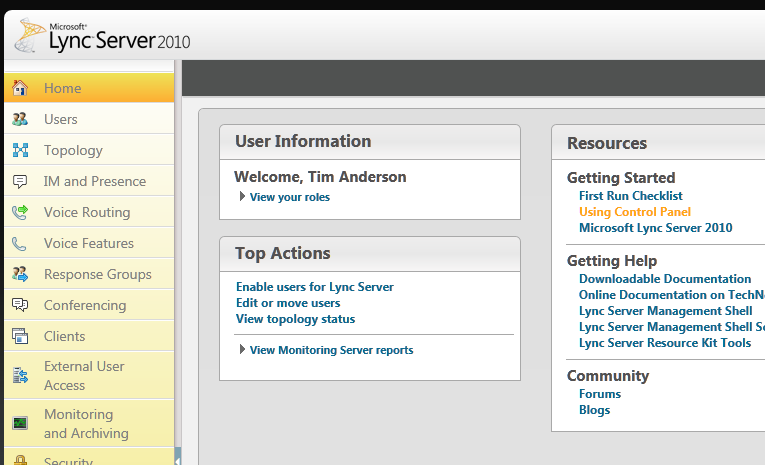
Lync Server 2010 is a better example. Silverlight is used for the control panel.

image

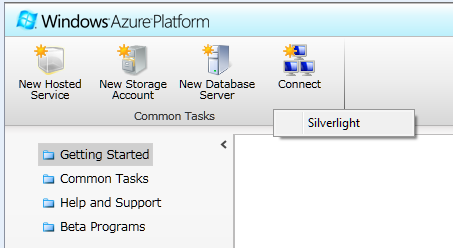
Windows Azure, a strategic product for Microsoft, uses Silverlight for its control panel

image

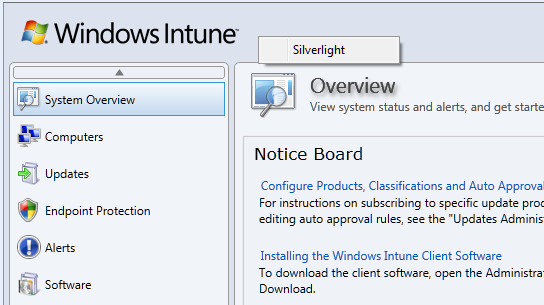
Windows Intune, for maintaining networks online

image

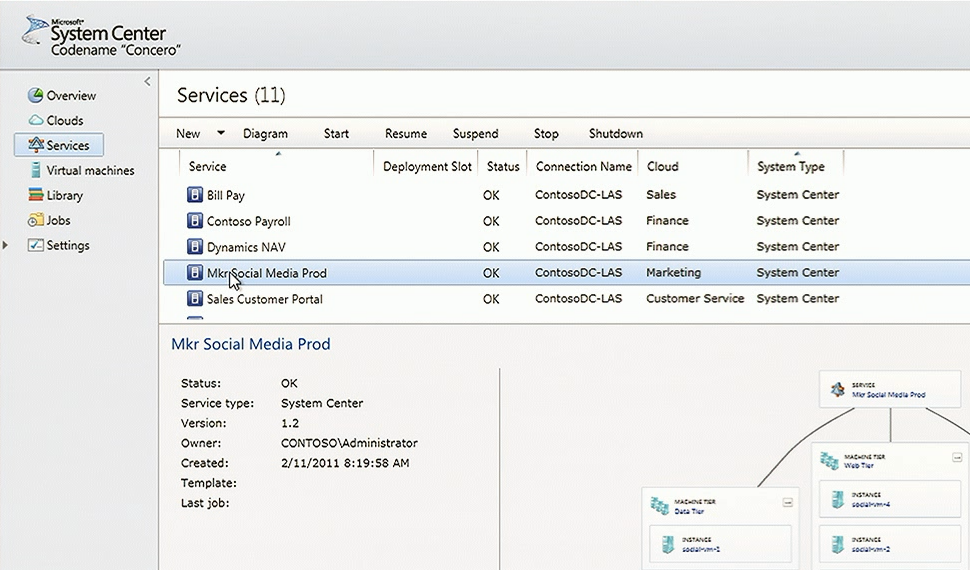
System Center for managing Microsoft servers. I’m not actually sure how much Silverlight is used in System Center, but I understand the newly announced “Concero”, a new feature for managing public and private clouds, uses a Silverlight control panel and I suspect it is used elsewhere as well.

image

These are a few that I am aware of; I would be interested in other examples.

Now, you can make sense of this to some extent by distinguishing “Windows platform” from “broad reach” applications. It is curious, but Silverlight which started out as a broad reach plugin is gradually moving towards a Windows platform runtime, though it still runs on a Mac with some limitations, mainly lack of COM interop. There has been speculation that Silverlight could merge with the desktop Windows Presentation Foundation and become a commonly used application runtime for desktop Windows as well as web apps, and of course Windows Phone.

When Microsoft wants broad reach, it uses HTML, an example being Office Web Apps which make hardly any use of Silverlight.

Nevertheless, using Silverlight for products like Windows Intune could be annoying for administrators who might otherwise use an Apple iPad when out and about; but I guess Microsoft figures that if you are deep enough into Windows to use Intune, you probably will not be using an iPad.

Let me add that Silverlight seems to me to be working well in the examples above, to the extent that I have tried it. Could they be done equally well in HTML and JavaScript? Probably, if users have IE9, but probably not if it is IE8 or earlier.

Silverlight the new Windows, HTML 5 the new Silverlight?

Adobe AIR 2.6, MonoMac 1.0, cross-platform is not dead yet

It is a busy time for cross-platform toolkits. Adobe has released AIR 2.6, and reading the list of what’s new you would think it was mainly for mobile, since the notes focus on new features for Apple iOS, though AIR is also a runtime for Windows, Linux and desktop Mac. New features for iOS include GPU rendering – a form of hardware accelerated graphics – access to the camera, microphone, and camera roll, and embedded Webkit for apps that use web content. On Google Android, you can now debug on devices connected via USB.

There is also a new feature called “owned native windows” which lets you have a group of windows that remain together in the Z order – this lets you have things like floating toolbars without odd results where toolbars get hidden underneath other applications.

Asynchronous decoding of bitmaps is another new feature, allowing images to be processed in the background. This seems like a stopgap solution to overcome the lack of mullti-threading in AIR, but useful nonetheless.

Since the Flash runtime does not run on iOS, Adobe has a packager that compiles an AIR application into a native app. This is now called the AIR Developer Tool or ADT. You can use the ADT to target Windows, Linux or Android as well; however platforms other than iOS still need the AIR runtime installed.

Adobe is dropping support for the original iPhone and the iPhone 3G. iPhone 3GS or higher is needed.

If you want to build a cross-platform app but prefer .NET to Adobe’s Flash and ActionScript, the Mono folk have what you need. I’d guess that the Mono team has a small fraction of the resources of Adobe; but nevertheless it has delivered MonoTouch for iOS and is working on MonoDroid for Android. Just completed in its 1.0 version is MonoMac, for building Cocoa applications on Apple OSX. Mono is not fully cross-platform, since the GUI framework is different on the various platforms, but you do get to use C# throughout.

I am happy to agree that true native code is usually a better solution for any one platform; but at a time when the number of viable platforms is increasing the attraction of cross-platform has never been greater.

What’s the story with IE9 and embedded Internet Explorer?

There is a certain amount of fuss over the fact that Apple’s latest mobile Safari does not give full performance when either embedded in another application, or pinned to the home screen.

It would help if Apple were more forthcoming on the issue; but in general you cannot assume that embedded browser components will behave the same way as the full browser, even when they share common libraries.

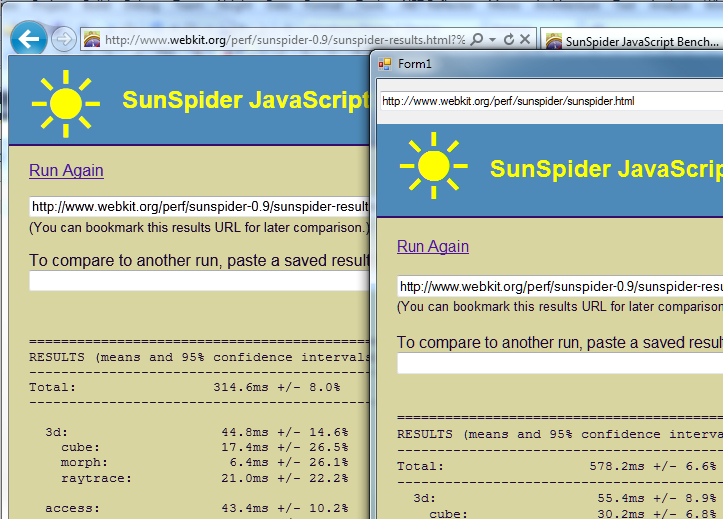
I did some quick experimentation with the released Internet Explorer 9 and the .NET Webbrowser control. First, I tried the SunSpider JavaScript benchmark. I had to use version 0.9 since the latest one gives an error in the Webbrowser control. No great surprise: the embedded version was substantially slower. I ran the tests separately, and for the .NET application I ran in release mode outside Visual Studio. IE9 completed in 314.6ms, the Webbrowser control in 578.2ms.

image

While that may seem a bad result for embedded IE, it could be much worse. Unfortunately I did not think to run this test before installing IE9, so I dual-booted into a Windows install that still has IE8 and ran the exact same application. At 6175ms it was more than ten times slower. It was slightly quicker in standalone IE8, but not by much.

image

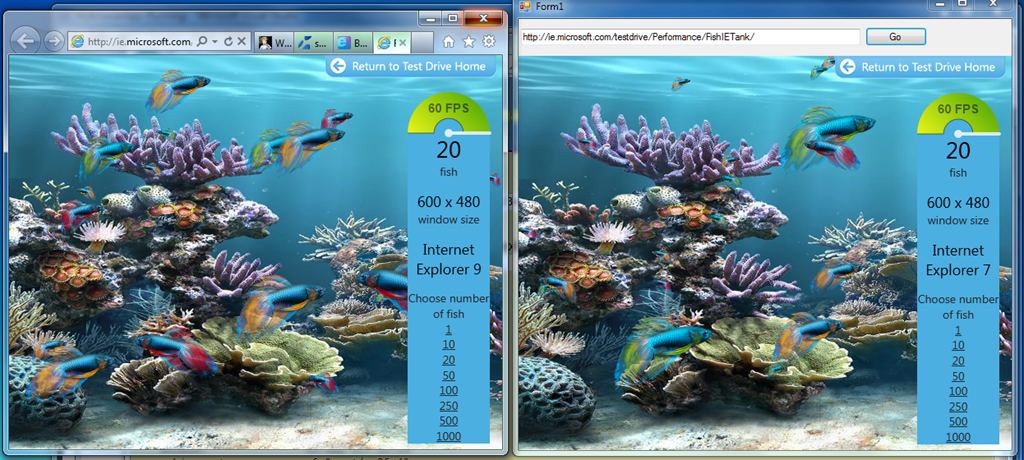
Next I tried the Fish Tank demo, which tests hardware graphic acceleration.

image

There were two notable facts about my result here. First, the Webbrowser control reports itself as Internet Explorer 7. Second, the frame rate for the two instances was nearly identical. In practice it varied slightly and some of the time the standalone IE9 was fractionally faster, but still close. By way of reference, Apple’s Safari was around 10 times slower.

Update: embedded IE is slower on the Fish Tank than I first realised. 60fps is a kind of maximum for the demo. Embedded IE9 slows to 45fps with 50 fish, whereas full IE9 does not drop below 60fps until 500 fish on my system. It does makes the fans whir though!

My guess is that Microsoft is more concerned about compatibility than performance, when it comes to embedded IE. However, clearly there is significant benefit from IE9 even when embedded.

How can you get embedded IE not to report itself as IE7 and to use full standards mode by default? If it is like IE8, this can only be done on a per-application basis via setting a registry key. That is awkward for developers, who would prefer an API call to set this. I am not sure if there is any change for IE9.

Microsoft remakes WCF for REST and the web

WCF is Windows Communication Foundation, the part of Microsoft’s .NET framework that handles service-oriented architecture. When WCF was first designed Microsoft was betting on SOAP web services. SOAP is still widely used but since then the trend has been towards more web-friendly services based on REST (Representational State Transfer) and JSON (JavaScript Object Notation). Microsoft has always argued that WCF is flexible enough to support such alternatives.

That said, a project which I have become aware of here at QCon London is the WCF Web APIs, presented here by Microsoft’s Glenn Block. WCF Web APIs focus on support for REST, JQuery clients, and programming model simplicity for a variety of other clients such as Silverlight and Windows Phone. The bit that surprised me is that WCF Web APIs are not just another wrapper for WCF; it is a completely new library that does not build on the old WCF Service Model. The fact that it is called WCF at all is confusing, though of course it belongs in that space within the overall .NET Framework.

I have not had time to look in detail at the WCF Web APIs, but from what I have seen and heard they are well worth exploring, even if you have found the old WCF somewhat impenetrable.

Mono project: no plans for cross-platform WPF

Miguel de Icaza’s report from the Game Developer Conference is upbeat, rightly so in my view as usage of Mono is continuing to build, not only in game development with Unity, a development tool that uses Mono as its scripting engine, but also for mobile development for Apple’s iOS with Monotouch and for Android with Monodroid. These mobile toolkits also give Mono a stronger business model; many sites use Mono for serving ASP.NET applications on Linux, but without paying or contributing back to the project.

Mono is an open source implementation of C# and Microsoft’s .NET Framework.

That said, it is interesting that Mono is still struggling with an issue that has been a problem since its first days: how to implement Microsoft’s GUI (Graphical User Interface) framework on other platforms. Mono does have Gtk# for Windows, Mac and Linux, but this does not meet the goal of letting developers easily port their Visual Studio client projects to Mono. There is also an implementation of Windows.Forms, but de Icaza mentions that “our Windows.Forms is not actively developed.”

Apparently many tools vendors asked the Mono team at GDC when Windows Presentation Foundation (WPF) would be implemented for Mono. WPF is the current presentation framework for Microsoft.NET, though there is some uncertainty about where Microsoft intends to take it. I remember asking de Icaza about this back in 2003, when the WPF framework was first announced (then called Avalon); he said it was too complex and that he did not plan to implement it.

This is still the case:

We have no plans on building WPF. We just do not have the man power to build an implementation in any reasonable time-frame.

That said, Mono has implemented Silverlight, which is based on WPF, and there are some signs that Microsoft might merge WPF and Silverlight. What would the Mono team do then?

Miguel de Icaza says:

Silverlight runs on a sandbox, so you can not really P/Invoke into native libraries, or host DirectX/Win32 content inside of it.
There are other things missing, like menubar integration and things like that.

Of course, this is no longer true on Windows: Platform Invoke is coming in Silverlight 5.

Perhaps the Mono team will knuckle down and implement Silverlight with desktop integration, which would be good for cross-platform Silverlight and compatibility with Microsoft .NET.

Then again, it seems to me that Mono is increasingly divergent from Microsoft .NET, focusing on implementing C# in places that Microsoft does not touch, such as the mobile platforms from Apple and Google.

That is actually a sign of health; and you can understand why the Mono team may be reluctant to shadow Microsoft’s every move with Silverlight and WPF.