Category Archives: professional

Microsoft backs Telefonica’s BlueVia mobile SDK – but the market is fragmented

Announced at Mobile World Congress last month, BlueVia is Telefonica’s effort to attract developers to its app platform. Telefonica is the largest phone operator in Spain and also owns O2 in the UK, and has various other operations around the world.

In this case though, “Platform” is not just the devices connected to Telefonica networks, but also services exposed to apps via newly published APIs. BlueVia has APIs for sending and receiving SMS messages, delivering mobile ads, and obtaining information about the current user through a User Context API.

Things like sending a text from an app are nothing new, but a difference is that BlueVia will pay the developer a cut from the revenue generated. Along with ads, the idea is that an app can generate a revenue stream, rather than being just a one-off purchase.

The news today is that Microsoft is backing BlueVia with a toolset and marketing to Windows platform developers. There has been an SDK for Microsoft .NET for some time, but today Microsoft and BlueVia have delivered a new SDK for .NET which includes both server and client side support for the BlueVia APIs. On the server, there are templates for Windows Azure and for BlueVia ASP.NET MVC2 and WCF (Windows Communication Foundation) applications. On the client side, there are Silverlight controls such as a DialPad, an Advertising control, and a text to speech control. Microsoft also provides hooks to Windows Live Services in the hope that you will integrate these with your BlueVia applications.

The snag with developing your app with BlueVia APIs is that it will only work for Telefonica customers, thus restricting your market or forcing you to code to different APIs for other operators. “If you want to expose an API in the way that Telefonica is doing, you need to be a Telefonica customer in order to be able to use it,” says Jose Valles, Head of BlueVia at Telefonica.

If you further restrict your app’s market by targeting only Windows Phone, it gets small indeed.

Valles says there is hope for improvement. “We are working with the industry and with WAC in order to standardise this API,” says, assuring me that the reaction is “very positive”. WAC is the Wholesale Applications Community, a cross-industry forum for tackling fragmentation. Do not count on it though; it strikes me as unlikely that a cross-industry group would accept BlueVia’s APIs as-is.

There is also a glimpse of the challenges facing developers trying to exploit this market in the BlueVia forums. This user observes:

During the submission process we could only submit the app for a single device model while it is actually supported on hundreds of models. So please also explain how to specify all the supported models during the submission process

The answer: BlueVia has defined around 20 groups of compatible devices, and you can only upload your app for one at a time. 20 uploads is better than hundreds, but still demonstrates the effort involved in trying to attain any kind of broad reach through this channel.

BlueVia is in beta, but Valles says this will change “in the next few weeks”. That said, it is already up and running and has 600 developers signed up. “It is already commercial, whoever wants to come in just needs to email and we will send it to him,” he says.

The idea of the operator sharing its ongoing revenue with app developers is a good one, but be prepared to work hard to make it a reality.
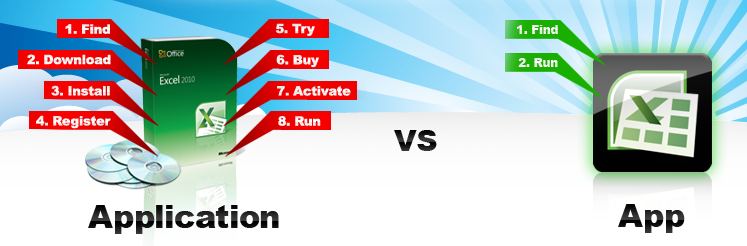
Another Windows app store – but this time it is virtual. Embarcadero’s AppWave promises instant installs

Embarcadero has announced the AppWave Store, a forthcoming app store for Windows which uses application virtualization to avoid the hassles and risks of the usual Windows install process.

image

The idea is that purchasing apps for Windows will be as simple as installing an app on a mobile using the Apple app store or Android Market.

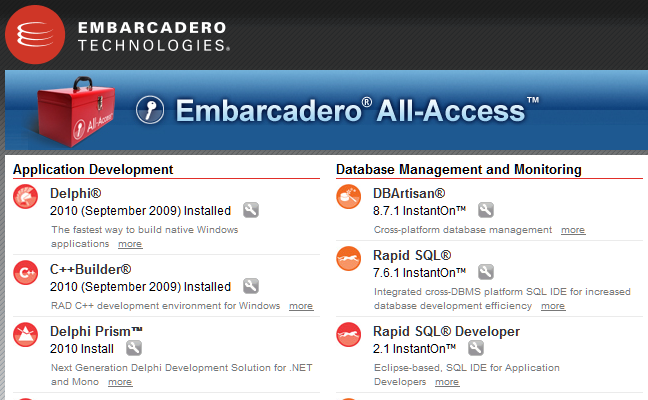
The underlying technology was developed to simplify deployment of Embarcadero’s tools. The All-Access subscription includes a tool box application that lets you run tools using “InstantOn”, which means no installation, just click and run. I have used this for a while now and it works well.

image

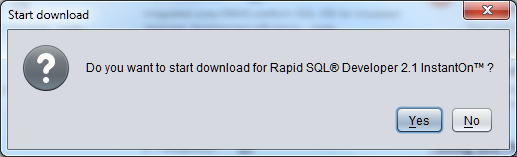
When you run an InstantOn tool for the first time, you are prompted to download:

image

There is of course a pause while the app downloads. This is not thin client technology where the app actually runs remotely. It is installed on your local machine, but isolated so there are no dependencies or conflicts.

image

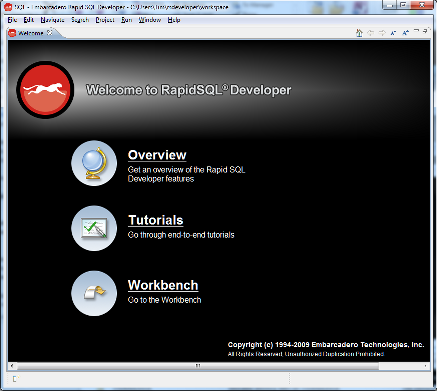
Once downloaded, you just launch the application. No other setup, other than software agreement and registration prompt.

image

The download is cached, so you can launch next time without delay, and it works offline too. AppWave is a rebranded version of InstantOn, and is also available for internal deployment of Embarcadero tools.

The AppWave store takes this technology and applies to a store for the general public. Developers will pay $99 per year (though the fee is waived if you sign up now) and get AppWave Studio, which lets you convert software to run under AppWave. The conversion process is called “mastering” and only takes a few hours, according to the FAQ [pdf].

Windows XP, Vista and 7 are supported clients, availability will be worldwide at launch, and Embarcadero takes 30% of your sale price. No launch date has been announced.

I guess the first big issue is whether developers will feel that the 30% fee is good value bearing in mind that there are many other ways to sell and deploy software.

Second, there are other app stores out there or coming, not least Microsoft’s own which is likely to be part of Windows 8. Will AppWave compete effectively?

Third, does Embarcadero have what it takes to market AppWave and make a destination for Windows users looking for apps?

App virtualization is a neat trick though, and could save significant support costs as well as being appealing for customers. Deploying apps using runtimes like Silverlight or Adobe AIR can be equally seamless, but apps have to be written specifically for those runtimes, whereas AppWave works with apps written for the full Windows API.

It is surprising that Embarcadero is not also marketing the AppWave technology for developers for general purpose use. Possibly this is coming; or maybe the company will try to keep it as an exclusive benefit for the AppWave store. There are alternatives, including Microsoft App-V and VMWare ThinApp.

See also Marco Cantu’s post Understanding Embarcadero AppWave, which is what alerted me to the AppWave store.

RIM announces Java and Android runtimes for the Playbook, beta of native SDK

RIM has announced several new options for developing apps for its PlayBook tablet.

RIM will launch two optional “app players” that provide an application run-time environment for BlackBerry Java® apps and Android v2.3 apps. These new app players will allow users to download BlackBerry Java apps and Android apps from BlackBerry App World and run them on their BlackBerry PlayBook.

In addition, RIM will shortly release the native SDK for the BlackBerry PlayBook enabling C/C++ application development on the BlackBerry® Tablet OS. For game-specific developers, RIM is also announcing that it has gained support from two leading game development tooling companies, allowing developers to use the cross-platform game engines from Ideaworks Labs and Unity Technologies to bring their games to the BlackBerry PlayBook.

It sounds as if the Android runtime will not be perfectly compatible with real Android:

Developers currently building for the BlackBerry or Android platforms will be able to quickly and easily port their apps to run on the BlackBerry Tablet OS thanks to a high degree of API compatibility.

Nevertheless, this will be an attractive route for Android developers looking for a quick way to port to the Blackberry.

The native SDK is currently in “limited alpha release” but RIM is promising an open beta for this summer.

The BlackBerry Tablet OS NDK will allow developers to build high-performance, multi-threaded, native C/C++ applications with industry standard GNU toolchains. Developers can create advanced 2D and 3D applications and special effects by leveraging programmable shaders available in hardware-accelerated OpenGL ES 2.0.

The deal with Unity is important too. Unity is an increasingly popular toolkit for game development and adding the Blackberry to the list of supported platforms will boost its appeal. Ideaworks Labs makes the Airplay SDK, a cross-platform toolkit which already supports Apple iOS, Android, Symbian, Samsung Bada, HP webOS and Windows Mobile.

Note that the primary SDK for the Playbook has until now been Adobe AIR; and since the UI itself uses the Flash runtime this likely still makes sense for many applications.

RIM is doing a good job of opening up its platform. It is an interesting contrast to Microsoft’s “Silverlight, XNA or nothing” approach for Windows Phone.

Silverlight in Microsoft products – Silverlight the new Windows runtime, HTML 5 the new Silverlight?

Is Microsoft ditching Silverlight and embracing HTML 5? Or is Silverlight the future of desktop and browser-based development on Microsoft’s platform?

Good question; and I am not sure that Microsoft itself can answer. There is evidence for both cases.

One thing I have noticed though is that Silverlight is turning up in numerous Microsoft products. This is in contrast to the early years of the original .NET Framework, which Microsoft used rather little in its own stuff, though the context is different today because of the growth in web-based development.

I guess we cannot really count Visual Studio LightSwitch, which is a tool that builds Silverlight applications, though it is interesting insofar as the target market is not expert developers, but smart general users who want to build database applications.

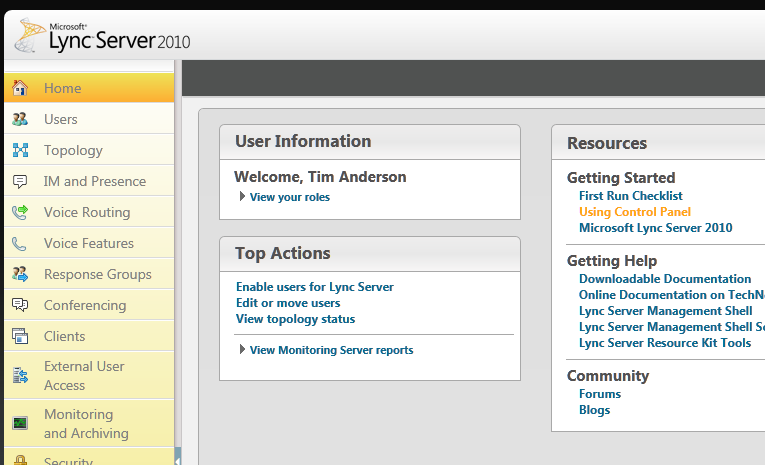
Lync Server 2010 is a better example. Silverlight is used for the control panel.

image

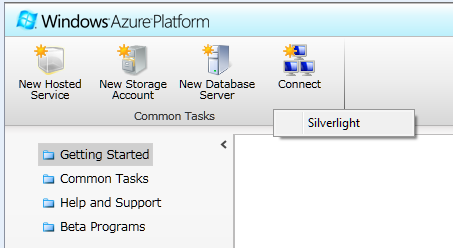
Windows Azure, a strategic product for Microsoft, uses Silverlight for its control panel

image

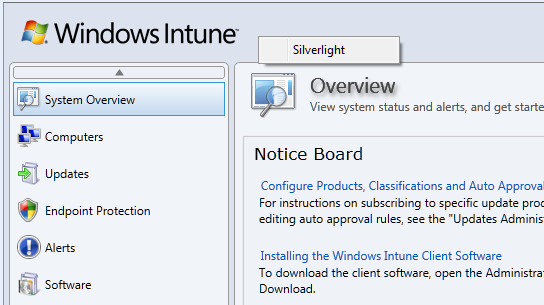
Windows Intune, for maintaining networks online

image

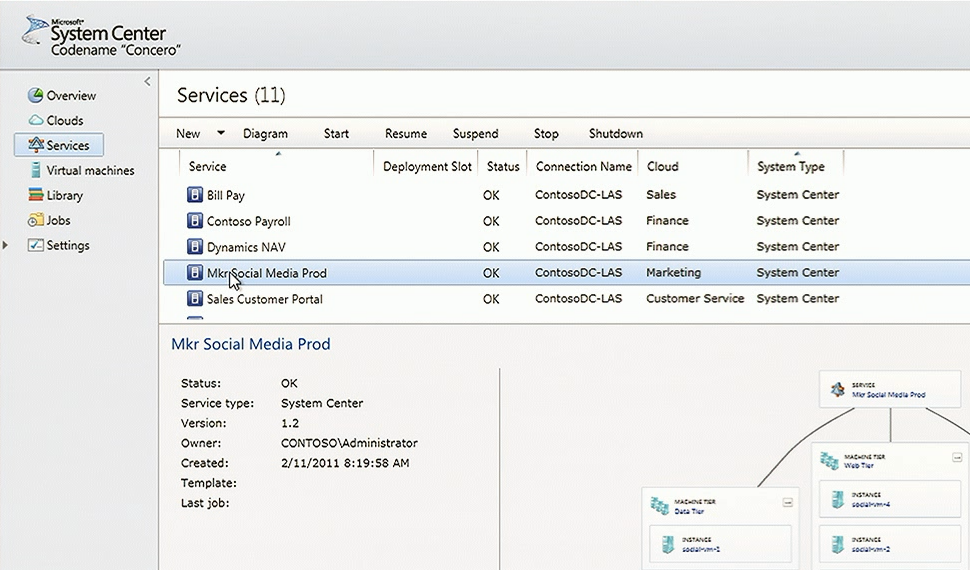
System Center for managing Microsoft servers. I’m not actually sure how much Silverlight is used in System Center, but I understand the newly announced “Concero”, a new feature for managing public and private clouds, uses a Silverlight control panel and I suspect it is used elsewhere as well.

image

These are a few that I am aware of; I would be interested in other examples.

Now, you can make sense of this to some extent by distinguishing “Windows platform” from “broad reach” applications. It is curious, but Silverlight which started out as a broad reach plugin is gradually moving towards a Windows platform runtime, though it still runs on a Mac with some limitations, mainly lack of COM interop. There has been speculation that Silverlight could merge with the desktop Windows Presentation Foundation and become a commonly used application runtime for desktop Windows as well as web apps, and of course Windows Phone.

When Microsoft wants broad reach, it uses HTML, an example being Office Web Apps which make hardly any use of Silverlight.

Nevertheless, using Silverlight for products like Windows Intune could be annoying for administrators who might otherwise use an Apple iPad when out and about; but I guess Microsoft figures that if you are deep enough into Windows to use Intune, you probably will not be using an iPad.

Let me add that Silverlight seems to me to be working well in the examples above, to the extent that I have tried it. Could they be done equally well in HTML and JavaScript? Probably, if users have IE9, but probably not if it is IE8 or earlier.

Silverlight the new Windows, HTML 5 the new Silverlight?

Browser wars heat up as Firefox 4 arrives

Just one week after the final release of Microsoft’s Internet Explorer 9, and here comes another major browser, Mozilla Firefox 4.

What’s new in Firefox? Performance, for one thing. There is a new JavaScript engine called JägerMonkey which is more effective than the old TraceMonkey – though TraceMonkey is still there – and there is hardware-accelerated graphics on Windows Vista and Windows 7 using Direct2D, and on Windows and Mac Direct3D or OpenGL are used to speed page composition.

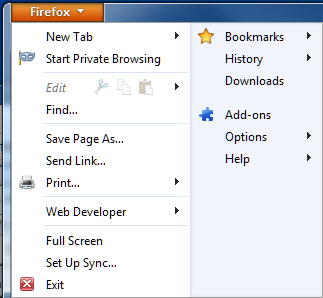
On the appearance side, Mozilla has streamlined the user interface with tabs above the address bar, sorry Awesome Bar, and reduced the number of buttons. By default there are no menus visible, and you are meant to use the Firefox button at top left:

image

I was disconcerted not to find the Tools menu here and one of the first things I did was to show the menu bar, though it does spoil the new UI design.

Firefox is also coming to Android and Maemo devices, and a great feature called Sync will synchronize bookmarks, tabs, passwords and history across all the devices you use.

There is also a new privacy feature called Do not track. This is a way of telling websites that you do not wish to be tracked. Tracking is used by web advertisers to send ads based on your browsing history as seen by that advertiser. Since many websites have scripts served by the same ad agency, this can be considerable. The feature does not block tracking, but only requests not to be tracked. It is off by default and buried in Advanced options, so will probably not be very effective.

image

Firefox is an excellent browser, with many more features than I have mentioned above. A few observations though.

The new features in Firefox 4 echo many of the few features in Internet Explorer 9, which in turn echoes some of the themes in Chrome. However on my system IE9 seems to be a little faster than Firefox 4, the user interface is more polished in my opinion, and the tracking protection in IE9 is more effective since it does actually block tracking.

Then again, there are Firefox add-ons that also block tracking; and in general Firefox seems to have the best range of available add-ons, which could well be the deciding factor for many users.

Firefox 4 still has a separate search box, and in principle I like this. I find it annoying that IE9 and Chrome intermingle searches and URLs in one box. I suspect though that I am in a minority of users. If you switch between browsers, you can find yourself typing searches in the Awesome Bar anyway, though habit, so I am guessing Mozilla will cave in and combine them eventually.

Mozilla is a non-profit organisation with a strong open source and community ethos and that also may be enough reason to use Firefox.

It does face intense competition now though, and it must be a concern that its income comes largely from:

search functionality included in our Firefox product through all major search partners including Google, Yahoo, Yandex, Amazon, Ebay and others.

which in practice is mostly from Google, which has a competing browser.

Personally I think Mozilla will struggle to maintain market share for Firefox; though version 4 is having a good launch complete with a delightful Twitter party

image

and a pretty download stats counter which is currently on 2.75 million and climbing fast.

image

Adobe AIR 2.6, MonoMac 1.0, cross-platform is not dead yet

It is a busy time for cross-platform toolkits. Adobe has released AIR 2.6, and reading the list of what’s new you would think it was mainly for mobile, since the notes focus on new features for Apple iOS, though AIR is also a runtime for Windows, Linux and desktop Mac. New features for iOS include GPU rendering – a form of hardware accelerated graphics – access to the camera, microphone, and camera roll, and embedded Webkit for apps that use web content. On Google Android, you can now debug on devices connected via USB.

There is also a new feature called “owned native windows” which lets you have a group of windows that remain together in the Z order – this lets you have things like floating toolbars without odd results where toolbars get hidden underneath other applications.

Asynchronous decoding of bitmaps is another new feature, allowing images to be processed in the background. This seems like a stopgap solution to overcome the lack of mullti-threading in AIR, but useful nonetheless.

Since the Flash runtime does not run on iOS, Adobe has a packager that compiles an AIR application into a native app. This is now called the AIR Developer Tool or ADT. You can use the ADT to target Windows, Linux or Android as well; however platforms other than iOS still need the AIR runtime installed.

Adobe is dropping support for the original iPhone and the iPhone 3G. iPhone 3GS or higher is needed.

If you want to build a cross-platform app but prefer .NET to Adobe’s Flash and ActionScript, the Mono folk have what you need. I’d guess that the Mono team has a small fraction of the resources of Adobe; but nevertheless it has delivered MonoTouch for iOS and is working on MonoDroid for Android. Just completed in its 1.0 version is MonoMac, for building Cocoa applications on Apple OSX. Mono is not fully cross-platform, since the GUI framework is different on the various platforms, but you do get to use C# throughout.

I am happy to agree that true native code is usually a better solution for any one platform; but at a time when the number of viable platforms is increasing the attraction of cross-platform has never been greater.

Microsoft’s code-first Entity Framework 4.1 nearly done

Microsoft has announced the release candidate of Entity Framework 4.1, the data persistence library for .NET, with a go-live licence. The final release to the web is expected in around one month’s time.

The big new feature is code-first, where you do not need to define a database schema or even a database model. You simply write classes that define objects you want to store, and the framework handles the work of defining the database for you.

Note that according to this article on MSDN:

The Entity Framework is Microsoft’s recommended data access technology for most types of applications.

Of course Microsoft has a long history of data access APIs and keeping up with the latest recommendation over the years has been a challenge. That said, the low-level ADO.NET data API has been in place since the first release of the .NET framework and has evolved rather than been replaced. There has been some confusion over LINQ to SQL versus Entity Framework; but note that LINQ (Language Integrated Query) works with Entity Framework as well.

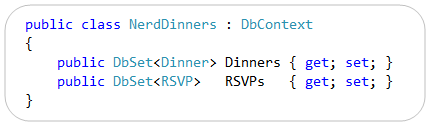
So what is code-first? A good starting point is VP Scott Guthrie’s post from July last year, where he walks through a complete example using his Nerd Dinner theme. He writes classes to define two entities, Dinner and RSVP. Then he writes the following code:

image

Having defined this NerdDinners class inheriting from DbContext, he can go ahead and write a complete database application.

At this point there is still no database. In the simplest case though, you can just add a database connection to the project with the same name as the DbContext class – in this case, “NerdDinners”. The Entity Framework will use this connection, define a database schema for you, and save and retrieve objects accordingly.

The magic under the hood is an example of convention over configuration. That is, the framework will generate code and schema according to assumptions it makes based on the names used in your classes. For example, it picks up the field named DinnerID and makes it a primary key; and seeing a collection of RSVP objects called RSVPs in the Dinner class, the framework creates a relationship between the two generated tables. You can override the default behaviour with code mapping rules. There is also provision for updating the schema if you need to add or modify the fields, though this is a point of uncertainty in Guthrie’s post.

It looks fantastic; though there are a few caveats. One is that Microsoft tends to assume use of its own database managers, SQL Server or for simple cases, SQL Server CE. That said, there are drivers for other databases; for example devart has code-first drivers for Oracle, MySQL, PostgreSQL and SQLite.

Another point is that there is a trade-off when working at such a high level of abstraction. There is less code for you to write, but a large amount of generated code, which can make debugging or optimizing an application harder. This is a familiar trade-off though; and you could say that hand-rolled SQL is no different in principle from hand-rolled assembly code; you can get fantastic results but the amount of effort and skill required is greater, as is the risk of errors if you get it slightly wrong.

The Mono team has said that it does not intend to implement Entity Framework currently; there is a summary of work needed here. If you want to write .NET code that ports easily to Mono it is best avoided.

Are you using Entity Framework in new .NET projects? I would be interested to hear from .NET developers what approach you take to data persistence.

What’s the story with IE9 and embedded Internet Explorer?

There is a certain amount of fuss over the fact that Apple’s latest mobile Safari does not give full performance when either embedded in another application, or pinned to the home screen.

It would help if Apple were more forthcoming on the issue; but in general you cannot assume that embedded browser components will behave the same way as the full browser, even when they share common libraries.

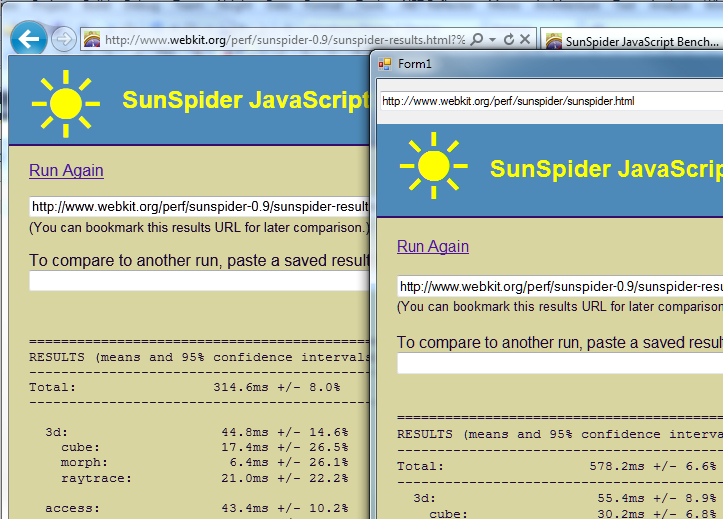
I did some quick experimentation with the released Internet Explorer 9 and the .NET Webbrowser control. First, I tried the SunSpider JavaScript benchmark. I had to use version 0.9 since the latest one gives an error in the Webbrowser control. No great surprise: the embedded version was substantially slower. I ran the tests separately, and for the .NET application I ran in release mode outside Visual Studio. IE9 completed in 314.6ms, the Webbrowser control in 578.2ms.

image

While that may seem a bad result for embedded IE, it could be much worse. Unfortunately I did not think to run this test before installing IE9, so I dual-booted into a Windows install that still has IE8 and ran the exact same application. At 6175ms it was more than ten times slower. It was slightly quicker in standalone IE8, but not by much.

image

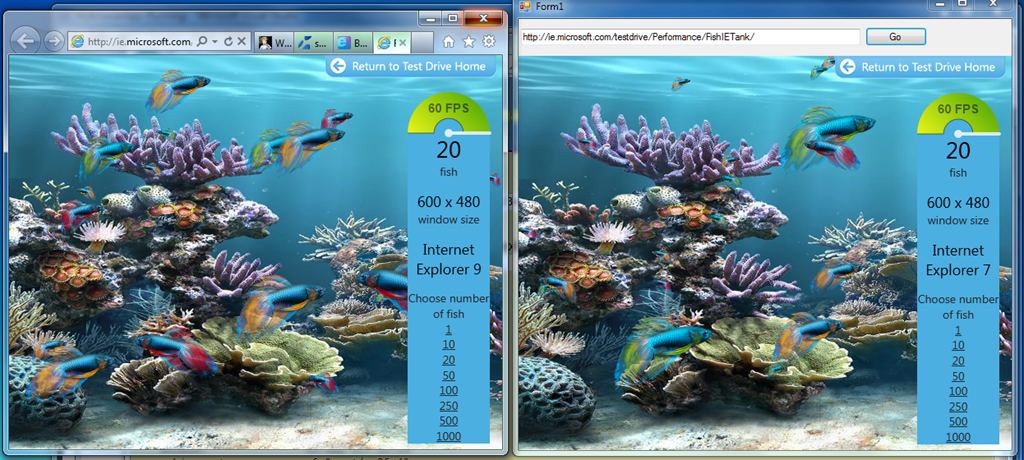
Next I tried the Fish Tank demo, which tests hardware graphic acceleration.

image

There were two notable facts about my result here. First, the Webbrowser control reports itself as Internet Explorer 7. Second, the frame rate for the two instances was nearly identical. In practice it varied slightly and some of the time the standalone IE9 was fractionally faster, but still close. By way of reference, Apple’s Safari was around 10 times slower.

Update: embedded IE is slower on the Fish Tank than I first realised. 60fps is a kind of maximum for the demo. Embedded IE9 slows to 45fps with 50 fish, whereas full IE9 does not drop below 60fps until 500 fish on my system. It does makes the fans whir though!

My guess is that Microsoft is more concerned about compatibility than performance, when it comes to embedded IE. However, clearly there is significant benefit from IE9 even when embedded.

How can you get embedded IE not to report itself as IE7 and to use full standards mode by default? If it is like IE8, this can only be done on a per-application basis via setting a registry key. That is awkward for developers, who would prefer an API call to set this. I am not sure if there is any change for IE9.

Fast JavaScript engine in Apple iOS 4.3 is in standalone Safari only, but why?

Now that Apple iOS 4.3 is generally available for iPhone and iPad, users have noticed something that seems curious. The fast new “Nitro” JavaScript engine only works in the standalone Safari browser, not when a web app is pinned to the home screen, or when a web view is embedded into an app.

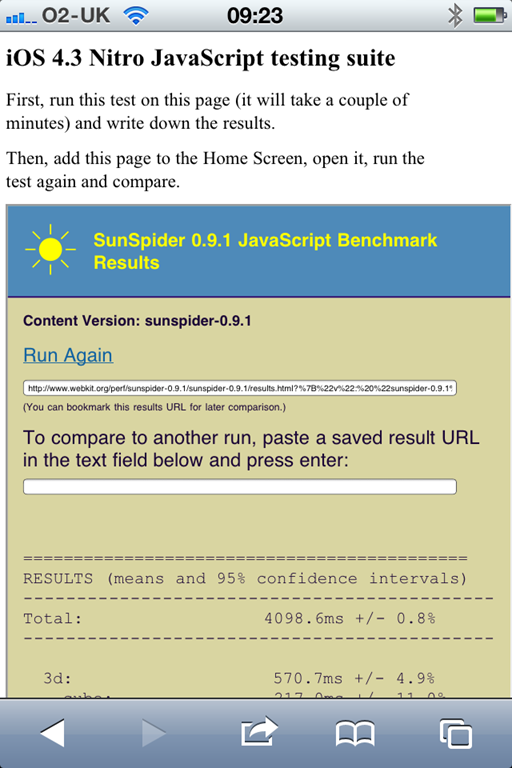
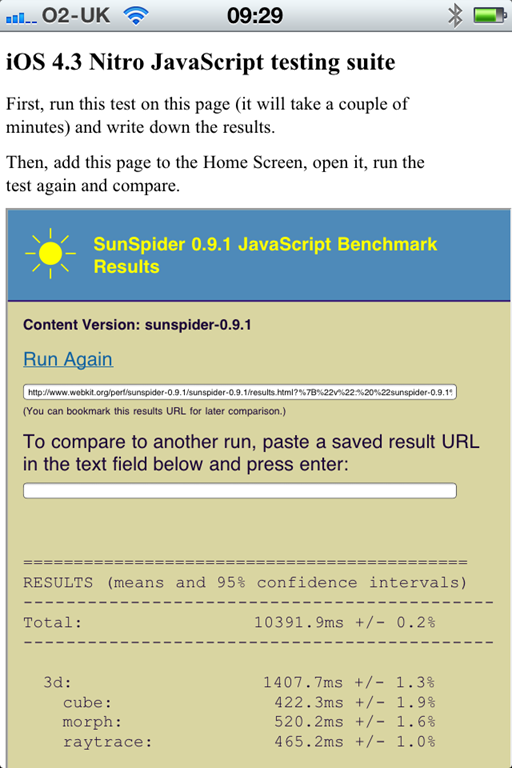
This link at mobilexweb.com shows the evidence. Here is the SunSpider test standalone, showing a time of 4098ms, and pinned to the home screen as an app, where it shows 10391.9ms:

image image

The consequence: apps created using WebKit as a runtime, for example using PhoneGap, will not get the benefit of Nitro.

It would be easy to conclude that Apple is deliberately hobbling these apps in order to protect native apps, which can only be installed via Apple’s App Store and are subject to its 30% cut. However that might not be the case. It could be a bug – according to Hacker News it has been reported as such:

To add another note to this, its a bug that Apple seems to know about. I can’t link to it because its marked CONFIDENTIAL across the top of the dev forums, but in short its known about and being investigated.

or it could be a security feature. Using a just-in-time compiler exposes the operating system more than just interpreting the code; perhaps Safari has more protection when running standalone.

Either way, with the increasing interest in WebKit as a de facto cross-platform application runtime for mobile, this particular limitation is unfortunate.

Update: There are also reports of the HTML 5 offline cache not working other than in full Safari:

I’ve tested this by switching apple-mobile-web-app-capable from ‘yes’ to ‘no’ and offline cache works as expected. But whenever it’s switched back to ‘yes’, it’s not working anymore. This occurs when the app is standalone at home screen. As a website, viewed with Safari cache is working as expected.

Guardian.co.uk enthuses about MongoDB, plans to ditch Oracle

The Guardian’s Mat Wall has spoken here at Qcon London about why it is migrating its web site away from Oracle and towards MongoDB.

He also said there are moves towards cloud hosting, I think on Amazon’s hosted infrastructure, and that its own data centre can be used as a backup in case of cloud failure – an idea which makes some sense to me.

So what’s wrong with Oracle? The problem is the tight relationship between updates to the code that runs the site, and the Oracle database schema. Significant code updates tend to require schema updates too, which means pausing content updates while this takes place. Journalists on a major news site hate these pauses.

MongoDB by contrast is not a relational database. Rather, it stores documents in JSON (JavaScript Object Notation) format. This means that documents with new attributes can be added to the database at runtime.

Although this was the main motivation for change, the Guardian discovered other benefits. Developer productivity is significantly better with MongoDB and they are enjoying its API.

Currently both MongoDB and Oracle are in use. The Guardian has written its own API layer to wrap database access and handle the complexity of having two radically different data stores.

I enjoyed this talk, partly thanks to Wall’s clear presentation, and partly because I was glad to hear solid pragmatic reasons for moving to a NoSQL data store.