Category Archives: software development

New Windows 8, new Visual Studio 2012

Microsoft has released the Release Candidate of Visual Studio 2012 (now the official name), which you can download here, to coincide with the release of Windows 8 Release Preview and Windows Server 2012 Release Preview.

Visual Studio also has a new logo, as you can see from the setup window below.

image

Microsoft’s Jason Zander has posted about the new release here. Some of the main areas of difference between the RC and the Beta are:

  • Better performance
  • User interface tweaks including the return of a little more colour to the product
  • Solution Explorer filtering
  • New Metro style app templates
  • Improved XAML and Blend designers
  • Updated ASP.NET 4.5 web forms to support the await keyword
  • Tweaks to LightSwitch, Team Foundation Server, Architectural Tools

There is also a more detailed post by Scott Hanselman on what’s new in web development here.

Developers like coding in the dark

Many developers prefer to code against dark backgrounds, according to this post by Monty Hammontree, Director of User Experience in Microsoft’s developer tools division.

Many of you have expressed a preference for coding within a dark editor. For example, dark editor themes dominate the list of all-time favorites at web sites such as http://studiostyl.es/ which serve as a repository for different Visual Studio styles.

Chief among the reasons many of you have expressed for preferring dark backgrounds is the reduced strain placed on the eyes when staring at the screen for many hours. Many developers state that light text on a dark background is easier to read over longer periods of time than dark text on a light background.

image

Personally I am not in this group. A white-ish background works well for me, and if it is too bright, simply reducing the monitor brightness is an effective fix.

Interesting post though, if only for the snippets of information about the new Visual Studio. Apparently it has around 6000 icons used in 28,000 locations. Another little fact:

Visual Studio’s UI is a mix of WPF, Windows Forms, Win32, HTML, and other UI technologies which made scrollbar theming a challenging project.

If you will be using Visual Studio 2012, are you on the dark side?

The application that would not uninstall

I install a ton of pre-release and test software so it is not surprising that I sometimes run into Windows Installer issues. Here is an entertaining error though. It is unlikely, I guess, that you will hit this problem; but I present it as an illustration of what can go wrong, as we move into the era of locked-down operating systems and easy app installs. Though even these are not perfect. Notice how the operating system fights me all the way.

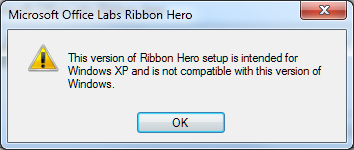
Years ago I installed Microsoft’s Office Labs Ribbon Hero, a tutorial add-on for Office. At the time I was running Windows Vista. Since then I have done an in-place upgrade to Windows 7. I tried to remove it today through Control Panel and got this message:

image

After presenting this information setup closed and the application was not uninstalled.

So … the application does not support Windows 7 and therefore you cannot remove it. Clever, and I found this a tricky problem to get around.

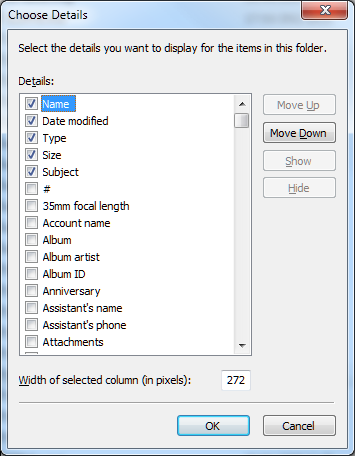
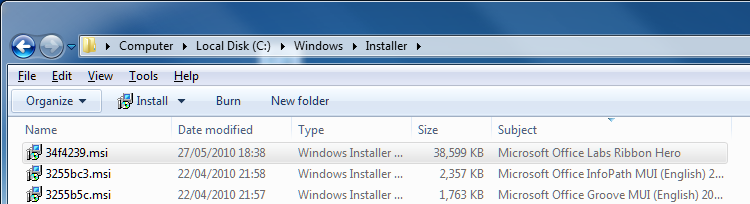
I took a look at the Windows installer files which you can find in %SYSTEMROOT%\Installer. All the msi files have random names. However, you can right-click the column heading area and choose More, then check Subject in the list. Click OK, and now the application to which each msi relates appears.

image

Now you can click the column heading to sort by subject and find the problem msi.

image

I copied the msi to my desktop.

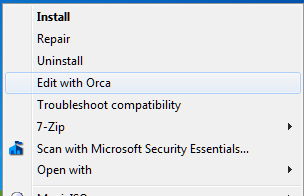
For the next step you need the Orca tool from the Windows Installer SDK. If Orca is installed, you can right-click the MSI and choose Edit with Orca.

image

I then selected LaunchCondition and deleted the launch condition that required Windows XP.

INSTALLED OR VersionNT = 501 OR APPLYING_AUTOUPDATE

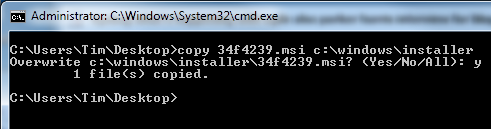
Hmm, something odd here as it should pass INSTALLED? Still, save, right-click the msi, choose Uninstall. You still hit the error. Why? Somehow, Windows works out that you are uninstalling a product for which an msi exists in the official location and uses that one instead. You have to copy your modified msi to the correct location. Open an administrator command prompt:

image

Now right-click the msi and choose Uninstall.

It worked. Phew.

Microsoft appeals to Windows 8 Metro developers not to stray from the official API

Microsoft’s John Hazen has posted on the official Building Windows 8 blog about the security and reliability principles in the Metro platform in Windows 8. Hazen explains how apps are installed from the Windows store, use contracts to interact with the operating system, and have to ask user consent for access to device capabilities such as the webcam or GPS, or to access user data such as documents and music.

The most intriguing part of the document comes when Hazen appeals to developers to stick to the API that is referenced in the official Windows 8 Metro SDK:

Resist the temptation to find ways to invoke APIs that are not included in the SDK. This ultimately undermines the expectations that customers have for your app. APIs that are outside the SDK are not guaranteed to work with Metro style apps either in this release or in future releases, so you may find that your app doesn’t function properly for all customers. These APIs may also not function properly in the async environment that is foundational to Metro style app design. Finally these APIs may undermine customer confidence by accessing resources or data that Metro style apps would not normally interact with. For all these reasons, we have provided checks in the Windows App Certification Kit to help you catch places where you might have inadvertently called interfaces not exposed by the SDK.

While it is possible to hide or obfuscate calls to APIs that are not included in the SDK, this is still a violation of customer expectations and Store policy. In the end, we have created this platform to help developers like you to build amazing apps that work well with the system and with other apps and devices to delight customers. Working with the Metro style SDK is fundamental to your realizing that goal.

The worrying aspect of this appeal to developers to play nice is Hazen’s admission that crafty developers may find ways to escape the Metro sandbox, undermining both the security and the privacy protection built into Metro. The main protection against this is such such an app should be blocked from the Windows Store, but can Microsoft check with 100% confidence that no hidden or obfuscated API calls exist? How effective is the Metro sandbox?

My guess is that the danger will be greater on the x86 version of Windows 8 than in Windows RT, which is locked down to prevent any third-party desktop applications from being installed. Nevertheless, a large part of the non-Metro Windows API must exist in Windows RT, to support the desktop, Explorer and Microsoft Office.

NVIDIA Nsight comes to Eclipse for Mac, Linux GPU programming

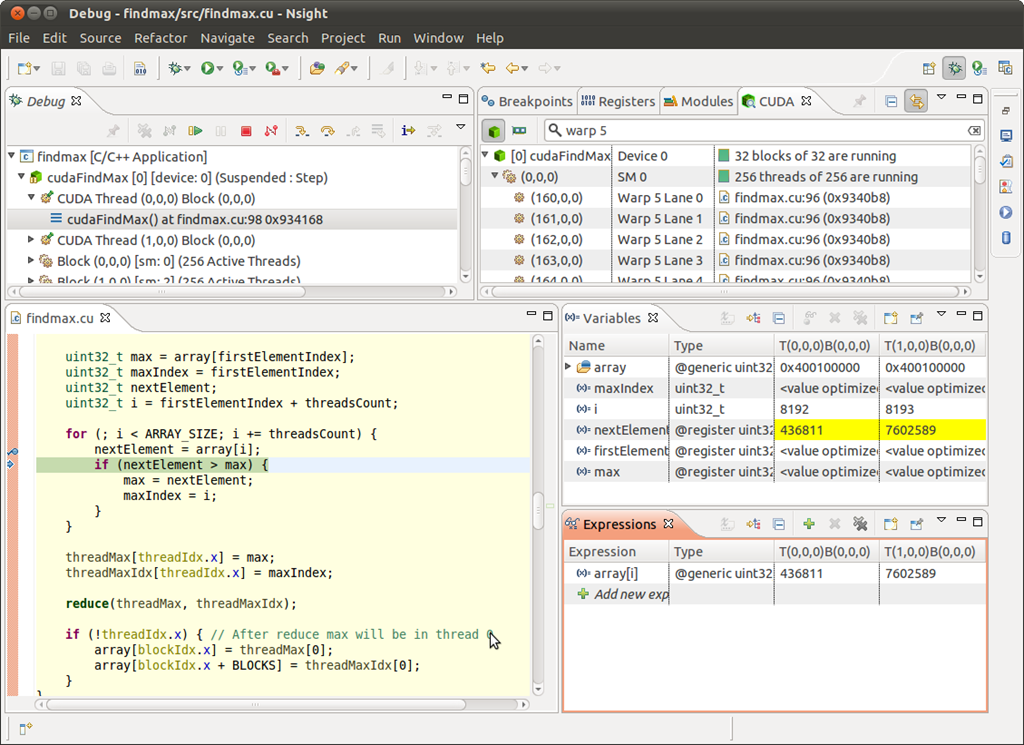
NVIDIA has ported its Nsight development tools, previously a plug-in for Visual Studio, to run within the open source Eclipse IDE for use on Mac and Linux.

image

The Nsight tools include profiling, refactoring, syntax highlighting and auto-completion, as well as a bunch of code samples.

The Windows version for Visual Studio has also been updated, and now supports local GPU debugging as well as new support for DirectX frame debugging and analysis.

Although Eclipse of course runs on Windows, Nsight users should continue to use the Visual Studio version. NVIDIA is not supporting use of the Eclipse Nsight on Windows.

The tools are in preview and you can sign up to try them here.

Another significant development is the availability of the CUDA LLVM Compiler. NVIDIA has contributed CUDA compiler code to the open source LLVM project. This means that other languages which compile to LLVM intermediate assembly language can be adapted to support parallel processing on NVIDIA GPUs. The CUDA Compiler SDK will be made available this week at the NVIDIA GPU Technology Conference in San Jose.

Microsoft’s Visual Studio LightSwitch: does it have a future?

A recent and thorough piece on Visual Studio LightSwitch prompted a Twitter discussion on what kind of future the product has. Background:

  • LightSwitch is an application generator which builds data-driven applications.
  • A LightSwitch application uses ASP.NET on the server and Silverlight on the client.
  • LightSwitch applications can be deployed to Windows Azure
  • LightSwitch apps can either be browser-hosted or use Silverlight out of browser for the desktop
  • LightSwitch is model-driven so in principle it could generate other kinds of client, such as HTML5 or Windows 8 Metro.
  • LightSwitch first appeared last year, and has been updated for Visual Studio 11, now in beta.

I have looked at LightSwitch in some detail, including a hands-on where I built an application. I have mixed feelings about the product. It was wrongly marketed, as the kind of thing a non-professional could easily pick up to generate an application for their business. In my opinion it is too complex for most such people. The real market is professional developers looking for greater productivity. As a way of building a multi-tier application which does its best to enforce good design principles, LightSwitch is truly impressive; though I also found annoyances like skimpy documentation, and that some things which should have been easy turned out to be difficult. The visual database designer is excellent.

The question now: what kind of future does LightSwitch have? Conceptually, it is a great product and could evolve into something useful, but I question whether Microsoft will stick with it long enough. Here is what counts against it:

  • The decision to generate Silverlight applications now looks wrong. Microsoft is not going to do much more with Silverlight, and is more focused on HTML5 and JavaScript, or Windows Runtime for Metro-style apps in Windows 8 and some future Windows Phone. There is some family resemblance between Windows Runtime and Silverlight, but not necessarily enough to make porting easy.
  • There is no mobile support, not even for Windows Phone 7 which runs Silverlight.
  • I imagine sales have been dismal. The launch product was badly marketed and perplexing to many.

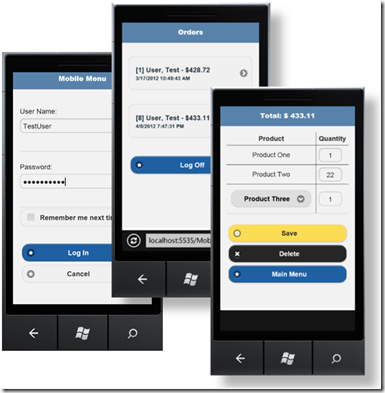
What about the case in favour? Silverlight enthusiast Michael Washington observes that the new Visual Studio 11 version of LightSwitch generates OData feeds on the server, rather than WCF RIA Services. OData is a REST-based service that is suitable for consumption by many different kinds of client. To prove his point, Washington has created demo mobile apps using HTML5 and JQuery – no Silverlight in sight.

image

Pic from here.

Washington also managed to extract this comment from Microsoft’s Steve Hoag on the future of LightSwitch, in an MSDN forum discussion:

LightSwitch is far from dead. Without revealing anything specific I can confirm that the following statements are true:

– There is a commitment for a long term life of this product, with other versions planned

– There is a commitment to explore creation of apps other than Silverlight, although nothing will be announced at this time

Hoag is the documentation lead for LightSwitch.

That said, Microsoft has been known to make such commitments before but later abandon them. Microsoft told me it was committed to cross-platform Silverlight, for example. And it was, for a bit, at least on Windows and Mac; but it is not now. Microsoft was committed to IronRuby and IronPython, once.

For those with even longer memories, I recall a discussion on CompuServe about Visual Basic for DOS. This was the last version of Microsoft Basic for DOS, a fine language in its way, and with a rather good character-based interface builder. Unfortunately it was buggy, and users were desperate for a bug-fix release. Into this discussion appeared a guy from Microsoft, who announced that he was responsible for the forthcoming update to Visual Basic for DOS and asked for the top requests.

Good news – except that there never was an update.

The truth is that with LightSwitch still in beta for Visual Studio 11, it is unlikely that any decision has been made about its future. My guess, and it is only that, is that the Visual Studio 11 version will be little used and that there will be no major update. If I am wrong and it is a big hit, then there will be an update. If I am right about its lack of uptake, but its backing within Microsoft is strong enough, then maybe in Visual Studio 12 or even sooner we will get a version that does it right, with output options for cross-platform HTML5 clients and for Windows Phone and Windows Metro. But do not hold your breath.

Appcelerator Titanium gets Mobile Web SDK, cloud services

Appcelerator’s Titanium cross-platform development framework has moved up a gear with the announcement of two new features:

  • A set of cloud services, based on those acquired with Cocoafish in February this year. These are now known as Appcelerator Cloud Services (ACS).
  • Support for mobile web applications as well as native

These features are integrated into the Titanium development environment, an Eclipse-based IDE which has evolved from Aptana, a JavaScript tool acquired in early 2011. Start a new project, and ACS support is included by default.

image

The cloud services are hosted on Amazon and comprise the following:

  • Push Notifications
  • User management
  • Photo manipulation and storage
  • Places (rich location storage)
  • Social integration
  • File Storage
  • Check-ins
  • Status updates
  • Chats
  • Friend connections
  • Ratings and Reviews
  • Discussion forums
  • Event planning
  • Messaging
  • Key-Value data storage

“We have a portfolio of additional services rolling out over the next several quarters,” said Jo Ann Buckner, VP of Product Management. There are code examples here. A limited usage of the services is available free, after which it is pay as you go. It is a REST API that you can use from any platform; use of Titanium is not essential.

The other big feature is the Mobile Web SDK. Why is Appcelerator doing this given that it has been pushing native code apps as the way forward for mobile deployment?

“Two reasons,” says Buckner. “The debate has been going on for a long time, is it native, or web? Our position is that it native and mobile web are complementary. We have customers building native apps with Titanium that also want to have a mobile web presence, even for iOS and Android. Some customers will just interact with a mobile web site and never download the application.

“The second is reach beyond iOS and Android.”

Does that mean Appcelerator will not support other platforms such as Blackberry or Windows Phone with its native approach? “This is not a replacement for those efforts. We are investing in support for additional platforms,” says Buckner.

There are differences of course between what you can do in a native app, and what you can do in a web app, and these differences vary according to the target browser. Titanium allows you to write platform-specific code in order to workaround these problems, or to vary the user interface to suit the device. The illustration below shows the new Titanium IDE with an app which targets both Android and the Mobile Web, and you can see the folders on the left which separate common code and platform-specific code (click the image to enlarge).

image

Titanium installs its own web server for testing. Here is an example running in the Android emulator, served from Titanium.

image

When should you do a native app and when a mobile web app? “You’re going to build more than one application,” says Mike King, Appcelerator’s Principal Mobile Strategist. “If you are doing an augmented reality application the native interaction is going to require that to be a native application. You can do a forms-based application as well, and mobile web is going to be a better fit for that. Different use cases require different architectures.”

But why do your mobile web apps in Titanium, when you could use pure HTML 5 tools instead? “It’s about one platform for all of your development requirements, as opposed to one for native and one for HTML 5,” says King.

Titanium is certainly evolving with impressive speed. The latest 2.0.1 IDE is a rich tool, and pop-up help guides you concerning supported platforms for each keyword.

image

Another strong point is the way you can easily write conditional code for tablet form-factors.

The comparison with Adobe PhoneGap is interesting. PhoneGap takes a different approach, supporting native apps but by means of the embedded browser in each device, rather than by building a native user interface. Titanium’s new mobile web support is different in that it runs as a web app in the browser, not as a native app with an embedded browser.

A bug in embedded Internet Explorer in Windows 8

Long-time readers of this site may remember that I did some work on embedding Internet Explorer, and its core rendering component MSHTML, in .NET applications. The code is still online.

I noticed that it does not work properly in Windows 8 Consumer Preview. Specifically, plain HTML works but you can no longer apply external CSS stylesheets. I reported the bug here (sign-in required).  I did not use my own component, but rather the standard WebBrowser control. I have appended the code to reproduce the bug in case you cannot see the report.

Microsoft has now responded as follows:

We were able to validate your feedback. However, based on the limited impact this bug may have, we will not be able to address this bug during this release.

This status is also known as “won’t fix” and gives me pause for thought. How many other little bugs are there which Microsoft is not fixing, but which break a certain number of applications?

If you are one of those few people using embedded IE in an application, I suggest checking Windows 8 compatibility now to avoid any unpleasant surprises.

Perhaps it would be preferable to use WebKit or Gecko (Mozilla) rather than IE in any case. There is a thread on stackoverflow that discusses some options. OpenWebKitSharp looks promising.

Code to reproduce the bug:

Create a Windows Forms application in C# in VS 11. Add a Webbrowser control and two buttons, and an OpenFileDialog control. Also add a reference to the COM library Microsoft HTML Object Library.

Here is the code for the first button that loads some HTML:

string sHTML = "<html><head><title>Some title</title></head><body><p>Some text</p></body></html>";
this.webBrowser1.DocumentText = sHTML;

Here is the code for the second button that applies a stylesheet:

openFileDialog1.Filter = "CSS files|*.css";
if (openFileDialog1.ShowDialog() == DialogResult.OK)  {
mshtml.HTMLDocument doc = (mshtml.HTMLDocument)this.webBrowser1.Document.DomDocument;
doc.createStyleSheet(openFileDialog1.FileName);
}

This is the stylesheet I am applying:

body
{
    font-family: Arial;
    font-size: 18pt;
}

To reproduce, run the application. Click the first button to load the HTML. Then click the second button to apply the stylesheet. In Windows 7 and earlier the stylesheet is applied. In Windows 8, the stylesheet is not applied.

UPDATE: It seems this bug was fixed in Windows 8 RTM, despite the “will not fix” designation. Good.

Hands on: building an app for Windows 8 Metro

How difficult is it to build an app for the Windows Runtime (WinRT), which powers Metro-style apps in Windows 8?

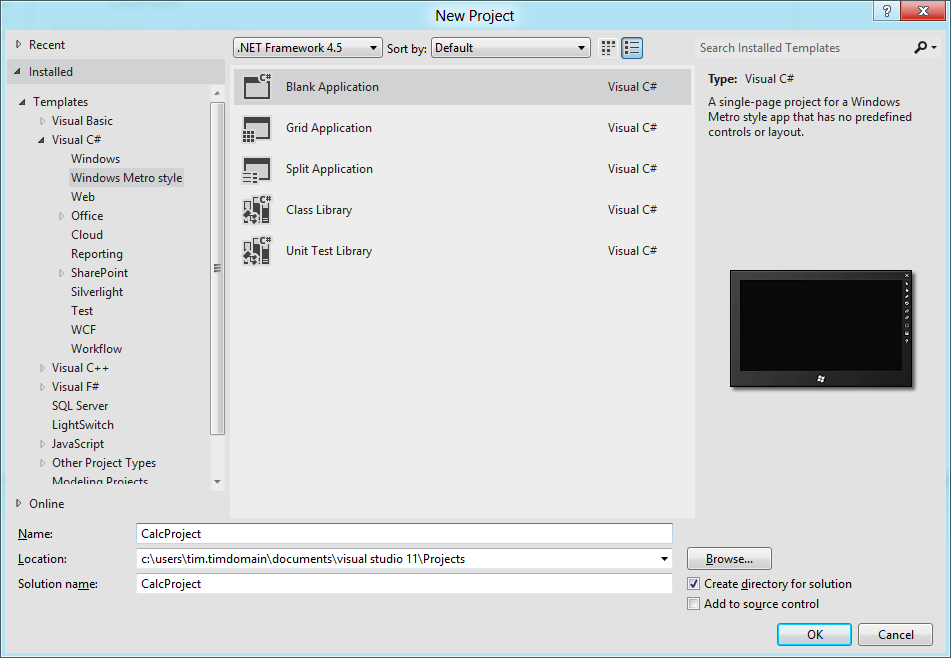
Here is how I created a simple calculator app (this is one in an occasional series) using Visual Studio 11 beta. I started with a new Visual C# Windows Metro Style project, choosing a blank template.
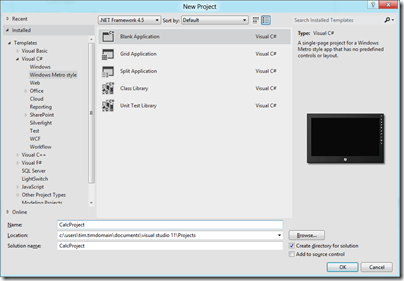
image

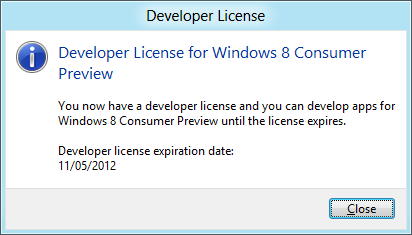
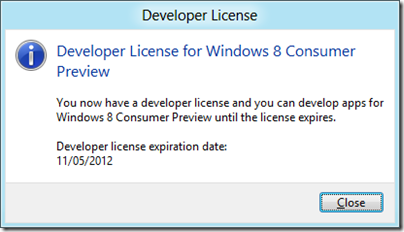
A slight complication is that you are prompted to install a Developer License, which means logging into your Windows Live account.
image

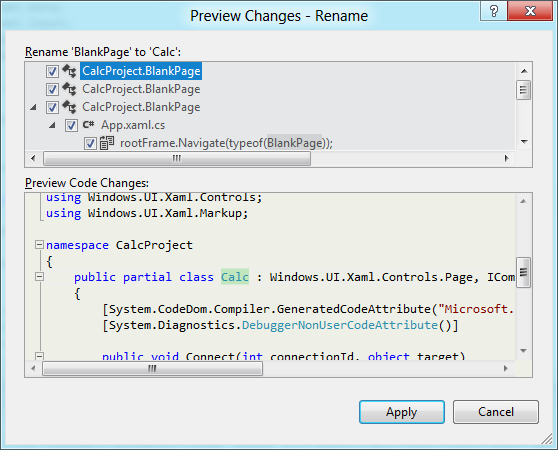
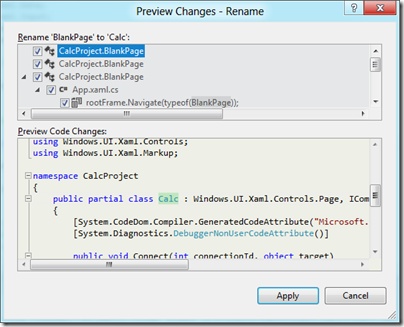
Next, I had to layout the controls. Visual Studio creates a single-page app with a main page called BlankPage.xaml. I renamed this to Calc.xaml. I also used Visual Studio’s refactor menu to rename the page class from BlankPage to Calc.
image

The default application has a black background, which seems gloomy. I changed the Background of the container grid to white.

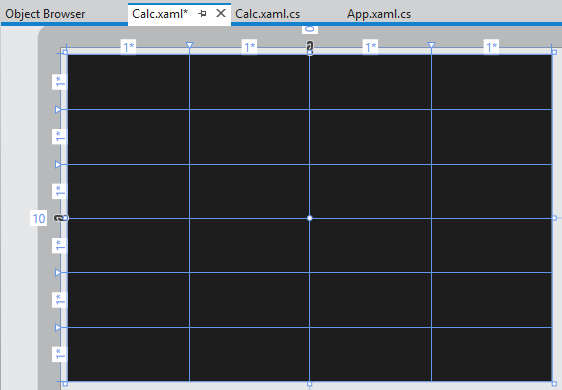
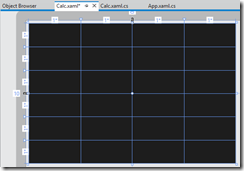
My basic calculator design is based on six rows and four columns, so I added 6 RowDefinitions and 4 ColumnDefinition to the XAML grid. The units for RowDefinitions and ColumnDefinitions can be set to Auto, Pixel or Star. Star means the unit is a weight which is calculated at runtime. For example, if you set the value of one RowDefinition.Height to 2 and the others to 1, the first one would be twice as high as the others. Here is my basic grid:
image

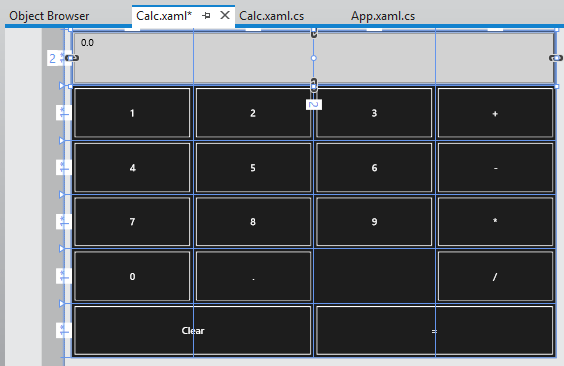
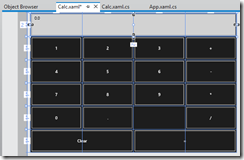
Next, I placed controls in the grid. The easiest way to get them to fill the space neatly is to set their HorizontalAlignment and VerticalAlignment properties to Stretch. Then you control the margin round the control with the Margin property. You can have a control fill more than one cell by using the Grid.ColumnSpan and Grid.RowSpan properties.

I found it easier to add the controls in code using copy and paste.
image

A Grid has no FontSize property, and although the Page has a FontSize property it does not seem to be inherited by the controls. I therefore set the FontSize individually for each control but there must be a better way of doing this.

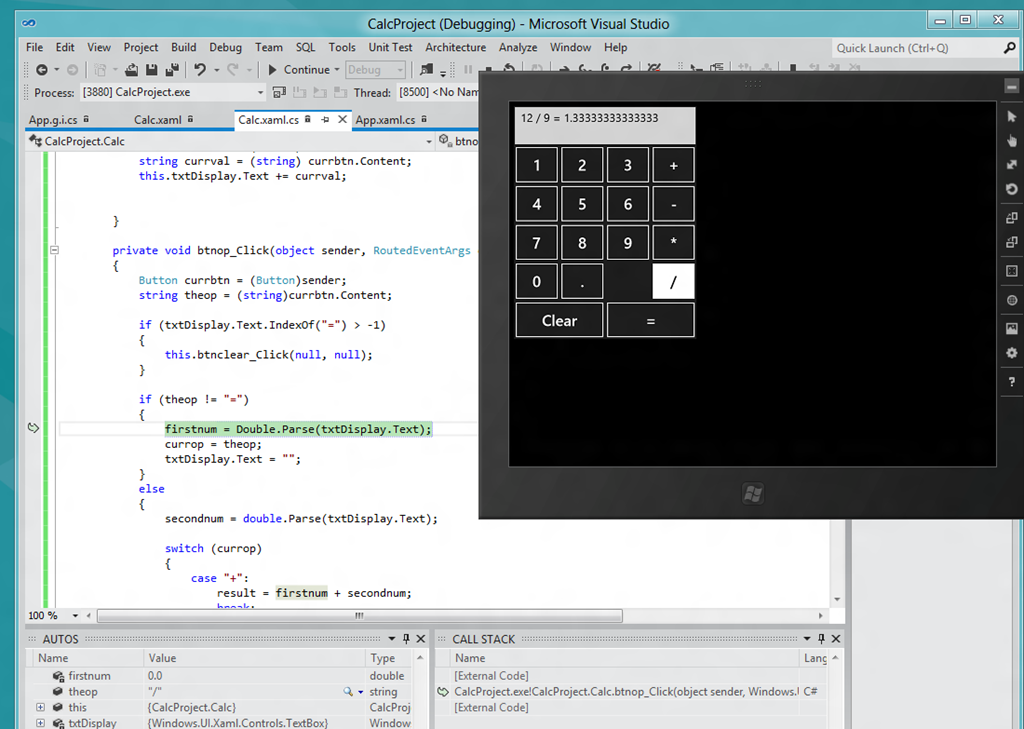
I then wrote minimal code that performs calculations without always crashing, and tested the app.  When you debug, you can choose Local Machine, Simulator, or Remote Machine. I found it easier to debug using the simulator, since if you use Local Machine and Visual Studio is running on the main display, then the app you are debugging becomes invisible if you hit a breakpoint or exception. The simulator seems really good (it is actually a remote session into your own machine) and I would like some way of running all Metro apps in a window like this, not just for debugging!
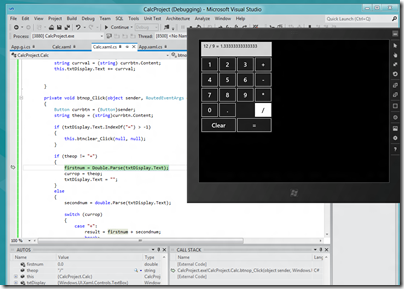
image

A few reflections

A developer with experience of C# and XAML (which is also used by Windows Presentation Foundation and by Silverlight) will not have much trouble getting started with WinRT, though I noticed that XAML is substantially cut-down, as Patrick Klug observes here.

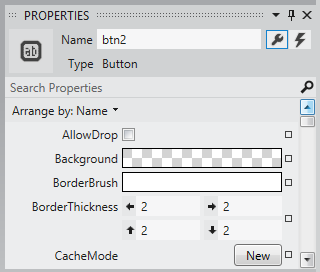
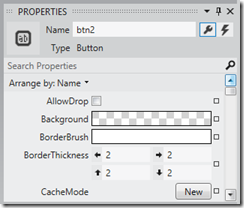
Visual Studio 2011 is an excellent IDE although I do not much like the new property editor; a minor point, but I find the latest go at prettification detrimental to usability; it is too busy. This may be a matter of familiarity and it is a minor point.
image

The XAML visual designer is slow to refresh even with my simple app, so this could be annoying with a more complex layout.

Layout with XAML works well, though it is more difficult than say Windows Forms for a new developer. It is easy to get peculiar results unless you do everything with pixel layout, which is not the best approach.

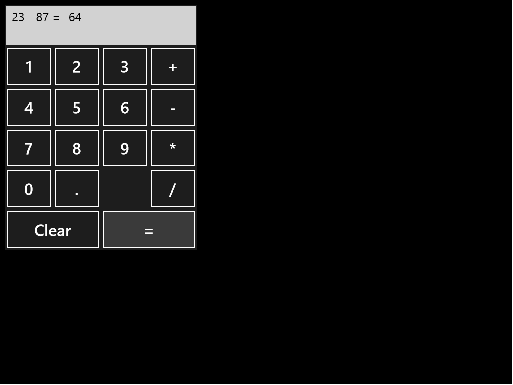
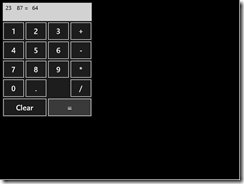
What about Metro itself? Apps always run full screen, and I had a problem with this in that my little calculator does not need all that space.
image

I am not a designer; and I suppose with a bit of effort you could add some decoration or effects to use the space, or add extra features. But why?

I was thinking about the Atari ST the other day, following the death of Jack Tramiel. The ST did not really multitask, but to get around the problem of needing to run a second app without closing the first, it had the concept of desktop accessories, available from a pull-down menu. My calculator would work well as a desktop accessory in Metro, except there is no such concept – unless you count the “Snap” split view. I wonder if Microsoft is too religious about its “Immersive UI” concept.

A few reservations then; but that does not take away from the overall impression of a strong integrated development experience for building Metro-style apps.
Windows Phone and Windows 8 convergence: a few more hints from Microsoft

The moment when Nokia is in the midst of the US launch for its Lumia 900 phone, which both Nokia and Microsoft hope will win some market share for Windows Phone 7, is not the best time to talk about Windows Phone 8 from a marketing perspective. Especially when Windows Phone 8 will have a new kernel based on Windows 8 rather than Windows CE, news which was leaked in early February and made almost official by writer Paul Thurrott who has access to advance information under NDA:

Windows Phone 8, codenamed Apollo, will be based on the Windows 8 kernel and not on Windows CE as are current versions. This will not impact app compatibility: Microsoft expects to have over 100,000 Windows Phone 7.5-compatible apps available by the time WP8 launches, and they will all work fine on this new OS.

Nevertheless, Microsoft is talking a little about Windows Phone 8. Yesterday Larry Lieberman posted about the future of the Windows Phone SDK. After echoing Thurrott’s words about compatibility, he added:

We’ve also heard some developers express concern about the long term future of Silverlight for Windows Phone. Please don’t panic; XAML and C#/VB.NET development in Windows 8 can be viewed as a direct evolution from today’s Silverlight. All of your managed programming skills are transferrable to building applications for Windows 8, and in many cases, much of your code will be transferrable as well. Note that when targeting a tablet vs. a phone, you do of course, need to design user experiences that are appropriately tailored to each device.

Panic or not, these are not comforting words if you love Silverlight. Lieberman is saying that if you code today in Silverlight, you had better learn to code for WinRT instead in order to target future versions of Windows Phone.

The odd thing here is that while Lieberman says:

today’s Windows Phone applications and games will run on the next major version of Windows Phone.

(in bold so that you do not doubt it), he also says that “much of your code will be transferrable as well”. Which is equivalent to saying “not all your code will be transferrable.” So how is it that “non-transferrable code” nevertheless runs on Windows Phone 8 if already compiled for Window Phone 7? It sounds like some kind of compatibility layer; I would be interested to know more about how this will work.

I was also intrigued by this comment from Silverlight developer Morton Nielsen:

Its really hard to sell this investment to customers with all these rumors floating, and you only willing to say that my skill set is preserved is only fuel onto that. The fact is that there is no good alternative to Silverlight, and its an awesome solution for distribution LOB apps, but the experience on win8 is horrible at best. And it doesn’t help that the blend team is ignoring us with a final v5, and sl5 is so buggy it needs 100% DEET but we don’t see any GDRs any longer.

What are these acronyms? DEET just means insect repellent, ie. bug fixes. GDR is likely “General Distribution Release”; I guess Nielsen is saying that no bug-fix releases are turning up are turning up for Silverlight 5, implying that Microsoft has abandoned it.

All in all, this does not strike me as a particularly reassuring post for Windows Phone developers hoping that their code will continue to be useful, despite Lieberman’s statement that:

I hope we’ve dispelled some of your concerns

Still, it has been obvious for some time that WinRT, not Silverlight, is how Microsoft sees the future of its platform so nobody should be surprised.

Update: Several of you have commented that Lieberman talks about WinRT on Windows 8 not on Windows Phone 8. Nobody has said that WinRT will be on Windows Phone 8, only that the kernel will be the that of Windows 8 rather than Windows CE. That said, Lieberman does specifically refer to “the long term future of Silverlight for Windows Phone” and goes on to talk about WinRT. The implication is that WinRT is the future direction for Windows Phone as well as for Windows 8 on tablets. Maybe that transition will not occur until Windows Phone 9; maybe Windows Phone as an OS will disappear completely and become a form factor for Windows 8 or Windows 9. This aspect is not clear to me; if you know more, I would love to know.